





Scheev
Members
-
Joined
-
Last visited
Everything posted by Scheev
-
Oh this is awesome, one of my biggest gripes will be solved. Thank you! Especially since solutions on the autofan plugin thread are along the lines of "fork it and change it yourself 🤷"
-
Love the plugin, I found the autofan plugin to be quite clunky to use. Happy I came across this. I found the autofan plugin to be much too verbose, constantly spamming my logs with fan speed updates. It doesn't seem like this is the case for this plugin, but maybe a feature consideration would be to allow the user to enable/disable logging? just to avoid clogging the system log. For those who want to determine which fans are associated with which pwm controllers pwmconfig is a great command to use. Although the pause feature for this plugin may be more useful.
-
Oh sorry, the autofan plugin.
-
Is there a way to turn logging off for this plugin? I find the syslog hard to parse now and want to disable the messages.
-
Excuse my ignorance on that, maybe I missed something. It looks like that info isn't present on the container description, could be worth just a sentence that says something to the tune of "sqlite database is already included as part of the container, if you wish to use postgres.....etc". I was confused for awhile as to whether or not I had to do additional setup.
-
Does the container implement sqlite by default? bit confused as to whether or not I need another container to hook up sqlite to mealie.
-
Yeah for sure, just send me a DM here on the forums and I can give it a shot
-
Oh awesome, I spent like 4 hours today converting some of it already, happy to help if you want.
-
I was able to figure it out, but my only hurdle is related to the use of InfluxQL for the dashboard instead of Flux. Is there a setting that will alleviate this? I started rewriting the dashboard in Flux...but realized theres probably another way around it.
-
Need some advice on here, Ive been bashing my head for awhile trying to get this all working. I am finding that all the guides are fairly outdated. When I use telegraf 1.20.2 it doesn't gather metrics cause the only way ive found to get the config provides the latest config. Using an older config wouldn't exactly solve my problem either as explained below. Switching to the latest telegraf branch gives me permissions errors and won't start. Ive tried to do some chmod antics but can't seem to get the hang of where or what this is supposed to be. In my post arguments I have it running apt install arguments that have been outlined in guides and such. Would that be the culprit? how do I elevate permissions for this? E: List directory /var/lib/apt/lists/partial is missing. - Acquire (13: Permission denied) I imagine if telegraf started I could likely configure it to give metrics to influx. Next problem, my influxDB docker is running influxdb v2 because I have a OPNsense instance that is posting metrics to Influx and requires it. However, without telegraf starting I can't even use the influxdb_v2 inputs in the config. As well, how would I configure influx if I have two different instances of telegraf providing metrics to the database? Thanks for any and all help!
-
I am quite confused, been trying to setup Telegraf, InfluxDB, and Grafana for quite awhile now. But I keep getting no data when I setup the data source in grafana. Any help is appreciated. Telegraf also does this thing where it stops after even just touching grafana or influx. Here are my setups: Telegraf is 1.20.2 Influx is 1.8.4 ( I don't get any WebUI) telegraf Post Arguments: /bin/sh -c 'apt update && apt install -y smartmontools && apt install -y lm-sensors && apt install -y nvme-cli && apt install -y ipmitool && telegraf' -u 0 telegraf config my data source looks like this Just not really sure where to go from here. I have tried so many things to see if it will work. Googled this so much, but can't seem to find a guide that solves the problem. Thanks for any help
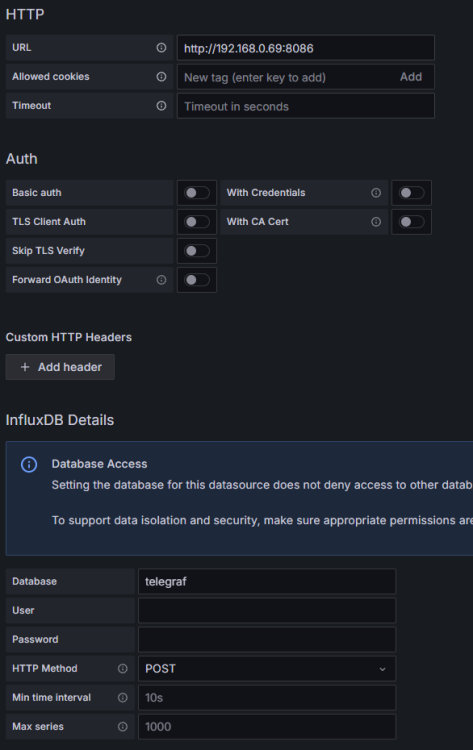
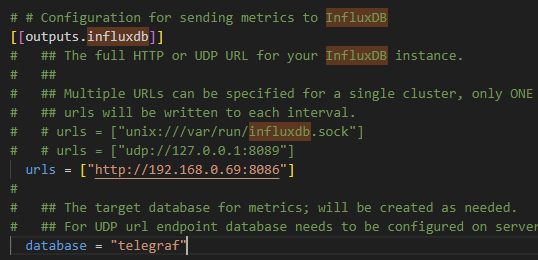
-
Huh genuinely confused as to how that would've happened. The mention of carriage returns in the folder name let me understand what I needed to google. Dynamix wasn't able to handle it, it would try to delete but seemingly fail and wouldn't provide any info as to why. Found this link https://unix.stackexchange.com/questions/60779/how-do-i-remove-carriage-returns-from-directory-names which provided some commands for me to try. Navigated to /mnt/user/ where the "appdata/r/r" was stored. used the command rename $'\r' '' *$'\r' to get rid of the of the carriage returns and the folder disappeared. I was also having issues where I couldn't open files because of the constantly restarting services. This solved that problem as well.
-
I actually discovered a new symptom of having the extra empty appdata folder in the syslog. I have been noticing that my "Starting Services" is periodically going away and appearing in the bottom left. The syslog shows these errors. repeat ad nauseum, seems like the folder is causing issues. Attached my diagnostics as well. server-diagnostics-20240323-0106.zip
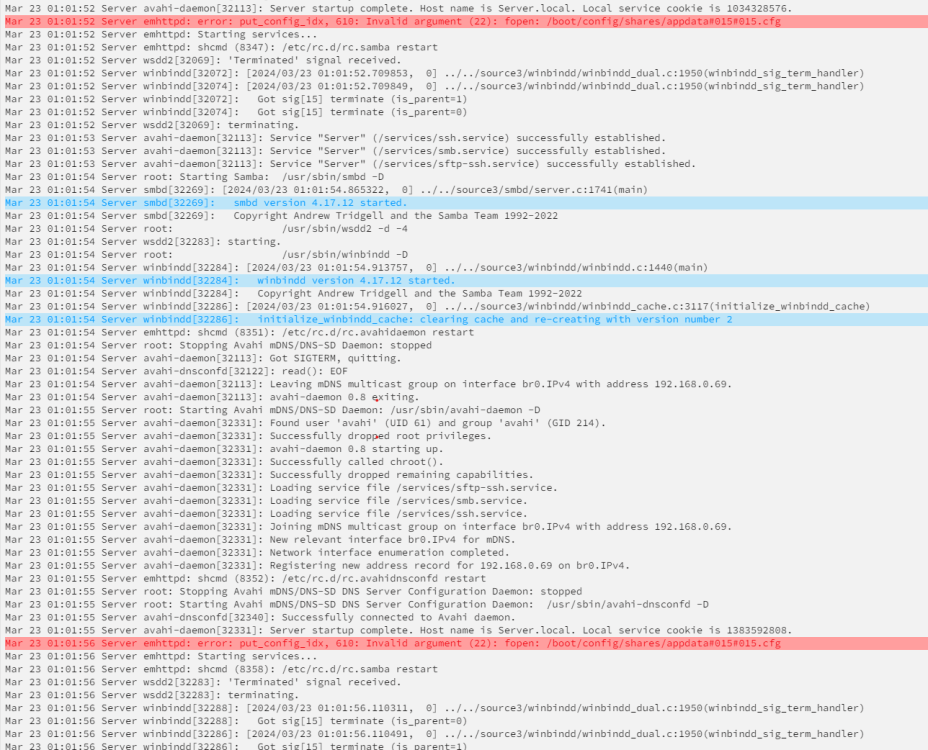
-
I am seeing an empty duplicate appdata share in my shares tab. Weirdest part is when I try to peer into the contents, there is nothing. Here is a picture for context. I figured I could go into command line and try rmdir on it but it has some "\r\r" after the name and im pretty confused by what that is. The following is what I see. Tried rebooting to no avail also. I think the problem is that I recently upgraded some hardware on my system and in my infinite wisdom started up unraid after forgetting to plug in the sata ssd drive I was using as my appdata storage. I imagine unraid may have compensated and placed this ghost appdata on the array. Any help to remove this would be appreciated.

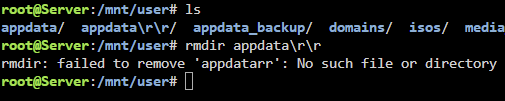
-
Okay cool, I tried looking at the settings page, but I am not seeing an obvious way to have both of those conditions. Do you mind sharing how exactly you achieved that?
-
For actual advice on the Mover action, typically you would do what I described before. As it means that if the cache gets full your not screwed. So I would keep it as that. For the opposite Mover action of "Cache to Array" this is useful as a way to sort of accelerate the storage in a way. As an example, in my NAS I have an SSD that I use as a media cache, so whenever I download media it first goes to the cache ssd. Then once the mover is invoked, it will get put into the array. SSD covers a few different storage media, but essentially if it doesn't have any moving parts and is intended for internal PC storage, its an SSD. NvMe and SATA define the "protocol" in which the data is transferred. M.2 and the SATA connector are just the name for the Physical connection.
-
The SMB options only appear once the share has been created. I don't remember exactly when, but unraid was updated fairly recently and changed the wording/language around primary and secondary storage. This is likely why your unraid differs from the video. As for the share not appearing when you click done, I'm uncertain of what that might be? possibly just a simple restart may fix it.
-
With appdata its typically a good idea to keep it on the cache drive because an ssd/nvme is more advantageous due to their speed for docker containers, most other things could do without the speed of an SSD. With that said, when defining a share, you can choose its "primary" and "secondary" storage. Using appdata as an example, if you intend for it to exclusively use the SSD as its storage you would select "Cache" for primary storage and leave it at that. But in the case where you think your cache drive may fill up, you can also set a "secondary" storage. You would set this to "Array". This means that if the cache were to be filled, unraid would start placing any new files onto the Array instead of the cache drive. So this is where the "mover" comes in, the share will contain a field for "Mover action" if you have specified a primary and secondary storage. Essentially the mover will transfer files in the direction specified. In the case from before where we set cache as primary and array as secondary, if we specify "Array to Cache" this means that any files placed into the array from appdata will move back to the cache when the mover is invoked. However, that only happens if cache space has been freed up. Hope that answers your question.
-
Is there a way to use this tuner to: 1. Move only when the cache fills to a certain amount 2. Move only the oldest files any help is appreciated!
-
To my understanding and research, USB 3+ keys are not ideal for use with Unraid. I would recommend moving to a USB 2.0 key.
-
right, I should have been more clear, my USB contained the Trial, Basic, and Plus keys. I had to remove the Trial and Basic but kept my Plus key as that is my current one. Then the button to transfer to a new USB appeared in Tools > Registration. Whereas before removing the keys it was not an available option.
-
When you upgraded to 6.12.6 did you try saving the /config folder from the boot USB. Re-flashing the boot USB with 6.12.4 via the usb creator tool. Then copying back the /config folder?
-
What is your current USB? I was having really similar issues where my syslog was showing corrupted data. Same behavior as you're describing, after a few days things would just gradually stop working, requiring a reboot.
-
As a bit of an update, switched to a 2.0 USB and haven't experienced anywhere near the problems I was encountering before. We will see as time goes on, but very stable right now. Switching USBs was an involved process though, I think incase anyone finds this later. Some things that need to be done in order to switch your boot USB, that aren't documented well. After writing the flash backup onto the new USB make sure you: 1. Delete all the old *.key files: I had my Trial.key and Basic.key on my usb previously in /config. With them there, the "replace USB key" was not available. 2. Install Unraid Connect When pressing the replace button, it wouldn't finish the transfer after logging into the popup window. It only properly functioned once I had installed the connect app.
-
Okay thanks, my understanding is that most of the OS is loaded into RAM on boot up. Is there still files that get accessed throughout the time that the system is booted?


