ABEIDO
Members
-
Joined
Everything posted by ABEIDO
-
thanks for the help and the fix 💯
-
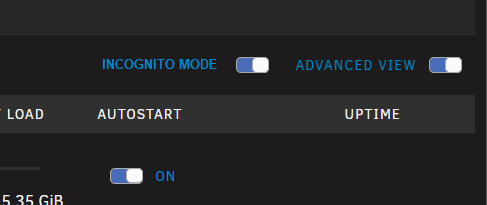
Sry for bothering again just wanted to add an idea, you can shoot me down if you want as its not really critical more esthetics😄 What about making incognito mode button follow the unraid ui looks by (my awsome mockup below):
-
In the end im going to end upp with a tv infront me instead of getting rid of containers So there was others like me but yeah that fixed it a bit for me. I guess unrelated to folderview i would wish that Unraid moved advanced view up to the bar above so the ui got more compressed. Then i guess it would be more worth to hide the incognito button as one would get more back in terms of vertical space.
-
Hmm maybe the advanced view is already making that space used, dont have an old screenshot of it. So i could be wrong but it feels that the incognito button is making the the space bigger and thereby taking up more space vertically.
-
First off, great work with v3 with a ton of new features and ui improvements. I see why you would add incognito mode and why its needed. But is there any possibliity to hide the incognito button on docker dashboard for example via a settings option in Plugin settings. For me that button is only taking up precious dashboard space as i already have alot of containers that needs the space so i dont need to scroll up and down.
-
Hi Im testing the beta of GraphQL API integration for HA and it looks promising. Im using UnraidAPI docker container for docker/vm/unraid control and Glances for monitoring sensors and the goal is to replace them bnoth with this by using the GraphQL API. While testing i wanted to test restarting containers and saw this on the github info: Docker Servicesunraid.docker_restart: Restart a container unraid.docker_logs: Get container logs But when i select the service there are no selectable target and i dont get the container attribute id in HA. I couldnt find if the services are available yet on github info. Are they availble and something wrong with my setup or are they not running yet?
-
Problem with latest update of NPM. Manual fix if you dont want to wait for fixed update: -Rollback to older version by changing repo to: jc21/nginx-proxy-manager:2.12.3 (previous version) -Or manually editing file with error as they show in the link below: https://github.com/NginxProxyManager/nginx-proxy-manager/issues/4606#issuecomment-3024524970
-
As https://hub.docker.com/r/foorschtbar/hyperion which this template uses was updated to 2.1 > this template doesnt work anymore. After update it starts but the ports cannot be accessed and hyperion is not working. Is there anyone with a possible solution?
-
After recent Unraid updates the vm sensor is having problems buy not getting updated after HA restart. Also issues with a large Unraid API container still present as its still seems that the container is running in dev mode as the container is over 1 gb. Is there any ongoing work on Unraid API-RE?
-
@BoKKeR I tend to run a daily script with docker image prune -af and docker volume prune -f to keep it clean. Only thing that was noted on system prune: Deleted Networks: br0
-
@BoKKeR Any update on when this could be coming out?
-
Hiya, after my docker.image starting to get big i wanted to see if i could get thge biggest containers smaller before actually increasing the size of the docker.imgae. And UnraidAPI is kinda big for me, mine is being around 1.14 GB atm. How big is normal for it and is there a way to decrease its size?
-
Ok thanks for info, so its only the name it reacts to.
-
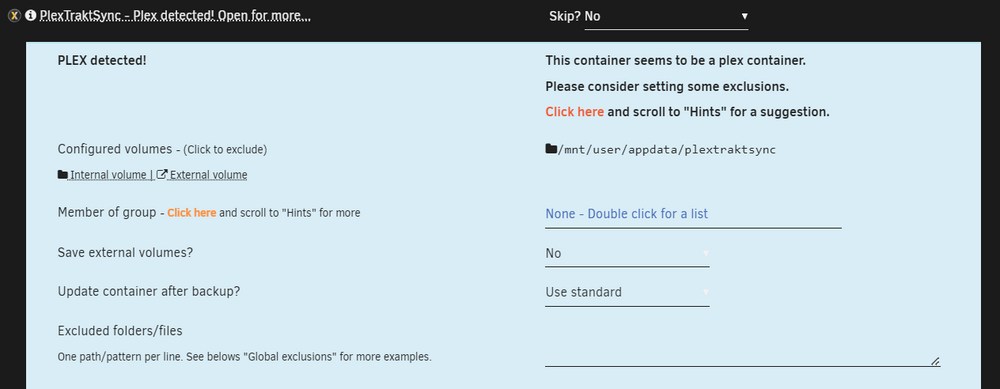
Hiya My PlexTraktSync docker is detected by Autobackup plugin as Plex and i misguiding info in settings due to it: PlexTraktSync: ghcr.io/taxel/plextraktsync:latest Is there a way to make it not see it as Plex?
-
Hi I just stumble on a small issue i cannot find the solution to so i post it here if anyone has an answer. When adding my own custom template for a docker (not via gui docker browser) the docker doesnt report status after HA restart. If i turn it on or off it gets reported as it should. Also restarting the unraidapi docker fixes it. The dockers installed via "docker store" gui works fine. And its actually the same for my WM. Anyone has any feedback or fix for this?


-
Hi Any possiblitiy of updating to 2.0.16? https://github.com/hyperion-project/hyperion.ng/releases/tag/2.0.16
-
Thanks for quick answer, its just me wanting to understand as much as i could about it all. I will leave it alone and not tinker with it as its only logs.
-
Sorry for bringing back a old post. I get this in Unraid log: Mar 25 11:22:19 UNRAID usbhid-ups[6922]: ups_status_set: seems that UPS [qnapups] is in OL+DISCHRG state now. Is it calibrating (perhaps you want to set 'onlinedischarge_calibration' option)? Note that some UPS models (e.g. CyberPower UT series) emit OL+DISCHRG when in fact offline/on-battery (perhaps you want to set 'onlinedischarge' option). But everything works as it should and nothing is being shutdown when my APC UPS is doing its biweekly test. But it logs that above message. In previous poster he had problems with pfsense shutting down which i dont have problems with. And according to documentation it states that APC models are effected. Can i add a flag/line some where to fix this or is not a "real" problem as its only shown in the logs?
-
Bokker, any possible fix for getting rid of nchan error thats spamming the unraid log like crazy which came after last update: Also have a question if there is a possible fix for neededing rsetart container whenever HA is restarted, was working before last update. To add to above poster i also have issues with attributes on status sensor. Example of nchan error: Jan 29 05:28:42 UNRAID monitor: Stop running nchan processes Jan 29 05:29:15 UNRAID monitor: Stop running nchan processes Jan 29 05:29:48 UNRAID monitor: Stop running nchan processes Jan 29 05:30:21 UNRAID monitor: Stop running nchan processes Jan 29 05:30:54 UNRAID monitor: Stop running nchan processes Jan 29 05:31:28 UNRAID monitor: Stop running nchan processes Jan 29 05:32:01 UNRAID monitor: Stop running nchan processes Jan 29 05:32:34 UNRAID monitor: Stop running nchan processes Jan 29 05:33:07 UNRAID monitor: Stop running nchan processes Jan 29 05:33:40 UNRAID monitor: Stop running nchan processes Jan 29 05:34:13 UNRAID monitor: Stop running nchan processes Jan 29 05:34:46 UNRAID monitor: Stop running nchan processes
-
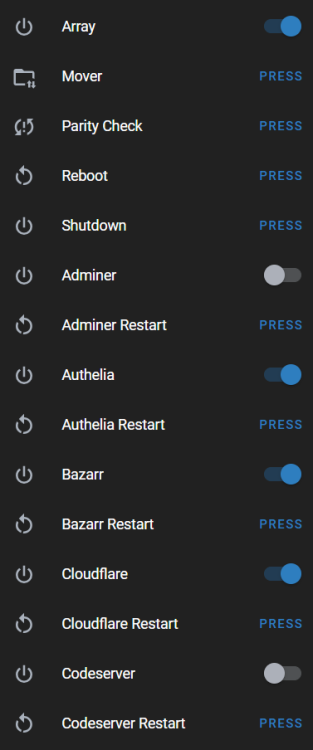
Yes bokker/unraidapi-re:6.12-naming, but to be honest i cannot find where to look for any errors for sure. I remember it there was supposed to be errors in debug log regarding naming. Cannot find any there now. So it seems to be working fine. Example from core.entity_registry file looks ok: "original_name": "docker_bazarr_restart", "unique_id": "unraid_bazarr_restart", That said i rename my entities always according to my own standard thats why i need to look in core.entity_registry file. Example:
-
Updated and couldnt find any issues with the naming I keep it kinda simple and set my entities to: docker on/off = mdi:power docker restart = mdi:restart mover: mdi:folder-arrow-up-down-outline array on/off: mdi:power parity check: mdi:sync-alert reboot: mdi:restart shutdown: mdi:power status: mdi:checkbox-marked-outline
-
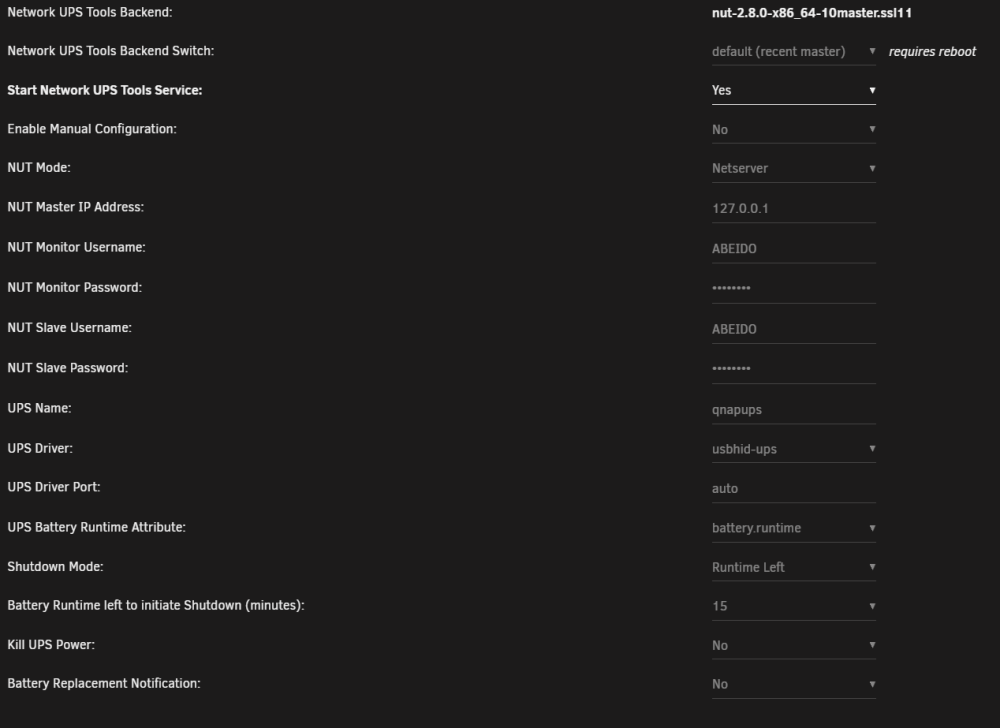
Tested everything now: Change the NUT backend to "legacy (2.7.4)" in NUT Settings Kill UPS Power off Worked perfect Change the NUT backend to "stable (2.8.0)" in NUT Settings, Kill UPS Power off Worked perfect Change the NUT backend to "stable (2.8.0)" in NUT Settings, Kill UPS Power on Worked perfect So seems to have be something with backend then. And i can run on stable i guess. I REALLY want to thank you for the time you put into this. And for all the good info. UPS Model Back-UPS RS 900MI https://www.apc.com/se/sv/product/BR900MI/apc-backups-pro-900va-230v-avr-lcd-6-iecuttag/ Not to be confused with below(mine has IEC outlets and below has Schuko outlets). There are other diffrences aswell. https://www.apc.com/se/sv/product/BR900G-GR/powersaving-backups-pro-900-230-v-schuko/?%3Frange=61888-backups-pro&parent-subcategory-id=88975&selected-node-id=27590292604
-
I didnt know that with slave and master users, good info. Have changed that now. The manual test acts the same as the schedueled in regards of symptons which i didnt thought was the case, so i have a way of testing solutions now. Btw i tested without Qnap running, didnt want to messup the NAS. And problems is the same even the load now only is 34w when ups is off. Test 1 -Did a test before but with only Kill UPS Power change to No. Only Unraid shuts down (correctly thou as it always had) but it does it directly. So not staying on until set rule. Test 2 -Tested with all the suggested changes. Unraid shuts down (correctly thou as it always had) So not staying on until set rule. So same as before. Test 3 -Tested with all the suggested changes but with Shutdown Mode Battery Level . Unraid shuts down (correctly thou as it always had). So not staying on until set rule. So same as before. Saw below just before it turned off both times. 1 2 In Home Assistant (just as extra info). Yellow status name is same status as above 2. Black part is when unraid is off. So still same issue but without the powerloss for the connected devices. When i thinkm about it i couldnt have had these problem before on the old repo. I mean i would remember that my nas/unraid/server was down randomly every 2 weeks as i cannot disable auto selftest (what i have found) Only other ui option i havent touched is: and Are those of any importance in regads to the problem? Some Log from a test.





-
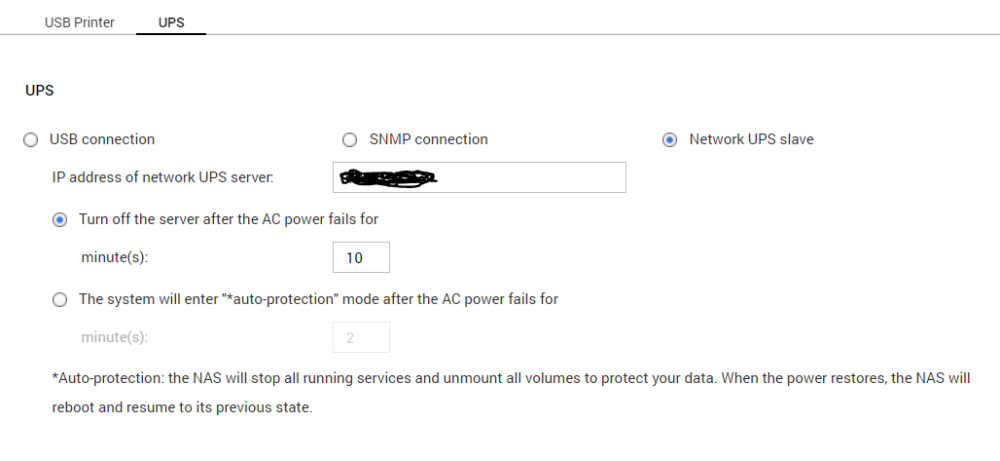
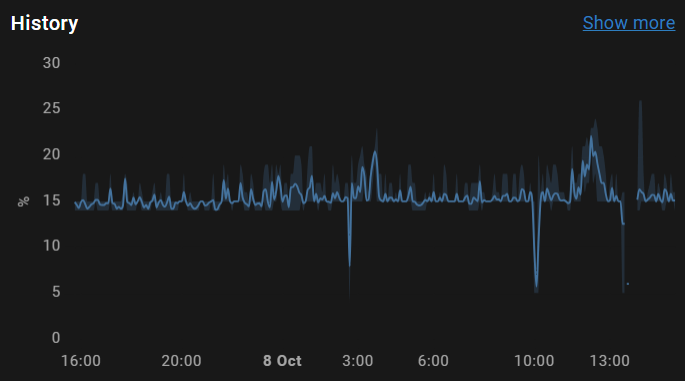
Firstly, not many takes the time you took here. So a massive thanks for that :). Im kinda torn were the problem is as explained below. But in short the UPS new, tests ok and only happens during 2 week auto selftest. Auto Selftest: It seems that the problem only occur during auto selftest thats done every 2 weeks. Havent been able to find any way to disable those. They are done at start aswell but no problem then with either blinking or power offs(hard to see as devices are off as ups is off aswell). Blinking lights: When i got the ups (first setup) i had some issues with blinking monitor when inverter acted and that was plugged into same area as UPS. This went away as i think i changed Input Sensitivity to low. No blinking during my own testing at all. Age/wear: My UPS is kinda new is less than a year old (even warranty on both batteries and ups) and is in a good location with normal temps. All selftest reports ok. Overload: Average usage is 80-100w and it should be able to handle 540w and havent been close to that. My homelab is based on lower power usage so no fancy big machines (Optiplex x2, RPI, router and QNAP Intel Atom) Load history Test: Have done full test to make sure all devices and automations works fine before and it was working, had battery runtime on about 40-45 min before it was depleted. Tested a quickie now so i unplugged power to UPS with everything up and running as normal and it worked as expected. Log below QNAP power outtage test Oct 8 15:11:04 NAS qlogd[9991]: event log: Users: System, Source IP: 127.0.0.1, Computer name: localhost, Content: Power loss detected on UPS. System would be shutdown after 10 minute(s). Oct 8 15:11:37 NAS qlogd[9991]: event log: Users: System, Source IP: 127.0.0.1, Computer name: localhost, Content: Power has returned to UPS. Canceling shutdown. UNRAID power outtage test Oct 8 15:10:40 UNRAID upsmon[3260]: UPS [email protected] on battery Oct 8 15:11:35 UNRAID upsmon[3260]: UPS [email protected] on line power Full log: Theres nothing close before that log, earlier there were unrelated logs imo. Regarding Stop running nchan processes i think its related to other problems with a container in below thread. And this error is always getting logged and i would have issue all the time with the NUT ot that was causing it. https://forums.unraid.net/topic/141974-support-fork-unraid-api-re/?do=findComment&comment=1314157 and so on...
-
Have happend a couple of times and im not sure really why. Been reading logs a lot and it seems that the plugin was updated in the vicinity of the time it happend. Som maybe incorrect deduction by me. Setup: UPS: Back-UPS RS 900MI connected via USB to Unraid. Unraid: NUT controls Unraid shutdown normally, power via UPS Qnap: Builtin QNAP UPS feature is controlling shutdown, power via UPS RPI(Home Assistant): NUT Integration to HA and automation thats shutdown server at 50% battery and then RPI(itself) at 20% battery, power via UPS. Server(Windows): Shutdown via automation as above, power via UPS. Router: No NUT, power via UPS After looking closer the UPS kills power to all connected devices (Router, Unraid, RPI Home Assistant, Qnap NAS, Server Windows). It seems that Unraid gets shutdown command and turns of fast enough but the others shows logs or messages that points to that they werent shutdown correctly The Home Assistant automation above wasnt triggerd by low battery so the server lost power. Windows logs confirm it too. So thats why i was thinking that the UPS kills the power outlets before the battery can even be drained by the machines and trigger the automation and so on. Can also add that i heard the UPS tick (switch between battery and power) a couple of times during this(no home power outage thou). It seems to run selftest every 2 weeks and thereyby the ticking and switching between battert and power. Is there anything you see that im doing wrong? Could the selftest affect NUT in some way(dont seem to be a way to disable it)? Could the the kill ups power to no help(or what does it do)? Logs/info QNAP LOG(that shows that shutdown was incorrectly done): Oct 8 02:48:53 QNAP qlogd[10732]: event log: Users: System, Source IP: 127.0.0.1, Computer name: localhost, Content: The system was not shut down properly last time. Oct 8 02:48:53 QNAP qlogd[10732]: event log: Users: System, Source IP: 127.0.0.1, Computer name: localhost, Content: System started. Oct 8 02:48:53 QNAP qlogd[10732]: event log: Users: System, Source IP: 127.0.0.1, Computer name: localhost, Content: [UPS] USB UPS device plugged in. Oct 8 02:48:57 QNAP qlogd[10732]: event log: Users: System, Source IP: 127.0.0.1, Computer name: localhost, Content: [Volume DataVol1, Pool 1] The file system is not clean. NUT/UNRAID Log: Oct 8 02:35:51 UNRAID upsmon[27897]: UPS [email protected]: administratively OFF or asleep Oct 8 02:35:51 UNRAID upsd[27893]: Client [email protected] set FSD on UPS [qnapups] Oct 8 02:35:51 UNRAID upsmon[27897]: Executing automatic power-fail shutdown Oct 8 02:35:51 UNRAID upsmon[27897]: Auto logout and shutdown proceeding Oct 8 02:35:56 UNRAID shutdown[3133]: shutting down for system halt Oct 8 02:35:57 UNRAID init: Switching to runlevel: 0 Oct 8 02:35:57 UNRAID init: Trying to re-exec init Oct 8 02:35:58 UNRAID kernel: mdcmd (36): nocheck cancel Oct 8 02:35:59 UNRAID emhttpd: Spinning up all drives... Qnap settings NUT Settings (i change Kill UPS Power this morning to NO)