





LAS
Members
-
Joined
-
Last visited
-
2026.04.10 Compose Down, Compose Stop, Compose Restart, Force Update all does this. Did not test Compose Up, but I can only assume it does for this as well. Check for Updates, Edit Stack, View Logs, View Last Cmd Log working, but those don't spawn a (visible atleast) terminal. Syslog: Apr 17 08:32:15 smart compose.manager: [hookLoadlist] hooked loadlist() for cross-widget sync, tabbed=false Apr 17 08:32:15 smart compose.manager: [dockerload] initializing subscriber, composeListReady=false Apr 17 08:32:16 smart compose.manager: [Updates] Last check was 3 minutes ago, interval is 4320 minutes. Skipping. Apr 17 08:32:20 smart compose.manager: setStackActionInProgress - Data: {"stack":"apipoo","inProgress":true,"text":"updating..."} Apr 17 08:32:21 smart compose.manager: processPendingComposeReloads - Data: {"stacks":["apipoo"]} Apr 17 08:32:21 smart compose.manager: [refreshStackRow] response - Data: Apr 17 08:32:21 smart compose.manager: {"project":"apipoo","data":"{\"result\":\"success\",\"containers\":[{\"name\":\"apipoo\",\"id\":\"328b49acaea9ad668640241b881cc9f073b692b6a7ffe038e26e757bc4fae102\",\"service\":\"apipoo\",\"image\":\"apipoo-apipoo\",\"state\":\"running\",\"isRunning\":true,\"hasUpdate\":false,\"updateStatus\":\"unknown\",\"localSha\":\"\",\"remoteSha\":\"\",\"isPinned\":false,\"pinnedDigest\":null,\"icon\":\"https:\\/\\/<redacted>\\/static\\/images\\/apipoo9_512.png\",\"shell\":\"\",\"webUI\":\"https:\\/\\/<redacted>\",\"ports\":[\"192.168.50.34:5510->5010\\/tcp\"],\"networks\":[{\"name\":\"apipoo_default\",\"ip\":\"172.22.0.2\",\"driver\":\"bridge\"}],\"volumes\":[{\"source\":\"\\/mnt\\/disk1\\/appdata\\/apipoo\\/stock.db\",\"destination\":\"\\/app\\/stock.db\",\"type\":\"bind\"},{\"source\":\"\\/etc\\/localtime\",\"destination\":\"\\/etc\\/localtime\",\"type\":\"bind\"}],\"created\":\"2026-04-02T14:31:46.529499484Z\",\"startedAt\":\"2026-04-02T14:32:08.743673699Z\"},{\"name\":\"ofelia\",\"id\":\"8c26369266ce9e379a7ff24a Apr 17 08:32:22 smart compose.manager: Deferring pending update check while action is in progress - Data: {"stack":"apipoo"} Apr 17 08:37:06 smart compose.manager: [hookLoadlist] hooked loadlist() for cross-widget sync, tabbed=false Apr 17 08:37:06 smart compose.manager: [dockerload] initializing subscriber, composeListReady=false Apr 17 08:37:06 smart compose.manager: checkPendingRechecks:found - Data: {"pendingStacks":["apipoo"]} Apr 17 08:37:06 smart compose.manager: Running recheck for recently updated stack: - Data: {"stackName":"apipoo"}Found the culprit though, and this is a real edge-case, that you might even don't need to worry about. I append to .bash_profile on boot with if [ -d /mnt/user/appdata/zsh/.oh-my-zsh ]; then if [ -x /bin/zsh ]; then /bin/zsh; exit; fi fi in order to have zsh as my shell, and $innerCmd = "bash -lc " . escapeshellarg($scriptCmd); (compose_util_functions.php) pick up and execute this. I've added [[ $- == i ]] and everything now works as it should. I guess if you want to avoid user customizations you could do --noprofile --norc then load a controlled env, but I wouldn't worry too much about it.
-
I'm on v5.0.2 I had 4 stacks needing update, it happened on all of them. Manually updated one of them via docker compose pull -> down -> up -d I've not found a way to get it to update in foreground, but Run in background seems to be working reliably. I've not attempted rebooting, as this is my this-should-always-stay-on server.
-
No log windows open, I had an open ssh session though, but closing it did nothing.
-
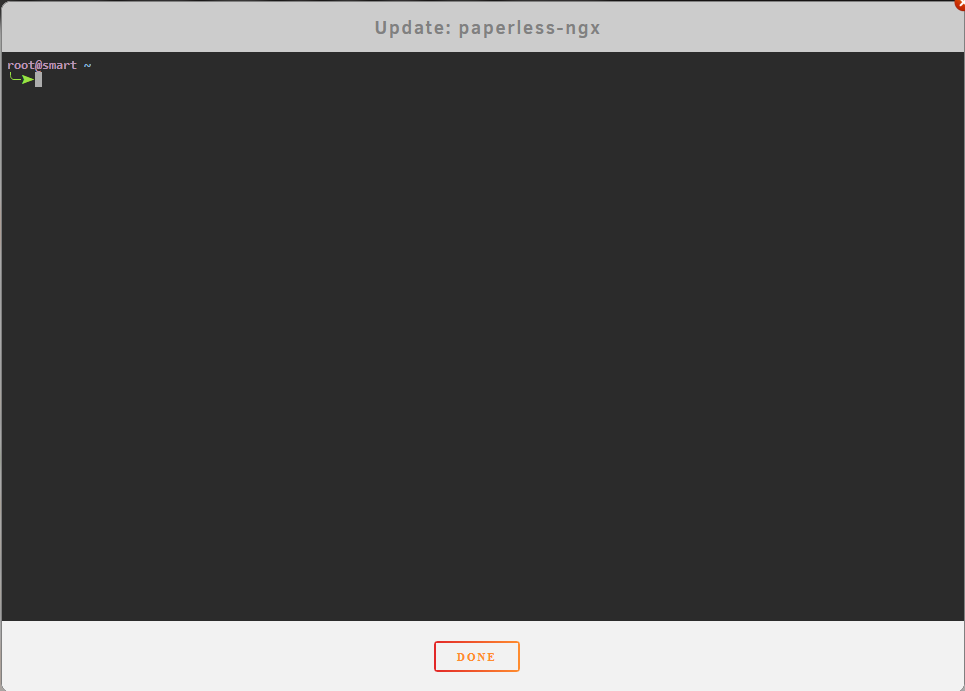
I have a weird issue where when I I click update, I'm left with a non-interactive terminal window at ~/ Running docker compose pull from the project dir successfully pulls the update, and down and up -d works as intended. I do have a custom .zshrc loaded at server start, with some vars set, but this shouldn't really interfere. I see mentions above to cd /boot/plugins/compose.manager/projects/[your immich project] I assume this is a typo, as projects are in /boot/config/plugins/compose.manager/projects/[your immich project]
-
This message showed up today. Has it been replaced, or is this an error?
-
Seeing my flash backup increasing in size, I did some digging and found Python 3 for unraid / dwpython containing a lot of older and semingly not used files Would it be an idea to have the plugin check whether some of the existing packages can be removed when downloading new? -rw------- 1 root root 60K Sep 20 2024 dwpython-2024.09.19-x86_64-1.txz -rw------- 1 root root 60K Oct 11 2024 dwpython-2024.10.08-x86_64-1.txz -rw------- 1 root root 60K Jan 9 2025 dwpython-2025.01.09-x86_64-1.txz -rw------- 1 root root 58K Feb 26 21:02 dwpython-2025.02.26-x86_64-1.txz -rw------- 1 root root 58K Jul 15 13:06 dwpython-2025.07.09-x86_64-1.txz -rw------- 1 root root 38 Sep 20 2024 dwpython.cfg -rw------- 1 root root 2.3M Sep 20 2024 python-pip-24.2-x86_64-1.txz -rw------- 1 root root 2.3M Sep 20 2024 python-pip-24.2-x86_64-1dwl_slack15.1.txz -rw------- 1 root root 2.3M Oct 11 2024 python-pip-24.2-x86_64-2dwl_slack15.1.txz -rw------- 1 root root 2.4M Jan 9 2025 python-pip-24.3.1-x86_64-1dw_slack15.1.txz -rw------- 1 root root 2.3M Jan 9 2025 python-pip-24.3.1-x86_64-1dwl_slack15.1.txz -rw------- 1 root root 2.3M Jan 9 2025 python-pip-24.3.1-x86_64-1dwp_slack15.1.txz -rw------- 1 root root 2.4M Jul 15 13:06 python-pip-25.1.1-x86_64-1dw_slack15.1.txz -rw------- 1 root root 2.4M Jul 15 13:06 python-pip-25.1.1-x86_64-1dwl_slack15.1.txz -rw------- 1 root root 2.3M Jul 15 13:06 python-pip-25.1.1-x86_64-1dwp_slack15.1.txz -rw------- 1 root root 1.8M Sep 20 2024 python-setuptools-75.1.0-x86_64-1.txz -rw------- 1 root root 1.8M Sep 20 2024 python-setuptools-75.1.0-x86_64-1dwl_slack15.1.txz -rw------- 1 root root 1.8M Oct 11 2024 python-setuptools-75.1.0-x86_64-2dwl_slack15.1.txz -rw------- 1 root root 1.8M Jan 9 2025 python-setuptools-75.8.0-x86_64-1dw_slack15.1.txz -rw------- 1 root root 1.8M Jan 9 2025 python-setuptools-75.8.0-x86_64-1dwl_slack15.1.txz -rw------- 1 root root 1.8M Jan 9 2025 python-setuptools-75.8.0-x86_64-1dwp_slack15.1.txz -rw------- 1 root root 1.7M Jul 15 13:06 python-setuptools-80.9.0-x86_64-1dw_slack15.1.txz -rw------- 1 root root 1.7M Jul 15 13:06 python-setuptools-80.9.0-x86_64-1dwl_slack15.1.txz -rw------- 1 root root 1.7M Jul 15 13:06 python-setuptools-80.9.0-x86_64-1dwp_slack15.1.txz -rw------- 1 root root 25M Sep 20 2024 python3-3.11.10-x86_64-1.txz -rw------- 1 root root 23M Jan 9 2025 python3-3.11.11-x86_64-1dw_slack15.1.txz -rw------- 1 root root 23M Jul 15 13:06 python3-3.11.13-x86_64-1dw_slack15.1.txz -rw------- 1 root root 23M Jul 15 13:06 python3-3.12.11-x86_64-1dwp_slack15.1.txz -rw------- 1 root root 22M Sep 20 2024 python3-3.12.6-x86_64-1dwl_slack15.1.txz -rw------- 1 root root 22M Oct 11 2024 python3-3.12.7-x86_64-1dwl_slack15.1.txz -rw------- 1 root root 22M Jan 9 2025 python3-3.12.8-x86_64-1dwp_slack15.1.txz -rw------- 1 root root 23M Oct 11 2024 python3-3.13.0-x86_64-1dwl_slack15.1.txz -rw------- 1 root root 23M Jan 9 2025 python3-3.13.1-x86_64-1dwl_slack15.1.txz -rw------- 1 root root 23M Jul 15 13:06 python3-3.13.5-x86_64-1dwl_slack15.1.txz NerdTools "installed" packages by downloading them to /boot/extra -- removing NerdTools would still leave those packages there, in a location form which where packages are installed automatically on boot.
-
This repository was archived by the owner on Apr 11, 2024. It is now read-only.https://github.com/WeeJeWel/wg-easy For compability, Container repository should be updated to ghcr.io/wg-easy/wg-easy:14 to use the the images from its dev: https://github.com/wg-easy/wg-easy
-
Sorry. Both systems on 7.0.0. yggdrasil had upgradepkg modified Feb 9, while smart Jan 25. yggdrasil is the one I just rebooted. Had a quick look in the syslog, and it seems I ran some updates at the above dates. smart-diagnostics-20250211-0733.zipyggdrasil-diagnostics-20250211-0733.zip
-
I finally took the time to have a look at un-get as I love tinkering with stuff, and I'm getting the same error code when attempting to install the .plg. Modifying the un-get.plg replacing upgradepkg -install-new with installpkg makes it install though, but un-get itself throws the same errors when attempting to install a package. Dug a bit deeper, and I found upgradepkg to have a new name.. ╭─root@smart ~ ╰─➤ v /sbin | rg pkg -rwxr-xr-x 1 root root 3.6K Apr 24 2021 explodepkg -rwxr-xr-x 1 root root 29K Dec 22 20:09 installpkg -rwxr-xr-x 1 root root 18K Sep 28 23:56 makepkg -rwxr-xr-x 1 root root 17K May 14 2023 removepkg -rwxr-xr-x 1 root root 16K Jan 25 17:56 upgradepkg- I checked both my servers, and they're both the same, but with different timestamps for when upgradepkg- was modified. Jan 25 on this, Feb 9 on the other (time of my prev reboot). This led me to wonder if Unraid Patch modifies this file. Removed Unraid Patch, rebooted, and.. root@Yggdrasil ~ ╰─➤ v /sbin | rg upgradepkg -rwxr-xr-x 1 root root 16K Jan 9 23:15 upgradepkg Installing Unraid Patch did not modify this file though, so not entirely sure this is the culprit. TLDR: Unraid Patch may or may not cause upgradepkg to be renamed to upgradepkg- [ -e /sbin/upgradepkg- ] && mv /sbin/upgradepkg- /sbin/upgradepkg
-
Having ocational issues with the GUI, I've added the following to my .zshrc for a quick fix to most issues. # Unraid GUI shortut unraid-gui () { if [[ "$1" = "nuke" ]]; then unraid-api restart /etc/rc.d/rc.nginx restart else /etc/rc.d/rc.nginx "$1" fi } To start nginx if it's down, /etc/rc.d/rc.nginx start usually does the trick (using the above function, I just type 'unraid-gui start')
-
Did you find a solution for this? Just recently upgraded from 8th-gen to 12th-gen i5. Managed to get UHD770 showing up in the VM, though I'm only able to boot as long as I have unraid virtual Graphics enabled as well. I've tested Parsec Virtual display, and github.com/itsmikethetech/Virtual-Display-Driver with no luch, getting the same error when attempting to connect using parsec. Edit: Add Amyuni USB Mobile Monitor to that as well; no luck.
-
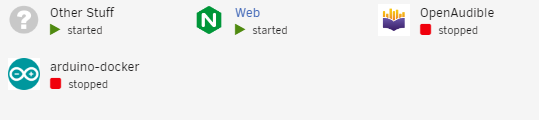
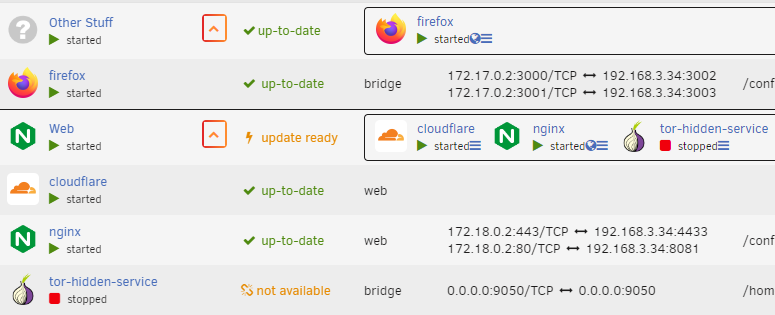
I really loved seeing this pop up on CA. Having about 45 containers running on my main server, I've really been missing a way to clean up my dashboard a bit. Few things though. The folder reports an update is ready when running containers from local self-built images. I'd really love to see numbers on the folders on Dashboard, eg. "2/3 started" on "Web" Attached my debug if needed. debug-DOCKER.json
-
It would seem it is the issue, yes. Everything has been stable now, when I've not been pushing the disks too hard. Think I'll be replacing the disks with Ironwolf, the whole Ironwolf-series seems to be CMR. What actually happens is explained quite nicely on https://superuser.com/a/1691665 Thank you @JorgeB for being patient with a complete newbie in this field of computing. It has been some interesting days of learning of how transfers and caching works.
-
Restarting the array seems to fix the issue. Transfering in max 80GB bulks, with small breaks to let the disk settle, I've now transferred another 1TB without any more issues.
-
Found some recommendations of disabling the parity drive on the initial data transfer, combined with setting Direct IO to Yes, I was getting consistent 110MB/s transfer speeds. ...Untill I hit the 3.2TB mark on my 8TB BarraCuda Disk1, tranfers stalled. Direct transfer to drive instead of share gave the same results, stalled. Attempts to read/download from Disk1, it stalls as well. Excluded Disk1 from the share, Disk2 spun up, back at full speed. Rebooted the server, I'm now able to both read and write to Disk1 at good speeds. Tested writing 63GB of data to ensure it wasn't all RAM cache (32GB total RAM), 110MB/s consistent. Would there be anything I've overlooked that could cause this behaviour, or do I simply have a drive thats starting to fail? SMART shows following 1. Raw read error rate - 2907048 (hex 2C 5BA8) 5. 0 7. Seek error rate - 669490849 (hex 27E7 9EA1) 187. 0 188. 0 0 0 197. 0 198. 0 199. 0 From what I can gather from this thread, this equals no errors Edit: After another 25GB, it yet again stalls. sigh


