






trevor4n
Members
-
Joined
-
Last visited
Everything posted by trevor4n
-
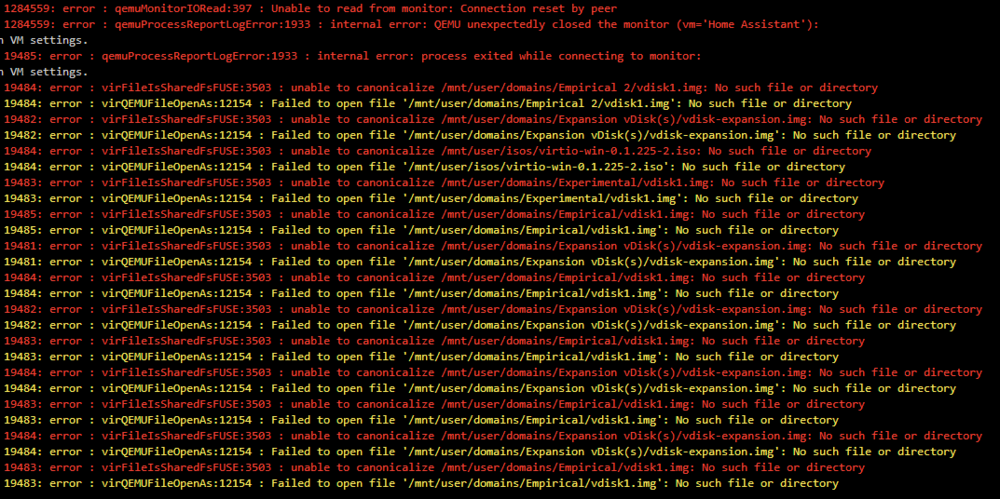
I was just able to resolve the same issue all of yall are dealing with. Here were my steps which expand on the advice from @Jorgo: First head to VM Manager and set 'Diable Autostart' to Yes. Remember to hit apply. Stop the HomeAssistant_inabox docker container If you still have a HomeAssistant OS vm hanging, delete it and the vdisk if it asks Go back to the docker tab and remove the container and image if it asks Use a terminal like midnight commander or whatever you find easiest to delete the HomeAssistant_inabox appdata folder Then go to the unraid apps tab > click previous > select HomeAssistant_inabox > delete (which removes the template) shout out @SpaceInvaderOne who shared this part of the solution in the app repo's issues! I've chosen not to link there at this time so as to encourage the next few steps also be taken. Now feel free to reinstall the container I also suggest editing the HomeAssistant_inabox docker container's VM Images Location to a sub-directory of '/mnt/user/domains/' such as '/mnt/user/domains/HAOS/' (no spaces in folder name) so that way the application install doesn't attach itself to any previously downloaded .qcow2.xz files. HomeAssistant_inabox has a tendancy to look far and wide for an image to use (see reference below) Head back over to VM Manager > Diable Autostart/Start option for VMs > set that to 'No' > remember to hit apply restart the HomeAssistant_inabox docker and it should rebuild the VM. Be patient while the webui needs to get started after re-initializing. Good Luck! Really hoping I didn't miss any steps I took lol

-
@Shivam Amin Did you ever find a solution? I'd also like to avoid running qbit in bridge mode while it's webui port is configured!
-
Do you have any tips on integration once they complete implementation on their end? I've never worked on anything like this before! I'd love to create a webpage to share with friends/family so they can see when my server has outages. I think it'd also be nice if i got an email notification so that i could add a webpage comment addressing how long i expect the outage might last. This could be useful for everything from power outages to unRAID maintenance when I'm upgrading versions!
-
What sort of UPS did you go with, and how did you automate the transmission? I'd love to create an outages map on my website to share with my server users!
-
@christenlanger you might be able to schedule your userscript to run on a regular basis to save yourself the hassle. Otherwise, I personally found that following spaceinvader's advanced gpu passthru techniques video was leading to my intel motherboard onboard audio issue. If youre not able to get your audio interface to display in the windows > Sounds > Playback (devices list) then I might be able to help you fix that issue!
-
how would I go about checking that? I just tried: to no avail
-
Hello hello, Just a few days ago, I was able to run my vm's without issue! Yesterday I started having trouble with my Windows 10 VM. I took the advice to launch into VNC to fix my issue, then launch normally. Ever since, I haven't been able to get any of my VMs to boot. One exception: I decided to build a fresh vm using a fresh vdisk. VNC setup went according to plan; however, as soon as I tried to restart the vm stopped booting. Not sure if this will help diagnose my issue, but here's a copy of my Syslinux configuration: label Unraid OS menu default kernel /bzimage append initrd=/bzroot vfio_iommu_type1.allow_unsafe_interrupts=1 isolcpus=2-7,10-15 pcie_acs_override=downstream,multifunction modprobe.blacklist=i2c_i801,i2c_smbus ^ This config worked totally fine for weeks before I ran into issues Any ideas what might cause general vm failure to boot on previously stable xml configs? crabshack-diagnostics-20230105-0019.zip
-
Yes. I typically shut down and hold the power button while unplugged to make sure im getting a completely fresh reboot.
-
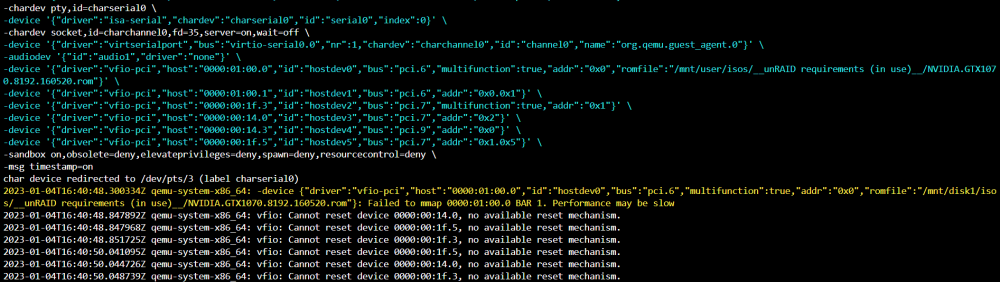
Apologies in advance if this is a bit hard to follow. It's just a very strange situational issue. I recently created a second VM for gaming. After tweaking it, I shut down and attempted to return to my main windows vm. Here's the vm log: I'm experiencing a black screen. I've attempted to perform a hard reboot to no avail. After a while, I edited the VM to use VNC instead of my GPU. Started the vm (which failed), then rolled back to using my gpu. I rebooted the vm via gui. My OS finally appeared to boot successfully, but with terrible stutters (below 40fps). I performed a reboot from that windows vm, and now I'm stuck back where I started (black screen). Do I need to start fresh with a clean vm?
-
Were you able to fix your system stutters? After I followed this guide and got rust working, I switched over to my main vm and that one (completely separate XML + vdisk) is stuttering like crazy. Its also not booting consistently!
-
There's a good chance you're correct, but I'm not entirely convinced just yet. It seems like Tarkov is having issues recognizing the game's path.
-
Hi, I'm having trouble playing EFT on my Windows 10 VM: Tarkov allows me to matchmake, but never finishes loading into raid Error Message: Game aborted. Try reconnect. Error Log File: Error|Default|Could not determine whether the disk is \\.\C: SSD Info|application|driveType:Unknown swapDriveType:Unknown I've tried uninstalling and reinstalling directly onto my vm's boot drive. I've also followed this thread to no avail: Games like Apex Legends, csgo, dota, starcraft II, and 3DMark run perfectly fine.
-
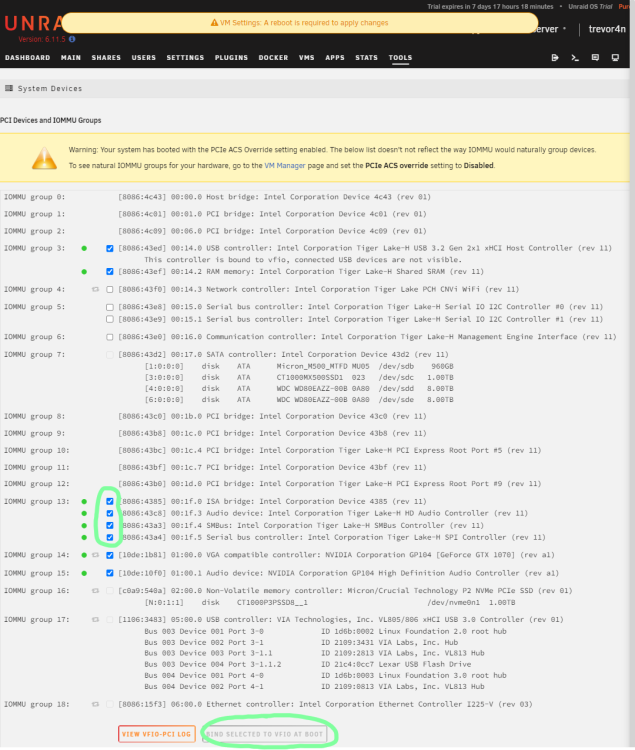
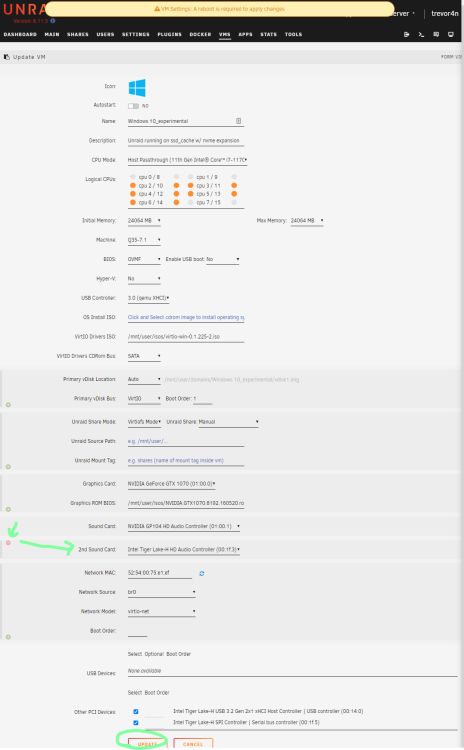
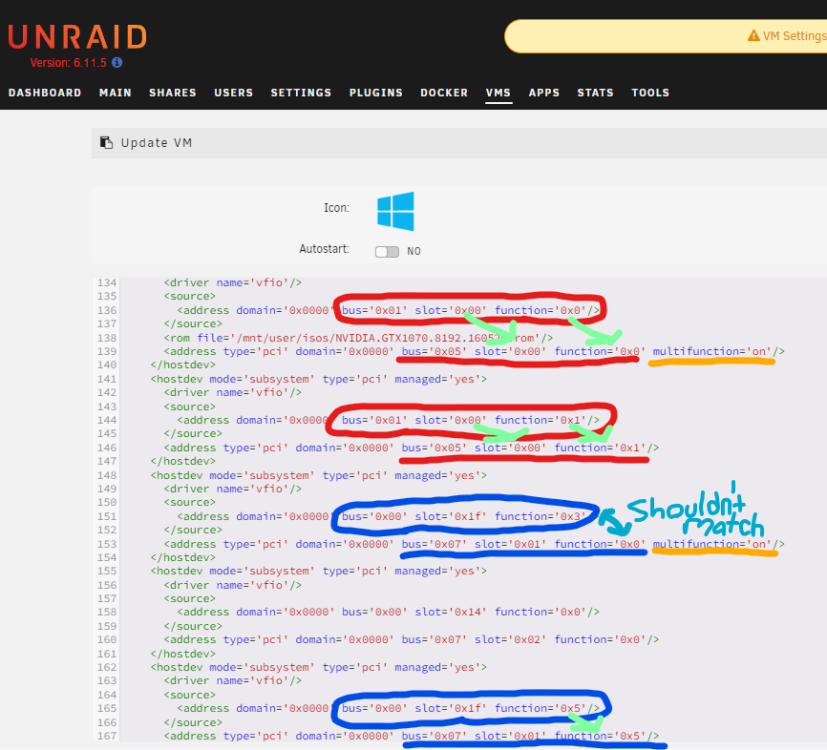
This fix corrects tweaks to Windows 10 vm hostdev virtual addresses. Much like myself, you may have ran into issues after following a nearly flawless guide like this: https://forums.serverbuilds.net/t/guide-remote-gaming-on-unraid/4248. In my case, no amount of bios updates, driver installs, or reboots would make my audio device appear in device manager. The third step below did: Head over to Unraid's Tools > System Devices > find the IOMMU group assigned to your Intel Audio Controller > toggle on the entire group > Bind Selected VFIO at Boot Next head to VMs > Edit your VM: make sure your gpu's audio is configured in the sound card drop down click the add button to add a second audio device and pick your onboard audio controller make sure to click update at the bottom Scroll all the way to the bottom of your VM XML to the first hostdev (in my case line 136 circled in red) update the virtual slot and functions that have been underlined in red to match the physical slot and function above them add multifunction='on' to the end of the virtual address (in my case line 139) Here's the solution I couldn't find documented elsewhere in my case, on line 153 I added multifunction='on' I did not update the function whatsoever below this on my line 167... bus/slot match the bus/slot on line 153, while funciton (167) matches funciton (165)
-
is this still the case? have you updated? has this changed much for you in the years since? have you been able to stream from you unraid setup recently?
-
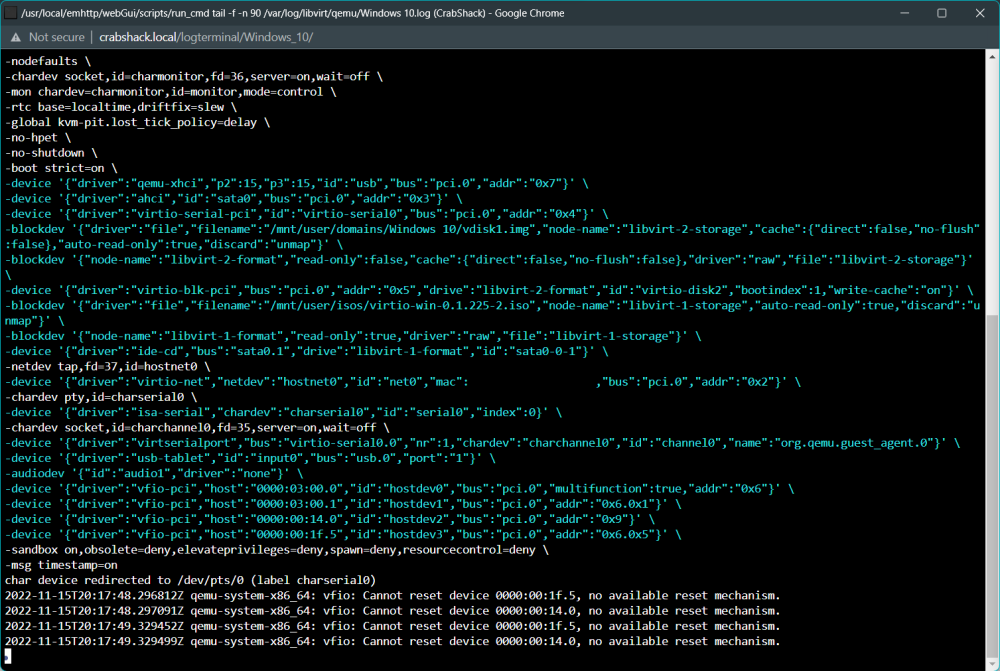
I'm also having issues getting my IOMMU group to appear in windows. Headphones plugged into my line out port aren't discovered. Would those parameters be different with more recent versions of unraid? I tried blacklisting the same thing, and then clearing the power from my system so unraid would let go of my audio device. No luck so far. I do have a few log errors, which I'd be happy to make a separate post about, just figured I'd ping this thread solution for an update! TIA!
-
Can you elaborate or link? I'm still trying to get my intel audio passed through. Am I to understand that as of early 2019, shutting down a vm was pointless if you were looking for integrated audio support? Any idea if this has changed more recently? P.S. any help would be appreciated! This is the first post I've found about my topic, but I'll keep reading into things tonight. I've only had unraid running for a few hours so pls be patient.






