





ChaOConnor
Members
-
Joined
-
Last visited
Everything posted by ChaOConnor
-
I'm getting the same " Import failed, path does not exist or is not accessible by Radarr: " error. Files are downloaded fine, then they sit in the folder they were downloaded and Radarr can't move them for some reason. Very weird.
-
docker exec -it letsencrypt htpasswd -c /config/nginx/.htpasswd <username> add: auth_basic_user_file /config/nginx/.htpasswd; to the default file under each service I wanted to protect. after doing the above, you also need to add auth_basic "Administrator Login"; auth_basic_user_file /config/nginx/.htpasswd; in the server config per http://www.tecmint.com/password-protect-web-directories-in-nginx/
-
How did you end up getting Transmission to work? Did you modify Transmission to support a sub-directory? What did your Nginx config end up looking like? Thanks!
-
Thanks again for everyone's help. So I setup password protection for the main site using .htpasswd and verified it's working. I also dumped the minimux files in the WWW folder and can get to that. Beyond that though, I need to figure out how to point Nginx to all the docker's i'm running (all Linuxserver.io dockers). I saw under the original Nginx docker support thread there used to be a link to sample config files, but that's gone now. Does anyone have a sample of how to configure Nginx for linuxserver.io dockers? (Plex, Sonarr, etc.) Just need one example and I can knuckle through the rest. Thanks!
-
I think the issue is you can't use a CNAME to point to a root domain, it has to be a subdomain, in this case "www". That's why it fails w/o the www. Instead I'm going to use a permanent re-direct (301) type from the root domain to the duckdns domain. I'll have to let it propagate and see if it works. Thanks for everyone's help!
-
This is driving me crazy! DuckDNS works UNRAIDSERVER.duckdns.org on my end, so does UNRAIDSERVER.com. UNRAIDSERVER.com is just a CNAME pointing to UNRAIDSERVER.duckdns.org I tried using the container with UNRAIDSERVER.duckdns.org and it works. Guess I'll just stick with that. Thank you!
-
To simplify I put the port back to 443. Log reports: Brought to you by linuxserver.io We gratefully accept donations at: https://www.linuxserver.io/index.php/donations/ ------------------------------------- GID/UID ------------------------------------- User uid: 99 User gid: 100 ------------------------------------- [cont-init.d] 10-adduser: exited 0. [cont-init.d] 20-config: executing... [cont-init.d] 20-config: exited 0. [cont-init.d] 30-keygen: executing... using keys found in /config/keys [cont-init.d] 30-keygen: exited 0. [cont-init.d] 50-config: executing... 2048 bit DH parameters present SUBDOMAINS entered, processing Sub-domains processed are: -d www.UNRAIDSERVER.com Generating new certificate Failed authorization procedure. UNRAIDSERVER.com (tls-sni-01): urn:acme:error:unknownHost :: The server could not resolve a domain name :: No valid IP addresses found for UNRAIDSERVER.com IMPORTANT NOTES: - The following errors were reported by the server: Domain: UNRAIDSERVER.com Type: unknownHost Detail: No valid IP addresses found for UNRAIDSERVER.com To fix these errors, please make sure that your domain name was entered correctly and the DNS A record(s) for that domain contain(s) the right IP address. /var/run/s6/etc/cont-init.d/50-config: line 105: cd: /config/keys/letsencrypt: No such file or directory [cont-init.d] 50-config: exited 1. [cont-finish.d] executing container finish scripts... [cont-finish.d] done. [s6-finish] syncing disks. Failed authorization procedure. chaoconnor.com (tls-sni-01): urn:acme:error:unknownHost :: The server could not resolve a domain name :: No valid IP addresses found for chaoconnor.com IMPORTANT NOTES: - The following errors were reported by the server: Domain: UNRAIDSERVER.com Type: unknownHost Detail: No valid IP addresses found for UNRAIDSERVER.com To fix these errors, please make sure that your domain name was entered correctly and the DNS A record(s) for that domain contain(s) the right IP address. /var/run/s6/etc/cont-init.d/50-config: line 105: cd: /config/keys/letsencrypt: No such file or directory [cont-init.d] 50-config: exited 1. [cont-finish.d] executing container finish scripts... [cont-finish.d] done. [s6-finish] syncing disks. [s6-finish] sending all processes the TERM signal. [s6-finish] sending all processes the KILL signal and exiting.
-
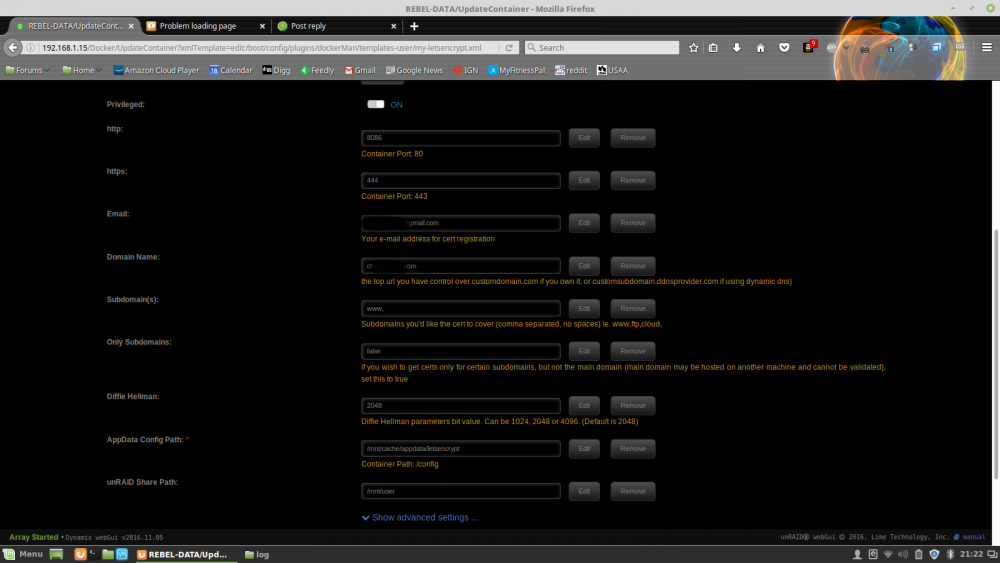
I'm trying to troubleshoot this. I've installed the docker and used ports 8086 and 444. When I go to https://unraidIP:444 or http://unraidIP:8086, I get "Unable to Connect". After a couple of minutes, the docker shuts down. I went to my "appdata" and locked in the "Log" folder, but nothing is in any of the three folders. I've deleted the docker and the folder in "appdata" and tried reinstalling. I've tried different ports, same thing. I'm using duckDNS and I've verified the domain I'm using works. I've also verified that port 443 on my firewall points to my Unraid server. What am i missing? Any thoughts?
-
Somewhat off-topic, but I have a question I haven't been able to figure out with regards to registered domain names and dynamic dns services. I have a domain name that I've had for years. It's currently registered through Google Domains, but I could change that. It's just sitting there, waiting for me to do something with it. I also have (and currently use) a dynamic DNS service (dyn-dns) to point to my server from off network. I'm on a Verizon FIOS connection here in the US and can't easily get a static IP without paying a fortune. Ideally I'd like to ditch the subdomain.dyndns.com and move to my domain name and have it point to my unRaid server and Nginx. Is that even possible? Or do I just stick with the subdomain.dyndns.com and register that with LetsEncrypt? Thanks!
-
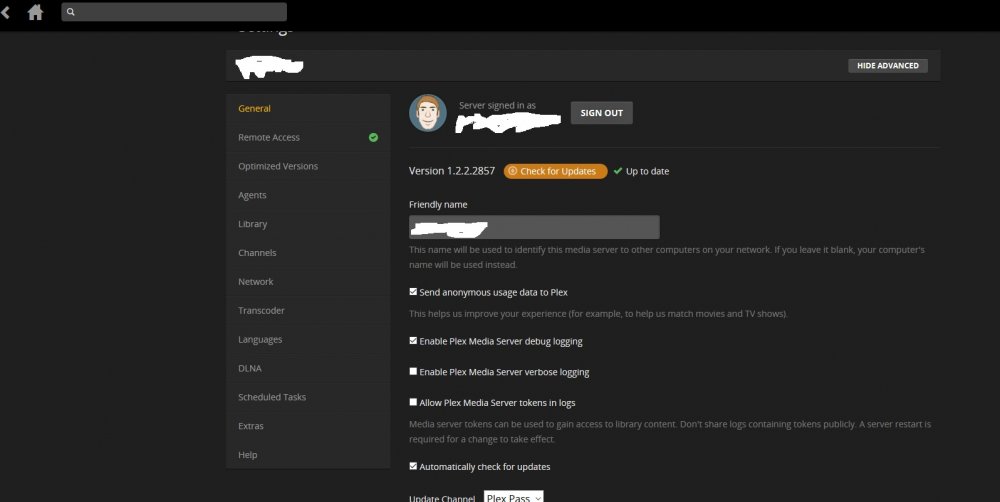
Where is the DVR functionality? I'm using the Plex Pass version (Version 1.2.2.2857) but I can't find anything? Thanks!
-
I'm noticing the same thing. Only on this docker.
-
Here you go! I used this method, works great!
-
Which web server plugin, Apache? Thanks!
-
I seem to be missing something. I installed the plugin, had it download the dependencies, etc. But I can't access the webserver to start configuring VMs. Is there a step by step guide? I think I'm missing a PHP plugin, but I don't know which one or where it goes. Sorry if I'm obtuse, I feel like I should have this cracked but I can't seem to make sense of what the dependencies are. Thanks!
-
+ some patch -HOSTCFLAGS = -Wall -Wmissing-prototypes -Wstrict-prototypes -O2 -fomit-frame-pointer +HOSTCFLAGS = -march=amdfam10 -Wall -Wmissing-prototypes -Wstrict-prototypes -O2 -fomit-frame-pointer HOSTCXXFLAGS = -O2 ------------- - cflags-$(CONFIG_MK8) += $(call cc-option,-march=k8) + cflags-$(CONFIG_MK8) += $(call cc-option,-march=amdfam10) -------------- -cflags-$(CONFIG_MK8) += $(call cc-option,-march=k8,-march=athlon) +cflags-$(CONFIG_MK8) += $(call cc-option,-march=amdfam10) after start from dmesg im also added to image: - media three (for support tuners DVB S/S2/C/T etc) - special if HP microserver has 2 PCIE - added exFAT and NTFS support (latest driver 2013) - added mc Link to file: https://dl.dropbox.com/u/49442039/unraid.rc11.tbs.zip Enjoy Any chance for an R12a update? Thank you! Sent from my SCH-I605 using Tapatalk 2




