





Gvon
Members
-
Joined
-
Last visited
Everything posted by Gvon
-
hello i am sorry to ask does this plugin support schedule send ? or do i need a script to make it done ?
-
sorry about that You're absolutely right.
-
just to update here my problem zfs mirror data corruption fixed i don't really sure what causing it, i try different sata port still same corruption report, no more corruption complain when i change docker system from cache0 to cache1 -tried rebuild docker system on cache0 still have corruption report -move docker system to cache1 fixed Note i have appdata and docker system on cache0 zfs mirror overlay2 data corruption complain on both drive.
-
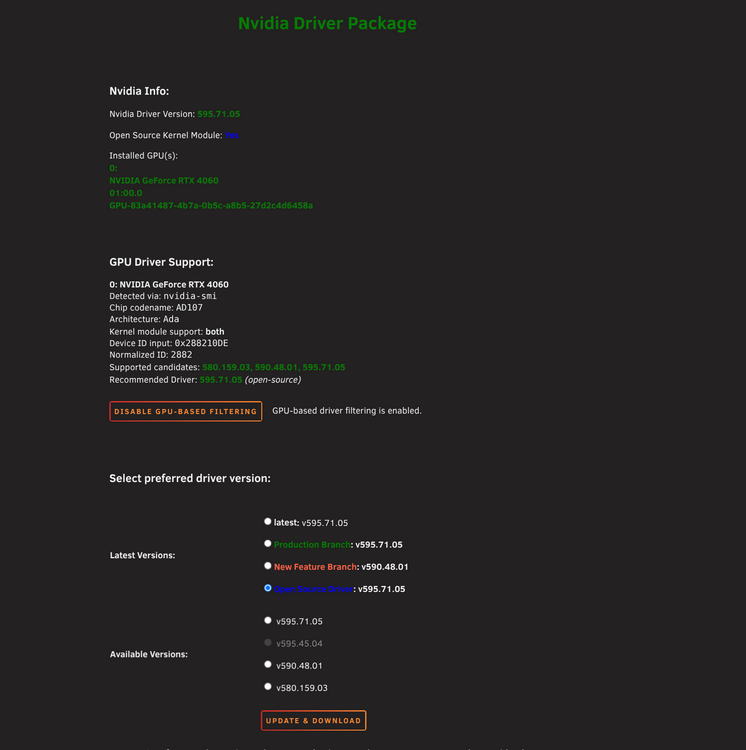
this is what i found maybe related ? Random screen freezes on Linux with driver 595.71.05 where even the keyboard stops responding — that's effectively a kernel freeze, which could block ZFS I/O mid-write. https://forums.developer.nvidia.com/t/595-71-05-screen-freezes-on-linux-wayland/369122 Graphical corruption after suspend/resume with Xid 13 errors on 595.71.05 https://forums.developer.nvidia.com/t/graphical-corruption-after-suspend-resume-with-nvidia-xid-13-595-71-05/368627
-
i notice my zfs mirror get data corruption on both drive same file do mem test pass decide to downgrade from 7.2.6 to 7.2.5 the same thing happened lucky i have snapshot and backup problem solve when i downgrade from nvidia driver v595.71.05 to v580.159.03 bug product unraid 7.2.5-6 zfs mirror with dataset nvidia driver v595.71.05 RTX 4060 copy new file or do zfs scub will report new data corruption it's a silence data corruption no log no drive error only when i check zpool status -v cache is this PCIe/ZFS I/O corruption bug?
-
same happen to me both ollama and open webui
-
maybe gtx 1060 end of life? so you would stuck on GPU 580.159.03
-
that's happen to me as well 1.remove and reboot 2.install nvidia driver plugin, disable docker and enable docker worked for me!
-
confirmed fix on 2026.05.01 thank for the quick fix.
-
-
i already did check for update twice but it's say 2026.03.19 up-to-date did i miss something? edit remove and install again still on 2026.03.19
-
sorry my bad here the Diagnostics gnas-diagnostics-20260501-1427.zip
-
thank for reply i have NVIDIA GeForce RTX 4060 now switch to open source driver still the same error docker run -d --name='llama.cpp' --net='br0' --ip='192.168.0.82' --pids-limit 2048 -e HOST_OS="Unraid" -e HOST_HOSTNAME="GNAS" -e HOST_CONTAINERNAME="llama.cpp" -e 'TCP_PORT_8000'='8080' -e 'CA_TS_FALLBACK_DIR'='/models' -l net.unraid.docker.managed=dockerman -l net.unraid.docker.webui='http://[IP]:[PORT:8080]/' -v '/mnt/ncache/appdata/llama.cpp/models':'/models':'rw' --gpus all 'ghcr.io/ggml-org/llama.cpp:server-cuda' f9238272f96172115220e760c98ae6daab201d5664e67e80b912c1592ff8c1e8 docker: Error response from daemon: failed to create task for container: failed to create shim task: OCI runtime create failed: runc create failed: unable to start container process: error during container init: error running prestart hook #0: exit status 1, stdout: , stderr: Auto-detected mode as 'legacy' nvidia-container-cli: ldcache error: process /sbin/ldconfig failed with error code: 1 Run 'docker run --help' for more information The command failed.
-
just upgrade unraid to 7.2.5 docker that use --gpus all failed to start docker: Error response from daemon: failed to create task for container: failed to create shim task: OCI runtime create failed: runc create failed: unable to start container process: error during container init: error running prestart hook #0: exit status 1, stdout: , stderr: Auto-detected mode as 'legacy'nvidia-container-cli: ldcache error: process /sbin/ldconfig failed with error code: 1 /sbin/ldconfig /sbin/ldconfig: /usr/lib64/libOpenGL.so.0 is not a symbolic link /sbin/ldconfig: /usr/lib64/libGLdispatch.so.0 is not a symbolic link /sbin/ldconfig: /usr/lib64/libGLX.so.0 is not a symbolic link switch driver version and reinstall plugin won't help (each step reboot)
-
you can install unraid user script plugin then create new script below #for nextcloud Cron jobs docker exec -u 99 Nextcloud php -f /var/www/html/cron.php #for missing indexes docker exec -u 99 Nextcloud php ./occ db:add-missing-indices you can separate these 2 command for it own schedule edit if your nextcloud container name Nextcloud-ffmpeg just change Nextcloud to Nextcloud-ffmpeg in script above
-
Did you set Generate Random Password to yes ? If so check your password in the mariadb log overy time you restart the password will change
-
Yes you updated on latest version that fixed the problemsupdate MariaDB 11.4.0 up seem fix the problem no need to add this to Post Arguments: --transaction-isolation=READ-COMMITTED --log-bin=binlog --binlog-format=ROW --character-set-server=utf8just add this to Post Arguments: --transaction-isolation=READ-COMMITTED --log-bin=binlog --binlog-format=ROW --character-set-server=utf8 https://github.com/nextcloud/docker/issues/2165
 For those who want email support just add variable below MAIL_HOST=smtp.gmail.com MAIL_PORT=587 [email protected] [email protected] MAIL_PASSWORD=yourpassword (create app one time password) use your main password will not work MAIL_ENCRYPTION=tls If i add this variable mail will not arrive (MAIL_MAILER=log) Note for safety you can create new gmail account just for mail notifications/log


