





Hellomynameisleo
Members
-
Joined
-
Last visited
Everything posted by Hellomynameisleo
-
I'll deal with the longer array startup time then not someimt I do often and its saving me 10TB (126/136TB) of space so far with its compression which is a decent amount.
-
Do you have compression set on your one? I have mine set at zstd:3 for all disks and most of my disks are around 40GB for the metadata. I counted the metadata total of all the disks and it sits at 305GB. So I am guessing its 305GB of metadata having to be read first in total to start up the array, and at the speed of 280MB/s it lines up with the time it takes . But I'm not sure if compression is making it longer. For the content on the disks I have millions of files mixed data types all over so I think that contributes to the metadata size
-
I do have a lot of data on the disks, they are almost full over 95% each. In regards to the metadata this is the stats below for my disk7: Data, single: total=16.06TiB, used=16.00TiB System, DUP: total=40.00MiB, used=1.88MiB Metadata, DUP: total=40.00GiB, used=38.01GiB GlobalReserve, single: total=512.00MiB, used=16.00KiB Does this look normal compared to yours? My metadata is 38GB/40GB from what I see. If you are able to share one of your stats so I can maybe compare the differences
-
I have my 9 disks formatted as BTRFS and compression set on all of them in the Array. The more disks I add the longer it gets, it takes about 14 minutes to start the array. Is it normal to have a long array mounting time with BTRFS? And if so did I make a mistake by choosing it over XFS? I have the logs below and it looks like it mounts each BTRFS device one by one instead of all at the same time
-
I recently am getting the below in my log files, I am wondering what does it mean? May 11 05:02:34 Unraid kernel: btrfs_print_data_csum_error: 8 callbacks suppressed May 11 05:02:34 Unraid kernel: BTRFS warning (device md7p1): csum failed root 5 ino 303196 off 292627996672 csum 0xd0351c61 expected csum 0x771af362 mirror 1 May 11 05:02:34 Unraid kernel: btrfs_dev_stat_inc_and_print: 8 callbacks suppressed May 11 05:02:34 Unraid kernel: BTRFS error (device md7p1): bdev /dev/md7p1 errs: wr 0, rd 0, flush 0, corrupt 19, gen 0 May 11 05:02:34 Unraid kernel: BTRFS warning (device md7p1): csum failed root 5 ino 303196 off 292628013056 csum 0xedc3a695 expected csum 0xb214ea11 mirror 1 May 11 05:02:34 Unraid kernel: BTRFS error (device md7p1): bdev /dev/md7p1 errs: wr 0, rd 0, flush 0, corrupt 20, gen 0 May 11 05:02:34 Unraid kernel: BTRFS warning (device md7p1): csum failed root 5 ino 303196 off 292627996672 csum 0xd0351c61 expected csum 0x771af362 mirror 1 May 11 05:02:34 Unraid kernel: BTRFS error (device md7p1): bdev /dev/md7p1 errs: wr 0, rd 0, flush 0, corrupt 21, gen 0 May 11 05:02:34 Unraid kernel: BTRFS warning (device md7p1): csum failed root 5 ino 303196 off 292627996672 csum 0xd0351c61 expected csum 0x771af362 mirror 1 May 11 05:02:34 Unraid kernel: BTRFS error (device md7p1): bdev /dev/md7p1 errs: wr 0, rd 0, flush 0, corrupt 22, gen 0 May 11 05:02:34 Unraid kernel: BTRFS warning (device md7p1): csum failed root 5 ino 303196 off 292627996672 csum 0xd0351c61 expected csum 0x771af362 mirror 1 May 11 05:02:34 Unraid kernel: BTRFS error (device md7p1): bdev /dev/md7p1 errs: wr 0, rd 0, flush 0, corrupt 23, gen 0 May 11 05:02:34 Unraid kernel: BTRFS warning (device md7p1): csum failed root 5 ino 303196 off 292627996672 csum 0xd0351c61 expected csum 0x771af362 mirror 1 May 11 05:02:34 Unraid kernel: BTRFS error (device md7p1): bdev /dev/md7p1 errs: wr 0, rd 0, flush 0, corrupt 24, gen 0 May 11 05:02:34 Unraid kernel: BTRFS warning (device md7p1): csum failed root 5 ino 303196 off 292627996672 csum 0xd0351c61 expected csum 0x771af362 mirror 1 May 11 05:02:34 Unraid kernel: BTRFS error (device md7p1): bdev /dev/md7p1 errs: wr 0, rd 0, flush 0, corrupt 25, gen 0 May 11 05:02:35 Unraid kernel: BTRFS warning (device md7p1): csum failed root 5 ino 303196 off 292627996672 csum 0xd0351c61 expected csum 0x771af362 mirror 1 May 11 05:02:35 Unraid kernel: BTRFS error (device md7p1): bdev /dev/md7p1 errs: wr 0, rd 0, flush 0, corrupt 26, gen 0 May 11 05:02:35 Unraid kernel: BTRFS warning (device md7p1): csum failed root 5 ino 303196 off 292627996672 csum 0xd0351c61 expected csum 0x771af362 mirror 1 May 11 05:02:35 Unraid kernel: BTRFS error (device md7p1): bdev /dev/md7p1 errs: wr 0, rd 0, flush 0, corrupt 27, gen 0 May 11 05:02:35 Unraid kernel: BTRFS warning (device md7p1): csum failed root 5 ino 303196 off 292627996672 csum 0xd0351c61 expected csum 0x771af362 mirror 1 May 11 05:02:35 Unraid kernel: BTRFS error (device md7p1): bdev /dev/md7p1 errs: wr 0, rd 0, flush 0, corrupt 28, gen 0 May 11 18:20:06 Unraid kernel: ------------[ cut here ]------------ May 11 18:20:06 Unraid kernel: WARNING: CPU: 2 PID: 0 at net/netfilter/nf_conntrack_core.c:1210 __nf_conntrack_confirm+0xa4/0x2b0 [nf_conntrack] May 11 18:20:06 Unraid kernel: Modules linked in: udp_diag macvlan nvidia_uvm(PO) xt_nat xt_tcpudp veth xt_conntrack nf_conntrack_netlink nfnetlink xfrm_user xt_addrtype br_netfilter nfsd auth_rpcgss oid_registry lockd grace sunrpc md_mod zfs(PO) zunicode(PO) zzstd(O) zlua(O) zavl(PO) icp(PO) zcommon(PO) znvpair(PO) spl(O) tcp_diag inet_diag iptable_nat xt_MASQUERADE nf_nat nf_conntrack nf_defrag_ipv6 nf_defrag_ipv4 wireguard curve25519_x86_64 libcurve25519_generic libchacha20poly1305 chacha_x86_64 poly1305_x86_64 ip6_udp_tunnel udp_tunnel libchacha ip6table_filter ip6_tables iptable_filter ip_tables x_tables efivarfs bridge stp llc ixgbe xfrm_algo mdio e1000e nvidia_drm(PO) nvidia_modeset(PO) intel_rapl_msr intel_rapl_common iosf_mbi x86_pkg_temp_thermal intel_powerclamp coretemp kvm_intel kvm nvidia(PO) crct10dif_pclmul crc32_pclmul crc32c_intel ghash_clmulni_intel sha512_ssse3 sha256_ssse3 sha1_ssse3 aesni_intel video crypto_simd drm_kms_helper cryptd drm isci mei_hdcp mei_pxp rapl wmi_bmof i2c_i801 May 11 18:20:06 Unraid kernel: backlight intel_cstate mpt3sas i2c_smbus firewire_ohci libsas ahci syscopyarea mei_me sysfillrect input_leds intel_uncore sysimgblt raid_class joydev led_class firewire_core i2c_core libahci fb_sys_fops mei scsi_transport_sas wmi button unix [last unloaded: xfrm_algo] May 11 18:20:06 Unraid kernel: CPU: 2 PID: 0 Comm: swapper/2 Tainted: P O 6.1.64-Unraid #1 May 11 18:20:06 Unraid kernel: Hardware name: Hewlett-Packard HP Z420 Workstation/1589, BIOS J61 v01.14 07/17/2012 May 11 18:20:06 Unraid kernel: RIP: 0010:__nf_conntrack_confirm+0xa4/0x2b0 [nf_conntrack] May 11 18:20:06 Unraid kernel: Code: 44 24 10 e8 e2 e1 ff ff 8b 7c 24 04 89 ea 89 c6 89 04 24 e8 7e e6 ff ff 84 c0 75 a2 48 89 df e8 9b e2 ff ff 85 c0 89 c5 74 18 <0f> 0b 8b 34 24 8b 7c 24 04 e8 18 dd ff ff e8 93 e3 ff ff e9 72 01 May 11 18:20:06 Unraid kernel: RSP: 0018:ffffc900002008e0 EFLAGS: 00010202 May 11 18:20:06 Unraid kernel: RAX: 0000000000000001 RBX: ffff8881a1c34200 RCX: 17b89ab3abac9504 May 11 18:20:06 Unraid kernel: RDX: 0000000000000000 RSI: 0000000000000001 RDI: ffff8881a1c34200 May 11 18:20:06 Unraid kernel: RBP: 0000000000000001 R08: 399ab33c0e253edb R09: 12629ad46bb42dd5 May 11 18:20:06 Unraid kernel: R10: c5fd5e8bfbd9c3d4 R11: ffffc900002008a8 R12: ffffffff82a14d00 May 11 18:20:06 Unraid kernel: R13: 000000000000604b R14: ffff8881ec6dd500 R15: 0000000000000000 May 11 18:20:06 Unraid kernel: FS: 0000000000000000(0000) GS:ffff888fefa80000(0000) knlGS:0000000000000000 May 11 18:20:06 Unraid kernel: CS: 0010 DS: 0000 ES: 0000 CR0: 0000000080050033 May 11 18:20:06 Unraid kernel: CR2: 00001545ab043840 CR3: 000000000c20a003 CR4: 00000000000606e0 May 11 18:20:06 Unraid kernel: Call Trace: May 11 18:20:06 Unraid kernel: <IRQ> May 11 18:20:06 Unraid kernel: ? __warn+0xab/0x122 May 11 18:20:06 Unraid kernel: ? report_bug+0x109/0x17e May 11 18:20:06 Unraid kernel: ? __nf_conntrack_confirm+0xa4/0x2b0 [nf_conntrack] May 11 18:20:06 Unraid kernel: ? handle_bug+0x41/0x6f May 11 18:20:06 Unraid kernel: ? exc_invalid_op+0x13/0x60 May 11 18:20:06 Unraid kernel: ? asm_exc_invalid_op+0x16/0x20 May 11 18:20:06 Unraid kernel: ? __nf_conntrack_confirm+0xa4/0x2b0 [nf_conntrack] May 11 18:20:06 Unraid kernel: ? nf_nat_inet_fn+0xc0/0x1a8 [nf_nat] May 11 18:20:06 Unraid kernel: nf_conntrack_confirm+0x25/0x54 [nf_conntrack] May 11 18:20:06 Unraid kernel: nf_hook_slow+0x3d/0x96 May 11 18:20:06 Unraid kernel: ? ip_protocol_deliver_rcu+0x164/0x164 May 11 18:20:06 Unraid kernel: NF_HOOK.constprop.0+0x79/0xd9 May 11 18:20:06 Unraid kernel: ? ip_protocol_deliver_rcu+0x164/0x164 May 11 18:20:06 Unraid kernel: ip_sabotage_in+0x52/0x60 [br_netfilter] May 11 18:20:06 Unraid kernel: nf_hook_slow+0x3d/0x96 May 11 18:20:06 Unraid kernel: ? ip_rcv_finish_core.constprop.0+0x3e8/0x3e8 May 11 18:20:06 Unraid kernel: NF_HOOK.constprop.0+0x79/0xd9 May 11 18:20:06 Unraid kernel: ? ip_rcv_finish_core.constprop.0+0x3e8/0x3e8 May 11 18:20:06 Unraid kernel: __netif_receive_skb_one_core+0x77/0x9c May 11 18:20:06 Unraid kernel: netif_receive_skb+0xbf/0x127 May 11 18:20:06 Unraid kernel: br_handle_frame_finish+0x43a/0x474 [bridge] May 11 18:20:06 Unraid kernel: ? br_pass_frame_up+0xdd/0xdd [bridge] May 11 18:20:06 Unraid kernel: br_nf_hook_thresh+0xe5/0x109 [br_netfilter] May 11 18:20:06 Unraid kernel: ? br_pass_frame_up+0xdd/0xdd [bridge] May 11 18:20:06 Unraid kernel: br_nf_pre_routing_finish+0x2c1/0x2ec [br_netfilter] May 11 18:20:06 Unraid kernel: ? br_pass_frame_up+0xdd/0xdd [bridge] May 11 18:20:06 Unraid kernel: ? br_nf_hook_thresh+0x109/0x109 [br_netfilter] May 11 18:20:06 Unraid kernel: br_nf_pre_routing+0x236/0x24a [br_netfilter] May 11 18:20:06 Unraid kernel: ? br_nf_hook_thresh+0x109/0x109 [br_netfilter] May 11 18:20:06 Unraid kernel: br_handle_frame+0x27a/0x2e0 [bridge] May 11 18:20:06 Unraid kernel: ? br_pass_frame_up+0xdd/0xdd [bridge] May 11 18:20:06 Unraid kernel: __netif_receive_skb_core.constprop.0+0x4fd/0x6e9 May 11 18:20:06 Unraid kernel: __netif_receive_skb_list_core+0x8a/0x11e May 11 18:20:06 Unraid kernel: netif_receive_skb_list_internal+0x1d2/0x20b May 11 18:20:06 Unraid kernel: gro_normal_list+0x1d/0x3f May 11 18:20:06 Unraid kernel: napi_complete_done+0x7b/0x11a May 11 18:20:06 Unraid kernel: e1000e_poll+0x9e/0x23e [e1000e] May 11 18:20:06 Unraid kernel: __napi_poll.constprop.0+0x2b/0x124 May 11 18:20:06 Unraid kernel: net_rx_action+0x159/0x24f May 11 18:20:06 Unraid kernel: ? e1000_intr_msi+0x118/0x124 [e1000e] May 11 18:20:06 Unraid kernel: __do_softirq+0x129/0x288 May 11 18:20:06 Unraid kernel: __irq_exit_rcu+0x5e/0xb8 May 11 18:20:06 Unraid kernel: common_interrupt+0x9b/0xc1 May 11 18:20:06 Unraid kernel: </IRQ> May 11 18:20:06 Unraid kernel: <TASK> May 11 18:20:06 Unraid kernel: asm_common_interrupt+0x22/0x40 May 11 18:20:06 Unraid kernel: RIP: 0010:cpuidle_enter_state+0x11d/0x202 May 11 18:20:06 Unraid kernel: Code: 2b ff 9f ff 45 84 ff 74 1b 9c 58 0f 1f 40 00 0f ba e0 09 73 08 0f 0b fa 0f 1f 44 00 00 31 ff e8 a3 c0 a4 ff fb 0f 1f 44 00 00 <45> 85 e4 0f 88 ba 00 00 00 48 8b 04 24 49 63 cc 48 6b d1 68 49 29 May 11 18:20:06 Unraid kernel: RSP: 0018:ffffc9000012be98 EFLAGS: 00000246 May 11 18:20:06 Unraid kernel: RAX: ffff888fefa80000 RBX: ffff888fefab6458 RCX: 0000000000000000 May 11 18:20:06 Unraid kernel: RDX: 0000c1b2a37d9445 RSI: ffffffff820d7e01 RDI: ffffffff820d830a May 11 18:20:06 Unraid kernel: RBP: 0000000000000002 R08: 0000000000000002 R09: 0000000000000002 May 11 18:20:06 Unraid kernel: R10: 0000000000000020 R11: 0000000000000126 R12: 0000000000000002 May 11 18:20:06 Unraid kernel: R13: ffffffff82320640 R14: 0000c1b2a37d9445 R15: 0000000000000000 May 11 18:20:06 Unraid kernel: ? cpuidle_enter_state+0xf7/0x202 May 11 18:20:06 Unraid kernel: cpuidle_enter+0x2a/0x38 May 11 18:20:06 Unraid kernel: do_idle+0x18d/0x1fb May 11 18:20:06 Unraid kernel: cpu_startup_entry+0x2a/0x2c May 11 18:20:06 Unraid kernel: start_secondary+0x101/0x101 May 11 18:20:06 Unraid kernel: secondary_startup_64_no_verify+0xce/0xdb May 11 18:20:06 Unraid kernel: </TASK> May 11 18:20:06 Unraid kernel: ---[ end trace 0000000000000000 ]---
-
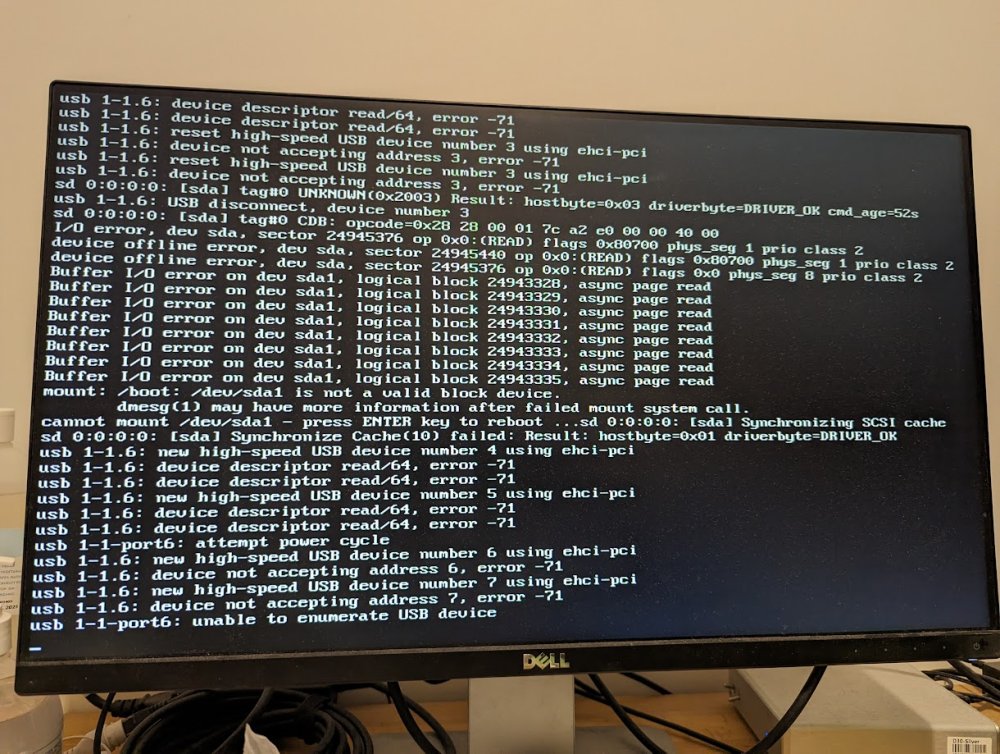
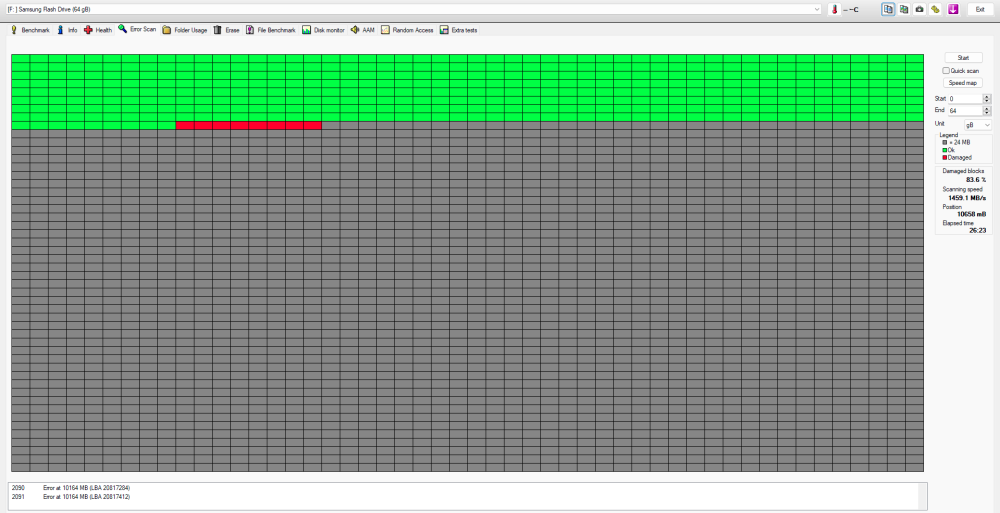
I came home with my unraid server unresponsive, so I have rebooted my computer and was met with the picture below. I've tried inserting the usb in a 2.0 slot behind the motherboard and in front of the case IO but the results are still the same. I am thinking its my USB that has failed after a year of 24/7 use. I use Unraid connect which has a backup from 2 days ago, how would I go about installing the same config and everything on a new USB drive? Do I have to move some files from the old usb to new usb?
-
Thanks I given it a try and extracted the storcli64 from \Linux-PPC\LittleEndian\ to the tmp folder and did the "chmod 777 storcli64", then "./storcli64 /c0 show temperature" but get an error saying "bash: ./storcli64: cannot execute binary file: Exec format error" any ideas?
-
In unraid how do I get the temperature sensor data for the HBA 9300-16I? It has 2 SAS3008 controllers in it and when I touch the heatsink is it really hot even though I only got 2 HDD connected
-
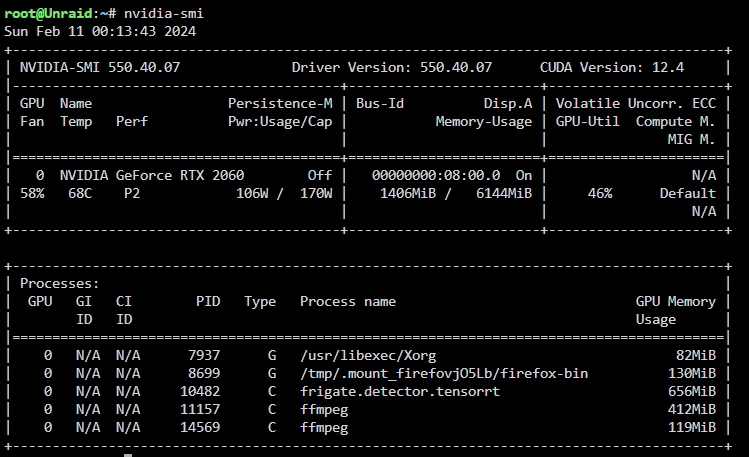
updated to latest version of unraid and nvidia drivers, still doesn't trigger events even though I can see it working on the GPU load for the detector. Might be a frigate bug in this version. edit: Got it working now, had to add input_tensor and input_pixel_format model: path: /config/model_cache/tensorrt/yolov7x-640.trt input_tensor: nchw input_pixel_format: rgb width: 640 height: 640
-
thinking its my unraid gpu driver version v530.41.03, that I need to update, but can't because I need to update my unraid which is still on 6.12.0-rc3. Feel like unraid will brick itself and the docker containers if I update the OS
-
okay got my gpu working in frigate but for some reason the event detection is not working with the tensorrt, I see no events being triggered any ideas why? My config below mqtt: enabled: False detectors: tensorrt: type: tensorrt device: 0 model: path: /config/model_cache/tensorrt/yolov7x-640.trt width: 640 height: 640 go2rtc: streams: bedroom: - http://192.168.4.183/flv?port=1935&app=bcs&stream=channel0_main.bcs&user=admin&password={FRIGATE_RTSP_PASSWORD} cameras: bedroom: enabled: True ffmpeg: inputs: - path: http://192.168.4.183/flv?port=1935&app=bcs&stream=channel0_main.bcs&user=admin&password={FRIGATE_RTSP_PASSWORD} input_args: preset-http-reolink roles: - record - path: http://192.168.4.183/flv?port=1935&app=bcs&stream=channel0_sub.bcs&user=admin&password={FRIGATE_RTSP_PASSWORD} input_args: preset-http-reolink roles: - detect detect: enabled: True width: 640 height: 480 fps: 7 record: enabled: True retain: days: 10 mode: all events: retain: mode: motion default: 20 birdseye: enabled: True mode: continuous restream: False width: 640 height: 480 quality: 12 ffmpeg: hwaccel_args: preset-nvidia-h264 output_args: record: -f segment -segment_time 10 -segment_format mp4 -reset_timestamps 1 -strftime 1 -g 300 -c:v hevc_nvenc -preset p7 -tune hq -level 6.2 -tier high -c:a copy and the logs doesn't show any errors: 2024-02-10 13:41:15.567309349 [INFO] Preparing Frigate... 2024-02-10 13:41:15.579936723 [INFO] Starting Frigate... 2024-02-10 13:41:17.224436812 [2024-02-10 13:41:17] frigate.app INFO : Starting Frigate (0.13.1-34fb1c2) 2024-02-10 13:41:18.796348475 [2024-02-10 13:41:18] peewee_migrate.logs INFO : Starting migrations 2024-02-10 13:41:18.805579722 [2024-02-10 13:41:18] peewee_migrate.logs INFO : There is nothing to migrate 2024-02-10 13:41:18.813163234 [2024-02-10 13:41:18] frigate.app INFO : Recording process started: 742 2024-02-10 13:41:18.816235491 [2024-02-10 13:41:18] frigate.app INFO : go2rtc process pid: 99 2024-02-10 13:41:18.841004447 [2024-02-10 13:41:18] frigate.app INFO : Output process started: 753 2024-02-10 13:41:18.862050587 [2024-02-10 13:41:18] detector.tensorrt INFO : Starting detection process: 751 2024-02-10 13:41:18.941615303 [2024-02-10 13:41:18] frigate.app INFO : Camera processor started for bedroom: 766 2024-02-10 13:41:18.943448568 [2024-02-10 13:41:18] frigate.app INFO : Capture process started for bedroom: 768 2024-02-10 13:41:20.430493881 [2024-02-10 13:41:20] frigate.detectors.plugins.tensorrt INFO : Loaded engine size: 317 MiB 2024-02-10 13:41:24.024620445 [2024-02-10 13:41:24] frigate.detectors.plugins.tensorrt INFO : [MemUsageChange] Init cuBLAS/cuBLASLt: CPU +772, GPU +192, now: CPU 1731, GPU 1287 (MiB) 2024-02-10 13:41:24.407048625 [2024-02-10 13:41:24] frigate.detectors.plugins.tensorrt INFO : [MemUsageChange] Init cuDNN: CPU +235, GPU +52, now: CPU 1966, GPU 1339 (MiB) 2024-02-10 13:41:24.409465278 [2024-02-10 13:41:24] frigate.detectors.plugins.tensorrt INFO : [MemUsageChange] TensorRT-managed allocation in engine deserialization: CPU +0, GPU +320, now: CPU 0, GPU 320 (MiB) 2024-02-10 13:41:24.422489353 [2024-02-10 13:41:24] frigate.detectors.plugins.tensorrt INFO : [MemUsageChange] Init cuBLAS/cuBLASLt: CPU +0, GPU +8, now: CPU 1649, GPU 1335 (MiB) 2024-02-10 13:41:24.422599790 [2024-02-10 13:41:24] frigate.detectors.plugins.tensorrt INFO : [MemUsageChange] Init cuDNN: CPU +0, GPU +8, now: CPU 1649, GPU 1343 (MiB) 2024-02-10 13:41:24.426641410 [2024-02-10 13:41:24] frigate.detectors.plugins.tensorrt INFO : [MemUsageChange] TensorRT-managed allocation in IExecutionContext creation: CPU +0, GPU +222, now: CPU 0, GPU 542 (MiB) 2024-02-10 13:41:24.426747591 [2024-02-10 13:41:24] frigate.detectors.plugins.tensorrt WARNING : CUDA lazy loading is not enabled. Enabling it can significantly reduce device memory usage. See `CUDA_MODULE_LOADING` in https://docs.nvidia.com/cuda/cuda-c-programming-guide/index.html#env-vars
-
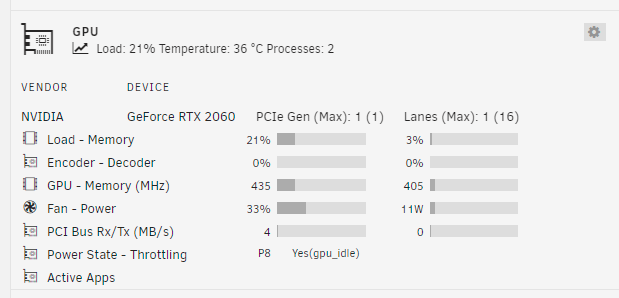
No its not being used for anything, my GPU settings was working before the frigate docker update so not sure why its not working now
-
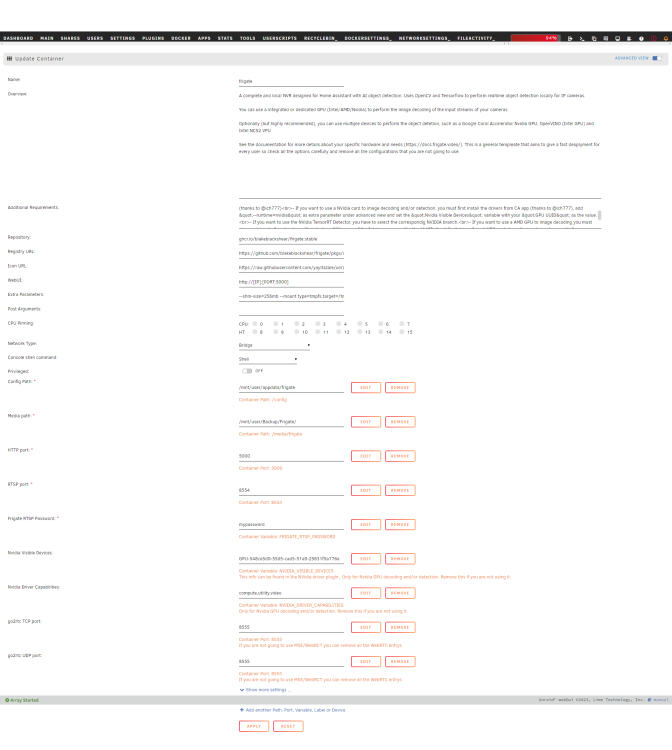
any idea why my frigate container won't start? I'm trying to add my RTX 2060 GPU with the drivers already installed, and --runtime=nvidia set in extra paramaters with gpu id set too, I get the error docker: Error response from daemon: failed to create shim task: OCI runtime create failed: runc create failed: unable to start container process: error during container init: error running hook #1: error running hook: exit status 1, stdout: , stderr: Auto-detected mode as 'legacy' nvidia-container-cli: initialization error: open failed: /proc/sys/kernel/overflowuid: permission denied: unknown.
-
So I have my wireguard set up as NAT = yes, host access to custom network = no, so I can't use my vpn peer client to access any docker containers on custom network br0. I need to set host access to custom network to yes but then the wireguard peer won't have access to LAN devices without static routes set on router. My router doesn't have the setting for it, what are my options to make this work? would hosting wireguard on another LAN device instead work?
-
I have seen many reverse proxy guides, but it seems they all cover for remoting into your docker containers exposed to the internet then securing them with reverse proxy authentication. This seems insecure since if someone got access to your LAN they can bypass your reverse proxy authentication and directly access the docker containers using their IP:port as your docker containers are exposed to the host's LAN network. Is there guides for when you already have home VPN access to your LAN remotely using unraid's own wireguard, and then securing your docker containers behind a reverse proxy authentication? But having your docker containers not exposed to your LAN network, only an internal docker network. This would be suitable for when you are sharing internet connection with other untrust users on the LAN.
-
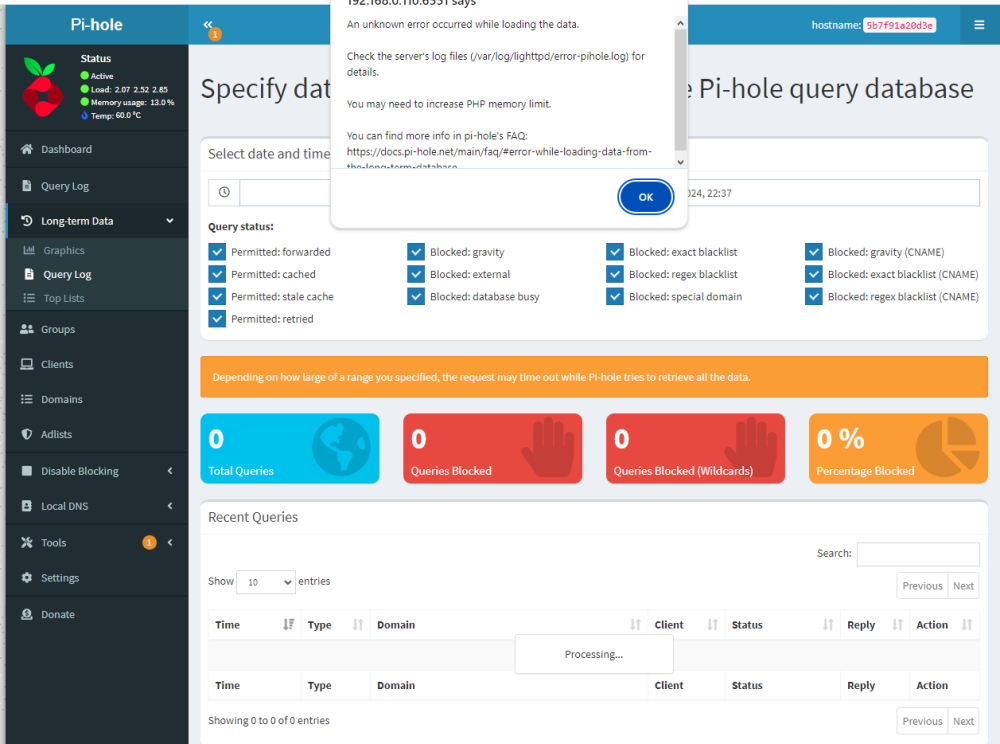
any idea why I am getting this error when trying to query the log dates? I have setup a new pihole, just modified the http and https ports to 6000
-
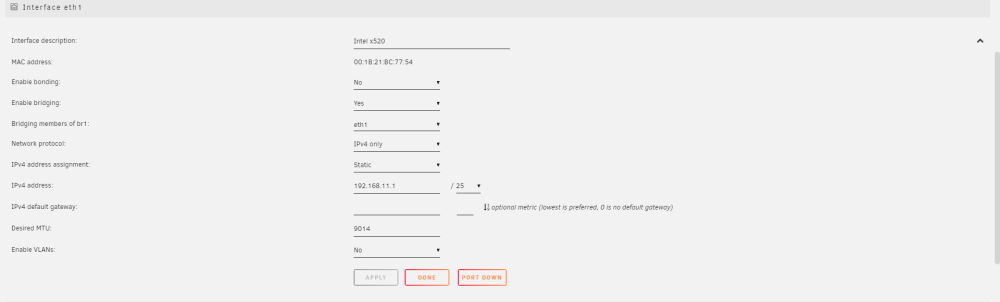
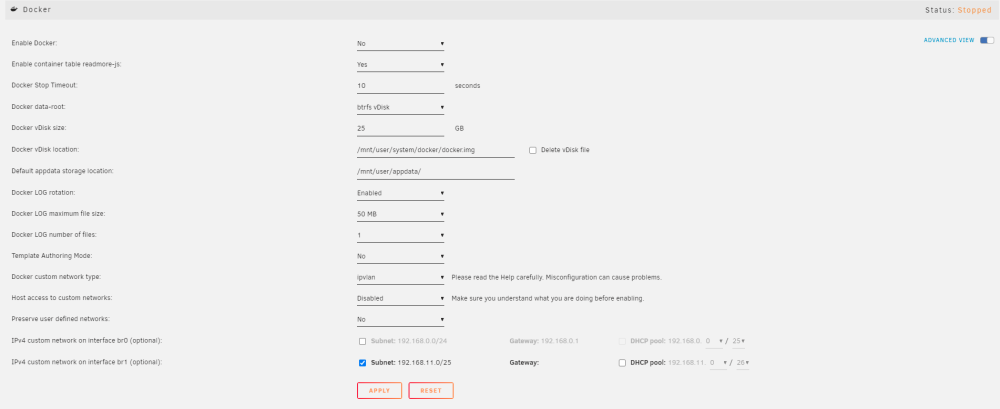
I have a 10GBe network card that is ETH1 (192.168.11.1) and have enabled bridging as BR1, and have ticked the checkbox in the docker settings for BR1 to be enabled but it is not shown as an option for docker containers. The 10GBe network card is directly attached to my windows pc (192.168.11.2) using a DAC which also has the same network card. Any ideas what I could be doing wrong? I accidentially changed something and now its no longer showing up as an option but it was before I changed a setting. network settings docker settings container settings

-
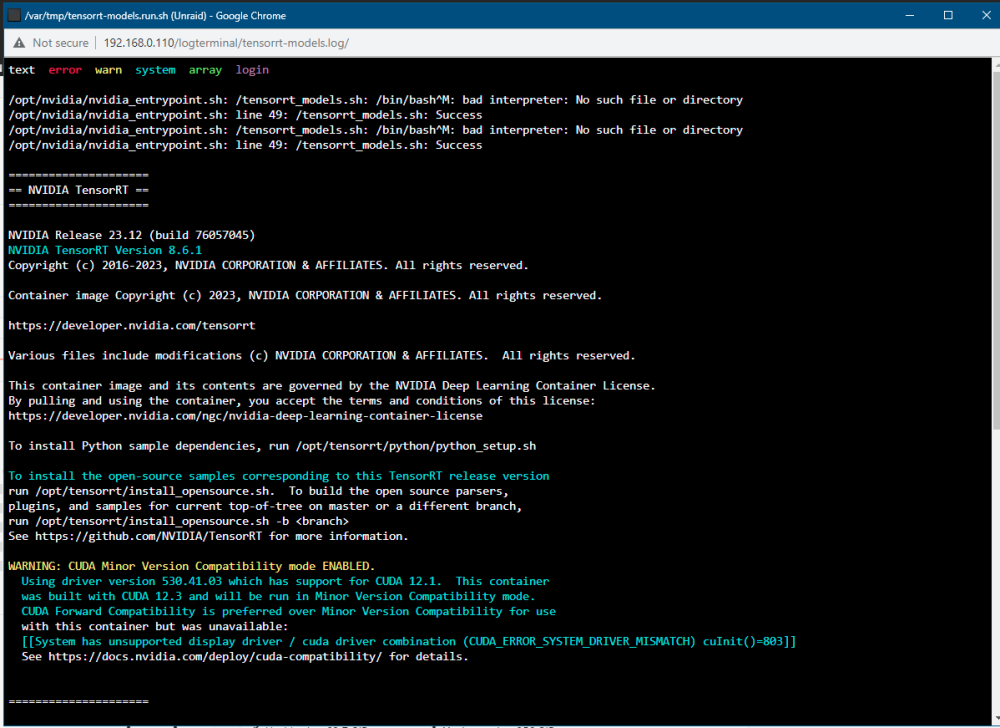
Yes its mapped to frigate, I've stopped the frigate container and started the Tensorrt-models docker and it the same error that pops up. Is there something else I am missing?
-
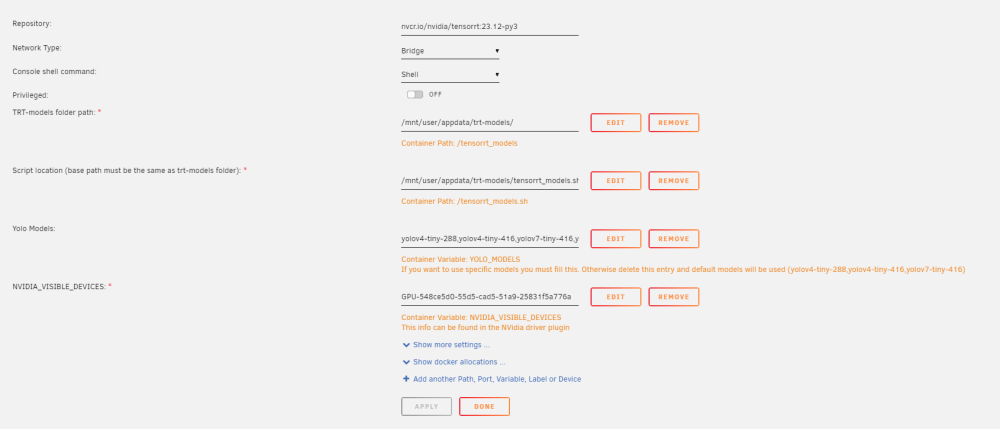
I am trying to get started with the Tensorrt-models docker container and have set it up as below with the script, have did the "chmod +x /mnt/user/appdata/trt-models/tensorrt_models.sh" and when running the container I get the error below: /opt/nvidia/nvidia_entrypoint.sh: /tensorrt_models.sh: /bin/bash^M: bad interpreter: No such file or directory /opt/nvidia/nvidia_entrypoint.sh: line 49: /tensorrt_models.sh: Success any ideas what I am doing wrong?
-
unraid uses fuse for user shares on the array and its very slow espcially at listing directories in windows with 1000s of small files. Would it be a good or bad idea to instead smb all my unraid disk shares to my Windows pc which bypasses fuse then use rclone's union on my windows pc to merge all the mapped disk shares? It will be like doing what fuse does but instead on the windows computer for improved performance gains. Any thoughts on doing this?
-
I have ran the command "ip address add 192.168.4.110/24 dev br0" as my cctv camera ip is 192.168.4.183 so I have made it so my unraid can communicate on the same subnet as the cctv camera. How do I run my docker container on 192.168.4.110/24 so I can use it to communicate with the cctv camera as well? I have setup a layer 2 LAN on my managed switch and set both the cctv camera and unraid ports to PVID 4
-
I have my unraid server on a local network where there are many other people using it as well and it seems anyone connected to my internet can access my docker containers like frigate and Krusader containing my personal stuff. How do I setup so all my docker containers will request for a password like unraids webui does or outright block any local ip address except the whitelisted ones? I don't remote connection to unraid so won't want to use a reverse proxy
-
Would it be possible to have the parity drive instead store the series of 1 and 0 data inside a text file instead of pysically on the blocks of the hard disks which would allow for massively reduced size and no longer need the requirement of having the parity drive as large as the biggest drive in the array? It would function the same but instead read the series of 1 and 0s from a text file instead of the sector blocks on the hard drive.
-
I am trying to mount a NFS share from my TrueNAS computer, but it shows the mount point directory empty. How do I put in the credentials for the mount point?
-
I have used it but find it less ease of use for drag drop moving and browsing which krusader does better similar to a windows file explorer experience, though I am using it a temperary measure. Would it be possible to instead present my whole UNRAID array using iSCSI instead of SMB to my windows pc or does it only work on single disks?





