





Jazer
Members
-
Joined
-
Last visited
Everything posted by Jazer
-
Hey, since migrating from 6 -> 7 I've docker issues when starting Unraid. The docker page shows "Docker Service failed to start" after every start. The only solution is to re-create a new "Docker image" in the settings and re-create all containers from app-templates ==> after every boot! I need a solution and I've attached the diagnostics file. I hope for help. Thank you! tower-diagnostics-20251201-2149.zip
-
Same here... my server (UI) crash with "out of memory". Restart nginx helped.
-
Setup: Unraid 7.0.0 Scenario: Install fresh Windows 11 or Ubuntu 24 LTE release with guest additions v0.1.299. I get a valid IP inside VM from DHCP. Internt works fine - local network devices are discoverd and ping-able beside "tower". Network: vhost0 / virtio-net 1) Inside VM: ping router [OK] 2) Inside VM: ping MacBook [OK] 3) From McBook: ping vm [OK] 4) From McBook: ping tower [OK] 5) Inside VM: ping tower [FAIL] 6) From Tower: ping vm [FAIL] The IP of tower is resolved successfully - but the ping can't reach "tower" by name nor IP. This is only a KVM problem and affects all VM's - Docker containers are not affacted. How can I fix this?
-
total published messages: 1830613 stored messages: 0 shared memory used: 130308K shared memory limit: 131072K channels: 0 subscribers: 0 redis pending commands: 0 redis connected servers: 0 redis unhealthy upstreams: 0 total redis commands sent: 0 total interprocess alerts received: 0 interprocess alerts in transit: 0 interprocess queued alerts: 0 total interprocess send delay: 0 total interprocess receive delay: 0 nchan version: 1.3.7 Yes - the load was shown. But honestly, I still don't really know what is causing the leak. I tested it with 16x open tabs and could not observe any significant increase for about 2h. After closing the lid of my laptop for some hours and coming back, am near the limit. *Maybe* messages/memory are not released after stalled connections or reconnecting causes it - im just guessing. Log: Jan 30 07:13:33 Tower nginx: 2025/01/30 07:13:33 [crit] 1257890#1257890: ngx_slab_alloc() failed: no memory Jan 30 07:13:33 Tower nginx: 2025/01/30 07:13:33 [error] 1257890#1257890: shpool alloc failed Jan 30 07:13:33 Tower nginx: 2025/01/30 07:13:33 [error] 1257890#1257890: nchan: Out of shared memory while allocating channel /shares. Increase nchan_max_reserved_memory. Jan 30 07:13:33 Tower nginx: 2025/01/30 07:13:33 [error] 1257890#1257890: *3172828 nchan: error publishing message (HTTP status code 507), client: unix:, server: , request: "POST /pub/shares?buffer_length=1 HTTP/1.1", host: "localhost"
-
total published messages: 1731910 stored messages: 157 shared memory used: 25524K shared memory limit: 131072K channels: 14 subscribers: 10 redis pending commands: 0 redis connected servers: 0 redis unhealthy upstreams: 0 total redis commands sent: 0 total interprocess alerts received: 0 interprocess alerts in transit: 0 interprocess queued alerts: 0 total interprocess send delay: 0 total interprocess receive delay: 0 nchan version: 1.3.7 Latest FF // 2x Docker Tab (Adv. View) - 20 container running - Folder View plugin
-
total published messages: 1520977 stored messages: 18 shared memory used: 12000K shared memory limit: 131072K channels: 23 subscribers: 15 redis pending commands: 0 redis connected servers: 0 redis unhealthy upstreams: 0 total redis commands sent: 0 total interprocess alerts received: 0 interprocess alerts in transit: 0 interprocess queued alerts: 0 total interprocess send delay: 0 total interprocess receive delay: 0 nchan version: 1.3.7 At least I'm oberving a constant increas of "shared memory used:", but I don't know whats causing it.
-
+1
-
Do I still get support here? Got following problem... I setuped my Macinabox Big Sur quite a while ago and it worked very well. At some point, maybe Unraid Update, my network stopped to work inside the VM (cable unplugged is shown). I tried all combos of card setting, w/o luck. I'm running the 7.0b3 - maybe Qemu changed and broke the support. XML is attached. Any ideas? mac.xml
-
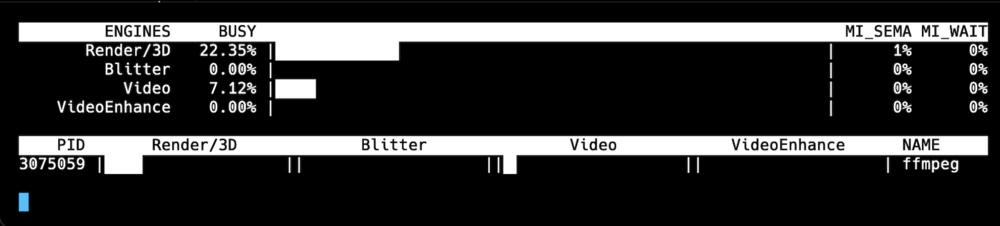
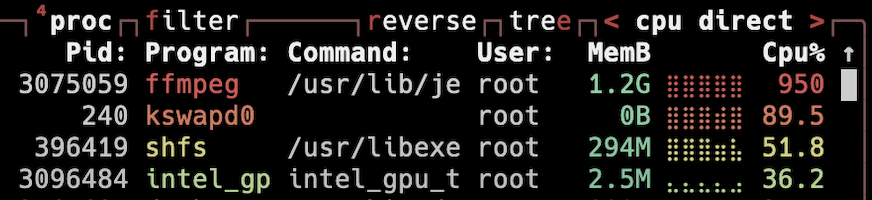
I've a Intel 13500T and Jellyfin is running with option `--device=/dev/dri` (no external GPU) My iGPU is used, but only with 25% load... at the same time, my CPU has a load >900% Is this how it should be?
-
I've not found an option how to trigger the mover when a disk is utilized by X% (e.g. 80%). Is this somehow possible? Maybe with a script or so?
-
Same here... anything new on this topic? 1920 is really bad for mac users, because the XDR display uses 1728 points (not pixels) in HiDPI mode.
-
right... turns out to be memory issues
-
All containers worked fine with rc2 and where able to update without any issues. After installing rc3, the containers-images can't be updated anymore. Error: Configuration not found. Was this container created using this plugin? All containers where created with rc2. How to fix it?
-
The network crashed not with the first kernel panic, but with the last. Weird. syslog
-
Sure... tower-diagnostics-20230322-0923.zip
-
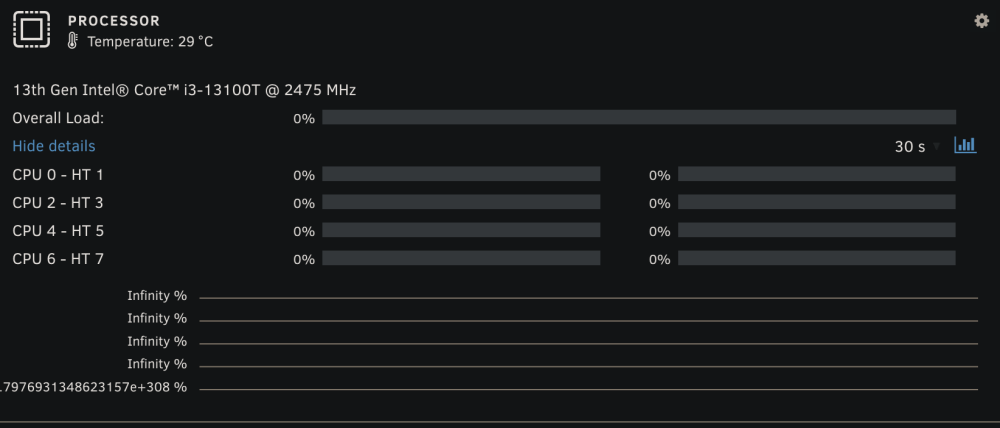
Firefox & Chrome - running 6.12-rc.2 Temp Values are wrong... READS / WRITES are not changing, even parity is running. Processor temp is changing, but load ist stalled.

-
From time to time, the dashboard is getting stalled. E.g. starting the parity sync "stops" in the dashboard after some time, but the process continues. Changes to temperature (seen on cosole) are also not reported anymore to the UI. How can I just restart the UI, without affecting the sync process?
-
Okay... this is somehome wired and I need a little bit assistant to provide the recomended analyze data. The problem: After unspecific time (may take days or minutes after reboot) I get a kernel panic and my unraid server crashes the network. This means - as long as my ethernet cable is plugged in, all devices to my switch are not responding (dropped connection). As soon as I disconnect the cable (or do a hard reset), my network works again. Reconnecting the cable dropps all connections again - like a short cut. root@Tower:~# Message from syslogd@Tower at Mar 22 01:13:39 ... kernel:Kernel panic - not syncing: Fatal exception in interrupt client_loop: send disconnect: Broken pipe I'm running on 6.12-rc2 for testing on a new build (never tested 6.11.x with new build). My old 6.11.x server build works fine. tower-diagnostics-20230322-0923.zip
-
Hey... how to apply for the beta access? I will migrate to a new server, but can keep my "old" system running - while I could use my new one for testing.
-
I dont have this experience... sometimes it takes 2 or 3 attempts to connect it succeeds and starts the backup. What wonders me is ... Backup cancelled (22: BACKUP_CANCELED) which seems to be a manual cancelation... I don't see these entry in my log.
-
I can confirm that timemachine with docker works flawless, even with mover... unless mover and tm don't run at same time.
-
No chance this will work relaiable... I've invested a lot of hours with diffrent settigns any non of them worked out. Now I'm giving the Timemachine Docker App a chance... and it looks very promising.
-
To me it seems also that having multiple timemachine backups on the same share is resposnible for this issue. Maybe also the mover mixes up stuff by destroying the integrity. I'm currently trying to use one machine per share, maybe this will be more stable. And yes - moving large amount of data (initial or large backups), lead to disconnectes.
-
+1 // Same here... Moved from OMV to unRAID and Timemachine is so unreliable. The good thing, I'm on a "trial" license and I will not purchase until this is fixed! Timemachine is one of the most important features for me. Any luck on fixing it?
-
/dev/sdc: ATA device, with non-removable media Model Number: WDC WD40EZRX-00SPEB0 Serial Number: WD-WCC4E1893XXX Firmware Revision: 80.00A80 Transport: Serial, SATA 1.0a, SATA II Extensions, SATA Rev 2.5, SATA Rev 2.6, SATA Rev 3.0 Standards: Supported: 9 8 7 6 5 Likely used: 9 Configuration: Logical max current cylinders 16383 16383 heads 16 16 sectors/track 63 63 -- CHS current addressable sectors: 16514064 LBA user addressable sectors: 268435455 LBA48 user addressable sectors: 7814037168 Logical Sector size: 512 bytes Physical Sector size: 4096 bytes device size with M = 1024*1024: 3815447 MBytes device size with M = 1000*1000: 4000787 MBytes (4000 GB) cache/buffer size = unknown Nominal Media Rotation Rate: 5400 Capabilities: LBA, IORDY(can be disabled) Queue depth: 32 Standby timer values: spec'd by Standard, with device specific minimum R/W multiple sector transfer: Max = 16 Current = 0 DMA: mdma0 mdma1 mdma2 udma0 udma1 udma2 udma3 udma4 udma5 *udma6 Cycle time: min=120ns recommended=120ns PIO: pio0 pio1 pio2 pio3 pio4 Cycle time: no flow control=120ns IORDY flow control=120ns Commands/features: Enabled Supported: * SMART feature set Security Mode feature set * Power Management feature set * Write cache * Look-ahead * Host Protected Area feature set * WRITE_BUFFER command * READ_BUFFER command * NOP cmd * DOWNLOAD_MICROCODE Power-Up In Standby feature set * SET_FEATURES required to spinup after power up SET_MAX security extension * 48-bit Address feature set * Device Configuration Overlay feature set * Mandatory FLUSH_CACHE * FLUSH_CACHE_EXT * SMART error logging * SMART self-test * General Purpose Logging feature set * 64-bit World wide name * WRITE_UNCORRECTABLE_EXT command * {READ,WRITE}_DMA_EXT_GPL commands * Segmented DOWNLOAD_MICROCODE * Gen1 signaling speed (1.5Gb/s) * Gen2 signaling speed (3.0Gb/s) * Gen3 signaling speed (6.0Gb/s) * Native Command Queueing (NCQ) * Host-initiated interface power management * Phy event counters * NCQ priority information * READ_LOG_DMA_EXT equivalent to READ_LOG_EXT DMA Setup Auto-Activate optimization Device-initiated interface power management Software settings preservation * SMART Command Transport (SCT) feature set * SCT Write Same (AC2) * SCT Features Control (AC4) * SCT Data Tables (AC5) unknown 206[12] (vendor specific) unknown 206[13] (vendor specific) unknown 206[14] (vendor specific) Security: Master password revision code = 65534 supported not enabled not locked not frozen not expired: security count supported: enhanced erase more than 508min for SECURITY ERASE UNIT. more than 508min for ENHANCED SECURITY ERASE UNIT. Logical Unit WWN Device Identifier: 50014ee2b4e61XXX NAA : 5 IEEE OUI : 0014ee Unique ID : 2b4e61XXX Checksum: correct This is the result of "hdparm -I /dev/sdc" for a 3,5" WDC Drive. At least power management seems to be supported. While this is a older drive, it also doesnt work on newer WD drives.



