sasbro97
Members
-
Joined
-
Last visited
Everything posted by sasbro97
-
@Kilrah do you also have a solution for this one: https://forums.unraid.net/bug-reports/stable-releases/and-are-deleted-from-docker-environment-variables-r3561/ ?
-
Hey there just tried to use the template and install the application but I cannot get the UI to work. Container runs but if I change the HTTP port I won't be able to access it. I also tried to adjust several things as the docker-compose.yml looks way different now in the repository but I still had no luck. Any ideas?
-
This used to work for me but stopped working out of nowhere with unRAID 7 (I guess). The command /usr/local/emhttp/plugins/dynamix.docker.manager/scripts/dockerupdate check takes forever and does nothing anymore...
-
Still nobody with an idea?
-
Exact same here. Did you find a solution?
-
Hey guys I got a short question. I created a small bash script with user scripts that should set alias values on array startup. The values are set but trying to load the changes does not work with source /root/.bashrc because it is executed in the script. As I can not do anything about the execution of the script, I don't know how to fix it. I cannot call the script with the dot notation like this: . /root/.bashrc Any ideas?
-
Works. More details on this here: https://docs.docker.com/engine/containers/resource_constraints/#--memory-swap-details Add this as an extra parameter: --memory-swap=-1
-
I'm running unRAID 7 but it was already in unRAID 6 a problem. In the Docker GUI I add an environment variable. When this variable includes < or > and I press the apply button they are deleted in the from unRAID created docker run command. I have multiple tools where I have to set a DEFAULT_MAIL and want to use the mailbox format like Sender <[email protected]>. This bug makes it impossible to configure this Docker container.
-
Seems to be a known issue but completely ignored. That is not okay.
-
It has been an issue in unRAID 6 already but now in 7 as well. I got an environment variable for SMTP_FROM_EMAIL I want to use the mailbox format, Outline <[email protected]> So I type into the variable: Outline <[email protected]> But it gets automatically converted into: e 'SMTP_FROM_EMAIL'='Outline [email protected]' I already tried it with an additional "" or ''. Nothing works. The less or more sign is always removed. But I need this. How to fix/escape this?
-
Edit: okay I just saw that NerdTools is deprecated and won't work anymore? What about un-get? Could this work? What is the way to install things now? For borgbackup for example a Docker container? Hey guys. Is anyone else with a problem regarding borgbackup? It worked well until I updated it to unRAID 7.0.0. Not sure what the reason is. I run the latest version available in NerdTools for borgbackup 1.2.7. My python version is 3.9.18. The logs of my script: Traceback (most recent call last): File "/usr/lib64/python3.9/site-packages/borg/archiver.py", line 37, in from . import helpers File "/usr/lib64/python3.9/site-packages/borg/helpers/__init__.py", line 9, in from .checks import * # NOQA File "/usr/lib64/python3.9/site-packages/borg/helpers/checks.py", line 4, in from .errors import Error File "/usr/lib64/python3.9/site-packages/borg/helpers/errors.py", line 3, in import borg.crypto.low_level ImportError: libcrypto.so.1.1: cannot open shared object file: No such file or directory Borg-Repository erzeugt unter ssh://xyz.repo.borgbase.com/./repo Pruning der Archive --keep-within=1d --keep-daily=7 --keep-weekly=4 --keep-monthly=4. Traceback (most recent call last): File "/usr/lib64/python3.9/site-packages/borg/archiver.py", line 37, in from . import helpers File "/usr/lib64/python3.9/site-packages/borg/helpers/__init__.py", line 9, in from .checks import * # NOQA File "/usr/lib64/python3.9/site-packages/borg/helpers/checks.py", line 4, in from .errors import Error File "/usr/lib64/python3.9/site-packages/borg/helpers/errors.py", line 3, in import borg.crypto.low_level ImportError: libcrypto.so.1.1: cannot open shared object file: No such file or directory Start der Sicherung Mon Jan 13 10:07:54 CET 2025. Traceback (most recent call last): File "/usr/lib64/python3.9/site-packages/borg/archiver.py", line 37, in from . import helpers File "/usr/lib64/python3.9/site-packages/borg/helpers/__init__.py", line 9, in from .checks import * # NOQA File "/usr/lib64/python3.9/site-packages/borg/helpers/checks.py", line 4, in from .errors import Error File "/usr/lib64/python3.9/site-packages/borg/helpers/errors.py", line 3, in import borg.crypto.low_level ImportError: libcrypto.so.1.1: cannot open shared object file: No such file or directory
-
Hey there, not sure if I should start a new thread or just reply to this one. It's the same situation but I have some questions. For me it says nginx invoked oom-killer: gfp_mask=0x100cca(GFP_HIGHUSER_MOVABLE), order=0, oom_score_adj=0 What does GFP_HIGHUSER_MOVABLE mean? How can I find out which Docker process caused this problem so I can limit the RAM? I guess it would fix it, right? Because right now I have no limit on any Docker container. oom-kill:constraint=CONSTRAINT_MEMCG,nodemask=(null),cpuset=6f1d41a33a8e3730ca0f61aab5ee8adb007a6faa20578d7cd0da208962dfb3bd,mems_allowed=0,oom_memcg=/docker/6f1d41a33a8e3730ca0f61aab5ee8adb007a6faa20578d7cd0da208962dfb3bd,task_memcg=/docker/6f1d41a33a8e3730ca0f61aab5ee8adb007a6faa20578d7cd0da208962dfb3bd,task=nginx,pid=308,uid=0 unraid-server-syslog-20241215-0346.zip
-
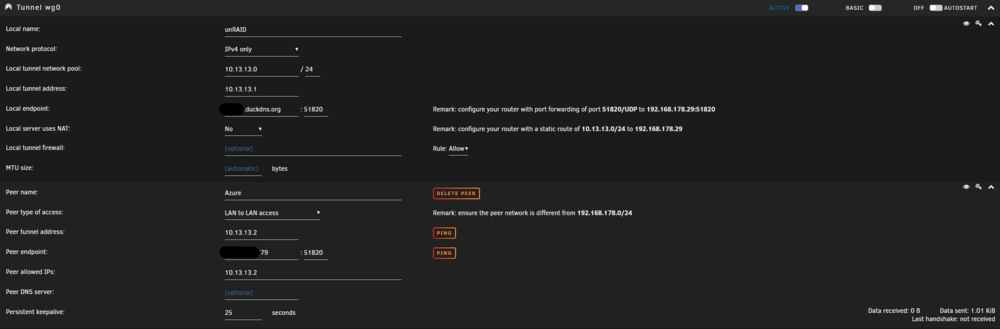
Hi folks, I've tried it before and failed and now I'm hoping that someone here has done it before. I want to set up a site-to-site VPN with Wireguard to monitor my unRAID server with all its services and Docker containers from the outside, even if the power is out at home etc. I also have a small Linux server at Azure for this purpose and would like to connect my local unRAID server and the Azure VM. I've done everything you're supposed to do according to normal tutorials, but it just doesn't work. I have also enabled port 51820 for WireGuard for my unRAID server in my router (FRITZ!Box). LAN to LAN access should be right I hope. Then I used DuckDNS to secure a domain just for this purpose. unRAID Config: This is my container config in Azure (port 51820 in Azure opened as well): services: wireguard: image: linuxserver/wireguard:latest container_name: wireguard cap_add: - NET_ADMIN - SYS_MODULE #optional environment: - PUID=1000 - PGID=1000 - TZ=Europe/Berlin - SERVERPORT=51820 #optional - SERVERURL=private... - PEERS=1 - PEERDNS=auto - INTERNAL_SUBNET=10.13.13.0 - PERSISTENTKEEPALIVE_PEERS=25 - LOG_CONFS=true - ALLOWEDIPS=0.0.0.0/0 volumes: - /media/appdata/wireguard/config:/config - /lib/modules:/lib/modules #optional ports: - 51820:51820/udp sysctls: - net.ipv4.conf.all.src_valid_mark=1 restart: unless-stopped networks: - azure networks: azure: external: true And I have this wg0.conf in my Azure Wireguard Container: [Interface] Address = 10.13.13.1 ListenPort = 51820 PrivateKey = private IDK where its from PostUp = iptables -A FORWARD -i %i -j ACCEPT; iptables -A FORWARD -o %i -j ACCEPT; iptables -t nat -A POSTROUTING -o eth+ -j MASQUERADE PostDown = iptables -D FORWARD -i %i -j ACCEPT; iptables -D FORWARD -o %i -j ACCEPT; iptables -t nat -D POSTROUTING -o eth+ -j MASQUERADE [Peer] # peer1 PublicKey = public PresharedKey = preshared AllowedIPs = 10.13.13.2/32 If you read on the internet it should be simple but I cannot achieve what I want.
-
Hi folks, the following scenario: I build individual images such as for WordPress myself with a Dockerfile. However, from time to time I have to update the whole thing because the main WordPress image has just been updated. I let Watchtower inform me about this and then execute the command myself: docker build -t xyz:wordpress --pull /mnt/cache/dockerfiles/wordpress After that, I have to change something in the configuration file of the container in unRAID each time so that the new image is also used. I would like to automate this. But you can't do something like docker build -t xyz:wordpress --pull /mnt/cache/dockerfiles/wordpress && \ docker stop wordpress && \ docker rm wordpress && \ docker run -d --name wordpress xyz:wordpress as this runs without the configuration of my Docker container from unRAID. Can I access the configuration of unRAID and generate the docker run command from it? Or are there even better ways?
-
@ZooMassnow I ran into the same problem... do you remember how to solve it? I don't want to reinstall Docker again that sucks for a productive system. Sometimes I feel like unRAID cannot be used for productive (home) environments. June 2024 and we are still not on ZFS 2.2. zfs version returns: zfs-2.1.14-1 zfs-kmod-2.1.14-1
-
It worked multiple times now... I used the local path variable in the script: PATH=/usr/local/sbin:/usr/sbin:/sbin:/usr/local/bin:/usr/bin:/bin Maybe that is the solution.
-
So the output of this exact script is the following: Environment variables in the Docker container: HOME=/root PATH=/usr/local/sbin:/usr/local/bin:/usr/sbin:/usr/bin:/sbin:/bin Local environment variables: PATH: /usr/local/sbin:/usr/sbin:/sbin:/usr/local/bin:/usr/bin:/bin User: root Group: root Home directory: /root
-
This did not output anything for me but I also don't know if it should. I just created a new script with the content and run it. It seems to work now again (not sure how long or if its stable). But I printed the docker run command of my portainer container and saw this environment variable: PATH=/usr/local/sbin:/usr/local/bin:/usr/sbin:/usr/bin:/sbin:/bin Is it possible that is my correct PATH then? It makes no goddamn sense... this are my logs: Script Starting May 10, 2024 03:00.01 Full logs for this script are available at /tmp/user.scripts/tmpScripts/nextcloud_auto_update_apps/log.txt All apps are up-to-date or no updates could be found OK Script succeeded Script Finished May 10, 2024 03:00.02 Full logs for this script are available at /tmp/user.scripts/tmpScripts/nextcloud_auto_update_apps/log.txt I know there were updates for some apps. So I ran the script again manually. Out of nowhere it is telling me ah calender can be updated and updates it. Then why the hell is it telling me there are no updates when running it in a script. Wtf is that? I cannot explain that now as the command seems to return different things depending on the automatic execution.
-
Hey as I told you it worked. At least I thought so. Now after many days I realized again it did not work. I changed the schedule now once to run it in a few minutes also opened the script and closed it again without changes. Now it worked again. I guess unfortunately again just once. What the hell is causing this behavior? I added the PATH line. I feels like some kind of cache or something.
-
@Amane that actually worked! I would have never known that but now I learned something new. Thank you!
-
Hey there. I'm maximum confused with a script I created. It works when I trigger it manually but never does on schedule / cronjob. I mean it runs but does not what it should and does when triggered manually. #!/bin/bash #description=This script updates all apps in Nextcloud. #arrayStarted=true #name=Nextcloud Auto-Update Apps # Befehl ausführen und Exit-Status speichern docker exec -u www-data nextcloud php /var/www/html/occ app:update --all docker_exit_status=$? if [ $docker_exit_status -eq 0 ]; then curl -fsS -m 10 --retry 5 --data-raw "$m" http://unraid-server:8003/ping/1505e87d-84e2-4806-a2a0-fa214d96cb17 echo -e "\nScript succeeded" This is the script. My docker container named nextcloud should automatically update the newer apps. When I press "Run Script" it works and apps are updated in the logs. On my set schedule "0 3 * * *" it does not work. I know the script is running because the curl request is sent. The logs look like this: Script Starting Apr 14, 2024 03:00.01 Full logs for this script are available at /tmp/user.scripts/tmpScripts/nextcloud_auto_update_apps/log.txt OK Script succeeded Script Finished Apr 14, 2024 03:00.10 Full logs for this script are available at /tmp/user.scripts/tmpScripts/nextcloud_auto_update_apps/log.txt Script Starting Apr 15, 2024 03:00.01 Full logs for this script are available at /tmp/user.scripts/tmpScripts/nextcloud_auto_update_apps/log.txt OK Script succeeded Script Finished Apr 15, 2024 03:00.10 Full logs for this script are available at /tmp/user.scripts/tmpScripts/nextcloud_auto_update_apps/log.txt Script Starting Apr 16, 2024 03:00.01 Full logs for this script are available at /tmp/user.scripts/tmpScripts/nextcloud_auto_update_apps/log.txt OK Script succeeded Script Finished Apr 16, 2024 03:00.02 Full logs for this script are available at /tmp/user.scripts/tmpScripts/nextcloud_auto_update_apps/log.txt And if I run the script manually now: Script location: /tmp/user.scripts/tmpScripts/nextcloud_auto_update_apps/script Note that closing this window will abort the execution of this script spreed new version available: 18.0.7 spreed updated keeweb new version available: 0.6.18 keeweb updated OK Script succeeded What could be the reason it does not work on schedule?
-
I can recommend to write your own backup script with user scripts for the folder where the XML templates and everything regarding FolderView is saved. If your folder structure will be deleted you can restore it. That saved me.
-
Hmm never heard of it unfortunately. Since when if I might ask you? I trust you already of course. Just curious.
-
I know that I read often enough that mounting the physical location directly is faster than mounting the user folder/symlink. That's the reason why I always do this.
-
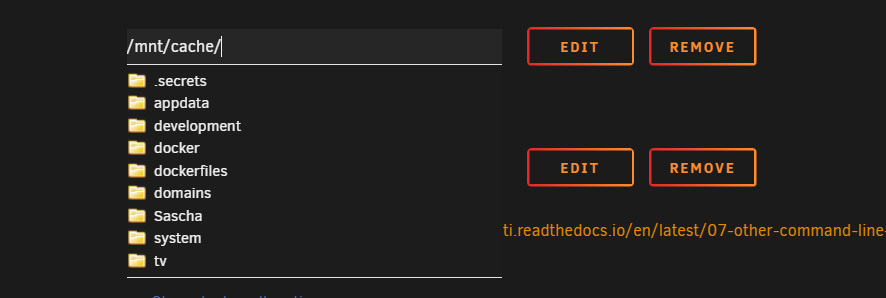
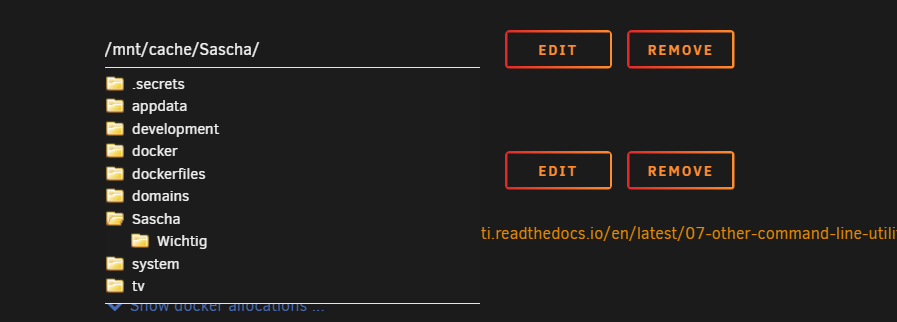
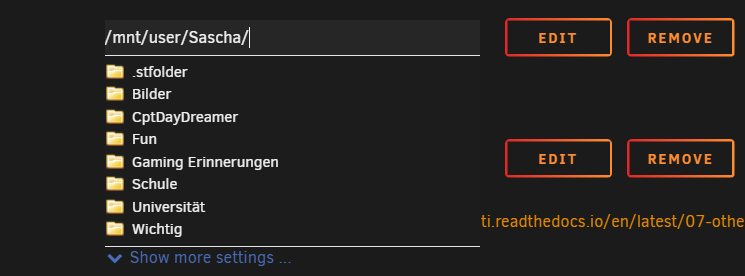
I'm wondering why I can use the most folders to map for a Docker container but somehow not this folder named "Sascha". Only if I use /mnt/user/Sascha. But not the direct cache ZFS pool. Don't wonder why one folder of many is shown. Because I saved it even though it has not shown its name before. But in the container really nothing is mapped. If I use user you can see everything is showing up (it's only this weird behavior for this folder) I'm on Unraid 6.12.9.