





mikeofoslo
Members
-
Joined
-
Last visited
Everything posted by mikeofoslo
-
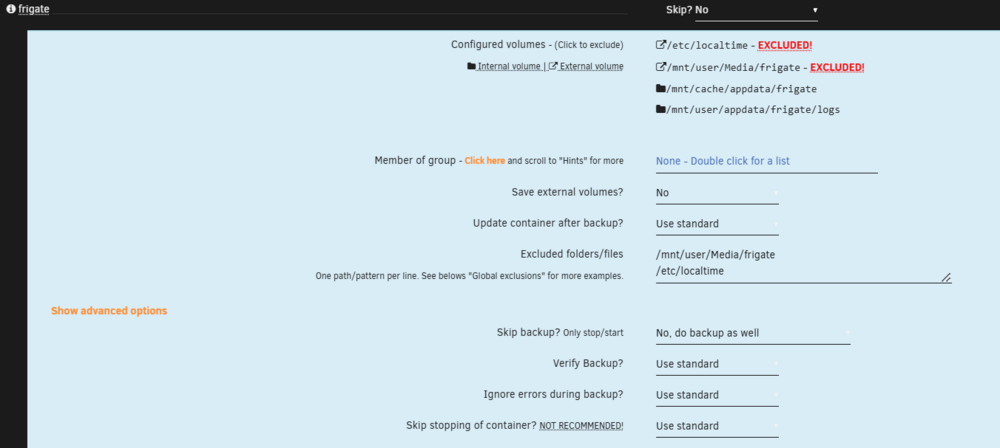
I'm struggling with a frigate container that gets reset on backup. The config file gets deleted and when the container reboots it defaults to standard out of the box settings. I cant find anything in the backup log. Mapped the log catalog in the frigate container in hopes of catching the bug, but that only shows a boot of a fresh install of frigate. The same thing happend a while back with a redis and postgresql16 (trimmed for immich) container. The solution in that case was to replace both containers with the same containers form forks. Ill post some logs if this persist. Just wanted to check if anyone else have had similar problems.
-
I have the same problem :-( PostgreSQL_Immich in docker is running and it stopps working, for no reson. I've had Immich running on unraid for over 8 months until I had to rebuild all my docker containers. Now it just flips from time to time for noe reson I can figure. It can run for 48h og it just flips afther 3-4h. Anyone seen the same thing? And managed to fix it? My latest log from PostgreSQL_Immich: 2025-01-17 02:31:20.707 CET [1] LOG: starting PostgreSQL 16.3 (Debian 16.3-1.pgdg120+1) on x86_64-pc-linux-gnu, compiled by gcc (Debian 12.2.0-14) 12.2.0, 64-bit 2025-01-17 02:31:20.707 CET [1] LOG: listening on IPv4 address "0.0.0.0", port 5432 2025-01-17 02:31:20.707 CET [1] LOG: listening on IPv6 address "::", port 5432 2025-01-17 02:31:20.720 CET [1] LOG: listening on Unix socket "/var/run/postgresql/.s.PGSQL.5432" 2025-01-17 02:31:20.742 CET [30] LOG: database system was shut down at 2025-01-17 02:30:45 CET 2025-01-17 02:31:20.743 [31] LOG: Find directory "pg_vectors/indexes/000000000000000000000000000000006752c6d507887027000040000000448c". 2025-01-17 02:31:20.743 [31] LOG: Find directory "pg_vectors/indexes/000000000000000000000000000000006752c6d5078870270000400000004580". 2025-01-17 02:31:20.743 [31] LOG: Find directory "pg_vectors/indexes/000000000000000000000000000000006752c6d507887027000040000000448c/segments/83f38377-48bd-4f5f-90a1-faa073c514c0". 2025-01-17 02:31:20.751 CET [1] LOG: database system is ready to accept connections 2025-01-17 02:31:20.762 [31] LOG: Find directory "pg_vectors/indexes/000000000000000000000000000000006752c6d5078870270000400000004580/segments/fe30d165-47d3-48a1-8097-eee073dc7432". 2025-01-17 02:36:20.778 CET [28] LOG: checkpoint starting: time 2025-01-17 02:36:27.768 CET [28] LOG: checkpoint complete: wrote 71 buffers (0.4%); 0 WAL file(s) added, 0 removed, 0 recycled; write=6.930 s, sync=0.041 s, total=6.990 s; sync files=12, longest=0.005 s, average=0.004 s; distance=11 kB, estimate=11 kB; lsn=0/C56CB040, redo lsn=0/C56CB008 2025-01-17 04:06:21.975 CET [28] LOG: checkpoint starting: time 2025-01-17 04:06:22.106 CET [28] LOG: checkpoint complete: wrote 2 buffers (0.0%); 0 WAL file(s) added, 0 removed, 0 recycled; write=0.101 s, sync=0.009 s, total=0.132 s; sync files=2, longest=0.005 s, average=0.005 s; distance=3 kB, estimate=10 kB; lsn=0/C56CBE40, redo lsn=0/C56CBE08 2025-01-17 06:06:23.112 CET [28] LOG: checkpoint starting: time 2025-01-17 06:06:23.242 CET [28] LOG: checkpoint complete: wrote 2 buffers (0.0%); 0 WAL file(s) added, 0 removed, 0 recycled; write=0.101 s, sync=0.009 s, total=0.131 s; sync files=2, longest=0.005 s, average=0.005 s; distance=3 kB, estimate=10 kB; lsn=0/C56CCCD0, redo lsn=0/C56CCC98 2025-01-17 06:11:23.342 CET [28] LOG: checkpoint starting: time 2025-01-17 06:11:23.577 CET [28] LOG: checkpoint complete: wrote 3 buffers (0.0%); 0 WAL file(s) added, 0 removed, 0 recycled; write=0.202 s, sync=0.013 s, total=0.235 s; sync files=3, longest=0.005 s, average=0.005 s; distance=5 kB, estimate=9 kB; lsn=0/C56CE0D0, redo lsn=0/C56CE098 2025-01-17 07:41:25.182 CET [28] LOG: checkpoint starting: time 2025-01-17 07:41:42.664 CET [28] LOG: checkpoint complete: wrote 175 buffers (1.1%); 0 WAL file(s) added, 0 removed, 0 recycled; write=17.434 s, sync=0.027 s, total=17.483 s; sync files=6, longest=0.005 s, average=0.005 s; distance=6 kB, estimate=9 kB; lsn=0/C56CF988, redo lsn=0/C56CF950 2025-01-17 08:06:26.088 CET [28] LOG: checkpoint starting: time 2025-01-17 08:06:26.206 CET [28] LOG: checkpoint complete: wrote 2 buffers (0.0%); 0 WAL file(s) added, 0 removed, 0 recycled; write=0.101 s, sync=0.005 s, total=0.118 s; sync files=2, longest=0.003 s, average=0.003 s; distance=3 kB, estimate=8 kB; lsn=0/C56D0898, redo lsn=0/C56D0860 2025-01-17 10:06:28.023 CET [28] LOG: checkpoint starting: time 2025-01-17 10:06:28.154 CET [28] LOG: checkpoint complete: wrote 2 buffers (0.0%); 0 WAL file(s) added, 0 removed, 0 recycled; write=0.101 s, sync=0.009 s, total=0.131 s; sync files=2, longest=0.005 s, average=0.005 s; distance=3 kB, estimate=8 kB; lsn=0/C56D1808, redo lsn=0/C56D17D0 2025-01-17 12:06:30.401 CET [28] LOG: checkpoint starting: time 2025-01-17 12:06:30.530 CET [28] LOG: checkpoint complete: wrote 2 buffers (0.0%); 0 WAL file(s) added, 0 removed, 0 recycled; write=0.101 s, sync=0.009 s, total=0.130 s; sync files=2, longest=0.005 s, average=0.005 s; distance=4 kB, estimate=7 kB; lsn=0/C56D2810, redo lsn=0/C56D27D8 2025-01-17 12:26:30.930 CET [28] LOG: checkpoint starting: time 2025-01-17 12:26:31.164 CET [28] LOG: checkpoint complete: wrote 3 buffers (0.0%); 0 WAL file(s) added, 0 removed, 0 recycled; write=0.202 s, sync=0.013 s, total=0.234 s; sync files=3, longest=0.005 s, average=0.005 s; distance=5 kB, estimate=7 kB; lsn=0/C56D3D18, redo lsn=0/C56D3CE0 2025-01-17 14:06:31.889 CET [28] LOG: checkpoint starting: time 2025-01-17 14:06:32.123 CET [28] LOG: checkpoint complete: wrote 3 buffers (0.0%); 0 WAL file(s) added, 0 removed, 0 recycled; write=0.201 s, sync=0.012 s, total=0.234 s; sync files=3, longest=0.005 s, average=0.004 s; distance=4 kB, estimate=7 kB; lsn=0/C56D4D98, redo lsn=0/C56D4D60 2025-01-17 14:48:57.659 CET [873] FATAL: could not open file "global/pg_filenode.map": No such file or directory 2025-01-17 14:49:57.702 CET [874] FATAL: could not open file "global/pg_filenode.map": No such file or directory 2025-01-17 14:50:57.761 CET [875] FATAL: could not open file "global/pg_filenode.map": No such file or directory 2025-01-17 14:51:57.820 CET [876] FATAL: could not open file "global/pg_filenode.map": No such file or directory 2025-01-17 14:52:57.879 CET [877] FATAL: could not open file "global/pg_filenode.map": No such file or directory 2025-01-17 14:53:57.936 CET [878] FATAL: could not open file "global/pg_filenode.map": No such file or directory 2025-01-17 14:54:57.987 CET [879] FATAL: could not open file "global/pg_filenode.map": No such file or directory 2025-01-17 14:55:58.045 CET [1] LOG: could not open file "postmaster.pid": No such file or directory 2025-01-17 14:55:58.045 CET [1] LOG: performing immediate shutdown because data directory lock file is invalid 2025-01-17 14:55:58.045 CET [1] LOG: received immediate shutdown request 2025-01-17 14:55:58.045 CET [1] LOG: could not open file "postmaster.pid": No such file or directory 2025-01-17 14:55:58.123 CET [1] LOG: database system is shut down
-
Managed to get it working, I removed and reseated the GPU. It works now! Thnak you all for the help :-)
-
The Nvidia GPU is still inside the server. It was working fine under 6.12.14. This is my backupserver and was the first to go for an upgrade. The main server is practically identical when hardware is concerned. I think I'll have to ty to roll back for now.
-
The Nvidia GPU is still inside the server. It was working fine under 6.12.14.
-
Drives are not loading afther upgrade from 6.12.14 to 7.0.0 Iahve unstalled and installed the drivers. Rebooting between avery stage. nest2-diagnostics-20250112-0515.zip
-
Search command returnes a error afther upgrading to Unraid 7 CA-Logging-20250112-0045.zip

-
I updated my backup server to Unraid version 7 last night and its running stable. All docker containers where updated and the array stopped prior to upgrade. There is on thing that has not worked. The GPU nvidia drivers are not loading. Nvidia Info: Nvidia Driver Version: 565.77 Open Source Kernel Module: No Installed GPU(s): NVIDIA-SMI has failed because it couldn't communicate with the NVIDIA driver. Make sure that the latest NVIDIA driver is installed and running. Is there any trick to get the nvidia drivers to load in Unraid version 7? Hopefully it's just a user error on my en that can be easily fixed. I'll have to sort this out befour I can upgrade my main server. Any tips?
-
Same thing happed with my server. Remaned the vifo-pci.cfg and it booted.
-
SOLVED: - enabled ip6 on the unraid server and on my router Tip: try checking the frigate log. I hade removed mqtt section from settings. That caused it to stop loading.
-
I have had a setup running for over 2 weeks testing and figuring out how to set up my system. I have had frigate running in docker for most of the time with a pcie coral tpu chip. After a reboot of the system last night the frigate docker refuses to start. The frigate container restarts and will not come online. I have already had it running and was just doing some tweaking of the frigate config when it stopped working. My log is filling up with: May 30 09:26:13 NEST avahi-daemon[7954]: Withdrawing address record for fe80::f458:52ff:fe07:8805 on veth8dc7042. May 30 09:26:14 NEST kernel: docker0: port 1(veth2564b00) entered blocking state May 30 09:26:14 NEST kernel: docker0: port 1(veth2564b00) entered disabled state May 30 09:26:14 NEST kernel: device veth2564b00 entered promiscuous mode May 30 09:26:14 NEST kernel: docker0: port 1(veth2564b00) entered blocking state May 30 09:26:14 NEST kernel: docker0: port 1(veth2564b00) entered forwarding state May 30 09:26:14 NEST kernel: docker0: port 1(veth2564b00) entered disabled state May 30 09:26:16 NEST kernel: eth0: renamed from vethbd13dac May 30 09:26:16 NEST kernel: IPv6: ADDRCONF(NETDEV_CHANGE): veth2564b00: link becomes ready May 30 09:26:16 NEST kernel: docker0: port 1(veth2564b00) entered blocking state May 30 09:26:16 NEST kernel: docker0: port 1(veth2564b00) entered forwarding state Enclosing the logs hope some one has a minute to review them an give me a pointer. nest-diagnostics-20230530-0912.zip


