





kiwijunglist
Members
-
Joined
-
Last visited
Everything posted by kiwijunglist
-
I wonder if there is an option to map the codecs folder outside of persistent storage so everytime the plex docker is restarted the codec folder is wiped
-
Hmm still can't get things to work I ran the borgmatic (client) container, and loaded a console in the container Then I created a ssh key pair Then I copied the .pub file into borgserver container, and restarted borgserver container. When I try to SSH into borgserver container from borgmatic container, I get the following error: Permission denied (publickey)
-
In answer to the above the correct command is SSH [email protected] -p 2222
-
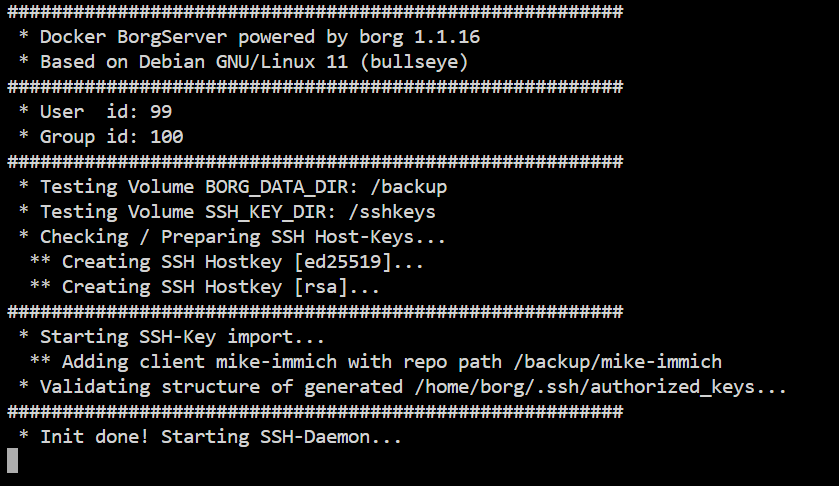
Can someone tell me what I'm doing wrong? Docker is set to port 22:2222 Logs look ok Can't SSH into the docker container on 2222


-
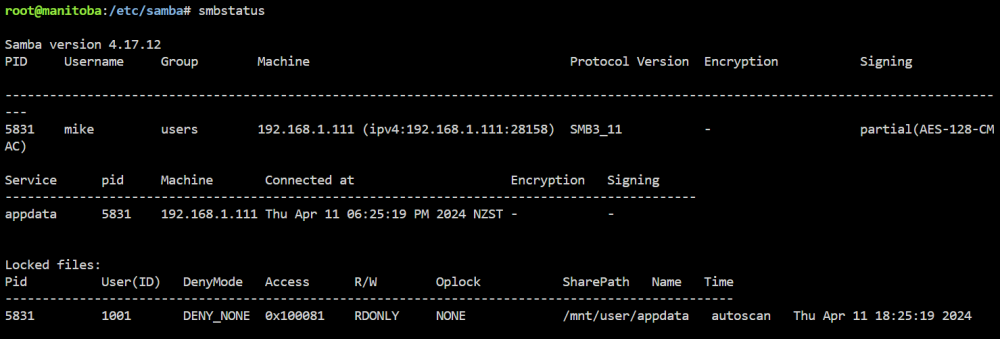
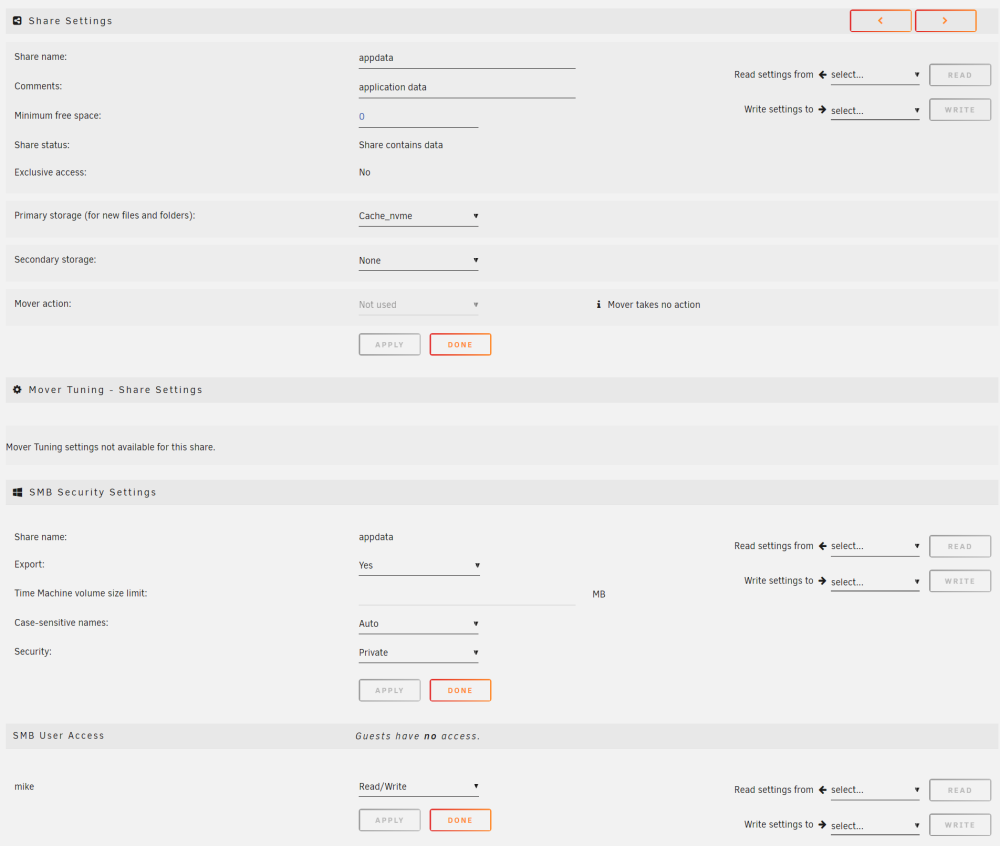
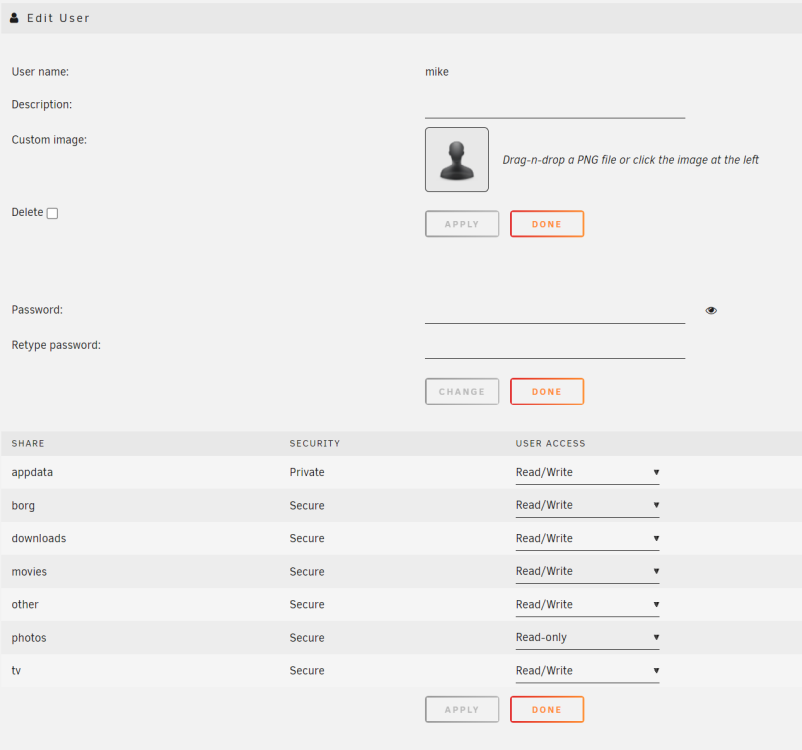
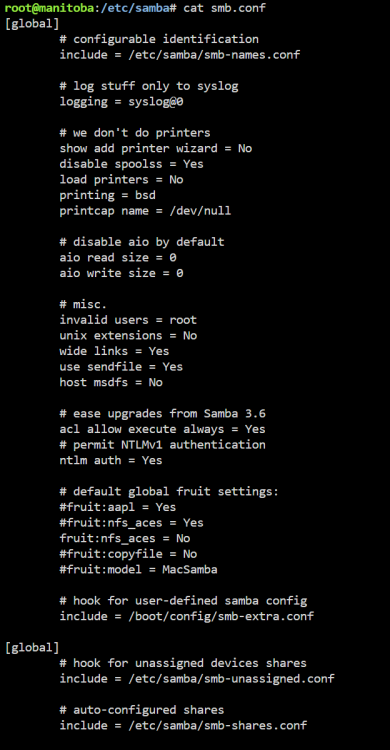
Hi I want the windows smb user to be all to edit my docker config.yaml without permission issues. I assume if it was set to 99:100 it would be ok? My docker containers are all set to PUID: 99 / PGID: 100. I've attached various screenshots that I think would be useful to troubleshoot. Please let me know what to do.
-
Thanks for this. I searched for AMISCE utility and found it here - https://www.intel.com/content/www/us/en/download/19551/amisce-ami-setup-control-environment-utility-for-m10jnp2sb.html but the .zip file doesn't have SCEWIN_64.exe Any help for this step?
-
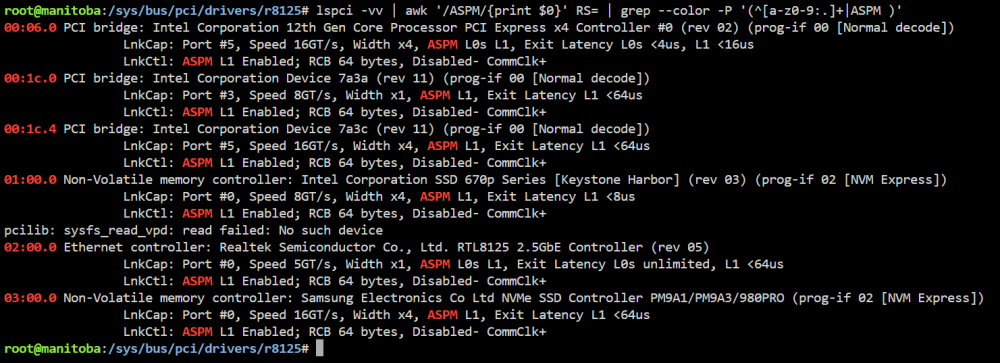
Ran the command echo 1 | sudo tee /sys/bus/pci/drivers/r8125/0000:02:00.0/link/l1_aspm It looks ok to my eyes: However I still don't seem to get any better than C3 pkg(HW) state. Anything else I should do.
-
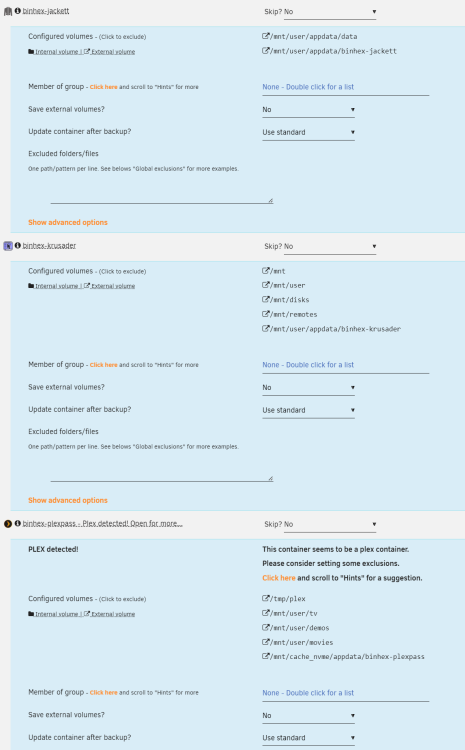
Does the backup use rsync or similar to save space? I was thinking to use the backup plugin to backup both my immich docker appdata and also the immich library directory (very very large).
-
Thanks for the plugin. Can I suggest if you click on a drive it brings up a popup showing individual data for last 7 days, then total data for last 7 days / 30 days / all-time. (or something similar). /sda Percentage Sleep: 30% 97% ... Spin up counts: 53 3 ... Spin down counts: 52 4 ... Date: 2 Jan 1 Jan ... Last 7 days Last 30 days Alltime /sdb Percentage Sleep: 40% 92% ... Spin up counts: 33 2 ... Spin down counts: 34 2 ... Date: 2 Jan 1 Jan ... Last 7 days Last 30 days Alltime The main thing I'm interested in personally is just data on how often the drives are spinning up and down.
-
You might know this already, while `smartctl --nocheck standby` won't wake a HDD, it will stop a HDD going to sleep when you poll it because it counts as activity. ie. if you set a hdd to sleep after 60 minutes of activity but you use `smartctl --nocheck standby` to poll the HDD every 30 minutes, then the HDD will never go to sleep.
-
I didn't have to create a custom unifi bridge network to have unifi container see the database container, just use the IP address of the unraid server instead of a host name, much easier. MONGO_HOST: <ip-address>
-
I typed these commands and I got it working again. /etc/rc.d/rc.inetd restart nginx -s reload
-
This might be my issue as well.
-
Hi I just installed tailscale plugin and I can no longer access the unraid gui (Unraid version 6.11.5) I can still access all my local dockers and I can access the server via SSH. The tailscale plugin breaks access to the unraid GUI via both the local url and the myunraid.net. Is there an SSH command to disable tailscale plugin? Do you want any particular logs for this problem. (Of note I am using dynamic remote access for unraid connect) Thanks
-
Attached is diagnostics post fixing the problem. Hopefully might help with any bug fixing etc diag-postfix.zip
-
I issued the following two commands and it was fixed (without needing to restart system) nginx -s reload /etc/rc.d/rc.inetd restart
-
I found this error: root@manitoba:/# nginx nginx: [emerg] bind() to unix:/var/run/nginx.socket failed (98: Address already in use) nginx: [emerg] bind() to 0.0.0.0:80 failed (98: Address already in use) nginx: [emerg] bind() to [::]:80 failed (98: Address already in use) nginx: [emerg] bind() to 0.0.0.0:443 failed (98: Address already in use) nginx: [emerg] bind() to [::]:443 failed (98: Address already in use) Message from syslogd@manitoba at Sep 18 18:53:48 ... nginx: 2023/09/18 18:53:48 [emerg] 6381#6381: bind() to unix:/var/run/nginx.socket failed (98: Address already in use) Message from syslogd@manitoba at Sep 18 18:53:48 ... nginx: 2023/09/18 18:53:48 [emerg] 6381#6381: bind() to 0.0.0.0:80 failed (98: Address already in use) Message from syslogd@manitoba at Sep 18 18:53:48 ... nginx: 2023/09/18 18:53:48 [emerg] 6381#6381: bind() to [::]:80 failed (98: Address already in use) Message from syslogd@manitoba at Sep 18 18:53:48 ... nginx: 2023/09/18 18:53:48 [emerg] 6381#6381: bind() to 0.0.0.0:443 failed (98: Address already in use) Message from syslogd@manitoba at Sep 18 18:53:48 ... nginx: 2023/09/18 18:53:48 [emerg] 6381#6381: bind() to [::]:443 failed (98: Address already in use) nginx: [emerg] bind() to unix:/var/run/nginx.socket failed (98: Address already in use) nginx: [emerg] bind() to 0.0.0.0:80 failed (98: Address already in use) nginx: [emerg] bind() to [::]:80 failed (98: Address already in use) nginx: [emerg] bind() to 0.0.0.0:443 failed (98: Address already in use) nginx: [emerg] bind() to [::]:443 failed (98: Address already in use) Message from syslogd@manitoba at Sep 18 18:53:48 ... nginx: 2023/09/18 18:53:48 [emerg] 6381#6381: bind() to unix:/var/run/nginx.socket failed (98: Address already in use) Message from syslogd@manitoba at Sep 18 18:53:48 ... nginx: 2023/09/18 18:53:48 [emerg] 6381#6381: bind() to 0.0.0.0:80 failed (98: Address already in use) Message from syslogd@manitoba at Sep 18 18:53:48 ... nginx: 2023/09/18 18:53:48 [emerg] 6381#6381: bind() to [::]:80 failed (98: Address already in use) Message from syslogd@manitoba at Sep 18 18:53:48 ... nginx: 2023/09/18 18:53:48 [emerg] 6381#6381: bind() to 0.0.0.0:443 failed (98: Address already in use) Message from syslogd@manitoba at Sep 18 18:53:48 ... nginx: 2023/09/18 18:53:48 [emerg] 6381#6381: bind() to [::]:443 failed (98: Address already in use) nginx: [emerg] bind() to unix:/var/run/nginx.socket failed (98: Address already in use) nginx: [emerg] bind() to 0.0.0.0:80 failed (98: Address already in use) nginx: [emerg] bind() to [::]:80 failed (98: Address already in use) nginx: [emerg] bind() to 0.0.0.0:443 failed (98: Address already in use) nginx: [emerg] bind() to [::]:443 failed (98: Address already in use) Message from syslogd@manitoba at Sep 18 18:53:49 ... nginx: 2023/09/18 18:53:48 [emerg] 6381#6381: bind() to unix:/var/run/nginx.socket failed (98: Address already in use) Message from syslogd@manitoba at Sep 18 18:53:49 ... nginx: 2023/09/18 18:53:48 [emerg] 6381#6381: bind() to 0.0.0.0:80 failed (98: Address already in use) Message from syslogd@manitoba at Sep 18 18:53:49 ... nginx: 2023/09/18 18:53:48 [emerg] 6381#6381: bind() to [::]:80 failed (98: Address already in use) Message from syslogd@manitoba at Sep 18 18:53:49 ... nginx: 2023/09/18 18:53:48 [emerg] 6381#6381: bind() to 0.0.0.0:443 failed (98: Address already in use) Message from syslogd@manitoba at Sep 18 18:53:49 ... nginx: 2023/09/18 18:53:48 [emerg] 6381#6381: bind() to [::]:443 failed (98: Address already in use) nginx: [emerg] bind() to unix:/var/run/nginx.socket failed (98: Address already in use) nginx: [emerg] bind() to 0.0.0.0:80 failed (98: Address already in use) nginx: [emerg] bind() to [::]:80 failed (98: Address already in use) nginx: [emerg] bind() to 0.0.0.0:443 failed (98: Address already in use) nginx: [emerg] bind() to [::]:443 failed (98: Address already in use) Message from syslogd@manitoba at Sep 18 18:53:49 ... nginx: 2023/09/18 18:53:48 [emerg] 6381#6381: bind() to unix:/var/run/nginx.socket failed (98: Address already in use) Message from syslogd@manitoba at Sep 18 18:53:49 ... nginx: 2023/09/18 18:53:48 [emerg] 6381#6381: bind() to 0.0.0.0:80 failed (98: Address already in use) Message from syslogd@manitoba at Sep 18 18:53:49 ... nginx: 2023/09/18 18:53:48 [emerg] 6381#6381: bind() to [::]:80 failed (98: Address already in use) Message from syslogd@manitoba at Sep 18 18:53:49 ... nginx: 2023/09/18 18:53:48 [emerg] 6381#6381: bind() to 0.0.0.0:443 failed (98: Address already in use) Message from syslogd@manitoba at Sep 18 18:53:49 ... nginx: 2023/09/18 18:53:48 [emerg] 6381#6381: bind() to [::]:443 failed (98: Address already in use) nginx: [emerg] bind() to unix:/var/run/nginx.socket failed (98: Address already in use) nginx: [emerg] bind() to 0.0.0.0:80 failed (98: Address already in use) nginx: [emerg] bind() to [::]:80 failed (98: Address already in use) nginx: [emerg] bind() to 0.0.0.0:443 failed (98: Address already in use) nginx: [emerg] bind() to [::]:443 failed (98: Address already in use) Message from syslogd@manitoba at Sep 18 18:53:50 ... nginx: 2023/09/18 18:53:48 [emerg] 6381#6381: bind() to unix:/var/run/nginx.socket failed (98: Address already in use) Message from syslogd@manitoba at Sep 18 18:53:50 ... nginx: 2023/09/18 18:53:48 [emerg] 6381#6381: bind() to 0.0.0.0:80 failed (98: Address already in use) Message from syslogd@manitoba at Sep 18 18:53:50 ... nginx: 2023/09/18 18:53:48 [emerg] 6381#6381: bind() to [::]:80 failed (98: Address already in use) Message from syslogd@manitoba at Sep 18 18:53:50 ... nginx: 2023/09/18 18:53:48 [emerg] 6381#6381: bind() to 0.0.0.0:443 failed (98: Address already in use) Message from syslogd@manitoba at Sep 18 18:53:50 ... nginx: 2023/09/18 18:53:48 [emerg] 6381#6381: bind() to [::]:443 failed (98: Address already in use) nginx: [emerg] still could not bind() Message from syslogd@manitoba at Sep 18 18:53:50 ... nginx: 2023/09/18 18:53:48 [emerg] 6381#6381: still could not bind()
-
I should add. This is a problem cropped up this morning, and everything was working fine yesterday and I haven't changed any unraid or network settings recently. Have also tried to clear browser cache and a different browser/device.
-
The other thing that is intersting is if I attempt to access my unraid server via connect myunraid from outside the local network then it says "Dynamic Remote Access is enabled, but not required for this server to be managed from your current location." which is strange, because it definitely is required in this situation.
-
Hi Unraid 6.11.5 I can access the login page on my local network: 192.168.1.173 However after entering the login details it tries to load the myunraid address http://192-168-1-173.xxxxxxxxxxxxxxxxx.myunraid.net:8081/ This doesn't work and nothing loads. This used to work but has stopped working. I can still access the server via SSH, the dockers are still working and I can view the server on: https://connect.myunraid.net/server/details/xxxxxxxxxxxxxxxxxxxx However I can't manage the server. Attached diag-nostics file Thanks diag.zip
-
what was the option in bios? I've been unable to get a good powerstate in Pkg(hw). I'm sure i've added all the options i need in bios.
-
if you benchmark the parity drive in the array, does that break the parity?
-
Hi, Are these errors a problem (unraid 6.11.5) ? root@manitoba:~# powertop --auto-tune powertop: /lib64/libncursesw.so.6: no version information available (required by powertop) powertop: /lib64/libtinfo.so.6: no version information available (required by powertop) modprobe cpufreq_stats failed Loaded 0 prior measurements Cannot load from file /var/cache/powertop/saved_parameters.powertop File will be loaded after taking minimum number of measurement(s) with battery only RAPL device for cpu 0 RAPL device for cpu 0 Devfreq not enabled glob returned GLOB_ABORTED Cannot load from file /var/cache/powertop/saved_parameters.powertop File will be loaded after taking minimum number of measurement(s) with battery only Leaving PowerTOP
-
Just in case someone has trouble adding config.gateway.json you need to place the folder inside \data\sites\your_site_name eg. for unraid running unifi controller in docker it would be "appdata\unifi-controller\data\sites\default" If you don't have \data\sites\ directory you need to create the folders by creating a "floor plan" in unifi. Click topology , then floorplan , then add floorplan. If you don't have the floor plan option in the GUI you need to enable the legacy GUI under settings -> advanced or something like that. Then you can create the config.gateway.json file and you should be good to go. After creating / editing the file you need to run "force provision" to the USG in UniFi Devices > select the USG > Config > Manage Device > Force provision. Hope that helps others.
-
Thanks... From my experience, on my system , it didn't work (detect button greyed out and can't be clicked and can't choose anything on the PWM controller drop down menu ) and I tried that .... but after installing the dyanmix temp plugin everything was able to be selected etc.



