





DevanteWeary
Members
-
Joined
-
Last visited
-
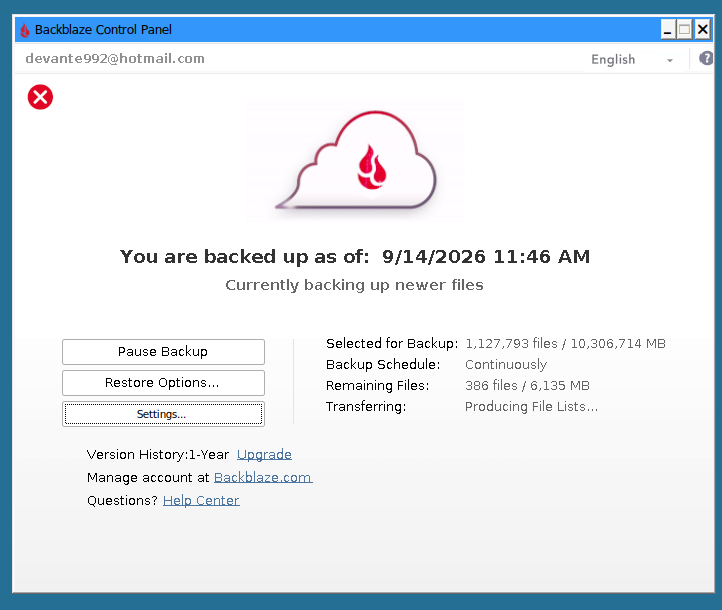
I have a similar problem after successfully migrating from the other container. It was working for a week or so and I noticed today it says it hasn't uploaded in more than a day. I also noticed that nearly everytime I have looked at it this last week or so, it says "Producing file list...". Even right now. backblaze64-diag-202609151752.zip
-
Hey, I was the one having the problem earlier with migrating TO iamfoz and getting a safety lock. Well let's just say I've tried various things to get it working and it wouldn't work. Then I tried one more time to wipe out the container completely and re-deploy it and let it run over night. I didn't do any inheriting or anything. I forgot to. Then I woke up to it just working and seems like it auto-inherited somehow. So... I think it's all working fine. The only issue and difference is that I forgot to make it the nightly/beta version (maybe that has something to do with it?). So I'm not getting those tabs on top nor does the widget work anymore. Is it safe to simply switch over to the nightly now?
-
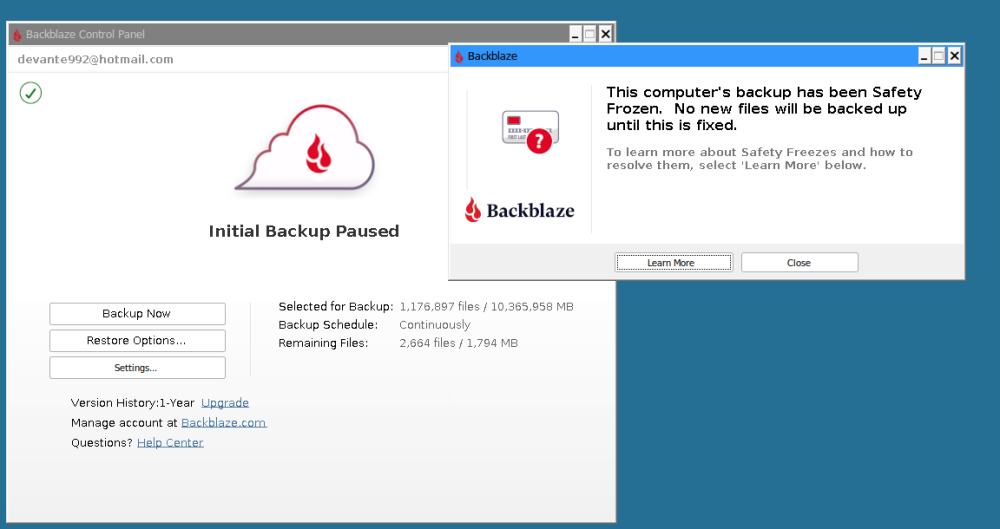
Well I checked a little bit ago and noticed it seemed to have my correct size/file amount on the main window and said it was preparing files. It also said it skipped a few files due to permissions. So I figured it started working. Well now I checked again and I have this: Computer's backup has been Safety Frozen.
-
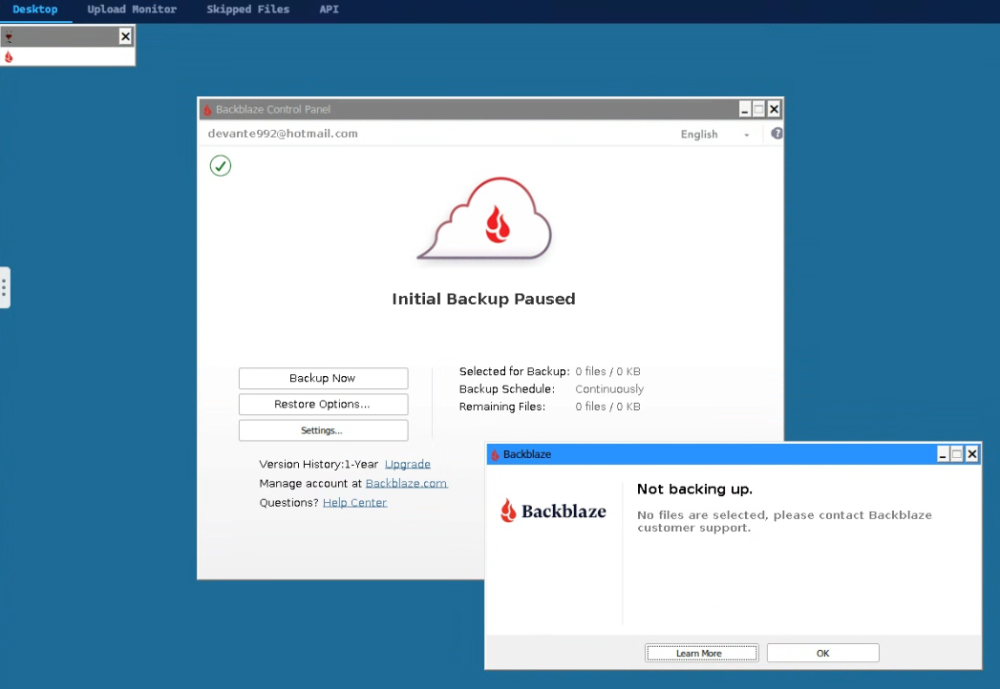
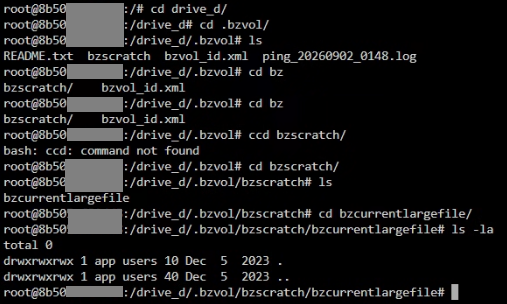
Hey guys, So I disabled tessypowder and installed iamfoz. I set a different appdata folder and mounted the exact same mount for /drive_d/ (which would be /mnt/user/). I've tried both with and without trailing slashes. I inherited backup and let it scan. I came back after a couple hours and there was simply no window. Just the tabs at the top. So I had to restart. Checking the web dashboard looks like the inherit worked and the container stopped showing trial and shows my 1 year plan. However, when I start the container up, I get a box that says "Not Backing Up: No files are selected." and the main window says "Initial Backup Paused." When I check the settings, the D drive is definitely selected. If I try inherit backup again, it only lets me select the trial backup so it seems inherit worked correctly. I just can't get it to pick up my local files I guess? Going into the console and going to cd /drive_d/ shows the correct files. And there is indeed a .bzvol at /mnt/user/. The files in the .bzvol folder have today's date, but the bzscratch folder has 2023 (when I first started using Backblaze). bazscratch has a folder called bzcurrentlargefile and bazcurrentlargefile has nothing in it. Did I just... magically lose my backup or something? Also, wouldn't it still be trying to scan the files in my /mnt/user/ folder? Thank you!
-
OK thank you! Oh and I should have mentioned the context of why I was trying to make sure. I know there's some file or collection of files in the appdata folder that's like a current status of backups file and if you lose it, your backup gets corrupt. At least that's my understanding anyway!
-
Thanks guys. Just to confirm, did you also mount the same appdata folder too and point it to the old one?
-
Hey, I just wanted to ask before I tried anything since I don't wanna mess anything up and have to re-back everything up... I'm currently on https://github.com/JonathanTreffler/backblaze-personal-wine-container right now and saw the dashboard widget that was released. Looks like the original project doesn't have an API section so I was looking into switching over. How would I migrate over from the above project to this one?. Is it a matter of just mounting this new container's appdata folder to the old one's? Thank you for any advice!
-
Oh sorry to double post but I wanted to say one more thing I noticed after the update: Krusader was showing up in my GPU Statistics widget on my dashboard as one of the apps that was using the GPU. This is even though I don't have /dev/dri assigned to binhex-krusader.
-
Well I never thought I'd be posting about binhex-krusader but since there was an update (that did who knows what), now I noticed two issues. 1) The icon for Krusader has turned into a bright red Krusader icon. This includes the one on the upper-left of the window and in the task bar at the bottom. 2) In my toolbar, I have a few shortcuts. One is to my torrents folder and I use the round, blue "qb" icon for this. Well with the update, that icon no longer exists. I just went ahead and pulled from binhex/arch-krusader:2.9.0-1-02 for now.
-
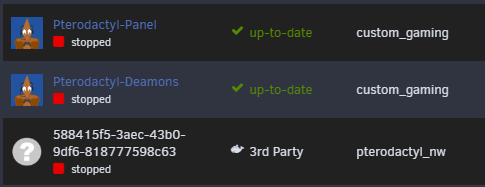
Clicking the icon shows only Start, Logs, and Remove. Name is unclickable. You can tell by the name not being blue (link color).
-
Hey guys, just a quick one. Anyone know of any way to customize the name and icon of servers installed via Pterodactyl? For example, this is Minecraft: ' Clicking the icon shows only Start, Logs, and Remove. Thank you!
-
Update Well guys, I don't wanna jinx it but I'm pretty sure I found the issue. You guys ready for this one? tldr; The stats in Prowlarr being called caused the RAM to max out. The culprit: the Prowlarr widget in the Homepage app/container. And only when actually bringing up the Homepage UI. So how did I get to that? Well over the months, I've turned on containers one by one and let it run. All the other times it locked up, I don't remember exactly what was running or what I was doing but I have had a feeling it was either Krusader or Homepage for months. If you see, I mentioned this on Feb. 25. Well a month or so ago I was talking with a friend about Homepage and started it to show my friend and the server locked up. So then I turned everything BUT Homepage on and it was fine. Then I started each app for which there was a Homepage widget until I started Prowlarr and it instantly locked up again. So then I load ONLY Prowlarr and it's fine. I click around and as soon as I click on the stats page, it spikes the RAM and locked up once again. My Prowlarr settings were set to never delete any history and so I had millions of queries from the past couple of years. Once I set it down to like two weeks, it still spikes the RAM if I go to stats but not as much (4GB vs the 20+ GB from before). I removed the Prowlarr widget from Homepage and turned everything else back on and so far it has been fine for a few weeks. One little widget caused me so much pain ha. I'm sure the widget was triggered whatever going to the stats tab in Prowlarr does. I think one thing that was making it harder was all the SIGTERM errors I've been getting. I don't think they're related at all actually. I think they're something else because I'm still getting them and it's still causing my webUI to lock up for a minute or two but the CPU and RAM both are at normal levels when it happens. Grok says it could be my disk IO wait times. I noticed usually when that happens, the busy percentage jumps from under 100% to like over 400%. I'm not sure how to tackle that issue though. I guess I'm just glad I found the original issue! THanks for everyone who tried to help!
-
I know this is pretty old now but looks like it should still work. However, I can't seem to get it to see my Intel QuickSync. I've tried three repositories, I've tried the /dev/dri thing, the /dev/dri/renderD128 thing, the adding --device=/ev/dri to extra parameters thing, the going into console and using apt install intel-media-va-driver-non-free, and adding UMASK 000 Whatever I do, encoder only shows Software. Am I missing anything? I just wanna use OBS directly on my Unraid server to stream movies on the server itself to Owncast which is also on the server without having to spinup a VM everytime.
-
So awesome, thank you!!!! I just assumed the file mimicked what was on the settings UI page. Thank you. Have it logging to a file now!
-
Yeah, at the end of the day, my log will be spammed with the ones from DMV. I wanna know if I can get rid of those. If not, I think I'm gonna disable the plugin unfortunately.


