






ijuarez
Members
-
Joined
-
Last visited
Everything posted by ijuarez
-
Yes sir cause i cant get it to work, please post What can't you get to work? Where you set the code for the cpu pinning i was doing it the old way and with improvements to the webgui I cannot find the spot also and example would be great.
-
Yes sir cause i cant get it to work, please post
-
wow that's one heck of a vaca
-
Trul that is what I planned to do since I remove the disk my parity went invalid so it's now rebuilding. And at 4tb it takes a while.
-
@johnO I replace my parity and added two drive and what gundamguy describe happens to me. Two new drives are xfs and the other rfs which makes parity rfs So I'm left with what he suggested if moving data to a different disk and converting and moving back.
-
Success!!! helps if you edit the correct path. :) :) :)
-
tried it still showing up as root not unraid I will double check my file and post
-
Any update? Sorry I have not had a change, work is busy, i will try tonight and report. thanks for all the help.
-
I will try this later tonight and report,
-
Update So I installed tonido for Android and notice when I logged in I had to folders one named unRAID and one name sync files I click on sync files and boom there's my file test from the outside. I open the unRAID folder and create a new folder so check my unRAID tower and boom it's there. So I have to figure out why the desktop client does not choose unRAID folder as default. I have that set in the properties. Anyways just wanted to say it works.
-
Capt. that worked and i was able to see the file from outside of my home network. here is my issue. i downloaded the windows client installed on my pc at work and filled in all of my connection settings and it connected. I put a file in the tonido sync folder and let is sync. i check my unraid folder and its no there. i logged into the webgui from outside and see my test file you ask me to create but not my test file from outside. in the /unRAID folder. however when i click on recent files (items) is there. so where is it going? My whole purpose to use tonido is to get rid of cloud base backup and save money. see the link for pictures. http://imgur.com/a/dpylJ
-
login as: root [email protected]'s password: Access denied [email protected]'s password: Last login: Fri May 1 07:23:09 2015 from 10.0.1.120 Linux 3.19.4-unRAID. root@LahomaMediaCenter:~# touch /mnt/user/Tonido/test.txt root@LahomaMediaCenter:~# docker exec -it Tonido /bin/bash root@d61fa82798cc:/# ls -la /unRAID total 0 drwxrwxrwx 1 nobody users 72 May 1 09:57 . drwxr-xr-x 1 root root 198 Apr 27 21:51 .. -rw-rw-rw- 1 root root 0 May 1 09:57 test.txt root@d61fa82798cc:/#
-
Capt. login as: root [email protected]'s password: Last login: Fri May 1 07:13:23 2015 from 10.0.1.120 Linux 3.19.4-unRAID. root@LahomaMediaCenter:~# ls- la /mnt/user -bash: ls-: command not found root@LahomaMediaCenter:~# ls -la /mnt/user total 41 drwxrwxrwx 1 nobody users 352 May 1 07:15 ./ drwxr-xr-x 8 root root 160 Apr 26 10:39 ../ -rw-rw-rw- 1 nobody users 16388 Feb 20 05:35 .DS_Store drwxrwxrwx 1 nobody users 112 Sep 8 2014 .TemporaryItems/ -rw-rw-rw- 1 nobody users 4096 May 18 2014 ._.DS_Store -rw-rw-rw- 1 nobody users 4096 Sep 8 2014 ._.TemporaryItems -rw-rw-rw- 1 nobody users 4096 Sep 8 2014 ._.apdisk -rw-rw-rw- 1 nobody users 291 Sep 8 2014 .apdisk drwxrwxrwx 1 nobody users 472 Apr 1 15:21 Drone/ drwxrwxrwx 1 nobody users 112 Apr 1 07:55 Flixx/ drwxrwxrwx 1 nobody users 120 Apr 12 21:58 MB3/ drwxrwxrwx 1 nobody users 2816 Apr 13 23:12 Mac\ Share/ drwxrwxrwx 1 nobody users 144 Apr 4 20:18 Media/ drwxrwxrwx 1 nobody users 168 Feb 9 12:51 Photos/ drwxrwxrwx 1 nobody users 128 Apr 27 07:12 Software/ drwxrwxrwx 1 nobody users 48 Apr 27 21:48 Tonido/ drwxrwxrwx 1 nobody users 48 Apr 27 2014 Torrents/ drwxrwxrwx 1 nobody users 488 Apr 30 23:07 appdata/ drwxrwxrwx 1 nobody users 48 Apr 17 2014 domain/ drwxrwxrwx 1 root root 72 May 1 07:15 downlaoddir/ drwxrwxrwx 1 nobody users 168 Apr 1 15:21 downloaddir/ drwxrwxrwx 1 ivan users 48 Jan 20 22:01 dronefactory/ drwxrwxrwx 1 nobody users 48 Apr 24 23:01 embytrans/ drwxrwxrwx 1 nobody users 48 Apr 30 23:07 handbrake/ drwxr-xr-x 1 nobody users 48 Jan 27 01:50 incomplete/ drwxrwxrwx 1 nobody users 104 Jan 20 22:05 newcouch/ drwxrwxrwx 1 ivan users 88 Apr 1 15:23 nzb/ drwxrwx--- 1 nobody users 336 Apr 30 18:27 owncloud/ drwxrwxrwx 1 nobody users 872 Apr 1 15:25 sab/ drwxrwxrwx 1 nobody users 544 Apr 1 15:25 test/ drwxrwxrwx 1 unraid-plex users 48 Mar 16 20:24 tmp/ drwxrwxrwx 1 nobody users 208 Nov 1 18:46 usenet/ drwxrwxrwx 1 nobody users 80 May 1 03:04 vms/ root@LahomaMediaCenter:~# ___________________________________________________________________________________ root@LahomaMediaCenter:~# ls -la /mnt/user/Tonido total 0 drwxrwxrwx 1 nobody users 48 Apr 27 21:48 ./ drwxrwxrwx 1 nobody users 352 May 1 07:15 ../ root@LahomaMediaCenter:~# root@LahomaMediaCenter:~# docker exec -it Tonido /bin/bash root@d61fa82798cc:/# ls -la /unRAID total 0 drwxrwxrwx 1 nobody users 48 Apr 27 21:48 . drwxr-xr-x 1 root root 198 Apr 27 21:51 .. root@d61fa82798cc:/#
-
Anyone else having the same issues
-
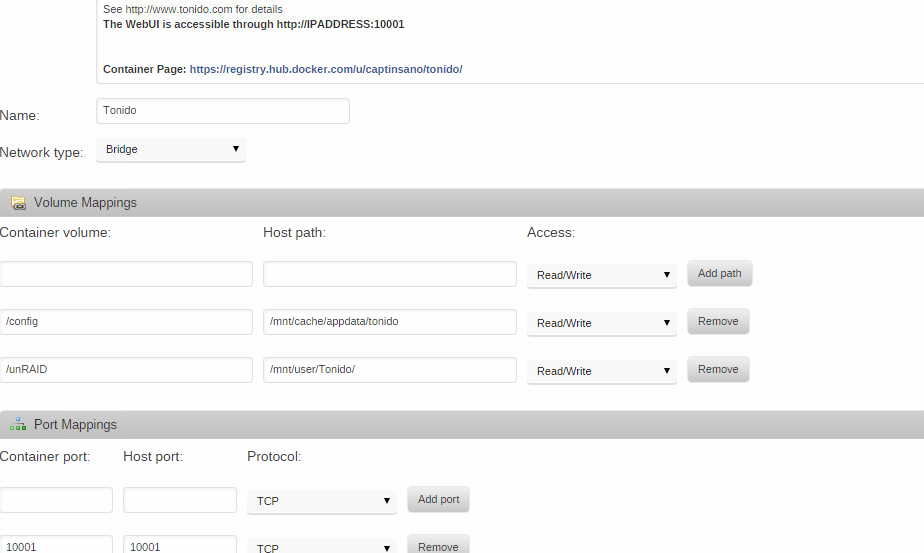
Do you mean that you have /unRaid as the container volume and /mnt/user/music as the host path? If so, then Tonido will see it under /unRAID. If that is not what you mean, then post your volume mappings. I am testing between ownCloud and this service and I got it working and I can reach the webgui from CLEAR NET. I installed the windows client on the pc outside of my home network and uploaded one file. However when i check the share i created for it to sync files there's nothing. Yet the page states that files were uploaded. Im including some screenshots, maybe you can tell me why its not really saving to my share. http://imgur.com/a/by9Xl What are your volume mappings? Damn it i forgot that picture
-
Do you mean that you have /unRaid as the container volume and /mnt/user/music as the host path? If so, then Tonido will see it under /unRAID. If that is not what you mean, then post your volume mappings. I am testing between ownCloud and this service and I got it working and I can reach the webgui from CLEAR NET. I installed the windows client on the pc outside of my home network and uploaded one file. However when i check the share i created for it to sync files there's nothing. Yet the page states that files were uploaded. Im including some screenshots, maybe you can tell me why its not really saving to my share. http://imgur.com/a/by9Xl
-
well DAMN IT!!!! stupid 0 core, thanks geezus Ya'll people are way to smart for your own good. Edit: go it going.
-
I keep getting this error df173d4fe7fab13f01642ce14f7e6eacfa0defbebea81a27a1ae7263a01d7f12 time="2015-04-15T23:00:28-05:00" level="fatal" msg="Error response from daemon: Cannot start container df173d4fe7fab13f01642ce14f7e6eacfa0defbebea81a27a1ae7263a01d7f12: write /sys/fs/cgroup/cpuset/docker/df173d4fe7fab13f01642ce14f7e6eacfa0defbebea81a27a1ae7263a01d7f12/cpuset.cpus: invalid argument" The command failed. Using this command --cpuset=4 mediabrowser/mbserver
-
Let just say i read thru all 5 pages of questions and help and my speed reading was awesomely fast but i fell to read the part where if add a new drive and it formats it XFS and all of the other drives are ReiserFS can they coexist?
-
You can set them however you like eg for plex you could --cpuset=3 (assigns core # 3) mediabrowser --cpuset=2 (assigns core # 2) Thank you sir or madam
-
do you have to add two cores to the docker or can only one be used? i only have 4 cores and would like to assign 1 to plex and 1 to media browser
-
Do you have one for media browser. I was going to install it but it did not have a specified port.
-
A few posts back and you will see the solution..... http://lime-technology.com/forum/index.php?topic=25715.msg358223#msg358223 I have pooched my go file before so that's not an alternative. I'll wait until rc 6 is out to spin up a vm.
-
It does not show up in the settings page
-
go team! good points

