






ijuarez
Members
-
Joined
-
Last visited
Everything posted by ijuarez
-
i shall thanks : Done
-
Now that LE has domain wildcards how does that effect the docker, can you do wildcards?
-
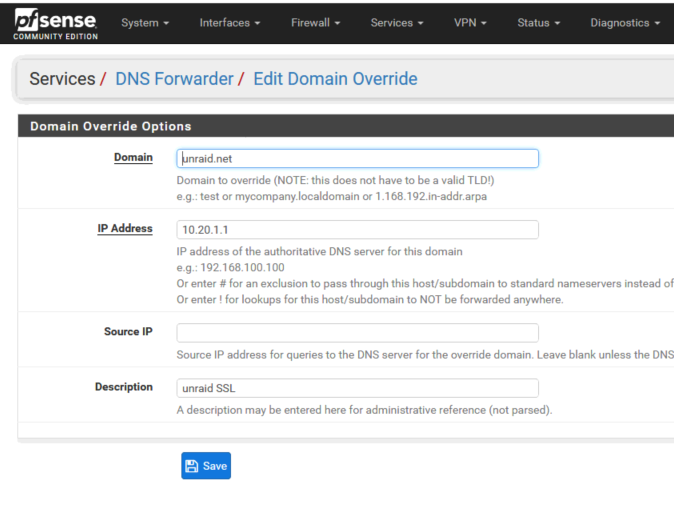
what if your using pfSense, but not the resolver but the forwarder, i've tried to add the custom options and it tells me they are invalid when i try to save. I am using the forwarder because I am using airvpn pfSense guide. If your using the DNS forwarder add a domain override
-
That's nice, just wondering what prompted unraid to make the gui on 443?
-
But doesn't let's encrypt require 443. Every other way ive seen installed it requires that 443 be the port. Going be interesting when 6.4 comes around.
-
###Extra Settings### ssl_prefer_server_ciphers on; ssl_session_cache shared:SSL:10m; ### Add HTTP Strict Transport Security ### add_header Strict-Transport-Security "max-age=63072000; includeSubdomains"; add_header Front-End-Https on; client_max_body_size 0; location / { proxy_pass https://10.20.1.39:8383/; proxy_max_temp_file_size 2048m; include /config/nginx/proxy.conf; } } /mnt/cache/appdata/letsencrypt/nginx/site-confs# this is where i modified it and it stopped that error for me. kamhighway Advanced Member Members 2 277 posts Report post Posted January 18 Solved File Upload Size Limitation I had been fiddling with the LSIO's letsencrypt container to make it work as a reverse proxy for LSIO's Nextcloud. The reverse proxy works, but file uploads are limited to 10MB. The solution is to edit the file proxy.conf which for me resides in /mnt/cache/appdata/letsencrypt_lsio/nginx. The first line in that file is: client_max_body_size 10m; Change to: I hope this helps
-
there's a solution its on the thread i dont have it off hand. search for client-size=10m; its on the nginx config its needs to be zero.
-
I got it formatted using preclear, and the reason why is i wanted to mount it and copy what is current cache drive then do the swap as this would avoid some plugins auto install and start fresh and just be able to use my current data.
-
Had a device on UD dismounted it, ran preclear finished no issue, Cannot re-mount the drive, drive shows offline and a little icon to forma. On the tools-preclear plugin it shows the drive green and i can start another preclear but i don't want that. I just want to format it so it can be my new cache drive.


-
i second this, i have a 4tb disk and it takes 12 hours 30 minutes
-
Lets encrypt secures it
-
better leave him alone he'll snatch them nutz!
-
I dont disagree Trurl
-
Well i take it back, i lost data but not all data. What i did was copy all data from disk2 rieser to disk9 xfs. It copied 1.8TB (used krusader) then stop the array, ran a new config, click preserve all , and all disk went blue when to disk2 changed the format to xfs, started the array, click on parity is valid, disk was unmounted, mounted it, of course it formatted to xfs. user krudaser to copy back to data from disk9 to disk2 but it only copied 50GB (hmmm) everything seem to work until i need to watch a tv series, and then noticed that the folder for series was completely gone. Not sure how that happen. I was able to get the series back. At this point im not sure what else may be missing from the 1.8TB initial copy. I will use the rsync on the next disk see of that has a different outcome. EDIT: So im guessing the difference between 1.8T and 50GB it definitely cause for concern I am missing movies i am not entirely sure why it lost that much data.
-
Just wanted to thank all who have posted on getting the conversion done I was able to do a convert on a disk with out data loss.
-
30 pages later you think Lime tech would develop a plugin that would help you out on the conversion. just saying.
-
Will you be here all week, and yes i've tipped the waitress.
-
LE needs to be on 443 and nextcloud can be something else. You could flip them
-
well DUH, where's my dunce hat, i used those FAILED!
-
you can go to the command line, SSH to the server and rm -r the mariadb folder, that gets rid of everything
-
So is this image mono based? because aptalca stated that there's no mono in this image.
-
Yeah pretty crappy then not so better now but it's point and click and its windows
-
thanks to aptalca for the link, it took me several reads to understand how he set it up but i finally got it. No ip needed. on goolge domains, select the domain you want to use, select DNS, create a dynamic dns entry for you domain. us the @. whatever your domain is and add it then create a cname record www cname 1H yourdomain,com then add it. For DynamicDNS, setup whatever you want router, ddclient, whatever and use the new creds for the dynamic dns run the docker and boom its good
-
sure send me the info, i like to use the domain i paid for.
-
I've updated my docker how do I add the new variable?




