






ijuarez
Members
-
Joined
-
Last visited
Everything posted by ijuarez
-
Great, sounded like it Sent from my BND-L34 using Tapatalk
-
Ok, so try to ping your unraid from pfsense Diagnostics-ping See if it replies As far as ken-ji request your need to login into to your unraid via ssh or terminal via the webgui Sent from my BND-L34 using Tapatalk
-
I see your using nvguru guide, so do I. So on your main page you have the localhost as a DNS server and the airvpn dns. So unless your forcing all of your Lan traffic thru air it doesn't know where to go. The setup is set to block all DNS unless it comes from the pfsense box so putting Google's DNS wouldn't work. I have under general an openic dns and cloudflare. My vpn subnet uses air's dns. However my server in not in the land subnet but a management vlan. Sent from my BND-L34 using Tapatalk
-
What the config on pfsense for this subnet, what version of pfsense, are you using DNS resolver or DNS forwarder? Sent from my BND-L34 using Tapatalk
-
Possibly but I've seen stuff taken that is under lock and key and surveillance so it can happen Sent from my BND-L34 using Tapatalk
-
So you're not on stable but the release candidate that might make a difference Sent from my BND-L34 using Tapatalk
-
How do you figure? if I have an encrypted disk in my system and somebody walks off with it I don't want them to be able to mount it on their system to try to read my data I mean that makes perfect sense I think of course I am not a expert at disk encryption just saying Sent from my BND-L34 using Tapatalk
-
what version of unraid are using? also where did "shell option" in your template come from? On my server i changed unraid's port to the following http is port 8383 and https to 444, my port forward is only for 443 but for me i had to used dns validation as my isp blocks port 80

-
yes if that's your servers IP
-
because you're using the proxynet, its fine
-
I say if have you have not done so, reboot the firewall, maybe something is hanging
-
and that's the only port forwards you have?
-
I use pfSense, when i create a port forward it gives me several fine details on how that port forward is going to behave. LE can't get thru the firewall to verify its you. Im sure you have the correct settings but i never hurts to have a second set of eyes take a look at it.
-
looks like your using and UniFi product, can you post the configs of the port forward.
-
when you log in to duckdns, are you seeing your IP
-
what are you using to update the duckdns ip?
-
Are you sure your ISP does not block port 80 Sent from my BND-L34 using Tapatalk
-
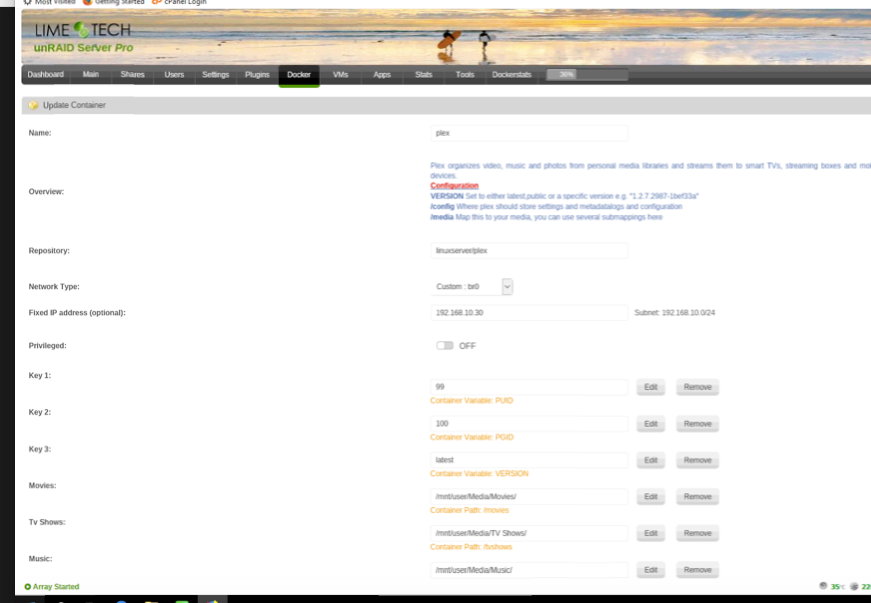
My plex looks like this, so if you dont have these there's something wrong
-
Looked at my config and notice that your template does not have the disclosure of what goes where in the template. How are you installing it? I'm assuming via the Apps tab Sent from my BND-L34 using Tapatalk
-
The hostname of the server is Server2? Sent from my BND-L34 using Tapatalk
-
Post your logs when your start Plex, also like trurl stated your template doesn't show where your media is located. Sent from my BND-L34 using Tapatalk
-
Yes but your config says it's on /mnt/user/appdata. Sent from my BND-L34 using Tapatalk
-
On your non-working Plex install have you deleted the Plex folder from appdata after you remove the cointainer and image? Something may be hanging Sent from my BND-L34 using Tapatalk
-
Are you running the same version of unraid? Sent from my BND-L34 using Tapatalk
-
Do you have a plexpass? Sent from my BND-L34 using Tapatalk


