






ijuarez
Members
-
Joined
-
Last visited
Everything posted by ijuarez
-
Corrected the name no luck, so i renamed the container in the gui to just guacamole and matched the name in the config and restarted and it worked. did not like the container name.
-
yep. compare them had the same issue removed the duplicate lines and LE was happy
-
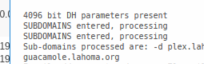
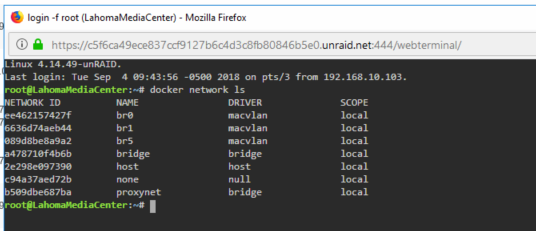
Need a little help, setup ApacheGuacamole container and modified the sonarr proxy-conf with the guac settings. When i try to get it to it i get a 502 bad gateway. I am using dns validation since isp blocks port 80 (cloudflare) added the subdomain to CF as i did with my others. Container is on the same docker network called proxynet. Added my new subdomain to LE config so it created a new cert. i can access guac internally. Not sure what i am missing. this is working on test vps that i use before modifying my server. Below is code and attached picture. The only error i get is in the ngix error log about not being able to resolve, but not sure where to look. Fairly certain I missing something obvious. # make sure that your dns has a cname set for sonarr and that your sonarr container is not using a base url # to enable password access, uncomment the two auth_basic lines server { listen 443 ssl; server_name guacamole.*; include /config/nginx/ssl.conf; client_max_body_size 0; location / { # auth_basic "Restricted"; # auth_basic_user_file /config/nginx/.htpasswd; include /config/nginx/proxy.conf; resolver 127.0.0.11 valid=30s; set $upstream_guacamole ApacheGuacamole; proxy_pass http://$upstream_guacamole:8080; } } 2018/09/04 10:24:51 [error] 381#381: *20 apacheguacamole could not be resolved (3: Host not found), client: 172.69.68.37, server: guacamole.*, request: "GET / HTTP/1.1", host: "guacamole.lahoma.org" 2018/09/04 10:31:21 [error] 381#381: *21 apacheguacamole could not be resolved (3: Host not found), client: 172.69.68.4, server: guacamole.*, request: "GET / HTTP/1.1", host: "guacamole.lahoma.org"

-
I agree, having to manage an iis server is painful. But it comes with Windows and has nice buttons that you can click on Sent from my BND-L34 using Tapatalk
-
So i this has been working but noticed that when i check on my cert (cause im that guy) it looks like its been provided by Comodo, which is cloudlflares. Its a little odd i think.
-
worked like a charmed
-
You can change the default index.html page to a meme of can I haz a cheeseburger if you want. Very easy it's in the ngix/www subfolder of the let'sencrypt config folder. Sent from my BND-L34 using Tapatalk
-
Cool I will try that Sent from my BND-L34 using Tapatalk
-
Clear your cache, looks like it started with no errors Sent from my BND-L34 using Tapatalk
-
I had the same problem today took me awhile to figure it out, if you leave the proxy on in cloudflare you are using their proxy and it does not read you config file, it reads theirs.
-
Last update from Plex broke it, if you look back several posts you will find a link to the Plex forum post discussing this. It really messes with people using docker Sent from my BND-L34 using Tapatalk
-
I also use my own domain, (Google) and use cloudflare for DNS validation because my ISP blocks Port 80. But when I did my certs I use did a wild card so any subdomains would be covered. As far as the cname I have not done that as I use my firewall to the dynamic DNS client so I am going to assume once my LE config file is configured it will work.. Sent from my BND-L34 using Tapatalk
-
If your ISP is not blocking port 80 why are you trying to use DNS? Sent from my BND-L34 using Tapatalk
-
Meh, You learned something Sent from my BND-L34 using Tapatalk
-
So are using the docker or a plug-in? Last picture looks like a plug-in. Sent from my BND-L34 using Tapatalk
-
I think what @aptalca is saying try the reverse proxy and that may correct your issues
-
Awesome! Sent from my BND-L34 using Tapatalk
-
Look under your advance network settings in Plex, if you can, they introduce a new feature that you can now bind to a specific network adapter. My is set to listen on all and it's working now. Sent from my BND-L34 using Tapatalk
-
Might be a fat fingered error but you have forward and backward slashes in your run command. Sent from my BND-L34 using Tapatalk
-
if you look back at his first video I think he made a diagram on how he had them connected and that's how I think he was going to do the videos Sent from my BND-L34 using Tapatalk
-
I think this is still in his queue as he developed a full vm install that can be replicated to bare metal. Next video might be the fail over process. Sent from my BND-L34 using Tapatalk
-
Glad you worked it out. Sent from my BND-L34 using Tapatalk
-
So you have port 81 (external internet facing) port forwarded to port 81 on your unraid and inside the container is port 80, is that correct? saarg beat me to it.
-
Post your docker template config, looks like its trying to use a 192.168 and 10.10 network
-
That's great they break it and it will be fixed in the next update. Bad PR how am I supposed to recommend it when it breaks it .... Emby it's your time to shine! Sent from my BND-L34 using Tapatalk

