





Everything posted by Svensen
-
Moin Die Lokale Version wird gar nicht mehr von mir Supportet, weil es ein Docker Version schon gibt. Wie das mit VPS und VPN aussieht muss du schauen. hier findest du mein Github dazu: kabelsalatundklartext/crowdsec-threat-map-docker Wichtig ist wie läuft Crowdsec bei dir Docker Container oder direkt installiert? Meine Anleitung habe ich nur mit Crowdsec Docker Version getestet Viele Grüße
-
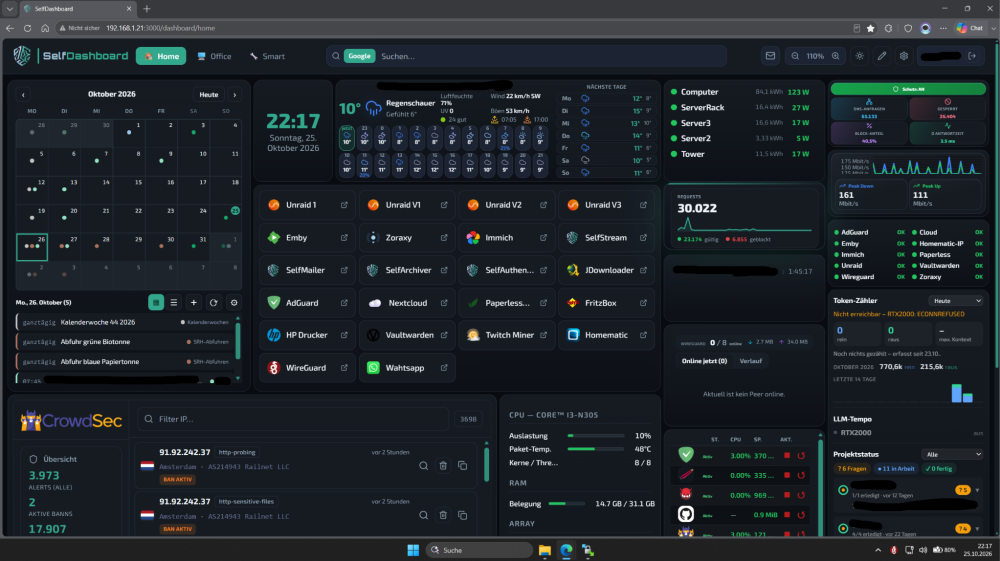
Hi everyone, 📦 The project has moved! SelfDashboard now lives on the GitHub account S3lfcod3r: 👉 https://github.com/s3lfcod3r/selfdashboard The old repo (kabelsalatundklartext) is archived and gets no more updates. Please use the new repo for issues, pull requests and releases. Why I built it There are so many dashboards out there, but none of them was truly modular. You couldn't really bring your own plugins, and most "widgets" were just links. So I built SelfDashboard: every widget is a plugin with its own server backend. It shows live data and can actually control your services. What's in 2.2.0 • 52 plugins in the built-in Plugin Store (31 stable, 21 beta): Docker, Unraid, FRITZ!, CrowdSec, AdGuard, Pi-hole, Proxmox, TrueNAS, Home Assistant, Plex/Jellyfin/Emby, Spotify, Shelly, Hue, Uptime Kuma, WireGuard, Weather, Calendar, Mail and more • Install and update plugins from the store or as a ZIP, with no image rebuild • Open plugin format, so you can write your own (docs/PLUGIN_DEV.md) • Multiple dashboards, 6 themes, drag & drop, responsive on phone, tablet and desktop • Login, TOTP 2FA, multi-user with per-user plugin permissions • Kiosk mode for wall tablets, plus an Android app • Everything configured in the UI, no YAML Pros ✔ Live widgets with real backends, not just bookmarks ✔ Modular: install only what you need, or build your own plugins ✔ Built-in auth, 2FA and AES-256-GCM encrypted credentials ✔ One container, no external database Install on Unraid Apps → search "SelfDashboard" → Install. Map /app/data and /app/plugins/custom, and set a fixed SELFDASHBOARD_SECRET_KEY. Never change that key afterwards. Already running it? Switch to the new image Change the repository in your container template to: ghcr.io/s3lfcod3r/selfdashboard:latest Your /app/data and plugins stay as they are. ⭐ GitHub: https://github.com/s3lfcod3r/selfdashboard 📰 Changelog: https://github.com/s3lfcod3r/selfdashboard/blob/main/CHANGELOG.md Feedback, bug reports and plugin ideas are very welcome, and screenshots of your setup even more!
-
Endlich auch hier findet ihr das CA Store
-
Ich bin drangeblieben an der Veröffentlichung CrowdSec-Threat-Map und ihr findet es jetzt CA Store.
-
🔀 Zoraxy + CrowdSec Bouncer (Docker) 📌 Support thread · Unraid Community Applications packaging 🔗 https://github.com/kabelsalatundklartext/zoraxy-crowdsec-bouncer This image bundles 🌐 Zoraxy (reverse proxy) with the 🛡️ CrowdSec bouncer plugin pre-installed. CrowdSec itself is NOT included — you need your own CrowdSec instance (e.g. Docker on Unraid) and a valid LAPI URL + bouncer API key. ➤ Community Applications: search zoraxy-crowdsec-bouncer when listed, or load the raw template URL (see 🔗 Links). ➤ Management UI: http://YOUR-UNRAID-IP:WEBUI_PORT/ (default template mapping often 8000). 📖 Summary • Reverse proxy (HTTP/HTTPS) + Zoraxy WebUI • CrowdSec bouncer plugin baked in; blocks malicious IPs via CrowdSec decisions • Plugin config.yaml is auto-generated on first start from container variables — no manual YAML edit to get started ✨ What you get 🌐 Zoraxy • Reverse proxy, TLS, routing — upstream project: https://github.com/tobychui/zoraxy (AGPL-3.0) 🛡️ CrowdSec bouncer plugin • Connects to your CrowdSec Local API (LAPI) • Upstream plugin: https://github.com/AnthonyMichaelTDM/zoraxy_crowdsec_bouncer (MIT) 📦 Packaging repo (this thread) • Dockerfile + Unraid template: https://github.com/kabelsalatundklartext/zoraxy-crowdsec-bouncer • License: MIT (packaging); respect upstream licenses in README ✅ Prerequisites • Running CrowdSec with LAPI exposed (container name/IP:port reachable from this container) • Create a bouncer API key, e.g.: docker exec -it crowdsec cscli bouncers add zoraxy-bouncer • Set CROWDSEC_API_KEY and CROWDSEC_AGENT_URL in the template (default agent URL often http://crowdsec:8080 if both share a custom Docker network) • Map config + plugin host folders; docker.sock + localtime mounts as in template 🔗 Links 🐙 GitHub: https://github.com/kabelsalatundklartext/zoraxy-crowdsec-bouncer 🐳 Image: ghcr.io/kabelsalatundklartext/zoraxy-crowdsec-bouncer:latest 📄 Unraid template (raw): https://raw.githubusercontent.com/kabelsalatundklartext/zoraxy-crowdsec-bouncer/main/zoraxy-crowdsec-bouncer.xml 🐞 Issues: https://github.com/kabelsalatundklartext/zoraxy-crowdsec-bouncer/issues 🚀 Install (short) 1) Apps → search: zoraxy-crowdsec-bouncer (when in CA) 2) Or Docker → Add Container → Template URL → raw link above 3) Fill API key + LAPI URL; set host paths for /opt/zoraxy/config and /opt/zoraxy/plugins 💬 Support 🐞 Bugs in this packaging / image → GitHub Issues (link above) 💬 Unraid-specific (ports, networks, paths, CA fields) → reply in this thread Please include: Unraid version, how CrowdSec is reached (IP:port / container name), redacted docker logs if helpful 👤 Maintainer: kabelsalatundklartext (Svensen) 🇩🇪 Deutsch · English section above 🔀 Zoraxy + CrowdSec Bouncer (Docker) 📌 Support-Thread · Unraid-Paketierung (Community Applications) 🔗 https://github.com/kabelsalatundklartext/zoraxy-crowdsec-bouncer Dieses Image kombiniert 🌐 Zoraxy (Reverse Proxy) mit dem 🛡️ vorinstallierten CrowdSec-Bouncer-Plugin. CrowdSec selbst ist NICHT enthalten — ihr braucht eine eigene CrowdSec-Instanz (z. B. Docker auf Unraid) plus LAPI-URL und Bouncer-API-Key. ➤ Community Applications: nach zoraxy-crowdsec-bouncer suchen, sobald gelistet, oder Raw-Template-URL laden (siehe 🔗 Links). ➤ Zoraxy-WebUI: http://EURE-UNRAID-IP:WEBUI-PORT/ (im Template typisch Port 8000). 📖 Kurzbeschreibung • Reverse Proxy (HTTP/HTTPS) + Zoraxy-WebUI • CrowdSec-Bouncer-Plugin integriert; blockiert bösartige IPs anhand CrowdSec-Entscheidungen • Plugin-config.yaml wird beim ersten Start aus den Container-Variablen erzeugt — kein manuelles YAML nötig für den Start ✨ Inhalt 🌐 Zoraxy • Reverse Proxy, TLS, Routing — Upstream: https://github.com/tobychui/zoraxy (AGPL-3.0) 🛡️ CrowdSec-Bouncer-Plugin • Verbindung zu eurer CrowdSec Local API (LAPI) • Upstream-Plugin: https://github.com/AnthonyMichaelTDM/zoraxy_crowdsec_bouncer (MIT) 📦 Packaging-Repo (dieser Thread) • Dockerfile + Unraid-Template: https://github.com/kabelsalatundklartext/zoraxy-crowdsec-bouncer • Lizenz: MIT (Paketierung); Upstream-Lizenzen siehe README ✅ Voraussetzungen • Laufender CrowdSec mit erreichbarer LAPI (Container-Name/IP:Port vom Zoraxy-Container aus) • Bouncer-API-Key erzeugen, z. B.: docker exec -it crowdsec cscli bouncers add zoraxy-bouncer • Im Template CROWDSEC_API_KEY und CROWDSEC_AGENT_URL setzen (Standard-Agent-URL oft http://crowdsec:8080 im gemeinsamen Docker-Netz) • Host-Ordner für Konfiguration + Plugins mappen; docker.sock + localtime wie im Template 🔗 Links 🐙 GitHub: https://github.com/kabelsalatundklartext/zoraxy-crowdsec-bouncer 🐳 Image: ghcr.io/kabelsalatundklartext/zoraxy-crowdsec-bouncer:latest 📄 Unraid-Template (Raw): https://raw.githubusercontent.com/kabelsalatundklartext/zoraxy-crowdsec-bouncer/main/zoraxy-crowdsec-bouncer.xml 🐞 Issues: https://github.com/kabelsalatundklartext/zoraxy-crowdsec-bouncer/issues 🚀 Installation (kurz) 1) Apps → Suche: zoraxy-crowdsec-bouncer (wenn in CA) 2) Oder Docker → Container hinzufügen → Template-URL → Raw-Link oben 3) API-Key + LAPI-URL eintragen; Host-Pfade für /opt/zoraxy/config und /opt/zoraxy/plugins setzen 💬 Support 🐞 Fehler im Packaging / Image → GitHub Issues (Link oben) 💬 Unraid-spezifisch (Ports, Netzwerk, Pfade, CA-Felder) → bitte in diesem Thread antworten Dazu: Unraid-Version, wie CrowdSec erreichbar ist (IP:Port / Containername), ggf. docker logs (ohne Keys) 👤 Maintainer: kabelsalatundklartext (Svensen)
-
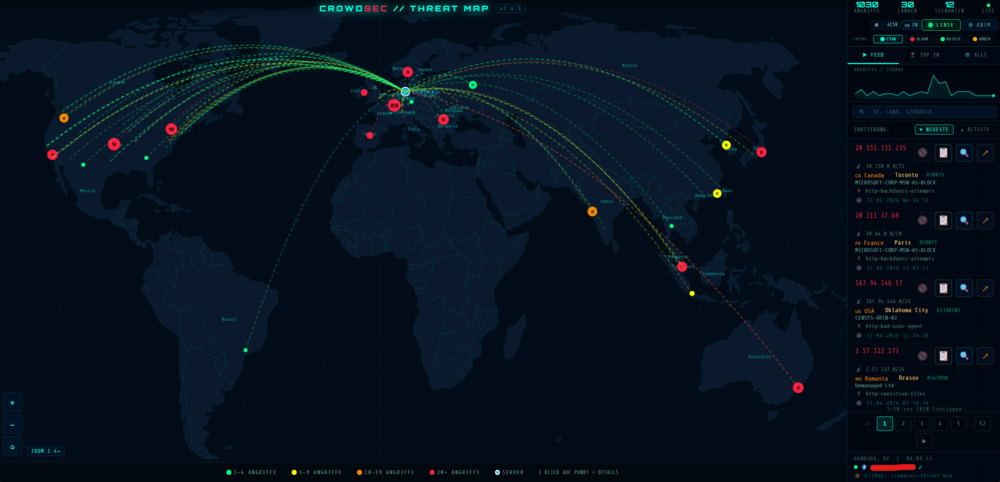
🛡️ CrowdSec Threat Map 📌 Support thread · Docker template · Community Applications Visualises attacks from your local CrowdSec database as a 🗺️ map and 📡 live feed. ➤ Community Applications: once the repo is listed in CA → install from the Apps tab. ➤ Until then: use the raw template URL from GitHub (under 🔗 Links below). 📖 Summary Web dashboard with a real-time attack map and live feed — data from your CrowdSec SQLite (crowdsec.db). ✨ Includes (optional): in-UI IP unban · dynamic IP whitelist · GeoIP/cities · themes · sound hints · CSV export · 📱 responsive UI 🌐 Language: LANGUAGE=de or LANGUAGE=en ✨ Features at a glance 🗺️ Map • Interactive world map, animated attack lines (D3.js) • Zoom follows visible points • Server marker from SERVER_LAT / SERVER_LON 📡 Feed & data • Search by IP, country, city, scenario, ASN + filters + pages • Ban status per entry • 🔓 Unban removes decision + alert (cscli) — IP won’t pop straight back • Sparkline: attacks per hour • DAYS_BACK = window · CACHE_TTL = metric cache 🛡️ Whitelist & ops • Dynamic IP whitelist (on by default), e.g. every 15 minutes • Writes YAML under postoverflows, may restart CrowdSec • Dashboard badge: OK / updating / error 🎨 UI • Four colour themes · LINE toggle hides lines & radar rings • CSV export · optional sound on new events 📍 GeoIP • Optional: GeoLite2-City.mmdb next to crowdsec.db → cities (see README / MaxMind) 🔗 Project & artefacts 🐙 GitHub: https://github.com/kabelsalatundklartext/crowdsec-threat-map-docker 📜 License: GPL-3.0 🐳 Image: ghcr.io/kabelsalatundklartext/crowdsec-threat-map-docker:latest 📄 Unraid template (raw): https://raw.githubusercontent.com/kabelsalatundklartext/crowdsec-threat-map-docker/main/unraid/crowdsec-threat-map.xml ✅ Prerequisites • CrowdSec running as a Docker container (usually on the same Unraid host) • Required mount: host folder with crowdsec.db → /crowdsec/data (read-only) • Whitelist: postoverflows → /crowdsec/postoverflows (read-write), WHITELIST_ENABLED=true • Unban + restarts: Docker socket + correct host docker GID in Extra Parameters (often 281 on Unraid; template defaults to --group-add 281 — verify with:) getent group docker | cut -d: -f3 • Set SERVER_LAT · SERVER_LON · SERVER_NAME 🚀 Installation (Community Applications) 1) Apps → search: crowdsec-threat-map (once listed in CA) 2) Or Docker → Add Container → “Template URL” → paste raw URL above 🌐 Dashboard after start: http://YOUR-UNRAID-IP:PORT/ (port configurable in the template; 8080 is common) 💬 Support 🐞 Bugs & features → GitHub Issues: https://github.com/kabelsalatundklartext/crowdsec-threat-map-docker/issues 💬 Unraid-specific (paths, permissions, GID, CA fields, networking) → reply in this thread Please mention: Unraid version · CrowdSec on same host? · docker logs excerpts (no keys/passwords) 👤 Maintainer: kabelsalatundklartext (Svensen) 🇩🇪 Deutsch · German section above · 🇬🇧 🛡️ CrowdSec Threat Map 📌 Support-Thread · Docker-Template · Community Applications Dieses Projekt zeigt Angriffe aus eurer lokalen CrowdSec-Datenbank als 🗺️ Karte und 📡 Live-Feed. ➤ Community Applications: Sobald das Repo in CA gelistet ist → Installation über den Apps-Tab. ➤ Bis dahin: Raw-Template-URL von GitHub (unten unter 🔗 Links). 📖 Kurzbeschreibung Web-Dashboard mit Echtzeit-Angriffskarte und Live-Feed — Daten aus eurer CrowdSec-SQLite (crowdsec.db). ✨ Optional u.a.: IP-Unban im UI · dynamische IP-Whitelist · GeoIP/Städte · mehrere Farbthemen · Sound-Hinweise · CSV-Export · 📱 Desktop & Mobil 🌐 Sprache: LANGUAGE=de oder LANGUAGE=en ✨ Features auf einen Blick 🗺️ Karte • Interaktive Weltkarte, animierte Angriffslinien (D3.js) • Zoom richtet sich nach den sichtbaren Punkten • Serverpunkt aus SERVER_LAT / SERVER_LON 📡 Feed & Daten • Suche nach IP, Land, Stadt, Szenario, ASN + Filter + Seiten • Ban-Status pro Eintrag • 🔓 Unban: Decision + Alert (cscli) — IP taucht nicht sofort wieder auf • Sparkline: Angriffe/Stunde • DAYS_BACK = Zeitraum · CACHE_TTL = Metrik-Cache 🛡️ Whitelist & Betrieb • Dynamische IP-Whitelist (Standard: an), z. B. alle 15 Min. • Schreibt YAML unter postoverflows, kann CrowdSec neu starten • Badge im UI: OK / Update / Fehler 🎨 Bedienung • 4 Farbthemen · LINIE-Toggle (Linien & Radar-Ringe aus) • CSV-Export · optional Sound bei neuen Events 📍 GeoIP • Optional: GeoLite2-City.mmdb neben crowdsec.db → Städte statt nur Länder (siehe README / MaxMind) 🔗 Projekt & Artefakte 🐙 GitHub: https://github.com/kabelsalatundklartext/crowdsec-threat-map-docker 📜 Lizenz: GPL-3.0 🐳 Image: ghcr.io/kabelsalatundklartext/crowdsec-threat-map-docker:latest 📄 Unraid-Template (Raw): https://raw.githubusercontent.com/kabelsalatundklartext/crowdsec-threat-map-docker/main/unraid/crowdsec-threat-map.xml ✅ Voraussetzungen • CrowdSec als Docker-Container (typisch auf demselben Unraid-Host) • Pflicht-Mount: Host-Ordner mit crowdsec.db → /crowdsec/data (read-only) • Whitelist: postoverflows → /crowdsec/postoverflows (read-write), WHITELIST_ENABLED=true • Unban + Neustarts: Docker-Socket + passende docker-GID in Extra Parameters (Unraid oft 281, im Template Startwert --group-add 281 — prüfen mit:) getent group docker | cut -d: -f3 • SERVER_LAT · SERVER_LON · SERVER_NAME setzen 🚀 Installation (Community Applications) 1) Apps → Suche: crowdsec-threat-map (wenn in CA gelistet) 2) Oder Docker → Add Container → „Template URL“ → Raw-URL oben einfügen 🌐 Dashboard nach dem Start: http://EURE-UNRAID-IP:PORT/ (Port im Template frei wählbar, oft 8080) 💬 Support 🐞 Bugs & Features → GitHub Issues: https://github.com/kabelsalatundklartext/crowdsec-threat-map-docker/issues 💬 Unraid (Pfade, Rechte, GID, CA-Felder, Netzwerk) → bitte hier im Thread antworten Kurz dazu: Unraid-Version · CrowdSec auf gleichem Host? · docker logs (ohne Keys/Passwörter) 👤 Maintainer: kabelsalatundklartext (Svensen)
-
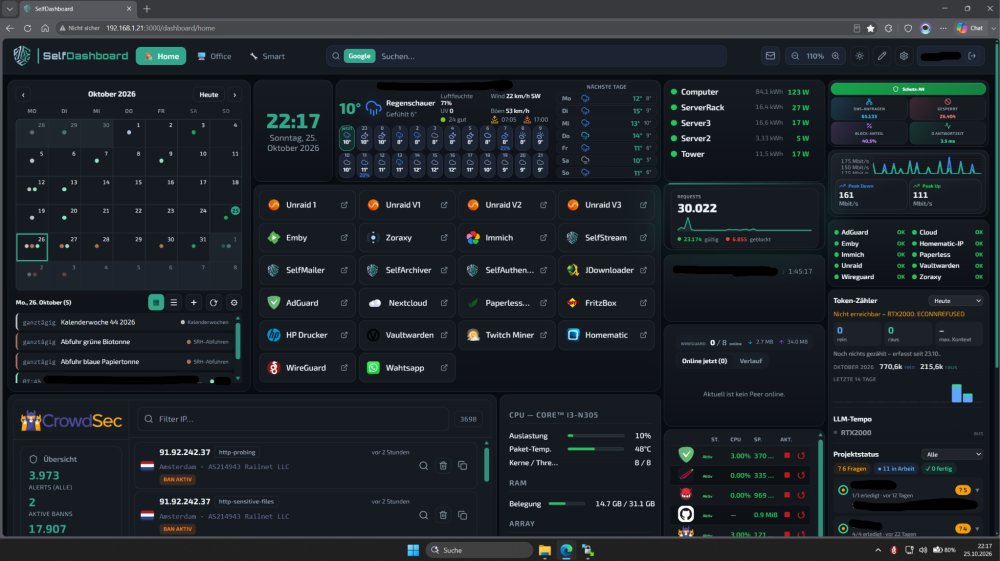
Hallo zusammen, 📦 Das Projekt ist umgezogen! SelfDashboard ist jetzt auf dem GitHub-Account S3lfcod3r zu finden: 👉 https://github.com/s3lfcod3r/selfdashboard Das alte Repo (kabelsalatundklartext) ist archiviert und bekommt keine Updates mehr. Bitte nutzt für Issues, Pull Requests und Releases nur noch das neue Repo. Warum ich es gebaut habe Es gibt unzählige Dashboards, aber keins war wirklich modular. Eigene Plugins konnte man kaum einbringen, und die meisten „Widgets“ waren nur Links. Deshalb habe ich SelfDashboard gebaut: Jedes Widget ist ein Plugin mit eigenem Server-Backend. Es zeigt Live-Daten an und kann deine Dienste auch wirklich steuern. Was steckt in 2.2.0 • 52 Plugins im eingebauten Plugin-Store (31 stabil, 21 Beta): Docker, Unraid, FRITZ!, CrowdSec, AdGuard, Pi-hole, Proxmox, TrueNAS, Home Assistant, Plex/Jellyfin/Emby, Spotify, Shelly, Hue, Uptime Kuma, WireGuard, Wetter, Kalender, Mail und mehr • Plugins aus dem Store oder als ZIP installieren und aktualisieren, ohne neues Image • Offenes Plugin-Format, damit du eigene Plugins schreiben kannst (docs/PLUGIN_DEV.md) • Mehrere Dashboards, 6 Farbthemen, Drag & Drop, responsiv auf Handy, Tablet und Desktop • Login, TOTP-2FA, Mehrbenutzer mit Plugin-Rechten pro Nutzer • Kiosk-Modus fürs Wand-Tablet, dazu eine Android-App • Alles in der Oberfläche einstellbar, kein YAML Vorteile ✔ Live-Widgets mit echtem Backend statt nur Lesezeichen ✔ Modular: Installiere nur, was du brauchst, oder bau eigene Plugins ✔ Eingebauter Login, 2FA und AES-256-GCM-verschlüsselte Zugangsdaten ✔ Ein Container, keine externe Datenbank Installation auf Unraid Apps → nach „SelfDashboard“ suchen → Installieren. Binde /app/data und /app/plugins/custom ein und setze einen festen SELFDASHBOARD_SECRET_KEY. Diesen Schlüssel danach nie mehr ändern. Du nutzt es schon? Wechsel auf das neue Image Ändere in deinem Container-Template das Repository auf: ghcr.io/s3lfcod3r/selfdashboard:latest Deine /app/data und Plugins bleiben erhalten. ⭐ GitHub: https://github.com/s3lfcod3r/selfdashboard 📰 Changelog: https://github.com/s3lfcod3r/selfdashboard/blob/main/CHANGELOG.md Feedback, Fehlerberichte und Plugin-Ideen sind sehr willkommen, und Screenshots von eurem Setup noch mehr! 🙂
-
Welche Support? ich habe @Squid pm geschickt vor mehreren Tagen aber noch keine Antwort erhalten.
-
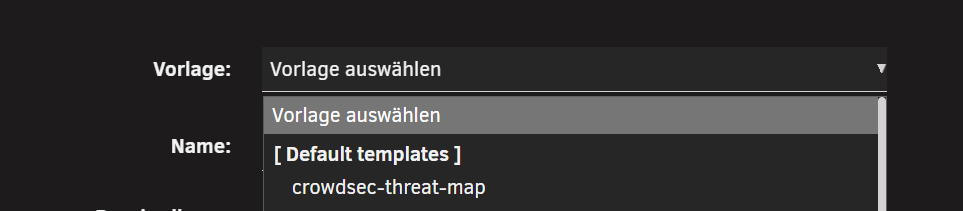
Moin, das würde ich auch gerne wissen – eingereicht habe ich es bereits. Vielleicht wissen @ich777 , woran es liegt, dass es noch nicht freigeschaltet ist? Oder was noch fehlt, damit es freigeschaltet wird? Falls es jemand schon jetzt testen möchte, kann das Template über die Konsole geladen werden: cd /boot/config/plugins/dockerMan/templates && wget wget https://raw.githubusercontent.com/kabelsalatundklartext/crowdsec-threat-map-docker/refs/heads/main/unraid/crowdsec-threat-map.xmlWenn man anschließend einen neuen Container erstellt und auf „Vorlagen“ klickt, wird es oben angezeigt. Gruß Svensen
-
Hallo zusammen, ich möchte euch mein Docker Template für Unraid vorstellen: CrowdSec Threat Map. Dieses Image stellt ein interaktives Live-Dashboard bereit, das eure CrowdSec-Bedrohungsdaten in Echtzeit auf einer Weltkarte visualisiert – komplett lokal, kein Cloud-Dienst, keine externen API-Keys erforderlich. Alle Daten werden direkt aus der lokalen CrowdSec SQLite-Datenbank gelesen. Was ist das? Ein interaktives Dashboard das euch zeigt: - 🌍 Interaktive Weltkarte mit animierten Angriffspfeilen (D3.js) - 🎯 Auto-Fit Zoom — alle Angriffspunkte automatisch sichtbar - 🔍 Echtzeit-Suche nach IP, Land, Stadt, Szenario, ASN - 🚫📋 Ban-Status-Anzeige — 🚫 aktiver Ban / 📋 nur Alert/Historie - 🔓 IP-Unban direkt aus dem Dashboard — löscht Decision UND Alert - 📊 Sparkline — Angriffe/Stunde auf einen Blick - 🎨 4 Farbthemen — Cyan, Alarm-Rot, Matrix-Grün, Amber - 🔊 Sound-Alarm bei neuen Hochrisiko-Angriffen (20+ Angriffe) - 📥 CSV-Export des kompletten Feeds - 📱 Vollständig responsive — Desktop und Mobile - 〰️ Linien-Toggle — Angriffspfeile & Radar-Ringe ein-/ausblenden - 🛡️ Dynamische IP-Whitelist — eigene IP automatisch alle 15 Min whitelisten - 🟢 Whitelist-Badge — zeigt aktuelle IP + Status live im Dashboard - 🌐 Zweisprachig (DE/EN) — alle Labels, Städte- und Ländernamen umschaltbar - 🏙️ Lokalisierte Stadtnamen — Nürnberg statt Nuremberg, München statt Munich etc. - 📍 Korrigierte GeoIP — Vogtland/Plauen korrekt statt falscher Grenzregion Alles läuft lokal – eure Daten verlassen niemals euren Server! Voraussetzungen: - Eine laufende CrowdSec-Instanz - Zugriff auf die CrowdSec SQLite-Datenbank Links: - 🐙 GitHub: https://github.com/kabelsalatundklartext/crowdsec-threat-map-docker - 📦 Image: ghcr.io/kabelsalatundklartext/crowdsec-threat-map-docker:latest Installation: Die vollständige Installationsanleitung findet ihr auf GitHub: 👉 https://github.com/kabelsalatundklartext/crowdsec-threat-map-docker#readme Die Dokumentation wird dort gepflegt und ist immer aktuell. Falls sich etwas ändert, findet ihr die neueste Anleitung direkt auf GitHub. Bei Fragen oder Problemen gerne hier antworten oder ein Issue auf GitHub öffnen! Ich habe das Repository bereits bei Community Applications eingereicht und es wurde freigegeben. Das Template sollte mit dem nächsten Community Applications Update im CA App Store erscheinen.
-
Hallo zusammen, ich möchte euch mein Docker Template für Unraid vorstellen: Zoraxy CrowdSec Bouncer. Dieses Image kombiniert den [Zoraxy](https://github.com/tobychui/zoraxy) Reverse Proxy mit dem [CrowdSec Bouncer Plugin](https://github.com/AnthonyMichaelTDM/zoraxy_crowdsec_bouncer) von AnthonyMichaelTDM – alles vorinstalliert und startklar, ohne manuelles Plugin-Setup. Was ist enthalten: - ✅ Zoraxy (latest) – ein moderner HTTP Reverse Proxy mit übersichtlicher Web-UI - ✅ CrowdSec Bouncer Plugin v1.2.1 – vorinstalliert, wird beim ersten Start automatisch konfiguriert - ✅ Automatische `config.yaml` Erstellung aus den Unraid Template-Variablen - ✅ Täglicher Auto-Update Check via GitHub Actions (Zoraxy + Plugin) Was NICHT enthalten ist: - ❌ CrowdSec selbst – ihr benötigt eine separate CrowdSec-Instanz (z.B. als eigener Docker Container) Links: - 🐙 GitHub: https://github.com/kabelsalatundklartext/zoraxy-crowdsec-bouncer - 📦 Image: ghcr.io/kabelsalatundklartext/zoraxy-crowdsec-bouncer:latest Installation: Die vollständige Installationsanleitung findet ihr auf GitHub: 👉 https://github.com/kabelsalatundklartext/zoraxy-crowdsec-bouncer#readme Die Dokumentation wird dort gepflegt und ist immer aktuell. Falls sich etwas ändert, findet ihr die neueste Anleitung direkt auf GitHub. Credits: - [Zoraxy](https://github.com/tobychui/zoraxy) von tobychui – AGPL v3 - [zoraxy_crowdsec_bouncer](https://github.com/AnthonyMichaelTDM/zoraxy_crowdsec_bouncer) von AnthonyMichaelTDM – MIT Bei Fragen oder Problemen gerne hier antworten oder ein Issue auf GitHub öffnen! Ich habe das Repository bereits bei Community Applications eingereicht und es wurde freigegeben. Das Template sollte mit dem nächsten Community Applications Update im CA App Store erscheinen.
-
Die Docker-Version ist fertig. Sie wurde auch bei Unraid für den App Store eingereicht und bereits freigegeben. Mit dem nächsten App-Store-Update wird sie veröffentlicht.
-
So Version ist Online V1.4.1 Docker Version ist in Arbeit
-
Wenn ich mich recht erinnere, läuft das über Metabasen. Ich steh nicht so drauf externe fremde Sachen zu integrieren. Was ich hier gebaut habe, ist alles Lokal
-
Danke, Ja komme auch sehr gut voran und sitz grade an der Doku das jeden auch selbst einrichten kann.
-
Hey zusammen, ich möchte euch mein kleines Homelab-Projekt vorstellen: Ein Live-Dashboard, das eure CrowdSec-Daten auf einer interaktiven Weltkarte visualisiert — komplett lokal, kein Cloud-Dienst, keine API-Keys, direkt aus der SQLite-Datenbank eures CrowdSec-Containers. 📸 Was ist das? Eine interaktive Weltkarte mit animierten Angriffspfeilen, einem Live-Feed aller Angriffe und der Möglichkeit, gebannte IPs direkt aus dem Dashboard heraus zu entsperren. Läuft auf Unraid als Python-Exporter + statisches HTML-Dashboard. ✨ Features auf einen Blick 🌍 Interaktive Weltkarte mit animierten Angriffspfeilen (D3.js) 🚫📋 Ban-Status direkt im Feed — aktiver Ban vs. nur Alert auf einen Blick 🔓 IP-Unban direkt aus dem Dashboard (löscht Decision + Alert dauerhaft) 🔍 Echtzeit-Suche nach IP, Land, Stadt, Szenario, ASN 🎯 Auto-Fit Zoom — alle Angriffspunkte automatisch sichtbar 🌆 Stadtname-Labels erscheinen beim Reinzoomen auf der Karte 🏷️ Ländernamen zentriert in der Landesmitte 🫧 Dot-Clustering beim Herauszoomen 📊 Sparkline — Angriffe/Stunde auf einen Blick 🎨 4 Farbthemen (Cyan, Alarm-Rot, Matrix-Grün, Amber) 🔊 Sound-Alarm bei neuen Hochrisiko-Angriffen 📥 CSV-Export des kompletten Feeds 📱 Vollständig responsive — Desktop und Mobile 〰️ Linien-Toggle — Angriffspfeile & Radar-Ringe ein-/ausblenden 🛡️ Dynamische IP-Whitelist — kein Selbst-Ban mehr bei wechselnder IP 🟢 Whitelist-Badge im Dashboard — zeigt aktuelle IP und Status live ⚙️ Voraussetzungen Was | Details ------------------|------------------------------------------------ CrowdSec | Als Docker-Container auf Unraid Python 3 | Community Apps → „Python 3" Plugin GeoLite2-City | MaxMind (kostenlos) — optional, für Stadtanzeige 🚀 Schnellstart 1. CrowdSec-Datenpfad herausfinden docker inspect crowdsec | grep -A5 "Mounts" # → "Source": "/euer/pfad/data" 2. crowdsec_exporter.py konfigurieren DB_PATH = "/EUER-PFAD/data/crowdsec.db" MMDB_PATH = "/EUER-PFAD/data/GeoLite2-City.mmdb" # optional SERVER_LAT = 0.0 # euer Breitengrad SERVER_LON = 0.0 # euer Längengrad CROWDSEC_CONTAINER = "crowdsec" # Dynamische Whitelist — verhindert Selbst-Ban bei wechselnder IP WHITELIST_ENABLED = True WHITELIST_FILE = "/EUER-PFAD/postoverflows/s01-whitelist/my-whitelist.yaml" WHITELIST_INTERVAL = 900 # alle 15 Minuten 3. Userscript in Unraid einrichten Settings → User Scripts → Add New Script → Inhalt von Userscript_Unraid einfügen → Ausführung: At Startup of Array 4. index.html konfigurieren const EXPORTER_URL = 'http://EURE-UNRAID-IP:9456/metrics'; const SERVER_LAT = 0.0; const SERVER_LON = 0.0; 5. Dashboard bereitstellen Option A — Zoraxy: Static Web Server → index.html hochladen → fertig Option B — Direkt im Browser per Drag & Drop Option C — Nginx-Container 🛡️ Selbst-Ban verhindern — Dynamische Whitelist Wer keinen festen Internetanschluss hat (in Deutschland üblich: IP-Wechsel alle 24h), konnte sich bisher versehentlich selbst bannen — z.B. durch viele eigene Requests beim Testen oder Browsen. CrowdSec kennt eure aktuelle IP nicht und bannt euch einfach mit. Ab v1.4.1 löst der Exporter das automatisch: Alle 15 Minuten wird die eigene öffentliche IP geprüft. Hat sie sich geändert, wird die Whitelist-YAML neu geschrieben, CrowdSec neugestartet und aktive Bans auf die eigene IP entfernt. Ein kleiner Badge im Dashboard zeigt immer den aktuellen Status. 🚫📋 Ban-Status im Feed Icon | Bedeutung | Klick-Aktion ----------------|------------------------------------|-------------------------- 🚫 (leuchtend) | Aktiver Ban — IP ist gesperrt | Decision + Alert löschen 📋 (leuchtend) | Nur Alert/Historie — kein Ban mehr | Nur Alert löschen Das jeweils nicht zutreffende Icon ist transparent ausgegraut. Tooltip erklärt was passiert. 🛠️ Fehlerbehebung # Läuft der Exporter? curl http://EURE-UNRAID-IP:9456/metrics | head -5 # Whitelist-Status prüfen: curl http://EURE-UNRAID-IP:9456/whitelist-status # Unban funktioniert nicht? Container-Namen prüfen: docker ps | grep -i crowdsec # → Diesen Namen in CROWDSEC_CONTAINER eintragen 📋 Changelog v1.4.1 — 22.04.2026 〰️ Linien-Toggle — Angriffspfeile & Radar-Ringe ein-/ausblenden 🛡️ Dynamische IP-Whitelist im Exporter (alle 15 Min, kein Selbst-Ban) 🟢 Whitelist-Badge im Dashboard (Desktop + Mobile) 📐 Responsive Controls — Buttons passen sich der Fenstergröße an 🐛 Bugfix: statische Linien wurden durch einen Bug nie gezeichnet 🔇 ConnectionResetError aus Exporter-Logs unterdrückt v1.4.0 — 21.04.2026 🚫📋 Ban-Status-Anzeige im Feed 🔓 Unban löscht jetzt Decision UND Alert dauerhaft 🗺️ Stadtname-Labels beim Reinzoomen 🏷️ Ländernamen zentriert in der Landesmitte v1.3.0 — IP-Unban direkt aus dem Feed, Mobile komplett überarbeitet v1.2.0 — Echtzeit-Suche, Filter-Chips, Sparkline, 4 Themes, Sound-Alarm, CSV-Export v1.1.0 — Stadtanzeige, Auto-Fit Zoom v1.0.0 — Initiale Version 🐳 Docker-Version — in Arbeit Für alle, die keinen Python-Exporter manuell einrichten möchten: Eine vollständige Docker-Version ist aktuell in Entwicklung. Das Ziel: Exporter + Dashboard als fertiger Container — einfach in die Unraid-compose.yml eintragen, Container starten, fertig. Kein User Script, kein manuelles Python-Setup. Sobald die Docker-Version verfügbar ist, wird sie hier im Thread angekündigt. Wer informiert bleiben möchte: GitHub-Repo auf Watch/Star setzen 👆 🔧 Docker support is work in progress — stay tuned. 📄 Lizenz CC BY-NC 4.0 — privat und im Homelab frei nutzbar, kein kommerzieller Einsatz. Bei Weitergabe bitte Namensnennung: "CrowdSec Live Threat Monitor" von kabelsalatundklartext 🔗 GitHub: https://github.com/kabelsalatundklartext/crowdsec-live-threat-monitor Feedback, Fragen und Verbesserungsvorschläge gerne hier im Thread! 🛡️ ⚠️ Wichtige Ankündigung – Diese Version wird nicht mehr weiterentwickelt! Hallo zusammen, ich habe beschlossen, die lokale Version des CrowdSec Threat Map einzustellen. Der Grund ist einfach: Beide Versionen gleichzeitig zu warten, zu testen und mit Updates zu versorgen kostet zu viel Zeit. Daher fokussiere ich mich ab sofort ausschließlich auf die Docker-Version, die einfacher zu installieren, aktualisieren und warten ist. Bitte wechselt auf die Docker-Version: 👉 https://github.com/kabelsalatundklartext/crowdsec-threat-map-docker 👉[Support] CrowdSec Threat Map Docker Template (crowdsec-threat-map-docker) - Deutsch - Unraid Vielen Dank für euer Verständnis und euer Interesse an dem Projekt! 🙏 CHANGELOG.md crowdsec_exporter.py DOKUMENTATION.html index.html README.md Userscript_Unraid
-
Hello, although I now did this in groups and everything related to Redis was stopped at the same time, this error unfortunately still occurs. [13.03.2026 02:00:01][ℹ️][Main] 👋 WELCOME TO APPDATA.BACKUP!! :D [13.03.2026 02:00:01][ℹ️][Main] Backing up from: /mnt/user/Docker, /mnt/user/Privat [13.03.2026 02:00:01][ℹ️][Main] Backing up to: /mnt/backup/ExternBackup/ab_20260313_020001 [13.03.2026 02:00:01][ℹ️][Main] Selected containers: AdGuard-Home, ContainerRedis, Grafana, Homematic-IP, Kutt, OnlyOfficeDocumentServer, Twitch-Channel-Points-Miner-v2, Vaultwarden, Wireguard-Easy, Zoraxy, crowdsec, emby, heimdall, virtual-dsm [13.03.2026 02:00:01][ℹ️][Main] Saving container XML files... [13.03.2026 02:00:01][ℹ️][Main] Method: Stop/Backup/Start [13.03.2026 02:00:01][ℹ️][AdGuard-Home] Stopping AdGuard-Home... done! (took 0 seconds) [13.03.2026 02:00:01][ℹ️][AdGuard-Home] Backing up EXTERNAL volumes, because its enabled! [13.03.2026 02:00:01][ℹ️][AdGuard-Home] Calculated volumes to back up: /mnt/user/Docker/adguard/config, /mnt/user/Docker/adguard/workingdir [13.03.2026 02:00:01][ℹ️][AdGuard-Home] Backing up AdGuard-Home... [13.03.2026 02:00:57][ℹ️][AdGuard-Home] Backup created without issues (took 00:00:56 (hours:mins:secs)) [13.03.2026 02:00:57][ℹ️][AdGuard-Home] Verifying backup... [13.03.2026 02:01:05][ℹ️][AdGuard-Home] Verification ended without issues (took 00:00:08 (hours:mins:secs)) [13.03.2026 02:01:05][ℹ️][AdGuard-Home] Starting AdGuard-Home... (try #1) done! [13.03.2026 02:01:10][ℹ️][Zoraxy] Stopping Zoraxy... done! (took 1 seconds) [13.03.2026 02:01:11][ℹ️][Zoraxy] '/mnt/user/Docker/zoraxy/plugin' is within mapped volume '/mnt/user/Docker/zoraxy'! Ignoring! [13.03.2026 02:01:11][ℹ️][Zoraxy] Backing up EXTERNAL volumes, because its enabled! [13.03.2026 02:01:11][ℹ️][Zoraxy] Calculated volumes to back up: /mnt/user/Docker/zoraxy [13.03.2026 02:01:11][ℹ️][Zoraxy] Backing up Zoraxy... [13.03.2026 02:01:29][ℹ️][Zoraxy] Backup created without issues (took 00:00:18 (hours:mins:secs)) [13.03.2026 02:01:29][ℹ️][Zoraxy] Verifying backup... [13.03.2026 02:01:33][ℹ️][Zoraxy] Verification ended without issues (took 00:00:04 (hours:mins:secs)) [13.03.2026 02:01:33][ℹ️][Zoraxy] Starting Zoraxy... (try #1) done! [13.03.2026 02:01:35][ℹ️][heimdall] Stopping heimdall... done! (took 4 seconds) [13.03.2026 02:01:39][ℹ️][heimdall] Backing up EXTERNAL volumes, because its enabled! [13.03.2026 02:01:39][ℹ️][heimdall] Calculated volumes to back up: /mnt/user/Docker/heimdall [13.03.2026 02:01:39][ℹ️][heimdall] Backing up heimdall... [13.03.2026 02:02:20][ℹ️][heimdall] Backup created without issues (took 00:00:41 (hours:mins:secs)) [13.03.2026 02:02:20][ℹ️][heimdall] Verifying backup... [13.03.2026 02:02:28][ℹ️][heimdall] Verification ended without issues (took 00:00:08 (hours:mins:secs)) [13.03.2026 02:02:28][ℹ️][heimdall] Starting heimdall... (try #1) done! [13.03.2026 02:02:30][ℹ️][Vaultwarden] Stopping Vaultwarden... done! (took 1 seconds) [13.03.2026 02:02:31][ℹ️][Vaultwarden] Should NOT backup external volumes, sanitizing them... [13.03.2026 02:02:31][ℹ️][Vaultwarden] Calculated volumes to back up: /mnt/user/Docker/vaultwarden [13.03.2026 02:02:31][ℹ️][Vaultwarden] Backing up Vaultwarden... [13.03.2026 02:02:31][ℹ️][Vaultwarden] Backup created without issues (took 00:00:00 (hours:mins:secs)) [13.03.2026 02:02:31][ℹ️][Vaultwarden] Verifying backup... [13.03.2026 02:02:31][ℹ️][Vaultwarden] Verification ended without issues (took 00:00:00 (hours:mins:secs)) [13.03.2026 02:02:31][ℹ️][Vaultwarden] Starting Vaultwarden... (try #1) done! [13.03.2026 02:02:33][ℹ️][Twitch-Channel-Points-Miner-v2] Stopping Twitch-Channel-Points-Miner-v2... done! (took 10 seconds) [13.03.2026 02:02:43][ℹ️][Twitch-Channel-Points-Miner-v2] Should NOT backup external volumes, sanitizing them... [13.03.2026 02:02:43][ℹ️][Twitch-Channel-Points-Miner-v2] Calculated volumes to back up: /mnt/user/Docker/twitch-miner/logs, /mnt/user/Docker/twitch-miner/run.py, /mnt/user/Docker/twitch-miner/cookies, /mnt/user/Docker/twitch-miner/analytics [13.03.2026 02:02:43][ℹ️][Twitch-Channel-Points-Miner-v2] Backing up Twitch-Channel-Points-Miner-v2... [13.03.2026 02:04:32][ℹ️][Twitch-Channel-Points-Miner-v2] Backup created without issues (took 00:01:49 (hours:mins:secs)) [13.03.2026 02:04:32][ℹ️][Twitch-Channel-Points-Miner-v2] Verifying backup... [13.03.2026 02:04:49][ℹ️][Twitch-Channel-Points-Miner-v2] Verification ended without issues (took 00:00:17 (hours:mins:secs)) [13.03.2026 02:04:49][ℹ️][Twitch-Channel-Points-Miner-v2] Starting Twitch-Channel-Points-Miner-v2... (try #1) done! [13.03.2026 02:04:54][ℹ️][Grafana] Stopping Grafana... done! (took 1 seconds) [13.03.2026 02:04:55][ℹ️][Grafana] Should NOT backup external volumes, sanitizing them... [13.03.2026 02:04:55][ℹ️][Grafana] Calculated volumes to back up: /mnt/user/Docker/grafana [13.03.2026 02:04:55][ℹ️][Grafana] Backing up Grafana... [13.03.2026 02:05:00][ℹ️][Grafana] Backup created without issues (took 00:00:05 (hours:mins:secs)) [13.03.2026 02:05:00][ℹ️][Grafana] Verifying backup... [13.03.2026 02:05:00][ℹ️][Grafana] Verification ended without issues (took 00:00:00 (hours:mins:secs)) [13.03.2026 02:05:00][ℹ️][Grafana] Starting Grafana... (try #1) done! [13.03.2026 02:05:03][ℹ️][crowdsec] Stopping crowdsec... done! (took 2 seconds) [13.03.2026 02:05:05][ℹ️][crowdsec] '/mnt/user/Docker/crowdsec/data' is within mapped volume '/mnt/user/Docker/crowdsec'! Ignoring! [13.03.2026 02:05:05][ℹ️][crowdsec] '/mnt/user/Docker/dmz/crowdsec/auth' is within mapped volume '/mnt/user/Docker/dmz/crowdsec'! Ignoring! [13.03.2026 02:05:05][ℹ️][crowdsec] Should NOT backup external volumes, sanitizing them... [13.03.2026 02:05:05][ℹ️][crowdsec] Calculated volumes to back up: /mnt/user/Docker/crowdsec, /mnt/user/Docker/dmz/crowdsec [13.03.2026 02:05:05][ℹ️][crowdsec] Backing up crowdsec... [13.03.2026 02:05:11][ℹ️][crowdsec] Backup created without issues (took 00:00:06 (hours:mins:secs)) [13.03.2026 02:05:11][ℹ️][crowdsec] Verifying backup... [13.03.2026 02:05:11][ℹ️][crowdsec] Verification ended without issues (took 00:00:00 (hours:mins:secs)) [13.03.2026 02:05:11][ℹ️][crowdsec] Starting crowdsec... (try #1) done! [13.03.2026 02:05:14][ℹ️][Homematic-IP] Stopping Homematic-IP... done! (took 10 seconds) [13.03.2026 02:05:24][ℹ️][Homematic-IP] Should NOT backup external volumes, sanitizing them... [13.03.2026 02:05:24][ℹ️][Homematic-IP] Calculated volumes to back up: /mnt/user/Docker/Homematic [13.03.2026 02:05:24][ℹ️][Homematic-IP] Backing up Homematic-IP... [13.03.2026 02:05:28][ℹ️][Homematic-IP] Backup created without issues (took 00:00:04 (hours:mins:secs)) [13.03.2026 02:05:28][ℹ️][Homematic-IP] Verifying backup... [13.03.2026 02:05:28][ℹ️][Homematic-IP] Verification ended without issues (took 00:00:00 (hours:mins:secs)) [13.03.2026 02:05:28][ℹ️][Homematic-IP] Starting Homematic-IP... (try #1) done! [13.03.2026 02:05:31][ℹ️][emby] Stopping emby... done! (took 3 seconds) [13.03.2026 02:05:34][ℹ️][emby] Should NOT backup external volumes, sanitizing them... [13.03.2026 02:05:34][ℹ️][emby] Calculated volumes to back up: /mnt/user/Docker/EmbyServer [13.03.2026 02:05:34][ℹ️][emby] Backing up emby... [13.03.2026 02:12:33][ℹ️][emby] Backup created without issues (took 00:06:59 (hours:mins:secs)) [13.03.2026 02:12:33][ℹ️][emby] Verifying backup... [13.03.2026 02:14:08][ℹ️][emby] Verification ended without issues (took 00:01:35 (hours:mins:secs)) [13.03.2026 02:14:08][ℹ️][emby] Starting emby... (try #1) done! [13.03.2026 02:14:12][ℹ️][Kutt] Stopping Kutt... done! (took 0 seconds) [13.03.2026 02:14:12][ℹ️][Kutt] Backing up EXTERNAL volumes, because its enabled! [13.03.2026 02:14:12][ℹ️][Kutt] Calculated volumes to back up: /mnt/user/Docker/kutt/db, /mnt/user/Docker/kutt/custom [13.03.2026 02:14:12][ℹ️][Kutt] Backing up Kutt... [13.03.2026 02:14:13][ℹ️][Kutt] Backup created without issues (took 00:00:01 (hours:mins:secs)) [13.03.2026 02:14:13][ℹ️][Kutt] Verifying backup... [13.03.2026 02:14:13][ℹ️][Kutt] Verification ended without issues (took 00:00:00 (hours:mins:secs)) [13.03.2026 02:14:13][ℹ️][Kutt] Starting Kutt... (try #1) done! [13.03.2026 02:14:15][ℹ️][Wireguard-Easy] Stopping Wireguard-Easy... done! (took 0 seconds) [13.03.2026 02:14:15][ℹ️][Wireguard-Easy] Backing up EXTERNAL volumes, because its enabled! [13.03.2026 02:14:15][ℹ️][Wireguard-Easy] Calculated volumes to back up: /mnt/user/Docker/wg-easy [13.03.2026 02:14:15][ℹ️][Wireguard-Easy] Backing up Wireguard-Easy... [13.03.2026 02:14:15][ℹ️][Wireguard-Easy] Backup created without issues (took 00:00:00 (hours:mins:secs)) [13.03.2026 02:14:15][ℹ️][Wireguard-Easy] Verifying backup... [13.03.2026 02:14:15][ℹ️][Wireguard-Easy] Verification ended without issues (took 00:00:00 (hours:mins:secs)) [13.03.2026 02:14:15][ℹ️][Wireguard-Easy] Starting Wireguard-Easy... (try #1) done! [13.03.2026 02:14:18][ℹ️][OnlyOfficeDocumentServer] Stopping OnlyOfficeDocumentServer... done! (took 10 seconds) [13.03.2026 02:14:28][ℹ️][OnlyOfficeDocumentServer] Should NOT backup external volumes, sanitizing them... [13.03.2026 02:14:28][ℹ️][OnlyOfficeDocumentServer] Calculated volumes to back up: /mnt/user/Docker/onlyofficeds/logs, /mnt/user/Docker/onlyofficeds/Data, /mnt/user/Docker/onlyofficeds/fonts [13.03.2026 02:14:28][ℹ️][OnlyOfficeDocumentServer] Backing up OnlyOfficeDocumentServer... [13.03.2026 02:14:28][ℹ️][OnlyOfficeDocumentServer] Backup created without issues (took 00:00:00 (hours:mins:secs)) [13.03.2026 02:14:28][ℹ️][OnlyOfficeDocumentServer] Verifying backup... [13.03.2026 02:14:28][ℹ️][OnlyOfficeDocumentServer] Verification ended without issues (took 00:00:00 (hours:mins:secs)) [13.03.2026 02:14:28][ℹ️][OnlyOfficeDocumentServer] Starting OnlyOfficeDocumentServer... (try #1) done! [13.03.2026 02:14:31][ℹ️][virtual-dsm] Stopping virtual-dsm... done! (took 10 seconds) [13.03.2026 02:14:41][ℹ️][virtual-dsm] Backing up EXTERNAL volumes, because its enabled! [13.03.2026 02:14:41][ℹ️][virtual-dsm] Calculated volumes to back up: /mnt/user/Docker/VDSM [13.03.2026 02:14:41][ℹ️][virtual-dsm] Backing up virtual-dsm... [13.03.2026 02:27:25][ℹ️][virtual-dsm] Backup created without issues (took 00:12:44 (hours:mins:secs)) [13.03.2026 02:27:25][ℹ️][virtual-dsm] Verifying backup... [13.03.2026 02:28:58][ℹ️][virtual-dsm] Verification ended without issues (took 00:01:33 (hours:mins:secs)) [13.03.2026 02:28:58][ℹ️][virtual-dsm] Starting virtual-dsm... (try #1) done! [13.03.2026 02:29:02][ℹ️][ContainerRedis] Method: Stop all container before continuing. [13.03.2026 02:29:02][ℹ️][ContainerRedis][PostgreSQL_Immich] Stopping PostgreSQL_Immich... done! (took 0 seconds) [13.03.2026 02:29:02][ℹ️][ContainerRedis][postgresql17_paperless] Stopping postgresql17_paperless... done! (took 0 seconds) [13.03.2026 02:29:02][ℹ️][ContainerRedis][postgresql17_cloud] Stopping postgresql17_cloud... done! (took 0 seconds) [13.03.2026 02:29:02][ℹ️][ContainerRedis][paperless-ngx] Stopping paperless-ngx... done! (took 6 seconds) [13.03.2026 02:29:08][ℹ️][ContainerRedis][Nextcloud] Stopping Nextcloud... done! (took 1 seconds) [13.03.2026 02:29:09][ℹ️][ContainerRedis][immich] Stopping immich... done! (took 4 seconds) [13.03.2026 02:29:13][ℹ️][Main] Starting backup for containers [13.03.2026 02:29:13][ℹ️][PostgreSQL_Immich] Backing up EXTERNAL volumes, because its enabled! [13.03.2026 02:29:13][ℹ️][PostgreSQL_Immich] Calculated volumes to back up: /mnt/user/Docker/PostgreSQL_Immich [13.03.2026 02:29:13][ℹ️][PostgreSQL_Immich] Backing up PostgreSQL_Immich... [13.03.2026 02:29:38][ℹ️][PostgreSQL_Immich] Backup created without issues (took 00:00:25 (hours:mins:secs)) [13.03.2026 02:29:38][ℹ️][PostgreSQL_Immich] Verifying backup... [13.03.2026 02:29:43][ℹ️][PostgreSQL_Immich] Verification ended without issues (took 00:00:05 (hours:mins:secs)) [13.03.2026 02:29:43][ℹ️][postgresql17_paperless] Backing up EXTERNAL volumes, because its enabled! [13.03.2026 02:29:43][ℹ️][postgresql17_paperless] Calculated volumes to back up: /mnt/user/Docker/postgresql17_paperless [13.03.2026 02:29:43][ℹ️][postgresql17_paperless] Backing up postgresql17_paperless... [13.03.2026 02:29:48][ℹ️][postgresql17_paperless] Backup created without issues (took 00:00:05 (hours:mins:secs)) [13.03.2026 02:29:48][ℹ️][postgresql17_paperless] Verifying backup... [13.03.2026 02:29:50][ℹ️][postgresql17_paperless] Verification ended without issues (took 00:00:02 (hours:mins:secs)) [13.03.2026 02:29:50][ℹ️][postgresql17_cloud] Should NOT backup external volumes, sanitizing them... [13.03.2026 02:29:50][ℹ️][postgresql17_cloud] Calculated volumes to back up: /mnt/user/Docker/postgresql17_cloud [13.03.2026 02:29:50][ℹ️][postgresql17_cloud] Backing up postgresql17_cloud... [13.03.2026 02:29:53][ℹ️][postgresql17_cloud] Backup created without issues (took 00:00:03 (hours:mins:secs)) [13.03.2026 02:29:53][ℹ️][postgresql17_cloud] Verifying backup... [13.03.2026 02:29:55][ℹ️][postgresql17_cloud] Verification ended without issues (took 00:00:02 (hours:mins:secs)) [13.03.2026 02:29:55][ℹ️][paperless-ngx] '/mnt/user/Privat/01_Dokumente/Paperless/export' is within mapped volume '/mnt/user/Privat/01_Dokumente'! Ignoring! [13.03.2026 02:29:55][ℹ️][paperless-ngx] '/mnt/user/Privat/01_Dokumente/Paperless/Drucker-Scan' is within mapped volume '/mnt/user/Privat/01_Dokumente'! Ignoring! [13.03.2026 02:29:55][ℹ️][paperless-ngx] '/mnt/user/Privat/01_Dokumente/Paperless/Backup Paperless' is within mapped volume '/mnt/user/Privat/01_Dokumente'! Ignoring! [13.03.2026 02:29:55][ℹ️][paperless-ngx] Backing up EXTERNAL volumes, because its enabled! [13.03.2026 02:29:55][ℹ️][paperless-ngx] Calculated volumes to back up: /mnt/user/Privat/01_Dokumente, /mnt/user/Docker/paperless-ngx/data [13.03.2026 02:29:55][ℹ️][paperless-ngx] Backing up paperless-ngx... [13.03.2026 02:30:33][ℹ️][paperless-ngx] Backup created without issues (took 00:00:38 (hours:mins:secs)) [13.03.2026 02:30:33][ℹ️][paperless-ngx] Verifying backup... [13.03.2026 02:30:38][ℹ️][paperless-ngx] Verification ended without issues (took 00:00:05 (hours:mins:secs)) [13.03.2026 02:30:38][ℹ️][Nextcloud] Should NOT backup external volumes, sanitizing them... [13.03.2026 02:30:38][ℹ️][Nextcloud] Calculated volumes to back up: /mnt/user/Privat/11_DJI, /mnt/user/Privat/05_Cloud, /mnt/user/Privat/08_Arbeit, /mnt/user/Privat/04_Server, /mnt/user/Privat/03_Ordner [13.03.2026 02:30:38][ℹ️][Nextcloud] Backing up Nextcloud... [13.03.2026 02:39:44][ℹ️][Nextcloud] Backup created without issues (took 00:09:06 (hours:mins:secs)) [13.03.2026 02:39:44][ℹ️][Nextcloud] Verifying backup... [13.03.2026 02:40:48][ℹ️][Nextcloud] Verification ended without issues (took 00:01:04 (hours:mins:secs)) [13.03.2026 02:40:48][ℹ️][immich] Should NOT backup external volumes, sanitizing them... [13.03.2026 02:40:48][ℹ️][immich] Calculated volumes to back up: /mnt/user/Docker/immich, /mnt/user/Privat/07_Immich/photos, /mnt/user/Privat/02_Bilder/Private, /mnt/user/Privat/07_Immich/libraries, /mnt/user/Privat/02_Bilder/Fotografie/Print [13.03.2026 02:40:48][ℹ️][immich] Backing up immich... [13.03.2026 05:03:12][❌][immich] tar creation failed! Tar said: tar: /mnt/user/Privat/07_Immich/photos/upload/08c2cc73-b804-40ee-918b-f21574952f9f/de/a2/dea29e1f-2476-4c82-a132-77bd07188a3e.jpg: File shrank by 6565906 bytes; padding with zeros [13.03.2026 05:05:21][ℹ️][Main] Set containers to previous state [13.03.2026 05:05:21][ℹ️][immich] Starting immich... (try #1) done! [13.03.2026 05:05:30][ℹ️][Nextcloud] Starting Nextcloud... (try #1) done! [13.03.2026 05:05:32][ℹ️][paperless-ngx] Starting paperless-ngx... (try #1) done! [13.03.2026 05:05:34][ℹ️][postgresql17_cloud] Starting postgresql17_cloud... (try #1) done! [13.03.2026 05:05:37][ℹ️][postgresql17_paperless] Starting postgresql17_paperless... (try #1) done! [13.03.2026 05:05:39][ℹ️][PostgreSQL_Immich] Starting PostgreSQL_Immich... (try #1) done! [13.03.2026 05:05:41][ℹ️][Main] Backing up the flash drive. [13.03.2026 05:06:45][ℹ️][Main] Flash backup created! [13.03.2026 05:06:45][ℹ️][Main] Copying the flash backup to '/mnt/backup/ExternBackup/' as well... [13.03.2026 05:06:51][⚠️][Main] An error occurred during backup! RETENTION WILL NOT BE CHECKED! Please review the log. If you need further assistance, ask in the support forum. [13.03.2026 05:06:51][ℹ️][Main] DONE! Thanks for using this plugin and have a safe day ;) [13.03.2026 05:06:51][ℹ️][Main] ❤️
-
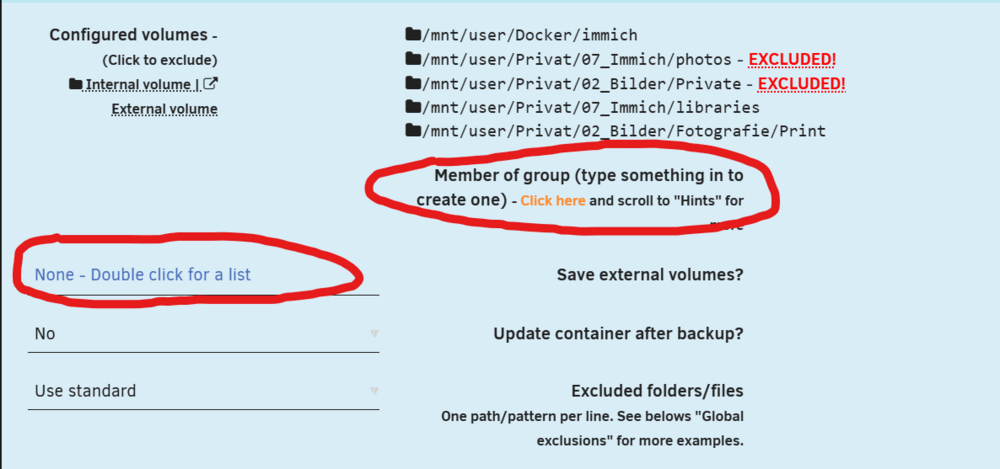
I found the function responsible for formatting. It’s somehow shifted.
-
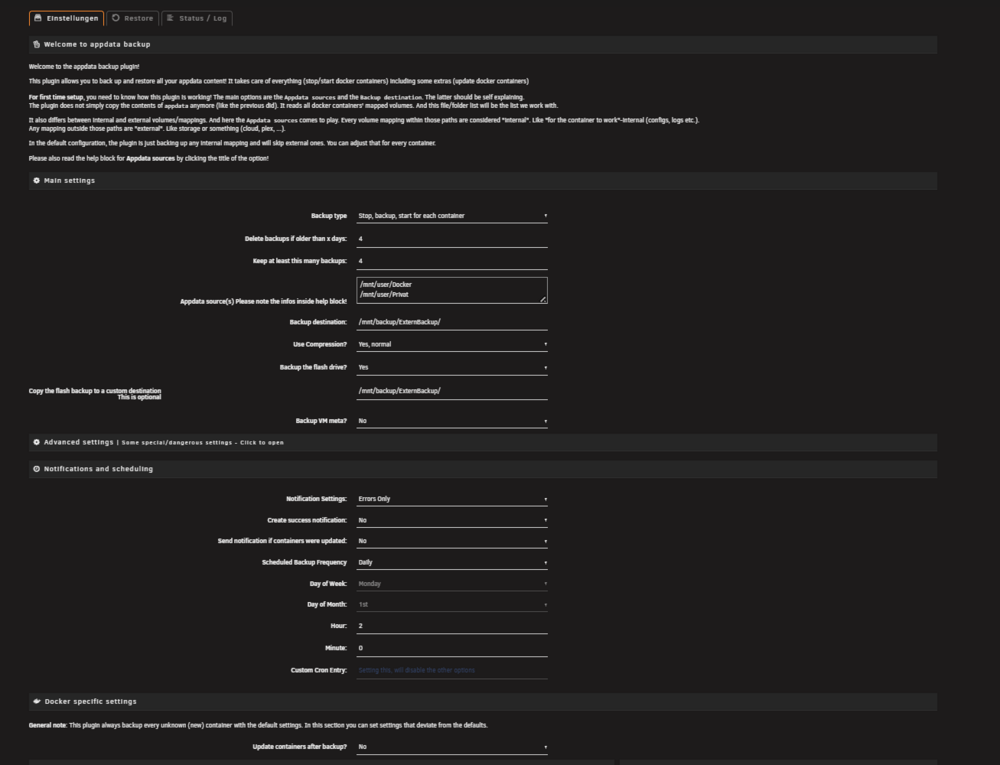
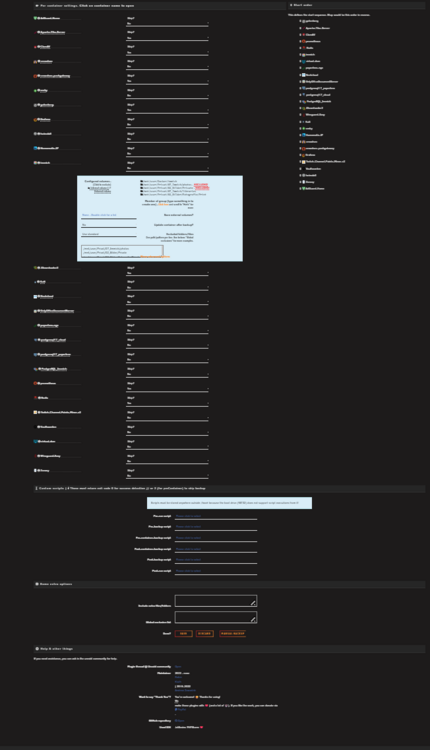
Sorry, but I can’t find this function. Could you maybe send me a screenshot of it?
-
How do you assemble this?
-
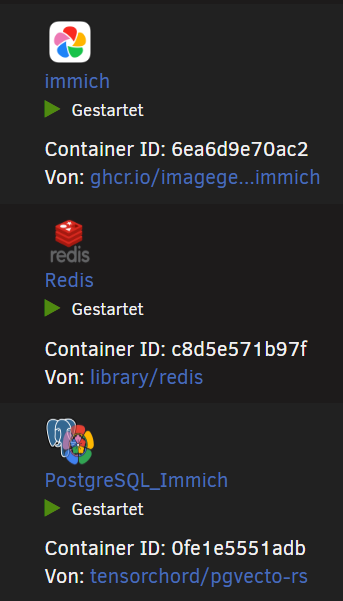
Hi, I have a problem updating the Immich container. As you can see in the logs, the container is stopped and the update process runs. Packaging the folders also completes without any issues. However, when it performs the verification afterward, it reports an error even though the container was stopped. Does anyone maybe have an idea what could be causing this?

-
Moin, also ich würde dir davon abraten, irgendetwas freizugeben – vor allem für Fremde. Nutze lieber Google Drive oder andere kostenlose Dienste, gerade wenn es um externe Personen geht. Für solche Freigaben muss man Cybersicherheit verstehen und seine Logs überwachen können. Ich selbst habe auch bestimmte Dienste von außen erreichbar, aber zusätzlich ein Cybersicherheitssystem mit Log-Speicher und einem Meldesystem bei verdächtigem Verhalten. Trotzdem schaue ich jeden Tag selbst noch rein und prüfe alles noch einmal manuell.
-
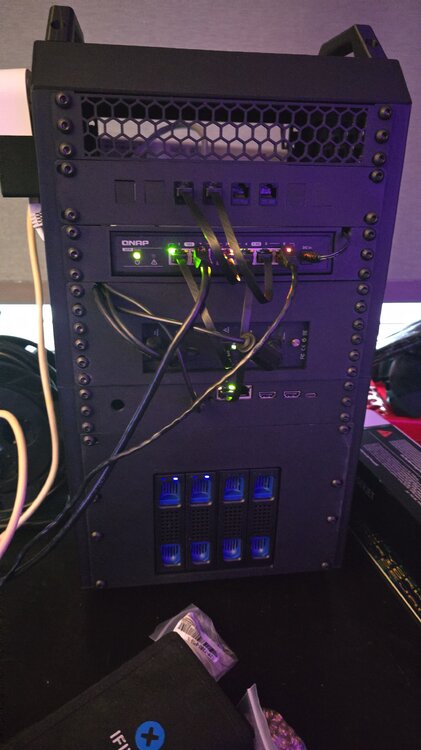
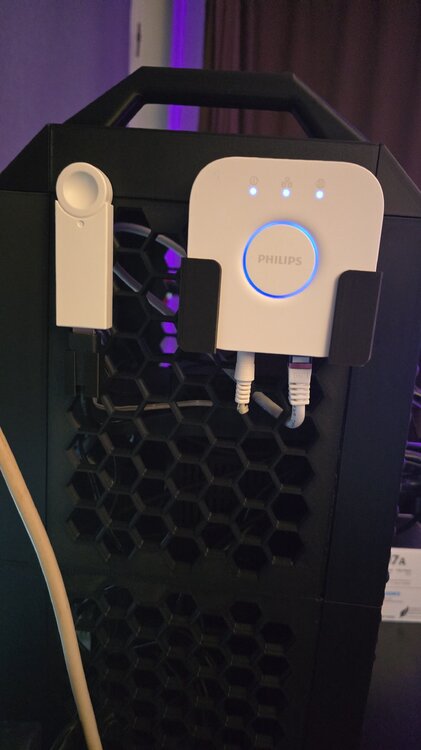
Ich habe ebenfalls einen Terramaster, aber das F8-SSD-Plus-Modell. Ich muss gestehen, dass ich vier NVMe-SSDs à 2 TB als RAID laufen habe – für Cache und Docker. Als USB-Erweiterung habe ich ein 4-Bay-Gehäuse angeschlossen, in dem zwei 20-TB-HDDs stecken: eine als Parität, die andere als Array. Das Ganze habe ich in ein 10-Zoll-3D-Druckgehäuse eingebaut. Es ist aber noch nicht fertig; ich warte noch auf Teile von AliExpress. Beim zweiten Server, dem N150, auch mit 4× NVMe à 2 TB, fehlt noch der Power-Button. Den muss ich anlöten, weil er auf der falschen Seite sitzt. Die Stromkabel der Geräte kommen später noch oben rein, und an der Seite hängen ein Philips-Hue-Stick und ein Homematic-USB-Stick. Hier ein kleines Beispiel, wie man das machen kann. Die 4× NVMe nutze ich als Cache für die Geschwindigkeit und auch für Docker, ebenfalls wegen der Geschwindigkeit. Auf den HDDs liegen Daten wie Dokumente und Multimedia-Dateien.
-
-
Ja das gebe ich dir vollkommen recht das einfacher wahr. Aber als ich gesehen habe, traefik alles kann bin ich sehr neugierig gewesen. GeoIP Ban, Crowdsec das sind punkte die mich sehr interessierten, weil es die Sicherheit betrifft. Vielleicht findet sich ja hier noch einer der vielleicht eine Idee hat








