xman111
Members
-
Joined
-
Last visited
Everything posted by xman111
-
hey guys, got this installed but cannot see my disks. under host path 2, i put /mnt/ but cannot find my disks anywhere. am trying to use this instead of MC, need some help please.
-
thanks guys, that worked great. What a great forum this is, appreciate it.
-
so /mnt/cache/appdata/Plex? ps. thanks for the quick response..
-
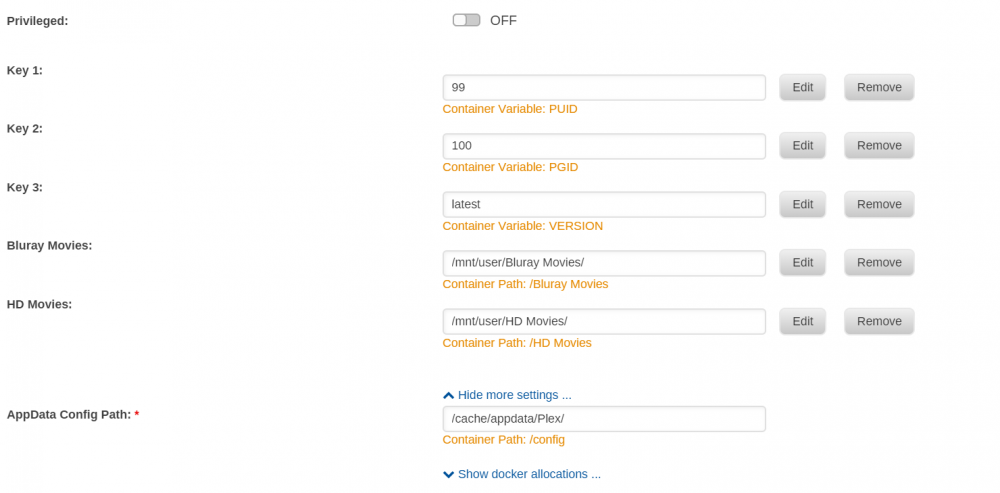
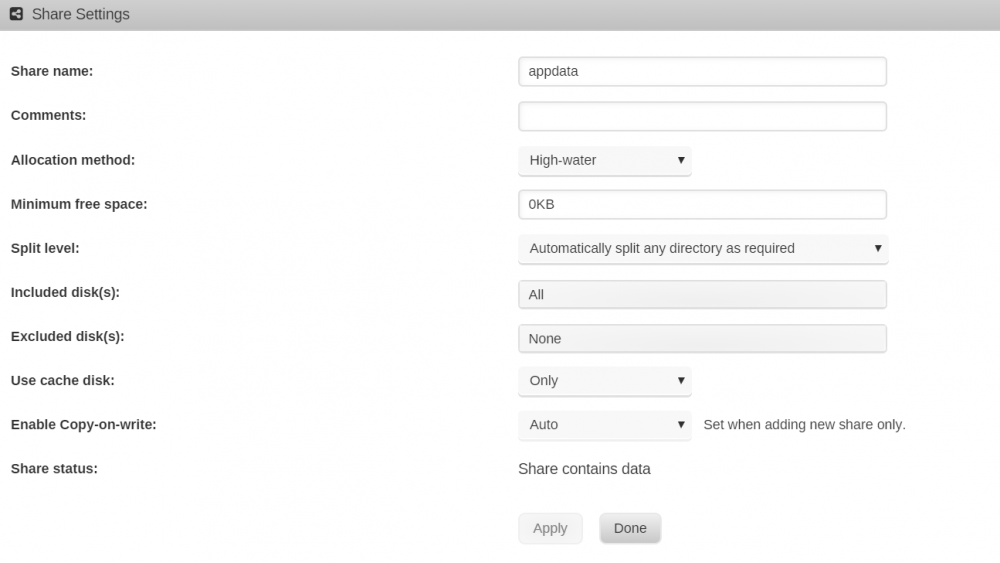
hey guys, got Plex working but everytime I reboot, i lose my library, thumbnails, etc and basically have to start from scratch. here is my config page.. Any ideas?
-
that's great to know. i just hope i don't fuxx it up if the network is down wife and kids go bananas..
-
thanks ijuarez, i will go through step by step and make sure my settings are right. i did this when it came out quite a while ago and my side probably (obviously) needs a little tweaking. Thanks for the link man!
-
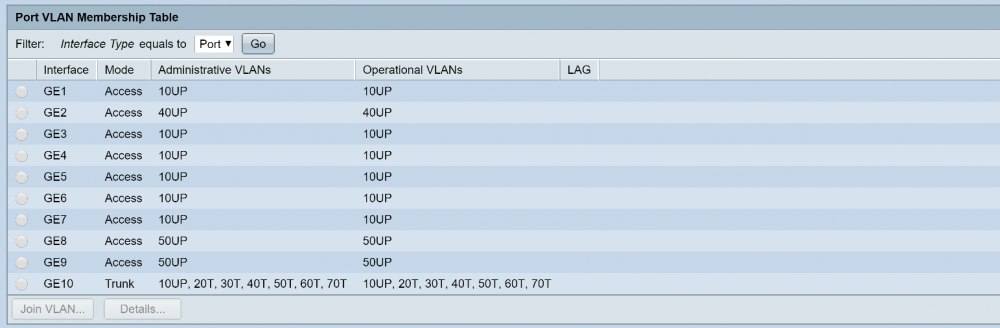
Ijuarez, sorry buddy, i didn't answer your questions. oh and yes AirVPN is the best VLAN 10 is my management lan as well. I am not forcing all the traffic through the VPN, only if it is connected to VLAN 40 which is AirVPN LAN or VLAN 60 which is a wireless version of AIRVPN. I also have the 10 Network as an untagged network, i was told to set it up that way on the PFsense forum. All my switches are setup using VLANS. Here is a screen shot of the one in my bedroom. See how port 10 is the trunk port that carries all my VLANs to my bedroom. Port 8 and 9 are for cameras. Port 2 is if I want to connect to AIRVPN, and the rest are my regular LAN. i don't think i used the exact same guide as you, i used the one from the AirVPN forum here: https://airvpn.org/topic/17444-how-to-set-up-pfsense-23-for-airvpn/ BTW, it is so nice to always be able to reach the GUI now, so happy.
-
hey, thanks for that info.. this is my task today, fix the VPN. Really appreciate that Ijuarez, since we have similar setups. I really realize i may be in over my head a little with the networking
-
thanks Ken-Ji, will look into that, think I will set it to static so I can control it. thanks so much for your help.
-
haha, it's 2:30 am here in Vancouver. you have a wonderful day, hopefully somebody might learn something from this thread, i know I sure did.. thanks a lot bonienl
-
i will play around and find a work around. right now to me, unraid is more important than my VPN as i have all my new computer stuff coming in the next couple days. Thanks again for staying up and working through this with me, i would have NEVER been able to figure that out. you're a rock star!!
-
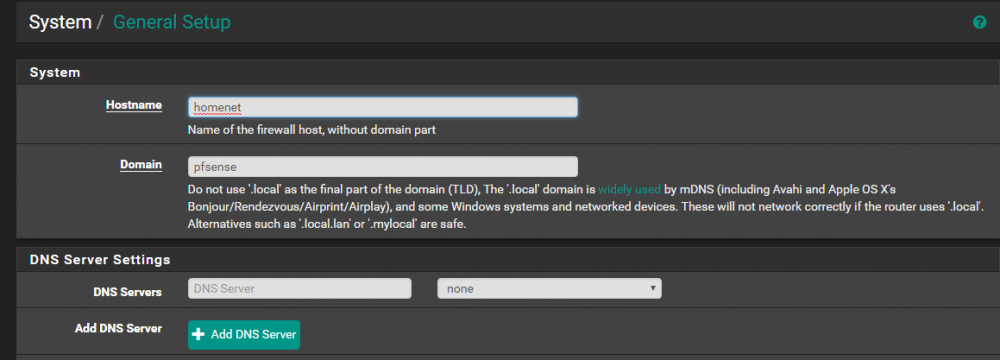
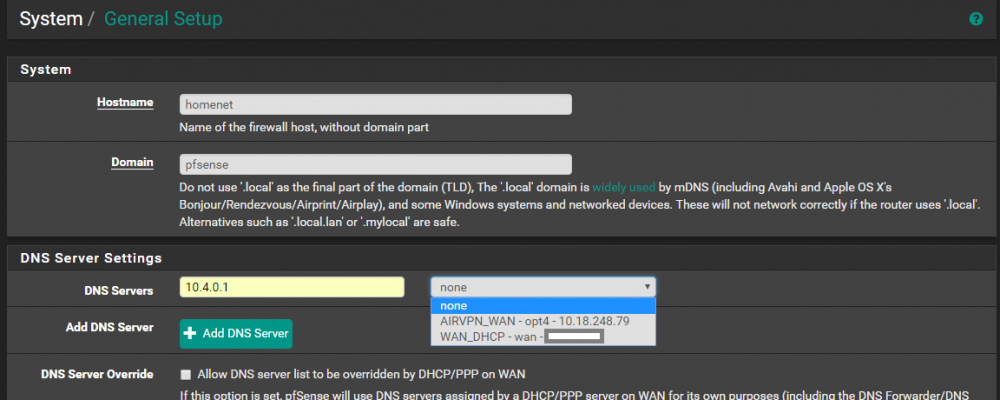
here is a picture of my pfsense general settings. i deleted the 10.4.0.1 out of the general DNS setting and now Unraid works but my VPN doesn't. And yes, all the VLANS are separate in pfsense and the switches. I tried putting back the 10.4.0.1 in the DNS setting and dropping down the list and picking AirVPN Wan but that didn't work. I am stoked though at least I know now where the problem was.. i was about ready to give up on unraid and throw the computer out the window.
-
here it is again.. i just switched Unraid back to automatically instead of static. here is with the static ip set. # Generated settings: IFNAME[0]="br0" BRNAME[0]="br0" BRSTP[0]="no" BRFD[0]="0" BRNICS[0]="eth0" PROTOCOL[0]="ipv4" USE_DHCP[0]="yes" DHCP_KEEPRESOLV="yes" DNS_SERVER1="8.8.8.8" DNS_SERVER2="8.8.4.4" USE_DHCP6[0]="yes" DHCP6_KEEPRESOLV="no" SYSNICS="1"
-
here is my network config file.. # Generated settings: IFNAME[0]="br0" BRNAME[0]="br0" BRSTP[0]="no" BRFD[0]="0" BRNICS[0]="eth0" PROTOCOL[0]="ipv4" USE_DHCP[0]="yes" DHCP_KEEPRESOLV="yes" DNS_SERVER1="54.187.61.200" USE_DHCP6[0]="yes" DHCP6_KEEPRESOLV="no" SYSNICS="1"
-
ya it broke my DNS for my VPN network but maybe I can find a workaround. there must be another way. I can't thank you enough for figuring this out for me.. I have been driving my wife and kids nuts. hopefully this will fix the webgui issue as well. for sure i will grab show the file.. that would be even better.
-
hey, in pfsense, under the general settings, that 10.4 number was there. I deleted it and now unraid takes the DNS number that i put in there. the only problem is i may have broken my VPN settings on my VPN network, i won't know until i can test it.
-
would that DNS make it so i couldn't get to the web gui as well? i know it wouldn't be able to resolve internet names.
-
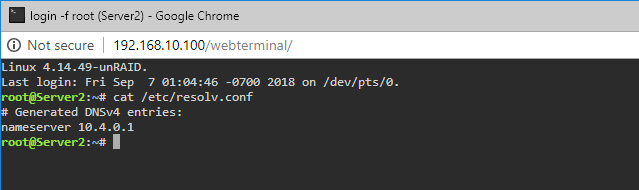
seems like no matter what I do in pfsense or unraid, always takes wrong DNS
-
I tried setting them statically in unraid to other DNS but it keeps wanting to take the VPN dns..
-
at least you found the problem, thanks man.. I just need to figure a way around it.
-
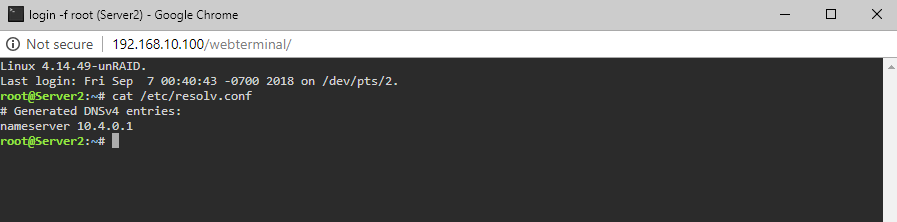
ya, sorry that is the DNS server from my VPN provider. It shouldn't get those. i do have unraid set to get static dns 8.8.8.8 and 8.8.4.4.sorry, edited my post! I think that is the problem, that is from my VPN provider. It shouldn't get that unless it is going through the tunnel on vlan 40 i think, that is weird.i just typed cat at the terminal and got this.. I think this may be the problem. That is the DNS of my VPN provider i think.
 of course, anything i can to help.. appreciate your time..