





rogales
Members
-
Joined
-
Last visited
Everything posted by rogales
-
I need the Python library qbittorrent-api (PyPI package), not the built-in Web API. My Python script uses import qbittorrentapi which isn't available in the container by default. Should I install it via pip or rewrite my script to use requests + Web API directly?
-
I would like to ask what's the easiest, and best way to install qbitorrent-api (it's necessary for a script I use every time when new torrent is added). Thanks
-
I apologize if there already was a thread, or post about it, but I'd like to ask if there is any possibility to downgrade libtorrent version?
-
I guess you're right. Was just happy that I made it work.. PS. Good to see you. It's been a while. 🤜🤛
-
If You want any assist in my person to make it work, dont hesitate, and ping me. :)
-
Im not sure how did You install this script. Because I have just created a docker container for this script with compose manager and here is my code which I've pasted there. services: autoremove-torrents: image: ghcr.io/nelsondane/autoremove-torrents:${VERSION:-latest} container_name: autoremove-torrents environment: CRON_SCHEDULE: "${CRON_SCHEDULE:-0 * * * *}" volumes: - /mnt/user/appdata/autoremove-torrents/config.yml:/app/config.yml - /mnt/user/appdata/autoremove-torrents/logs:/app/logs restart: unless-stopped of course at first You have to create config.yml
-
Which newer version of deluge? If we talk about latest binhex-deluge docker then it still works without any problems. Secondly, IF you want an alternative (which I personally use for binhex-qbittorrent) You should check: 1. https://github.com/jerrymakesjelly/autoremove-torrents 2. https://autoremove-torrents.readthedocs.io/en/latest/
-
I'm using autoremove plugin which can be installed through deluge interface. AutoRemovePlus-0.6.3.egg
-
Hey, well You tell me... Have no idea why it was a problem. Unfortunately I'm not that good, or even decent when it comes to linux, so my knowledge is at low level, but with small help of AI promts I've manage to find where my problem was. I just used grep "02:00\|09:00" /var/log/syslog command (with time forks which I was interested in) and there were a lot of inquiries about this share. I use "Unassigned Devices" plugin, in which I've just unmounted this specific share (it's my only one to be precise), and after that voilà! mover tuning script worked as it should - it checked the threshold, which wasn't passed, and it finished it's job - just as it should work.
-
@Masterwishx I found my issue. I don't know if it's a bug, or there is any option to disabled it in Mover Tuning, but my earlier mounted smb share was the problem. It's my personal PC, which is powered off - mover tuning is set to start always at night when I'm asleep, but the script have tried all the time to connect with this SMB share. I had to unmount this share, and after that there was no issue, or any kind of pause like it was earlier. Hope that will help You. Thanks.
-
I see. Well would love to help You but it's beyond my capabilities.
-
Even if You would check it via terminal command? For example with: du -h --max-depth=2 /mnt/yourcachepool/ | sort -hrYou can change depth for more detailed information. But I bet You know that already. :)
-
If that's important to You; that's why I wrote a script which stops, and after mover process finishes its job, it starts a.o. deluge client.
-
For a test I've deleted script path's in mover tuning, and set script for a daily check at 2 am. (just for a test!) There was the same situation, please take a look. There is a strange time break between 2 am and 10 am - its almost 8.30 hours. I have absolutely no idea where is the issue. //EDIT: I think, that I have found the source of the problem, but will confirm it tomorrow, after scron runs script again. ca.mover.tuning-debug-20250916-1044.zip
-
That's my script: #!/bin/bash docker stop binhex-deluge sleep 1 docker stop binhex-lidarr sleep 1 docker stop bazarr sleep 1 docker stop binhex-plexpass /usr/local/emhttp/plugins/dynamix/scripts/notify -s "Mover Tuning" -d "Mover Tuning has started @ `date +%H:%M:%S`." and that's my script after mover finish it's job: #!/bin/bash docker stop binhex-deluge sleep 1 docker stop binhex-lidarr sleep 1 docker stop bazarr sleep 1 docker stop binhex-plexpass /usr/local/emhttp/plugins/dynamix/scripts/notify -s "Mover Tuning" -d "Mover Tuning has started @ `date +%H:%M:%S`." No, parity check was disabled.
-
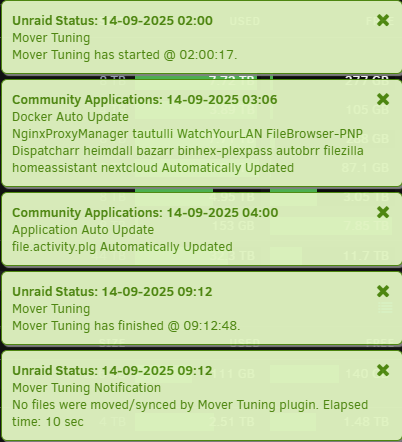
I do understand that, but my question is, why does the mover start its script (checking whether the conditions for operation are met) at 2.00, and it must pass over 7 hours to decide that there is nothing to move and terminates the operation? Why it's not imidiate after 2.00?
-
I will just take care of parity tuning later, it's not a big deal right now. Most important thing is to know why mover tuning behave like I posted earlier today. If You will have time, please look at it.
-
Where Can I found correct command for this? Nevermind, it was easier than ask. :) Attached debug file. /// Couple minutes ago Ive just removed Parity Tuning Plugin just because I guess it's not supported anymore. ca.mover.tuning-debug-20250914-1516.zip
-
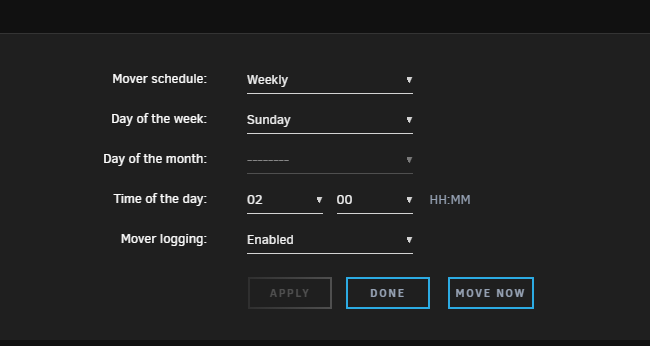
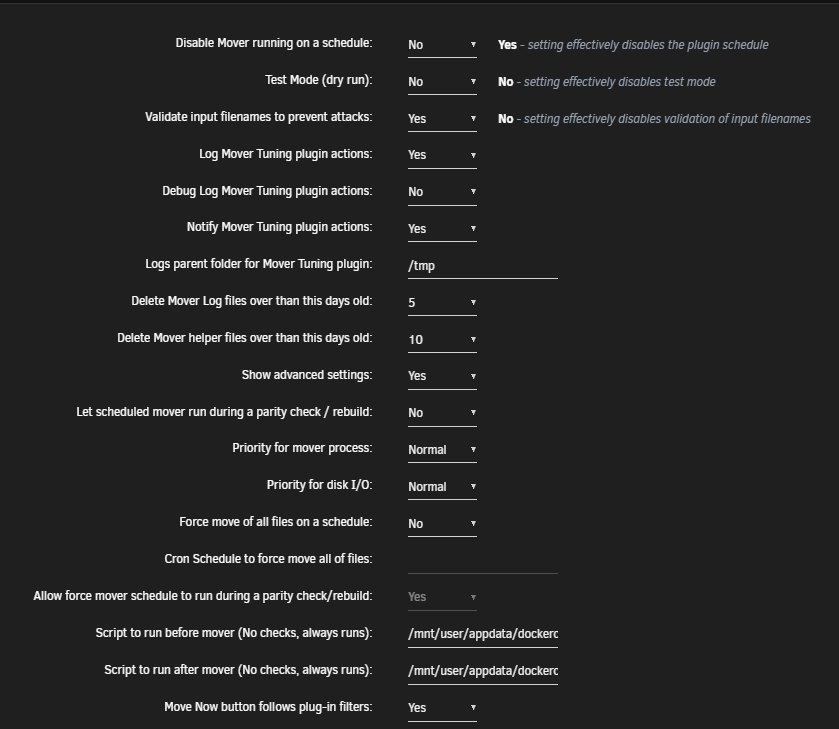
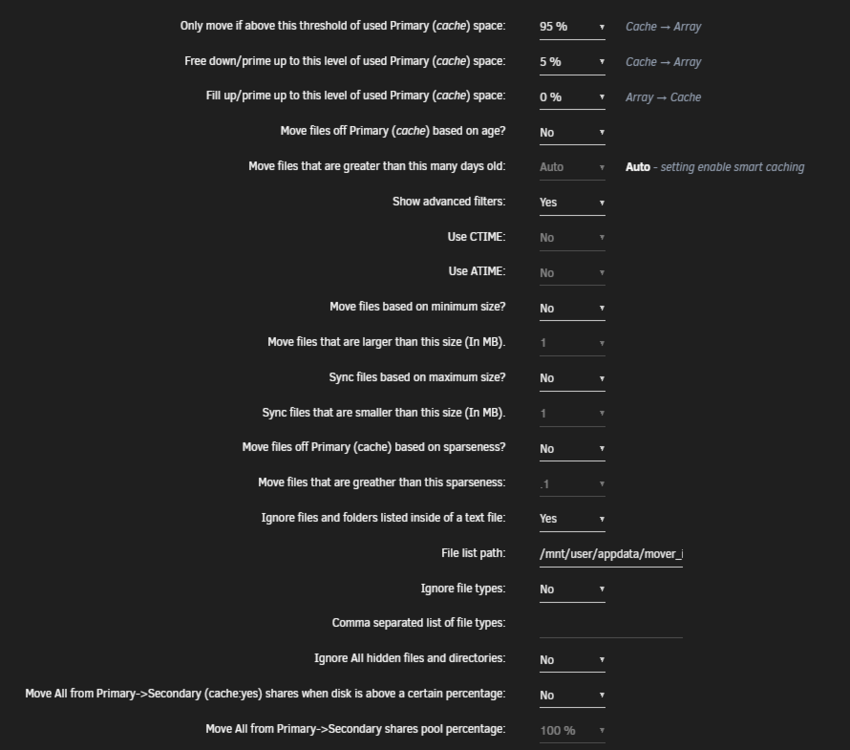
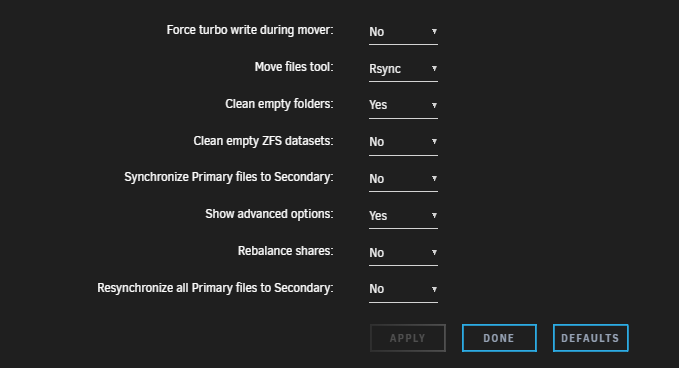
Hello there, I would like to figure what have I set wrong that my mover is activated for so long, even if the conditions to start process are not met. and here are my settings: I tried different settings but none of them seem to do the job. Where should I look for a problem? Tried also to create Debug package, but I received and error: ERROR: The Mover Tuning Debug Package Generation Script has failed - no response from the bash backend. thank You.
-
Hey there, It would be awesome if someone would add this github project to Community Apps. https://github.com/HydroshieldMKII/Guardian I think this app needs more recognition from the start. It's an absolute musthave for a PMS. and also, maybe this icon would be good for a start, click!
-
UPDATE: So now I know much more. I've replaced disk 3 with new 8TB IronWolf Pro drive, reorganised my array, and so far so good, there are no errors and everything works fine. I still want to look closer what's wrong with my old drive; rescanned it with few special for diagnostics apps, and on every it shows there is a connection issue (just like You said earlier with cables and so), so for now I will connect it for a couple of days with completely different machine than my Unraid server and will know everything; if I should still give it a chance, or just drill it through. :)
-
Yes, I'm 100% sure that electronic side of the HDD is broken. Will update this thread, after I recieve my new HDDs.
-
Bump. Anyone guys?
-
I agree with You, but I also have to admit that I've pasted this error to chatGPT and ClaudeAI and there is also an information about power cycle, or spin up time, so it would be a proper guess to what I've witnessed "visually". I've already ordered two 8TB IronWolf Pro drives, so I would be very thankful for a way to reorganize my array. Of course I would love not to lose my whole data, but I'm aware that this might happen.
-
I have followed Your suggestion, and... now it worked properly for aprx. 10 minutes, second time couldn't start, restarted for couple times, and so on. - different cable, where earlier another HDD worked without any issues for many hours. (and also different machine) but this is HDTune report Im pretty sure there must be something with electric side with this hard drive. What can I do now. I have only one parity drive, and 2 of my 4 HDD's are now corrupted. One electrically, one aborted with data. If it is important - I have "Fill Up" method active.



