rogales
Members
-
Joined
-
Last visited
Everything posted by rogales
-
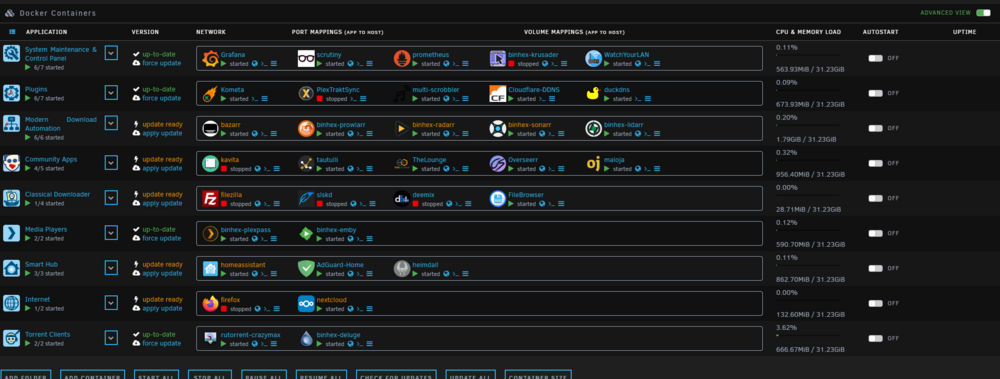
Hello there, I know there is an old topic (but it was solved), but I'd like to ask You for a help with my problem that I'm having lately with my Unraid Server. Well either if I restart my Unraid Server, or just Disable/Enable DOCKER tab (rarely, for any kind of custom settings which are not allowed while DOCKER runs) I cant get all of my docker containers to start (5-7 containers from the first row of my folder list starts) (list below), rest are in "the loop" of starting with "Please wait... starting up containers" notofication. Couldn't start more so what I did is I've disabled AUTOSTART in every docker folder, and made a poweroff procedure. Right after the system started, I could manually start every docker without any problems. Even if I click on every folder of my containers to run, the just start properly. My whole appdata share is on NVME drive. Yes I know its not the fastest one, but still should manage to start docker's even after few minutes right? Maybe I have something not properly set. Also seems like the "wait" feature doesn't make anything better. Can I ask You for a help on how can I deal with my problem? Thank You. unraid-diagnostics-20241030-2054.zip
-
Ohh, now I do understand it completely. Thank You for Your patience and clarification.
-
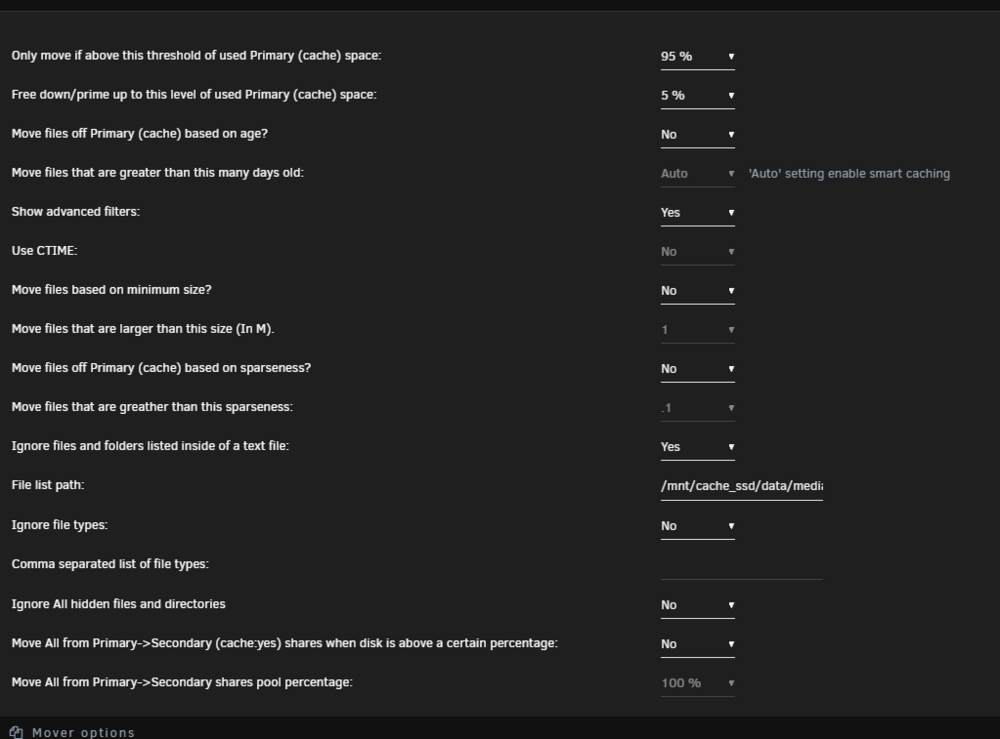
Yes I do understand that, but I was sure that it does not matter if i chose to start mover when disk utilization is 95% or more?
-
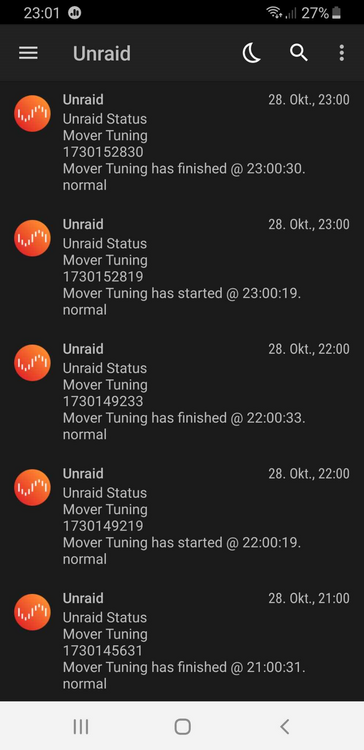
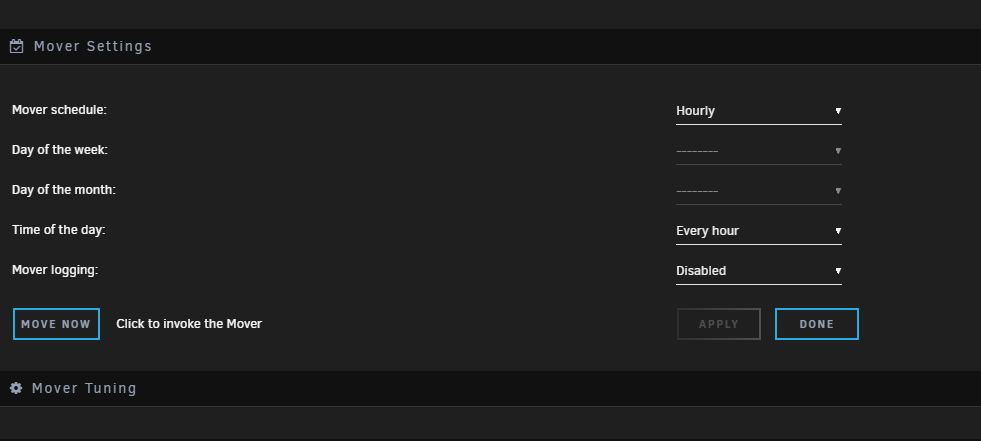
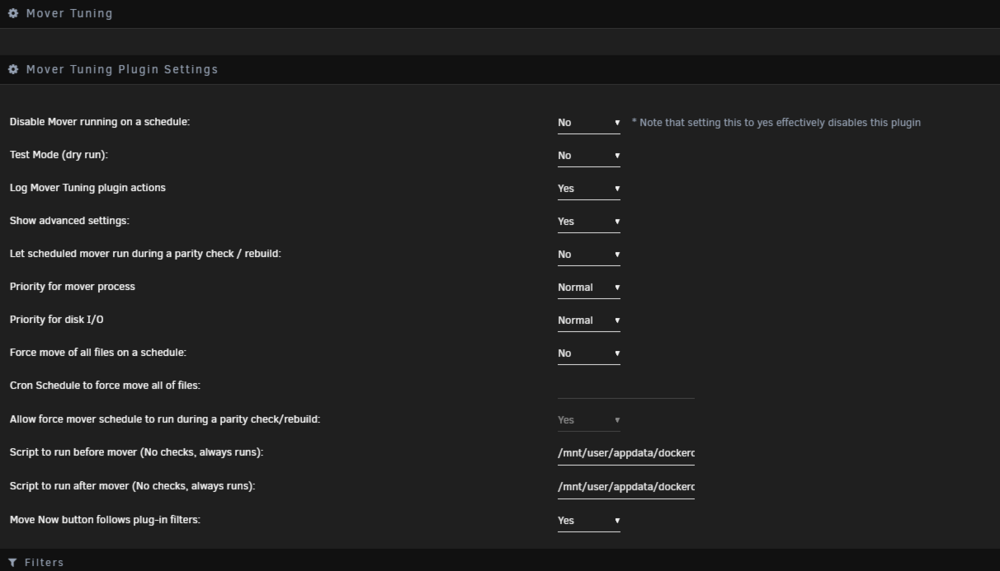
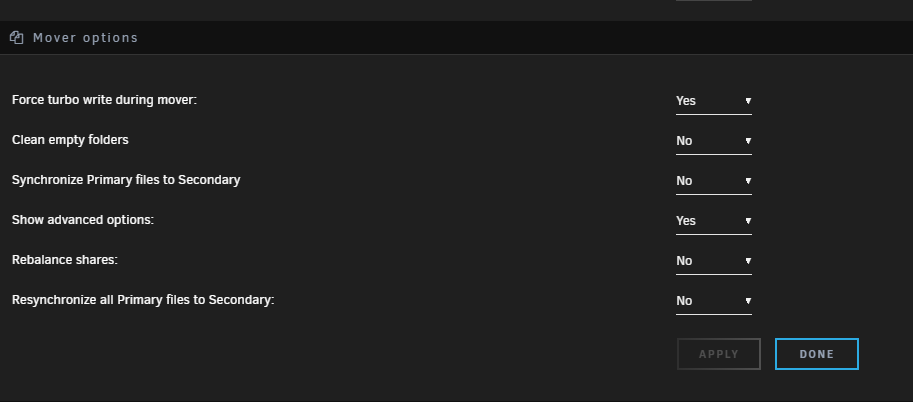
Hello there, Hope I won't disturb Your conversation here, but I have a problem with mover. I did not start mover process but it seems to automatically start every hour for few seconds and absolutely nothing to move. Can I ask You for help, what can be possibly wrong? Thank You. Have the same problem as You can see below. Don't know why.

-
Thank You for Your answer. Just to be sure, will there be an option to choose RAID0 mode, or how it will be possible to set it up?
-
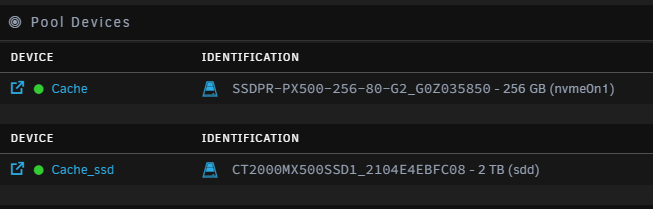
I know it's an old topic, but I'd like to be sure about what I want to do in a couple of days. So right now, as You can see below I have one Cache Drive (nvme one) which is set up for appdata, and system. The second SSD drive "Cache_ssd) is only for data - when it's almost full it is moved to my main array disks. I've ordered new (the same model and capacity as the first cache_ssd) drive to have IN TOTAL 4TB of available space for new data. The problem is that I don't want to move now files that are now stored on Cache_ssd. As I already checked this drive its in mode: Data, single: total=1.46TiB, used=1.46TiB System, DUP: total=8.00MiB, used=176.00KiB Metadata, DUP: total=2.00GiB, used=1.63GiB GlobalReserve, single: total=512.00MiB, used=0.00B So, my question is, If I be able to add second exactly the same SSD drive to installed one WITHOUT losing my data? Cache_ssd is in BTRFS format. Thanks.
-
Yeah, also having 500 | Server Error while trying to add new application.
-
Worked perfectly. @ich777, Vielen Dank
-
Hello there, I would like to ask how can I install custom themes from https://www.npmjs.com/package/thelounge-theme-ianon ? I've tried with docker run -it --entrypoint sh -v /mnt/user/appdata/thelounge:/var/opt/thelounge ich777/thelounge:latest but it gave me: thelounge install thelounge-theme-ianon What am I doing wrong? Any tips? Thanks!
-
Did exactly as You wrote and it worked! Thank You.
-
Have anybody else problem with logging out every time you want to get back to radarr site. Switching sites from radarr to (for example) Google, and then coming back radarr seems to be logging me out. For further questions. No I do not delete my cookies every time I close my browser. Second thing that I'd like to to add is that, community of servarr says that hotio or linuxserver images works properly. And last one, wanted to check if it's a browser problem, and it seems to work properly on MS EDGE.
-
Would be thankful for any kind of help.
-
Hey. I've managed to make multi-scrobbler work like I wanted to, but now I'm trying to import my last.fm library, but it fails. I've posted my problem here: https://github.com/krateng/maloja/issues/382 so if You had time, could you take a look on this one? Any help would be much apperaciated. Thanks UPDATE: resolved my issue with a small script. Your maloja docker repo still has https://benjaminbenben.com/lastfm-to-csv/ way of importing. Unfortunately site stops while trying to fetch the whole list, so... I've downloaded my list through https://lastfm.ghan.nl/export/ site, and after that, I've used script below to convert whole library to benjaminsbenben code. and after the whole process maloja import .csv file was imported completely. import csv from datetime import datetime # Funkcja do konwersji formatu daty def convert_date(date_str): # Usuwanie przecinka i przekształcanie daty na format bez przecinka return datetime.strptime(date_str, "%d %b %Y, %H:%M").strftime("%d %b %Y %H:%M") # Ścieżki plików (zamień na własne ścieżki) input_file = 'rogal.csv' output_file = 'proper.csv' # Otwieranie pliku wejściowego with open(input_file, 'r', newline='', encoding='utf-8') as csvfile: # Czytanie danych z pliku CSV reader = csv.DictReader(csvfile) # Otwieranie pliku wyjściowego with open(output_file, 'w', newline='', encoding='utf-8') as outfile: # Zapisz nowy plik CSV writer = csv.writer(outfile) # Iteracja przez każdą linię w pliku wejściowym for row in reader: artist = row['artist'] # Wykonawca album = row['album'] # Tytuł płyty track = row['track'] # Tytuł utworu date = convert_date(row['utc_time']) # Data (zmieniona na nowy format) # Zapisz dane w nowym formacie writer.writerow([artist, album, track, date]) print("Konwersja zakończona. Wynik zapisano w pliku 'wyjsciowy.csv'.") (and here small detail, on how to put Your docker in a shell mode:) docker run -it --entrypoint sh -v /mnt/user/appdata/maloja:/config -e MALOJA_DATA_DIRECTORY=/config krateng/maloja
-
Ohh. so that's my problem. is there any possibility to add sources to multiscrobber?
-
which results should I post?
-
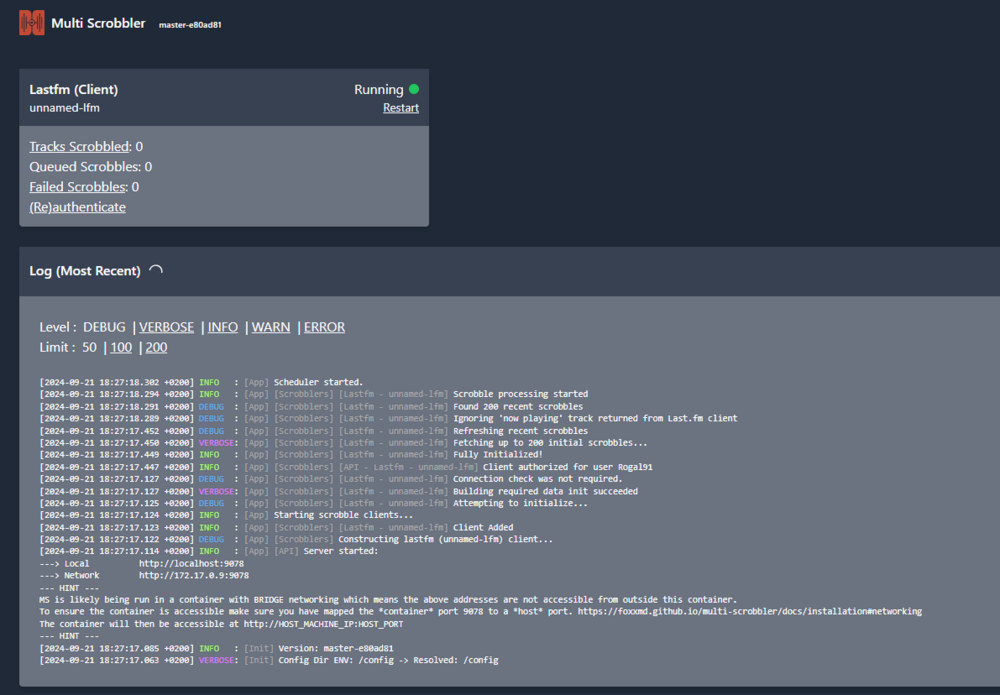
Can someone tell me why my connected lastfm account doesn't send recent scrobbles to multi-scrobber? Maybe it helps, I cant access this docker via "localhost" domain. Instead of that I use IP:PORT.
-
Ok, I know it's been a while, but now I could sit and try to test it. and.... it's strange, I do not understand that. Having scripts in appdata folder seem not to work (trying to run scripts even with "bash" command in terminal, it gives me an information about that docker is not known), BUT pasting scripts to /boot/config/plugins/ca.mover.tuning and run them with terminal bash /boot/config/plugins/ca.mover.tuning/dockeroff.sh command seem to work. any tips?
-
Thank You for Your answer! Looking forward for that possibility!
-
Hey. Just one question, is it possibile to stop/start docker containers using built-in scripts column before and after parity check? thanks.
-
Guys? Any kind of help?
-
Ok, will do that. How can I now check if it's working now? Should I run test mode, and see the logs?
-
Thank You for Your answer. To be honest I've had it earlier in my appdata folder (cache drive for appdata files, no the one I want to move files to array) and it did not work either. Would like to add, that I've created another script in notepad++ in unix system with .sh format: #!/bin/bash docker stop binhex-deluge sleep 1 docker stop binhex-lidarr sleep 1 docker stop bazarr sleep 1 docker stop binhex-plexpass sleep 1 docker stop binhex-radarr sleep 1 docker stop binhex-sonarr /usr/local/emhttp/plugins/dynamix/scripts/notify -s "Mover Tuning" -d "Mover Tuning has started @ `date +%H:%M:%S`." and it did not work. any tips?
-
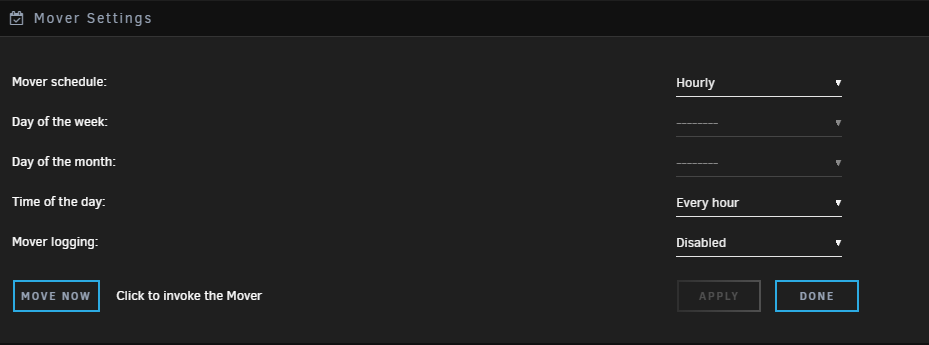
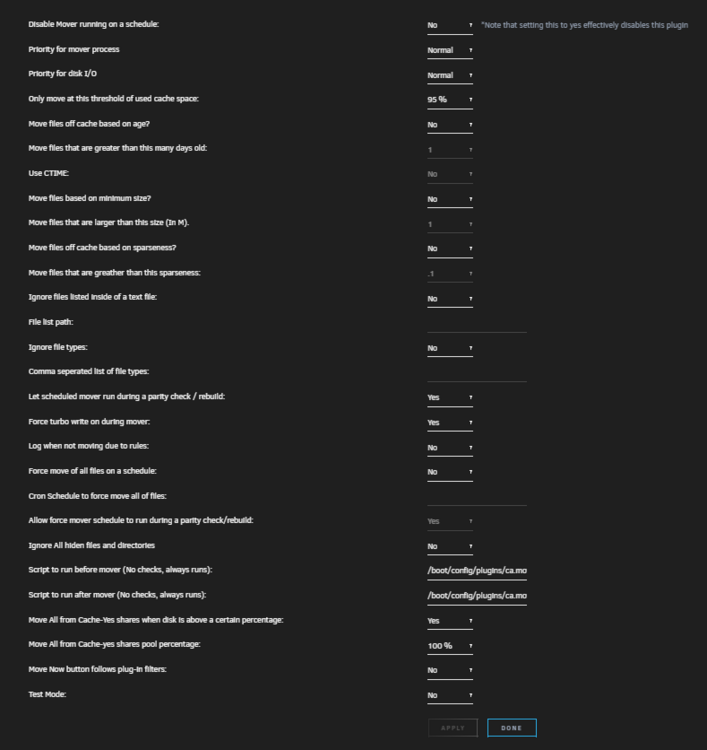
Hello, I know there is a lot of posts about this awesome plugin, but it also hard to find answer for my question (tried with search feature). So... moverDisabled="no" moverNice="0" moverIO="-c 2 -n 0" threshold="95" age="no" sizef="no" sparsnessf="no" filelistf="no" filetypesf="no" parity="yes" enableTurbo="yes" logging="no" force="no" ignoreHidden="no" beforeScript="/boot/config/plugins/ca.mover.tuning/dockeroff.sh" afterScript="/boot/config/plugins/ca.mover.tuning/dockeron.sh" omovercfg="yes" movenow="no" testmode="no" omoverthresh="100" These are my settings for mover tuning. I would like to stop before moving files few dockers, and after process is complete I want to start them back. Here is my script for that: #!/bin/bash docker stop binhex-deluge sleep 1 docker stop binhex-lidarr sleep 1 docker stop bazarr sleep 1 docker stop binhex-plexpass sleep 1 docker stop binhex-radarr sleep 1 docker stop binhex-sonarr exit 0 and of course same code is for start (stop word has been replaced with start obviously). Why my dockers don't want to stop, or even if I manually stop them, they won't start after moving process? thank You.
-
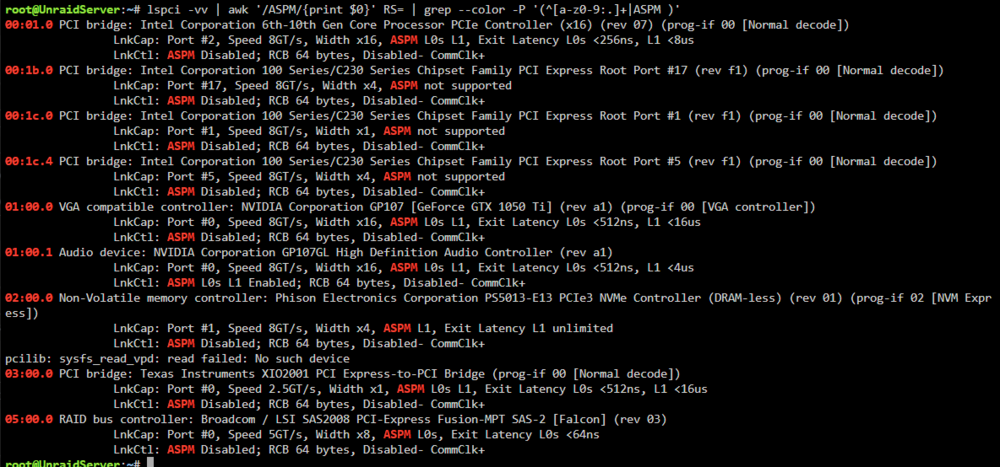
Hello there, I would ask You for a help. I want to try activate ASPM on my Unraid Server. Here is an output after command: lspci -vv | awk '/ASPM/{print $0}' RS= | grep --color -P '(^[a-z0-9:.]+|ASPM )' 00:01.0 PCI bridge: Intel Corporation 6th-10th Gen Core Processor PCIe Controller (x16) (rev 07) (prog-if 00 [Normal decode]) LnkCap: Port #2, Speed 8GT/s, Width x16, ASPM L0s L1, Exit Latency L0s <256ns, L1 <8us LnkCtl: ASPM Disabled; RCB 64 bytes, Disabled- CommClk+ 00:1b.0 PCI bridge: Intel Corporation 100 Series/C230 Series Chipset Family PCI Express Root Port #17 (rev f1) (prog-if 00 [Normal decode]) LnkCap: Port #17, Speed 8GT/s, Width x4, ASPM not supported LnkCtl: ASPM Disabled; RCB 64 bytes, Disabled- CommClk+ 00:1c.0 PCI bridge: Intel Corporation 100 Series/C230 Series Chipset Family PCI Express Root Port #1 (rev f1) (prog-if 00 [Normal decode]) LnkCap: Port #1, Speed 8GT/s, Width x1, ASPM not supported LnkCtl: ASPM Disabled; RCB 64 bytes, Disabled- CommClk+ 00:1c.4 PCI bridge: Intel Corporation 100 Series/C230 Series Chipset Family PCI Express Root Port #5 (rev f1) (prog-if 00 [Normal decode]) LnkCap: Port #5, Speed 8GT/s, Width x4, ASPM not supported LnkCtl: ASPM Disabled; RCB 64 bytes, Disabled- CommClk+ 01:00.0 VGA compatible controller: NVIDIA Corporation GP107 [GeForce GTX 1050 Ti] (rev a1) (prog-if 00 [VGA controller]) LnkCap: Port #0, Speed 8GT/s, Width x16, ASPM L0s L1, Exit Latency L0s <512ns, L1 <16us LnkCtl: ASPM Disabled; RCB 64 bytes, Disabled- CommClk+ 01:00.1 Audio device: NVIDIA Corporation GP107GL High Definition Audio Controller (rev a1) LnkCap: Port #0, Speed 8GT/s, Width x16, ASPM L0s L1, Exit Latency L0s <512ns, L1 <4us LnkCtl: ASPM L0s L1 Enabled; RCB 64 bytes, Disabled- CommClk+ 02:00.0 Non-Volatile memory controller: Phison Electronics Corporation PS5013-E13 PCIe3 NVMe Controller (DRAM-less) (rev 01) (prog-if 02 [NVM Express]) LnkCap: Port #1, Speed 8GT/s, Width x4, ASPM L1, Exit Latency L1 unlimited LnkCtl: ASPM Disabled; RCB 64 bytes, Disabled- CommClk+ pcilib: sysfs_read_vpd: read failed: No such device 03:00.0 PCI bridge: Texas Instruments XIO2001 PCI Express-to-PCI Bridge (prog-if 00 [Normal decode]) LnkCap: Port #0, Speed 2.5GT/s, Width x1, ASPM L0s L1, Exit Latency L0s <512ns, L1 <16us LnkCtl: ASPM Disabled; RCB 64 bytes, Disabled- CommClk+ 05:00.0 RAID bus controller: Broadcom / LSI SAS2008 PCI-Express Fusion-MPT SAS-2 [Falcon] (rev 03) LnkCap: Port #0, Speed 5GT/s, Width x8, ASPM L0s, Exit Latency L0s <64ns LnkCtl: ASPM Disabled; RCB 64 bytes, Disabled- CommClk+ and here is chatgpt analysis; Here’s an analysis of the lspci -vv output related to ASPM (Active State Power Management) in English: ASPM Status Analysis: Port 00:01.0 (PCI bridge - Intel Corporation, Gen Core Processor PCIe Controller) ASPM Support: L0s and L1 are supported. Current Status: ASPM Disabled (power-saving states are not enabled). Port 00:1b.0 (PCI bridge - Intel 100 Series/C230 Series Chipset Family, PCIe Root Port #17) ASPM Support: Not supported (ASPM cannot be enabled on this port). Port 00:1c.0 (PCI bridge - Intel 100 Series/C230 Series Chipset Family, PCIe Root Port #1) ASPM Support: Not supported (ASPM cannot be enabled). Port 00:1c.4 (PCI bridge - Intel 100 Series/C230 Series Chipset Family, PCIe Root Port #5) ASPM Support: Not supported (ASPM cannot be enabled). Port 01:00.0 (NVIDIA GeForce GTX 1050 Ti, VGA Controller) ASPM Support: L0s and L1 are supported. Current Status: ASPM Disabled. Port 01:00.1 (NVIDIA Audio Controller) ASPM Support: L0s and L1 are supported. Current Status: ASPM Enabled (power-saving states L0s and L1 are enabled for the audio controller). Port 02:00.0 (Phison NVMe Controller) ASPM Support: L1 is supported. Current Status: ASPM Disabled. Port 03:00.0 (Texas Instruments PCI Express-to-PCI Bridge) ASPM Support: L0s and L1 are supported. Current Status: ASPM Disabled. Port 05:00.0 (Broadcom / LSI SAS2008 Controller) ASPM Support: L0s is supported. Current Status: ASPM Disabled. What I want to achieve is to enable ASPM on most of those devices except NVME controller (which is my cache drive). What should I try to do? Can I count on Your help? Thank You.
-
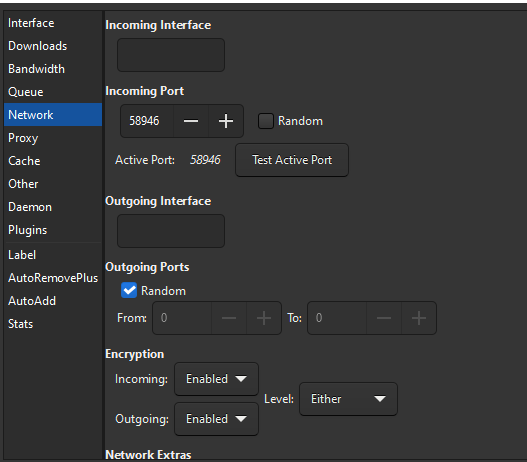
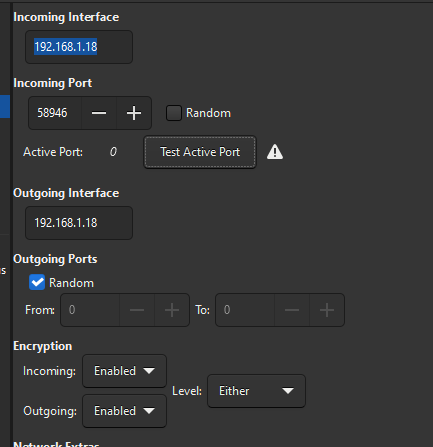
Hello there, I would like to ask Your for a help. Lately, even more and more often I'm having a problem with tracker annoucing; Sometimes tracker status give an information of: Error: skipping tracker announce (unreachable) So I've started googling, about this problem. I'm using this topic docker, without VPN, my port is open. https://forum.deluge-torrent.org/viewtopic.php?t=56331 - found this solution, but adding my server IP gives an error about port. So here, port is opened, but as mentioned above, from time to time, I'm getting errored on tracker announce. and here, after putting my server IP address, something is wrong with port: If it's useful, here is my network config; Can someone help me with this problem? Any help would be much apperaciated. Thanks!