mich2k
Members
-
Joined
-
Last visited
Everything posted by mich2k
-
Hello everybody, sometimes (so far I saw this behavior only when the apc ups sends the power off signal to the server), the server doesn't manage to power off and stays in a weird state for days also (up to 3 days so far) just for context I have a KVM to power it ow through WoL, I don't live where the server is so I have to wait that someone forcefully powers it off honestly I have no idea what's happening, I checked the logs (happened today 2 July at around 1pm) and I see this (see code block below) essentially hangs on the killall the server is unreachable in this state, on Tailscale is down, ssh is off, network interface is off too, WoL doesn't work the only thing I see is a 05 code on my maximus ix formula (did not manage to understand what this means) motherboard does anybody have any idea with this? thank you all I ran a meatiest with 3 passes and 0 errors thank you all homedata-diagnostics-20260702-1930.zip root@HomeData:~# tail -n 300 /boot/logs/syslog-previous Jul 2 12:52:33 HomeData kernel: br-bbdb4f0b810c: port 16(vetha3d7816) entered disabled state Jul 2 12:52:33 HomeData kernel: vethab5977a: renamed from eth0 Jul 2 12:52:33 HomeData kernel: br-bbdb4f0b810c: port 16(vetha3d7816) entered disabled state Jul 2 12:52:33 HomeData kernel: vetha3d7816 (unregistering): left allmulticast mode Jul 2 12:52:33 HomeData kernel: vetha3d7816 (unregistering): left promiscuous mode Jul 2 12:52:33 HomeData kernel: br-bbdb4f0b810c: port 16(vetha3d7816) entered disabled state Jul 2 12:52:33 HomeData kernel: br-bbdb4f0b810c: port 14(veth31ac0a0) entered disabled state Jul 2 12:52:33 HomeData kernel: veth014a3fc: renamed from eth0 Jul 2 12:52:33 HomeData kernel: br-bbdb4f0b810c: port 14(veth31ac0a0) entered disabled state Jul 2 12:52:33 HomeData kernel: veth31ac0a0 (unregistering): left allmulticast mode Jul 2 12:52:33 HomeData kernel: veth31ac0a0 (unregistering): left promiscuous mode Jul 2 12:52:33 HomeData kernel: br-bbdb4f0b810c: port 14(veth31ac0a0) entered disabled state Jul 2 12:52:33 HomeData kernel: br-bbdb4f0b810c: port 12(veth8e55556) entered disabled state Jul 2 12:52:33 HomeData kernel: veth9f1b53a: renamed from eth0 Jul 2 12:52:33 HomeData kernel: br-bbdb4f0b810c: port 12(veth8e55556) entered disabled state Jul 2 12:52:33 HomeData kernel: veth8e55556 (unregistering): left allmulticast mode Jul 2 12:52:33 HomeData kernel: veth8e55556 (unregistering): left promiscuous mode Jul 2 12:52:33 HomeData kernel: br-bbdb4f0b810c: port 12(veth8e55556) entered disabled state Jul 2 12:52:36 HomeData kernel: br-bbdb4f0b810c: port 10(vethb38d289) entered disabled state Jul 2 12:52:36 HomeData kernel: vethfc4b932: renamed from eth0 Jul 2 12:52:36 HomeData kernel: br-bbdb4f0b810c: port 10(vethb38d289) entered disabled state Jul 2 12:52:36 HomeData kernel: vethb38d289 (unregistering): left allmulticast mode Jul 2 12:52:36 HomeData kernel: vethb38d289 (unregistering): left promiscuous mode Jul 2 12:52:36 HomeData kernel: br-bbdb4f0b810c: port 10(vethb38d289) entered disabled state Jul 2 12:52:36 HomeData kernel: br-175c109829a5: port 1(vethf7858c7) entered disabled state Jul 2 12:52:36 HomeData kernel: veth10f5b48: renamed from eth1 Jul 2 12:52:36 HomeData kernel: br-175c109829a5: port 1(vethf7858c7) entered disabled state Jul 2 12:52:36 HomeData kernel: vethf7858c7 (unregistering): left allmulticast mode Jul 2 12:52:36 HomeData kernel: vethf7858c7 (unregistering): left promiscuous mode Jul 2 12:52:36 HomeData kernel: br-175c109829a5: port 1(vethf7858c7) entered disabled state Jul 2 12:52:37 HomeData kernel: br-bbdb4f0b810c: port 13(vethddcf201) entered disabled state Jul 2 12:52:37 HomeData kernel: veth3fcae2c: renamed from eth0 Jul 2 12:52:37 HomeData kernel: br-bbdb4f0b810c: port 13(vethddcf201) entered disabled state Jul 2 12:52:37 HomeData kernel: vethddcf201 (unregistering): left allmulticast mode Jul 2 12:52:37 HomeData kernel: vethddcf201 (unregistering): left promiscuous mode Jul 2 12:52:37 HomeData kernel: br-bbdb4f0b810c: port 13(vethddcf201) entered disabled state Jul 2 12:52:39 HomeData kernel: BTRFS info (device loop3): last unmount of filesystem 8aad4abe-b4c5-4813-8ba8-ddca8fce9c3b Jul 2 12:52:39 HomeData kernel: br-175c109829a5: port 2(veth2c0876a) entered disabled state Jul 2 12:52:39 HomeData kernel: veth3e1df91: renamed from eth0 Jul 2 12:52:40 HomeData kernel: br-175c109829a5: port 2(veth2c0876a) entered disabled state Jul 2 12:52:40 HomeData kernel: veth2c0876a (unregistering): left allmulticast mode Jul 2 12:52:40 HomeData kernel: veth2c0876a (unregistering): left promiscuous mode Jul 2 12:52:40 HomeData kernel: br-175c109829a5: port 2(veth2c0876a) entered disabled state Jul 2 12:52:40 HomeData rc.docker: Unraid managed containers stopped. Jul 2 12:52:40 HomeData rc.docker: Stopping network... Jul 2 12:52:40 HomeData rc.docker: ip -4 addr del 10.5.0.128/23 dev shim-br0 metric 0 Jul 2 12:52:40 HomeData rc.docker: Network stopped. Jul 2 12:52:40 HomeData rc.docker: Stopping Docker daemon... Jul 2 12:52:40 HomeData root: Waiting 30 seconds for Docker daemon to die. Jul 2 12:52:42 HomeData rc.docker: ip link set docker0 down Jul 2 12:52:42 HomeData rc.docker: ip link del docker0 Jul 2 12:52:42 HomeData rc.docker: Docker daemon... Stopped. Jul 2 12:52:42 HomeData emhttpd: shcmd (25833): umount --lazy /var/lib/docker Jul 2 12:52:43 HomeData kernel: BTRFS info (device loop2): last unmount of filesystem f0022b9f-906a-4310-91a6-e712796a9975 Jul 2 12:52:43 HomeData root: Stopping CA Turbo Mode Jul 2 12:52:43 HomeData root: Terminating 19009 Jul 2 12:52:43 HomeData cache_dirs: Stopping cache_dirs process 19517 Jul 2 12:52:44 HomeData cache_dirs: cache_dirs service rc.cachedirs: Stopped Jul 2 12:52:44 HomeData unassigned.devices: Unmounting All Devices... Jul 2 12:52:44 HomeData sudo: pam_unix(sudo:session): session closed for user root Jul 2 12:52:47 HomeData emhttpd: shcmd (25835): /etc/rc.d/rc.samba stop Jul 2 12:52:47 HomeData rc.samba: Stopping Samba server daemon... Jul 2 12:52:47 HomeData rc.samba: kill 11385 Jul 2 12:52:48 HomeData rc.samba: killall --ns 4111122 smbd nmbd wsdd2 winbindd Jul 2 12:52:48 HomeData wsdd2[11430]: 'Terminated' signal received. Jul 2 12:52:48 HomeData wsdd2[11430]: terminating. Jul 2 12:52:48 HomeData winbindd[11440]: [2026/07/02 12:52:48.435562, 0, traceid=1] ../../source3/winbindd/winbindd_dual.c:1984(winbindd_sig_term_handler) Jul 2 12:52:48 HomeData winbindd[11440]: Got sig[15] terminate (is_parent=1) Jul 2 12:52:48 HomeData rc.samba: Samba server daemon... Stopped. Jul 2 12:52:48 HomeData emhttpd: shcmd (25836): rm -f /etc/avahi/services/smb.service Jul 2 12:52:48 HomeData emhttpd: shcmd (25838): /etc/rc.d/rc.nfsd stop Jul 2 12:52:48 HomeData rc.nfsd: Stopping NFS server daemon... Jul 2 12:52:49 HomeData rpc.mountd[29876]: Caught signal 15, un-registering and exiting. Jul 2 12:52:49 HomeData rc.nfsd: /usr/sbin/rpc.nfsd 0 Jul 2 12:52:49 HomeData rc.nfsd: /usr/sbin/exportfs -au Jul 2 12:52:49 HomeData rc.nfsd: NFS server daemon... Stopped. Jul 2 12:52:49 HomeData emhttpd: Stopping mover... Jul 2 12:52:49 HomeData emhttpd: shcmd (25839): /usr/local/sbin/mover stop Jul 2 12:52:49 HomeData root: mover: not running Jul 2 12:52:49 HomeData emhttpd: Sync filesystems... Jul 2 12:52:49 HomeData emhttpd: shcmd (25840): sync Jul 2 12:52:49 HomeData rc.rsyslogd: Restarting Syslog server daemon... Jul 2 12:52:49 HomeData rc.rsyslogd: Stopping Syslog server daemon... Jul 2 12:52:49 HomeData rc.rsyslogd: killall --ns 4111249 rsyslogd Jul 2 12:52:52 HomeData rc.rsyslogd: Syslog server daemon... Started. Jul 2 12:52:52 HomeData emhttpd: shcmd (25841): /usr/sbin/zfs unmount -a Jul 2 12:52:53 HomeData rsyslogd: [origin software="rsyslogd" swVersion="8.2102.0" x-pid="4111501" x-info="https://www.rsyslog.com"] start Jul 2 12:52:53 HomeData emhttpd: shcmd (25842): umount /mnt/user0 Jul 2 12:52:53 HomeData emhttpd: shcmd (25843): rmdir /mnt/user0 Jul 2 12:52:53 HomeData emhttpd: shcmd (25844): umount /mnt/user Jul 2 12:52:55 HomeData emhttpd: shcmd (25845): rmdir /mnt/user Jul 2 12:52:55 HomeData emhttpd: shcmd (25846): rm -f /boot/config/plugins/dynamix/mover.cron Jul 2 12:52:55 HomeData emhttpd: shcmd (25847): /usr/local/sbin/update_cron Jul 2 12:52:55 HomeData emhttpd: Unmounting disks... Jul 2 12:52:55 HomeData emhttpd: shcmd (25848): /usr/sbin/zpool export -f disk1 Jul 2 12:52:56 HomeData emhttpd: shcmd (25849): rmdir /mnt/disk1 Jul 2 12:52:56 HomeData emhttpd: shcmd (25851): umount /mnt/disk2 Jul 2 12:52:56 HomeData kernel: XFS (md2p1): Unmounting Filesystem 59a4b9ad-1e2d-4a62-bcfc-7b8ac0b1cce4 Jul 2 12:52:56 HomeData emhttpd: shcmd (25852): rmdir /mnt/disk2 Jul 2 12:52:56 HomeData emhttpd: shcmd (25853): /usr/sbin/zpool export -f disk3 Jul 2 12:52:57 HomeData emhttpd: shcmd (25854): rmdir /mnt/disk3 Jul 2 12:52:57 HomeData emhttpd: shcmd (25855): /usr/sbin/zpool export -f disk4 Jul 2 12:52:57 HomeData emhttpd: shcmd (25856): rmdir /mnt/disk4 Jul 2 12:52:57 HomeData emhttpd: shcmd (25857): /usr/sbin/zpool export -f cache Jul 2 12:52:58 HomeData emhttpd: shcmd (25858): rmdir /mnt/cache Jul 2 12:52:58 HomeData emhttpd: shcmd (25860): umount /mnt/temp_cache Jul 2 12:52:58 HomeData kernel: BTRFS info (device sdd1): last unmount of filesystem bc9fb719-709d-4a06-8470-e4ddae82c091 Jul 2 12:52:58 HomeData emhttpd: shcmd (25861): rmdir /mnt/temp_cache Jul 2 12:52:58 HomeData kernel: mdcmd (40): stop Jul 2 12:52:58 HomeData kernel: md1p1: stopping Jul 2 12:52:58 HomeData kernel: md2p1: stopping Jul 2 12:52:58 HomeData kernel: md3p1: stopping Jul 2 12:52:58 HomeData kernel: md4p1: stopping Jul 2 12:52:58 HomeData kernel: md: unRAID driver removed Jul 2 12:52:58 HomeData emhttpd: shcmd (25864): /sbin/modprobe md-mod super=/boot/config/super.dat Jul 2 12:52:58 HomeData kernel: md: unRAID driver 2.9.35 installed Jul 2 12:52:58 HomeData kernel: mdcmd (1): import 0 sdg 64 17578328012 0 ST18000NM003D-3DL103_ZVT719C3 Jul 2 12:52:58 HomeData kernel: md: import disk0: (sdg) ST18000NM003D-3DL103_ZVT719C3 size: 17578328012 Jul 2 12:52:58 HomeData kernel: mdcmd (2): import 29 Jul 2 12:52:58 HomeData kernel: md: import_slot: 29 empty Jul 2 12:52:58 HomeData kernel: mdcmd (3): import 1 sdh 64 17578328012 0 ST18000NM003D-3DL103_ZVTB4S7C Jul 2 12:52:58 HomeData kernel: md: import disk1: (sdh) ST18000NM003D-3DL103_ZVTB4S7C size: 17578328012 Jul 2 12:52:58 HomeData kernel: mdcmd (4): import 2 sde 64 976762552 0 WDC_WD10EZEX-00BN5A0_WD-WCC3F2HTLCJ5 Jul 2 12:52:58 HomeData kernel: md: import disk2: (sde) WDC_WD10EZEX-00BN5A0_WD-WCC3F2HTLCJ5 size: 976762552 Jul 2 12:52:58 HomeData kernel: mdcmd (5): import 3 sdf 64 976762552 0 WDC_WD10EZEX-00WN4A0_WD-WCC6Y0ZERCX6 Jul 2 12:52:58 HomeData kernel: md: import disk3: (sdf) WDC_WD10EZEX-00WN4A0_WD-WCC6Y0ZERCX6 size: 976762552 Jul 2 12:52:58 HomeData kernel: mdcmd (6): import 4 sdc 64 976762552 0 WDC_WD10EZEX-08WN4A0_WD-WCC6Y7NK84F6 Jul 2 12:52:58 HomeData kernel: md: import disk4: (sdc) WDC_WD10EZEX-08WN4A0_WD-WCC6Y7NK84F6 size: 976762552 Jul 2 12:52:58 HomeData kernel: mdcmd (7): import 5 Jul 2 12:52:58 HomeData kernel: mdcmd (8): import 6 Jul 2 12:52:58 HomeData kernel: mdcmd (9): import 7 Jul 2 12:52:58 HomeData kernel: mdcmd (10): import 8 Jul 2 12:52:58 HomeData kernel: mdcmd (11): import 9 Jul 2 12:52:58 HomeData kernel: mdcmd (12): import 10 Jul 2 12:52:58 HomeData kernel: mdcmd (13): import 11 Jul 2 12:52:58 HomeData kernel: mdcmd (14): import 12 Jul 2 12:52:58 HomeData kernel: mdcmd (15): import 13 Jul 2 12:52:58 HomeData kernel: mdcmd (16): import 14 Jul 2 12:52:58 HomeData kernel: mdcmd (17): import 15 Jul 2 12:52:58 HomeData kernel: mdcmd (18): import 16 Jul 2 12:52:58 HomeData kernel: mdcmd (19): import 17 Jul 2 12:52:58 HomeData kernel: mdcmd (20): import 18 Jul 2 12:52:58 HomeData kernel: mdcmd (21): import 19 Jul 2 12:52:58 HomeData kernel: mdcmd (22): import 20 Jul 2 12:52:58 HomeData kernel: mdcmd (23): import 21 Jul 2 12:52:58 HomeData kernel: mdcmd (24): import 22 Jul 2 12:52:58 HomeData kernel: mdcmd (25): import 23 Jul 2 12:52:58 HomeData kernel: mdcmd (26): import 24 Jul 2 12:52:58 HomeData kernel: mdcmd (27): import 25 Jul 2 12:52:58 HomeData kernel: mdcmd (28): import 26 Jul 2 12:52:58 HomeData kernel: mdcmd (29): import 27 Jul 2 12:52:58 HomeData kernel: mdcmd (30): import 28 Jul 2 12:52:58 HomeData emhttpd: import 30 pool device: (nvme0n1) Samsung_SSD_960_PRO_512GB_S3EWNX0J409250M Jul 2 12:52:58 HomeData emhttpd: import 31 pool device: (nvme1n1) Lexar_SSD_NM620_512GB_NB1824R011990P1110 Jul 2 12:52:58 HomeData emhttpd: import 32 pool device: (sdd) Samsung_SSD_850_EVO_250GB_S21PNSAG728648X Jul 2 12:52:58 HomeData emhttpd: /sbin/blkid /dev/sda1 2>&1 Jul 2 12:52:58 HomeData emhttpd: /dev/sda1: LABEL_FATBOOT="UNRAID" LABEL="UNRAID" UUID="AA5E-5644" BLOCK_SIZE="512" TYPE="vfat" Jul 2 12:52:58 HomeData emhttpd: import 33 flash device: (sda) Jul 2 12:52:58 HomeData emhttpd: update_pool_cfg: 30 cache 0 Jul 2 12:52:58 HomeData emhttpd: update_pool_cfg: 32 temp_cache 0 Jul 2 12:52:59 HomeData SysDriversBuild: Submitting SysDrivers Build Jul 2 12:52:59 HomeData emhttpd: shcmd (25873): rm -f /boot/config/forcesync Jul 2 12:52:59 HomeData emhttpd: shcmd (25874): sync Jul 2 12:52:59 HomeData sysDrivers: SysDrivers Build Starting Jul 2 12:52:59 HomeData emhttpd: shcmd (25878): /etc/rc.d/rc.samba start Jul 2 12:52:59 HomeData rc.samba: Starting Samba server daemon... Jul 2 12:52:59 HomeData rc.samba: /usr/sbin/smbd -D Jul 2 12:52:59 HomeData rc.samba: /usr/sbin/wsdd2 -d -4 -6 Jul 2 12:52:59 HomeData wsdd2[4112088]: starting. Jul 2 12:52:59 HomeData rc.samba: /usr/sbin/winbindd -D Jul 2 12:52:59 HomeData rc.samba: Samba server daemon... Started. Jul 2 12:52:59 HomeData emhttpd: shcmd (25879): cp /tmp/emhttp/smb.service /etc/avahi/services/smb.service Jul 2 12:52:59 HomeData emhttpd: shcmd (25881): /etc/rc.d/rc.nfsd start Jul 2 12:52:59 HomeData rc.nfsd: Starting NFS server daemon... Jul 2 12:52:59 HomeData rc.nfsd: /usr/sbin/exportfs -r Jul 2 12:52:59 HomeData rc.nfsd: /usr/sbin/rpc.nfsd -u -H 10.5.0.128 -H 127.0.0.1 -H 100.100.229.38 -H fd7a:115c:a1e0::23e4:e526 -s 8 Jul 2 12:53:01 HomeData kernel: NFSD: Using UMH upcall client tracking operations. Jul 2 12:53:01 HomeData kernel: NFSD: Using UMH upcall client tracking operations. Jul 2 12:53:01 HomeData kernel: NFSD: starting 90-second grace period (net f0000000) Jul 2 12:53:01 HomeData rc.nfsd: /usr/sbin/rpc.mountd Jul 2 12:53:01 HomeData rpc.mountd[4112494]: Version 2.8.4 starting Jul 2 12:53:01 HomeData rc.nfsd: NFS server daemon... Started. Jul 2 12:53:01 HomeData emhttpd: shcmd (25883): /etc/rc.d/rc.avahidaemon reload Jul 2 12:53:01 HomeData unassigned.devices: Updating share settings... Jul 2 12:53:01 HomeData unassigned.devices: Share settings updated. Jul 2 12:53:02 HomeData rc.local_shutdown: Stopping emhttpd Jul 2 12:53:02 HomeData rc.local_shutdown: /usr/local/sbin/emhttp stop Jul 2 12:53:02 HomeData emhttp: Stopping web services... Jul 2 12:53:02 HomeData rc.nginx: Stopping Nginx server daemon gracefully... Jul 2 12:53:04 HomeData rc.nginx: Nginx server daemon... Stopped. Jul 2 12:53:04 HomeData rc.php-fpm: Stopping PHP-fpm daemon... Jul 2 12:53:04 HomeData rc.php-fpm: kill -QUIT 8869 Jul 2 12:53:04 HomeData rc.php-fpm: PHP-fpm daemon... Stopped. Jul 2 12:53:04 HomeData emhttp: Stopping emhttpd... Jul 2 12:53:04 HomeData kernel: md: unRAID driver removed Jul 2 12:53:04 HomeData emhttp: All services... Stopped. Jul 2 12:53:04 HomeData rc.mcelog: Stopping MCElog daemon... Jul 2 12:53:04 HomeData rc.mcelog: MCElog daemon... Stopped. Jul 2 12:53:04 HomeData rc.samba: Stopping Samba server daemon... Jul 2 12:53:04 HomeData rc.samba: kill 4112026 Jul 2 12:53:04 HomeData sysDrivers: SysDrivers Build Complete Jul 2 12:53:05 HomeData rc.samba: killall --ns 4113727 smbd nmbd wsdd2 winbindd Jul 2 12:53:05 HomeData wsdd2[4112088]: 'Terminated' signal received. Jul 2 12:53:05 HomeData winbindd[4112120]: [2026/07/02 12:53:05.505742, 0, traceid=1] ../../source3/winbindd/winbindd_dual.c:1984(winbindd_sig_term_handler) Jul 2 12:53:05 HomeData winbindd[4112120]: Got sig[15] terminate (is_parent=1) Jul 2 12:53:05 HomeData wsdd2[4112088]: terminating. Jul 2 12:53:05 HomeData rc.samba: Samba server daemon... Stopped. Jul 2 12:53:05 HomeData rc.avahidaemon: Stopping Avahi mDNS/DNS-SD daemon... Jul 2 12:53:05 HomeData rc.avahidaemon: /usr/sbin/avahi-daemon -k Jul 2 12:53:06 HomeData rc.avahidaemon: Avahi mDNS/DNS-SD daemon... Stopped. Jul 2 12:53:06 HomeData rc.avahidnsconfd: Stopping Avahi mDNS/DNS-SD DNS server daemon... Jul 2 12:53:06 HomeData rc.avahidnsconfd: Avahi mDNS/DNS-SD DNS server daemon... Already stopped. Jul 2 12:53:06 HomeData rc.nfsd: Stopping NFS server daemon... Jul 2 12:53:06 HomeData rpc.mountd[4112494]: Caught signal 15, un-registering and exiting. Jul 2 12:53:06 HomeData rc.nfsd: /usr/sbin/rpc.nfsd 0 Jul 2 12:53:06 HomeData rc.nfsd: /usr/sbin/exportfs -au Jul 2 12:53:06 HomeData rc.nfsd: NFS server daemon... Stopped. Jul 2 12:53:06 HomeData rc.sshd: Stopping SSH server daemon... Jul 2 12:53:06 HomeData sshd[9901]: Received signal 15; terminating. Jul 2 12:53:06 HomeData rc.sshd: SSH server daemon... Stopped. Jul 2 12:53:06 HomeData rc.ntpd: Stopping NTP server daemon... Jul 2 12:53:06 HomeData ntpd[2064]: ntpd exiting on signal 1 (Hangup) Jul 2 12:53:07 HomeData rc.ntpd: NTP server daemon... Stopped. Jul 2 12:53:07 HomeData rc.0: Unmounting remote filesystems: Jul 2 12:53:07 HomeData rc.messagebus: Stopping System Message Bus... Jul 2 12:53:07 HomeData rc.messagebus: kill 1916 Jul 2 12:53:07 HomeData rc.messagebus: killall --ns 4113956 dbus-daemon Jul 2 12:53:07 HomeData rc.messagebus: System Message Bus... Stopped. Jul 2 12:53:07 HomeData rc.inet1: ip -4 route flush default dev br0 Jul 2 12:53:07 HomeData rc.inet1: ip -4 addr flush dev br0 Jul 2 12:53:07 HomeData rc.inet1: ip -4 route flush dev br0 Jul 2 12:53:07 HomeData rsyslogd: omfwd/udp: socket 7: sendto() error: Network is unreachable [v8.2102.0 try https://www.rsyslog.com/e/2354 ] Jul 2 12:53:07 HomeData rsyslogd: omfwd: socket 7: error 101 sending via udp: Network is unreachable [v8.2102.0 try https://www.rsyslog.com/e/2354 ] Jul 2 12:53:07 HomeData rsyslogd: action 'action-2-builtin:omfwd' suspended (module 'builtin:omfwd'), retry 0. There should be messages before this one giving the reason for suspension. [v8.2102.0 try https://www.rsyslog.com/e/2007 ] Jul 2 12:53:07 HomeData rsyslogd: action 'action-2-builtin:omfwd' resumed (module 'builtin:omfwd') [v8.2102.0 try https://www.rsyslog.com/e/2359 ] Jul 2 12:53:07 HomeData rsyslogd: omfwd/udp: socket 2: sendto() error: Network is unreachable [v8.2102.0 try https://www.rsyslog.com/e/2354 ] Jul 2 12:53:07 HomeData rsyslogd: omfwd: socket 2: error 101 sending via udp: Network is unreachable [v8.2102.0 try https://www.rsyslog.com/e/2354 ] Jul 2 12:53:07 HomeData rsyslogd: action 'action-2-builtin:omfwd' suspended (module 'builtin:omfwd'), retry 0. There should be messages before this one giving the reason for suspension. [v8.2102.0 try https://www.rsyslog.com/e/2007 ] Jul 2 12:53:07 HomeData rsyslogd: action 'action-2-builtin:omfwd' resumed (module 'builtin:omfwd') [v8.2102.0 try https://www.rsyslog.com/e/2359 ] Jul 2 12:53:07 HomeData rsyslogd: omfwd/udp: socket 2: sendto() error: Network is unreachable [v8.2102.0 try https://www.rsyslog.com/e/2354 ] Jul 2 12:53:07 HomeData rsyslogd: omfwd: socket 2: error 101 sending via udp: Network is unreachable [v8.2102.0 try https://www.rsyslog.com/e/2354 ] Jul 2 12:53:07 HomeData rsyslogd: action 'action-2-builtin:omfwd' suspended (module 'builtin:omfwd'), retry 0. There should be messages before this one giving the reason for suspension. [v8.2102.0 try https://www.rsyslog.com/e/2007 ] Jul 2 12:53:07 HomeData rsyslogd: action 'action-2-builtin:omfwd' resumed (module 'builtin:omfwd') [v8.2102.0 try https://www.rsyslog.com/e/2359 ] Jul 2 12:53:07 HomeData rsyslogd: omfwd/udp: socket 2: sendto() error: Network is unreachable [v8.2102.0 try https://www.rsyslog.com/e/2354 ] Jul 2 12:53:07 HomeData rsyslogd: omfwd: socket 2: error 101 sending via udp: Network is unreachable [v8.2102.0 try https://www.rsyslog.com/e/2354 ] Jul 2 12:53:07 HomeData rsyslogd: action 'action-2-builtin:omfwd' suspended (module 'builtin:omfwd'), retry 0. There should be messages before this one giving the reason for suspension. [v8.2102.0 try https://www.rsyslog.com/e/2007 ] Jul 2 12:53:07 HomeData rsyslogd: action 'action-2-builtin:omfwd' resumed (module 'builtin:omfwd') [v8.2102.0 try https://www.rsyslog.com/e/2359 ] Jul 2 12:53:07 HomeData rsyslogd: omfwd/udp: socket 2: sendto() error: Network is unreachable [v8.2102.0 try https://www.rsyslog.com/e/2354 ] Jul 2 12:53:07 HomeData rsyslogd: omfwd: socket 2: error 101 sending via udp: Network is unreachable [v8.2102.0 try https://www.rsyslog.com/e/2354 ] Jul 2 12:53:07 HomeData rsyslogd: action 'action-2-builtin:omfwd' suspended (module 'builtin:omfwd'), retry 0. There should be messages before this one giving the reason for suspension. [v8.2102.0 try https://www.rsyslog.com/e/2007 ] Jul 2 12:53:07 HomeData rsyslogd: action 'action-2-builtin:omfwd' resumed (module 'builtin:omfwd') [v8.2102.0 try https://www.rsyslog.com/e/2359 ] Jul 2 12:53:07 HomeData rsyslogd: omfwd/udp: socket 2: sendto() error: Network is unreachable [v8.2102.0 try https://www.rsyslog.com/e/2354 ] Jul 2 12:53:07 HomeData rsyslogd: omfwd: socket 2: error 101 sending via udp: Network is unreachable [v8.2102.0 try https://www.rsyslog.com/e/2354 ] Jul 2 12:53:07 HomeData rsyslogd: action 'action-2-builtin:omfwd' suspended (module 'builtin:omfwd'), retry 0. There should be messages before this one giving the reason for suspension. [v8.2102.0 try https://www.rsyslog.com/e/2007 ] Jul 2 12:53:07 HomeData rsyslogd: action 'action-2-builtin:omfwd' resumed (module 'builtin:omfwd') [v8.2102.0 try https://www.rsyslog.com/e/2359 ] Jul 2 12:53:07 HomeData rsyslogd: omfwd/udp: socket 2: sendto() error: Network is unreachable [v8.2102.0 try https://www.rsyslog.com/e/2354 ] Jul 2 12:53:07 HomeData rsyslogd: omfwd: socket 2: error 101 sending via udp: Network is unreachable [v8.2102.0 try https://www.rsyslog.com/e/2354 ] Jul 2 12:53:07 HomeData rsyslogd: action 'action-2-builtin:omfwd' suspended (module 'builtin:omfwd'), retry 0. There should be messages before this one giving the reason for suspension. [v8.2102.0 try https://www.rsyslog.com/e/2007 ] Jul 2 12:53:07 HomeData rsyslogd: action 'action-2-builtin:omfwd' resumed (module 'builtin:omfwd') [v8.2102.0 try https://www.rsyslog.com/e/2359 ] Jul 2 12:53:07 HomeData rsyslogd: omfwd/udp: socket 2: sendto() error: Network is unreachable [v8.2102.0 try https://www.rsyslog.com/e/2354 ] Jul 2 12:53:07 HomeData rsyslogd: omfwd: socket 2: error 101 sending via udp: Network is unreachable [v8.2102.0 try https://www.rsyslog.com/e/2354 ] Jul 2 12:53:07 HomeData rsyslogd: action 'action-2-builtin:omfwd' suspended (module 'builtin:omfwd'), retry 0. There should be messages before this one giving the reason for suspension. [v8.2102.0 try https://www.rsyslog.com/e/2007 ] Jul 2 12:53:07 HomeData rsyslogd: action 'action-2-builtin:omfwd' resumed (module 'builtin:omfwd') [v8.2102.0 try https://www.rsyslog.com/e/2359 ] Jul 2 12:53:07 HomeData rsyslogd: omfwd/udp: socket 2: sendto() error: Network is unreachable [v8.2102.0 try https://www.rsyslog.com/e/2354 ] Jul 2 12:53:07 HomeData rsyslogd: omfwd: socket 2: error 101 sending via udp: Network is unreachable [v8.2102.0 try https://www.rsyslog.com/e/2354 ] Jul 2 12:53:07 HomeData rsyslogd: action 'action-2-builtin:omfwd' suspended (module 'builtin:omfwd'), retry 0. There should be messages before this one giving the reason for suspension. [v8.2102.0 try https://www.rsyslog.com/e/2007 ] Jul 2 12:53:07 HomeData rsyslogd: action 'action-2-builtin:omfwd' resumed (module 'builtin:omfwd') [v8.2102.0 try https://www.rsyslog.com/e/2359 ] Jul 2 12:53:07 HomeData rsyslogd: omfwd/udp: socket 2: sendto() error: Network is unreachable [v8.2102.0 try https://www.rsyslog.com/e/2354 ] Jul 2 12:53:07 HomeData rsyslogd: omfwd: socket 2: error 101 sending via udp: Network is unreachable [v8.2102.0 try https://www.rsyslog.com/e/2354 ] Jul 2 12:53:07 HomeData rsyslogd: action 'action-2-builtin:omfwd' suspended (module 'builtin:omfwd'), retry 0. There should be messages before this one giving the reason for suspension. [v8.2102.0 try https://www.rsyslog.com/e/2007 ] Jul 2 12:53:07 HomeData rsyslogd: action 'action-2-builtin:omfwd' suspended (module 'builtin:omfwd'), next retry is Thu Jul 2 12:53:37 2026, retry nbr 0. There should be messages before this one giving the reason for suspension. [v8.2102.0 try https://www.rsyslog.com/e/2007 ] Jul 2 12:53:07 HomeData rc.inet1: ip -4 addr flush dev bond0 Jul 2 12:53:07 HomeData rc.inet1: ip -4 route flush dev bond0 Jul 2 12:53:07 HomeData rc.inet1: ip -4 addr flush dev eth0 Jul 2 12:53:07 HomeData rc.inet1: ip -4 route flush dev eth0 Jul 2 12:53:07 HomeData rc.inet1: ip link set br0 down Jul 2 12:53:07 HomeData kernel: br0: port 1(bond0) entered disabled state Jul 2 12:53:07 HomeData rc.inet1: ip link set bond0 nomaster Jul 2 12:53:07 HomeData kernel: bond0: left allmulticast mode Jul 2 12:53:07 HomeData kernel: e1000e 0000:00:1f.6 eth0: left allmulticast mode Jul 2 12:53:07 HomeData kernel: bond0: left promiscuous mode Jul 2 12:53:07 HomeData kernel: e1000e 0000:00:1f.6 eth0: left promiscuous mode Jul 2 12:53:07 HomeData kernel: br0: port 1(bond0) entered disabled state Jul 2 12:53:07 HomeData rc.inet1: ip link set br0 down Jul 2 12:53:07 HomeData rc.inet1: ip link del br0 Jul 2 12:53:07 HomeData rc.inet1: ip link set eth0 nomaster Jul 2 12:53:07 HomeData kernel: bond0: (slave eth0): Releasing backup interface Jul 2 12:53:07 HomeData kernel: e1000e 0000:00:1f.6 eth0: NIC Link is Down Jul 2 12:53:07 HomeData rc.inet1: ip link set bond0 down Jul 2 12:53:07 HomeData rc.inet1: ip link del bond0 Jul 2 12:53:07 HomeData kernel: bond0 (unregistering): Released all slaves Jul 2 12:53:07 HomeData rc.inet1: ip link set lo down Jul 2 12:53:07 HomeData rc.acpid: Stopping ACPI power management daemon... Jul 2 12:53:07 HomeData rc.acpid: kill 2082 Jul 2 12:53:07 HomeData rc.acpid: killall --ns 4114023 acpid Jul 2 12:53:07 HomeData acpid: exiting Jul 2 12:53:07 HomeData rc.acpid: ACPI power management daemon... Stopped. Jul 2 12:53:07 HomeData rc.udev: Stopping udevd Jul 2 12:53:07 HomeData rc.0: Sending all processes the SIGTERM signal. Jul 2 12:53:07 HomeData rc.0: /sbin/killall5 -15
-
I think I managed to find the restarting container (was restarting because the logs were full of "no space left") let me know... thank you all homedata-diagnostics-20260612-1431.zip
-
I do not know to which container you are referring to, but the no space left is everywhere, example: root@HomeData:/mnt/user/appdata# ls DiskSpeed/ adguard-2/ crowdsec/ immich_public_proxy/ pgadmin4/ sonarr-1/ traefik/ HandBrake/ authentik/ debian-bookworm/ jdownloader2/ postgre_alpine/ steam-headless/ vaultwarden/ P3R-OpenRGB/ bazarr/ faster-whisper/ kopia/ prowlarr/ syslog-10.5.1.128.log wireshark/ Stirling-PDF/ bbergle-jellyfin/ homarr/ overleaf/ qbittorrent/ tailscale/ actual-server/ cloudflared/ immich/ paperless-ai/ radarr-1/ tailscale_one/ adguard/ cloudflareddns/ immich_postgres/ paperless-ngx/ redis/ test_write root@HomeData:/mnt/user/appdata# mkdir test mkdir: cannot create directory ‘test’: No space left on device root@HomeData:/mnt/user/appdata# touch a touch: cannot touch 'a': No space left on device root@HomeData:/mnt/user/appdata# please help im so stuck thanks
-
Hello everybody, I am stuck with this issue and idk whats going on for example if i try to spin up every container i get this error one week ago the server crashed totally and had these error logs (sorry if is small and only a screen from mobile) I still have space left on all shares and drives and i have really no idea whats going on.. any help would be really appreciated i attach the diagnostics thanks homedata-diagnostics-20260610-1600.zip
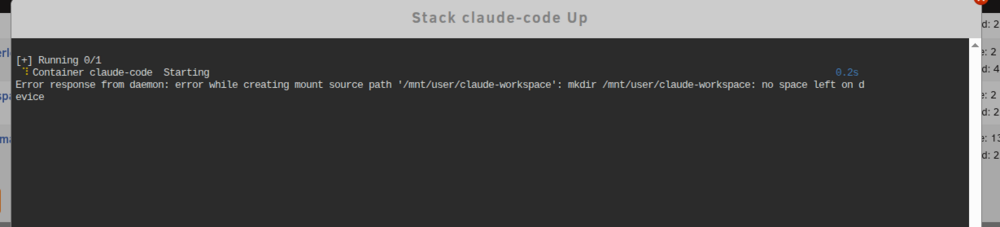
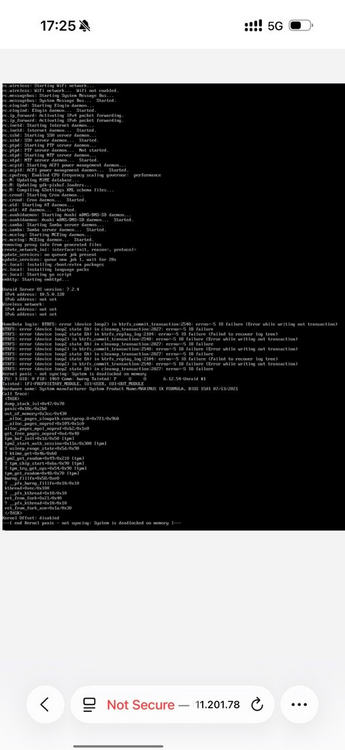
-
Hello, Just a follow up of this discussion here has been one week I ve been trying to do this backup unsuccessfully, is still broken into unraid or am I doing something wrong? Thanks
-
thank you for the hint the interesting thing is that that ghost container was created through the GUI
-
homedata-diagnostics-20241226-1344.zip
-
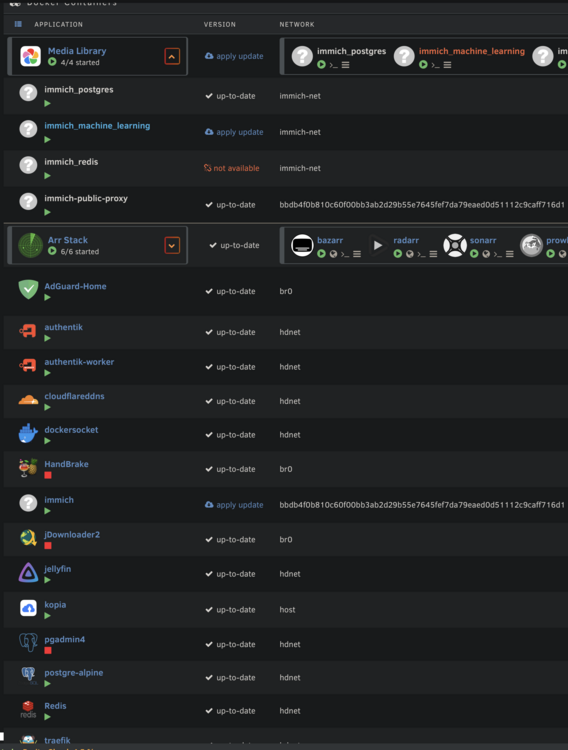
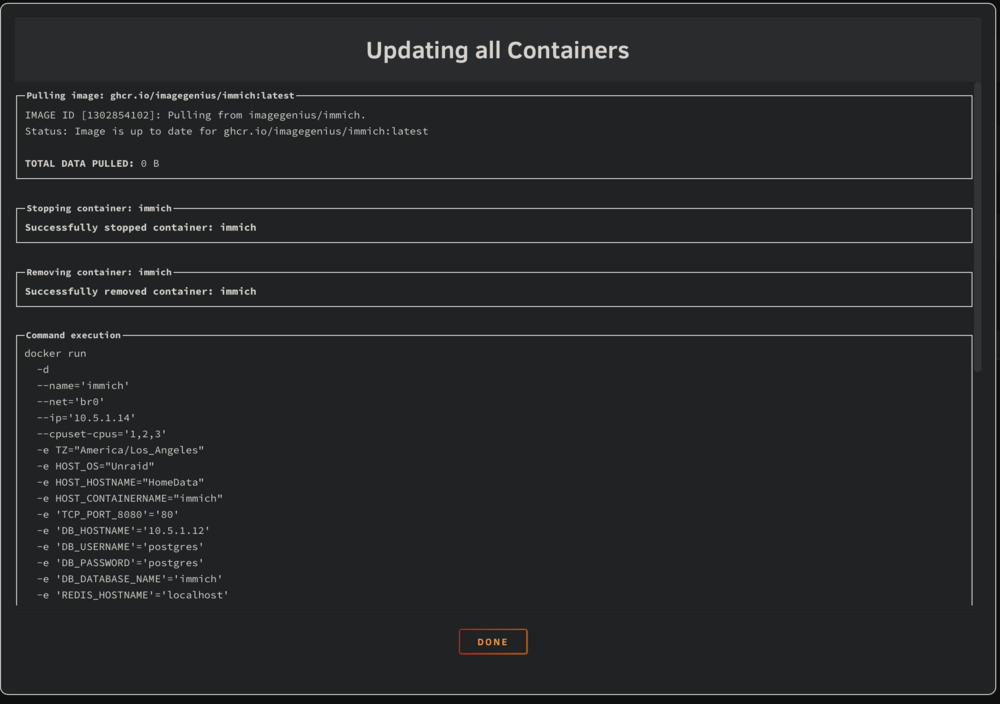
Hello, for some months I am having a ghost container issue, I do not really know if the issue is unraid itself or compose plugin long story short before I was using immich with an all in one image, then I used this plugin to replace It with the docker compose setup the issue is that this all in one image (imagegenius/immich) still reappears anytime I click upgrade all, when this happens my actual container (coming from docker compose) gets stopped and disappears, I have to click compose up and then gets recreated (you can see it getting recreated outside the media library folder, the one with the long string as docker network, idk why that happens to some containers and does not happen to others) I do not know where in my system this cursed image is stored and the only thing in common between the old immich image and the (official) new one is the two having the same container name thank you all
-
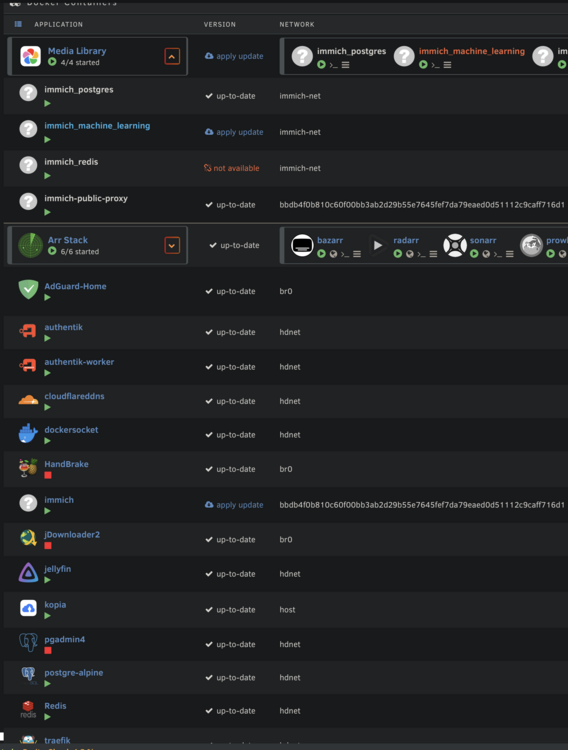
Hello, for some months I am having a ghost container issue, I do not really know if the issue is unraid itself or this plugin long story short before I was using immich with an all in one image, then I used this plugin to replace It with the docker compose setup the issue is that this all in one image (imagegenius/immich) still reappears anytime I click upgrade all, when this happens my actual container (coming from docker compose) gets stopped and disappears, I have to click compose up and then gets recreated (you can see it getting recreated outside the media library folder, the one with the long string as docker network, idk why that happens to some containers and does not happen to others) I do not know where in my system this cursed image is stored and the only thing in common between the old immich image and the (official) new one is the two having the same container name thank you all
-
Hello, I already know all the limits of having 1 zfs pool for each drive but having a cloud backup i care only for the snapshot (due to fat fingers and wrong deletes), compression and corruption warnings The issue is i cant understand how to perform a dataset share-level If I have a folder that gets replicated on more disks should I manually create a dataset for each disk? And what happens if i gather on one disk the files, each disk snapshot will not delete what we moved away, right? I saw many scripts about auto-snaps but they grab as source only one pool and only one dataset in a pool/dataset fashion Am I missing something? Thank you all
-
Ok, I feel really fool by having missed that folder during the mappings! I followed the PR which split the /library (or /photos in my case) in 3 volumes and did not mention the upload one Thank you again for real

-
Hello, thank you for the hints 1) By checking here and here I do not understand which folder do you refer as "upload" folder, I see "/photos", I must have missed this folder but cant even find docs about it 2) Is a well known approach solved in a PR on GH that allows you as example to keep thumbs on a ssd thus not spinning the drives 3) i know right, i had some external libs to move in with immich CLI, will remove it after, for now is read only thank you
-
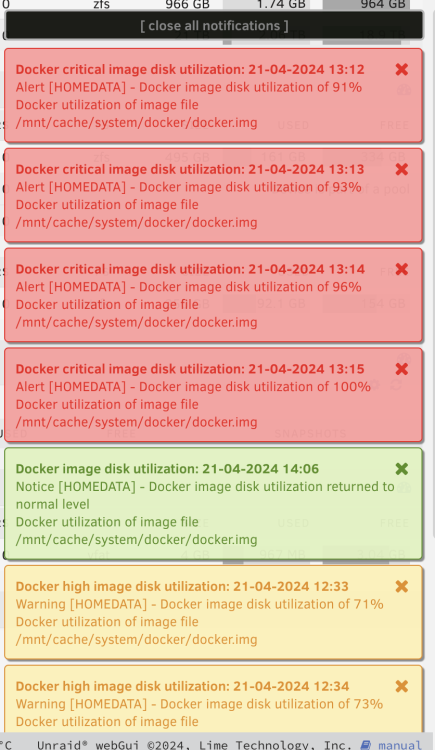
Hello, I've been having this issue for 1-2 months now My docker img keeps growing, last time this happened I erased all my containers and increased the size to like 40gb of the image I understood the issue is with immich container somehow, thus yesterday I removed the unraid app of immich and went with the compose file since some people rightly said you have full control and is more supported in this way, yet I reached 100% usage I m desperate now since reaching 100% kills the immich jobs and is really frustrating Any help would be appreciated thank you all --- version: "2.1" services: immich: image: ghcr.io/imagegenius/immich:latest container_name: immich environment: - PUID=99 - PGID=100 - UMASK=022 - TZ=Etc/UTC - DB_HOSTNAME=postgres_db - DB_USERNAME=postgres - DB_PASSWORD=postgres - DB_DATABASE_NAME=immich - REDIS_HOSTNAME=redis - DB_PORT=5432 #optional - REDIS_PORT=6379 #optional - REDIS_PASSWORD= #optional - MACHINE_LEARNING_GPU_ACCELERATION= #optional - MACHINE_LEARNING_WORKERS=1 #optional - MACHINE_LEARNING_WORKER_TIMEOUT=120 #optional volumes: - /mnt/user/appdata/immich:/config - /mnt/user/immich_library:/photos/library - /mnt/user/immich_thumbs:/photos/thumbs - /mnt/user/immich_encoded_video:/photos/encoded-video - /mnt/user:/import:ro #optional ports: - 8080:8080 restart: unless-stopped devices: - "/dev/dri/card0:/dev/dri/card0" - "/dev/dri/renderD128:/dev/dri/renderD128" networks: br0: ipv4_address: 10.5.1.14 # This container requires an external application to be run separately to be run separately. # By default, ports for the databases are opened, be careful when deploying it # Redis: redis: image: redis ports: - 6379:6379 container_name: redis networks: br0: ipv4_address: 10.5.1.13 # PostgreSQL 14: postgres_db: image: tensorchord/pgvecto-rs:pg14-v0.2.0 ports: - 5432:5432 container_name: postgres14 environment: - PUID=99 - PGID=100 - UMASK=022 - POSTGRES_USER=postgres - POSTGRES_PASSWORD=postgres - POSTGRES_DB=immich volumes: - /mnt/user/appdata/postgres_immich:/var/lib/postgresql/data networks: br0: ipv4_address: 10.5.1.12 networks: br0: external: true name: br0 homedata-diagnostics-20240422-0835.zip
-
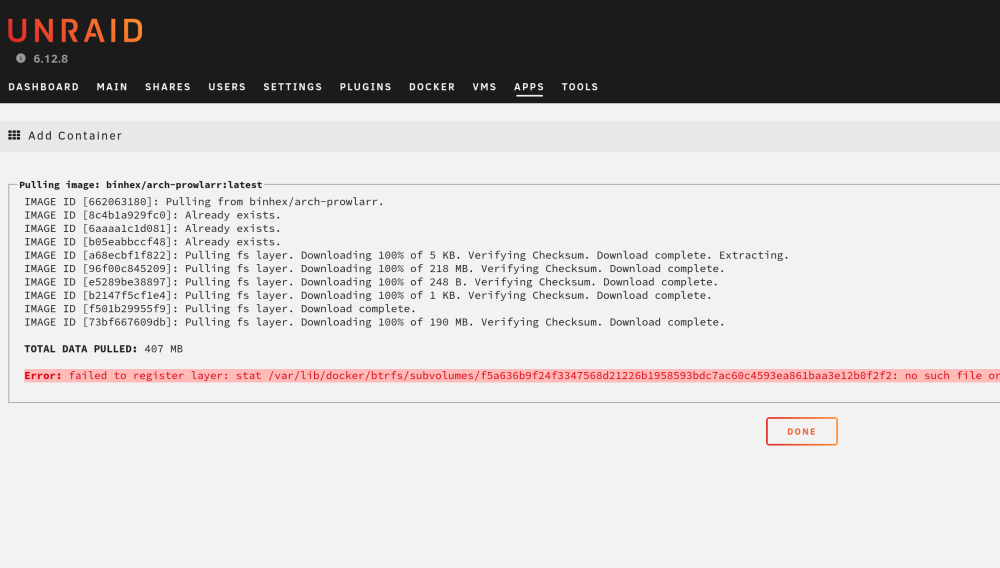
Hello i was almost over and kept receiving warnings about my docker img filling I already checked with 10 scripts and tools that im not writing inside and there is no misconfig I went to 35 gb and now this (i cant update or install containers) Whathomedata-diagnostics-20240318-1058.zip is happening? Thanks :)
-
Hello, After a week of research about the cloud provider i found a fitting s3 compatible cloud storage Now i know this topic has already been opened hundreds of times but yet I did not manage to find a complete answer premise: as of today i m moving all drives and pool to zfs but yet i m not going to a zfs compatible backup (so no zsend/zreceive like rsync.net) This means I m sticking to the good old rsync/rclone so I m looking to: -> I do not care for incremental backups, for me is ok if once a day evertything gets sent again -> client-side encryption -> versioning, now my provider provides versioning but I guess wont work with binary encrypted files ( I would like a "keep last 3 versions" approach for instance) -> ideally I would like to switch to a zfs so that if scrub flags me some errors i can just restore that single file, now yet i do not know how and if is possible to schedule a scrub with zfs in unraid and if would be possible to restore a single file if the remote is encrypted plus as i understood if i would instead go for a zfs zsend the backup would be on the /mnt/diskX and that in my opinion would break the unraid philisophy since you should be very careful in which drive is saving what, with an rsync based approach i should instead be able to backup the user share sight instead /mnt/user/share if i understood well now i saw some users using scripts, others using middleware containers that can encrypt and still manage the versioning on their own I mean thats all I am looking for, yet dont manage to find a path, does something on the "Apps" already exists or i have to go with scripts? thank you all
-
Hello how did you all manage to install powertop on the lastest unraid version? Thanks
-
oh thanks, i already did by cli, it needed the destructive mode on Now i have back the data so i destroy this dataset, create a new one and just move the files in? I guess is a nice to have to have appdata folder as a dataset no? thanks
-
how can i do this? I mean is possible by gui?
-
funny enough I just lost my appdata (still had to set up the backup plugin) since I had the appdata folder but not the appdata dataset I went to Create Dataset -> typed appdata and wiped straight the appdata folder In my opinion there should be a follow up warning for this if the directory exists
-
hello, first of all thanks for the plugin i was wondering if there were an option to enable auto-refresh for sata ssd/nvme pools and disable it for spinner based pools, or a way to hand-select the refresh
-
thank you for reaching out, actually I was having two issues: templates not using official image AND I had to enable the Low power HuC/GuC due my processor type Thank you for the template :)
-
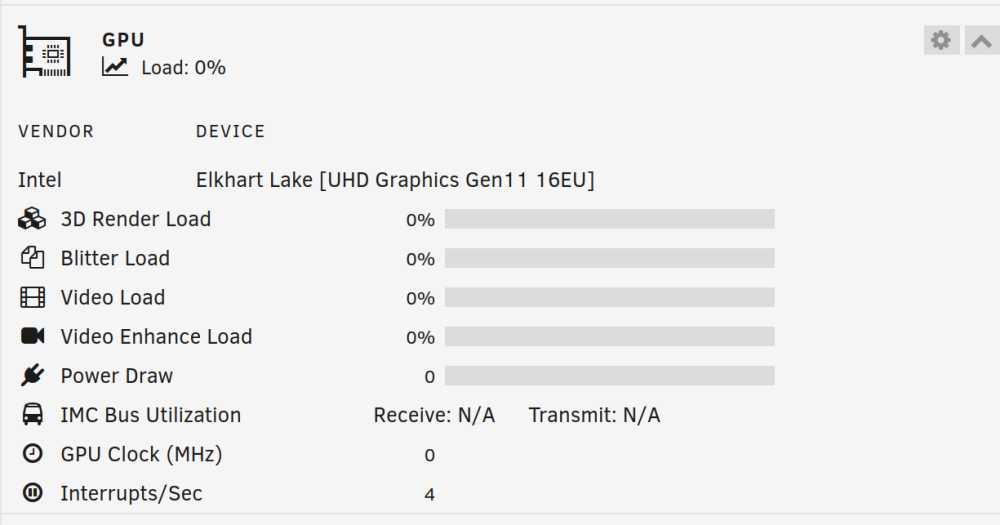
I did enable mode 3 and now seems to work, cpu is still under heavy load and gpu gets used only 200/300 MHz up to 800MHz (max capacity), from the gpu stats I also see a ton of interrupts/sec, wondering if is normal ^^" I yet have to fully understand the difference between mode 2 and 3, archwiki is quite technical about this I just hope the system is using as much as possible the iGPU since the cpu is a very weak one thankk you for your help edit: this topic is among the first results googling for guc/huc on LP mode, is actually the only reference for unraid and it did help a lot homedata-diagnostics-20240113-1109.zip
-
Hello, are there any new indications on how to enable GuC / HuC on unraid 6.12? I am running a J6413 processor and facing this issue right now (or does any plugin exist for this?) Thanks
-
I guess the issue is my specific CPU that only allows low power acceleration, I met other uses with same CPU on unRAID Would be safe to execute this directly on unraid host (?) cd ~/ git clone --depth=1 https://git.kernel.org/pub/scm/linux/kernel/git/firmware/linux-firmware.git sudo mkdir -p /usr/lib/firmware sudo cp -r linux-firmware/i915 /usr/lib/firmware https://jellyfin.org/docs/general/administration/hardware-acceleration/intel/#configure-and-verify-lp-mode-on-linux
-
Hello, I am trying to setup jellyfin/plex transcoding and this would be the first time of me using in some way the embedded gpu I got to have now having installed GPU stats and intel gpu top the gpu seems like dead and never in use from the dashboard (jellyfin and plex, tried both with multiple images and settings, only use software transcoding, killing my poor cpu) Now i do not know if i am missing something or is an hardware problem as always any hint would be really appreciated thanks edit: seems this family of cpus needs special config for acceleration ( here and here ), wondering if is safe to edit the i915.conf on unraid 00:02.0 VGA compatible controller: Intel Corporation Elkhart Lake [UHD Graphics Gen11 16EU] (rev 01) (prog-if 00 [VGA controller]) DeviceName: Onboard - Video Subsystem: Intel Corporation Device 7270 Flags: bus master, fast devsel, latency 0, IRQ 160, IOMMU group 0 Memory at 6000000000 (64-bit, non-prefetchable) [size=16M] Memory at 4000000000 (64-bit, prefetchable) [size=256M] I/O ports at 5000 [size=64] Expansion ROM at 000c0000 [virtual] [disabled] [size=128K] Capabilities: [40] Vendor Specific Information: Len=0c <?> Capabilities: [70] Express Root Complex Integrated Endpoint, MSI 00 Capabilities: [ac] MSI: Enable+ Count=1/1 Maskable+ 64bit- Capabilities: [d0] Power Management version 2 Capabilities: [100] Process Address Space ID (PASID) Capabilities: [200] Address Translation Service (ATS) Capabilities: [300] Page Request Interface (PRI) Kernel driver in use: i915 Kernel modules: i915 homedata-diagnostics-20240112-1507.zip