





xreyuk
Members
-
Joined
-
Last visited
Everything posted by xreyuk
-
I won't hijack this thread completely cause I'll be making a new one, but I'm having the exact same symptoms as this also. Sometimes server needs rebooting hours later, but longest I've had it stable is just shy of 7 days. However my syslog logs simply point at nothing.
-
I keep getting crashes on Unraid which don't seem to have a consistent pattern in the logs. I belive powertop is enabling auto suspend for my USB ports, could this possibly affect unraid and cause it to crash?
-
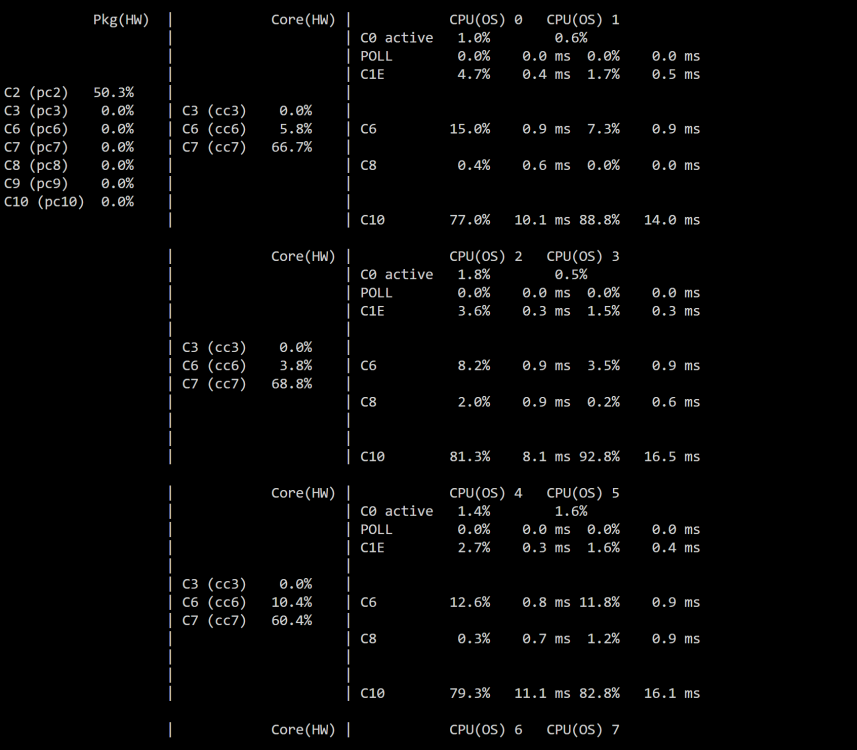
Confirmed it is definitely the card causing this. I started the server with the PCI E card removed and was able to instantly hit C10 on the package as a whole. I'm using the same ASM1166 card everyone else is using and it's on a later firmware than the one that fixes the power states issue and as you can see from the quoted post, it does support ASPM. The only other thing I've seen is that someone had to compile their own kernel to get it to go lower. Any ideas on anything I can do or am I just stuck?
-
No, it's GbE - and without the PCI card plugged in I am able to reach package state C10, so I think this is somehow related to the card/PCI slot. All the tuneables are listed as 'good' in powertop after the --auto-tune
-
I'd have no idea how to pull it if someone could tell me I wouldn't mind. I bought the card off Amazon UK, it was the MZHOU one everyone else appears to be buying.
-
So I have changed my card to an ASM1166 card which is running a high enough firmware version to support ASPM. This is the output of lspci 00:01.0 PCI bridge: Intel Corporation 12th Gen Core Processor PCI Express x16 Controller #1 (rev 05) (prog-if 00 [Normal decode]) LnkCap: Port #2, Speed 32GT/s, Width x16, ASPM L1, Exit Latency L1 <16us LnkCtl: ASPM L1 Enabled; RCB 64 bytes, Disabled- CommClk+ 00:1c.0 PCI bridge: Intel Corporation Alder Lake-S PCH PCI Express Root Port #1 (rev 11) (prog-if 00 [Normal decode]) LnkCap: Port #1, Speed 8GT/s, Width x1, ASPM L0s L1, Exit Latency L0s <1us, L1 <4us LnkCtl: ASPM L0s L1 Enabled; RCB 64 bytes, Disabled- CommClk- 00:1c.4 PCI bridge: Intel Corporation Alder Lake-S PCH PCI Express Root Port #5 (rev 11) (prog-if 00 [Normal decode]) LnkCap: Port #5, Speed 8GT/s, Width x4, ASPM L1, Exit Latency L1 <64us LnkCtl: ASPM L1 Enabled; RCB 64 bytes, Disabled- CommClk+ 01:00.0 SATA controller: ASMedia Technology Inc. ASM1166 Serial ATA Controller (rev 02) (prog-if 01 [AHCI 1.0]) LnkCap: Port #0, Speed 8GT/s, Width x2, ASPM L0s L1, Exit Latency L0s <4us, L1 <64us LnkCtl: ASPM L1 Enabled; RCB 64 bytes, Disabled- CommClk+ 03:00.0 Non-Volatile memory controller: Micron/Crucial Technology P2 [Nick P2] / P3 / P3 Plus NVMe PCIe SSD (DRAM-less) (rev 01) (prog-if 02 [NVM Express]) LnkCap: Port #1, Speed 16GT/s, Width x4, ASPM L1, Exit Latency L1 unlimited LnkCtl: ASPM L1 Enabled; RCB 64 bytes, Disabled- CommClk+ So I am using the same settings as before installing the card where I could reach package C10 states. I have applied --auto-tune and the disks seem to spin up and down as expected, and all tuneables are listed as 'good'. However, now I can only reach package state of C2, and core state of C10. Does anyone know how I can troubleshoot why the package is no longer going to C10 with the PCI card installed? I have tried disabling all dockers and VM's I have installed, I am still running the same plugins (no new ones) and I am still not able to reach C10 with these disabled.
-
Hi, I have just bought an ASM1166 card. I plugged it into a windows PC to do the firmware upgrade, however the firmware on the card is 221118-003E-00 which is a higher number than the 211108-0000-00 recommended in this thread. Do I need to change the firmware or not do we think? Thanks.
-
Could I just use the --auto-tune settings if I get an ASM1166 card and make sure firmware is upgraded? *EDIT* I saw another post, I can. I'll return the JBM one and get an ASM1166 card. Thanks.
-
Hi all, I have previously managed to acheive C10 state on my machine with BIOS settings and using --auto-tune, however I needed to expand my storage earlier than expected and thus have had to install a PCI to SATA card with the JMicron JBM585 controller. From my understanding using --auto-tune is now not possible as it stops the drives connected to this card spinning up. Therefore I need to use the CLI commands and a startup script to achieve any power savings I can (I realise the PCI card may stop me reaching low power states too). My output to see whether ASPM is enabled is as follows. 00:01.0 PCI bridge: Intel Corporation 12th Gen Core Processor PCI Express x16 Controller #1 (rev 05) (prog-if 00 [Normal decode]) LnkCap: Port #2, Speed 32GT/s, Width x16, ASPM L1, Exit Latency L1 <16us LnkCtl: ASPM Disabled; RCB 64 bytes, Disabled- CommClk- 00:1c.0 PCI bridge: Intel Corporation Alder Lake-S PCH PCI Express Root Port #1 (rev 11) (prog-if 00 [Normal decode]) LnkCap: Port #1, Speed 8GT/s, Width x1, ASPM L0s L1, Exit Latency L0s <1us, L1 <4us LnkCtl: ASPM L0s L1 Enabled; RCB 64 bytes, Disabled- CommClk- 00:1c.4 PCI bridge: Intel Corporation Alder Lake-S PCH PCI Express Root Port #5 (rev 11) (prog-if 00 [Normal decode]) LnkCap: Port #5, Speed 8GT/s, Width x4, ASPM L1, Exit Latency L1 <64us LnkCtl: ASPM L1 Enabled; RCB 64 bytes, Disabled- CommClk+ 01:00.0 SATA controller: JMicron Technology Corp. JMB58x AHCI SATA controller (prog-if 01 [AHCI 1.0]) LnkCap: Port #0, Speed 8GT/s, Width x2, ASPM not supported LnkCtl: ASPM Disabled; RCB 64 bytes, Disabled- CommClk- 03:00.0 Non-Volatile memory controller: Micron/Crucial Technology P2 [Nick P2] / P3 / P3 Plus NVMe PCIe SSD (DRAM-less) (rev 01) (prog-if 02 [NVM Express]) LnkCap: Port #1, Speed 16GT/s, Width x4, ASPM L1, Exit Latency L1 unlimited LnkCtl: ASPM L1 Enabled; RCB 64 bytes, Disabled- CommClk+ All ASPM/Power options are enabled in BIOS (as previously mentioned but double checked), and the PCI to SATA controller is plugged into the PCI x16 slot. I can see that ASPM is disabled on the x16 controller and the PCI to SATA card - do I need to get this enabled somehow or is this expected? (there are no explicit BIOS options to enable this). Furthermore, here is the output of 'bad' devices from powertop before the card was installed. All of these auto-tuned correctly. >> Bad Enable SATA link power management for host6 Bad Enable SATA link power management for host7 Bad Enable SATA link power management for host5 Bad Enable SATA link power management for host3 Bad Enable SATA link power management for host1 Bad Enable SATA link power management for host8 Bad Enable SATA link power management for host4 Bad Enable SATA link power management for host2 Bad VM writeback timeout Bad Autosuspend for USB device Flash Drive [Samsung] Bad Runtime PM for disk sdd Bad Runtime PM for disk sda Bad Runtime PM for PCI Device Intel Corporation Alder Lake-S PCH SATA C Bad Runtime PM for disk sdc Bad Runtime PM for port ata1 of PCI device: Intel Corporation Alder Lak Bad Runtime PM for port ata2 of PCI device: Intel Corporation Alder Lak Bad Runtime PM for port ata3 of PCI device: Intel Corporation Alder Lak Bad Runtime PM for port ata4 of PCI device: Intel Corporation Alder Lak Bad Runtime PM for port ata5 of PCI device: Intel Corporation Alder Lak Bad Runtime PM for port ata6 of PCI device: Intel Corporation Alder Lak Bad Runtime PM for port ata7 of PCI device: Intel Corporation Alder Lak Bad Runtime PM for disk sde Bad Runtime PM for port ata8 of PCI device: Intel Corporation Alder Lak Bad Runtime PM for PCI Device Intel Corporation Alder Lake-S PCH Serial Bad Runtime PM for PCI Device Intel Corporation Alder Lake-S PCH Serial Bad Runtime PM for PCI Device Intel Corporation Alder Lake-S PCH Serial Bad Runtime PM for PCI Device Intel Corporation Ethernet Connection (17 Bad Runtime PM for PCI Device Intel Corporation Alder Lake-S PCH PCI Ex Bad Runtime PM for PCI Device Intel Corporation Alder Lake-S PCH Shared Bad Runtime PM for PCI Device Intel Corporation Alder Lake-S PCH Serial Bad Runtime PM for PCI Device Intel Corporation Device 4630 Bad Runtime PM for PCI Device Intel Corporation Alder Lake-S PCH Serial Bad Runtime PM for PCI Device Intel Corporation Alder Lake-S PCH Serial Bad Runtime PM for PCI Device Intel Corporation Alder Lake-S PCH SPI Co Bad Runtime PM for PCI Device Micron/Crucial Technology P2 [Nick P2] / Bad Runtime PM for PCI Device Intel Corporation Device 7a87 Bad Runtime PM for disk sdb Here is the output from after I've installed the card. Bad Enable SATA link power management for host6 Bad Enable SATA link power management for host7 Bad Enable SATA link power management for host8 Bad Enable SATA link power management for host13 Bad Enable SATA link power management for host11 Bad Enable SATA link power management for host5 Bad Enable SATA link power management for host3 Bad Enable SATA link power management for host1 Bad Enable SATA link power management for host12 Bad Enable SATA link power management for host10 Bad Enable SATA link power management for host4 Bad Enable SATA link power management for host2 Bad VM writeback timeout Bad Enable SATA link power management for host9 Bad Autosuspend for USB device Flash Drive [Samsung] Bad Runtime PM for PCI Device Micron/Crucial Technology P2 [Nick P2] / P3 / P3 Plus NVMe PCIe SSD (DRAM-less) Bad Runtime PM for port ata6 of PCI device: Intel Corporation Alder Lake-S PCH SATA Controller [AHCI Mode] Bad Runtime PM for PCI Device Intel Corporation Alder Lake-S PCH Serial IO I2C Controller #3 Bad Runtime PM for port ata5 of PCI device: Intel Corporation Alder Lake-S PCH SATA Controller [AHCI Mode] Bad Runtime PM for disk sda Bad Runtime PM for disk sdb Bad Runtime PM for disk sdc Bad Runtime PM for disk sdd Bad Runtime PM for disk sde Bad Runtime PM for disk sdf Bad Runtime PM for PCI Device Intel Corporation Alder Lake-S PCH SATA Controller [AHCI Mode] Bad Runtime PM for port ata2 of PCI device: Intel Corporation Alder Lake-S PCH SATA Controller [AHCI Mode] Bad Runtime PM for port ata3 of PCI device: Intel Corporation Alder Lake-S PCH SATA Controller [AHCI Mode] Bad Runtime PM for PCI Device JMicron Technology Corp. JMB58x AHCI SATA controller Bad Runtime PM for port ata1 of PCI device: Intel Corporation Alder Lake-S PCH SATA Controller [AHCI Mode] Bad Runtime PM for port ata4 of PCI device: Intel Corporation Alder Lake-S PCH SATA Controller [AHCI Mode] Bad Runtime PM for port ata7 of PCI device: Intel Corporation Alder Lake-S PCH SATA Controller [AHCI Mode] Bad Runtime PM for PCI Device Intel Corporation Ethernet Connection (17) I219-V Bad Runtime PM for PCI Device Intel Corporation Alder Lake-S PCH Serial IO I2C Controller #5 Bad Runtime PM for PCI Device Intel Corporation Alder Lake-S PCH PCI Express Root Port #1 Bad Runtime PM for port ata8 of PCI device: Intel Corporation Alder Lake-S PCH SATA Controller [AHCI Mode] Bad Runtime PM for PCI Device Intel Corporation Alder Lake-S PCH Serial IO I2C Controller #1 Bad Runtime PM for PCI Device Intel Corporation Device 7a87 Bad Runtime PM for PCI Device Intel Corporation Device 4630 Bad Runtime PM for port ata10 of PCI device: JMicron Technology Corp. JMB58x AHCI SATA controller Bad Runtime PM for port ata11 of PCI device: JMicron Technology Corp. JMB58x AHCI SATA controller Bad Runtime PM for port ata12 of PCI device: JMicron Technology Corp. JMB58x AHCI SATA controller Bad Runtime PM for port ata13 of PCI device: JMicron Technology Corp. JMB58x AHCI SATA controller Bad Runtime PM for PCI Device Intel Corporation Alder Lake-S PCH SPI Controller Bad Runtime PM for PCI Device Intel Corporation Alder Lake-S PCH Serial IO I2C Controller #4 Bad Runtime PM for PCI Device Intel Corporation Alder Lake-S PCH Serial IO I2C Controller #2 Bad Runtime PM for PCI Device Intel Corporation Alder Lake-S PCH Serial IO I2C Controller #0 Bad Runtime PM for port ata9 of PCI device: JMicron Technology Corp. JMB58x AHCI SATA controller Bad Runtime PM for PCI Device Intel Corporation Alder Lake-S PCH Shared SRAM So from what I can see I would need to do the commands for all disks except sdf, as that did not exist before and will be the new one connected to the controller (confirmed from main tab as well). I would need to do the sata link management for hosts 1 to 8, and the PM ATA port for ata1 to ata8. However after that I am unable to identify which other tweaks to do and which devices they need doing on listed in the /sys/ folder directories. I would basically like to be able to do as much power tuning as possible without messing up the controller and the disk currently connected to it (and future disks). Is anyone able to advise how to find these devices and then use that information to help me do the commands manually?
-
Hi, I have a server with a total of 16GB RAM. My unraid dashboard currently shows 5.79GiB (6.2GB) of RAM In use. If I use htop and sort by RES and manually calculate everything there is around 2.5GB in use, which if I add the 100% ZGS usage to (2GB, 1/8 of total ram), that makes 4.5GB total. If I use free --mega it shows 5.5GB used, 345MB shared, 9.66GB buff/cache. If I look at what's actually being used by the dockers and VM's I have (reserved and reported by unraid) I believe I'm using around 4.5GB Why are all three showing different variations of usage and how do I know which is the most accurate? Diagnostics file: diagnostics-20240118-1442.zip
-
Hi All, I've set my docker image to be 15GB in the docker settings, however when I look on the share where the image is saved, I can see the docker.img is 16.1GB, could anyone advise why this is? My containers only use up around 2-3GB of the image.
-
Ahh okay no worries, thanks. From my 'extensive' testing today, turning off power boost and going into power saver mode saves about 15w under a load of sabnzbd downloading, doesn't really have an affect under idle. However, disabling the 'boost' feature under my BIOS, for whatever reason saves me basically 50% under idle so I think I might run with this for the forseeable until I notice a performance impact. Thanks.
-
Thanks. On the original guide it says to disable turbo boosting but if you think that won’t affect it much I’ll re-enable it. I’m assuming that if I re-enable boosting in bios, I can just use the tips and tweaks plugin to disable/re-enable it? If I do this I’m assuming my normal governer should still be set to powersave? Finally can I just use the tune all command in my go file to run that at startup rather than using the individual commands? thank you for all your help.
-
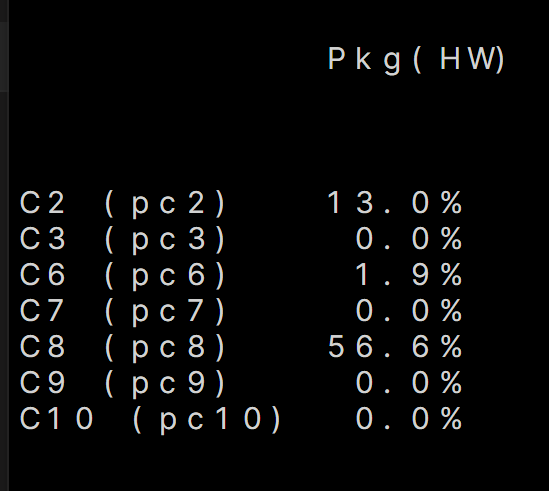
Thanks this has seemed to make it work. Idle has dropped from 20-23w to 11-13w, so a good power saving. Once I left it a bit longer after the image below I was dropping into c10 state. My question is do you think this will affect plex transcoding? I'm using hardware transcoding to the Intel iGPU - will turning boost off have any effect on that? I will see how server performance goes otherwise with these settings enabled. I'm running plex/sabnzbd/sonarr/radarr/pi-hole/unbound dockers so I think even in it's non turbo boosting I should be okay?
-
Thanks, I'll give this a go and report back. It's not like the consumption isn't low on my current system, it's at 20w idle with disks spun down, but would like to get even lower if possible.
-
Thank you for this guide, this seems to be working for me as I can see items being created in the sessions folder on the RamScratch disk. However, I have 'stopped' a plex viewing halfway throguh and can still see items in the 'session' folder on the RamScratch Disk, how long does it usually take to remove these?
-
I'm a little confused as to what the refresh option does and how 'no refresh' works. Would someone mind giving me a quick rundown?
-
I am hopefully after some help. I've just setup a new unraid server with just the array bit with some data on it. I have no installed dockers/VMs and only a few plugins at this stage. I have followed the guide in the first post however according to powertop I am not even entering c2 after doing all the tweaks. Powertop autotune command shows all the options as 'good', however on the dashboard there always seems to be a bit of load on the CPU. Disks are fully spinning down and tips and tweaks is set as per the guide, as well as the BIOS settings I could find. The only 'weird' BIOS setting I had was enabling C-States C7/C8/C9 etc was 'Package C-State limit' which is set to Auto, as it wanted me to pick a specific C state setting for idle. The only other setting was ‘native aspm’ which make you choose between BIOS or OS to control ASPM - I left this at BIOS, does that need changing? Spec is as follows: Core i3-12100 16 GB Corsair Vengeance LPX Gigabyte H610 DDR4 Mini ITX Crucial P3 Plus M2 SSD 500GB (brand new - Cache) 2 x 4TB Seagate Ironwolf HDD (brand new - 1 Parity, 1 Array) 1 x 4TB Seagate Desktop HDD (unsure on model, used - Array) 1 x 120GB Crucial MX300 Sata SSD (used - Cache for plex only - but plex isn't installed yet) Any ideas if I can figure out what's going on?
-
I have recently set this up following the guide and have it working for 'Access to Server' just to remotely manage the server/access dockers. One thing I wanted to check, when I am connected to the VPN on a remote network from my Phone, internet access still works via my phone, is this expected behaviour or should the tunnel be stopping all other access and only allowing access to the unraid server?
-
Ahh okay thanks. I am planning on using the SATA SSD purely for Plex appdata - Would I see a noticable impact to Plex if I allow this drive to enter it's low power state and wait for it to 'spin up'?
-
Thanks, I'm assuming it can't do this with NVME drives? If I click 'spin down now' the NVME drive stays 'spun up'
-
Hi, I have an M2 NVME Drive, and a SATA SSD connected for a cache drives. If I click spin down now or use the default spin down timer on the SATA SSD, the grey icon appears next to it like it has 'spun down' which I thought was impossible with SSDs. Can anyone advise if this is an issue and what's going?
-
Hi, I'm new to unraid and have setup my cache drives formatted in ZFS. I've tried searching but can't seem to find the information I want. When setting up docker, should I use a btrfs/xfs vdisk or directory? If it's vdisk, is there any advantage/disadvantage to vdisk format? Thanks.


