





RobAinscough
Members
-
Joined
-
Last visited
Everything posted by RobAinscough
-
I've entered my root user/password and owner user account and password several times and UnRaid refused to login and show the graphical UI? root is set for console and webGUI access, so confused why it's not working. I don't get any error message just after I enter my password returns to prompt for user in an endless cycle? I can login via website on another computer with root or my user account without issue, just can't boot the NAS to UI? Any suggestions? UnRaid version: Version 6.12.13 2024-08-22 Rob.
-
Ok, I believe I’ve managed to discover the issue. I had installed Unassigned Drive plug-in which seemed ok, but then it showed “reboot” on one of my external HDD USB drives … doesn’t seem to like having two external USB drives … not really sure, but it triggered a reboot grayed out button under the Unassigned Drive list for one external HDD? When that happened (I just noticed now) one of my SSD drives that made up 3 drive Cache (2 SSD and one M.2) disappeared. AppData is setup to use Cache to Array as well as Media share that is used by Plex (both used by Plex). After 2 weeks of finally getting all my data transferred over to Unraid, I noticed an Unraid update, so let that install this morning and did a reboot … this is when I noticed my cache SSD was set to unassigned and I re-added back to my Cache array. So I suspect Unassigned Drive plug-in “may” have been the source of this.
-
I have posted on Plex Support forum but thought I'd post here also since Plex Media Server is commonly used with Unraid. There are many threads on "soci_error: sqlite3_statement_backend..." but none that contained "file is not a database ..."
-
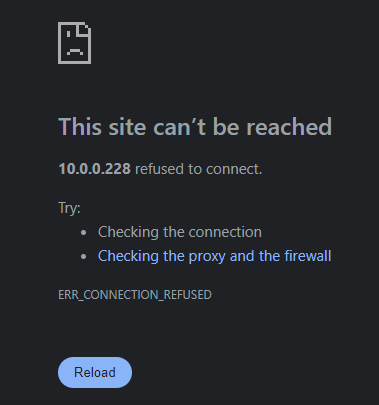
My Plex Media Server seems to have issues and I'm out of ideas on how to resolve. When I try to open the WebUI from Plex App in Unraid I just get: This just started happening, no idea why, was in the middle of doing a MetaData update (via Plex WebUI) and suddenly these issues? I tried uninstalling and re-installing Plex Media Server, but same issue? (although not entirely sure the uninstall/reinstall cleared out prior config/settings). Check permissions and all is good, so really have no idea what this is about? "sqlite3_statement_backend::prepare: file is not a database for SQL: PRAGMA cache_size=5120" ??

-
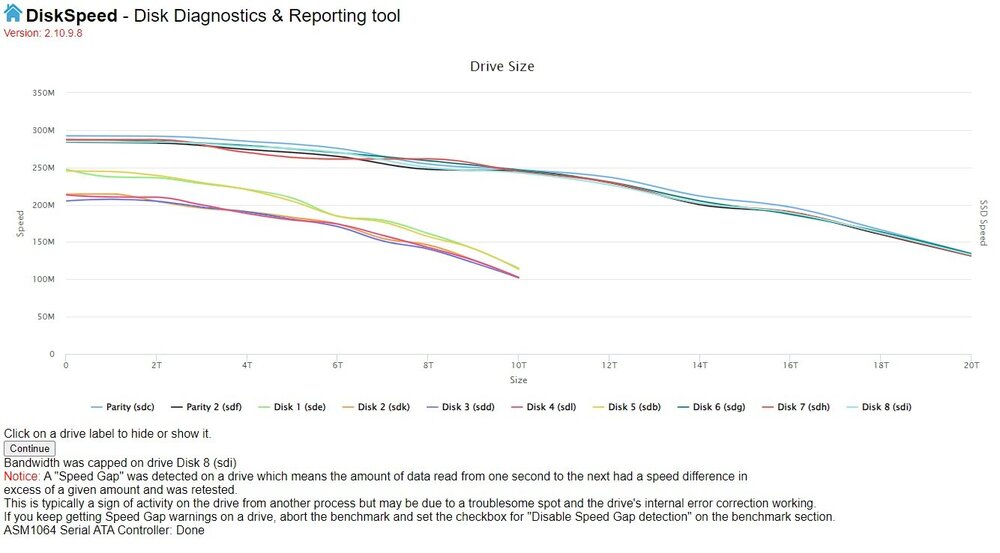
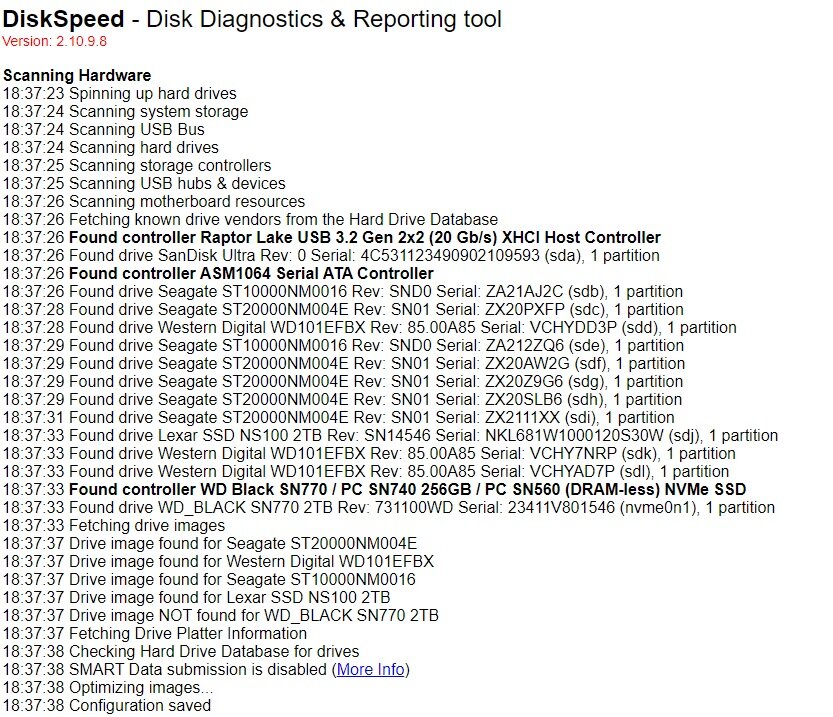
Here are the DiskSpeed test results. I don't see anything unusual except some warning about a "gap"? Drives:
-
I will give that package a try and report back. I do have 12 drives - 2 largest ones set to parity.
-
Great link, thanks. I’ll do that for the next file transfer job and report back. I’ve confirmed it’s not a network issue by transferring the same file between two PCs (Win11) and it was very fast. But as soon as I copy the same file to Unraid it fluctuates from 1MB/s to best case 50MB/s but oddly starts at 200MB/s then quickly drops (this is just one single large file about 27GB). Given that I had the same problem direct from USB mount on the Unraid box … starts out fast at 200MB/s then soon drops to 1-5MB/s. Anyway, will go thru the diagnostics process and see. Cheers, Rob.
-
Tried without parity (basically unassign my 2 parity drives), still extremely slow with transfers. Found this thread with someone having similar problem: Looks like Unraid is just SLOW! I do feel there is something just not right about this ... the xfers start fast 200+ MB/s but over time crawl to 1-5 MB/s ... and these are single large MP4 or AVI or MKV video files (not millions of small files). Honestly folks, I think there is something wrong with Unraid in this particular instance. I'm hoping the Unraid folks can come up with an alternate solution or something in the future, lucky I only have about 47TB to put on Unraid ... anyway, hopefully it'll complete sometime next month.
-
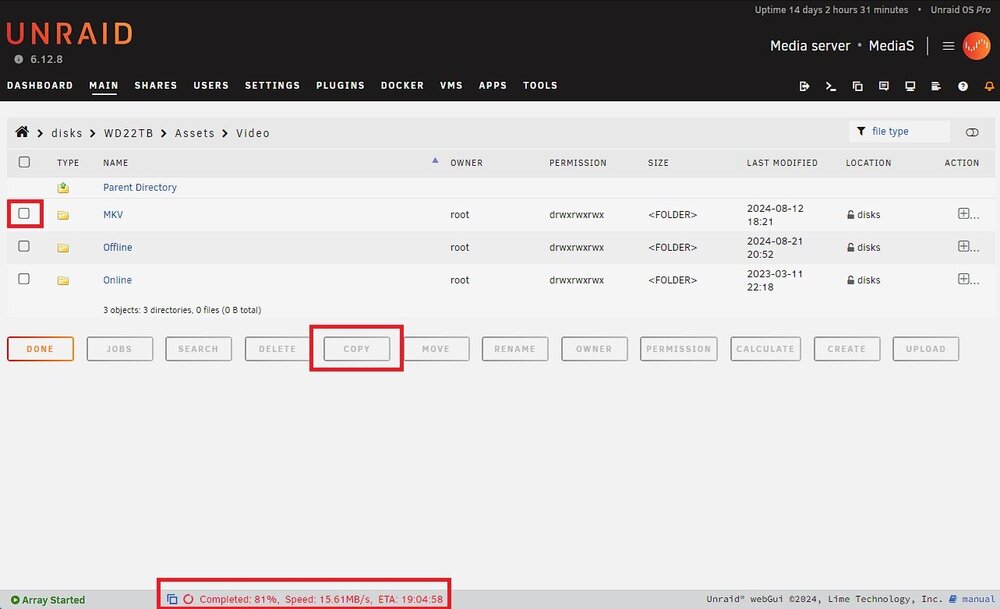
From USB PC via LAN to Unraid, I've tried standard Win11 Copy and Paste, cmd line xcopy, and a 3rd party tool called TeraCopy. Direct USB on the Unraid server I use the following: And

-
Interesting, thanks for the suggestions. Now, how do I stop my transfer so I can test this out? I can’t seem to find any place where I can cancel my copy? I can see the copy status if I click on the Unassigned Drive in Main but can’t find any UI area to stop/cancel the copy?
-
Yes, parity is enabled (2 X 20 TB drives set for parity). Hmmm … but when I added parity that took 2 days to complete. So if I disable parity, do the transfers, then enable parity again, isn’t that going to be another 2-3 days or more for parity to catchup? I’m a little surprised parity is cutting performance by that much?
-
I have about 40TB worth of data on two external WD USB 3.2 Gen1 drives (22TB each) - NTFS format - rated at 5 Gb/s (625 MB/s) RPM listed as 7200. I realize that I'm not going to get 625 MB/s from a 7200 RPM SATA drive, it'll be more like 200-300 MB/s. USB 3.2 cable. I started moving data from these drives via one of the PC's connected to my LAN (10G network thru-out, tested and verified). Performance was pretty bad, it would start out ok at 200 MB/s but would soon drop to about 50 MB/s and if many small files it would 1 MB/s. I was getting estimate time to complete around 8-16 days ... yikes. After some research I discovered I could use Unassigned Drive package for Unraid and plug my external drives directly into USB 3.2 port on my UnRaid box ... thinking this would be faster than going across my LAN from another PC. Installed UD, mounted external drive, selected folder on it and selected destination on my share and hit Copy. Sadly it mimicked exactly same performance as I experience via using my PC going thru my LAN ... starts out at 200 MB/s and then soon drops to 50 MB/s. Puzzled, USB 3.2 is rated at 2500 MB/s ... so why am I at 50 MB/s? Are there faster alternatives for external storage devices? Cheers, Rob. EDIT: Motherboard is Z790 with USB 3.2 Gen 1 ports also
-
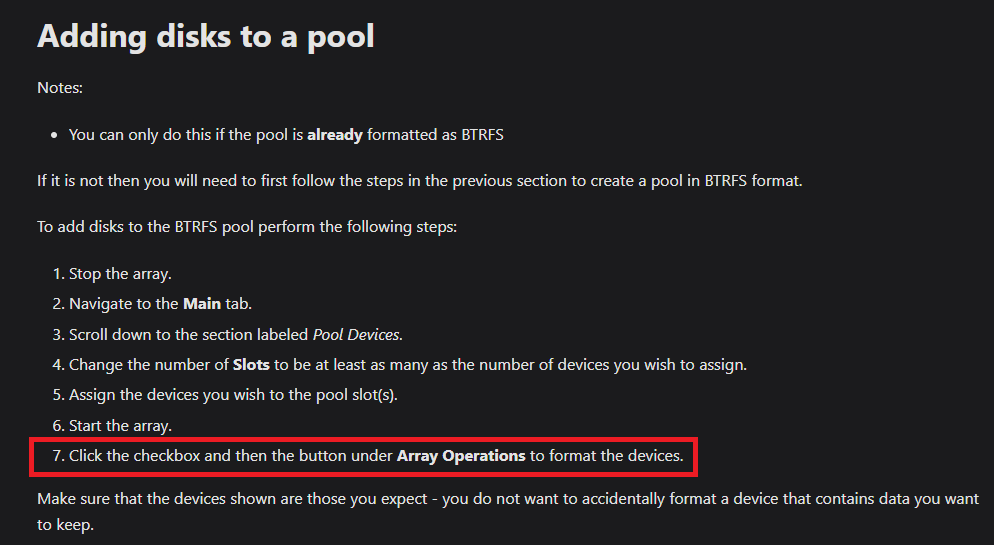
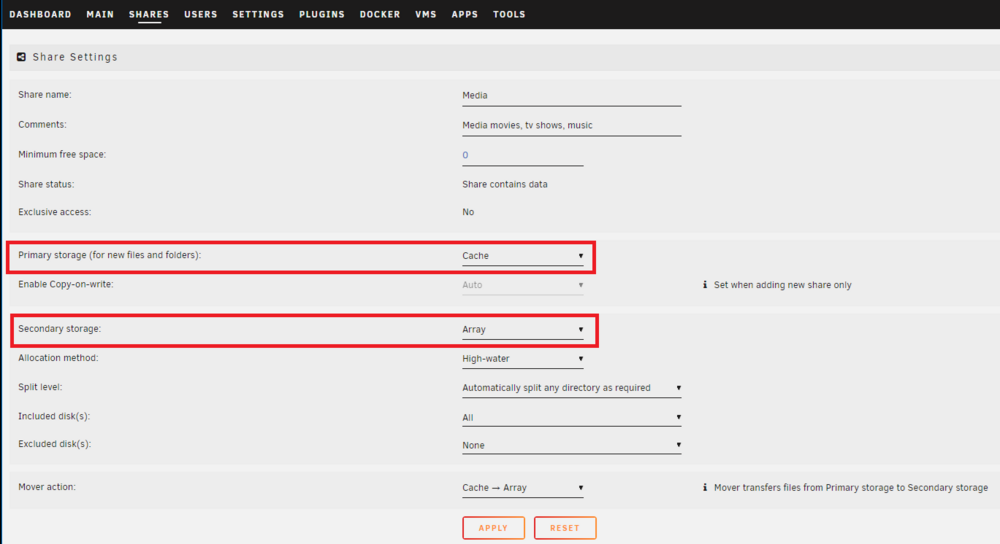
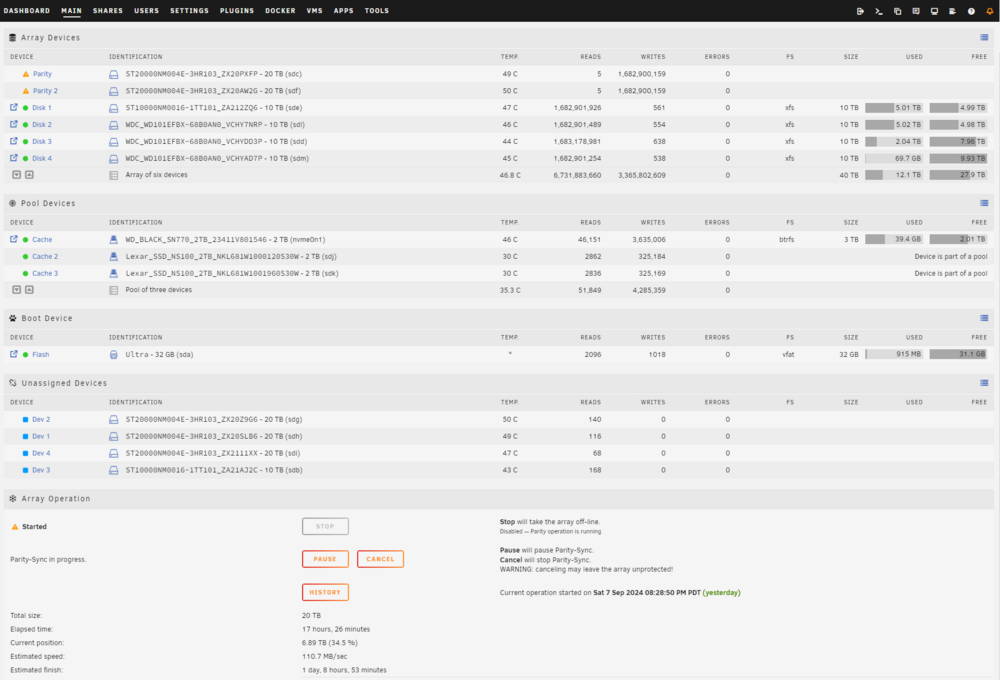
Reading thru the documentation where I couldn't perform "Step 7" because I can't find a reference to "Checkbox" ... don't see these option anywhere? Assuming my Cache Pool is setup correctly and being used (6TB total with RAID 1 so 3TB available): I think these are the settings I need to add my Cache Pool to my Share: Does the above seem correct? Overview, parity is updating as I swapped out 10TB Parity 1 and now using two 20TB drives for parity. Waiting for these (2 days) to build then I'll stop the array and add 4 other unassigned drives. Cheers, Rob.

-
Happy to report, no events … plugged the USB stick back in after my build upgrade and everything just worked! Found the existing 5 drives, found the 7 unassigned drives, found the new SATA controller (well obviously), found the new 10G NIC, found new motherboard/chipset, no issues with DDR5 128GB RAM, found the new nVidia 4060, found the UPS, Plex Media server all good … all squashed into a 4U rack mount case. Super quiet, performing extremely well. Running on Intel 12th gen CPU so lucky to avoid all the Intel 13/14th gen problems. Had to tweak the UEFI a little to change the Secure Boot options, Virtual enable, IOMMU enable … good to go. Color me impressed!! Great job by the Unraid development team. Rob.
-
Unraid has a lifetime license, price went up but probably because it’s an awesome Linux OS variant. I got a deal at $129, but I’d happily pay $249 for another lifetime license if I needed it. I believe in supporting software engineers, but primarily because I am one … we work our ass off and have to retain a huge knowledge base of technology.
-
Excellent, I'll stick to UnRaid for my VMs. Cheers, Rob.
-
1st, loving UnRaid (purchased the Pro version for $129 which no longer seems to exist as a price option?), best thing since sliced bread. Have a few questions. I'm primarily using UnRaid as a NAS in a custom NAS box and running Plex server from it. I'm going to be moving UnRaid drives to a different motherboard (same CPU and RAM) and SATA controller housed in a larger rack mount case. I'll move the existing 5 HDDs (10TB) over and be adding 5 more HDDs (22TB) and 2 SSDs (4TB) for total of 12 drives. Since UnRaid loads from USB stick, will it have issues recognizing the original 5 HDDs and other configuration settings? I was going to set two of 22TB HDDs for parity. And finally, I plan to run VM with UnRaid and install Ubuntu 24.04.1 Server and install MySQL on it and maybe another VM with Linux base for Microsoft SQL for Linux. I've heard that UnRaid can do VMs but isn't a good choice, sadly no one provides any details as to why it's not a good choice? FYI, this is not a "production" environment, it's entire home based and more of a technology test bed (I'm a software engineer) for various apps I develop. I don't have much Linux experience (have been mostly in the Microsoft tech path), but wanting to learn (yes even at the old age of 60). All input welcome. Cheers, Rob.
-
Many thanks, sounds like it might be an experiment ... make sure my Amazon return policy is good. 🙂 Cheers, Rob. EDIT: reading thru this doc and still not absolutely clear if it'll work so I think experiment is the only option.
-
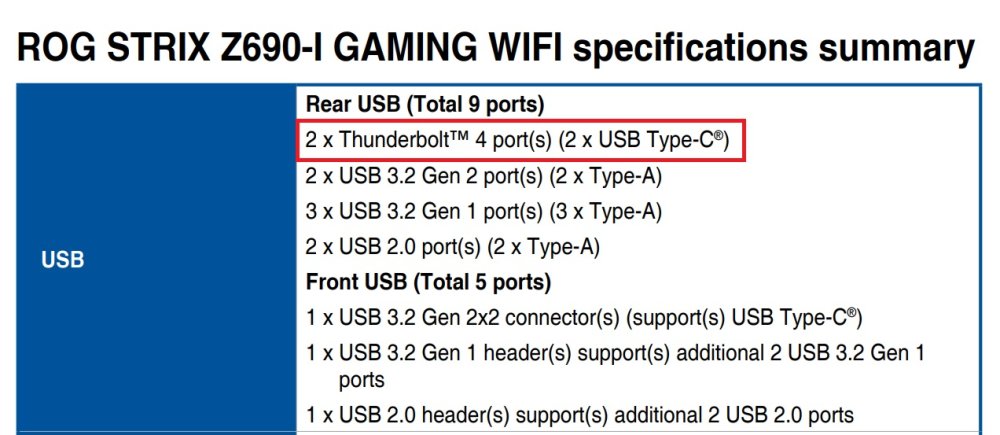
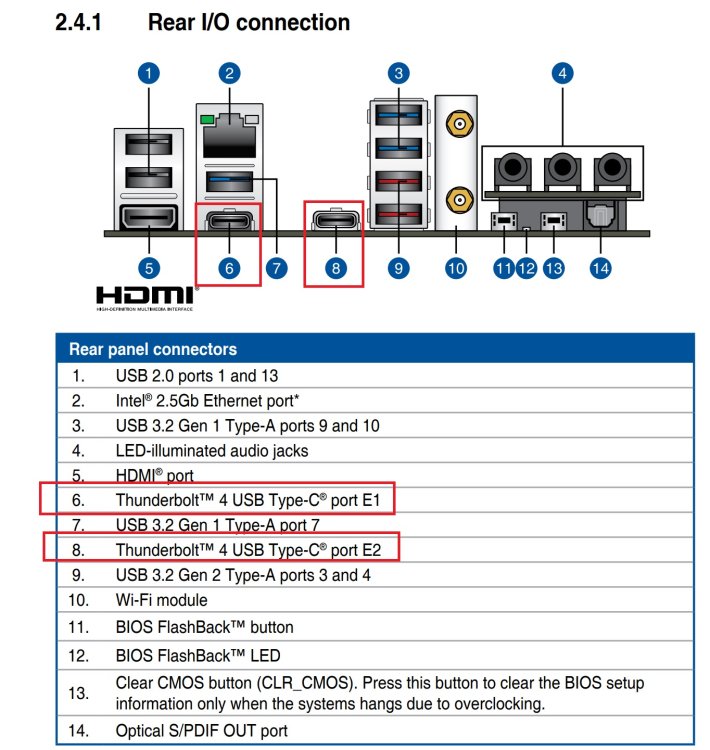
Here are screenshots from the Asus Z690-I manual for USB4/Thunderbolt: It should work with just an MB replacement for Z690-I Cheers, Rob.
-
More digging it seems UnRaid is based on Linux Slackware 15.x which was released in 2022 and that was based on Linux Kernel 5.15.x ... sooooo, I thinking a motherboard swap for the Z and getting that external 10GbE Thunderbolt 3/4 NIC will hopefully work -- $500 experiment unless someone has more info? Cheers, Rob.
-
I was able to locate more info on the Thunderbolt 3/4 to 10GbE external network interface. It supports Linux Kernel 5.0+ ... so I guess the question now is what version of Linux is UnRaid based on? Cheers, Rob.
-
I have similar question, but for USB 3.2 / Thunderbolt 3/4 (using USB-C port connector) ... your 2nd item. Since your question is 2 years old but no answer ... does that mean UnRaid does NOT support this scenario? Or ... did you find an answer elsewhere? Cheers, Rob.
-
I did find this MB for LGA 1700 with USB-C/Thunderbolt 4 here. Basically the Z version of my B version board with two Thunderbolt 4 USB-C ports. I can't find any LGA 1700 mini-ITX MB that has 10GbE support ... found mini-ITX for older Xeon CPUs but that's basically entire MB/CPU/Fan/RAM replacement. Per Intel article it suggests USB 3.2 is compatible with Thunderbolt 4 and they use the same USB-C "connector" ... see article here. Since Thunderbolt 4 is compatible with Thunderbolt 3 the USB 3.2 port C should work per spec for the Z version of my motherboard (which is mini-ITX). So will UnRaid support USB 3.2 (Thunderbolt 3/4) port C? If not, are there drivers that will? From the ASUS support page there is no driver support for anything other than Win10 or Win11.
-
I have a 10GbE network at home, it's just the NAS I built doesn't have 10GbE on the MB. "Need" well that's subjective ... but my need comes from copying large files from the PCs used to convert my BD/DVDs to MKV files (and/or upscales lower quality ones with Topaz Video AI to mp4 files) ... 50-80GB for 4K movies (with future plans for 8K content). When going thru 1GbE my xfers from PCs to NAS are: When going thru 10GbE my xfers from PC to NAS are: Pretty close to 10X faster ... when doing xfers with a lot of 50-80GB files, can make a big difference. Finding a mini-ITX motherboard with 10GbE port is not trivial ... and finding one that UnRaid supports is even more a challenge ... suggestions welcome, prefer for LGA 1700 but all welcome?
-
Not sure I agree, but I'll research more. Can't use another PCIe slot ... no space or slot ... hence my desire to leverage onboard USB-C ports ... if I had an extra PCIe, I would just install 10Gbe NIC. Sadly I can't find USB-C to 10Gbe external NIC.






