





Bmalone
Members
-
Joined
-
Last visited
Everything posted by Bmalone
-
I guess it's dead. Shame. It was a cool idea.
-
It's hard to take this OS seriously without this.
-
TOTP login. TrueNAS has it, Synology has it, Proxmox has it, etc. out of the box. It really needs to happen.
-
Not sure if this project is still being maintained or no, but when I install it for the first time, I'm getting this at first login. I added all the configs but to no avail. What is this about needing to migrate? It's a new install so what needs to be migrated from where to where? Something is preventing it from accessing the library despite having access using the default PGID PUID.

-
Yep, that was it. Never noticed that before. Thanks for the guidance.
-
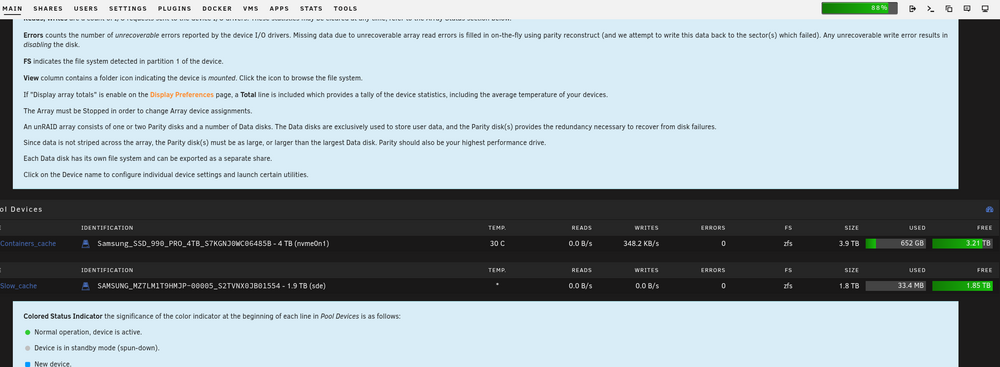
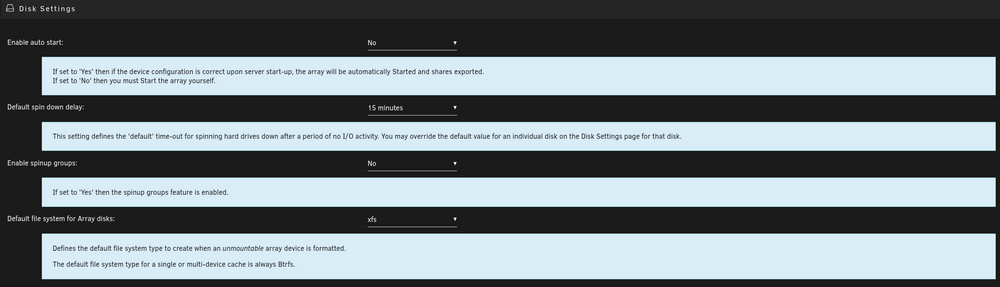
I just upgraded to Unraid 6.12.15 and it mostly went fine (remote SMB shares needed to be recreated). However, there is a global change that happened in all the menus. Normally, you can click on a setting to get a more verbose explanation of that setting. Previously the default was off and you had to click on the setting for a verbose description. That has now been reversed and the verbose shows up, even after I have clicked on the setting to close the verbose explanation, as soon as I open the menu again, the verbose description is there again. It takes up a huge amount of real estate and makes it more unusable on a phone. Is there any way to change this back to the way it was? Examples of what I'm referring to:
-
I've reinstalled it 30-40 times and sometimes it works, sometimes it doesn't, and sometimes it works for a little and then it just goes black. No issues with any other containers, just this one. I set up a backup and ran it, I can see that my destination is consuming the data because it's maxing out a 10GbE connection, but there is no way to get to a GUI unless I reinstall it 1-10 times. It's a bit strange this one is the only app that it's an issue and there definitely is no port conflict and I've tried to connect to the GUI from 4 different browsers, and also MacOS, Kubuntu, Bazzite, Windows, and iOS with most of those browsers(obviously not all are compatible with each other).
-
There isn't really much to check other than the config path going to my appdata folder and the data path mapped to /mnt. Is there something else I need to be adding for something specific to VNC?
-
Apologies, I missed this one. I do have another container using 8080 so I've been using port 8777 which is not used.
-
I did try all of that before posting. However, I did notice that there was no appdata folder when I went in to delete it.
-
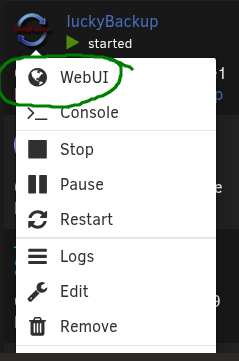
What's the trick to getting access to the Lucky Backup GUI? When I install it and select the WebUI, I just get a black screen. I'm running almost 30 containers and none of them have any issues like this. Is there a step I'm missing other than editing the properties in the container? Logs when starting: text error warn system array login WebSocket server settings: - Listen on :8080 - Web server. Web root: /usr/share/novnc - No SSL/TLS support (no cert file) - Backgrounding (daemon) WebSocket server settings: - Listen on :8080 - Web server. Web root: /usr/share/novnc - No SSL/TLS support (no cert file) - Backgrounding (daemon) ---Ensuring UID: 99 matches user--- ---Ensuring GID: 100 matches user--- ---Setting umask to 0000--- ---Checking for optional scripts--- ---No optional script found, continuing--- ---Checking configuration for noVNC--- Nothing to do, noVNC resizing set to default Nothing to do, noVNC qaulity set to default Nothing to do, noVNC compression set to default ---Starting cron--- ---Taking ownership of data...--- ---Starting...--- ---Preparing Server--- ---ssh_host_rsa_key keys found!--- ---ssh_host_ecdsa_key found!--- ---ssh_host_ed25519_key found!--- ---Starting ssh daemon--- ---Resolution check--- ---Checking for old logfiles--- ---Starting TurboVNC server--- ---Starting Fluxbox--- ---Starting noVNC server--- ---Starting ssh daemon--- ---Starting luckyBackup--- ---Ensuring UID: 99 matches user--- usermod: no changes ---Ensuring GID: 100 matches user--- usermod: no changes ---Setting umask to 0000--- ---Checking for optional scripts--- ---No optional script found, continuing--- ---Checking configuration for noVNC--- Nothing to do, noVNC resizing set to default Nothing to do, noVNC qaulity set to default Nothing to do, noVNC compression set to default ---Starting cron--- ---Taking ownership of data...--- ---Starting...--- ---Preparing Server--- ---ssh_host_rsa_key keys found!--- ---ssh_host_ecdsa_key found!--- ---ssh_host_ed25519_key found!--- ---Starting ssh daemon--- ---Resolution check--- ---Checking for old logfiles--- ---Starting TurboVNC server--- ---Starting Fluxbox--- ---Starting noVNC server--- ---Starting ssh daemon--- ---Starting luckyBackup---

-
There must be something else to it because this is a personal account with 2FA.
-
App passwords are only available certain accounts it seems.

-
Even better. Thanks for your help and thanks for clarifying.
-
Use super.dat to open super.dat? I don't understand.
-
I was able to find the super.dat file from the flash backup, but it doesn't appear to be in human readable format when I open it with Notepad. How can I extract the drive setup from this file?
-
here is the output of 'diagnostics' # diagnostics Starting diagnostics collection... sh: line 1: /usr/bin/todos: Input/output error tail: cannot open '/boot/bz*.sha256' for reading: No such file or directory sh: line 1: /usr/bin/todos: Input/output error sh: line 1: /usr/bin/todos: Input/output error sh: line 1: /usr/bin/todos: Input/output error sh: line 1: /usr/bin/todos: Input/output error sh: line 1: /usr/bin/todos: Input/output error sh: line 1: /usr/bin/todos: Input/output error sh: line 1: /usr/bin/todos: Input/output error sh: line 1: /usr/bin/todos: Input/output error sh: line 1: /usr/bin/todos: Input/output error sh: line 1: /usr/bin/todos: Input/output error sh: line 1: /usr/bin/todos: Input/output error sh: line 1: /usr/bin/todos: Input/output error sh: line 1: /usr/bin/todos: Input/output error sh: line 1: /usr/bin/todos: Input/output error sh: line 1: /usr/bin/todos: Input/output error sh: line 1: /usr/bin/todos: Input/output error sh: line 1: /usr/bin/todos: Input/output error sh: line 1: /usr/bin/todos: Input/output error sh: line 1: /usr/bin/todos: Input/output error sh: line 1: /usr/bin/todos: Input/output error sh: line 1: /usr/bin/todos: Input/output error sh: line 1: /usr/bin/todos: Input/output error sh: line 1: /usr/bin/todos: Input/output error sort: write failed: 'standard output': Broken pipe sort: write error timeout: failed to run command ‘todos’: Input/output error sh: line 3: /usr/bin/todos: Input/output error ls: write error: Broken pipe sh: line 3: /usr/bin/todos: Input/output error ls: write error: Broken pipe sh: line 3: /usr/bin/todos: Input/output error ls: write error: Broken pipe sh: line 3: /usr/bin/todos: Input/output error ls: write error: Broken pipe sh: line 3: /usr/bin/todos: Input/output error ls: write error: Broken pipe sh: line 3: /usr/bin/todos: Input/output error ls: write error: Broken pipe sed: can't read /goathead-diagnostics-20250310-1427/config/go.txt: No such file or directory timeout: failed to run command ‘todos’: Input/output error sh: line 1: /usr/bin/todos: Input/output error sh: line 1: /usr/bin/todos: Input/output error sh: line 1: /usr/bin/todos: Input/output error sh: line 1: /usr/bin/todos: Input/output error sh: line 1: /usr/bin/todos: Input/output error sh: line 1: /usr/bin/todos: Input/output error sh: line 1: /usr/bin/todos: Input/output error sh: line 1: /usr/bin/todos: Input/output error sh: line 1: /usr/bin/todos: Input/output error sh: line 1: /usr/bin/todos: Input/output error sh: line 1: /usr/bin/todos: Input/output error sh: line 1: /usr/bin/todos: Input/output error sh: line 1: /usr/bin/todos: Input/output error sh: line 1: /usr/bin/todos: Input/output error sh: line 1: /usr/bin/todos: Input/output error sh: line 1: /usr/bin/todos: Input/output error sh: line 1: /usr/bin/todos: Input/output error sh: line 1: /usr/bin/todos: Input/output error sh: line 1: /usr/bin/todos: Input/output error sh: line 1: /usr/bin/todos: Input/output error sh: line 1: /usr/bin/todos: Input/output error timeout: failed to run command ‘todos’: Input/output error timeout: failed to run command ‘todos’: Input/output error awk: inplace:31: fatal: load_ext: cannot open library `/usr/lib64/gawk/inplace.so': /usr/lib64/gawk/inplace.so: cannot read file data: Input/output error timeout: failed to run command ‘todos’: Input/output error timeout: failed to run command ‘todos’: Input/output error timeout: failed to run command ‘todos’: Input/output error sh: line 1: /usr/bin/todos: Input/output error /usr/bin/env: ‘node’: No such file or directory sh: line 1: /usr/bin/todos: Input/output error sh: line 1: /usr/bin/todos: Input/output error sh: line 1: /usr/bin/todos: Input/output error sh: line 1: /usr/bin/todos: Input/output error sh: line 1: /usr/bin/todos: Input/output error sh: line 1: /usr/bin/todos: Input/output error timeout: failed to run command ‘zip’: Input/output error done. ZIP file '/boot/logs/goathead-diagnostics-20250310-1427.zip' created.
-
is there a command to output the current configuration if not?
-
I have plenty of backups. So you're saying if I recreate it using one of the backups it will automatically populate the drives in the correct order without me manually doing the mapping to the way it was?
-
I had a couple of power outages where my server did its thing and all was well, but it seems to have corrupted the flash drive. I am going to try and repair it, but if I can't, I need a way of getting the drive assignments out so I can put it back in the correct order. I still have shell access via SSH. Is there a command to get this information?
-
There are 3 servers and 3 switches in the same rack using this UPS. One of the servers is a backup so it's almost always off unless I'm backing up to it. It was off when this happened. In this configuration the UPS can power everything in the rack for about 30 minutes when tested. Even the core network switch and aggregation switch located where the fiber comes in from my ISP have their own dedicated UPS which is tested often as we often lose power and I work from home. For short (i.e. =<30 mins) there is no disruption to network services.
-
Performance issues solved, but no root cause of the issue. So I followed the instructions and started one container at a time. I would check CPU/RAM usage, speed of browsing file system, and then reviewing each line in the logs carefully after starting up the container. I found more than one container that had a malformed DB or didn't show any clues in the logs but performance was notably impacted. For those containers I deleted them and the appdata and recreated and reconfigured them. Took a few days but it worked. I think the thing that was preventing the array from stopping was an update to FileBot that required an opensubtitles.com login to be added to the container configuration. Since it was started without this, there was no way to fix it, kill it (CLI or GUI) and so I just needed to do an unclean shutdown. Now, what I still can't understand is how it is possible for a power outage where none of my servers powered off while attached to a fully functioning APC UPS to corrupt my containers.
-
So I tried this and I wasn't able to stop the array to boot into safe mode. I did everything except booting into safe mode and performance looks good with the Docker service stopped, but deleting the docker image and reinstalling all the apps produces the same issue. I see lots of these errors in the syslog. Dec 26 11:33:05 Goathead root: rmdir: failed to remove '/mnt/user': Device or resource busy Dec 26 11:33:05 Goathead emhttpd: shcmd (1754): exit status: 1 Dec 26 11:33:05 Goathead emhttpd: shcmd (1756): rm -f /boot/config/plugins/dynamix/mover.cron Dec 26 11:33:05 Goathead emhttpd: shcmd (1757): /usr/local/sbin/update_cron Dec 26 11:33:05 Goathead emhttpd: Retry unmounting user share(s)... Dec 26 11:33:10 Goathead emhttpd: shcmd (1758): /usr/sbin/zfs unmount -a Dec 26 11:33:10 Goathead root: cannot unmount '/mnt/containers_cache/appdata': pool or dataset is busy Dec 26 11:33:10 Goathead root: cannot unmount '/mnt/containers_cache': pool or dataset is busy Dec 26 11:33:10 Goathead emhttpd: shcmd (1758): exit status: 1 Dec 26 11:33:10 Goathead emhttpd: shcmd (1759): umount /mnt/user Dec 26 11:33:10 Goathead root: umount: /mnt/user: target is busy. Dec 26 11:33:10 Goathead emhttpd: shcmd (1759): exit status: 32 Dec 26 11:33:10 Goathead emhttpd: shcmd (1760): rmdir /mnt/user Dec 26 11:33:10 Goathead root: rmdir: failed to remove '/mnt/user': Device or resource busy Dec 26 11:33:10 Goathead emhttpd: shcmd (1760): exit status: 1 Dec 26 11:33:10 Goathead emhttpd: shcmd (1762): rm -f /boot/config/plugins/dynamix/mover.cron Dec 26 11:33:10 Goathead emhttpd: shcmd (1763): /usr/local/sbin/update_cron Dec 26 11:33:10 Goathead emhttpd: Retry unmounting user share(s)... Dec 26 11:33:15 Goathead emhttpd: shcmd (1764): /usr/sbin/zfs unmount -a Dec 26 11:33:15 Goathead root: cannot unmount '/mnt/containers_cache/appdata': pool or dataset is busy Dec 26 11:33:15 Goathead root: cannot unmount '/mnt/containers_cache': pool or dataset is busy Dec 26 11:33:15 Goathead emhttpd: shcmd (1764): exit status: 1 Dec 26 11:33:15 Goathead emhttpd: shcmd (1765): umount /mnt/user Dec 26 11:33:15 Goathead root: umount: /mnt/user: target is busy. Dec 26 11:33:15 Goathead emhttpd: shcmd (1765): exit status: 32 Dec 26 11:33:15 Goathead emhttpd: shcmd (1766): rmdir /mnt/user Dec 26 11:33:15 Goathead root: rmdir: failed to remove '/mnt/user': Device or resource busy Dec 26 11:33:15 Goathead emhttpd: shcmd (1766): exit status: 1 Dec 26 11:33:15 Goathead emhttpd: shcmd (1768): rm -f /boot/config/plugins/dynamix/mover.cron Dec 26 11:33:15 Goathead emhttpd: shcmd (1769): /usr/local/sbin/update_cron Dec 26 11:33:15 Goathead emhttpd: Retry unmounting user share(s)... Dec 26 11:33:20 Goathead emhttpd: shcmd (1770): /usr/sbin/zfs unmount -a Dec 26 11:33:20 Goathead root: cannot unmount '/mnt/containers_cache/appdata': pool or dataset is busy Dec 26 11:33:20 Goathead root: cannot unmount '/mnt/containers_cache': pool or dataset is busy Dec 26 11:33:20 Goathead emhttpd: shcmd (1770): exit status: 1 Dec 26 11:33:20 Goathead emhttpd: shcmd (1771): umount /mnt/user Dec 26 11:33:20 Goathead root: umount: /mnt/user: target is busy. Dec 26 11:33:20 Goathead emhttpd: shcmd (1771): exit status: 32 Dec 26 11:33:20 Goathead emhttpd: shcmd (1772): rmdir /mnt/user Dec 26 11:33:20 Goathead root: rmdir: failed to remove '/mnt/user': Device or resource busy Dec 26 11:33:20 Goathead emhttpd: shcmd (1772): exit status: 1 Dec 26 11:33:20 Goathead emhttpd: shcmd (1774): rm -f /boot/config/plugins/dynamix/mover.cron Dec 26 11:33:20 Goathead emhttpd: shcmd (1775): /usr/local/sbin/update_cron Dec 26 11:33:20 Goathead emhttpd: Retry unmounting user share(s)...
-
Last night Sabnzbd paused itself for the first time. I checked the logs and there was an error that my quota limit was reached and it was pausing. I went into config/switches and changed it to 100TB/day and it still hasn't restarted. I have over 40TB of storage left on the array so it's got plenty of space. I used the 'force' priority and they still won't begin downloading. Any idea what other quota there is that could be causing this paused state?
-
Thanks. I'll try that. I kicked off a restore of all my appdata and containers from before the incident so I'll just let that complete first.


