





noonamer
Members
-
Joined
-
Last visited
-
future proof is something unknown. My A380, doing 4 * 4k ReMUX -> 1080p without breaking a sweat. A310 I expect to have close to similar performance. You can always wait for B series, they are future proofed for sure
-
for just transcoding - A310 or A380 is plenty. if you are not planning to use it for something else - I’d pick A310, no reason for A380, really. me and @MowMdown did power test recently (I have A380 Challenger), and A310 consumes 12W idle and my A380 22W idle. A310 Eco could have fan noise, but you can connect it to motherboard PWM.
-
I do not think any XEON has iGPU, it is not a consumer hardware
-
I have intel ARC A380 OC, power consumption is pretty bad at least for me... 30W idle is not great. Depends how many transcodes you need to do, but A310 ECO or PRO A40 are much better options. with ECO you need to connect fan directly to mobo
-
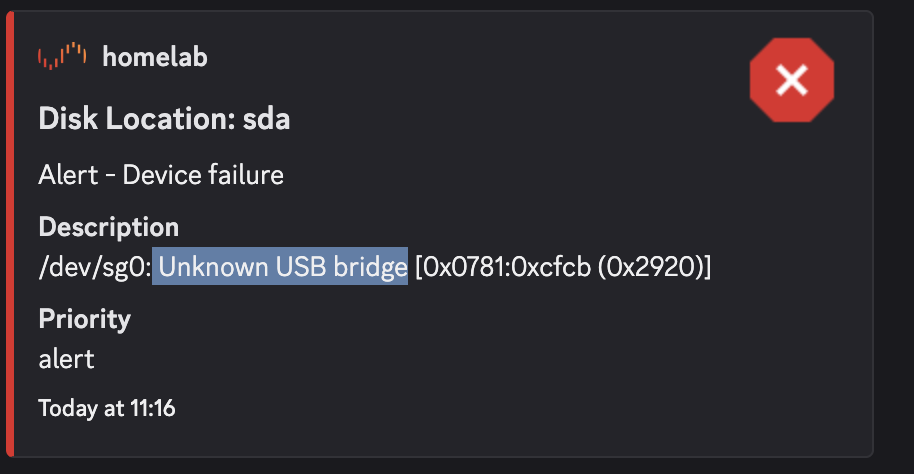
this is related to plugin? as my usb is healthy on Unraid root@homelab:~# cat /var/log/syslog | grep sg0 -A 10 -B 10 May 24 11:15:24 homelab kernel: scsi host0: usb-storage 6-1:1.0 May 24 11:15:24 homelab kernel: hub 7-1:1.0: USB hub found May 24 11:15:24 homelab kernel: hub 7-1:1.0: 5 ports detected May 24 11:15:24 homelab kernel: usb 7-1.1: new high-speed USB device number 3 using xhci_hcd May 24 11:15:24 homelab kernel: usb 7-1.2: new high-speed USB device number 4 using xhci_hcd May 24 11:15:24 homelab kernel: input: Linux 3.18.0 with ast_vhub SMCI HID KM as /devices/pci0000:40/0000:40:08.1/0000:49:00.3/usb7/7-1/7-1.2/7-1.2:1.0/0003:0557:9241.0001/input/input1 May 24 11:15:24 homelab kernel: hid-generic 0003:0557:9241.0001: input,hidraw0: USB HID v1.00 Keyboard [Linux 3.18.0 with ast_vhub SMCI HID KM] on usb-0000:49:00.3-1.2/input0 May 24 11:15:24 homelab kernel: input: Linux 3.18.0 with ast_vhub SMCI HID KM as /devices/pci0000:40/0000:40:08.1/0000:49:00.3/usb7/7-1/7-1.2/7-1.2:1.1/0003:0557:9241.0002/input/input2 May 24 11:15:24 homelab kernel: hid-generic 0003:0557:9241.0002: input,hidraw1: USB HID v1.00 Mouse [Linux 3.18.0 with ast_vhub SMCI HID KM] on usb-0000:49:00.3-1.2/input1 May 24 11:15:24 homelab kernel: scsi 0:0:0:0: Direct-Access SanDisk SDDR-B531 2920 PQ: 0 ANSI: 6 May 24 11:15:24 homelab kernel: sd 0:0:0:0: Attached scsi generic sg0 type 0 May 24 11:15:24 homelab kernel: sd 0:0:0:0: [sda] 15712256 512-byte logical blocks: (8.04 GB/7.49 GiB) May 24 11:15:24 homelab kernel: sd 0:0:0:0: [sda] Write Protect is off May 24 11:15:24 homelab kernel: sd 0:0:0:0: [sda] Mode Sense: 21 00 00 00 May 24 11:15:24 homelab kernel: sd 0:0:0:0: [sda] Write cache: disabled, read cache: enabled, doesn't support DPO or FUA May 24 11:15:24 homelab kernel: sda: sda1 May 24 11:15:24 homelab kernel: sd 0:0:0:0: [sda] Attached SCSI removable disk May 24 11:15:24 homelab kernel: floppy0: no floppy controllers found May 24 11:15:24 homelab kernel: Freeing unused kernel image (initmem) memory: 3068K May 24 11:15:24 homelab kernel: Write protecting the kernel read-only data: 20480k May 24 11:15:24 homelab kernel: Freeing unused kernel image (rodata/data gap) memory: 76K -- May 24 11:16:06 homelab rc.local: inflating: /tmp/disklocation-packages/disklocation-master/disklocation/pages/styles/signals.static.css May 24 11:16:06 homelab rc.local: inflating: /tmp/disklocation-packages/disklocation-master/disklocation/pages/system.php May 24 11:16:06 homelab rc.local: inflating: /tmp/disklocation-packages/disklocation-master/disklocation/pages/variables.php May 24 11:16:06 homelab rc.local: Extraction done. May 24 11:16:06 homelab rc.local: Installing files... May 24 11:16:06 homelab rc.local: Backup was made in the recent 0 days or backup is disabled, skipping. May 24 11:16:06 homelab rc.local: Configuring... May 24 11:16:06 homelab rc.local: Stylesheets: signals.dynamic.css activated. May 24 11:16:06 homelab rc.local: Installing cronjob... May 24 11:16:06 homelab rc.local: System newly booted, gathering SMART data May 24 11:16:06 homelab rc.local: SMART: /dev/sg0 FAILED () done in 706ms. May 24 11:16:06 homelab rc.local: SMART: /dev/sg1 ACTIVE (126039c927) done in 292ms. May 24 11:16:06 homelab rc.local: SMART: /dev/sg2 ACTIVE (8ce62c94e6) done in 307ms. May 24 11:16:06 homelab rc.local: SMART: /dev/sg3 IDLE (026f3709ba) done in 126ms. May 24 11:16:06 homelab rc.local: SMART: /dev/sg4 IDLE (a78f0e580a) done in 121ms. May 24 11:16:06 homelab rc.local: SMART: /dev/sg5 ACTIVE (4f572a265a) done in 136ms. May 24 11:16:06 homelab rc.local: SMART: /dev/sg6 IDLE (31127881ac) done in 121ms. May 24 11:16:06 homelab rc.local: SMART: /dev/nvme0n1 ACTIVE (0b9a281004) done in 79ms. May 24 11:16:06 homelab rc.local: SMART: /dev/nvme1n1 ACTIVE (b98b2cb3ac) done in 52ms. May 24 11:16:06 homelab rc.local: SMART: /dev/nvme2n1 ACTIVE (e8085398ba) done in 59ms. May 24 11:16:06 homelab rc.local: Writing to the database... done in 2.4 seconds.
-
Hey folks, can I create more zones for fan control? as by default supermicro H12ssl has 2 zones, which doesn’t place nice with my case.
-
I used exactly the same value you posted, it had the same situation though. PostUp=logger -t wireguard -- 'Tunnel WireGuard-wg0 started'; /usr/local/emhttp/webGui/scripts/update_services PostUp=ip -4 route flush table 200 PostUp=ip -4 route add default via 10.13.13.2 dev wg0 table 200 PostUp=ip -4 route add 10.10.179.0/24 via 10.10.179.1 dev br0 table 200 PostUp=iptables -t nat -A POSTROUTING -o br0 -s 10.13.13.0/24 -j MASQUERADE PostDown=logger -t wireguard -- 'Tunnel WireGuard-wg0 stopped'; /usr/local/emhttp/webGui/scripts/update_services PostDown=ip -4 route flush table 200 PostDown=ip -4 route add unreachable default table 200 PostDown=ip -4 route add 10.10.179.0/24 via 10.10.179.1 dev br0 table 200 PostDown=iptables -t nat -D POSTROUTING -o br0 -s 10.13.13.0/24 -j MASQUERADE to clarify, I can ping Unraid host, but I can't reach out to any other hosts on LAN.
-
as you can see modprobing in go file just works. I was curious if there is a "better" way to do that.
-
I can ping Unraid ip easily, I can also reach out to other devices using br0 with different IP, BUT and only through traefik which is hosted on Unraid docker doesn't seem to be the case, enabling NAT didn't solve it. no luck
-
does this really work in modprobe.d? I think syntax is different
-
Hey, I'm trying to setup wireguard exit node on Unraid to get access to my Lan from remote: VPS (wireguard entry for remote clients) -> [Unraid -> Lan] I can establish connection to Unraid and even ping local unraid IP from wireguard, but can't access other machine on the lan (like my Raspberry PI or even Docker on unraid br0 network). My network is the following: 10.13.13.0/24 - WG 10.10.179.0/24 - LAN My Unraid config: [Interface] PrivateKey= Address=10.13.13.2 ListenPort=51820 MTU=1414 PostUp=logger -t wireguard -- 'Tunnel WireGuard-wg0 started';/usr/local/emhttp/webGui/scripts/update_services PostDown=logger -t wireguard -- 'Tunnel WireGuard-wg0 stopped';/usr/local/emhttp/webGui/scripts/update_services PostUp=ip -4 route flush table 200 PostUp=ip -4 route add default via 10.13.13.2 dev wg0 table 200 PostUp=ip -4 route add 10.10.179.0/24 via 10.10.179.1 dev br0 table 200 PostDown=ip -4 route flush table 200 PostDown=ip -4 route add unreachable default table 200 PostDown=ip -4 route add 10.10.179.0/24 via 10.10.179.1 dev br0 table 200 [Peer] PublicKey= PresharedKey= Endpoint=<VPS> AllowedIPs=10.13.13.0/24 PersistentKeepalive=30 My VPS wireguard config: [Interface] Address = 10.13.13.1 ListenPort = 51820 PrivateKey = PostUp = iptables -A FORWARD -i %i -j ACCEPT; iptables -A FORWARD -o %i -j ACCEPT; iptables -t nat -A POSTROUTING -o eth+ -j MASQUERADE PostDown = iptables -D FORWARD -i %i -j ACCEPT; iptables -D FORWARD -o %i -j ACCEPT; iptables -t nat -D POSTROUTING -o eth+ -j MASQUERADE [Peer] # unraid PublicKey = <> PresharedKey = <> AllowedIPs = 10.13.13.2/32, 10.10.179.0/24 So, VPS is not a problem, as I used to do run the same setup on my previous machine and it worked wonders. Here is traceroute from VPS: docker exec wireguard traceroute 10.10.179.222 traceroute to 10.10.179.222 (10.10.179.222), 30 hops max, 46 byte packets 1 10.10.179.222 (10.10.179.222) 32.155 ms 33.153 ms 34.911 ms docker exec wireguard traceroute 10.10.179.111 traceroute to 10.10.179.111 (10.10.179.111), 30 hops max, 46 byte packets 1 10.13.13.2 (10.13.13.2) 30.257 ms * 30.365 ms 2 Trace from Unraid : docker run --rm --net=host --privileged nicolaka/netshoot tcpdump -i wg0 icmp 17:23:25.232337 IP 10.13.13.1 > 10.10.179.156: ICMP echo request, id 13, seq 7958, length 64 17:23:25.264245 IP 10.13.13.1 > 10.10.179.111: ICMP echo request, id 17, seq 7801, length 64 17:23:25.328433 IP 10.13.13.1 > 10.10.179.25: ICMP echo request, id 12, seq 7967, length 64 17:23:25.680662 IP 10.13.13.1 > 10.10.179.25: ICMP echo request, id 15, seq 7810, length 64 17:23:25.872120 IP 10.13.13.1 > 10.10.179.111: ICMP echo request, id 10, seq 7977, length 64 17:23:26.096960 IP 10.13.13.1 > 10.10.179.111: ICMP echo request, id 14, seq 7925, length 64 17:23:26.178497 IP 10.13.13.2 > 10.13.13.1: ICMP host 10.10.179.11 unreachable, length 92 17:23:26.178600 IP 10.13.13.2 > 10.13.13.1: ICMP host 10.10.179.11 unreachable, length 92 17:23:26.178688 IP 10.13.13.2 > 10.13.13.1: ICMP host 10.10.179.11 unreachable, length 92 17:23:26.192874 IP 10.13.13.1 > 10.10.179.11: ICMP echo request, id 16, seq 7869, length 64 17:23:26.256181 IP 10.13.13.1 > 10.10.179.156: ICMP echo request, id 13, seq 7959, length 64 17:23:26.288759 IP 10.13.13.1 > 10.10.179.111: ICMP echo request, id 17, seq 7802, length 64 17:23:26.352742 IP 10.13.13.1 > 10.10.179.25: ICMP echo request, id 12, seq 7968, length 64 17:23:26.704375 IP 10.13.13.1 > 10.10.179.25: ICMP echo request, id 15, seq 7811, length 64 17:23:26.896409 IP 10.13.13.1 > 10.10.179.111: ICMP echo request, id 10, seq 7978, length 64 17:23:27.120236 IP 10.13.13.1 > 10.10.179.111: ICMP echo request, id 14, seq 7926, length 64 17:23:27.194156 IP 10.13.13.1 > 10.10.179.11: ICMP echo request, id 16, seq 7870, length 64 17:23:27.280249 IP 10.13.13.1 > 10.10.179.156: ICMP echo request, id 13, seq 7960, length 64 17:23:27.312450 IP 10.13.13.1 > 10.10.179.111: ICMP echo request, id 17, seq 7803, length 64 17:23:27.376523 IP 10.13.13.1 > 10.10.179.25: ICMP echo request, id 12, seq 7969, length 64 17:23:27.728145 IP 10.13.13.1 > 10.10.179.25: ICMP echo request, id 15, seq 7812, length 64 17:23:27.920087 IP 10.13.13.1 > 10.10.179.111: ICMP echo request, id 10, seq 7979, length 64 17:23:28.144053 IP 10.13.13.1 > 10.10.179.111: ICMP echo request, id 14, seq 7927, length 64 17:23:28.208105 IP 10.13.13.1 > 10.10.179.11: ICMP echo request, id 16, seq 7871, length 64 17:23:28.304883 IP 10.13.13.1 > 10.10.179.156: ICMP echo request, id 13, seq 7961, length 64 17:23:28.336279 IP 10.13.13.1 > 10.10.179.111: ICMP echo request, id 17, seq 7804, length 64 17:23:28.400237 IP 10.13.13.1 > 10.10.179.25: ICMP echo request, id 12, seq 7970, length 64 17:23:28.752468 IP 10.13.13.1 > 10.10.179.25: ICMP echo request, id 15, seq 7813, length 64 17:23:28.944679 IP 10.13.13.1 > 10.10.179.111: ICMP echo request, id 10, seq 7980, length 64 17:23:29.168269 IP 10.13.13.1 > 10.10.179.111: ICMP echo request, id 14, seq 7928, length 64 17:23:29.232642 IP 10.13.13.1 > 10.10.179.11: ICMP echo request, id 16, seq 7872, length 64 17:23:29.250396 IP 10.13.13.2 > 10.13.13.1: ICMP host 10.10.179.11 unreachable, length 92 17:23:29.250427 IP 10.13.13.2 > 10.13.13.1: ICMP host 10.10.179.11 unreachable, length 92 17:23:29.250446 IP 10.13.13.2 > 10.13.13.1: ICMP host 10.10.179.11 unreachable, length 92 17:23:29.250465 IP 10.13.13.2 > 10.13.13.1: ICMP host 10.10.179.11 unreachable, length 92 docker run --rm --net=host --privileged nicolaka/netshoot tcpdump -i br0 icmp 17:24:35.728178 IP 10.13.13.1 > 10.10.179.111: ICMP echo request, id 14, seq 7993, length 64 17:24:35.728207 IP 10.10.179.111 > 10.13.13.1: ICMP echo reply, id 14, seq 7993, length 64 17:24:35.888592 IP 10.13.13.1 > 10.10.179.156: ICMP echo request, id 13, seq 8027, length 64 17:24:35.920387 IP 10.13.13.1 > 10.10.179.111: ICMP echo request, id 17, seq 7870, length 64 17:24:35.920490 IP 10.10.179.111 > 10.13.13.1: ICMP echo reply, id 17, seq 7870, length 64 17:24:35.984128 IP 10.13.13.1 > 10.10.179.25: ICMP echo request, id 12, seq 8036, length 64 17:24:35.984174 IP 10.10.179.25 > 10.13.13.1: ICMP echo reply, id 12, seq 8036, length 64 17:24:36.336436 IP 10.13.13.1 > 10.10.179.25: ICMP echo request, id 15, seq 7879, length 64 17:24:36.336465 IP 10.10.179.25 > 10.13.13.1: ICMP echo reply, id 15, seq 7879, length 64 17:24:36.529386 IP 10.13.13.1 > 10.10.179.111: ICMP echo request, id 10, seq 8046, length 64 17:24:36.529404 IP 10.10.179.111 > 10.13.13.1: ICMP echo reply, id 10, seq 8046, length 64 17:24:36.752165 IP 10.13.13.1 > 10.10.179.111: ICMP echo request, id 14, seq 7994, length 64 17:24:36.752202 IP 10.10.179.111 > 10.13.13.1: ICMP echo reply, id 14, seq 7994, length 64 17:24:36.912232 IP 10.13.13.1 > 10.10.179.156: ICMP echo request, id 13, seq 8028, length 64 17:24:36.944051 IP 10.13.13.1 > 10.10.179.111: ICMP echo request, id 17, seq 7871, length 64 17:24:36.944079 IP 10.10.179.111 > 10.13.13.1: ICMP echo reply, id 17, seq 7871, length 64 17:24:37.008047 IP 10.13.13.1 > 10.10.179.25: ICMP echo request, id 12, seq 8037, length 64 17:24:37.008081 IP 10.10.179.25 > 10.13.13.1: ICMP echo reply, id 12, seq 8037, length 64 17:24:37.360607 IP 10.13.13.1 > 10.10.179.25: ICMP echo request, id 15, seq 7880, length 64 17:24:37.360708 IP 10.10.179.25 > 10.13.13.1: ICMP echo reply, id 15, seq 7880, length 64 17:24:37.389144 IP 10.10.179.111 > 10.13.13.1: ICMP 10.10.179.111 udp port 33459 unreachable, length 54 17:24:37.552523 IP 10.13.13.1 > 10.10.179.111: ICMP echo request, id 10, seq 8047, length 64 17:24:37.552623 IP 10.10.179.111 > 10.13.13.1: ICMP echo reply, id 10, seq 8047, length 64 17:24:37.776917 IP 10.13.13.1 > 10.10.179.111: ICMP echo request, id 14, seq 7995, length 64 17:24:37.776936 IP 10.10.179.111 > 10.13.13.1: ICMP echo reply, id 14, seq 7995, length 64 17:24:37.936096 IP 10.13.13.1 > 10.10.179.156: ICMP echo request, id 13, seq 8029, length 64 17:24:37.968242 IP 10.13.13.1 > 10.10.179.111: ICMP echo request, id 17, seq 7872, length 64 17:24:37.968268 IP 10.10.179.111 > 10.13.13.1: ICMP echo reply, id 17, seq 7872, length 64 17:24:38.032561 IP 10.13.13.1 > 10.10.179.25: ICMP echo request, id 12, seq 8038, length 64 17:24:38.032664 IP 10.10.179.25 > 10.13.13.1: ICMP echo reply, id 12, seq 8038, length 64 17:24:38.384570 IP 10.13.13.1 > 10.10.179.25: ICMP echo request, id 15, seq 7881, length 64 17:24:38.384663 IP 10.10.179.25 > 10.13.13.1: ICMP echo reply, id 15, seq 7881, length 64 17:24:38.576410 IP 10.13.13.1 > 10.10.179.111: ICMP echo request, id 10, seq 8048, length 64 17:24:38.576437 IP 10.10.179.111 > 10.13.13.1: ICMP echo reply, id 10, seq 8048, length 64 17:24:38.600594 IP 10.10.179.111 > 10.13.13.1: ICMP 10.10.179.111 udp port 33439 unreachable, length 54 17:24:38.800106 IP 10.13.13.1 > 10.10.179.111: ICMP echo request, id 14, seq 7996, length 64 17:24:38.800148 IP 10.10.179.111 > 10.13.13.1: ICMP echo reply, id 14, seq 7996, length 64 17:24:38.960515 IP 10.13.13.1 > 10.10.179.156: ICMP echo request, id 13, seq 8030, length 64 17:24:38.992442 IP 10.13.13.1 > 10.10.179.111: ICMP echo request, id 17, seq 7873, length 64 17:24:38.992490 IP 10.10.179.111 > 10.13.13.1: ICMP echo reply, id 17, seq 7873, length 64 17:24:39.056333 IP 10.13.13.1 > 10.10.179.25: ICMP echo request, id 12, seq 8039, length 64 17:24:39.056376 IP 10.10.179.25 > 10.13.13.1: ICMP echo reply, id 12, seq 8039, length 64 17:24:39.408442 IP 10.13.13.1 > 10.10.179.25: ICMP echo request, id 15, seq 7882, length 64 17:24:39.408480 IP 10.10.179.25 > 10.13.13.1: ICMP echo reply, id 15, seq 7882, length 64 17:24:39.628095 IP 10.13.13.1 > 10.10.179.111: ICMP echo request, id 10, seq 8049, length 64 17:24:39.628196 IP 10.10.179.111 > 10.13.13.1: ICMP echo reply, id 10, seq 8049, length 64 17:24:39.828300 IP 10.13.13.1 > 10.10.179.111: ICMP echo request, id 14, seq 7997, length 64 17:24:39.828332 IP 10.10.179.111 > 10.13.13.1: ICMP echo reply, id 14, seq 7997, length 64 17:24:39.985117 IP 10.13.13.1 > 10.10.179.156: ICMP echo request, id 13, seq 8031, length 64 17:24:40.016139 IP 10.13.13.1 > 10.10.179.111: ICMP echo request, id 17, seq 7874, length 64 17:24:40.016168 IP 10.10.179.111 > 10.13.13.1: ICMP echo reply, id 17, seq 7874, length 64
-
Hey folks, I'm wondering what is the best way to enable nf_tables in Unraid 7? By default, for some reason, it is not enabled on my machine, even though it is available in system drivers. currently I have this line in my go file, which does the trick: modprobe nf_tables Maybe there is a right way to enable it? otherwise can I leverage modprobe.d?
-
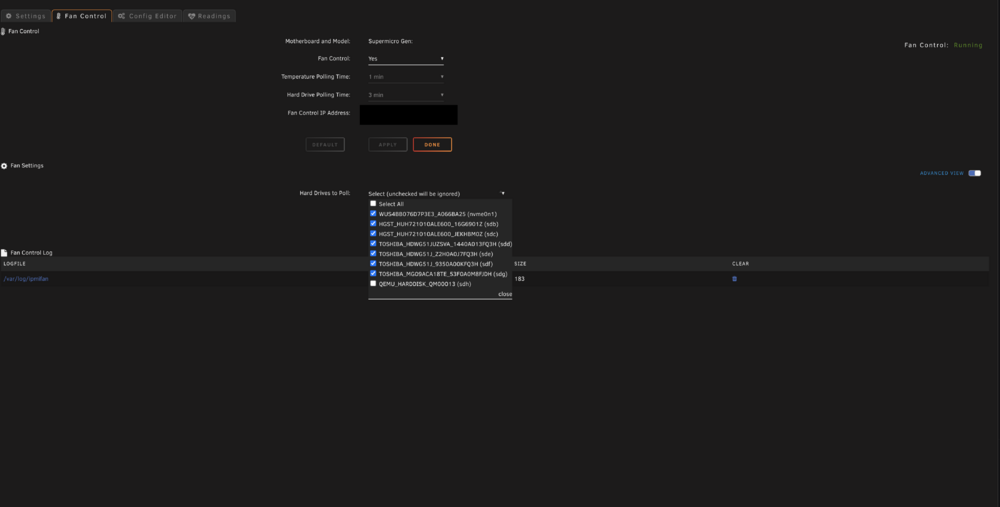
I think I have figured out, it was a "too long password" now I can see 2 groups of fans, but ideally I need 3. and it does not seem to be able to change fan values
-
Is there any configuration I need to make to control my fans on Supermicro H12SSL? as enabling Fan control doesn't do any changes?
-
Hey, After upgrading to 7.0.0 my network became unstable. Frequent packet losses/unresponsiveness from internal and external network (no ssh, no WEB, etc). Can't figure out what is happening, but was able to get the diagnostics. Event occurred multiple times 22.02.2025 ~19:00 - 20:20 tnas-diagnostics-20250222-2011.zip
