





pOpYRaid
Members
-
Joined
-
Last visited
Everything posted by pOpYRaid
-
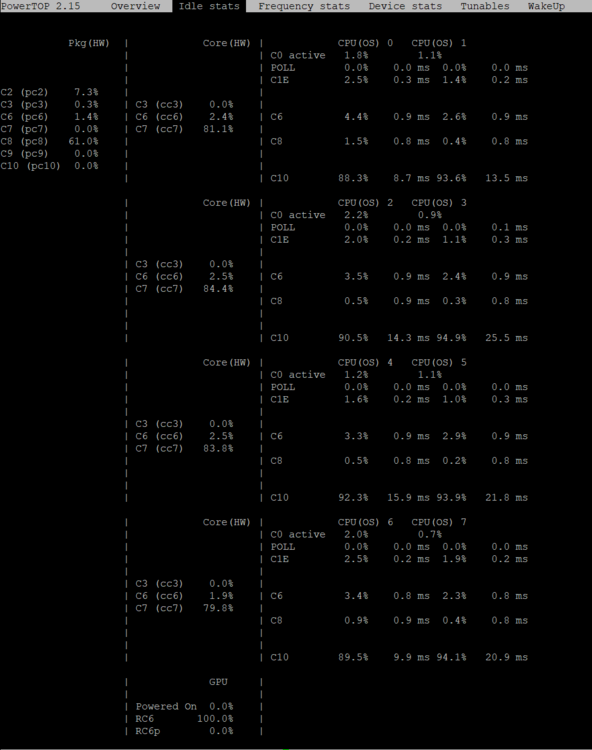
Hi guys. I am facing the same issue on my H610i with i3-12100T. My system is idling at about 11w and reaching c state C8, which is ok for me. When i connect my "SONOFF Zigbee 3.0 USB Dongle Plus,TI CC2652P + CP2102(N)" stick it just reaches C3 and power consumption is about 20W. Have you guys found an workaround to this issue? I have found out that the issue seems to be Intel related because of the USB full speed devices (12 MBit/s), which the usb serial CP2102 chip on the stick is. Here are some references: https://github.com/Koenkk/zigbee2mqtt/issues/3140 https://community.intel.com/t5/Processors/Poor-power-efficiency-with-B660-B760-boards-and-active-Full/td-p/1565137 https://community.intel.com/t5/Processors/Poor-power-efficency-with-B760-and-active-Full-Speed-USB-devices/m-p/1628022 Because i don't think intel will solve the issue quick, here are ideas for workarounds, which i will try: Try every USB Port on the MoBo -> Tested, doesn't solve the issue Use an old self powered USB 2.0 HUB in between -> Tested, doesn't solve the issue Use an self powered USB 3.0 HUB in between -> Tested, doesn't solve the issue Use a PCIe to USB adapter which supports ASPM -> not tested, but probably will not work Use an SLZB-06 PoE network zigbee adapter -> !! Hurray !! That is an workaround!!!! I have migrated (cloned IEEE) my zigbee network (132 devices) from the sonoff to an SLZB-06 (which has the same zigbee frontend CC2652P and an PoE ethernet port) flawlessly. The CPU now reaches C8 again! So yes, this is a workaround and Intel has an serious USB issue there! Here are the stats with running Z2M conrainer + SLZB-06 (PoE):
-
@mgutt thx for your info. So when i assume right, that's without the intel i226-T1 card, right? Would be so nice if you could plug it in and check c states and stability. thx a lot
-
@dopeytree Yeah, the base clock of the i3-12100T is 2,2 Ghz @ 4x p-cores & 8x threads, which is enough for us. I have 1x Samsung 980 nvme & 3x Seagate (2x 20TB & 1x 14 TB) hdd's. I am happy with this build now regarding power consumption. One thing i have to solve is the 2,5 GBE Upgrade. With the RTL8125B i had a bad experience stuck in C3. Maybe i'll try the i226-T1. Do you have 2,5 GBE? If yes, which adapter?
-
@hallamnet thx for the info. I am on Unraid 7 beta 2 and sadly it also does'nt work. @limetech Maybe you could look into this for an future unraid 7 beta/final release? Will there be an kernel update?
-
@hallamnet I have the exact same issue on an Gigabyte H610I and an ASRock B660 itx board. Did you found an solution, or do we have to wait for an Kernel update? Thx
-
@Kawada13 I have the exact same issue. Did you found a solution to this issue?
-
@dopeytree tested the settings. The idle is up to ~13 watt and peaking much more (yeah the boost is visible here). Now gone back to disable all turbo boost settings and XMP. Thinked about it an all worked well without and for our use case, the performance is enought. Anayway, thx for your time.
-
thx @dopeytree i will test this and post my measurement results. One question, i have seen in the AutoTweaks screenshots that you can set ASPM forthe realtek 8125B driver. I and others (see above) had bad experiences with this chip on current unraid 7 beta 2 build. System is stuck C3 or C6 and doesnt reach higher C states. Also when ASPM is shown enabled by linux. Do you have such an NIC card and does the AutoTweak's plugin fixes this issue? Just asking because the 8125 cards are cheaper than other intel cards. thx
-
@dopeytree thanks for your answer. Ok so when i got your right, just enable XMP Will try it and measure power consumption again. So my current config is: BIOS: EIST/C-States enabled, Turbo boost, Speedstep & XMP disabled Added /boot/config/go tweaks from OP (to set powersave cpu governor & other small tweaks) Idle consumption is ~11,4 Watt (All docker running, HDD's in standby) So your suggestions are: BIOS: EIST/C-States enabled, Turbo boost, Speedstep & XMP enabled Remove tweaks from /boot/config/go Use AutoTweak plugin to set powersave cpu governor and other tweaks Right?
-
Hey guys. Turbo and speedshift is disabled, but want to get best performance. So thinking of activating XMP. Does activating XMP (to 3200 in my case) increases power consumption?
-
Hi, i am such a people, want to backup a manuall created folder in appdata, and added it like this: Also tried without slash, with wildcard, ... nothing works. Also from cache folder (where it lives) doesnt work. As you said, there is no hint/error/warning that it was not backed-up, it's just missing. Any hint's how i can include this folder in the backup? Any hint's how i can add this folder to the backup? PS.: have now made an workaround with an user script
-
@Brutos @KarlMeyer @mgutt I have now tested the 8125B card again. Sadly if it's installed, the machine is stuck in C6 which consumes 4-5 Watts more idle. I have also tested it with different drivers and tweaks (verifed with lsmod that it's loaded): Default r8169 driver -> ASPM shown enabled -> Same issue as stated above. Driver R8125 plugin () -> ASPM shown enabled -> Same issue as stated above. Tried the aspm=1 mod from here: https://forums.unraid.net/topic/141349-plugin-realtek-r8125-r8126-r8168-and-r815267-drivers/?do=findComment&comment=1379870 -> Same issue as stated above. So no chance to get low idle power consumption when this card is installed. Would be nice if anyone of you can recommend an "cheap" 2,5GBE PCIe card which is capable of high cstates (low power consumption). When i got it right there not so much chip manufactures, there is Intel, Marvel and Realtek. Maybe a marvel one will do the job? thx
-
Thanks a lot for the hint. Is it possible for you test c-states of unraid with this card? If it get's worse with it or not. If you search the net there are many many reported issues with I225 and (yes intel did it again :-) the I226. Would be really nice if you can test your card and give us feedback. Thank you pOpY
-
Any cheap 2,5 GBE REplacement card which has no issues with higher c-states? P.S.: Dont need 10 GBE Thank you
-
Hi guys. Thanks for this thread and all the informations. I have documented my c-states journey here: https://forums.unraid.net/topic/98070-reduce-power-consumption-with-powertop/?do=findComment&comment=1464500 Hope this helps someone. pOpY
-
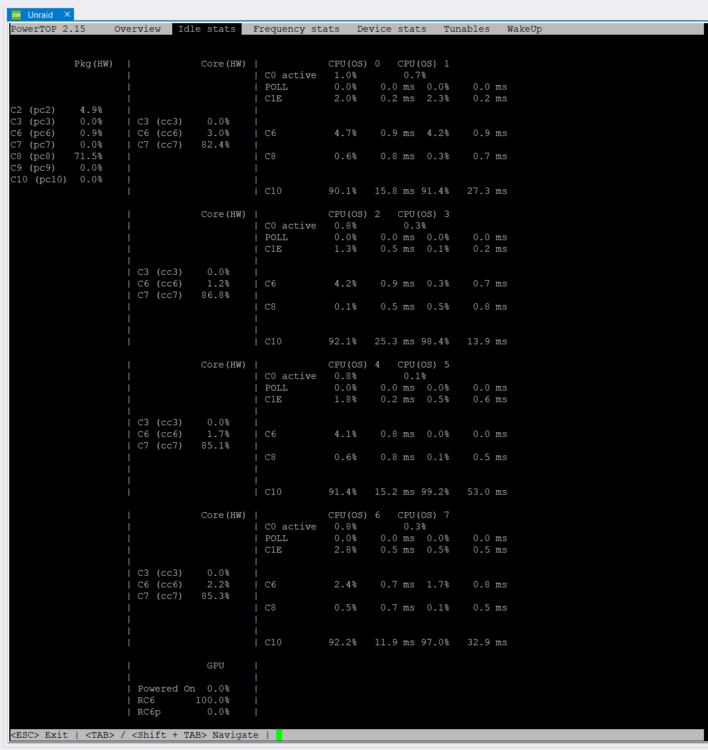
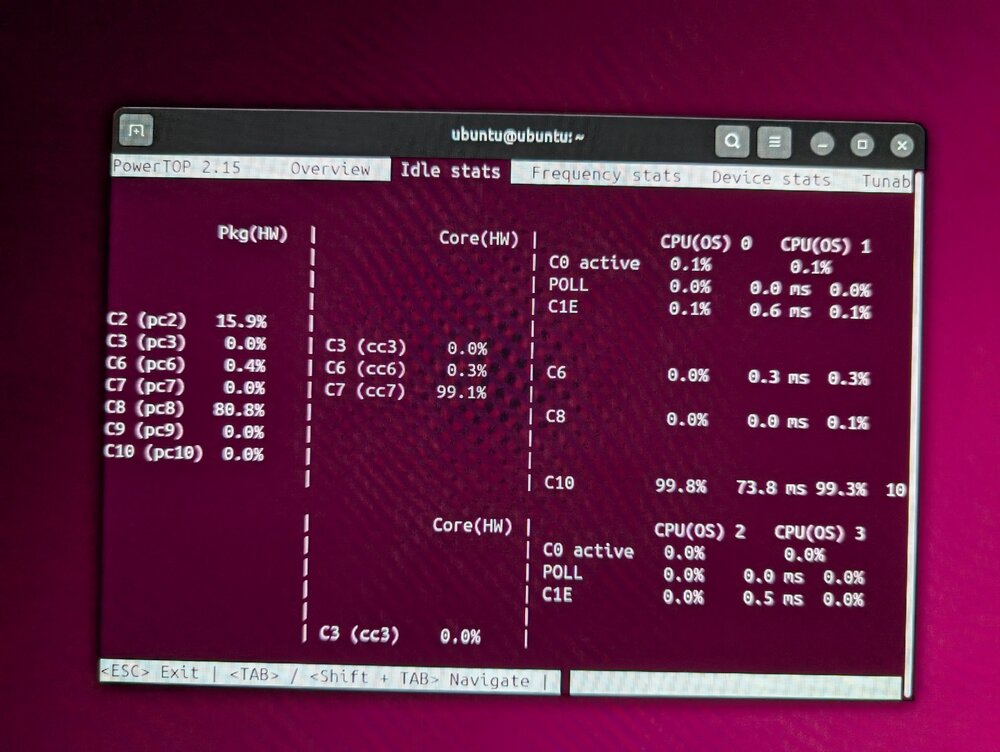
So keep you updated, i will post my results here. !! FIRST A HUGE THANKS TO @mgutt and @Chr1sch !! From this thread: https://forums.unraid.net/topic/147723-itx-messungen-gigabyte-b760i-aorus-pro-und-asrock-z790-phantom-gaming-itxtb4/ I have now replaced my ~15 year old PSU with an pixoPSU-XT-160 and today the shitty Asrock "B660M-ITX/ac" with an Gigabyte "H610I DDR 4" all other hardware is unchanged. See my post above for the other hardware https://forums.unraid.net/topic/98070-reduce-power-consumption-with-powertop/?do=findComment&comment=1462149 After changing the PSU to the pixoPSU-XT-160 i got an improvment (with Asrock BIOS hack to reach C6-C8), see here https://forums.unraid.net/topic/98070-reduce-power-consumption-with-powertop/?do=findComment&comment=1463177 Now after swapping the mainboard but all other hardware connected (idle, no HDMI/DP, 1x NVME, 3x HDD (in standby)): Ubuntu: ~9,6 Watt / No Dockers/VM's / C8 (see picture 1) Unraid: ~10,3 Watt / All Dockers/VM's stopped / C8 Unraid: ~11,3 Watt / All Dockers started & VM (Windows 11) removed/stopped / C8 I am happy with the results, so finally i will leave my unraid 24/7 on. Thanks a lot for the help on c-states journey Picture 1 - 9,6 Watt: Picture 2 - 11,3 Watt:
-
I have now replaced my rather old PSU with picoPSU. Now when all docker and VM's stopped i am down to ~14w from ~19w - 20w. It reaches c6 with the asrock board and Samsung nvme not removed (which i know prevents it from c8). So yesss, picoPSU saved 25% power draw, yeah. My next step is to replace the known bad Asrock B660M-ITX/ac board with the gigabyte H610i, which should perform better, see here: Keep you updated.
-
What manufacturer of the board is it? If ASRock and you have just up to "Enable C7" in the BIOS you can try the following to reach higher c states: Enable the hidden Low Power BIOS setting to reach higher c states: !! BE AWARE !! when enabling this you will reach higher c states (C8 instead of C3 for me) BUT s3 sleep is not working in my case!!!!!!!!!! When you don't use S3 sleep (standby) it's ok. Also try to boot Ubuntu with the nvmes removed. In my case my Samsung 980 nvme prevents C8 and it's stuck in C6, when it's installed.
-
Sadly my Mobo just has 1 slot which seems to be connected to the CPU, hence preventing it from sleep. This i can solve later and now i know this. I also have laying arround another WD nvme 1TB and an 1TB sata SSD. Thos i will try later. BUT becaue you have mentioned the PSU. I have looked at it an it's an "be quiet BQT L7-350W (85plus)", rather old from before 2010!!!!!!!!!!!!!!!!!! (Have corrected my first post from above). I dont find any reviews regarding eficiency on low power draw, maybe that's one culprit. I dont want an external brick + PicoPSU-160-XT + Internal adapters, so is there an replacement for the rather good "corsair RM550x 2021"? Ok, after more reading, i will go with an PicoPSU-160XT + LEICKE 150W power supply 12V 12.5A + SATA Adapters. My plan now is: picoPSU Mainboard (i think the Gigabyte H610I) check cstates and power draw again and... maybe replace the "Samsung 850" NVME
-
Thx, for your suggestions. Maybe i will try a PicoPSU (120W). Have now booted ubuntu and it was also stuck at c6 (~19w). After removing my nvme SSD it got c8 with ~17 watt. Not much and i dont want to remove the nvme :-( Have found this thread: What i am reading the "Gigabyte H610I DDR 4" would fit my needs and runs in higher c-states. Maybe i will also try it. Otherwise i am happy with the current results of ~20 watt when all docker and VM's are running (on nvme cache) and disks spun down. Before the tweaks it was 30-35w. I must decide for myself if i want it 24/7 or in s3 sleep (which i had up until now).
-
Will look into it, i think the PicoPSU-90 will be sufficent? I have an Lian Li PC-Q25 case which just holds mini-ITX. Will look in the thread. Is there any recommended chipset for LGA1700 cpu`s (regarding c states). thx
-
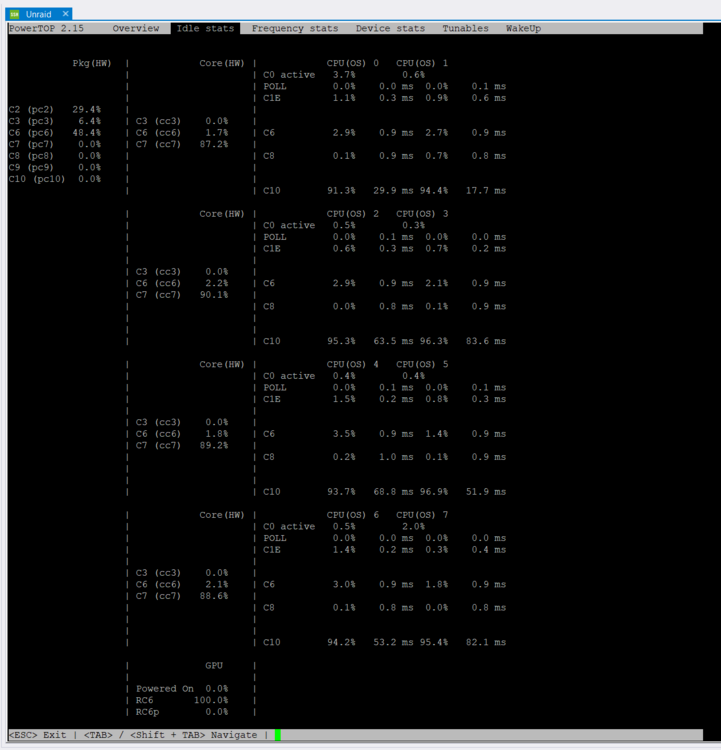
@mgutt thanks for all the informations. i have read a lot in the thread followed guide to keep 24/7 power consumption low. Up until now i have used standby with the s3 script, but i want it to be online 24/7 (because of other issues with standby). Here is my setup : Mainboard: ASRock B660M-ITX/ac RAM: 2X16GB PSU: be quiet BQT L7-350W (85plus) - rather old from before 2010!!!!!!!!!!!!!!!!!! CPU: 12th Gen Intel® Core™ i3-12100T @ 2178 MHz Cache: 1x Samsung 980 NVMe M.2 SSD, 1 TB Array: Seagate 1x 14TB & 1x 20TB PCIe NIC RTL8125B Starting point was ~50 Watt, disks spun up and ~35 Watt spun down (all VM and dockers running, Display disconnected). As stated in the above post, the RTL8125B PCIe nic card was a culprit! It prevented the cpu from entering pkg c states and consumed about ~10 w (incl. cpu). After i read the posts above i immidattly removed it and used the internal intel I219V. These was the idle stats before: device stats: lspci cmd: cpufreq: This is what i have done to lower the consumption: Update BIOS from 3.01 to 11.05 (had a rather 2 year old one) Disconnect the monitor (was connected all the time before to the AVR) Edit the /boot/config/go as in OP and also add "powertop --auto-tune" at the end, which gives another watt Enabled all BIOS settings regarding power save, ASPM, ... some of which PCIe ASPM L0sL1 and just L0s Intel C-State: Enabled C1E Support: Enabled Package C6 State Limit: Enabled Package C7 State Limit: Enabled Disabled HD Audio Controller/COM/LPT Enable the hidden Low Power BIOS setting for my asrock to reach higher c states: https://www.reddit.com/r/ASRock/comments/1998ozl/how_to_get_higher_pkg_cstates_on_asrock/ !! BE AWARE !! when enabling this you will reach higher c states (C8 instead of C3 for me) BUT s3 sleep is not working!!!!!!!!!! This is the result: I am now reaching C6 and been down to ~19 watt with disk spun down (all docker & vms are running). Which is good, but electricity costs are high in europe, so i want to come down further. My ideas are: Enable hidden "Native ASPM" which is default on "Auto" (with AMI tool) -> Result: does'nt make a difference Remove cache ssd and retest (Samsung 980 1 TB PCIe 3.0 (bis zu 3.500 MB/s) NVMe M.2 Internes Solid State Drive (SSD) (MZ-V8V1T0BW)) Result: tested in Ubuntu, with nvme it reaches also C6 (like in unraid ~19w), without nvme it reaches C8 (~17w) Other ITX LGA1700 Mainboard which supports C10 state? (any hints which one)? Another ATX PSU (any recommendations)? Thanks a lot pOpY
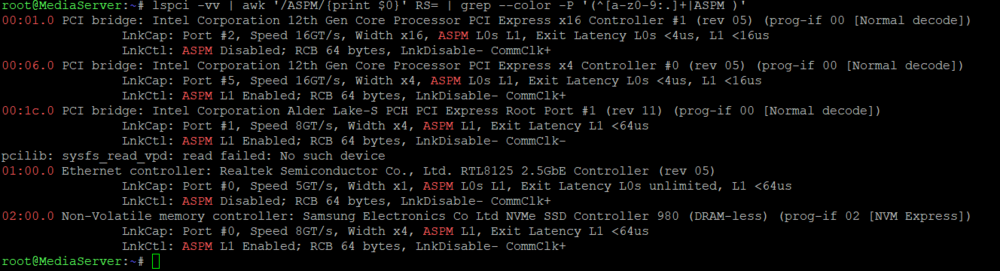
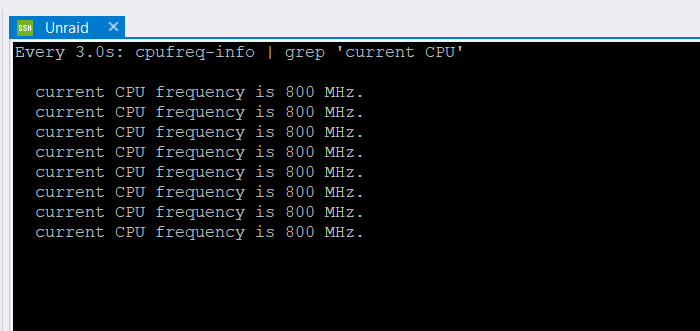
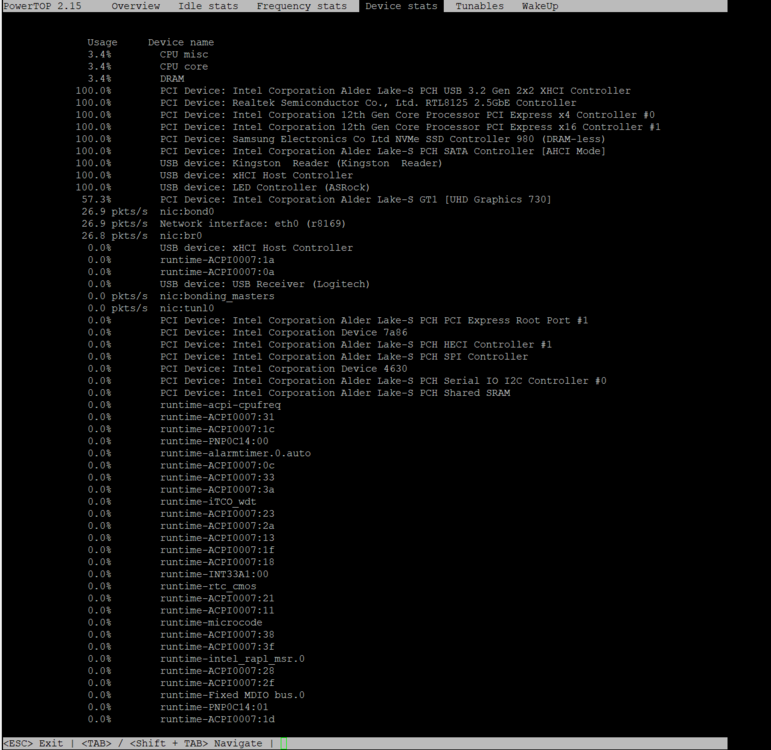
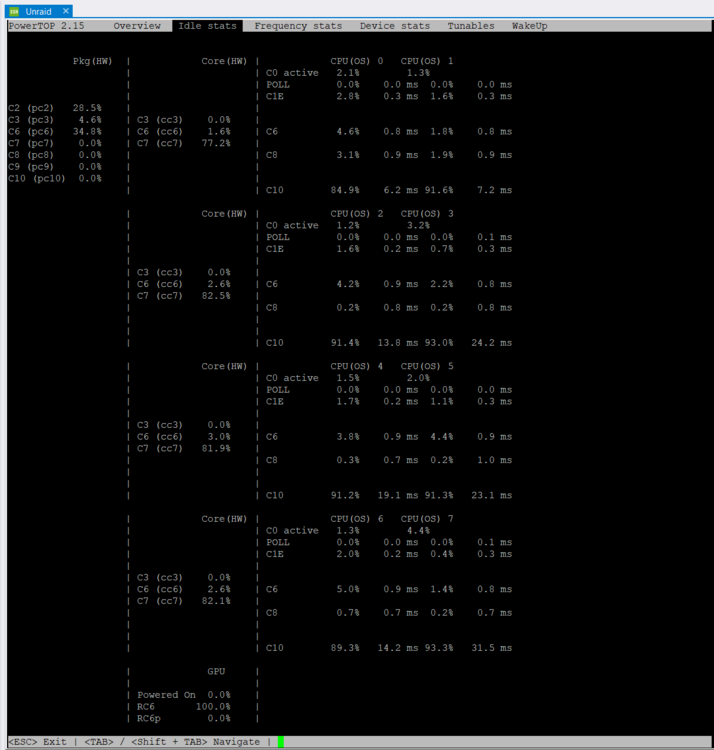
-
Thanks a lot, this saved me ~10 watts of idle consumption! When the RTL8125B is installed in the system, pkg state just got to C2. Now it's hitting C6 again. Will post my reports soon to get help an maybe get to C10 :-)
-
@SimonFi think the issue was the sleep options in the VM. It now not paused for over ~24h.
-
vdisk is not filling up inside VM. It's an KVM 64GB disk (allocated) and now are ~33GB free. I had already the idea because of the sleep options inside the VM before i posted here and disabled them. So will see how it goes...








