





Synoxion
Members
-
Joined
-
Last visited
Everything posted by Synoxion
-
Hi itimpi, I just ran the test mode logging with a manual parity check and a Unraid reboot. The logs no longer show the error, and based on the logs, it should be working. But it isn't. The notification about the cancellation was triggered at 08:34:09 and arrived correctly. Status: Last incomplete check on Sun, Jan 4, 2026, 1:59 AM (Today) Error code: Aborted Here's the log. I've only posted the part of the log that I think is what you need. If you need anything else that isn't included, just let me know what you're looking for and I'll find it in the log. I didn't want to post the entire log. syslog Additionally, the following error was found in the phplog. phplog
-
The parity check is currently running for quite some time. I'll let it complete fully first. After that, I could manually restart it for a test.
-
Hi @itimpi, I'm experiencing an error with the resumption of the partity check after an Unraid reboot. After a reboot, the currently paused check is aborted. Unraid version is 7.2.3 and the plugin is dated 2025-12-29. Here's what I found in the system log: Jan 2 10:13:35 nginx: 2026/01/02 10:13:35 [error] 9468#9468: *385 FastCGI sent in stderr: "Primary script unknown" while reading response header from upstream, client: 192.168.x.x, server: , request: "GET /plugins/parity.check.tuning/parity.check.entries.php HTTP/1.1", upstream: "fastcgi://unix:/var/run/php-fpm.sock:", host: "192.168.x.x", referrer: "http://192.168.x.x/Tools/Parity.check.problems" Jan 2 10:16:24 ool www[25505]: /usr/local/emhttp/plugins/parity.check.tuning/parity.check.tuning.php 'config' Jan 2 10:16:30 Parity Check Tuning: Versions: Unraid 7.2.3, Plugin Version: <unbekannt Jan 2 10:16:30 Parity Check Tuning: Configuration Jan 2 10:16:30 Check Tuning: Array#012(#012 [parityTuningScheduled] => 1#012 [parityTuningManual] => 1#012 [parityTuningAutomatic] => 1#012 [parityTuningFrequency] => 0#012 [parityTuningResumeCustom] => 5,15,25,35,45,55 * * * *#012 [parityTuningResumeDay] => 0#012 [parityTuningResumeHour] => 0#012 [parityTuningResumeMinute] => 15#012 [parityTuningPauseCustom] => 0,10,20,30,40,50 * * * *#012 [parityTuningPauseDay] => 0#012 [parityTuningPauseHour] => 3#012 [parityTuningPauseMinute] => 30#012 [parityTuningNotify] => 1#012 [parityTuningRecon] => 0#012 [parityTuningClear] => 1#012 [parityTuningRestart] => 1#012 [parityTuningShutdown] => 0#012 [parityTuningMover] => 1#012 [parityTuningBackup] => 0#012 [parityTuningBackground] => 1#012 [parityTuningDocker] => 0#012 [parityTuningContainers] => #012 [parityTuningHeat] => 0#012 [parityTuningHeatHigh] => 3#012 [parityTuningHeatLow] => 8#012 [parityTuningHeatNotify] => 1#012 [parityTuningHeatShutdown] => 0#012 [parityTuningHeatCritical] => 2#012 [parityTuningHeatTooLong] => 30#012 [parityTuningLogging] Jan 2 10:17:14 ool www[26070]: /usr/local/emhttp/plugins/parity.check.tuning/parity.check.tuning.php 'config' Jan 2 10:17:27 Parity Check Tuning: Versions: Unraid 7.2.3, Plugin Version: <unbekannt Jan 2 10:17:27 Parity Check Tuning: Configuration Jan 2 10:17:27 Parity Check Tuning: Array#012(#012 [parityTuningScheduled] => 1#012 [parityTuningManual] => 1#012 [parityTuningAutomatic] => 1#012 [parityTuningFrequency] => 0#012 [parityTuningResumeCustom] => 5,15,25,35,45,55 * * * *#012 [parityTuningResumeDay] => 0#012 [parityTuningResumeHour] => 0#012 [parityTuningResumeMinute] => 15#012 [parityTuningPauseCustom] => 0,10,20,30,40,50 * * * *#012 [parityTuningPauseDay] => 0#012 [parityTuningPauseHour] => 3#012 [parityTuningPauseMinute] => 30#012 [parityTuningNotify] => 1#012 [parityTuningRecon] => 0#012 [parityTuningClear] => 1#012 [parityTuningRestart] => 1#012 [parityTuningShutdown] => 0#012 [parityTuningMover] => 1#012 [parityTuningBackup] => 0#012 [parityTuningBackground] => 1#012 [parityTuningDocker] => 0#012 [parityTuningContainers] => #012 [parityTuningHeat] => 0#012 [parityTuningHeatHigh] => 3#012 [parityTuningHeatLow] => 8#012 [parityTuningHeatNotify] => 1#012 [parityTuningHeatShutdown] => 0#012 [parityTuningHeatCritical] => 2#012 [parityTuningHeatTooLong] => 30#012 [parityTuningLogging] Jan 2 10:17:30 Parity Check Tuning: Parity History invoked Jan 2 10:18:22 Parity Check Tuning: Parity History invoked Jan 2 10:34:14 Parity Check Tuning: Manual Nicht-korrigierend Paritätsprüfung canceled (0 Fehler) The configuration itself seems to be fine. Could there be a bug in the plugin?
-
The backup is essentially unnecessary, as the original key remains preserved and valid. LUKS2 has 32 key locations. This means you could create 32 keys and use each of them to unlock the drive. A self-created key remains fully preserved and valid. The plug-in adds a second, independent key. The drive can be unlocked with either key. If the plug-in key is ever lost (router/MB defective), you unlock the drive with your first key and simply create a new one for the plug-in.
-
Die angebotenen Zahlungsmittel sind bei Unraid Länderabhängig. Wenn Du einen Proxy, VPN oder eben einen Übersetzer nutzt, kommst Du mit der IP des entsprechenden Landes. Und dann bietet Dir Unraid nur die Zahlungsoptionen an, die für dieses Land vorgesehen sind.
-
Alternativ könntest Du dir auch JellyFin anschauen. Der hat ebenfalls einen eingebauten DLNA-Server und kann neben Videos auch Musik. Der Jellyfin-Docker holt die Platten nur aus dem Spindown, wenn auch drauf zugegriffen wird. Sprich, wenn Du aktiv drauf zugreifst oder ein Library Scan (Manuell gestartet oder per Zeitsteuerung) läuft.
-
Nur mal zu Sicherheit gefragt. Du schreibst, dass deine Testversion abgelaufen ist und dass Du diese Ugraden willst? Die Meldung zur Invalid GUI kann eigentlich nur zwei Ursachen haben. Der Stick hat entweder keine GUID (ja, die gibt es), oder Du hattest den Stick schon für eine Trial laufen und nie aktiviert. Dann landet der auf der Blacklist und wäre nur mit dem richtigen Trial-Key wieder zu nutzen. Ein Trial-Key kannst Du nicht auf einen neuen Stick übertagen. Ich denke, Du solltest hier einen neuen Stick nehmen, der noch nie mit Unraid in Berührung kam und eine GUID hat. Dann lädst Du dir im Account-Managment das Key-File und startest Unraid damit. Dann musst Du nur noch den Key an den neuen Stick binden. Wie es geht, steht hier. Changing the flash device | Unraid Docs
-
Ja, man kann auch andere nehmen. Genau genommen würde auch ein mv /mnt/diskX/* /mnt/diskX/ ausreichen. mv -v ... wenn man sehen will was er gerade macht. Der MC macht es halt nur übersichtlicher und er ist in Unraid gleich dabei.
-
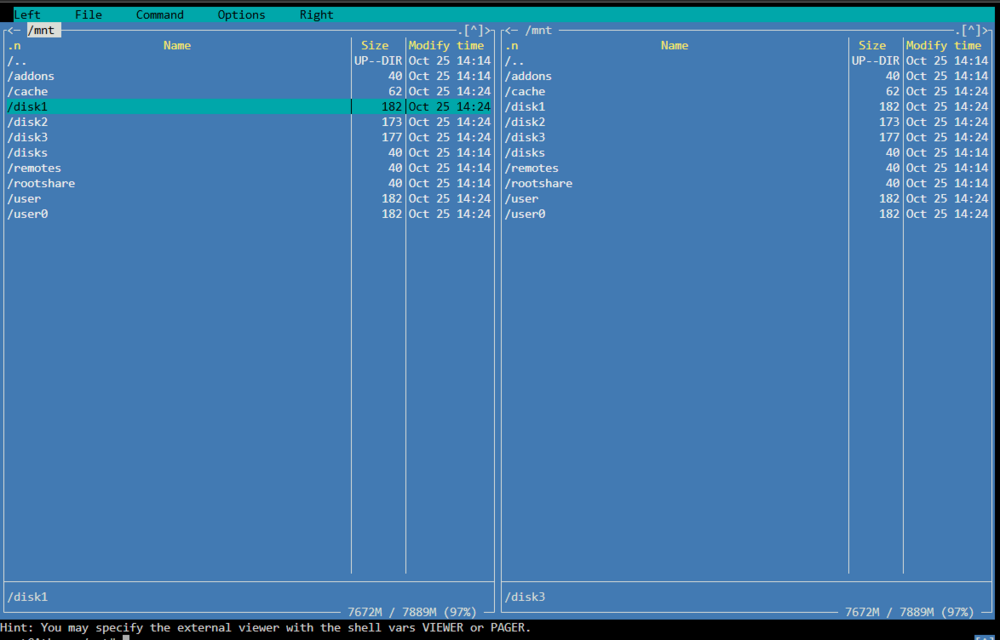
Gut, dass wusste ich noch nicht. Bin von ausgegangen das der Mover das erledigt. Zumindes mit der 7'er gibt es dann eine Lösung. Trotz dem gibt es einen Weg, nur "von Hand". Die Disk sind im normalen Unraid-Array auch einzeln unter /mnt/diskX ansprechbar. Also neue Platte ins Array hängen, danach in Webterminal und mittels dem Midnight Commander die Inhalte von den alten Disk auf die neue Disk verschieben. Funktioniert auch einwandfrei. Habe es gerade mit einem Testverzeichnis getestet. Würde aber vorsichtshalber den Wartungsmodus nutzen. Wenn die alten dann leer sind, können diese aus dem Array entfernt werden.
-
Ich selbst bin noch nicht lange mit Unraid dabei. Aber wenn ich es richtig verstanden habe, wäre die Lösung doch ganz einfach. Er hat 3 SATA-Ports noch frei. Also hängt er dann die Beiden neuen Platten ins Array. Danach geht er in die Freigaben und schließt dort für jede die alten Platten aus. Wenn er jetzt den Mover laufen lässt, sollte Unraid die alten Platten leeren und auf die neuen Schieben. Alternativ kann man in Unraid7 den Mover auch im Webterminal eine ganze Platte leeren lassen. mover start -e diskN |& logger & # where N is [1..28] Siehe Versionshinweise: Version 7.0.0-beta.4 vom 21.10.2024 | Dokumente entraiden Danach Array stoppen und alte Platten raus. Fertig. Oder übersehe ich hier etwas?


