Novaliz
Members
-
Joined
-
Last visited
-
The following worked for me: (1) All local paths need "file://" at the beginning, e.g., "file:///mnt/user/xxx.png". Note the three slashes. (2) Delete all files from "/var/lib/docker/unraid/images/" and "/var/local/emhttp/plugins/dynamix.docker.manager/images/" (3) Delete the file "/var/local/emhttp/plugins/dynamix.docker.manager/docker.json" (4) Reload the Docker UI page. After that, all the icons were back.
-
There is a much simpler solution to use fail2ban with swag without using the iptables of Unraid: (1) Create an empty "blocklist.conf" file in /nginx/site-confs; (2) Create an "nginx-blocklist.conf" file in /fail2ban/action.d with the following content: [Definition] actionstart = actionstop = actioncheck = actionban = echo "deny <ip>;" >> /config/nginx/site-confs/blocklist.conf && nginx -s reload actionunban = sed -i '/deny <ip>;/d' /config/nginx/site-confs/blocklist.conf && nginx -s reload [Init] (3) Edit your "jail.local" for an application to be monitored, in my example owncloud: [owncloud] enabled = true port = http,https filter = owncloud logpath = /fail2ban/owncloud.log maxretry = 3 findtime = 600 bantime = 10800 action = nginx-blocklist (4) Create the corresponding filter, in my example "owncloud.local", in /fail2ban/filter.d: [Definition] failregex = ^{"reqId":"[^"]*","level":\d+,"time":"[^"]*","remoteAddr":"<HOST>","user":"[^"]*","app":"core","method":"[^"]*","url":"[^"]*","message":"Login failed: [^"]* \(Remote IP: '[^']*'\)"}$ ignoreregex = datepattern = %%Y-%%m-%%dT%%H:%%M:%%S That's it. After three failed login attempts, the IP address to be blocked is now added to the "/nginx/site-confs/blocklist.conf" file. Access is blocked. Tip: Set the following environment variable in docker: "SWAG_AUTORELOAD=true"
-
Sofern es jemanden interessieren sollte, hier meine Docker Compose für PILER. https://pastebin.com/C4FGf5Fe Zuvor müsst ihr in Appdata entsprechend die Dateien manticore.conf und piler.cnf ablegen. https://github.com/jsuto/piler/blob/master/docker/piler.cnf https://github.com/jsuto/piler/blob/master/docker/manticore.conf Außerdem muss unter PILER_HOSTNAME eure lokale IP eingetragen werden (oder alternativ eure Domain).
-
My only solution to the problem is to simply move the file from the "removed" folder back to the plugins folder 5-10 minutes after the restart (with a script).
-
The problem is actually relatively easy to solve. Open Console/Terminal and then: cd /var/lib/docker/unraid/images ls rm -f filename.png and cd /var/local/emhttp/plugins/dynamix.docker.manager/images ls rm -f filename.png recreate the container with the correct image url.
-
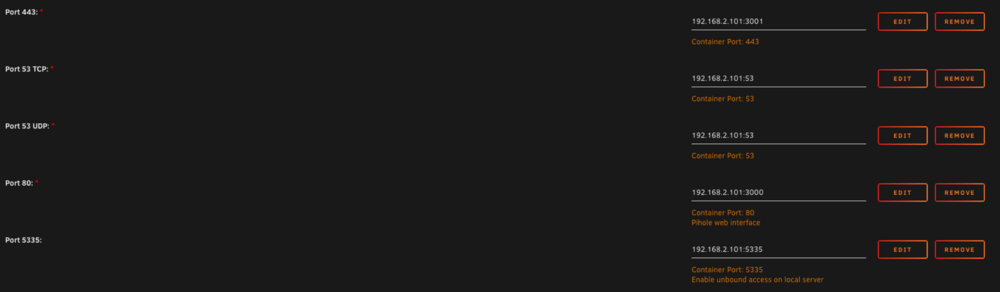
Simply add the IP of your server in front of the ports:
-
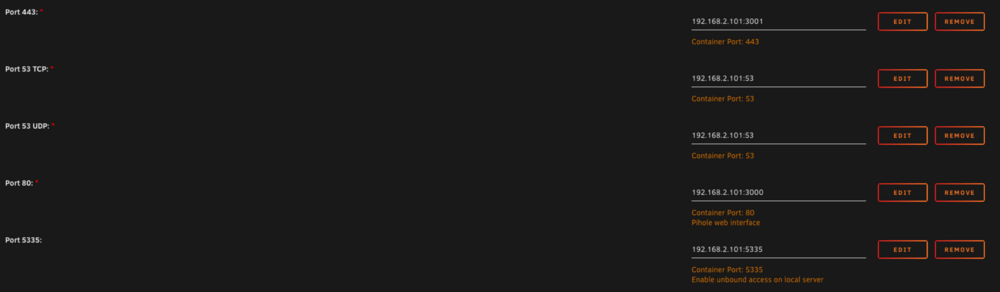
Simply add the IP of your server in front of the ports:
-
Hello, I have the same problem that was described on page 2. Every time I restart my server I have to reinstall the plugin. On the stick it is moved from the "Plugins" folder to the "Plugins-error" folder. But no errors are displayed in the logs and it works without any problems.. 😐 A bit annoying 😅
-
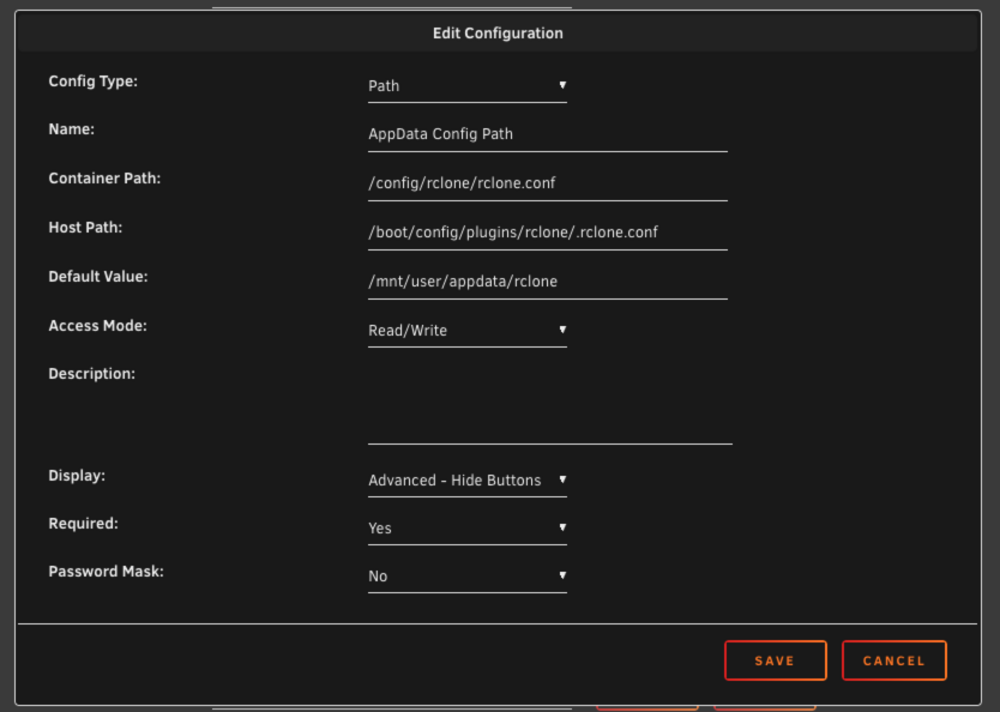
My solution: (1) Install the rclone plugin for Unraid (2) Install "Nacho-Rclone-Native-GUI" and change the following path: (a) Click on "Show more settings" (b) Change "AppData Config Path" (see image) (3) Run the container. After that you have the normal Rclone plugin running and can also edit the config in the GUI.
-
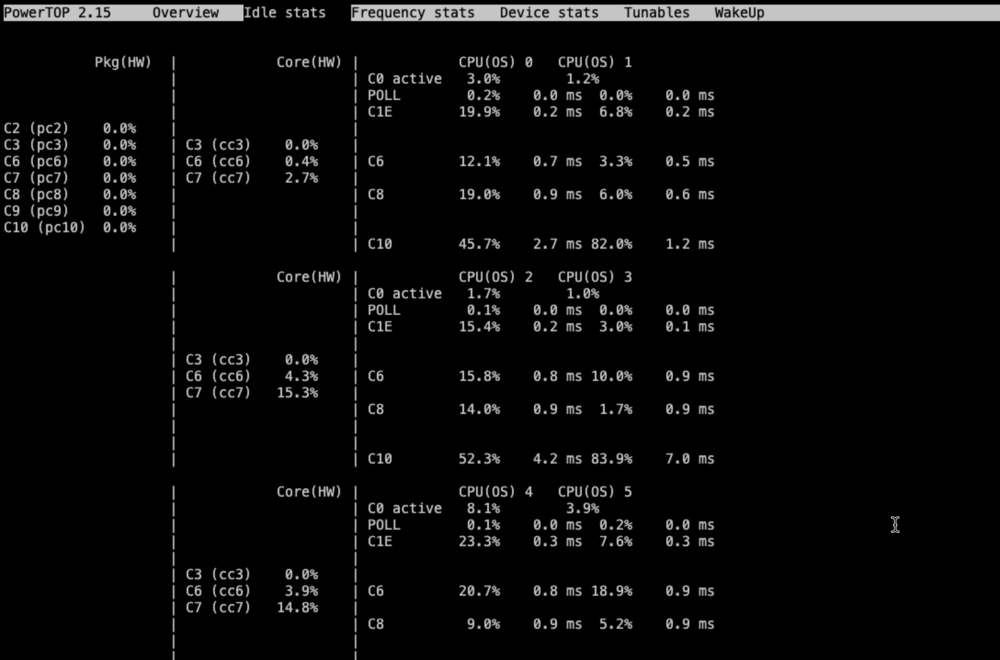
Hello, powertop shows me the following c states values: Why do the CPUs go up to C10, but Pkg shows 0 percent everywhere? Something isn't right?! MB: ASrock Z790 Pro RS Addition: I have made all the BIOS settings/tips that I could find. No change.
-
Great. Thanks for the instructions. It finally worked Finally, don’t forget to enable the GPU in Plex:

-
Genau das hat mein Problem gelöst. Danke
-
Thanks for the instructions
-
Das dürfte funktionieren. Zumindest klappt es bei mir
-
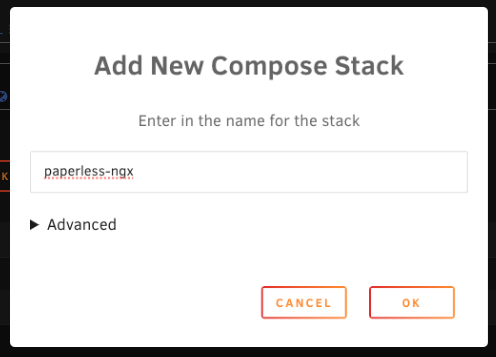
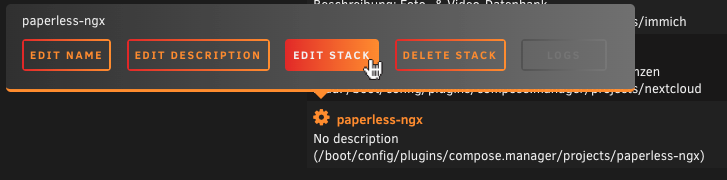
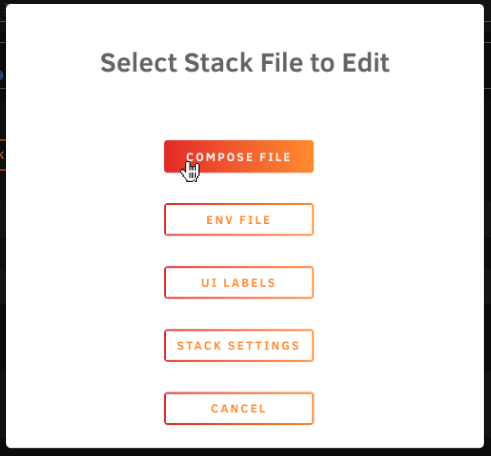
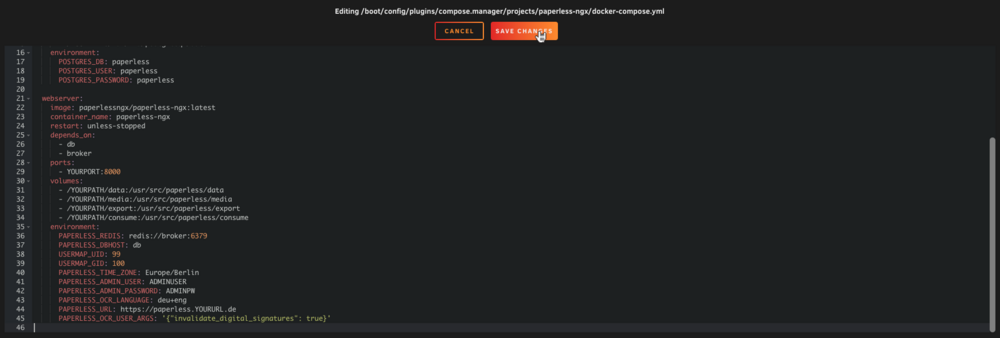
Bei mir ist es bislang noch nicht zu einem derartigen Problem gekommen. Schwierig nachzuvollziehen, wo da genau der Stolperstein lag. Aber im Folgenden einmal meine Konfiguration (docker compose), die seither problemlos läuft – sowohl auf einer Synology als auch mit Unraid: services: broker: image: redis:7.4.0 container_name: paperless-ngx-redis restart: unless-stopped volumes: - /YOURPATH:/data db: image: postgres:16.3 container_name: paperless-ngx-postgres restart: unless-stopped volumes: - /YOURPATH:/var/lib/postgresql/data environment: POSTGRES_DB: paperless POSTGRES_USER: paperless POSTGRES_PASSWORD: paperless webserver: image: paperlessngx/paperless-ngx:latest container_name: paperless-ngx restart: unless-stopped depends_on: - db - broker ports: - YOURPORT:8000 volumes: - /YOURPATH/data:/usr/src/paperless/data - /YOURPATH/media:/usr/src/paperless/media - /YOURPATH/export:/usr/src/paperless/export - /YOURPATH/consume:/usr/src/paperless/consume environment: PAPERLESS_REDIS: redis://broker:6379 PAPERLESS_DBHOST: db USERMAP_UID: 99 USERMAP_GID: 100 PAPERLESS_TIME_ZONE: Europe/Berlin PAPERLESS_ADMIN_USER: ADMINUSER PAPERLESS_ADMIN_PASSWORD: ADMINPW PAPERLESS_OCR_LANGUAGE: deu+eng PAPERLESS_URL: https://paperless.YOURURL.de PAPERLESS_OCR_USER_ARGS: '{"invalidate_digital_signatures": true}' Sinnvoll ist es vermutlich, sowohl die Datenbank als auch Redis einfach auf eine Version – wie hier geschehen – festzulegen und diese auch erst einmal nicht zu updaten. Außerdem bin ich dazu übergegangen, für jede Anwendung eine eigene, neue Datenbank-Instanz zu erstellen, die dann den Namen der Anwendung im Namen trägt. Wenn also etwas zerschossen wird, sind alle übrigen Anwendungen nicht betroffen, wie z. B. bei dir Nextcloud. Ergänzung für jene, die noch nicht docker compose verwendet haben: Gruß aus dem nahen Hamburg