






snowboardjoe
Members
-
Joined
-
Last visited
Everything posted by snowboardjoe
-
I just started getting this error as well after upgrading to 6.12.6 this morning. Plex was running all day and this evening stopped responding. When I bring up Docker, it has no stats for any container. Here is syslog: Dec 17 18:37:00 laffy kernel: BTRFS error (device loop2): bdev /dev/loop2 errs: wr 9, rd 0, flush 0, corrupt 0, gen 0 Dec 17 18:37:00 laffy kernel: I/O error, dev loop2, sector 2556800 op 0x1:(WRITE) flags 0x1800 phys_seg 4 prio class 2 Dec 17 18:37:00 laffy kernel: BTRFS error (device loop2): bdev /dev/loop2 errs: wr 10, rd 0, flush 0, corrupt 0, gen 0 Dec 17 18:37:00 laffy kernel: BTRFS: error (device loop2) in btrfs_commit_transaction:2494: errno=-5 IO failure (Error while writing out transaction) Dec 17 18:37:00 laffy kernel: BTRFS info (device loop2: state E): forced readonly Dec 17 18:37:00 laffy kernel: BTRFS warning (device loop2: state E): Skipping commit of aborted transaction. Dec 17 18:37:00 laffy kernel: BTRFS: error (device loop2: state EA) in cleanup_transaction:1992: errno=-5 IO failure Dec 17 18:37:04 laffy kernel: docker0: port 2(vethf809026) entered disabled state Dec 17 18:37:04 laffy kernel: veth3f981c1: renamed from eth0 Dec 17 18:37:09 laffy kernel: lo_write_bvec: 25 callbacks suppressed Dec 17 18:37:09 laffy kernel: loop: Write error at byte offset 14684160, length 4096. Dec 17 18:37:09 laffy kernel: loop: Write error at byte offset 2864652288, length 4096. Dec 17 18:37:09 laffy kernel: blk_print_req_error: 25 callbacks suppressed Dec 17 18:37:09 laffy kernel: I/O error, dev loop2, sector 28680 op 0x1:(WRITE) flags 0x100000 phys_seg 1 prio class 2 Dec 17 18:37:09 laffy kernel: loop: Write error at byte offset 2728972288, length 4096. Dec 17 18:37:09 laffy kernel: loop: Write error at byte offset 2728976384, length 4096. Dec 17 18:37:09 laffy kernel: btrfs_dev_stat_inc_and_print: 25 callbacks suppressed Dec 17 18:37:09 laffy kernel: I/O error, dev loop2, sector 5330024 op 0x1:(WRITE) flags 0x100000 phys_seg 1 prio class 2 Dec 17 18:37:09 laffy kernel: BTRFS error (device loop2: state EA): bdev /dev/loop2 errs: wr 36, rd 0, flush 0, corrupt 0, gen 0 Dec 17 18:37:09 laffy kernel: BTRFS error (device loop2: state EA): bdev /dev/loop2 errs: wr 37, rd 0, flush 0, corrupt 0, gen 0 Dec 17 18:37:09 laffy kernel: I/O error, dev loop2, sector 5330032 op 0x1:(WRITE) flags 0x100000 phys_seg 1 prio class 2 Dec 17 18:37:09 laffy kernel: BTRFS error (device loop2: state EA): bdev /dev/loop2 errs: wr 38, rd 0, flush 0, corrupt 0, gen 0 Dec 17 18:37:09 laffy kernel: I/O error, dev loop2, sector 5595024 op 0x1:(WRITE) flags 0x100000 phys_seg 1 prio class 2 Dec 17 18:37:09 laffy kernel: BTRFS error (device loop2: state EA): bdev /dev/loop2 errs: wr 39, rd 0, flush 0, corrupt 0, gen 0 Dec 17 18:37:30 laffy kernel: loop: Write error at byte offset 2541936640, length 4096. Dec 17 18:37:30 laffy kernel: loop: Write error at byte offset 2542256128, length 4096. Dec 17 18:37:30 laffy kernel: loop: Write error at byte offset 2542260224, length 4096. Dec 17 18:37:30 laffy kernel: I/O error, dev loop2, sector 4964720 op 0x1:(WRITE) flags 0x100000 phys_seg 1 prio class 2 Dec 17 18:37:30 laffy kernel: BTRFS error (device loop2: state EA): bdev /dev/loop2 errs: wr 40, rd 0, flush 0, corrupt 0, gen 0 Dec 17 18:37:30 laffy kernel: I/O error, dev loop2, sector 4965344 op 0x1:(WRITE) flags 0x100000 phys_seg 1 prio class 2 Dec 17 18:37:30 laffy kernel: BTRFS error (device loop2: state EA): bdev /dev/loop2 errs: wr 41, rd 0, flush 0, corrupt 0, gen 0 Dec 17 18:37:30 laffy kernel: I/O error, dev loop2, sector 4965352 op 0x1:(WRITE) flags 0x100000 phys_seg 1 prio class 2 Dec 17 18:37:30 laffy kernel: BTRFS error (device loop2: state EA): bdev /dev/loop2 errs: wr 42, rd 0, flush 0, corrupt 0, gen 0 I've never seen BTRFS errors before.
-
Since upgrading to 2.1.1 the client is still seeding existing torrents, but I'm unable to any new ones. When I try to add a new URL I get this error in the logs: Traceback (most recent call last): File "/usr/lib/python3.11/site-packages/twisted/web/_newclient.py", line 1043, in dispatcher return func(*args, **kwargs) File "/usr/lib/python3.11/site-packages/twisted/web/_newclient.py", line 1594, in _finishResponse_WAITING self._giveUp(Failure(reason)) File "/usr/lib/python3.11/site-packages/twisted/web/_newclient.py", line 1644, in _giveUp self._disconnectParser(reason) File "/usr/lib/python3.11/site-packages/twisted/web/_newclient.py", line 1633, in _disconnectParser parser.connectionLost(reason) --- <exception caught here> --- File "/usr/lib/python3.11/site-packages/twisted/web/_newclient.py", line 555, in connectionLost self.response._bodyDataFinished() File "/usr/lib/python3.11/site-packages/twisted/web/_newclient.py", line 1043, in dispatcher return func(*args, **kwargs) File "/usr/lib/python3.11/site-packages/twisted/web/_newclient.py", line 1283, in _bodyDataFinished_CONNECTED self._bodyProtocol.connectionLost(reason) File "/usr/lib/python3.11/site-packages/twisted/web/client.py", line 1432, in connectionLost self.original.connectionLost(reason) File "/usr/lib/python3.11/site-packages/deluge/httpdownloader.py", line 73, in connectionLost with open(self.agent.filename, 'wb') as _file: builtins.IsADirectoryError: [Errno 21] Is a directory: '/tmp/delugeweb-79lq129d/' I do see the directory created there, but still don't understand what the problem is. [root@8db4cdfa95b3 tmp]# ls -l total 52 drwx------ 1 nobody users 0 Oct 22 20:06 delugeweb-0mcyk1et drwx------ 1 nobody users 0 Oct 22 20:05 delugeweb-1p815gjl drwx------ 1 nobody users 0 Oct 23 19:40 delugeweb-79lq129d drwx------ 1 nobody users 0 Oct 23 19:39 delugeweb-lojv_rhe drwx------ 1 nobody users 0 Oct 22 20:15 delugeweb-wa68rbic drwx------ 1 nobody users 0 Oct 22 20:08 delugeweb-wb6i4q_0 drwx------ 1 nobody users 0 Oct 22 20:05 delugeweb-z71r_x_h -rw-rw-rw- 1 root root 946 Oct 22 20:08 getiptables -rw-rw-rw- 1 root root 15 Oct 22 20:08 getvpnextip -rw------- 1 root root 0 Oct 22 20:08 start-script-stderr---supervisor-s2urs698.log -rw------- 1 root root 22049 Oct 23 19:45 start-script-stdout---supervisor-1g8290c4.log -rw-rw-rw- 1 root root 1 Oct 22 20:08 vpngatewayip -rw-rw-rw- 1 root root 9 Oct 22 20:08 vpnip -rw------- 1 root root 6995 Oct 23 19:41 watchdog-script-stderr---supervisor-15emil97.log -rw------- 1 root root 1195 Oct 22 20:08 watchdog-script-stdout---supervisor-bmc8bdvw.log Any suggestions on on what to look at next?
-
Confirmed the problem with disk location plugin and having a disk spun down blocks the dashboard tab. Just happened again this morning. As soon as I removed the plugin, the dashboard returned.
-
Disk location is installed. I just ran an update on that plugin and updated all Docker containers. The Dashboard came back. Not entirely sure which issue resolved the problem, but the Docker container update likely spun up all disks noting your issue that you found. I will keep an eye on this.
-
Just ran update assistant and it reports there are no issues.
-
Normally I use macOS/Chrome to access unraid. Tried to use Safari to access the dashboard and still get a blank screen, so this is not a browser/cache issue.
-
I upgraded to 6.12.2 last week and just noticed today I can no longer get the Dashboard tab to load. All other tabs load properly. The Dashboard is simply a blank screen when selected. No errors reported in log. The Main tab shows all resources and the array are healthy.
-
I just upgraded to 6.12.2 this morning, selected Docker, clicked CHECK FOR UPDATES and then UPDATE ALL. The first pass updated about a dozen containers as expected. Then it looped through all of the containers again five times doing nothing but stopping, restarting and removing the previous container. I thought I was in an infinite loop, but glad it stopped after pass five. This has been happening for the past few versions. If this has continued looping, what would be the safe action to stop this process? This is becoming an unreliable process and I'm hesitant to do future updates based on this behavior. I suppose a workaround for now is just update on package at a time, but that's painful as well.
-
This was resolved by rebooting the UNRAID host. Unknown on root cause of this. HB now completes the post processing steps after successfully auto encoding a file. The workaround (until I rebooted) was to manually clear the watch folder, stage a few file and then restart HB to have it start encoding again. Guessing this is an UNRAID OS (v6.11.5) or Docker bug.
-
Using v1.6.1 and while auto processing of watch queues is working to encode files, it's no longer removing them from the watch directory on successful completion. Anyone else seeing this? It's worked great for years, but this is gumming up my process now and have to delete files manually (my script won't populate a new one until it's empty). AUTOMATED_CONVERSION_KEEP_SOURCE is still set to 0. I've also noticed as new items are added manually to the watch folder they are not getting processed. I have to restart the container to get it to start converting. Nothing in the logs showing any issues. Auto conversion process is pretty much dead at this point.
-
Any logs from the Docker container or from the application logs themselves? Does it crash immediately or after some time? I would at least try to debug the situation a little bit to find root cause before trying to uninstall and restore.
-
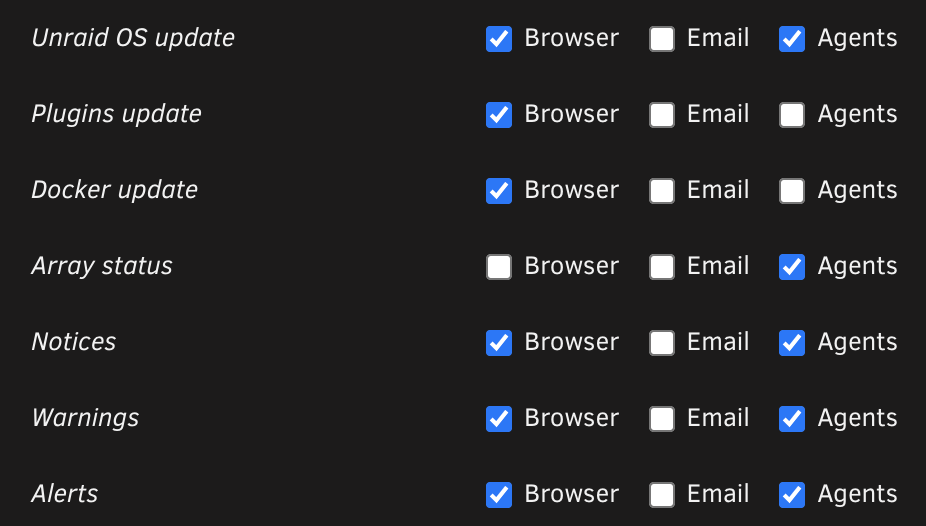
Attached is a screenshot of my current configuration. I get notices for other things just fine--just not the UPS alerts.
-
Another update from SWAG and my configuration is broken again. Same error as before: nginx: [emerg] "stream" directive is not allowed here in /etc/nginx/conf.d/stream.conf:3 nginx: [emerg] "stream" directive is not allowed here in /etc/nginx/conf.d/stream.conf:3 nginx: [emerg] "stream" directive is not allowed here in /etc/nginx/conf.d/stream.conf:3 I renamed /etc/nginx/conf.d/stream.conf to a non .conf name, restarted and it's back now. Why is this offending file constantly injected and start producing errors every time I update?
-
All networking equipment on one UPS. unRAID server and all attached components on a separate UPS. No service or network interruptions for any service during a power failure.
-
I thought this used to work in the past, but I don't recall the last time I received a notification for a UPS event. This includes when the UPS goes on battery and back on AC. I recall getting email messages in the past, but it's been a long time since I've seen then. I assumed it would go to the agent where I have Pushover configured (and I do get other unRAID notifications for other events there like update notifications and sync operations). I did have several events today and all of those UPS events were detected and logged by unRAID (no notifications). Am I just missing something here in my config?
-
Just upgraded from 6.11.1 to 6.11.2 this morning. After reboot decided to update all containers. Hmmm, looks like it just resolved itself. That was weird. There were several containers that updated up 4X and freaked me out. Everything appears stable for now. Will leave this post out here in case others run into the issue and maybe verify the odd behavior if it proves to be a bigger problem.
-
Does it truly get to 100%? My schedule was interfering with the progress of the maintenance and had to let it run 24x7 to complete.
-
These maintenance processes are scheduled and they need to complete. If they don't it will keep trying over and over again. This will block routine backups as well. In general, CP is intended to run 24x7. How big is your server? Does it draw that much power? Daily shutdowns can cause more stress on hardware than leaving it on. I would measure your current draw and do the math. It may not be worth shutting it down every night. unRAID was designed to be low power (spinning down disks in particular). The work by CP should have a minuscule impact on resources.
-
It should be in your appdata share. In a typical install, it should be: /mnt/user/appdata/HandBrake/successful_conversions
-
Are you looking at the files from another computer or directly from unRAID itself (via web console or ssh session)? It's possible some other permissions are not set right and hiding them due to a permissions issue.
-
The typical permissions should be 755 and owned by nobody:users at the bare minimum (I think 777 is preferred). Of the movies that are missing, are you able to browse through your directories and actually find them?
-
I think I just figured out what was going on based on documentation. I'm using the High-water method. Disk 1 is only utilized 21%. Disks 3, 4, 5 are all utilized over 80%. So, as I understand it, unRAID will keep filling disk 1 to the 50% mark before it starts to fill any other disk. I assume it will just create those share directories on disk 2 when it eventually gets to that point.
-
I'm about 50% of my way through migrating 4 disks from ReiserFS to XFS. So far, no issues until something I noticed this morning after formatting disk 2 last night and brining the array back online. Everything is up and running, but noticed that /mnt/disk2 has no subdirectories of the shares present. I was tinkering with the shares to exclude disks I was working on at the time and stop unraid from adding more files to those locations. As I reformat the disks, I go back and enable them again to use all disks and disable for the next. Now I feel like something is confused with the configuration. How do I enable disk2 to start accepting new data again? I did not have this issue with /mnt/disk1. I'm running 6.9.2 and have paused my migration work for now (what I had planned to do anyway for a few days). laffy-diagnostics-20220210-1216.zip
-
Has anyone mapped the container path /config/Library/Application Support/Plex Media Server/Media/localhost to a separate share? I'm over 100GB now for this directory and wondering if there is any benefit moving this off the cache (would still use the cache for new files).
-
SMTP configuration was accepted, but no email. So, I'm blocked setting up additional accounts. On the forums, seeing several complaints about this, so it appears to be a known and widespread problem for 6.4.54. Sigh.

