





Vexz
Members
-
Joined
-
Last visited
Everything posted by Vexz
-
Could RAID 10 be the problem here, because the files of the other share are on the other RAID 1?
-
Whenever I try to reboot my unRAID server, I have to force reboot with "reboot -f", because when I want to stop the array/pool, it always gets stuck with the message "Retry unmounting disk share(s)". My guess is that some process hinders the array (or pool in my case) from stopping. Is there a way I can find out what blocks the process? nas-diagnostics-20250124-2101.zip
-
I use multiples SMB shares on the same pool on unRAID. When I move a file or folder to another shared folder on that pool, the files get downloaded to my Windows 10 client first, then uploaded to the destination. Server-side move doesn't work somehow. With Get-SmbConnection I can see that SMB version 3.1.1 is used, so it should work, right? It worked perfectly with my previous Synology NAS. Do you need to activate it somewhere in unRAID first?
-
Anyway, I ran some commands on the CLI which was another step in the right direction: chown -R nobody /mnt/user/Downloads chgrp users /mnt/user/Downloads chmod g+s /mnt/user/Downloads setfacl -d -m u::rwx /mnt/user/Downloads setfacl -d -m g::rwx /mnt/user/Downloads setfacl -d -m o::rwx /mnt/user/Downloads At least the files in the subfolders get rw-rw-rw- permissions now, and I can do with them whatever I want. The only thing that still causes problems is the thing when I extract files from an archive. Thanks for the help and taking the time @bmartino1. You helped me quite a bit here.
-
This is my configuration right now: [Global] browseable = yes case sensitive = auto force group = users force user = nobody path = /mnt/user comment = writable = yes read only = no guest ok = no vfs objects = acl_xattr map acl inherit = yes store dos attributes = yes directory mask = 0777 force directory mode = 0777 create mask = 0777 force create mode = 0777 I think the biggest problem is that I can't change Windows ACLs because of missing permissions to do that. I really don't know what to do about that. Edit: It's NOT Windows ACLs. As soon as I "chmod -R 777 <Subfolder of /mnt/user/Downloads>" I can delete the files inside that subfolder and the subfolder itself.
-
Now I added "vfs objects = acl_xattr" and "map acl inherit = yes". With PeaZip when I try to extract the archive it immediately gets deleted as soon as its done. With 7-Zip it's the same old behavior. For some strange reason I can do everything directly in "/mnt/user/Downloads" but I only have read permissions for subfolders and files in subfolders (talking about Windows ACLs here). I can't set Windows ACLs, because when I try to apply my changes, it always says "permission denied". Man, I feel like I've put hours into solving this problem and it won't just work. It's so frustrating.
-
Hm, I'm not so sure about that, unless there's a specific reason unRAID needs this. The default value for "vfs objects =" is in fact just "vfs objects =" according to samba.org (https://www.samba.org/samba/docs/current/man-html/smb.conf.5.html#vfsobjects). As mentioned in one of my previous posts (https://forums.unraid.net/topic/185441-issues-wit-acls/#findComment-1515142) I ran unRAID's "New Permissions" tool, which fixes these permissions and ownerships recursively and I can confirm that the permissions are set correctly with "ls -l" from the shell. Still I run into issues like in my original post. If you run a Windows machine, you could download the ZIP archive I linked in the original post and then follow these steps to see if it's the same for you: Download the ZIP directly on one of your SMB shares. Access that SMB share with Windows Explorer. Extract that ZIP file with 7-Zip. --> Extracting the "partitionwizard.exe" fails during this process with 7-Zip, but with PeaZIP it surprisingly works. If you successfully extracted the archive, run the "partitionwizard.exe". Close the Partition Wizard software. Now try to delete the extracted folder and ZIP file, it doesn't work (at least for me). The permissions are unexpectedly "rw-rw-rw-" for both the ZIP and the folder. Yes, I could run the "New Permissions" fix tool to fix the permissions and then delete the files or just use the shell, but that is exactly what I should not have to do with these SMB.conf overrides.
-
Partial success. I used your SMB configuration template and changed it a little to my liking. [Global] browseable = yes case sensitive = auto force group = users force user = nobody path = /mnt/user comment = writable = yes read only = no guest ok = no vfs objects = directory mask = 0777 force directory mode = 0777 create mask = 0777 force create mode = 0777 Extracting the archive with 7-Zip still fails, but I at least can delete the extracted folder. I tried PeaZIP instead of 7-Zip, just to test. With its smart extract feature I could extract the contents of the archive just fine. But now I have the ZIP archive, the Peazip setup EXE file and a partitionwizard.exe (the one that is the issue here) from another test, that I extracted from the ZIP archive after I applied the SMB configuration, that I can't delete via SMB now. -rw-rw-rw- 1 nobody users 449776 Dec 2 12:25 partitionwizard.exe -rwxrwxrwx 1 nobody users 9931824 Jan 22 07:17 peazip-10.2.0.WIN64.exe* -rw-rw-rw- 1 nobody users 58597737 Jan 22 07:11 pwfree-64bit-portable.zip I really don't get why the partitionwizard.exe and the pwfree-64bit-portable.zip just have rw-rw-rw- permissions. Also I don't get, why I can't delete any of these files via SMB. But I'd be more curious to know how not to run into such problems anymore. Maybe @bmartino1 or someone else knows a way? Help is appreciated.
-
Hmm, it has nothing to do with Docker in this case. On unRAID in the Tools menu I used the "New Permissions" tool to fix the permissions for the Downloads shared folder. It sets these permissions, but this sadly didn't help. Interesting. Thanks for the hint, I'll look into that later and report.
-
I come from Synology, where I never had any issues with ACLs on SMB shares, so I don't really know the steps to resolve this problem. Background: I use a shared folder, which I access from my Windows 10 machine via SMB. I created one shared folder, named "Downloads" which is - as the name suggests - used for downloads. With archive files I run into issues, where I sometimes don't have the permission to extract, delete and execute a file or folder. Example: I download this archive (https://cdn2.minitool.com/?p=pw&e=pwfree-64bit-portable) to the Downloads shared folder. With 7-Zip I right click it > extract to "pwfree-64bit-portable". The contents of the archive get extracted, except for one file. The error message says: "Cannot open output file: Permission denied : F:\pwfree-64bit-portable\partitionwizard.exe". This file can be extracted to the same path where the zip archive is though. It's one of those files that can only be executed with an administrator account. With other archives, I experienced the problem that I couldn't delete the archive files. Windows Explorer made it look like the file was deleted, but when I refreshed the folder, it was back again. The only way I could delete it was via shell. Is there a solution to fix such issues for good? I don't wanna use the shell all the time, just because I can't do it in Windows.
-
That actually worked. I should have tried that in the first place. Thank you.
-
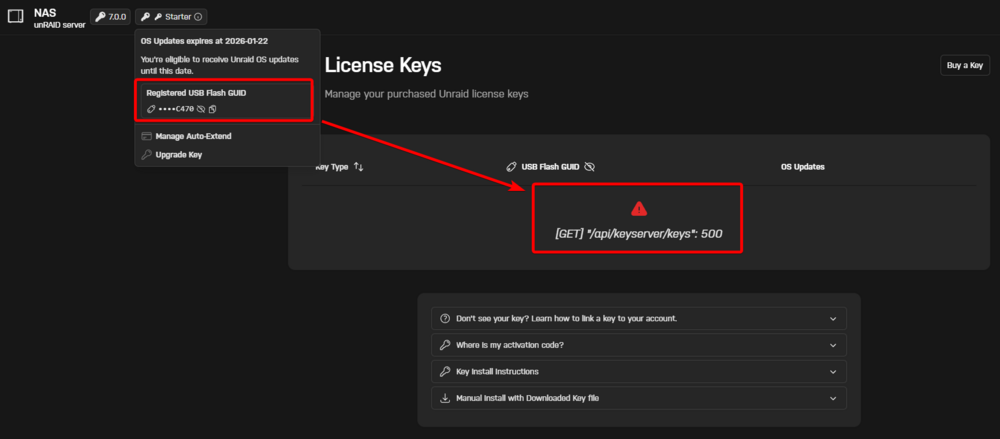
I bought my starter license key about 20 minutes ago. When I go to the License Keys page in my account it says --> [GET] "/api/keyserver/keys": 500 Is this some kind of bug or is something wrong with my license? nas-diagnostics-20250117-1915.zip
-
For some reason I can't explain, ZFS snapshots are most of the time not created when I use the combination of Sanoid and the Unraid ZFS Snapshot and Replication Script. It's really strange, because in rare cases it works, but in like 90% or more of the times no snapshot is created. The logs look good though. Selected datasets: Sonstiges Performing pre-run checks for Sonstiges Replication target is a local/same server. All pre-run checks passed. Continuing... Creating sanoid config for Sonstiges Performing autosnapshot for Sonstiges creating the automatic snapshots of pool/Sonstiges using sanoid based off retention policy Performing autoprune for Sonstiges pruning the automatic snapshots of pool/Sonstiges using sanoid based off retention policy Performing rsync replication for Sonstiges Performing ZFS replication for Sonstiges ZFS replication not set. Skipping ZFS replication. Script Finished Jan 16, 2025 17:16.02 Full logs for this script are available at /tmp/user.scripts/tmpScripts/00000/log.txt Running Unraid 7, using the Sanoid plugin, as well as the User Scripts plugin. Help is appreciated. nas-diagnostics-20250116-1757.zip
-
The license transfer process immediately starts on the first boot from the new USB drive, I guess? This sounds very easy. Thank you.
-
I am completely new to unRAID and initially have a test license running temporarily on a USB drive to get familiar with unRAID and to be sure that I want to continue using it. As I could already read from the documentation, a test license cannot be transferred to another USB drive, only purchased licenses. Let's say I buy a license and the license key file is on that USB drive I'm currently using, is it possible to simply take a new USB drive with the GPT partition scheme, create a FAT32 partition on it, and unpack the archive that I created via "flash backup" there? Or are there more steps to consider? Unfortunately, this has not become entirely clear to me through my research.
-
I tried unRAID for the first time yesterday and also had the problem that I couldn't connect to the network drives. To solve the problem, I added and removed the shares several times until it eventually worked. A bit strange, but it has been working since then.
-
Maybe I'm misunderstanding this Plugin. I set the "Log Deleted Files?" option to No but when I delete a file, it appears in the log. The "Hide Recycle Bin Folder" only works for Linux users because it just adds the "." at the beginnen of the recycle bin folder name, I guess?
-
Okay, this helped me to figure out the problem - somewhat. For some reason the unRAID server has issues with my AdGuard Home DNS server. I can see that the name resolutions works with IPv6 (in the AdGuard Home protocol), not with IPv4 though. That's weird, because it's the only device that has issues with it. I set the IPv4 DNS settings of my unRAID server to 1.1.1.1 and the problem was solved. Thank you.
-
@trurl Here you go. tower-diagnostics-20250113-2154.zip
-
I've got the exact same problem here. The DNS name resolution works, as well as pinging various public IP addresses. @BenDiesel did you find a solution?


