tomkenobi
Members
-
Joined
-
Last visited
Everything posted by tomkenobi
-
Hi, just in case this helps anyone after the latest SearXNG update: There is already an upstream GitHub issue about this: GitHubTypeError: engine 'xyz' (xpath) - in the about section --...Using podman with the latest docker image. Since update this morning, container is crashing. I asked my local ai to fix it, this is the finding: Root cause: The searxng latest image auto-updated th...My Unraid container also failed to start after updating to the image based on commit cf1410af8d794793c8af02b97d3e1cf3bc7a7dda. The relevant error was: TypeError: engine 'woxikon.de synonyme' (xpath) - in the about section --> Unexpected keyword argument 'language' In my case the issue was caused by old entries in my mounted appdata settings.yml / settings.yaml. I had three engine definitions with this kind of structure: about: website: ... language: de After removing the language: line from the about: section, the container started again. So the fix was: about: website: ... instead of: about: website: ... language: de Important: I only removed language: where it was inside an about: block. I did not remove all language: entries globally. There were also other old-engine warnings in my log, e.g. podcastindex, searchcode_code, livespace and wikicommons wc_search_type warnings, but those did not seem to be the actual startup blocker in my case. So for Unraid users: if the container fails after the update, check the mounted appdata settings file directly, not only the Docker template fields. A rollback to the previous image also seems to be mentioned upstream as a workaround, but cleaning up the old settings file fixed it for me.
-
Thanks @mcreekmore for the effort in creating this community app! However, I wanted to share my experience attempting to use OpenCloud on Unraid. My Background: I had been planning to migrate from Seafile to OpenCloud for quite some time. Initially, my goal was to install OpenCloud through Unraid's Docker UI (essentially native docker run configurations). Testing Phase: For testing purposes, I set up a complete OpenCloud stack in an Ubuntu VM, including: - OpenCloud (core) - Collabora Office - Apache Tika (using apache/tika:latest-full) - PocketID as OIDC provider - I even got OnlyOffice working successfully I followed the external proxy configuration from the [official OpenCloud docs](https://docs.opencloud.eu/docs/admin/getting-started/container/docker-compose/external-proxy) to use my existing Nginx Proxy Manager on Unraid. Challenges with Native Docker Deployment: Unfortunately, when I attempted to replicate the working configuration via Unraid's Docker UI, I ran into issues that prevented a clean deployment. I don't recall all the specific problems, but it wasn't as straightforward as I had hoped. VM-Specific Challenge: During VM testing, I also encountered an interesting limitation: I wanted to mount an Unraid share into the VM (via 9P/VirtFS) to store the actual user data on the Unraid array. However, OpenCloud's database and cryptographic key files had write permission issues with the 9P filesystem. This meant I had to keep system data local to the VM. Final Solution: After the various challenges, I decided to stick with the VM-based installation that was working reliably. OpenCloud is now in production use on my system. Backup Strategy: My data resides in /mnt/user/backup/opencloud/ on the Unraid host. I've integrated this into my existing backup workflows: - Local backup via rsync to my QNAP NAS - Cloud backup via restic to pCloud (encrypted) Conclusion: While I appreciate the community app effort, my experience suggests that for a stable, production OpenCloud deployment with additional services like Collabora or OnlyOffice, running it in a dedicated VM might be the more reliable approach. The VM approach provides: - Better isolation - Easier troubleshooting - More predictable behavior with complex docker-compose stacks - Standard OpenCloud documentation applies directly Hope this helps others who might be considering their deployment options! Alternative for External Access: Self-Hosted Tunneling with Pangolin For those looking for a self-hosted alternative to Cloudflare Tunnel or Tailscale, I'm using Pangolin (https://github.com/fosrl/pangolin) - an open-source tunneled reverse proxy similar to Cloudflare Tunnel but completely self-hosted. My Setup: - Hetzner VPS running Pangolin (Gerbil + Traefik) - WireGuard tunnel via Newt client (Docker on Unraid) - OpenCloud accessible via custom domain with automatic Let's Encrypt certificates - No ISP port forwarding required - Full control over the entire stack Advantages: - Complete privacy (no third-party tunneling service) - Custom domains with your own DNS - Built-in identity-aware access control - No vendor lock-in - Works even with CGNAT/DS-Lite Comparison to mentioned solutions: - More complex than Cloudflare Tunnel (requires VPS) - More flexible than Tailscale (supports public access with auth) - Similar cost to VPS solutions (~$4/month for small VPS) Happy to share more details if anyone is interested in this approach!
-
Hi @itimpi ! Many thanks for your tip! That solved my problem with the bzfirmware checksum error I got after I added a second 32 GB RAM module. Just copied over the 10 bz*files from the same OS release onto the same flashdrive. Now Unraid is running again. Best regards, Tom
-
Hi @stephan182730 ! Since my last migration, I’ve been using the Pro version because I wanted to take advantage of some features not available in the Community Edition – mainly fine-grained folder permissions and role-based account management. Regarding backups, I’m still in the process of separating the files I always want available via Seafile from those I prefer to keep in an archive or a dedicated file storage directory on the server. On the server, I currently have two main locations: /sync – which contains the files and folder structures I work with on a daily basis – and /archive, which contains files that are mostly stored for reference and no longer actively edited. The latter also includes larger libraries such as my music and audiobooks, which are managed locally via Audiobookshelf and Navidrome. I’m now close to the point where I can include both areas in my backup strategy. For /sync, my plan is to use Seafile FUSE to access the “Sync” data in plaintext, then back it up daily in two ways: Via rclone + restic to an off-site cloud location. In parallel, via rsync to a local QNAP NAS. As for the databases, I will follow the official instructions at: Seafile Backup & Recovery Guide – that will be my next step. I haven’t implemented this yet, since most of my “Sync” data is not fully inside Seafile at this point, but the final migration is planned for later this week. Regarding the seasearch_token, I had to retrace my steps to confirm how it works. It is generated from a combination of your username and password. You can find instructions here: SeaSearch Authentication Guide. I hope this helps – good luck! Cheers, Tom
-
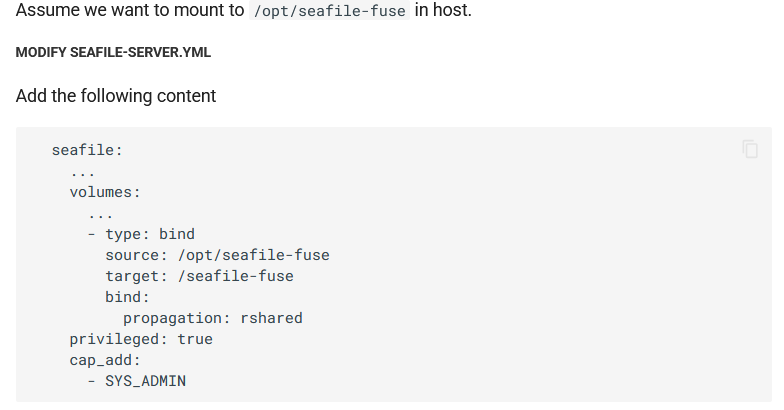
Hi @Gryman ! Were you able to solve your issue? And for anyone else who might be interested: I finally managed to get Seafile’s FUSE mount working on Unraid. The official documentation here – https://manual.seafile.com/latest/extension/fuse/ – is a good starting point, but if you’re not a Docker expert and still fairly new to Unraid (like me – using it for less than 3 months), you can run out of ideas quickly. Here’s how I did it: I edited the existing seafile-12 container and added an additional path. I first created a share /mnt/user/sync on Unraid, but then I switched to using the absolute disk path /mnt/disk1/sync as the host path, which I mapped to /seafile-fuse in the container. I don't know if I could have also used the /mnt/user/sync. Somewhere I read that it would be better to use the "real" location. Would be great if someone could confirm this. Important: you need to select “read-only shared” for this path, because the default is private, which prevents the mount from propagating to the host. The container also needs to run in privileged mode. Additionally, you need to set the following in the extra parameters: --cap-add=SYS_ADMIN. You need to switch from simple to extended view first on the upper right. After restarting the container, I entered it using docker exec -it <SEAFILE_CONTAINER_NAME> bash. Then I navigated to cd /opt/seafile/seafile-server-latest and started the FUSE mount with ./seaf-fuse.sh start /seafile-fuse. To verify that the mount is actually shared, you can run findmnt -o TARGET,PROPAGATION | grep /seafile-fuse . If everything is working correctly, you should now see several directories under /mnt/user/sync on the host. One of them will include the user’s email address. Inside that folder you’ll find the individual libraries, which have hash-based directory names. But once you go one level deeper, you’ll see the familiar folder structure and file names in plaintext. This was important to me because I want to include the FUSE-mounted folder in my restic and rsync-based backup strategy (to QNAP and pCloud). In addition, I’ll also be backing up the Seafile databases and blob data separately to ensure a full and restorable backup – just in case. Hope this helps someone! Best regards, Tom
-
Hi @Gryman ! As you wrote: "Failed to connect to mysql server using user 'seafile' and password '***': Access denied..." Please follow the instructions from dglb99. That should make it quite easy. Otherwise, I can only guess. You're not exactly generous with information. That makes it almost impossible to help you. Good luck! Tom
-
Great you managed to make it run, @presence06!
-
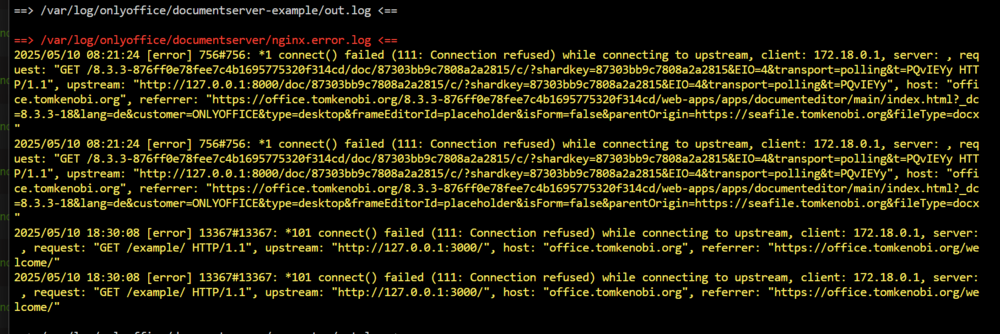
Hi all! Just a quick screenshot from the OnlyOffice log, as I remember to have something similar. Se here: But everythings works. I can edit all types of files, they get locked in Seafile during this, I can all save them. Also on my phone. So this is probably not a big deal. At least for me as I do not understand this log. Maybe someone can help me out. But it works. Regarding reverse proxy I use Nginx Proxy Manager. So I can't say anything about Swag.
-
Hello everyone! At this point, I would like to post an off-topic contribution. I just wanted to briefly mention a relatively new project that I just found out about today. https://github.com/opencloud-eu/opencloud https://opencloud.eu It's based on oCIS, and part of the original developer team moved to the Heinlein Group after the sale of OwnCloud. The Heinlein Group is also responsible for mailbox.org and OpenTalk. I have a lot of respect for Peer Heinlein. His companies follow a very clear line with a strong focus on data protection and open source. I believe that there will soon be good guides available for Unraid as well. For me, it's still a bit too advanced, mainly because Traefik is integrated by default. I’m afraid I wouldn’t be able to get it up and running at the moment. Some of the highlights are: Foundation: OpenCloud is a fork of oCIS, written in Go, utilizing a microservices architecture for enhanced scalability and performance. Database-Free Design: By eliminating the need for a traditional database, OpenCloud simplifies backups and reduces complexity. Key Features: - Integration with Collabora Online for real-time document editing. - Introduction of "Spaces" for collaborative team folders. - Advanced search capabilities, including OCR for scanned documents. - "File Native Backup" using PosixFS, allowing straightforward file system backups without additional tools. The approach without using a database is particularly interesting, and I think this project has great potential for the future. There’s also a video (unfortunately only in German) from a Linux conference where two of the developers talk about OpenCloud. Please consider this just a heads-up about a new product that is currently being developed rapidly and will soon become a solid alternative to NextCloud. I will definitely keep an eye on it. Best regards, Tom
-
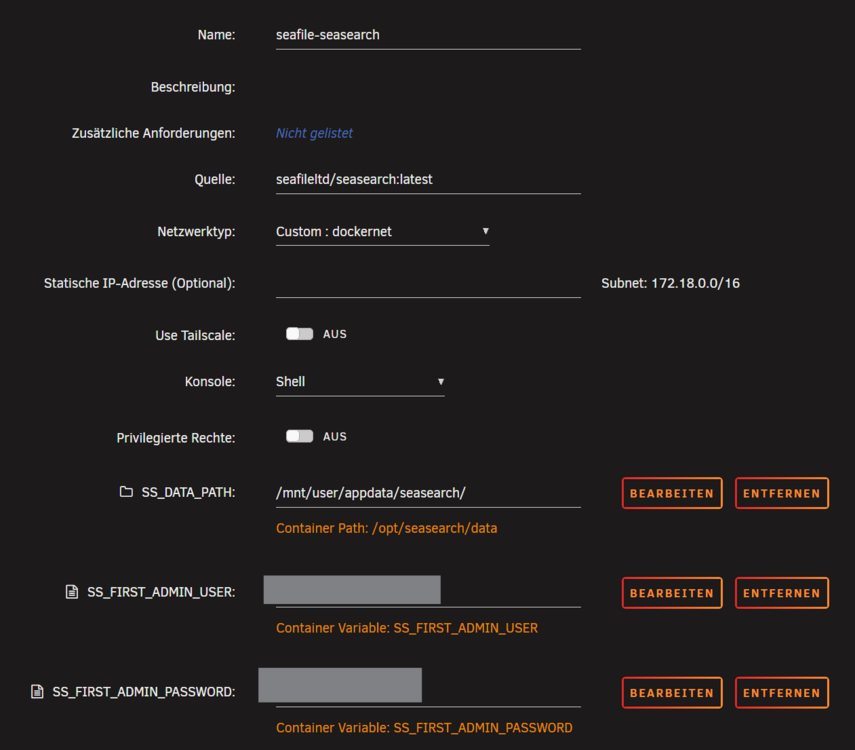
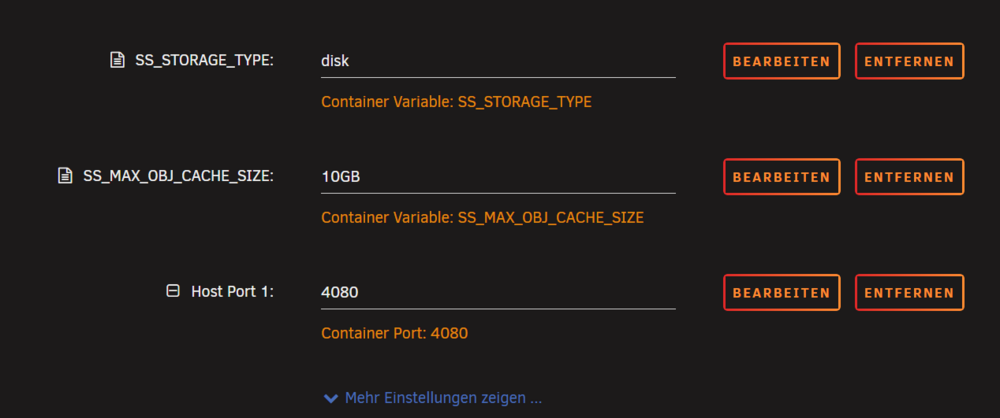
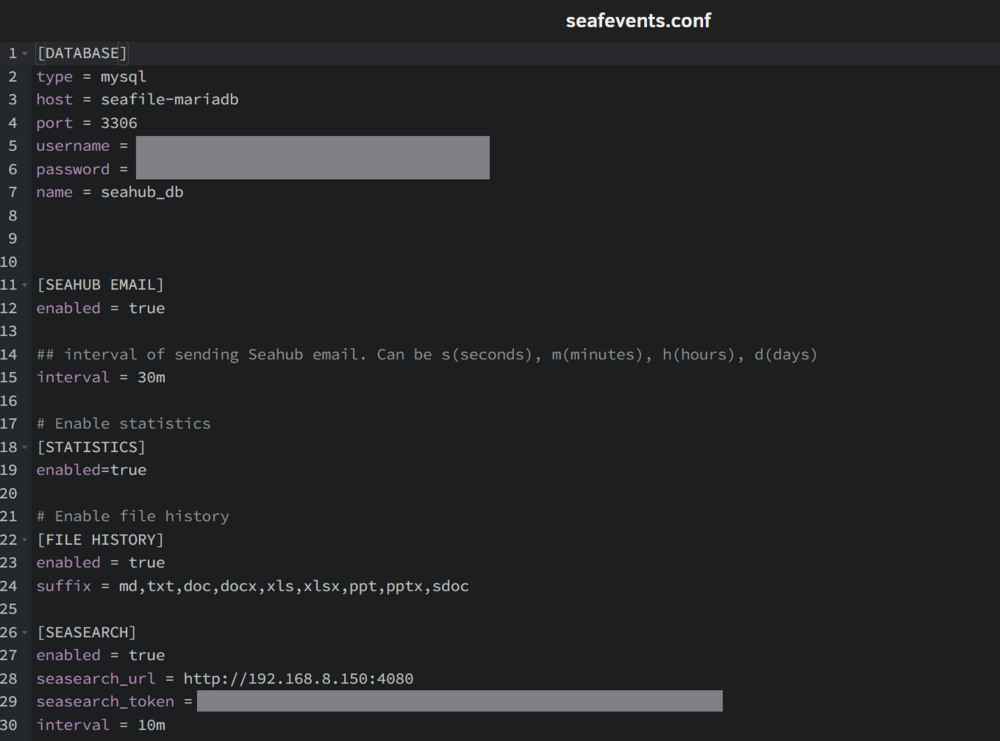
Quick update: I somehow managed to get Seasearch up and running. I took a detailed look at the seasearch.yml file and manually added all the variables that seemed necessary into a completely new Docker template on Unraid. I have no idea which of the variables might be redundant. Maybe someone with a more trained eye could take a look and comment. Here are the entries I added to seafevents.conf: I wasn't entirely sure about the value for seasearch_url, so I just tried it this way. The first sign of success was that, unlike my previous attempts with Elasticsearch, the local folder actually started filling up with data. After about 10-15 minutes, I was able to see relevant search results in Seafile. However, it doesn’t seem like the contents of the files themselves are being indexed yet. I'll keep an eye on that. But for now, I consider this a success, even though it took me more than half a day to get it working. Best regards, Tom
-
Thanks, @MowMdown , for listing everything so clearly again. OnlyOffice works perfectly for me. I thought about giving Seafile 12 Pro another try. I really like the extended role management in this version. I have a specific use case where I want to share a library—not via a share link, but with a user. However, that user should not be allowed to create their own library. This is only possible with the guest role. Additionally, I find the more detailed folder sharing options quite useful. And last but not least, I find the document search feature very useful. However, for that, I need Elasticsearch or Seasearch. If I understand correctly, Seafile plans to fully transition to Seasearch in the future, so it makes sense to focus on that. Well—Seafile 12 Pro works flawlessly for me, including OnlyOffice. However, I’m having trouble installing Elasticsearch or Seasearch. I don’t quite understand which variables are mandatory when creating the container. For Elasticsearch, there are a few pre-configured versions available under Apps. I followed this guide: https://manual.seafile.com/latest/setup/migrate_ce_to_pro_with_docker. Starting from a clean installation of Seafile 12 CE, I first adjusted the source to 'seafileltd/seafile-pro-mc:12.0-latest' for the seafile container. Next, I took the elasticsearch container by d8sychain and adjusted the source to 'elasticsearch:8.15.0' and added the variable 'SEAFILE_ELASTICSEARCH_VOLUME'. I also created a subfolder within my Seafile share and configured it accordingly (hopefully): I’m not even sure if this was correct. But then it gets even more complicated for me (since I still lack some fundamental Docker knowledge—yes, unfortunately, that’s the case...). According to the guide, I need to adjust the seafile-server.yml. I understand that, in principle, all these variables/paths can be configured via Unraid’s built-in tools. However, I’m not sure which ones are essential and which are not. elasticsearch: image: ${SEAFILE_ELASTICSEARCH_IMAGE:-elasticsearch:8.15.0} container_name: seafile-elasticsearch environment: - discovery.type=single-node - bootstrap.memory_lock=true - "ES_JAVA_OPTS=-Xms2g -Xmx2g" - "xpack.security.enabled=false" ulimits: memlock: soft: -1 hard: -1 mem_limit: 4g volumes: - "${SEAFILE_ELASTICSEARCH_VOLUME:-/opt/seafile-elasticsearch/data}:/usr/share/elasticsearch/data" networks: - seafile-net And when I look at the .env file, nothing stands out as missing somewhere in my setup: COMPOSE_FILE='seafile-server.yml,caddy.yml,seadoc.yml' COMPOSE_PATH_SEPARATOR=',' # Seafile & Basic services ## Images SEAFILE_IMAGE=seafileltd/seafile-pro-mc:12.0-latest SEAFILE_DB_IMAGE=mariadb:10.11 SEAFILE_MEMCACHED_IMAGE=memcached:1.6.29 SEAFILE_ELASTICSEARCH_IMAGE=elasticsearch:8.15.0 SEAFILE_CADDY_IMAGE=lucaslorentz/caddy-docker-proxy:2.9-alpine ## Persistent Storage SEAFILE_VOLUME=/opt/seafile-data SEAFILE_MYSQL_VOLUME=/opt/seafile-mysql/db SEAFILE_ELASTICSEARCH_VOLUME=/opt/seafile-elasticsearch/data SEAFILE_CADDY_VOLUME=/opt/seafile-caddy ## Database SEAFILE_MYSQL_DB_HOST=db SEAFILE_MYSQL_DB_USER=seafile SEAFILE_MYSQL_DB_PASSWORD=PASSWORD ## Scheme SEAFILE_SERVER_HOSTNAME=seafile.example.com SEAFILE_SERVER_PROTOCOL=http ## Startup parameters TIME_ZONE=Etc/UTC JWT_PRIVATE_KEY= ## Initial variables (can be removed after firstime startup) ### Database root password INIT_SEAFILE_MYSQL_ROOT_PASSWORD=ROOT_PASSWORD ### Seafile admin user [email protected] INIT_SEAFILE_ADMIN_PASSWORD=asecret ### S3 INIT_S3_STORAGE_BACKEND_CONFIG=false INIT_S3_COMMIT_BUCKET=<your-commit-objects> INIT_S3_FS_BUCKET=<your-fs-objects> INIT_S3_BLOCK_BUCKET=<your-block-objects> INIT_S3_KEY_ID=<your-key-id> INIT_S3_SECRET_KEY=<your-secret-key> INIT_S3_USE_V4_SIGNATURE=true INIT_S3_AWS_REGION=us-east-1 INIT_S3_HOST=s3.us-east-1.amazonaws.com INIT_S3_USE_HTTPS=true # SeaDoc service ENABLE_SEADOC=true SEADOC_IMAGE=seafileltd/sdoc-server:1.0-latest SEADOC_VOLUME=/opt/seadoc-data # Notification server NOTIFICATION_SERVER_IMAGE=seafileltd/notification-server:12.0-latest NOTIFICATION_SERVER_VOLUME=/opt/notification-data # SeaSearch ## Image #SEASEARCH_IMAGE=seafileltd/seasearch-nomkl:latest # Apple's Chip SEASEARCH_IMAGE=seafileltd/seasearch:latest ## Storage SS_STORAGE_TYPE=disk # disk (local storage), s3, oss ### Local storage mode SS_DATA_PATH=/opt/seasearch-data # Persistent storage path SS_MAX_OBJ_CACHE_SIZE=10GB ### S3 mode SS_S3_USE_V4_SIGNATURE=false SS_S3_ACCESS_ID=<your access id> SS_S3_ACCESS_SECRET=<your access secret> SS_S3_ENDPOINT=s3.us-east-1.amazonaws.com SS_S3_BUCKET=<your bucket name> SS_S3_USE_HTTPS=true SS_S3_PATH_STYLE_REQUEST=true SS_S3_AWS_REGION=us-east-1 SS_S3_SSE_C_KEY=<your SSE-C key> ## Log SS_LOG_TO_STDOUT=false SS_LOG_OUTPUT=true SS_LOG_LEVEL=info ## Initial variables (can be removed after firstime startup SeaSearch service) INIT_SS_ADMIN_USER=<admin-username> INIT_SS_ADMIN_PASSWORD=<admin-password> And finally, I just need to add the configuration to seafevents.conf. [INDEX FILES] es_host = elasticsearch es_port = 9200 enabled = true interval = 10m So far, so good. But after that is where I get stuck. And I’m already very confused at this point. Somewhere it's pointed out that you can manually update the indexing of Elasticsearch. So I slipped inside the seafile docker container and did the following: But as you can see there is no such file or directory. If everything was done right I should find something here. Also the subfolder on the share for elasticsearch stays empty. Here I am, stuck and unsure how to proceed. Maybe I still need to make some adjustments to the Seafile Docker container, but that’s where I’ve been struggling for quite a while. Has anyone managed to get Elasticsearch or, even better, Seasearch up and running? If so, I would really appreciate any help. Maybe it would make sense to use the Docker Compose plugin for Unraid altogether. All the templates are available on the Seafile website—the docker-compose.yml and the .env file. However, I’m sure there are some pitfalls with that approach as well. Has anyone already tried this? Hi @presence06! Great that you found this thread. Have you had any success getting OnlyOffice to work yet? If not, feel free to share some screenshots of your containers and their settings. I’m sure we can figure it out together. Best regards, Tom



-
Update – Thanks to the instructions on GitHub, I’ve now successfully integrated OnlyOffice as well. However, it only worked externally once I made the service accessible from outside. Apparently, there are ways to do it differently, but this seemed like the simpler method. Something went wrong during my first attempt, though I’m not sure what exactly. On the second try, I skipped this step: If I understand the OnlyOffice welcome page correctly, this command is only necessary if no secret key was set during deployment. Since I did set a 40-character JWT secret key (replacing the 'secret123'), I believe this approach should be fine. I’ll test it again when I’m back at my desk and see if I can figure it out, what went wrong on my first approach. I think I may have mixed something up when using the following command, and in the end, I entered the wrong key in the seahub_settings.py file. I'm a bit confused about what is meant by 'random secret', 'custom secret' and 'default secret'. To my understanding I set a 'custom secret' within the Unraid Docker template (and by doing this replacing a 'default secret'?). This 'custom secret' I wrote into the seahub_settings.py. As for Seafile Pro, I’ll definitely give it another shot. Instead of Elasticsearch – which, according to the Seafile developers, is going to be phased out – I’m planning to try Seasearch. Hopefully I can get that working, too. Full-text search within documents is a real advantage over simple file name search.


-
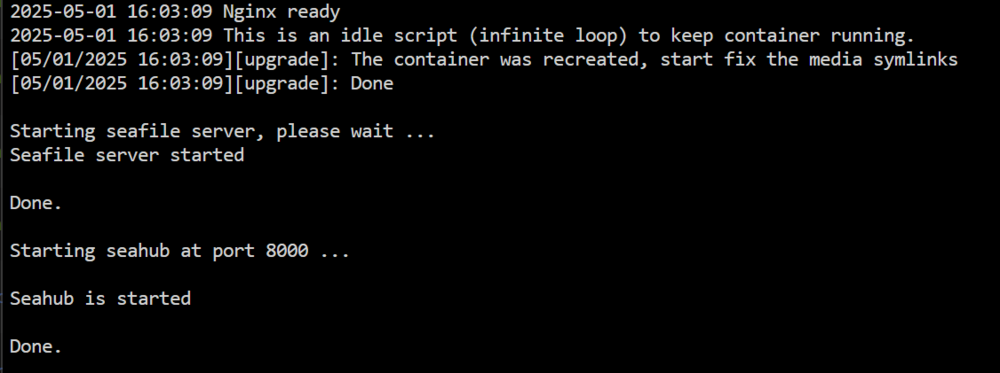
I’ve now switched back to the Community Edition. I followed the guide by @dglb99, and the log shows the following: So it looks like everything worked I guess. Search is now functioning again within the libraries. Honestly, I don’t really need most of the features from the Pro version. Sure, full-text search would be a great feature, and I could probably make good use of fine-grained folder permissions as well — but that’s really just nitpicking at a high level.
-
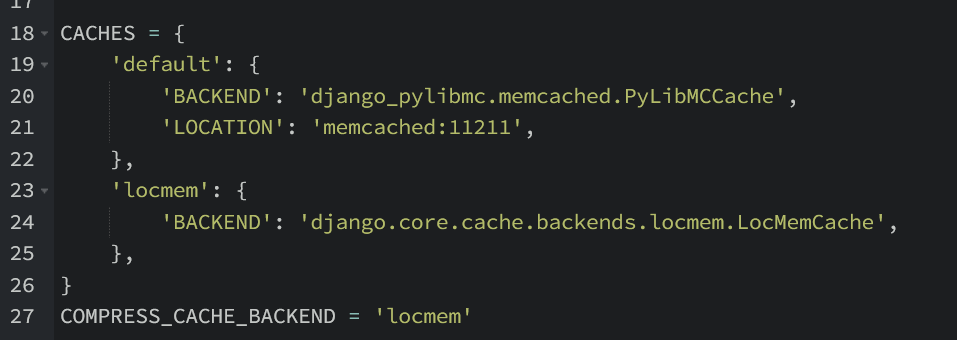
Thanks for the clear summary! That explains exactly what I ran into — especially the part about the "Page Unavailable" error when using wrong credentials. I didn't realize it was tied to the memcached config. I just tested it myself using intentionally wrong login credentials — and you're absolutely right. It brings me back to the error page. I’ll give your suggestion a try. Also, something I noticed with the Pro version: search doesn't work at all out of the box. It seems you need to install either Elasticsearch or Seasearch. That looks a bit tricky to set up — at least for me. I've now installed memcached, and it works as expected — even when entering incorrect login credentials. Thanks a lot for your help @MowMdown! As you mentioned, changing the seahub_settings.py to use memcached > localhost didn’t work for me either. But I didn’t go any further trying to remove the entire block — since everything is working fine now with memcached running.
-
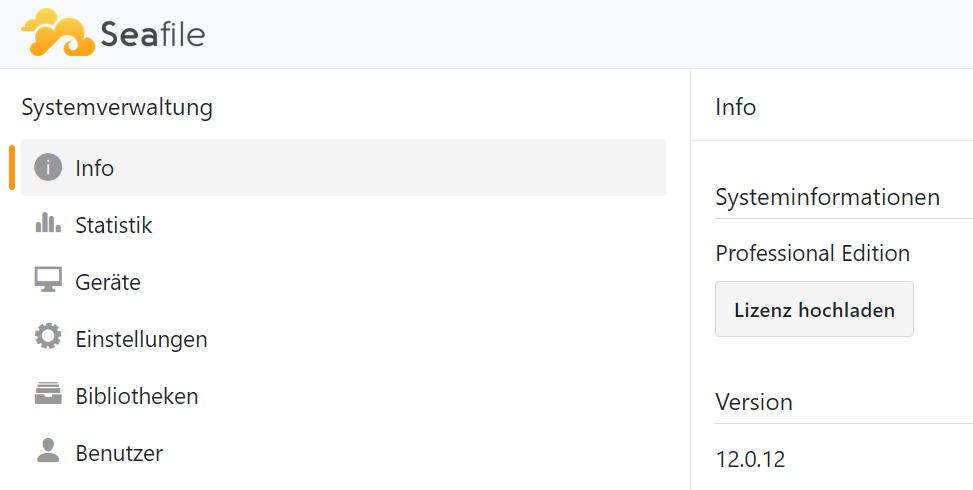
Since I'm already on a roll, I decided to give Seafile Pro a try as well. I initially followed the guide by @dglb99, and while registering at customer.seafile.com, I found out that starting from version 12, the Docker images are available on Docker Hub and no login credentials are required anymore. I'll test it out right now — and if everything works, I’ll update this post shortly. I tested it. First, I used seafileltd/seafile-pro-mc:12.0.12 as the image source, and that version was installed as expected. On another attempt, I tried seafileltd/seafile-pro-mc:12.0-latest, which pulled version 12.0.11 instead. I’ve decided to stick with that for now. If I run into any issues, I’ll report back here. But it looks like I’ve finally reached my goal. I'm still in the process of organizing data from various sources into a clean folder structure, roughly separating archive folders from those I want to sync. The sync folders — which are located in a dedicated share on my Unraid server — will be synced to my PC using the Seafile Sync Client, each as its own library. Both main directories — archive and sync — will then be backed up regularly via rsync to a separate Synology DS. I believe this setup should be fairly solid. I’ll leave the encrypted data that Seafile stores in its own share as-is — basically treating it as an additional "backup".

-
Apologies — I missed a few posts because I was away on a short vacation last weekend. Everything from Monday onward kind of slipped through the cracks for me. Due to work, I only got the chance to catch up here today. Yes, that must have been the issue — the username and password weren’t being applied properly. Please disregard my last post regarding that. The updated template resolved the issue. Huge thanks, @dglb99!
-
So, I’ve got some good news! I honestly have no idea what I might have done differently this time. I deleted both Docker containers and their images again, wiped all files and folders under the share mnt/user/seafile, and also removed the seafile-mariadb directory from appdata. Then I reinstalled MariaDB — following @dglb99 instructions precisely, removing all variables except for MYSQL_ROOT_PASSWORD. I left everything else unchanged. For the Seafile 12 container, I entered all the same settings as before. The only minor change was that I left the password at the default asecret for now. But I’m absolutely sure that wasn’t the issue earlier. Checked the logs during deployment — everything looked fine. Then I went to the WebUI, entered user/pass, and fully expected to be redirected to the error page again. But nope — I’m in! The issue must have been on my end, but honestly, I have no clue where or what it was. Before I also wanted to check @MowMdown's tip editing the seahub_settings.py part for memcached. But I didn't have to as it works now without. Here's mine - unchanged and everything works: Huge thanks to everyone here who offered support!

-
Thanks for following up @MowMdown — and you're right about the versioning point in Filerun, credit where it's due. I'm not entirely against closed-source software, but I definitely prefer open-source solutions whenever possible. The ability to sync with Google Cloud might be useful for some, but it's a hard no for me. One of the main reasons I run my own server is to stay independent from Big Data services like Google or Meta. So any kind of built-in integration with those platforms is actually a dealbreaker in my case. Also, as far as I know, FileRun requires a recurring subscription. I'm totally fine with paying for good software — after all, I paid for Unraid too — but €99 per year is simply too much for my personal use. I might consider a one-time fee of €200 or so, but as it stands, I can’t even properly test it because it seems to require a license key right from the start. By the way, I haven’t made any progress with installing Seafile 12 yet. I’ve done some digging, but couldn’t find anything related to the error I’m getting. Still, I’m sticking with it and will keep troubleshooting.
-
Seafile 11 was running without issues on my server. I'm confident that Seafile 12 will work as well. I wouldn't really compare these three applications directly. I've also looked into FileRun and, of course, I'm familiar with Nextcloud. The latter feels way too bloated for my needs. Sure, you could strip it down to the essentials, but I'd rather use a product that's focused on doing just one thing: file synchronization — and doing it securely, with encryption on both client and server. That's not what FileRun offers. It's basically just a nicely designed file browser. On top of that, I also need a mature system for managing shares and users, along with versioning. FileRun simply doesn't provide that. And since the code is proprietary, FileRun is a no-go for me anyway.
-
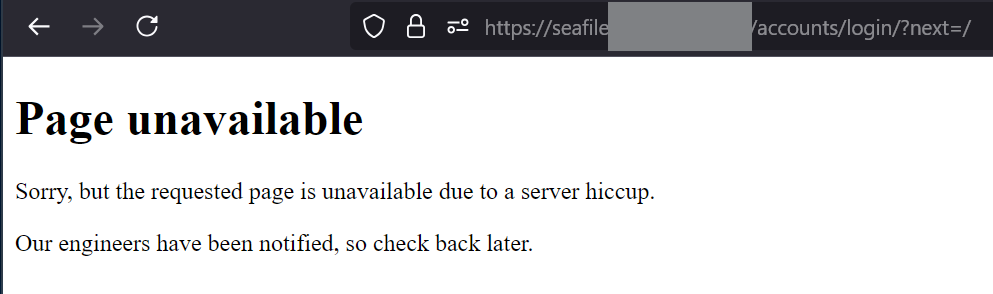
Now I finally found some time to delete everything and start completely from scratch. I installed MariaDB with just the MYSQL_ROOT_PASSWORD set, and installed Seafile 12 exactly according to the instructions. I always made it successfully to the login page — both locally and through the FQDN set up in NGINX Proxy Manager. However, every time I try to log in, I end up on the following error page: Page unavailable Sorry, but the requested page is unavailable due to a server hiccup. Our engineers have been notified, so check back later. I have no idea what is causing this. I also tried going from https in the container settings to http. The Seafile container log right after deployment shows no errors. Maybe I need to make some adjustments in seafile.conf or seahub_settings.py. I vaguely remember that during my very first attempts with Seafile 11, I had to change something there to make it work. Since I'm heading out on a weekend trip in less than two hours, I'll leave it as it is for now. Maybe I'll get another chance to experiment with it on Monday. Wishing everyone a great weekend! Best regards, Tom
-
Yeah, I'm pretty sure I didn’t mess up the login. I'm using Bitwarden and copied the credentials straight into the Seafile 12 container – not much room for error. But hey, never say never. Since I haven’t started using Seafile in production yet, I’ve got no problem wiping everything and starting fresh. I’m still in the exploration phase with Unraid – haven’t had the server for that long, but I’m loving it. Lately, I’ve been focused on gathering and organizing all my scattered photo collections. I ditched Google Photos years ago and just recently exported everything from Flickr. After some final checks, I’m ready to delete it all. I ended up choosing Immich, and just yesterday copied about 30,000 photos to Unraid – then backed it all up to an old Synology DS using rsync. Right now, it’s just photos, movies, and TV shows on the server, but that’s going to grow. Seafile really impressed me – it beat out Resilio Sync mainly because I often need to share files externally, and Resilio is a bit clunky for some people. Still, I’m not giving up on it – it’s too good to ignore completely. And yeah, I guess this whole journey is driven by one thing: getting my digital life in order and building a solid backup setup. I’ve been burned before – I was hit by Deadbolt on a QNAP a few years ago. Total nightmare. I got lucky and found a one-off backup, but a lot of personal videos from my sports events were lost. Some might still be on a 20-year-old hard drive that's now dead. Recovery would cost €1,500–2,000. Maybe someday, if I win the lottery. So yeah – lesson learned. Never again without a backup.
-
Hi @dglb99! Thanks so much for your quick reply – much appreciated! Honestly, I should have just read more carefully. You clearly pointed out in the description that the four fields in the MariaDB container should be cleared. I didn’t take that seriously enough at first – that’s on me! The Seafile WebUI is reachable both locally over LAN and via a FQDN with https. I’m using NGINX Proxy Manager as well, and everything seems to be configured correctly there. I changed the forward port in the docker container to 8080. MariaDB ist also set to standard 3306. However, after entering the username and password on the login page, I can’t get any further. At some point I briefly tried setting SEAFILE_SERVER_PROTOCOL to http, but that didn’t change anything – though it’s possible something else wasn’t right at the time. I’ll test it again with that setting and report back once I’ve tried it. Thanks again for your help!
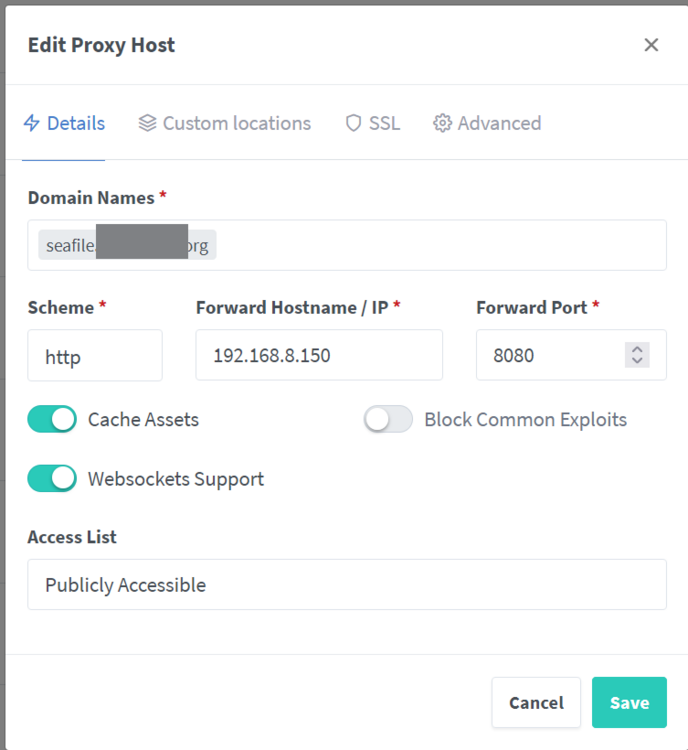
-
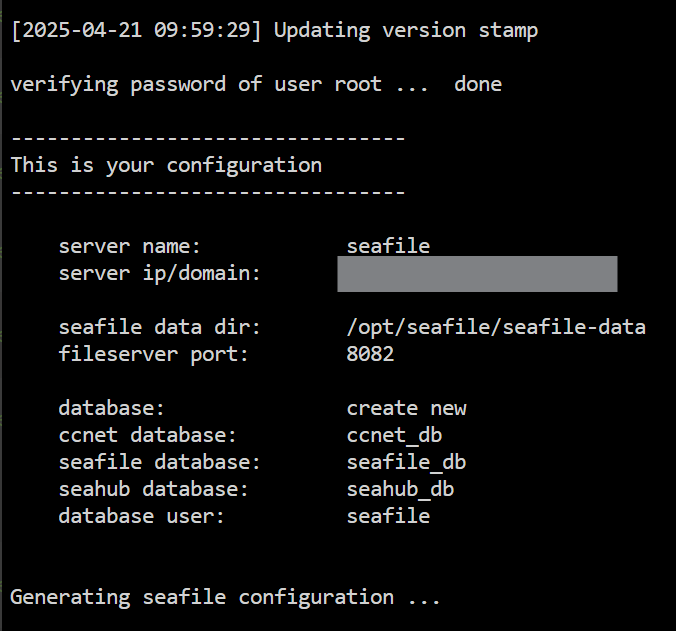
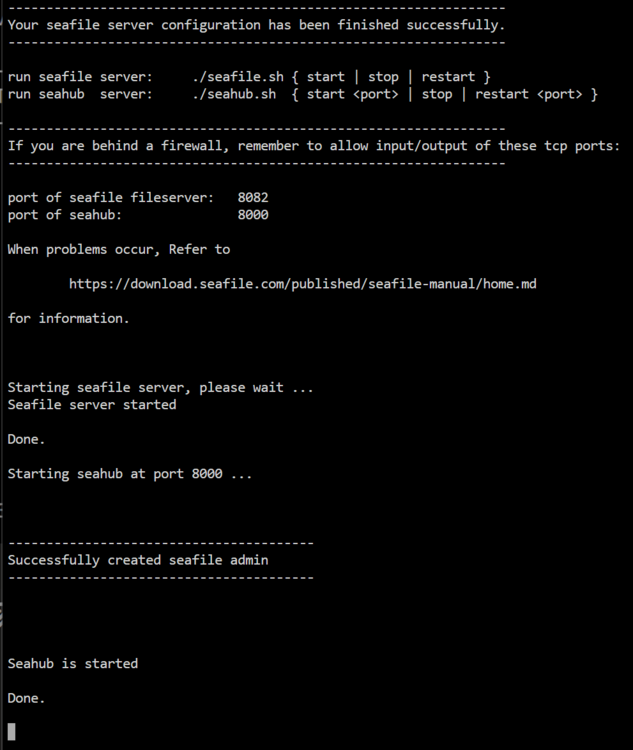
Back again. Now I did what I for sure didn't do when setting up Seafile 11. I went to https://github.com/chirmstream/unraid-templates/blob/main/seafile-12/seafile-12_guide.md and found the following: Suddenly I got this (again like in Seafile 11): I can now move on to the WebUI using either the local IP:8080 (I changed from 8081 to 8080 to make sure this wasn't the problem). I use the same credentials as with Seafile 11. But now there's this message showing up: So I think I already got quite far till this point.
-
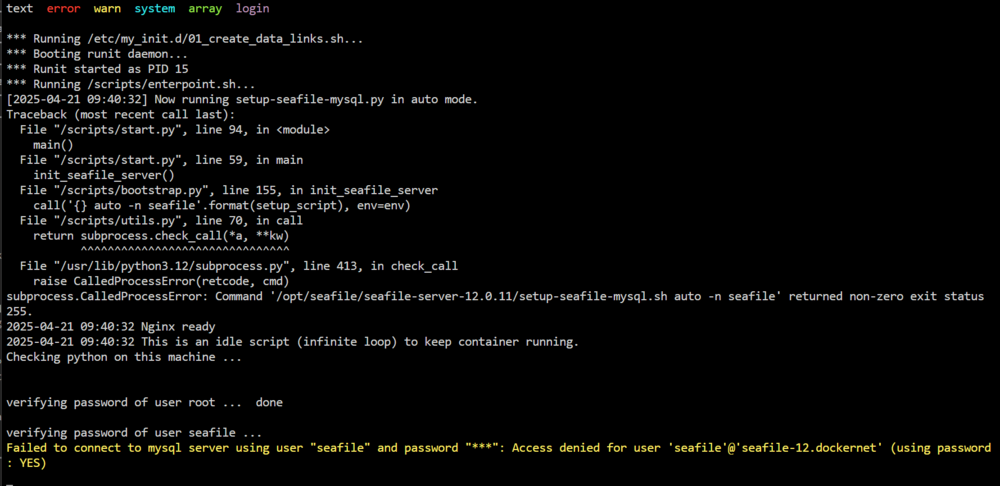
I have now also renamed the SQL from seafile12-mariadb to seafile-mariadb and also renamed the container to seafile-mariadb. Now everything seems to be exactly as it was setup for seafile-11 before. I'm getting this error now when staring the seafile-12 container. Thias also happened before renaming this: I also tried accessing the db within the container like this: So the MYSQL_PASSWORD works. I double checked the password (here MYSQL_ROOT_PASSWORD) I set in the settings for the seafile container, matching everything to the previous setup. Don'T know what I'm missing here.

-
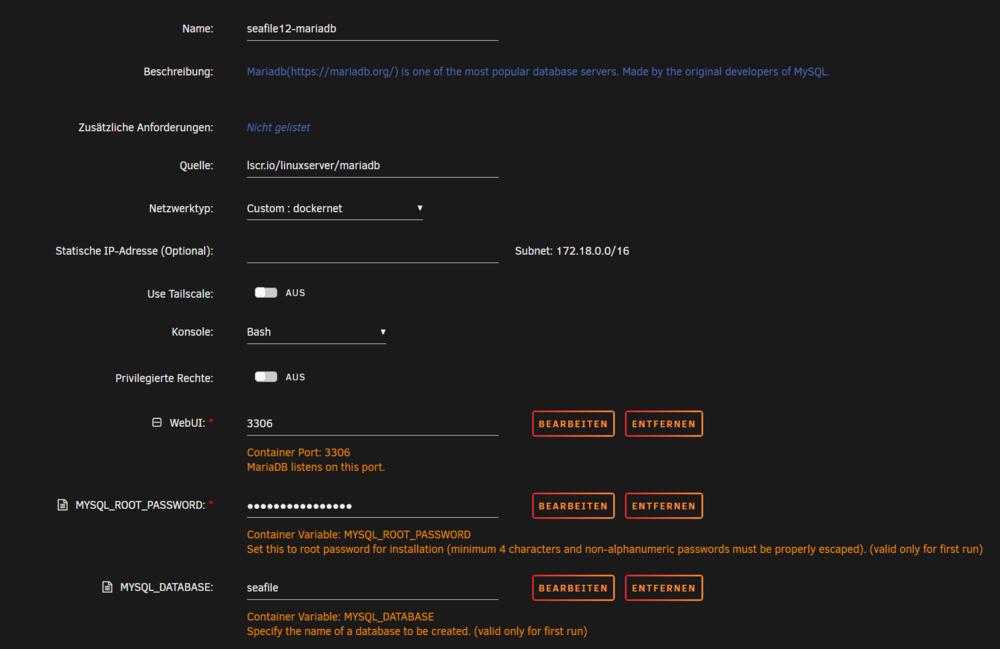
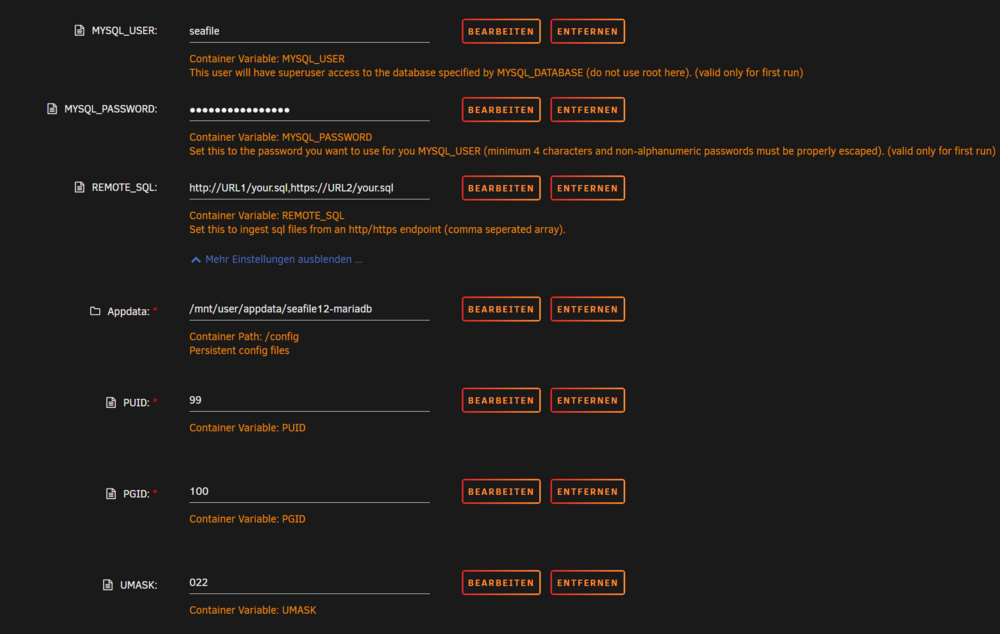
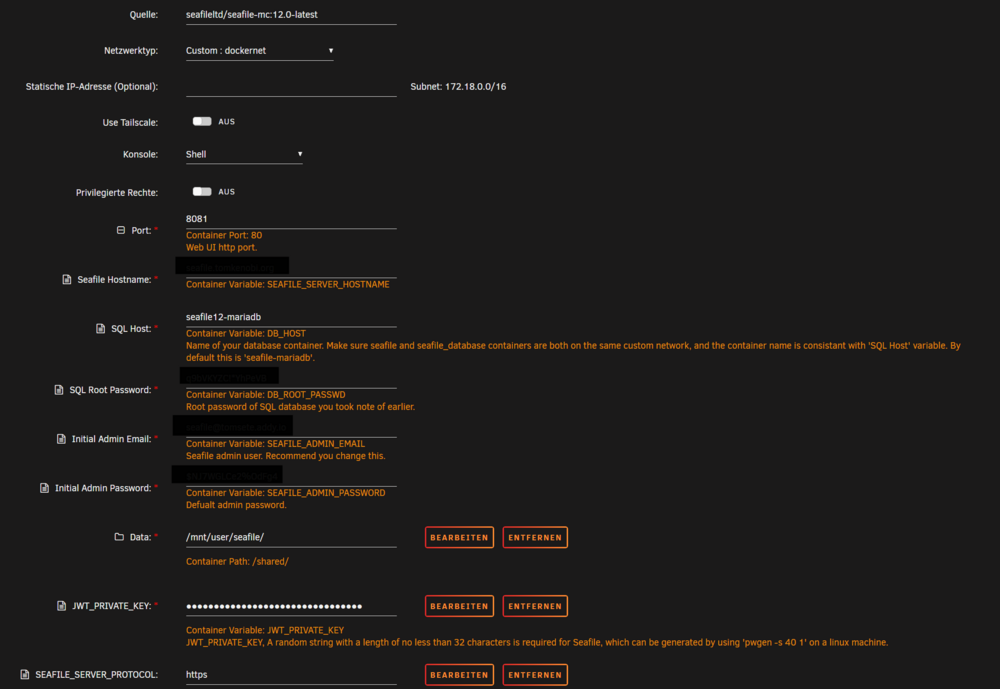
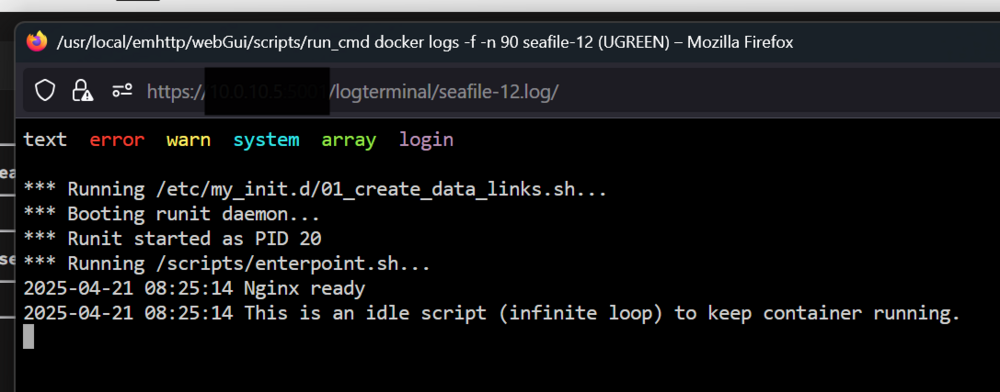
Hi @dglb99! Thank you so much for jumping into this thread. I’ve only now found the time to give it a try. Unfortunately, I’m getting a 502 error and I’m not sure why. As far as I can tell, I followed the same procedure I used for Seafile 11. Since I only want to switch once everything works, I stopped the existing Seafile 11 and MariaDB Docker containers and created a new MariaDB instance for Seafile 12. Accordingly, I named the new container "seafile12-mariadb" and adjusted everything else to match. See screenshots below: Here are the settings for the MariaDB docker container: And here the settings for seafile-12 docker container: By the way, I already had issues with Seafile 11 not working properly with seafile-net, so I used an already existing custom Docker network instead. I did the same thing here. I’d really appreciate your support with troubleshooting this. I’m sure it’s something on my end, but I just can’t find the solution. Please let me know which additional info or screenshots you might need. Thanks a lot in advance! Best regards Tom And here's the container log after starting the seafile-12 container: