Joloxx9
Members
-
Joined
-
Last visited
-
Can't download a backup, pressing on the button does nothing.
-
This is onw of this cases when something simple has been lifted to the limits and now it is unusable. Good luck trying to do anything:

-
It does work now, it looks like GPU group changed and immich could not access it anymore, after adding immich to the new GPU group all is running well.
-
I just found this post: https://www.reddit.com/r/unRAID/comments/1tbnlfx/730_stableintel_arc_310_hw_transcoding_stopped/ I am on 7.3 RC1, and I was not aware about it until now, this user is correct, ARC card doesn't work, in my case it is A380. It is detected in the system, but Unraid does not read anything from it (intel_gpu_top returns igpu only). I have set it in plex as transcode device and it does fall back to igpu. Immich fails to use GPU as well got errors in the log when it is trying to use it for AI. Device is listed under System Devices. Please see attached Diagnostics. arrakis-diagnostics-20260513-0713.zip
-
Well in this case, I will have to set up everything in IPMI as nothing besides "coretemp" sensor is visible in unraid, also I did following command: modprobe nct6687 force=1 manual=1 And after this I could finally see some: NCT6687-ISA-0290 A lot of readings but most of them inaccurate like 0, 255 etc but some fan's are visible. Is there anything I could do? This is my motherboard: https://www.asus.com/uk/motherboards-components/motherboards/workstation/pro-ws-w880-ace-se/
-
Hi mate, are you able to compile a new version please? I have an issue with fans on W880-ACE-SE
-
Actualy I found the issue, I have share mounted from my other NAS, if I power it down without unmounting first in unraid, then it won't be able to stop the array.
-
I was trying to stop the array, like always I turned off the docker first, then after few minutes I pressed Stop Array, it stuck like that for 30 min, I was able to log via webgui/ssh etc I just could not stop it. I really need to get to the bottom of it as I do not shut my server ofter(once every 1/3 months) but I need it to be reliable I cannot do parity checks everytime i shut it down because I have to force a shutdown. Please see attached diagnostics - generated when it was stuck, also this was the end of the LOG:</ Apr 20 16:02:43 Arrakis usb_manager: Info: rc.usb_manager Reset Connected Status Apr 20 16:02:43 Arrakis emhttpd: shcmd (4532053): /etc/rc.d/rc.libvirt stop Apr 20 16:02:43 Arrakis rc.libvirt: Stopping libvirt daemon... Apr 20 16:02:43 Arrakis rc.libvirt: virsh net-destroy 13f20c73-b89c-4e11-9a12-68458ae72e02 Apr 20 16:02:43 Arrakis dnsmasq[28282]: exiting on receipt of SIGTERM Apr 20 16:02:45 Arrakis rc.libvirt: libvirt daemon... Stopped. Apr 20 16:02:45 Arrakis rc.libvirt: Stopping virtlog daemon... Apr 20 16:02:46 Arrakis rc.libvirt: virtlog daemon... Stopped. Apr 20 16:02:46 Arrakis rc.libvirt: Stopping virtlock daemon... Apr 20 16:02:47 Arrakis rc.libvirt: virtlock daemon... Stopped. Apr 20 16:02:48 Arrakis emhttpd: shcmd (4532054): umount /etc/libvirt Apr 20 16:02:48 Arrakis kernel: BTRFS info (device loop2): last unmount of filesystem 63a062d1-12e2-4021-b2c9-610bd74f8d93 Apr 20 16:02:48 Arrakis ttm-plugin: Killing all Tmux sessions accessing the array/pools (as configured)... Apr 20 16:03:19 Arrakis unassigned.devices: Remote server '192.168.50.153' port '445' is not open; server appears to be offline. Apr 20 16:05:15 Arrakis emhttpd: spinning down /dev/sdo Apr 20 16:05:17 Arrakis emhttpd: read SMART /dev/sdo Apr 20 16:05:26 Arrakis nginx: 2026/04/20 16:05:26 [error] 308118#308118: *2216296 upstream timed out (110: Connection timed out) while reading upstream, client: 192.168.50.22, server: , request: "POST /update.htm HTTP/2.0", upstream: "http://unix:/var/run/emhttpd.socket:/update.htm", host: "192.168.50.158", referrer: "https://192.168.50.158/Main" arrakis-diagnostics-20260420-1615.zip
-
Thanks I didn't notice that I left stress on autostart ;)
-
Yeah, there was some issue with it

-
Yeah something was odd.arrakis-diagnostics-20260323-0809.zip
-
But we can transfer the license and tie it with TPM correct?
-
Just noticed that I have out of memory error, are you able to let me know what caused it? arrakis-diagnostics-20260323-0809.zip Was it because of "stress" application or there was something else?
-
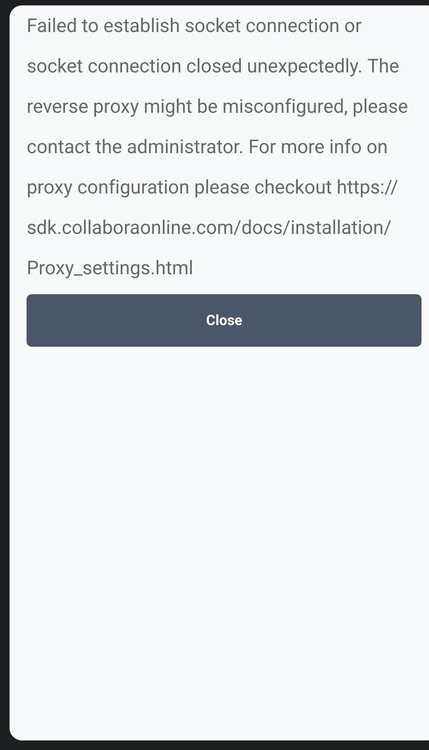
I was looking where connection stops, I had to disable authentication for the tests. But now I stuck on this: It wolduld be nice to know if issue is with wopi or with collabora
-
Yup, there was something going on between Pangolin OIDC and opencloud, had to do some rules and voila: