





flashback
Members
-
Joined
Everything posted by flashback
-
I've recently setup Unraid on a TerraMaster NAS, with the view to it becoming the primary and the Synology NAS it replaced becoming the backup target. I've done quite a bit of research and am conflicted in the best way to achieve a backup solution, as each way has pros and cons. I'm only looking to mirror really, version control isn't required. It's more so to have a remote/physically separated copy of the data in case there is huge failure or theft of the Unraid unit. The backup should only copy new/changed data, and delete anything that no longer exists in the source, on the target. For example, backing up my OneDrive and Dropbox repositories Synology excels at that, with Cloud Sync in-built that 'just works'. Unraid allows you to install rclone, but most of the setup guides I've seen for that reference a plugin by waseh, which seems to be deprecated and there is now an 'official' docker container that shows up in CA. When installing the docker container it asks for a few settings such as "Rclone config" and "Data path", where it's not clear if I'm setting the path in the filesystem on the Docker container, or whether that path references the underlying Unraid filesystem. Whereas with the older waseh plugin version, it says just install that (no input required during the install unlike the newer version) and then type rclone config on the command line. If I manage all the backups from Unraid to Synology, I've been looking at Duplicacy, Kopia and Restic. Rsync also factors in obviously (with some GUI front ends to it e.g., luckyBackup). I have AppData backup installed already, so that's taking care of the flash drive backup and Docker containers/metadata(?). If I manage all the backups from Synology to Unraid, you can use either Hyper Backup or Active Backup for Business. With Hyper Backup for example, I think I would need to mount my Unraid share on the Synology, then essentially backup from 1 share to the other as otherwise the way the software works is more selecting another NAS as a target, rather than itself. When I did the initial sync from my Synology to Unraid, I used the following command, but note that the date/time stamp on the files was set as the time of the sync, rather than retaining their original date/time stamp. rsync -r --info=progress2 --info=name0 --delete-delay --size-only "/mnt/remotes/SOURCE" "/mnt/user/data/DESTINATION" So, I see the options as: Hyper Backup/ABB on Synology - mount the Unraid shares, and then backup/mirror to the same file structure on the Synology, Cloud Sync to pull down OneDrive/Dropbox. Unraid crontab rsync with the command above, but in the reverse (although timestamp issue would still exist), Cloud Sync on the Synology (e.g., no mirror/sync will exist on Unraid) Unraid - install rclone (to cover OneDrive/Dropbox), then either rsync as per point 2 or one of the various backup apps available (Duplicacy, Kopia, restic etc.) to the Synology. Any thoughts? Anything else I've not considered? I do also plug in a USB hard drive every few weeks just to give another critical items backup option, which covers things like Photos etc.
-
That makes more sense then! Thanks, I'll ignore for now.
-
I'm seeing this issue when I run the scan: Share docker is an implied array-only share, but files / folders exist on the cache Set Use Cache appropriately, then rerun this analysis. I looked at the post in https://forums.unraid.net/topic/120220-fix-common-problems-more-information/ however it doesn't shed any light on how to fix. If I look at the 'docker' share, which docker auto creates when it runs, it's set to Cache and secondary is set to None, also Exclusive Shares = yes. I can see the symlink from /mnt/user/docker to /mnt/cache/docker lrwxrwxrwx 1 root root 168 Nov 8 07:37 docker -> ../cache/docker/ What am I missing here? If I run Compute All on Shares - it shows just utilising the cache as expected: docker - - Cache 246 KB 1.93 TB Cache 246 KB 1.93 TB In Docker settings, the paths are set as follows: Docker directory: /mnt/user/docker/ Default appdata storage location: /mnt/user/appdata/
-
That would be a long time indeed, as it's been connected for 2 weeks! ;) I wonder if unplugging/replugging seemed to sort it. Anyway, all good and thanks for the swift help.
-
'tis indeed, how unusual. Key Value Key Value battery.charge 100 battery.charge.low 20 battery.runtime 4320 battery.type PbAc device.mfr EATON device.model Eaton 3S 850 device.serial Blank device.type ups device.usb.version USB driver.debug 0 driver.flag.allow_killpower 0 driver.name usbhid-ups
-
Amazing. It's now working! What was the issue? Proof of life:

-
FYI on my old Synology NAS it detects straight away: I'll go and grab a USB drive and plug that in and see whether Unraid sees it.
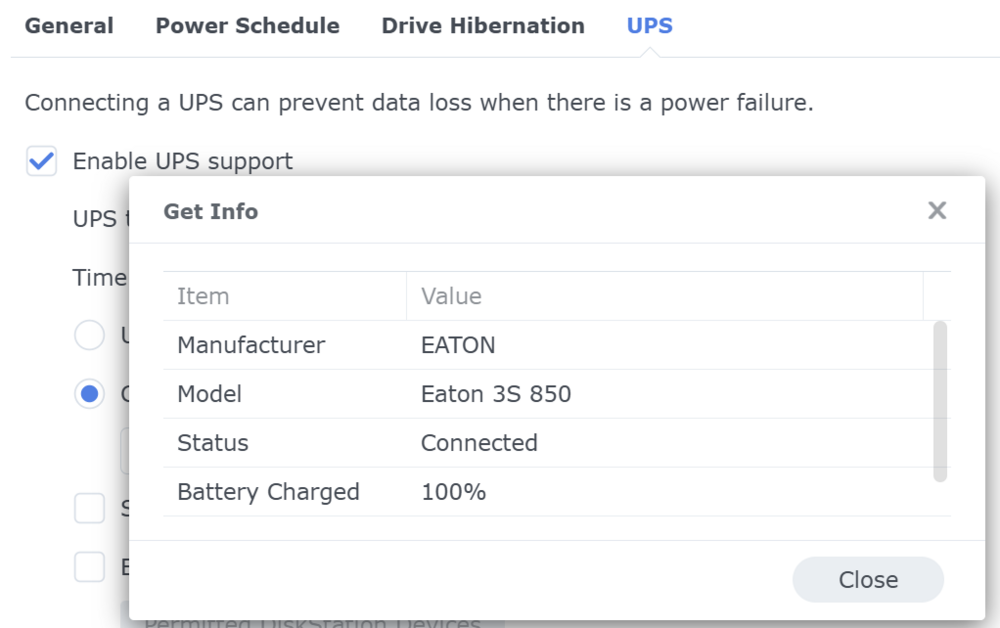
-
There's only 1 USB A input on the NAS unfortunately, I'd otherwise have to try the USB C port perhaps with an adaptor? FYI, plugged into my laptop: Ignore the load, I only just installed it, it's now showing 27W.
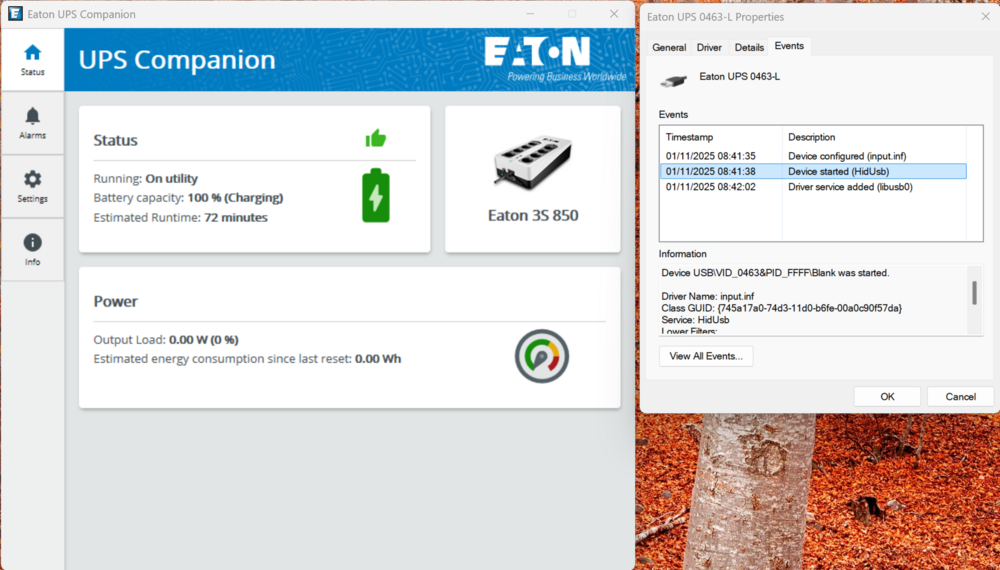
-
Interesting. NUT Scanner is now searching for UPS devices... ##################################################### NO DEVICES FOUND
-
Sure! Nov 1 08:30:27 FWLONNAS01 rc.nut: 0.000000 [D1:1845439] debug level is '6' Nov 1 08:30:27 FWLONNAS01 rc.nut: 0.000038 [D5:1845439] send_to_all: SETINFO driver.debug "6" Nov 1 08:30:27 FWLONNAS01 rc.nut: 0.000046 [D5:1845439] send_to_all: SETFLAGS driver.debug RW NUMBER Nov 1 08:30:27 FWLONNAS01 rc.nut: 0.001953 [D1:1845439] Succeeded to become_user(root): now UID=0 GID=0 Nov 1 08:30:27 FWLONNAS01 rc.nut: 0.001988 [D1:1845439] Signalling UPS [ups]: driver.exit (quietly, no fuss if no driver is running or responding) Nov 1 08:30:27 FWLONNAS01 rc.nut: 0.002007 Can't open /var/run/nut/usbhid-ups-ups: No such file or directory Nov 1 08:30:27 FWLONNAS01 rc.nut: 0.002011 [D1:1845439] Request for other driver to exit returned code -1 Nov 1 08:30:27 FWLONNAS01 rc.nut: 0.002026 [D1:1845439] Socket dialog with the other driver instance (may be absent) failed: No such file or directory Nov 1 08:30:27 FWLONNAS01 rc.nut: 0.002039 [D1:1845439] PID file /var/run/nut/usbhid-ups-ups.pid not found; stat() returned -1: No such file or directory Nov 1 08:30:27 FWLONNAS01 rc.nut: 0.002073 [D1:1845439] Saving PID 1845439 into /var/run/nut/usbhid-ups-ups.pid Nov 1 08:30:27 FWLONNAS01 rc.nut: 0.002118 [D5:1845439] send_to_all: SETINFO device.type "ups" Nov 1 08:30:27 FWLONNAS01 rc.nut: 0.002127 [D5:1845439] send_to_all: SETINFO driver.state "init.device" Nov 1 08:30:27 FWLONNAS01 rc.nut: 0.002130 [D1:1845439] upsdrv_initups (non-SHUT)... Nov 1 08:30:27 FWLONNAS01 rc.nut: 0.002134 [D2:1845439] Initializing an USB-connected UPS with library libusb-1.0.28 (API: 0x0100010A) (NUT subdriver name='USB communication driver (libusb 1.0)' ver='0.50') Nov 1 08:30:27 FWLONNAS01 rc.nut: 0.003483 [D2:1845439] Checking device 1 of 3 (1D6B/0003) Nov 1 08:30:27 FWLONNAS01 rc.nut: 0.024415 [D1:1845439] nut_libusb_open: invalid libusb bus number 0 Nov 1 08:30:27 FWLONNAS01 rc.nut: 0.024711 [D2:1845439] - VendorID: 1d6b Nov 1 08:30:27 FWLONNAS01 rc.nut: 0.024721 [D2:1845439] - ProductID: 0003 Nov 1 08:30:27 FWLONNAS01 rc.nut: 0.024725 [D2:1845439] - Manufacturer: Linux 6.12.24-Unraid xhci-hcd Nov 1 08:30:27 FWLONNAS01 rc.nut: 0.024729 [D2:1845439] - Product: xHCI Host Controller Nov 1 08:30:27 FWLONNAS01 rc.nut: 0.024732 [D2:1845439] - Serial Number: 0000:00:14.0 Nov 1 08:30:27 FWLONNAS01 rc.nut: 0.024736 [D2:1845439] - Bus: 002 Nov 1 08:30:27 FWLONNAS01 rc.nut: 0.024739 [D2:1845439] - Bus Port: unknown Nov 1 08:30:27 FWLONNAS01 rc.nut: 0.024743 [D2:1845439] - Device: 001 Nov 1 08:30:27 FWLONNAS01 rc.nut: 0.024747 [D2:1845439] - Device release number: 0612 Nov 1 08:30:27 FWLONNAS01 rc.nut: 0.024750 [D2:1845439] Trying to match device Nov 1 08:30:27 FWLONNAS01 rc.nut: 0.024758 [D2:1845439] match_function_subdriver (non-SHUT mode): matching a device... Nov 1 08:30:27 FWLONNAS01 rc.nut: 0.024794 [D2:1845439] match_function_subdriver (non-SHUT mode): failed to match a subdriver to vendor and/or product ID Nov 1 08:30:27 FWLONNAS01 rc.nut: 0.024800 [D2:1845439] Device does not match - skipping Nov 1 08:30:27 FWLONNAS01 rc.nut: 0.024987 [D2:1845439] Checking device 2 of 3 (0781/5583) Nov 1 08:30:27 FWLONNAS01 rc.nut: 0.026407 [D2:1845439] - VendorID: 0781 Nov 1 08:30:27 FWLONNAS01 rc.nut: 0.026422 [D2:1845439] - ProductID: 5583 Nov 1 08:30:27 FWLONNAS01 rc.nut: 0.026426 [D2:1845439] - Manufacturer: USB Nov 1 08:30:27 FWLONNAS01 rc.nut: 0.026429 [D2:1845439] - Product: SanDisk 3.2Gen1 Nov 1 08:30:27 FWLONNAS01 rc.nut: 0.026432 [D2:1845439] - Serial Number: 0101b24fa2eae5d36e6c56ab524c516452170f58879cc6bda7b0381660b92b2df4ee00000000000000000000166bb2aaff8647008355810725b3666a Nov 1 08:30:27 FWLONNAS01 rc.nut: 0.026437 [D2:1845439] - Bus: 001 Nov 1 08:30:27 FWLONNAS01 rc.nut: 0.026440 [D2:1845439] - Bus Port: 003 Nov 1 08:30:27 FWLONNAS01 rc.nut: 0.026443 [D2:1845439] - Device: 006 Nov 1 08:30:27 FWLONNAS01 rc.nut: 0.026446 [D2:1845439] - Device release number: 0100 Nov 1 08:30:27 FWLONNAS01 rc.nut: 0.026448 [D2:1845439] Trying to match device Nov 1 08:30:27 FWLONNAS01 rc.nut: 0.026453 [D2:1845439] match_function_subdriver (non-SHUT mode): matching a device... Nov 1 08:30:27 FWLONNAS01 rc.nut: 0.026461 [D2:1845439] match_function_subdriver (non-SHUT mode): failed to match a subdriver to vendor and/or product ID Nov 1 08:30:27 FWLONNAS01 rc.nut: 0.026464 [D2:1845439] Device does not match - skipping Nov 1 08:30:27 FWLONNAS01 rc.nut: 0.026482 [D2:1845439] Checking device 3 of 3 (1D6B/0002) Nov 1 08:30:27 FWLONNAS01 rc.nut: 0.026513 [D1:1845439] nut_libusb_open: invalid libusb bus number 0 Nov 1 08:30:27 FWLONNAS01 rc.nut: 0.026688 [D2:1845439] - VendorID: 1d6b Nov 1 08:30:27 FWLONNAS01 rc.nut: 0.026696 [D2:1845439] - ProductID: 0002 Nov 1 08:30:27 FWLONNAS01 rc.nut: 0.026699 [D2:1845439] - Manufacturer: Linux 6.12.24-Unraid xhci-hcd Nov 1 08:30:27 FWLONNAS01 rc.nut: 0.026702 [D2:1845439] - Product: xHCI Host Controller Nov 1 08:30:27 FWLONNAS01 rc.nut: 0.026705 [D2:1845439] - Serial Number: 0000:00:14.0 Nov 1 08:30:27 FWLONNAS01 rc.nut: 0.026708 [D2:1845439] - Bus: 001 Nov 1 08:30:27 FWLONNAS01 rc.nut: 0.026711 [D2:1845439] - Bus Port: unknown Nov 1 08:30:27 FWLONNAS01 rc.nut: 0.026713 [D2:1845439] - Device: 001 Nov 1 08:30:27 FWLONNAS01 rc.nut: 0.026716 [D2:1845439] - Device release number: 0612 Nov 1 08:30:27 FWLONNAS01 rc.nut: 0.026719 [D2:1845439] Trying to match device Nov 1 08:30:27 FWLONNAS01 rc.nut: 0.026723 [D2:1845439] match_function_subdriver (non-SHUT mode): matching a device... Nov 1 08:30:27 FWLONNAS01 rc.nut: 0.026729 [D2:1845439] match_function_subdriver (non-SHUT mode): failed to match a subdriver to vendor and/or product ID Nov 1 08:30:27 FWLONNAS01 rc.nut: 0.026732 [D2:1845439] Device does not match - skipping Nov 1 08:30:27 FWLONNAS01 rc.nut: 0.026750 [D2:1845439] libusb1: No appropriate HID device found Nov 1 08:30:27 FWLONNAS01 rc.nut: 0.026754 No matching HID UPS found Nov 1 08:30:27 FWLONNAS01 rc.nut: 0.026767 [D5:1845439] send_to_all: SETINFO driver.state "cleanup.exit" Nov 1 08:30:27 FWLONNAS01 rc.nut: 0.026773 [D1:1845439] upsnotify: failed to notify about state NOTIFY_STATE_STOPPING: no notification tech defined, will not spam more about it Nov 1 08:30:27 FWLONNAS01 rc.nut: Driver failed to start (exit status=1)
-
Recently purchased an Eaton 3S850B 3S Gen2 UPS, and have tried all drivers available in the NUT plugin config, but to no avail. When trying to start the NUT server: Nov 1 08:20:53 FWLONNAS01 rc.nut: Writing NUT configuration... Nov 1 08:20:55 FWLONNAS01 rc.nut: Updating permissions for NUT... Nov 1 08:20:55 FWLONNAS01 rc.nut: Checking if the NUT Runtime Statistics Module should be enabled... Nov 1 08:20:55 FWLONNAS01 rc.nut: Disabling the NUT Runtime Statistics Module... Nov 1 08:20:56 FWLONNAS01 rc.nut: Network UPS Tools upsdrvctl - UPS driver controller 2.8.4 release Nov 1 08:20:56 FWLONNAS01 rc.nut: Network UPS Tools 2.8.4 release - Generic HID driver 0.67 Nov 1 08:20:56 FWLONNAS01 rc.nut: USB communication driver (libusb 1.0) 0.50 Nov 1 08:20:56 FWLONNAS01 rc.nut: No matching HID UPS found Nov 1 08:20:56 FWLONNAS01 rc.nut: Driver failed to start (exit status=1) Debug package is unable to be provided: ERROR: The NUT Debug Package Generation Script has failed - no response from the bash backend.
-
I can't see anything in syslog for the past 26 hours (which is when the reboot was done), so I can only assume then that has fixed it!
-
Did you end up getting something sorted?
-
Thanks, that was the plan 👍 Once the initial data sync finishes from the old NAS, I'll reboot and see if it made a difference.
-
I'm seeing some similar errors in my logs, I just want to check whether this thread is the right fix before I go ahead and action it? The item referenced in the log seems to be: IOMMU group 7: [8086:54be] 00:1c.6 PCI bridge: Intel Corporation Alder Lake-N PCI Express Root Port #7 Here is the logs: Oct 20 19:57:38 NAS01 kernel: pcieport 0000:00:1c.6: AER: Correctable error message received from 0000:00:1c.6 Oct 20 19:57:38 NAS01 kernel: pcieport 0000:00:1c.6: PCIe Bus Error: severity=Correctable, type=Physical Layer, (Receiver ID) Oct 20 19:57:38 NAS01 kernel: pcieport 0000:00:1c.6: device [8086:54be] error status/mask=00000001/00002000
-
I've tried everything noted in here, but I'm still not getting anywhere. For reference to the comment on deleting /etc/nfs.conf - that doesn't exist anyway. On the Unraid side, I have the following set as the rule: 192.168.0.100(rw,async,no_wdelay,insecure_locks,sec=sys,anonuid=99,anongid=100,all_squash) On my Synology, which I'm migrating from, it has the following in /etc/exports: /volume2/Photos 192.168.0.100(ro,async,no_wdelay,all_squash,insecure_locks,sec=sys,anonuid=1024,anongid=100) /volume2/Movies 192.168.0.100(rw,async,no_wdelay,all_squash,insecure_locks,sec=sys,anonuid=1024,anongid=100) /volume2/Music 192.168.0.100(rw,async,no_wdelay,all_squash,insecure_locks,sec=sys,anonuid=1024,anongid=100) /volume2/TV 192.168.0.100(rw,async,no_wdelay,all_squash,insecure_locks,sec=sys,anonuid=1024,anongid=100) I tried setting the Unraid rule to 1024, but that made no difference which makes sense, as /etc/passwd shows 99 as the ID for nobody. For the Group IP, 100 looks right (I think) as /etc/groups has: nobody:x:98:nobody nogroup:x:99: users:x:100: Any thoughts? I'm using autofs with /etc/auto.nfs.shares on .0.100 configured with the following, which when I try to then browse /mnt/nas01/data I just get an error saying 'ls: cannot open directory '/mnt/nas01/data': No such file or directory': /mnt/nas01/data 192.168.0.22:/mnt/usr/data I'm not sure if it helps, but here are the file/folder perms: root@NAS01:/mnt/user/data# ls -al total 0 drwxrwxrwx 1 nobody users 145 Oct 17 16:35 ./ drwxrwxrwx 1 nobody users 18 Oct 17 16:30 ../ drwxrwxrwx 1 root root 6 Oct 17 16:35 Apps/ drwxrwxrwx 1 root root 6 Oct 17 16:35 Backup/ drwxrwxrwx 1 root root 6 Oct 17 16:35 Misc/ drwxrwxrwx 1 root root 6 Oct 17 16:35 Movies/ drwxrwxrwx 1 root root 6 Oct 17 16:35 Music/ drwxrwxrwx 1 root root 6 Oct 17 16:35 Photos/ drwxrwxrwx 1 root root 58 Oct 18 03:53 TV/ drwxrwxrwx 1 root root 6 Oct 17 16:35 eBooks/ root@NAS01:/mnt/user/data# cd TV root@NAS01:/mnt/user/data/TV# ls -al total 2999580 drwxrwxrwx 1 root root 58 Oct 18 03:53 ./ drwxrwxrwx 1 nobody users 145 Oct 17 16:35 ../ -rwxrw-rw- 1 james users 3071568079 Aug 13 23:09 TestFile.mkv* I should also note that this works fine when using SMB (from a Windows machine).
-
I've just installed Unraid and have setup a single share (data), enabling both SMB and NFS in private mode. I have an installation of Kodi and when I go to add the NFS share, I can't even see the IP address at all. I've tried public (doesn't show) as well as private, and with private I tried the rule as above: IPADDRESS(sec=sys,rw) I've also tried: IPADDRESS(async,no_subtree_check,rw,sec=sys,insecure,anongid=100,anonuid=99,root_squash) IPADDRESS(async,no_subtree_check,rw,sec=sys,insecure,anongid=100,anonuid=99,no_root_squash) Any thoughts as to what I might be doing wrong?



