





sonofdbn
Members
-
Joined
-
Last visited
Everything posted by sonofdbn
-
I'm on Calibre 6.14.1 (according to the Preferences page on the Web GUI). GUI seems to be running OK, although a bit slow. Calibre is running on bridge network mode and I do have calibre-web running as well. (unRAID version is 6.11.5) On looking at my appdata\calibre folder, I saw a large .xorgxrdp.11.log file. There are other similar log files with sequential numbers, but they're much smaller. This large log file seems to consist almost entirely of this line repeated constantly: [171161.330] (EE) dbus-core: error connecting to system bus: org.freedesktop.DBus.Error.FileNotFound (Failed to connect to socket /run/dbus/system_bus_socket: No such file or directory) What's the cause of this error?
-
Problem solved here: Essentially the problem is an issue with libtorrent 2.x, which is used by qbittorrent, which I was running. Solution was to roll back to an earlier version of qbittorrent. See details in the quoted thread.
-
Briefly: I had the animated logo problem as well as some page fault errors. For me, it turns out that the problem was actually some component that qbittorrent relies on, and not a bug in the UD plug-in. The link to the discussion is below. I rolled back to qbittorrent 4.3.9-2-01* and now everything has been working fine for more than 24 hours. Previously the crash came after a few hours, so I'm calling it fixed. *Please read the thread above - rolling back might lead to some loss of configuration settings.
-
Just tried again, and now it's done. 👍
-
I've been told I have some page fault errors; the extract from syslog is shown below and diagnostics are attached. I'm running 6.11.5 and, if it's relevant, I have ECC RAM. According to the Event Log that I can get from IPMI there are no relevant errors (the l last recorded error was in 2020.) How can I fix these page fault errors? Or at least narrow down the possible cause? Mar 4 13:00:48 Tower kernel: BUG: kernel NULL pointer dereference, address: 00000000000000b6 Mar 4 13:00:48 Tower kernel: #PF: supervisor read access in kernel mode Mar 4 13:00:48 Tower kernel: #PF: error_code(0x0000) - not-present page Mar 4 13:00:48 Tower kernel: PGD 0 P4D 0 Mar 4 13:00:48 Tower kernel: Oops: 0000 [#1] PREEMPT SMP PTI Mar 4 13:00:48 Tower kernel: CPU: 8 PID: 1532 Comm: qbittorrent-nox Not tainted 5.19.17-Unraid #2 Mar 4 13:00:48 Tower kernel: Hardware name: Supermicro Super Server/X10SDV-TLN4F, BIOS 2.0c 06/27/2019 Mar 4 13:00:48 Tower kernel: RIP: 0010:folio_try_get_rcu+0x0/0x21 Mar 4 13:00:48 Tower kernel: Code: e8 9d fd 67 00 48 8b 84 24 80 00 00 00 65 48 2b 04 25 28 00 00 00 74 05 e8 c1 35 69 00 48 81 c4 88 00 00 00 5b c3 cc cc cc cc <8b> 57 34 85 d2 74 10 8d 4a 01 89 d0 f0 0f b1 4f 34 74 04 89 c2 eb Mar 4 13:00:48 Tower kernel: RSP: 0000:ffffc90008d2bcc0 EFLAGS: 00010246 Mar 4 13:00:48 Tower kernel: RAX: 0000000000000082 RBX: 0000000000000082 RCX: 0000000000000082 Mar 4 13:00:48 Tower kernel: RDX: 0000000000000001 RSI: ffff8882764e4000 RDI: 0000000000000082 Mar 4 13:00:48 Tower kernel: RBP: 0000000000000000 R08: 0000000000000028 R09: ffffc90008d2bcd0 Mar 4 13:00:48 Tower kernel: R10: ffffc90008d2bcd0 R11: ffffc90008d2bd48 R12: 0000000000000000 Mar 4 13:00:48 Tower kernel: R13: ffff888046fcf2f8 R14: 0000000000237eeb R15: ffff888046fcf300 Mar 4 13:00:48 Tower kernel: FS: 00001542112ad6c0(0000) GS:ffff88885fc00000(0000) knlGS:0000000000000000 Mar 4 13:00:48 Tower kernel: CS: 0010 DS: 0000 ES: 0000 CR0: 0000000080050033 Mar 4 13:00:48 Tower kernel: CR2: 00000000000000b6 CR3: 00000003477a8003 CR4: 00000000003726e0 Mar 4 13:00:48 Tower kernel: DR0: 0000000000000000 DR1: 0000000000000000 DR2: 0000000000000000 Mar 4 13:00:48 Tower kernel: DR3: 0000000000000000 DR6: 00000000fffe0ff0 DR7: 0000000000000400 Mar 4 13:00:48 Tower kernel: Call Trace: Mar 4 13:00:48 Tower kernel: <TASK> Mar 4 13:00:48 Tower kernel: __filemap_get_folio+0x98/0x1ff Mar 4 13:00:48 Tower kernel: filemap_fault+0x6e/0x524 Mar 4 13:00:48 Tower kernel: __do_fault+0x30/0x6e Mar 4 13:00:48 Tower kernel: __handle_mm_fault+0x9a5/0xc7d Mar 4 13:00:48 Tower kernel: handle_mm_fault+0x113/0x1d7 Mar 4 13:00:48 Tower kernel: do_user_addr_fault+0x36a/0x514 Mar 4 13:00:48 Tower kernel: exc_page_fault+0xfc/0x11e Mar 4 13:00:48 Tower kernel: asm_exc_page_fault+0x22/0x30 Mar 4 13:00:48 Tower kernel: RIP: 0033:0x154216b7504d Mar 4 13:00:48 Tower kernel: Code: 00 00 00 00 00 66 66 2e 0f 1f 84 00 00 00 00 00 66 66 2e 0f 1f 84 00 00 00 00 00 66 90 f3 0f 1e fa 48 89 f8 48 83 fa 20 72 33 <c5> fe 6f 06 48 83 fa 40 0f 87 b5 00 00 00 c5 fe 6f 4c 16 e0 c5 fe Mar 4 13:00:48 Tower kernel: RSP: 002b:00001542112ab2c8 EFLAGS: 00010202 Mar 4 13:00:48 Tower kernel: RAX: 0000153640058f60 RBX: 00001542112ac308 RCX: 00001542112ab500 Mar 4 13:00:48 Tower kernel: RDX: 0000000000004000 RSI: 000015088f8ebfe1 RDI: 0000153640058f60 Mar 4 13:00:48 Tower kernel: RBP: 0000000000000000 R08: 0000000000000001 R09: 0000000000000000 Mar 4 13:00:48 Tower kernel: R10: 0000000000000008 R11: 0000000000000246 R12: 0000000000000000 Mar 4 13:00:48 Tower kernel: R13: 0000153640004b80 R14: 0000000000000001 R15: 0000557bf3268f70 Mar 4 13:00:48 Tower kernel: </TASK> Mar 4 13:00:48 Tower kernel: Modules linked in: xt_mark tcp_diag udp_diag inet_diag xt_CHECKSUM ipt_REJECT nf_reject_ipv4 ip6table_mangle ip6table_nat iptable_mangle vhost_net vhost vhost_iotlb tap tun veth macvlan xt_nat xt_tcpudp xt_conntrack xt_MASQUERADE nf_conntrack_netlink nfnetlink xfrm_user xt_addrtype iptable_nat nf_nat nf_conntrack nf_defrag_ipv6 nf_defrag_ipv4 br_netfilter xfs md_mod ip6table_filter ip6_tables iptable_filter ip_tables x_tables bridge stp llc ixgbe xfrm_algo mdio igb x86_pkg_temp_thermal intel_powerclamp mxm_wmi coretemp ast drm_vram_helper drm_ttm_helper ttm kvm_intel drm_kms_helper kvm crct10dif_pclmul crc32_pclmul crc32c_intel ghash_clmulni_intel aesni_intel ipmi_ssif crypto_simd cryptd rapl intel_cstate drm intel_uncore mpt3sas backlight i2c_i801 agpgart i2c_smbus ahci intel_pch_thermal i2c_algo_bit input_leds joydev acpi_ipmi libahci led_class raid_class syscopyarea sysfillrect i2c_core sysimgblt scsi_transport_sas fb_sys_fops ipmi_si wmi acpi_pad button unix Mar 4 13:00:48 Tower kernel: [last unloaded: xfrm_algo] Mar 4 13:00:48 Tower kernel: CR2: 00000000000000b6 Mar 4 13:00:48 Tower kernel: ---[ end trace 0000000000000000 ]--- Mar 4 13:00:48 Tower kernel: RIP: 0010:folio_try_get_rcu+0x0/0x21 Mar 4 13:00:48 Tower kernel: Code: e8 9d fd 67 00 48 8b 84 24 80 00 00 00 65 48 2b 04 25 28 00 00 00 74 05 e8 c1 35 69 00 48 81 c4 88 00 00 00 5b c3 cc cc cc cc <8b> 57 34 85 d2 74 10 8d 4a 01 89 d0 f0 0f b1 4f 34 74 04 89 c2 eb Mar 4 13:00:48 Tower kernel: RSP: 0000:ffffc90008d2bcc0 EFLAGS: 00010246 Mar 4 13:00:48 Tower kernel: RAX: 0000000000000082 RBX: 0000000000000082 RCX: 0000000000000082 Mar 4 13:00:48 Tower kernel: RDX: 0000000000000001 RSI: ffff8882764e4000 RDI: 0000000000000082 Mar 4 13:00:48 Tower kernel: RBP: 0000000000000000 R08: 0000000000000028 R09: ffffc90008d2bcd0 Mar 4 13:00:48 Tower kernel: R10: ffffc90008d2bcd0 R11: ffffc90008d2bd48 R12: 0000000000000000 Mar 4 13:00:48 Tower kernel: R13: ffff888046fcf2f8 R14: 0000000000237eeb R15: ffff888046fcf300 Mar 4 13:00:48 Tower kernel: FS: 00001542112ad6c0(0000) GS:ffff88885fc00000(0000) knlGS:0000000000000000 Mar 4 13:00:48 Tower kernel: CS: 0010 DS: 0000 ES: 0000 CR0: 0000000080050033 Mar 4 13:00:48 Tower kernel: CR2: 00000000000000b6 CR3: 00000003477a8003 CR4: 00000000003726e0 Mar 4 13:00:48 Tower kernel: DR0: 0000000000000000 DR1: 0000000000000000 DR2: 0000000000000000 Mar 4 13:00:48 Tower kernel: DR3: 0000000000000000 DR6: 00000000fffe0ff0 DR7: 0000000000000400 tower-diagnostics-20230311-2048.zip
-
I run unRAID on a Supermicro X10SDV-TLN4F motherboard which has IPMI capabilities. I'm able to access the IPMI webserver, but it seems the SSL certificate has expired. The web interface does have a facility for uploading a new certificate and key. I don't have any experience of this and am a bit worried about locking myself out or otherwise messing up the IPMI webserver. My googling couldn't find any definitive method of generating the required files and uploading. For example, Certbot seems to cover situations where I'm the owner of the website, but this is the Supermicro webserver for using IPMI. There are examples of people generating the required files but not being able to upload them or having the files rejected. How should I go about updating the certificates? I don't mind trying to generate the certificates and uploading them. But is there any risk of something going wrong? I'd be happy to know that the files will either get accepted or rejected. Worst case would be being able to upload some bad files and then being unable to access the webserver after that.
-
Thanks for this. No time to do the memtest now, but will get on to it when I'm back from my travels.
-
The UD GUI hung again. I'm on UD version 2023.03.03. The diagnostics are attached. Unfortunately I didn't read the next post at first. So I tried to stop the array using emcmd cmdStop=Stop Waited a while and looks like some services stopped (like VMs) but I couldn't get into the GUI - perhaps I should have expected this. Next I ran "powerdown" and heard some beeps but the array didn't shut down. Then I saw that next post, so I ran ls -la /tmp/unassigned.devices/ and this is the result: total 4 drwxr-x--- 5 root root 120 Mar 4 14:33 ./ drwxrwxrwt 17 root root 380 Mar 4 14:36 ../ -rwxrwx--- 1 root root 634 Mar 4 09:48 add-smb* drwxr-xr-x 2 root root 100 Mar 4 09:48 config/ drwxr-xr-x 2 root root 40 Mar 4 00:41 logs/ drwxr-xr-x 2 root root 40 Mar 4 00:41 scripts/ tower-diagnostics-20230304-1425.zip
-
Just to mention that I got the same error message. So I'll ignore it and wait for an FCP update.
-
Unfortunately I've already rebooted. Will grab diagnostics next time, but I'll be away for most of next week, and not having Plex running during that time will not go down well. I'll see if I can do a reboot before I leave, but no guarantees. Edit: Oooh, a new shiny update of the plug-in. Have just installed it.
-
I carried out these steps and for a few hours everything was OK. But then after a short time the problem cropped up again: the UD part showed the animated logo and the GUI slowly died. Some docker containers couldn't be reached, others OK, VM OK. Anything else I should do?
-
I'm thinking of setting up a Windows 10 VM on my unRAID server and connecting to it via a thin client. I currently have such a VM that I connect to using RDP on my Win 10 PC and that works very nicely. This second VM would just be for emails, browsing and maybe watching some YouTube; no gaming. Connection would be via Ethernet LAN. Having never used a thin client before, I was wondering how this would compare to using Win 10 RDP? What happens when you boot up something like a Wyse 5070? I believe it does support RDP, so does the native OS (Thin OS?) go straight into RDP and connect automatically, or do you select from a menu? Not a big deal, but would like to know. Just to be clear, the Win 10 VM would be Pro, so it would have remote access functionality. I'm assuming that using a thin client doesn't mean that I need a Windows Server version. If I go this route, I'm likely to buy a used thin client. Again, assuming it's a Wyse 5070, does the OS come embedded or do you have to install one? How difficult is this? Years ago I tried various VNC clients in Linux to connect to a Win 10 VM, but I couldn't get it to work well. Typically the problem was that I couldn't get any decent sound and I could never get an RDP client working under Linux. (It's quite possible that I didn't understand what needed to be done.) At the time, I did feel that RDP on Win 10 was a far superior experience - basically flawless. So I'd really like something that supports RDP.
-
So I've tried a few more times, including using a clean Edge browser, but still no luck when I click Enable MFA. Nothing happens. And because I keep on trying, Google Authenticator keeps on telling me I already have an unRAID account when I scan the QR code, and asks if I want to keep both accounts. I've always said no (because I can only imagine complications with two accounts). Wasting far too much time on this. 😣
-
Maybe I missed something obvious, but honestly I didn't see anything highlighting this change until this morning (my time). And while I see now that it was in a newsletter, it was quite far down. As another poster said, there should really have been an email specifically on this quite important change - surely more significant that another podcast or whatever. So while trying to solve a problem on the forums I suddenly found myself logged out and then saw the MFA message. OK, so I tried to login - yes, using my email address - but no joy with the password which I was quite sure was correct. So I had to do a password reset and entered a complexity-compliant password. My previous password didn't meet the requirements, so maybe the password complexity checking was preventing me from logging in? Anyway, now that I'm in (obviously) I can't get MFA set up using Google Authenticator. I scan the QR, enter the code numbers, click Verify (or whatever the button label is) and nothing happens. I've tried a few times without any luck. (Using Vivaldi on Win 10, if that's relevant). Is it possible that there's some call to another site that is being blocked by pi-hole or some browser privacy setting? Gettiing a bit annoyed by this.
-
I have had a similar problem to what @csendre reported a few posts above, as described in the thread above. I followed the suggestion in that thread of removing the SSD that I had as an Unassigned Device (removed virtually) and now everything looks fine except that of course I can't use the SSD. It does look as if something is going wrong with my UD setup, but I haven't changed anything for a long time, except that a few days ago I couldn't access the SSD and had to set the Unassigned Devices SMB Security Settings to Yes (which fixed that issue). And I updated the UD plugin during this time. Currently on 2023.02.26 (and unRAID 6.11.5). I've attached my syslog and diagnostics files. Please note that the syslog covers about 2 - 4 restarts while I tried to fix the problem, as well as unclean shutdowns. Hoping for some advice on how to fix my UD situation. syslog-192.168.1.14 (3).log tower-diagnostics-20230301-2348.zip
-
OK, I've removed the UD SSD (virtually) so that it's now under Historical Devices. Everything seems to be OK now! So it looks like it's quite possibly a UD issue.
-
Just to add: perhaps I didn't check properly earlier, but Plex is definitely working now. But I can't get to qbittorrent, or Audiobookshelf. VM is still OK after many hours.
-
Do you mean physically or virtually? (It's just that doing it physically means digging around in my very untidy case and possibly knocking wires loose.)
-
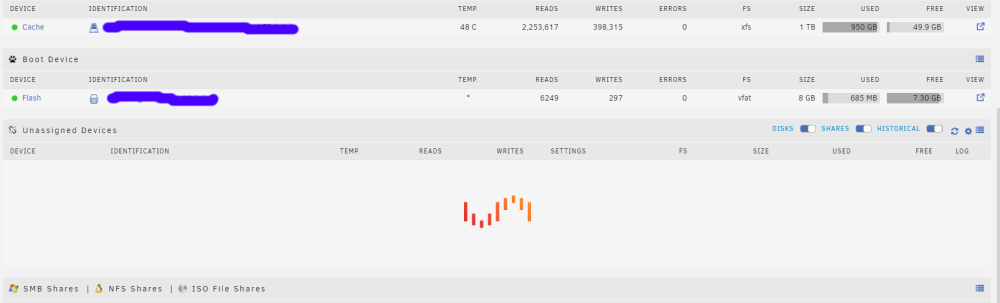
Unfortunately It's happened again. GUI is getting unresponsive. Main tab shows up with the Unassigned Devices showing only the unRAID logo. (Pic is attached.) Can't get into other tabs, like Dashboard or Docker. VM is still OK, but looks like containers aren't running, or at least can't be accessed. Can't get to Plex, qBittorrent or Audiobookshelf from local network, for example. I've uploaded the current syslog. Can't get to the GUI page for getting diagnostics. Parity check is running because of previous unclean shutdown. syslog_2.log
-
Just over the last few days the GUI has hung and on the Main page instead of showing the single Unassigned Device that I have, in the UD section there is an animated unRAID logo. At first, I can still access a few things, including files on the UD, and most (but not all) docker containers and my Win10 VM still seem to be running. But gradually the whole system seems to hang. When I restart, everything seems fine (although I end up with an unclean shutdown - but that's another issue I think), but then after a while - some hours or a day or so - it happens again. I'm on 6.11.5. I've attached diagnostics and a syslog file. Hope someone can help. syslog-192.168.1.14.log tower-diagnostics-20230227-2214.zip
-
Just, I hope, to close this: got everything working by fixing my Swag configuration. My problem was that I hadn't updated the proxy.conf file to the latest updated one. I was still using a version from 2019. Once I updated, I connected with no problem and could hear the audio. TL;DR If you're using Swag for reverse proxy, use the default config file for audiobookshelf and make the very minor change to server_name for your sub-domain. Also make sure your proxy.conf is up-to-date. (Easily checked by looking at the Swag logs.)
-
Thanks for the quick response. Indeed using "https://" and my abcaudiobookshelf.domain.org address (no port) got me in. But while I can see the library, I can't listen - the cloud icon is orange and connection status is "Socket not connected". (Just documenting this for anyone reading the thread. I'll go onto Discord and look around.)
-
I'm struggling to get this to work, and quite possibly I'm misunderstanding what I'm meant to be doing. I'm using Swag, and Audiobookshelf is on the same network, and I have subdomains set up. (Swag currently works fine for Nextcloud and Calibre-web.) My objective is to be able to reach Audiobookshelf when I'm away from my home network. I see that the above config file is pretty much the same as the sample audiobookshelf.subdomain.conf file that comes with Swag, so this looks like it should be quite sound. My question is about # make sure that your dns has a cname set for <container_name> and that your <container_name> container is not using a base url How would I go about doing this? My container name is Audiobookshelf, and I've got a file named audiobookshelf.subdomain.conf with the lines as set out by @jxjelly above. The only difference is that my subdomain is in the form abcaudiobookshelf.domain.org, so I've set the server_name line to server_name abcaudiobookshelf.*; I'm not sure whether the problem actually lies with the way I try to connect to Audiobookshelf from Android. On my home network over wi-fi I just use the internal IP address and port 13378 and it connects fine. But when I try from outside my home network, I've tried using abcaudiobookshelf.domain.org (without a port), as well as abcaudiobookshelf.domain.org:13378, I get a message in the app saying "Failed to ping server". I also can't reach Audiobookshelf from my Win10 browser when I try abcaudiobookshelf.domain.org with and without the port. In my container template, I've set the Network Type to "Custom: someproxynet" where someproxynet is the proxy network used by my other reverse proxy containers. Also, my Web UI Port is set to 13378 for the container port 80. Any help would be appreciated.
-
This is a slightly odd question and probably didn't word it too well, so to give some context: I understand that not having ECC RAM increases the risk of data corruption. My question is around where this data corruption might come from in daily operations. For example, if I'm writing data to the unRAID server from my Windows PC, or transferring family photos to the server, I can see that I'd like as much protection as possible. But let's say I was running some docker containers like calibre, bubbleupnpserver and Plex and some non-serious VMs on an unRAID server without ECC RAM, but keeping the data on a second unRAID server with ECC RAM, what is the risk? Or put another way, is that a significantly bigger risk than running everything on a server with ECC RAM? I assume it's possible that something I do in calibre might mess up a book if there was a RAM error, and that corrupted data would then be copied to the data server. But then again I don't have ECC RAM on my Windows PC, and that's the source of some important data that goes onto the server. (I do have ECC RAM on my current server - as well as an extra unRAID licence 😀)
-
That's an excellent question, and proved to be much harder to answer than I expected. Turns out I didn't know as much about Plex as I should. So after setting up a second Plex server (didn't know I could do that) on a Windows 10 PC with an i7-9700T CPU, and some experimenting, it looks like going for 1080p at 8 Mbps is a reasonable target for 4K HEVC files. Had a bit of a problem with HDR tone mapping - according to Plex it doesn't work with Intel under Windows (but is fine for Linux and dockers) - so couldn't get H/W transcoding going for a while. So next question is, if I want ECC RAM, which Intel CPU and motherboard combos would work?


