





j0nnymoe
Members
-
Joined
-
Last visited
Everything posted by j0nnymoe
-
Great! If I have sickrage or couchpotato notify the headless kodi, will headless also update the library on its own from then on and grab the fanart and information? Or should I leave a client machine to this task? Correct, when headless gets notified, it updates the library and the clients will pull that info next time they check the central db
-
Give us more details of how you've got things setup. Ports & folder mappings for the containers. Kodi-Headless: 8080/tcp <-> 192.168.1.133:8084 /mnt <-> /mnt /config/.kodi <-> /mnt/cache/Apps/Kodi/ In Sonarr, notifications going to: Host: 192.168.133 Post 8084 Username: kodi Password: <blank> Edit: And now its working... Wonder if it took a bit first kodi-headless to initialize? Got me, its working now though, Ill leave my configuration there in case anyone else finds them useful Edit2: And now the requests are failing again... Looking at the logs for kodi-headless it doesnt even seem to be starting. Its having trouble connecting to the db. mysql (linuxserver.io docker): 3306/tcp <-> 192.168.1.133:3306 /config <-> /mnt/cache/Apps/MySQL/ My htpc can connect to it using the same advancedsettings.xml configuration. Edit3: For those of you following along with this cluster, I copied and pasted my advancedsettings.xml fill again (only the DB portion) and kodi-headless booted right up. No idea why or how it was working earlier Not sure why you have /mnt going through to your kodi-headless. In terms of sonarr talking with kodi-headless, the login/pass for this is xbmc / xbmc unless you have changed this within the advancedsettings.xml (Note, this is not the user/pass you setup for the MySQL DB)
-
For each client, you will need to copy over your advancedsettings.XML + sources.XML + passwords.XML if you have passworded sources then setup the rest of each client manually. With notifications, you just notify the the headless install then any database updates will show on the clients accordingly.
-
Please read OP, you do not want kodi-headless to clean your db as it will empty them. Always best to use the client you used to scan for cleaning
-
You change it via the OpenVPN-AS webui
-
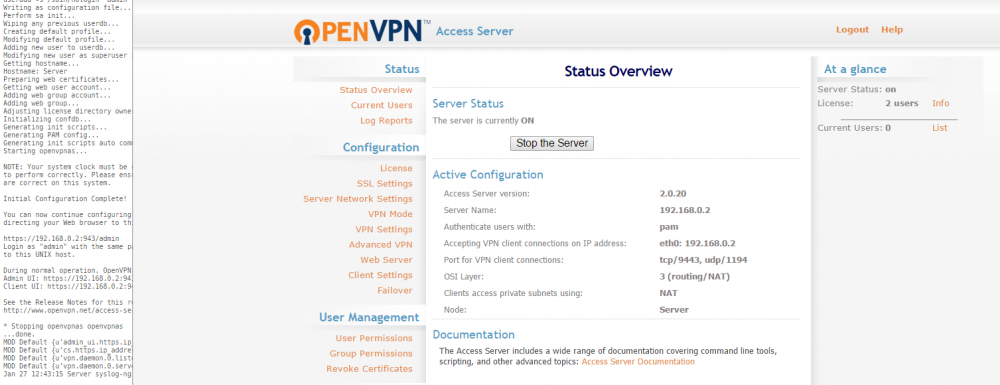
Just set this up here. Webui has booted up fine. Fresh install. openvpn-as.txt

-
I will be setting up our openvpn-as docker soon so I will do a test run on it yo make sure its not an issue with the docker.
-
A very succinct summary of my point in my above post! Sorry danioj, didn't see your post above [emoji14] call mine the TL;DR
-
Please don't get this confused with the normal openvpn. This is OpenVPN-AS which is more of a streamlined package and administrated via the webui. Note that if you want more than 2 concurrent connections, you need to purchase a license.
-
I'm going to assume you have tried connecting from outside your home network and have setup port forwarding on your router/firewall? Once thing you could test is try connecting locally to the openvpn instance just as a proof of concept that the docker is running correctly.
-
have you tested that you have setup the kodi user correctly by trying to use heidisql to login to the mariadb instance?
-
I don't believe this is the place for that conversation but google is your answer
-
This was helpful thanks. When I login I only see the last three items in your screen shot so I think I must have set up Mariadb wrong. Any suggestions from here. Should I just start over and re install Mariadb? No need to be drastic and starting over again, did you test the login you create for kodi? I personally believe you just need to make sure you have created the user correctly and it should work.
-
try connecting to your mariadb with heidiSQL client using the username/password you setup for kodi to use. I believe you just haven't configured mariadb correctly. When you connect to mariaDB with heidiSQL, you will see this: https://hostr.co/WNCAPINadp5n and if you see those databases, kodi is communicating with mariadb correctly. Also, you don't need to copy the whole advancedsettings.xml file from the kodi-headless instance, the only bits you need for each client are: <advancedsettings> <videodatabase> <type>mysql</type> <!-- don't change this value --> <host>192.168.0.2</host> <!-- change this to the IP address of your mysql/mariadb server --> <port>3306</port> <!-- change this to the port of your mysql/mariadb server --> <user>kodi</user> <!-- change this to the user for your database, not root --> <pass>kodi</pass> <!-- change this to the password for your database --> </videodatabase> <musicdatabase> <type>mysql</type> <!-- don't change this value --> <host>192.168.0.2</host> <!-- change this to the IP address of your mysql/mariadb server --> <port>3306</port> <!-- change this to the port of your mysql/mariadb server --> <user>kodi</user> <!-- change this to the user for your database, not root --> <pass>kodi</pass> <!-- change this to the password for your database --> </musicdatabase> <videolibrary> <importwatchedstate>true</importwatchedstate> <importresumepoint>true</importresumepoint> </videolibrary> </advancedsettings>
-
First make sure the kodi clients are connecting to the sql server (assuming the sql server currently has no databases in it) as once a client connects, it will try to find the videos/music dbs and if they don't exist they will get created
-
Hi Scott, could you post some more information for us please? For example, what details are you putting into MySQL Workbench/system logs etc Thanks
-
MusicBrainz won't be moving to the release repo as it doesn't meet the requirements for that (auto updating etc) so you won't have any issues
-
Mine does the same, I gave up and went back to using Bliss. I'm in the same boat as the two of you. After getting into the container and running beets, the program doesn't respond to any keyboard commands so I end up stuck at the first prompt. I thought it might be a putty issue, but I'm having the same problem from a linux terminal. I'm confused, this is working fine for me..
-
Mine does the same, I gave up and went back to using Bliss. Working for me: This album is already in the library! Old: 22 items, MP3, 270kbps, 78:17, 153.5 MiB New: 22 items, MP3, 270kbps, 78:17, 153.5 MiB [s ]kip new, Keep both, Remove old? R root@d3516716fa01:/# ^C root@d3516716fa01:/#
-
You need to get to bash first: docker exec -i -t Beets bash then run beet import /downloads
-
anyone? This is to do with timezone settings.
-
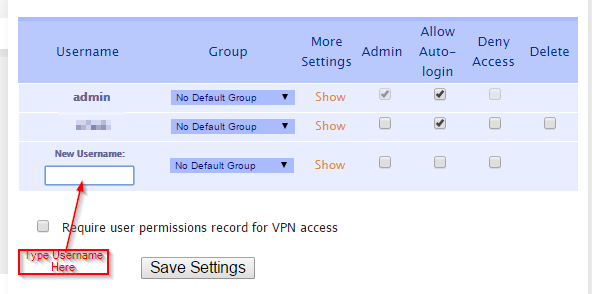
Hi schpongo, The users in OpenVPN-AS / Unraid do not correlate at all, they are separate. See the attached file, that will who you how to add users under the "User Permissions" Section. Once you have saved the user, click "Show" and there you configure the password.
-
Hi hilljd00, Could you post this as a ticket on the github site please? Thanks
-
This should be fixed now, Received a pushbullet notification today for an updated version of couchpotato.
-
Hi airbillion, Just tested my pushbullett on CP and the same issue. I will see if I get time to look at this over the weekend, it could be a CP issue though. Cheers


