






cybrnook
Members
-
Joined
Everything posted by cybrnook
-
It's only ripping one of the two discs that were inserted.
-
Yep Yep, I was too quick to ask. The container adds them as you add them,. I see that now..... of course after you replied ?
-
The docker icon is fine if I leave your default repository. The moment I add :v1.9.0-rc1, it switches to handbrake, FYI. Icon URL in the docker itself seems to be set correctly: //raw.githubusercontent.com/jlesage/docker-templates/master/jlesage/images/makemkv-icon.png removed https so it doesn't just display the icon.
-
When I set variables on a container, what I am seeing now is unRAID doesn't let you then view what you have set. Is there a way I can pull what parameters are currently defined (default and custom) and their values?
-
Got it, will test it out now.
-
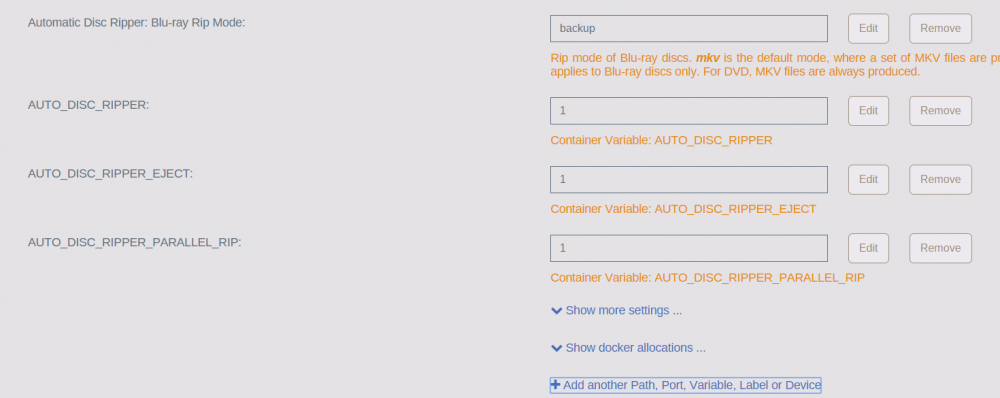
Ahh, seems you just added it ? So I need three variables to do this cleanly: AUTO_DISC_RIPPER to 1 AUTO_DISC_RIPPER_EJECT to 1 AUTO_DISC_RIPPER_PARALLEL_RIP to 1 So when I enable AUTO_DISC_RIPPER to 1, I no longer need to really even access the GUI. I should be able to just put a disc in and it rips. Then when it ejects it, it's done. EDIT: Then I assume depending on the value of AUTO_DISC_RIPPER_BD_MODE, I will either get a bunch of mkv files, or a full DB dump, like I have been doing with my TV show seasons.
-
I guess I didn't read that far into the hand book ? I assume this is on your git?
-
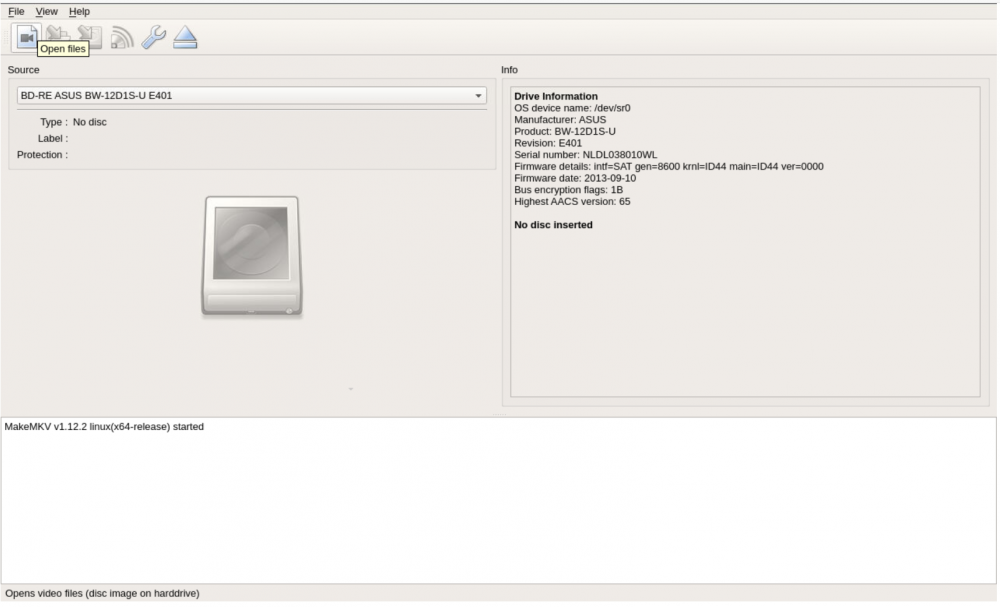
Seems to come down with the handbrake logo: Added the variable: But docker shows only one drive at a time. Not sure what I should be looking for, but I would have expected two drive selects in one window, I guess?



-
Testing now........ EDIT: Whelp, it has eaten through 7 episodes back to back. None of the failing containers ever made it that far. As far as I am concerned, PROBLEM SOLVED!! Great job @Djoss, sent a little something your way. Now, let's get that dual ripping in MakeMKV setup
-
-
So the newly added quick sync functionality will remain? I was rather excited to get around to testing that. ? (Not sure if it was library dependent)
-
If the base Alpine is reverted back to the known stable version, I assume we still get to retain the newly added QS?
-
Will do tonight! It has been very reproducible for me, create a Queue of episodes and let it run ? QQ, so no build with older base, and no build with QS disabled. We will shoot just straight for a debug version instead?
-
It should. The container itself is not volatile like that, it does retain settings through restarts. I think this will all be in the ghb folder in appdata/Handbrake, so you could even back them up yourself for things like upgrades, just in case.
-
Sounds good to me! Just let me know the tag and the release notes for each tag and I will test.
-
It is not always the same point on the same file. For example, If I have 5 episodes in a queue 1-5. Perhaps I make it through episode 1, and then beginning of 2 container crashes. When I restart the container, and restart the queue, there is a good chance I will at least get episode 2 this time, then likely crash on 3 (but not guaranteed). With tag v1.13.5, it is stable. But like you said, either Alpine or QS. (My suspicions are on Alpine) EDIT: The CPU I am using now does not support QS (Haven't had time this weekend to setup that build). So I am not using QS at the moment, I am using raw CPU on a E5 v4 Xeon.
-
@Djoss I dropped back to tag v1.13.5 because this was the last release prior to you upgrading the base Alpine OS. I was able to process 20 episodes staged in a queue last night, no issues. So I think the segfault issue, in my opinion, arose from the base upgrade, since it appears in all releases since. Would it be at all possible for you to compile your latest build for me to test on, but using the older base image that is in use for v1.13.5, prior to the v3.4.0 base image?
-
So far so good on 1.14.1 (knock on wood). @Djoss , what's happening on these two commits? https://github.com/jlesage/docker-handbrake/commit/46dec53d7920081ad0609141af4bbe9b699ed713 https://github.com/jlesage/docker-handbrake/commit/fa660ff0eed5f68a3e2a860d39735c9e77d15841 Outside of upgrading to HB 1.1.1, these are the only two differences, and so far 1.14.1 is working, while 1.14.2 (and dev-latest) fails with segfaults. EDIT: Spoke too soon: ghb[19742]: segfault at 1542a3636fe0 ip 00001542e634e33b sp 00001542a3636fe8 error 6 in ld-musl-x86_64.so.1[1542e62fd000+8d000] Dropping to v1.13.5 which is on an older base.
-
So is dev-latest a tag? EDIT: Testing against dev-latest, let's see
-
Would it be possible to revert to 1.1.0, for a test case? Or perhaps you still have it, and I can just change my docker source? I am seeing this is an Handbrake forums as well: https://forum.handbrake.fr/viewtopic.php?f=13&t=37842 "Hmm. There does seem to be a common pattern...If I try and re-encode a DVD with a single main title, like a movie, 99% of the time it works fine.But if I try and re-encode a DVD with multiple titles, like a TV show, it's almost always guaranteed to fail." This is the case for me as well.
-
Files uploaded to Git @Djoss, password PM'd
-
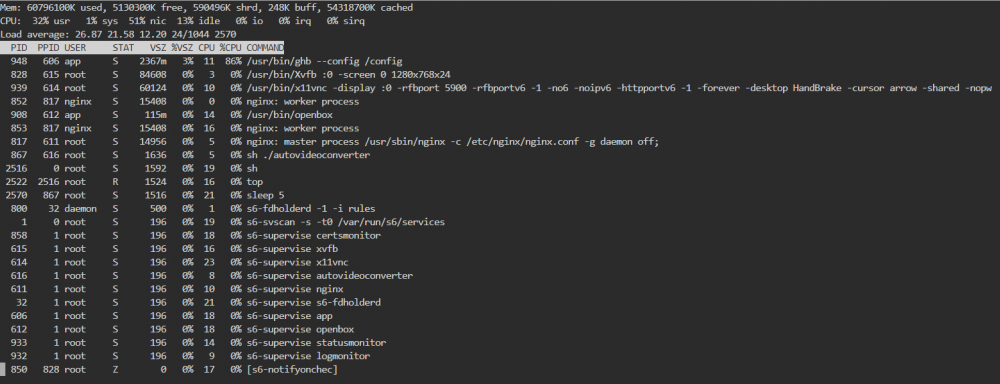
Container resources while encoding (CPU/MEM wise):
-
Are we (I) running out of memory perhaps within the container? EDIT: Seems I am not the only one: https://github.com/jlesage/docker-handbrake/issues/23
-
Segfault of ld-musl-x86_64.so.1 seems to point to the underlying Alpine Linux build of the container itself.
-
And this is UnRaid's log: Jul 14 13:16:15 noah kernel: ghb[4990]: segfault at 14f0889e5fe0 ip 000014f0cb86333b sp 000014f0889e5fe8 error 6 in ld-musl-x86_64.so.1[14f0cb812000+8d000] Jul 14 13:16:22 noah kernel: docker0: port 3(veth66c3bee) entered disabled state Jul 14 13:16:22 noah kernel: veth50cb98e: renamed from eth0 Jul 14 13:16:22 noah avahi-daemon[4591]: Interface veth66c3bee.IPv6 no longer relevant for mDNS. Jul 14 13:16:22 noah avahi-daemon[4591]: Leaving mDNS multicast group on interface veth66c3bee.IPv6 with address fe80::48fa:b1ff:fed2:857b. Jul 14 13:16:22 noah kernel: docker0: port 3(veth66c3bee) entered disabled state Jul 14 13:16:22 noah kernel: device veth66c3bee left promiscuous mode Jul 14 13:16:22 noah kernel: docker0: port 3(veth66c3bee) entered disabled state Jul 14 13:16:22 noah avahi-daemon[4591]: Withdrawing address record for fe80::48fa:b1ff:fed2:857b on veth66c3bee.




