






cybrnook
Members
-
Joined
Everything posted by cybrnook
-
That's how it's appearing. And seems that instead of copying, we could fix it by adding more PATH directories as well, though untested.
-
I think it's an Alpine Linux and Java related issue.
-
Nothing special, I am not as picky. I just use the default Fast 1080p 30fps as that's good enough for me.
-
Strange, I still see the same failure if I use MakeMKV to convert to mkv format. HOWEVER, that's not what I did last night. I use MakeMKV to "Backup" my disc's (whole disc, removing encryption), and then I use HandBrake to convert for me since it generates an equal quality video at a fraction of the size. Try "Backup", and see if that works now. If it does, use Handbrake to then encode it to mp4. (Chapter 354 I believe)
-
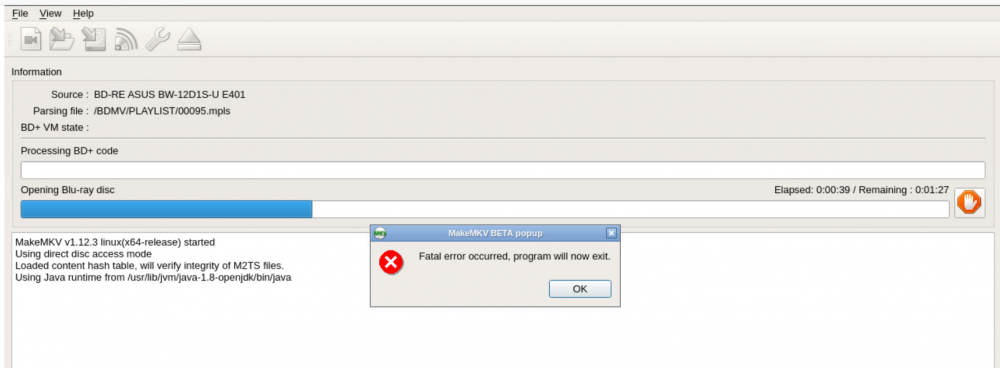
Looking at the playlist file you are parsing 00095.mpls, is it Sicario? I ran it last night, and it went fine after the change. Your errors almost look like a firewall type issue between your unraid server and elsewhere.
-
You have to be doing something wrong, your command shouldn't be interpreted as "sh" (I suspect your are trying to copy/paste the command?)..... /tmp # which cp /bin/cp /tmp # cp -p /usr/lib/jvm/java-1.8-openjdk/jre/lib/amd64/jli/libjli.so /lib /tmp # ls -l /lib/libjli.so -rwxr-xr-x 1 root root 55320 Jun 13 14:46 /lib/libjli.so /tmp # ldd /usr/bin/java /lib/ld-musl-x86_64.so.1 (0x149e9e174000) libjli.so => /lib/libjli.so (0x149e9dd64000) libc.musl-x86_64.so.1 => /lib/ld-musl-x86_64.so.1 (0x149e9e174000) libz.so.1 => /lib/libz.so.1 (0x149e9db4d000) /tmp # And YES, the change does retain after a container restart 🙂
-
Sorry, type this command manually: cp -p /usr/lib/jvm/java-1.8-openjdk/jre/lib/amd64/jli/libjli.so /lib Respect there is a space between libjli.so and /lib
-
Either option is going to be within the container os itself. I would recommend this for now: CONFIRMED: This fixed it, and ripping works again - no segfault: /usr/bin # cp -p /usr/lib/jvm/java-1.8-openjdk/jre/lib/amd64/jli/libjli.so /lib I am not sure if it will be persistent through container reboots yet, haven't tried. You can click on your container icon and there is a terminal option to get you there. I wanted to submit a pr, but I think this will need to be handled in the base Alpine os that's being used for the container. So Djoss will need to get it.
-
Also seeing the java segfault: Other users seem to relate this to the JAVA version: https://www.makemkv.com/forum/viewtopic.php?f=3&t=17268 I know unrelated, but there is a broken symlink in /usr/bin as well: appletviewer -> ../lib/jvm/default-jvm/bin/appletviewer Maybe this helps, perhaps a compile error? (https://github.com/docker-library/openjdk/issues/77): /usr/bin # ldd java /lib/ld-musl-x86_64.so.1 (0x1483185c6000) Error loading shared library libjli.so: No such file or directory (needed by java) libc.musl-x86_64.so.1 => /lib/ld-musl-x86_64.so.1 (0x1483185c6000) Error relocating java: JLI_Launch: symbol not found /usr/bin # whoami root CONFIRMED: This fixed the backup issue, and ripping works again - no segfault: /usr/bin # cp -p /usr/lib/jvm/java-1.8-openjdk/jre/lib/amd64/jli/libjli.so /lib /usr/bin # ldd java /lib/ld-musl-x86_64.so.1 (0x1479396b8000) libjli.so => /lib/libjli.so (0x1479392a8000) libc.musl-x86_64.so.1 => /lib/ld-musl-x86_64.so.1 (0x1479396b8000) libz.so.1 => /lib/libz.so.1 (0x147939091000) However, the more permanent fix I think is to add the proper path variables as suggested by "echa" in the link above.
-
Haven't tested yet, hope to do so this weekend. Didn't realize you were interfacing with the program itself through the setup scripts. I thought you were just appending into the standard app with additional functionality. Meaning autoripper would work, but GUI driven wouldn't. Great news then! Thanks, and look forward to testing my friend. (Sorry for assuming)
-
@DJoss Thanks for all your help, and patience with everyone in the forums. It is appreciated. I just wanted to circle back on that UMASK for backup mode issue. I saw the commit update you did against the autoripper, nice job. I did want to point out that the container has the same issue when using Backup Disc from within the GUI itself, wasn't just using autoripper. Not sure if there is/was anything you can do about that.
-
You don't HAVE to buy a key. But in that case, if you do stick with the BETA key, you will have gaps in time where the current key expires, and Mike hasn't posted a new one yet. Normally about a week or two in between. If you get tired of that, buy a key, then follow DJoss's instructions on changing from BETA key to UNSET and then add your key in the GUI.
-
https://www.makemkv.com/forum/viewtopic.php?t=1053 I bought Key a while ago, good to support the development
-
Thank you very much.
-
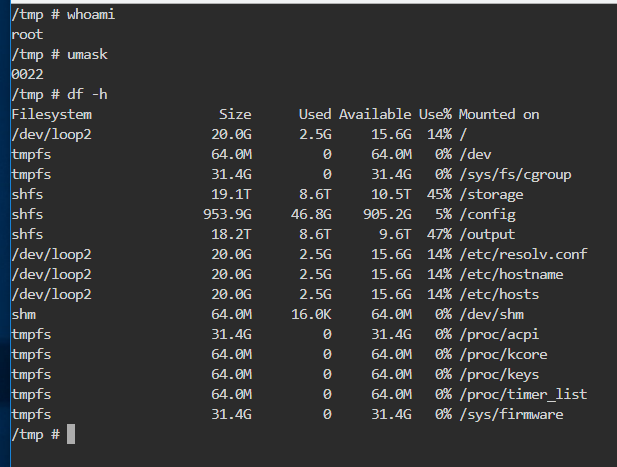
@Djoss quick question. What umask can I use to get files created as 777? I see you have default of 000. What I notice is that when I create rips using makemkv, I cannot delete them from my windows PC over the network, permission denied. It is because the directories (when using backup mode) are being created as 755. When I manually change them to 777 from the OS layer, I can then delete them over windows PC. EDIT: Is this correct, or are the template umask settings of 000 being ignored?
-
Perms are right, container can read it?
-
Confirmed working great in 6.6-rc1 |||||||||| 🙂
-
Confirmed, working great
-
Thanks for the update
-
Thanks @Djoss
-
------------------- UPDATE AVAILABLE: FileBot 4.8.2 (r5789) --------------------
-
Nope, always different discs with different label names. Good thinking though......
-
Sure, next time I get some rips I will try and recreate it again. All in all, I checked it out before, and there was nothing remarkable in the log. Looked as it should, just wasn't kicking off when a disc was inserted.
-
@Djoss you ever use the dual ripping auto ripper? I only ask, because I have used it before and it worked well. But what I have noticed some restarts later, container restarts later etc..... is that it seems temperamental at times to actually get it to work. Sometimes it will rip for one of the two drives, or from the 2nd drive but not the first, or none at all. Ripping through the GUI always works, so I know drives are known good, and the container itself works. Just the finickiness of getting the scripts to detect both drives and rip from both drives. I have since gone back to two containers, one per drive, and it "just works".
-
Is 6.6 anywhere close to going to the RC phase?


