






cybrnook
Members
-
Joined
Everything posted by cybrnook
-
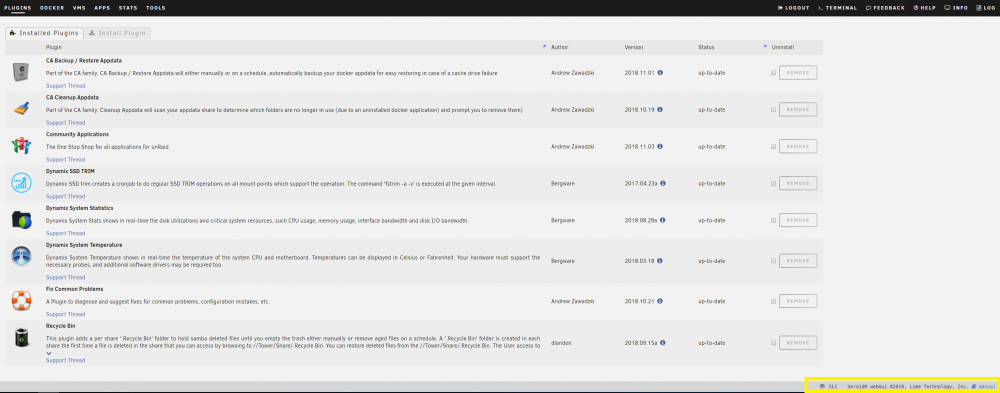
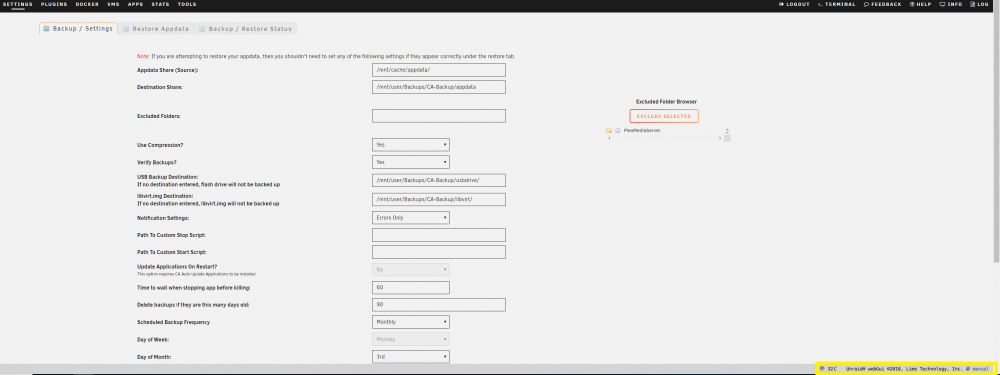
Noticed that this plugin's text/font is set differently than anywhere else in the unraid webui: Regular Menu: Backup Menu (Settings):
-
Thanks buddy, looking forward to testing it out.
-
Can the application run without JAVA altogether? I think I read in the MakeMKV forums, users were comparing their installs to running MakeMKV on windows, which would not have JAVA installed by default. Is it possible that you can build your Alpine base without JAVA, and we just rely on MakeMKV's ability to decode without, assuming it can't properly use JAVA to begin with (Does MakeMKV have a hard dependency on JAVA?)? I feel like this could be a solution, as I read another users "solution" was to just rename jvm to jvm.save and that solved their issue. So that would lead me to believe that IF MakeMKV find's JAVA it will attempt to use it, else if it does NOT find JAVA, it falls back onto stored procedures it can carry out itself. Seem at all plausible? https://www.makemkv.com/forum/viewtopic.php?f=3&t=17268 "I just ran into this problem again with the UHD version of Wonder. I was able to get around it (on linux) by: sudo mv /usr/lib/jvm /usr/lib/jvm.save That way MakeMKV couldn't find the Java runtime and I was able to rip the disc (at least it's in progress). Once it's done I can just rename the directory again to re-enable Java. I'm running the latest Oracle version btw." Are the JAVA exceptions local to Alpine Linux that we are using? In reading up on that, there seems to be a few github issues opened here and there talking about the issues in trying to run Oracle JAVA on Alpine (MUSL, GNU, glibc, etc..). Would yet another alternative be to switch the base OS to something a bit more friendly? I assume that would put a heavier load on you as you use the same base for all your containers I believe.
-
User Scripts is the cause for me, %100. But in the meantime, I am just doing my scripting need though the go file. @Squid Thanks for the explanation on your setup. Sounds like you have been hard pressed to see the issue at all then, and will take you some time to get a test bed. Wouldn't a trial license on something other than your prod system work as well to reproduce the issue?
-
Thanks buddy. Not sure why I am holding on to this so much 🙂 Just want to make sure we get it right.
-
@Djoss I am noticing a few things strange with the new Java deployment. 1. When logging into the container, $PATH does not contain any direct path to "java", so "which java" fails. I would assume this also means that the user that is running MakeMKV also cannot find Java. So I wonder if the upgrade to Java 11 has instead not fixed the issue, but instead prevented MakeMKV from even finding Java, and thus skipping it's use? /tmp # whoami root /tmp # which java /tmp # echo $PATH /usr/local/sbin:/usr/local/bin:/usr/sbin:/usr/bin:/sbin:/bin 2. There is still a broken dependency which seems to be related to Alpine (Dated but similar: https://github.com/gliderlabs/docker-alpine/issues/11 and also https://github.com/docker-library/openjdk/issues/100 ) - Is this MUSL vs GNU issue? /tmp # ldd /usr/lib/jvm/jdk-11.0.1/bin/java /lib64/ld-linux-x86-64.so.2 (0x154d50718000) libz.so.1 => /lib/libz.so.1 (0x154d50501000) libpthread.so.0 => /lib64/ld-linux-x86-64.so.2 (0x154d50718000) libjli.so => /usr/lib/jvm/jdk-11.0.1/bin/../lib/jli/libjli.so (0x154d502f0000) libdl.so.2 => /lib64/ld-linux-x86-64.so.2 (0x154d50718000) libc.so.6 => /lib64/ld-linux-x86-64.so.2 (0x154d50718000) Error relocating /usr/lib/jvm/jdk-11.0.1/bin/../lib/jli/libjli.so: __rawmemchr: symbol not found 3. Also not sure Java is perhaps even properly working, can't even check version /usr/lib/jvm/jdk-11.0.1/bin # ls -l java -rwxr-xr-x 1 668 668 8672 Oct 6 08:17 java /usr/lib/jvm/jdk-11.0.1/bin # ./java -version sh: ./java: not found /usr/lib/jvm/jdk-11.0.1/bin # java -version sh: java: not found /usr/lib/jvm/jdk-11.0.1/bin # cd /tmp /tmp # export PATH=$PATH:/usr/lib/jvm/jdk-11.0.1/bin /tmp # echo $PATH /usr/local/sbin:/usr/local/bin:/usr/sbin:/usr/bin:/sbin:/bin:/usr/lib/jvm/jdk-11.0.1/bin /tmp # which java /usr/lib/jvm/jdk-11.0.1/bin/java /tmp # java -version sh: java: not found /tmp #
-
Sent! And thanks again, you are awesome to work with.
-
Thanks for getting to the bottom of it. How much was the disc, I will chip in to help $. Also, check the previous notes on the broken symlink and validate ldd if you don't mind.
-
That's what I am trying to figure out. You and I know we have a way to reproduce this issue, however, what do we need to provide to @Djoss that will be helpful to find the cause. Which logs, which dumps etc..... There is a few threads and responses online that point to the JAVA version that's installed, but of course, in our case we haven't proven that yet since we are in a docker container. Only Djoss would be able to test that on the Alpine build. Unless you or I try and install manually a newer v10 of Java inside our container directly, but I think that is a messy way.I will go to the movie store and get Sicario this weekend, as posted before. I know this triggers the crash, and was also the same movie that caused @luisv 's crash as well. @Djoss if you have a movie rental store near you, you likely could reproduce the same, might be easier to collect logs. If not, let me know what i need to gather at the time it's happening, specifically.Thanks, hopefully that helps get @Djoss a head start.Can you share the protection they use?Oh no.... I don't have that disc anymore. If you want, I can get it again this weekend if you're available.You're not alone 🙂@Djoss still no luck on the java issue? Hope all is well on your end.Reinstalled your latest user scripts today, and the issue still comes back. This is the only plugin causing it for me on reboot (user scripts).I saw this as well, and it was the user scripts plugin in my case.Another user, stating upgrade to Java 10 fixed their issue. https://www.makemkv.com/forum/viewtopic.php?f=3&t=18134In WebUI, I selected my VM and "Restart". VM restarted no issues, however, WebUI and virsh believes they are both "shutdown". This is an issue as if I was to shutdown now, there would be no graceful shutdown of my VM's.Maybe a red herring but I know libvirt was just upgraded, this displays in my libvirt log: 2018-10-14 14:16:54.067+0000: 6886: info : libvirt version: 4.8.0 2018-10-14 14:16:54.067+0000: 6886: info : hostname: noah 2018-10-14 14:16:54.067+0000: 6886: error : virGetUserID:1042 : invalid argument: Failed to parse user 'tss' 2018-10-14 14:16:54.068+0000: 6886: error : virGetGroupID:1125 : invalid argument: Failed to parse group 'tss'Sure, but there is still a problem. This is a good disc to use to expose it.Sicario: Day of the soldado If you have a movie store near you that rents.Any luck?I notice the same behavior 🙂 seems almost like "burps" of high CPU, then it goes back to %50 until it burps again.


