






cybrnook
Members
-
Joined
Everything posted by cybrnook
-
Had 13~ or so chapters in a queue for conversion, and during processing seems the container crashed/shutdown: [s6-init] making user provided files available at /var/run/s6/etc...exited 0. [s6-init] ensuring user provided files have correct perms...exited 0. [fix-attrs.d] applying ownership & permissions fixes... [fix-attrs.d] done. [cont-init.d] executing container initialization scripts... [cont-init.d] 00-app-niceness.sh: executing... [cont-init.d] 00-app-niceness.sh: exited 0. [cont-init.d] 00-app-script.sh: executing... [cont-init.d] 00-app-script.sh: exited 0. [cont-init.d] 00-app-user-map.sh: executing... [cont-init.d] 00-app-user-map.sh: exited 0. [cont-init.d] 00-clean-logmonitor-states.sh: executing... [cont-init.d] 00-clean-logmonitor-states.sh: exited 0. [cont-init.d] 00-clean-tmp-dir.sh: executing... [cont-init.d] 00-clean-tmp-dir.sh: exited 0. [cont-init.d] 00-set-app-deps.sh: executing... [cont-init.d] 00-set-app-deps.sh: exited 0. [cont-init.d] 00-set-home.sh: executing... [cont-init.d] 00-set-home.sh: exited 0. [cont-init.d] 00-take-config-ownership.sh: executing... [cont-init.d] 00-take-config-ownership.sh: exited 0. [cont-init.d] 00-xdg-runtime-dir.sh: executing... [cont-init.d] 00-xdg-runtime-dir.sh: exited 0. [cont-init.d] 10-certs.sh: executing... [cont-init.d] 10-certs.sh: exited 0. [cont-init.d] 10-cjk-font.sh: executing... [cont-init.d] 10-cjk-font.sh: exited 0. [cont-init.d] 10-nginx.sh: executing... [cont-init.d] 10-nginx.sh: exited 0. [cont-init.d] 10-vnc-password.sh: executing... [cont-init.d] 10-vnc-password.sh: exited 0. [cont-init.d] 10-web-index.sh: executing... [cont-init.d] 10-web-index.sh: exited 0. [cont-init.d] 95-check-optical-drive.sh: executing... [cont-init.d] 95-check-optical-drive.sh: looking for usable optical drives... [cont-init.d] 95-check-optical-drive.sh: found optical drive /dev/sr0, but it is not usable because is not exposed to the container. [cont-init.d] 95-check-optical-drive.sh: found optical drive /dev/sr1, but it is not usable because is not exposed to the container. [cont-init.d] 95-check-optical-drive.sh: no usable optical drive found. [cont-init.d] 95-check-optical-drive.sh: exited 0. [cont-init.d] 95-check-qsv.sh: executing... [cont-init.d] 95-check-qsv.sh: Processor: Intel(R) Xeon(R) CPU E5-2650 v4@ 2.20GHz [cont-init.d] 95-check-qsv.sh: Intel Quick Sync Video not supported: device directory /dev/dri not exposed to the container. [cont-init.d] 95-check-qsv.sh: exited 0. [cont-init.d] handbrake.sh: executing... Generating machine-id... [cont-init.d] handbrake.sh: exited 0. [cont-init.d] done. [services.d] starting services [services.d] starting s6-fdholderd... [services.d] starting certsmonitor... [services.d] starting nginx... [services.d] starting xvfb... [nginx] starting... [certsmonitor] disabling service: secure connection not enabled. [xvfb] starting... [services.d] starting autovideoconverter... [services.d] starting logmonitor... [logmonitor] no file to monitor: disabling service... [services.d] starting statusmonitor... [services.d] starting openbox... [statusmonitor] no file to monitor: disabling service... [autovideoconverter] starting... [openbox] starting... [autovideoconverter] Processing watch folder '/watch'... [autovideoconverter] Watch folder '/watch' processing terminated. [services.d] starting x11vnc... [services.d] starting app... [x11vnc] starting... [app] starting HandBrake... [services.d] done. 14/07/2018 09:45:07 passing arg to libvncserver: -rfbport 14/07/2018 09:45:07 passing arg to libvncserver: 5900 14/07/2018 09:45:07 passing arg to libvncserver: -rfbportv6 14/07/2018 09:45:07 passing arg to libvncserver: -1 14/07/2018 09:45:07 passing arg to libvncserver: -httpportv6 14/07/2018 09:45:07 passing arg to libvncserver: -1 14/07/2018 09:45:07 passing arg to libvncserver: -desktop 14/07/2018 09:45:07 passing arg to libvncserver: HandBrake 14/07/2018 09:45:07 x11vnc version: 0.9.14 lastmod: 2015-11-14 pid: 932 14/07/2018 09:45:07 Using X display :0 14/07/2018 09:45:07 rootwin: 0x43 reswin: 0x400001 dpy: 0xc553ea00 14/07/2018 09:45:07 14/07/2018 09:45:07 ------------------ USEFUL INFORMATION ------------------ 14/07/2018 09:45:07 X DAMAGE available on display, using it for polling hints. 14/07/2018 09:45:07 To disable this behavior use: '-noxdamage' 14/07/2018 09:45:07 14/07/2018 09:45:07 Most compositing window managers like 'compiz' or 'beryl' 14/07/2018 09:45:07 cause X DAMAGE to fail, and so you may not see any screen 14/07/2018 09:45:07 updates via VNC. Either disable 'compiz' (recommended) or 14/07/2018 09:45:07 supply the x11vnc '-noxdamage' command line option. 14/07/2018 09:45:07 X COMPOSITE available on display, using it for window polling. 14/07/2018 09:45:07 To disable this behavior use: '-noxcomposite' 14/07/2018 09:45:07 14/07/2018 09:45:07 Wireframing: -wireframe mode is in effect for window moves. 14/07/2018 09:45:07 If this yields undesired behavior (poor response, painting 14/07/2018 09:45:07 errors, etc) it may be disabled: 14/07/2018 09:45:07 - use '-nowf' to disable wireframing completely. 14/07/2018 09:45:07 - use '-nowcr' to disable the Copy Rectangle after the 14/07/2018 09:45:07 moved window is released in the new position. 14/07/2018 09:45:07 Also see the -help entry for tuning parameters. 14/07/2018 09:45:07 You can press 3 Alt_L's (Left "Alt" key) in a row to 14/07/2018 09:45:07 repaint the screen, also see the -fixscreen option for 14/07/2018 09:45:07 periodic repaints. 14/07/2018 09:45:07 GrabServer control via XTEST. 14/07/2018 09:45:07 14/07/2018 09:45:07 Scroll Detection: -scrollcopyrect mode is in effect to 14/07/2018 09:45:07 use RECORD extension to try to detect scrolling windows 14/07/2018 09:45:07 (induced by either user keystroke or mouse input). 14/07/2018 09:45:07 If this yields undesired behavior (poor response, painting 14/07/2018 09:45:07 errors, etc) it may be disabled via: '-noscr' 14/07/2018 09:45:07 Also see the -help entry for tuning parameters. 14/07/2018 09:45:07 You can press 3 Alt_L's (Left "Alt" key) in a row to 14/07/2018 09:45:07 repaint the screen, also see the -fixscreen option for 14/07/2018 09:45:07 periodic repaints. 14/07/2018 09:45:07 14/07/2018 09:45:07 XKEYBOARD: number of keysyms per keycode 7 is greater 14/07/2018 09:45:07 than 4 and 51 keysyms are mapped above 4. 14/07/2018 09:45:07 Automatically switching to -xkb mode. 14/07/2018 09:45:07 If this makes the key mapping worse you can 14/07/2018 09:45:07 disable it with the "-noxkb" option. 14/07/2018 09:45:07 Also, remember "-remap DEAD" for accenting characters. 14/07/2018 09:45:07 14/07/2018 09:45:07 X FBPM extension not supported. 14/07/2018 09:45:07 X display is not capable of DPMS. 14/07/2018 09:45:07 -------------------------------------------------------- 14/07/2018 09:45:07 14/07/2018 09:45:07 Default visual ID: 0x21 14/07/2018 09:45:07 Read initial data from X display into framebuffer. 14/07/2018 09:45:07 initialize_screen: fb_depth/fb_bpp/fb_Bpl 24/32/5120 14/07/2018 09:45:07 14/07/2018 09:45:07 X display :0 is 32bpp depth=24 true color 14/07/2018 09:45:07 14/07/2018 09:45:07 Listening for VNC connections on TCP port 5900 14/07/2018 09:45:07 14/07/2018 09:45:07 Xinerama is present and active (e.g. multi-head). 14/07/2018 09:45:07 Xinerama: number of sub-screens: 1 14/07/2018 09:45:07 Xinerama: no blackouts needed (only one sub-screen) 14/07/2018 09:45:07 14/07/2018 09:45:07 fb read rate: 917 MB/sec 14/07/2018 09:45:07 fast read: reset -wait ms to: 10 14/07/2018 09:45:07 fast read: reset -defer ms to: 10 14/07/2018 09:45:07 The X server says there are 10 mouse buttons. 14/07/2018 09:45:07 screen setup finished. 14/07/2018 09:45:07 The VNC desktop is: cadbbe3b5f10:0 0 ****************************************************************************** Have you tried the x11vnc '-ncache' VNC client-side pixel caching feature yet? The scheme stores pixel data offscreen on the VNC viewer side for faster retrieval. It should work with any VNC viewer. Try it by running: x11vnc -ncache 10 ... One can also add -ncache_cr for smooth 'copyrect' window motion. More info: http://www.karlrunge.com/x11vnc/faq.html#faq-client-caching (ghb:942): GLib-GIO-CRITICAL **: 09:45:07.328: g_dbus_proxy_new_sync: assertion 'G_IS_DBUS_CONNECTION (connection)' failed GLib-GIO-Message: 09:45:07.553: Using the 'memory' GSettings backend. Your settings will not be saved or shared with other applications. 14/07/2018 09:45:08 Got connection from client 127.0.0.1 14/07/2018 09:45:08 other clients: 14/07/2018 09:45:08 Got 'ws' WebSockets handshake 14/07/2018 09:45:08 Got protocol: binary 14/07/2018 09:45:08 - webSocketsHandshake: using binary/raw encoding 14/07/2018 09:45:08 - WebSockets client version hybi-13 14/07/2018 09:45:08 Disabled X server key autorepeat. 14/07/2018 09:45:08 to force back on run: 'xset r on' (3 times) 14/07/2018 09:45:08 incr accepted_client=1 for 127.0.0.1:54422 sock=10 14/07/2018 09:45:08 Client Protocol Version 3.8 14/07/2018 09:45:08 Protocol version sent 3.8, using 3.8 14/07/2018 09:45:08 rfbProcessClientSecurityType: executing handler for type 1 14/07/2018 09:45:08 rfbProcessClientSecurityType: returning securityResult for client rfb version >= 3.8 14/07/2018 09:45:08 copy_tiles: allocating first_line at size 41 14/07/2018 09:45:08 Pixel format for client 127.0.0.1: 14/07/2018 09:45:08 32 bpp, depth 24, little endian 14/07/2018 09:45:08 true colour: max r 255 g 255 b 255, shift r 16 g 8 b 0 14/07/2018 09:45:08 no translation needed 14/07/2018 09:45:08 Enabling NewFBSize protocol extension for client 127.0.0.1 14/07/2018 09:45:08 Enabling full-color cursor updates for client 127.0.0.1 14/07/2018 09:45:08 Using image quality level 6 for client 127.0.0.1 14/07/2018 09:45:08 Using JPEG subsampling 0, Q79 for client 127.0.0.1 14/07/2018 09:45:08 Using compression level 9 for client 127.0.0.1 14/07/2018 09:45:08 Enabling LastRect protocol extension for client 127.0.0.1 14/07/2018 09:45:08 rfbProcessClientNormalMessage: ignoring unsupported encoding type Enc(0xFFFFFECC) 14/07/2018 09:45:08 Using tight encoding for client 127.0.0.1 14/07/2018 09:45:09 client_set_net: 127.0.0.1 0.0001 14/07/2018 09:45:09 created xdamage object: 0x40002c 14/07/2018 09:45:09 client 1 network rate 1383.8 KB/sec (94912.8 eff KB/sec) 14/07/2018 09:45:09 client 1 latency: 0.6 ms 14/07/2018 09:45:09 dt1: 0.0130, dt2: 0.0288 dt3: 0.0006 bytes: 57344 14/07/2018 09:45:09 link_rate: LR_LAN - 1 ms, 1383 KB/s 14/07/2018 09:45:17 created selwin: 0x40002d 14/07/2018 09:45:17 called initialize_xfixes() 14/07/2018 09:45:17 got closure, reason 1001 14/07/2018 09:45:17 rfbProcessClientNormalMessage: read: Connection reset by peer 14/07/2018 09:45:17 client_count: 0 14/07/2018 09:45:17 Restored X server key autorepeat to: 1 14/07/2018 09:45:17 Client 127.0.0.1 gone 14/07/2018 09:45:17 Statistics events Transmit/ RawEquiv ( saved) 14/07/2018 09:45:17 FramebufferUpdate : 66 | 0/ 0 ( 0.0%) 14/07/2018 09:45:17 copyRect : 1 | 16/ 757416 (100.0%) 14/07/2018 09:45:17 LastRect : 38 | 456/ 456 ( 0.0%) 14/07/2018 09:45:17 tight : 246 | 172732/ 10420808 ( 98.3%) 14/07/2018 09:45:17 RichCursor : 1 | 1374/ 1374 ( 0.0%) 14/07/2018 09:45:17 TOTALS : 352 | 174578/ 11180054 ( 98.4%) 14/07/2018 09:45:17 Statistics events Received/ RawEquiv ( saved) 14/07/2018 09:45:17 PointerEvent : 663 | 3978/ 3978 ( 0.0%) 14/07/2018 09:45:17 FramebufferUpdate : 68 | 680/ 680 ( 0.0%) 14/07/2018 09:45:17 SetEncodings : 1 | 56/ 56 ( 0.0%) 14/07/2018 09:45:17 SetPixelFormat : 1 | 20/ 20 ( 0.0%) 14/07/2018 09:45:17 TOTALS : 733 | 4734/ 4734 ( 0.0%) 14/07/2018 09:45:17 destroyed xdamage object: 0x40002c 14/07/2018 11:39:52 Got connection from client 127.0.0.1 14/07/2018 11:39:52 other clients: 14/07/2018 11:39:52 Got 'ws' WebSockets handshake 14/07/2018 11:39:52 Got protocol: binary 14/07/2018 11:39:52 - webSocketsHandshake: using binary/raw encoding 14/07/2018 11:39:52 - WebSockets client version hybi-13 14/07/2018 11:39:52 Disabled X server key autorepeat. 14/07/2018 11:39:52 to force back on run: 'xset r on' (3 times) 14/07/2018 11:39:52 incr accepted_client=2 for 127.0.0.1:54426 sock=10 14/07/2018 11:39:52 Client Protocol Version 3.8 14/07/2018 11:39:52 Protocol version sent 3.8, using 3.8 14/07/2018 11:39:52 rfbProcessClientSecurityType: executing handler for type 1 14/07/2018 11:39:52 rfbProcessClientSecurityType: returning securityResult for client rfb version >= 3.8 14/07/2018 11:39:52 Pixel format for client 127.0.0.1: 14/07/2018 11:39:52 32 bpp, depth 24, little endian 14/07/2018 11:39:52 true colour: max r 255 g 255 b 255, shift r 16 g 8 b 0 14/07/2018 11:39:52 no translation needed 14/07/2018 11:39:52 Enabling NewFBSize protocol extension for client 127.0.0.1 14/07/2018 11:39:52 Enabling full-color cursor updates for client 127.0.0.1 14/07/2018 11:39:52 Using image quality level 6 for client 127.0.0.1 14/07/2018 11:39:52 Using JPEG subsampling 0, Q79 for client 127.0.0.1 14/07/2018 11:39:52 Using compression level 9 for client 127.0.0.1 14/07/2018 11:39:52 Enabling LastRect protocol extension for client 127.0.0.1 14/07/2018 11:39:52 rfbProcessClientNormalMessage: ignoring unsupported encoding type Enc(0xFFFFFECC) 14/07/2018 11:39:52 Using tight encoding for client 127.0.0.1 14/07/2018 11:39:52 client_set_net: 127.0.0.1 0.0001 14/07/2018 11:39:52 created xdamage object: 0x40002e 14/07/2018 11:40:12 client 2 network rate 3018.8 KB/sec (346251.9 eff KB/sec) 14/07/2018 11:40:12 client 2 latency: 0.6 ms 14/07/2018 11:40:12 dt1: 0.0101, dt2: 0.0016 dt3: 0.0006 bytes: 34286 14/07/2018 11:40:12 link_rate: LR_LAN - 1 ms, 3018 KB/s 14/07/2018 11:40:58 got closure, reason 1001 14/07/2018 11:40:58 rfbProcessClientNormalMessage: read: Connection reset by peer 14/07/2018 11:40:58 client_count: 0 14/07/2018 11:40:58 Restored X server key autorepeat to: 1 14/07/2018 11:40:58 Client 127.0.0.1 gone 14/07/2018 11:40:58 Statistics events Transmit/ RawEquiv ( saved) 14/07/2018 11:40:58 ServerCutText : 1 | 8/ 8 ( 0.0%) 14/07/2018 11:40:58 FramebufferUpdate : 92 | 0/ 0 ( 0.0%) 14/07/2018 11:40:58 copyRect : 2 | 32/ 3998712 (100.0%) 14/07/2018 11:40:58 LastRect : 61 | 732/ 732 ( 0.0%) 14/07/2018 11:40:58 tight : 525 | 361176/ 25868204 ( 98.6%) 14/07/2018 11:40:58 RichCursor : 1 | 1374/ 1374 ( 0.0%) 14/07/2018 11:40:58 TOTALS : 682 | 363322/ 29869030 ( 98.8%) 14/07/2018 11:40:58 Statistics events Received/ RawEquiv ( saved) 14/07/2018 11:40:58 KeyEvent : 4 | 32/ 32 ( 0.0%) 14/07/2018 11:40:58 PointerEvent : 2061 | 12366/ 12366 ( 0.0%) 14/07/2018 11:40:58 FramebufferUpdate : 95 | 950/ 950 ( 0.0%) 14/07/2018 11:40:58 SetEncodings : 1 | 56/ 56 ( 0.0%) 14/07/2018 11:40:58 SetPixelFormat : 1 | 20/ 20 ( 0.0%) 14/07/2018 11:40:58 TOTALS : 2162 | 13424/ 13424 ( 0.0%) 14/07/2018 11:40:58 destroyed xdamage object: 0x40002e 14/07/2018 11:40:58 Got connection from client 127.0.0.1 14/07/2018 11:40:58 other clients: 14/07/2018 11:40:58 Got 'ws' WebSockets handshake 14/07/2018 11:40:58 Got protocol: binary 14/07/2018 11:40:58 - webSocketsHandshake: using binary/raw encoding 14/07/2018 11:40:58 - WebSockets client version hybi-13 14/07/2018 11:40:58 Disabled X server key autorepeat. 14/07/2018 11:40:58 to force back on run: 'xset r on' (3 times) 14/07/2018 11:40:58 incr accepted_client=3 for 127.0.0.1:54428 sock=10 14/07/2018 11:40:58 Client Protocol Version 3.8 14/07/2018 11:40:58 Protocol version sent 3.8, using 3.8 14/07/2018 11:40:58 rfbProcessClientSecurityType: executing handler for type 1 14/07/2018 11:40:58 rfbProcessClientSecurityType: returning securityResult for client rfb version >= 3.8 14/07/2018 11:40:58 Pixel format for client 127.0.0.1: 14/07/2018 11:40:58 32 bpp, depth 24, little endian 14/07/2018 11:40:58 true colour: max r 255 g 255 b 255, shift r 16 g 8 b 0 14/07/2018 11:40:58 no translation needed 14/07/2018 11:40:58 Enabling NewFBSize protocol extension for client 127.0.0.1 14/07/2018 11:40:58 Enabling full-color cursor updates for client 127.0.0.1 14/07/2018 11:40:58 Using image quality level 6 for client 127.0.0.1 14/07/2018 11:40:58 Using JPEG subsampling 0, Q79 for client 127.0.0.1 14/07/2018 11:40:58 Using compression level 9 for client 127.0.0.1 14/07/2018 11:40:58 Enabling LastRect protocol extension for client 127.0.0.1 14/07/2018 11:40:58 rfbProcessClientNormalMessage: ignoring unsupported encoding type Enc(0xFFFFFECC) 14/07/2018 11:40:58 Using tight encoding for client 127.0.0.1 14/07/2018 11:40:58 client_set_net: 127.0.0.1 0.0001 14/07/2018 11:40:58 created xdamage object: 0x40002f 14/07/2018 11:41:02 client 3 network rate 133.4 KB/sec (12522.2 eff KB/sec) 14/07/2018 11:41:02 client 3 latency: 0.6 ms 14/07/2018 11:41:02 dt1: 0.7102, dt2: 0.0017 dt3: 0.0006 bytes: 94927 14/07/2018 11:41:02 link_rate: LR_BROADBAND - 1 ms, 133 KB/s 14/07/2018 11:41:02 increased wireframe timeouts for slow network connection. 14/07/2018 11:41:02 netrate: 133 KB/sec, latency: 1 ms 14/07/2018 11:48:06 idle keyboard: turning X autorepeat back on. [services.d] stopping services [services.d] stopping app... [services.d] stopping x11vnc... caught signal: 15 14/07/2018 13:16:15 deleted 40 tile_row polling images. [services.d] stopping openbox... [services.d] stopping statusmonitor... [services.d] stopping logmonitor... [services.d] stopping autovideoconverter... [services.d] stopping xvfb... [services.d] stopping nginx... [services.d] stopping certsmonitor... [services.d] stopping s6-fdholderd... [cont-finish.d] executing container finish scripts... [cont-finish.d] done. [s6-finish] syncing disks. [s6-finish] sending all processes the TERM signal. [s6-finish] sending all processes the KILL signal and exiting.
-
Gotcha, I remember that way. Was just wondering about that pretty button ? Thank you much!
-
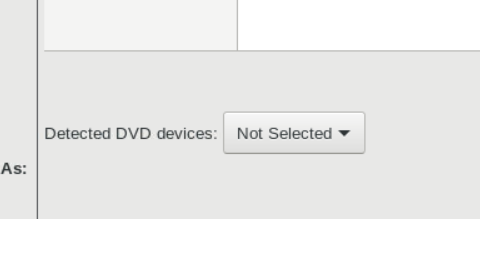
Would it be possible to get this to work? Or as simple as passing a device to the container, same as we do MakeMKV?
-
Do that, and a few bucks are coming your way EDIT: should I say a few "more" bucks
-
Nice, still use windirstat from time to time.
-
Well, I ended up mapping a drive 1:1 per container. I am able to use the physical eject button, and discs are scanning in no issue on swap. I am wondering if perhaps since both containers had both drives mapped, and I was swapping and dropping new discs into both drives within the same 10 - 15 second span, perhaps it was somehow causing an issue where drive 1 was actively scanning in a new disc when suddenly drive 2 received a new disc for scan it at the same time, and neither container was able to handle that in quick succession? I will try with containers as 1:1 for now and see if anything pops up.
-
Balls, I could easily see that being the case, because YES, I am known to hit the eject button on the drive itself. I got tons of discs to rip through this weekend, will try this out and report back. Thanks @saarg
-
@Djoss hope all is well! Had a quick question..... Now that I am really cranking on this container in particular (and handbrake), I am noticing something. As you know, I am running two instances of this container (as seen above) on separate ports. It's working fine, and I can rip from both containers at the same time against the 2 x ASUS USB BD drives I have attached (both drives are mounted to both containers, not just one to one). What I am just now seeing, and maybe has been that way for some time, is that let's say I start a backup before bed on both drives, then walk away..... I come back in the am or two days later, and the containers have the nice "Backup Complete" message and all seems well. Click okay, and MakeMKV goes back to it's primary screen. At that point in time, I head over to the server, eject, and swap in two more discs, and come back to the PC interface. However, the containers are still presenting the "old" discs I just previously took out, like it's not refreshing. I need to restart the containers to refresh/re-initiate. AT THIS POINT, I am also noticing that when the container goes down, it's not always return code (0) in the advanced logs view in UnRaid. It's ending with a 2xx code (I forget exactly). But nevertheless they do come back up, and work fine from that point. Have you seen any time outs or any sequencing issues with the MakeMKV container if you let it sit running for an extended period of time perhaps on a display window with a disc inserted?
-
I should have my E3 1275 v6 and SM board waiting for me when I get home. Can't wait to play ? Want to bench mark it against my E5 2650 v4. Many slow cores vs few fast cores ? (with QS) - I got seasons 1 - 7 of GoT BD to convert from MKV RAW backup.
-
Super cool Quick Sync is finally making it's way to Handbrake. It's only been what, 7 years? ? I remember encoding years ago in a desktop based CPU using quick sync (another program other than handbrake) and it was amazingly fast, as stated in your git.
-
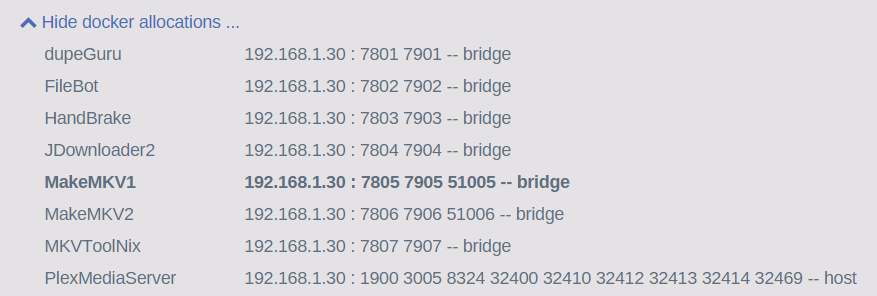
Ended up working out just fine ? Only thing is I needed to remap some ports, so I just ended up remapping them all a bit cleaner, at least in my eyes: Outside of that, dual ripping worked fine. FYI, "Backup" mode does convert to a three folder format (CERTIFICATE, BDMV, and MAKEMKV). Handbrake seems to understand that structure well enough to convert out of it.
-
I know I could (and likely will) just try, but if you're bored, I have a question. If you change the default output from MKV to BACKUP, does this produce an ISO structure? Or does it just create the folder structure, which I could then just compress to an ISO (similar as rip to iso does in anydvd)?
-
Hmm, to go back on your original thought. Or, I could map all drives to all containers, and then just choose from the drop down of each container what disc it will rip. I actually like that better. Thanks @Djoss
-
This will let be rip multiple discs at once? EDIT: I should have clarified that, as that is the ultimate goal.
-
Hye @Djoss If I have more than one USB Blu-Ray drive I am looking to use. I assume I just need to install your makemkv container, once per blu-ray drive and map appropriately? i.e. two drives two containers, three drive three containers
-
I would think it's likely because it's "background" process encoding, not a foreground GUI driven process.
-
@Djoss Saw in the logs a new version is available, just FYI.

-
No issues were found with your server that may hinder the OS upgrade. You should be good to go Done
-
No worries, take your time. The ride is over at this point. But remember, it's always 16 somewhere :-).
-
Mucho Gracis sir! Keep up the great work, and for being thorough, it is appreciated.
-
root@noah:~# fdisk -l /dev/nvme0n1 Disk /dev/nvme0n1: 477 GiB, 512110190592 bytes, 1000215216 sectors Units: sectors of 1 * 512 = 512 bytes Sector size (logical/physical): 512 bytes / 512 bytes I/O size (minimum/optimal): 512 bytes / 512 bytes Disklabel type: dos Disk identifier: 0x00000000 Device Boot Start End Sectors Size Id Type /dev/nvme0n1p1 64 1000215215 1000215152 477G 83 Linux EDIT: udpated to your latest push and still get the same error: Checking cache drive partitioning Issue Found: Cache drive partition doesn't start on sector 64. You will have problems. See here https://lime-technology.com/forums/topic/46802-faq-for-unraid-v6/?tab=comments#comment-511923 for how to fix this. NOTE: Currently there may be false positives associated with this test
-
noah-diagnostics-20180315-2021.zip Here ya go! Shoot me whatever syntax you had in mind...
-
Unfortunately not at the moment, at work...... Give me 10 -12 hours? :-)
-
Looking forward to it, send it over when you have time and I will run it tonight for you.
-
I upgraded to 6.50. from 6.4.1 last night, and the upgrade went fine.... However, prior to that I noticed (IIRC) that Common Problems had an update that offered one new item, a script that offers a check list for upgrade compatibility (6.4.1 -> 6.5.0 for example), I thought it would be good to update and test it out prior to the upgrade. Everything came back clean except for my cache drive, complaining that my SSD cache did not start on sector 64, with a link to a process of moving items to array, formatting, and moving back (on at least 6.4.0). My SSD in a Samsung PM961 512 GB NVMe drive formatted as btrfs (originally formatted by unraid in 6.3.5). Up until now, coming from 6.3.5 to 6.4.0 to 6.4.1 I have had no issues with it not being detected, but I figured why not, this is pretty straight forward. So I followed the advice, and: - Marked cache shares to move to array - "moved" - stopped array and changed to XFS for my cache, formatted, then changed back to btrfs and formatted - started array - ran script, still error 64 - stopped array - unassigned cache - started array - performed upgrade - added ssd back as cache, was picked up as btrfs - did the same mark to xfs, format, mark as btrfs, format - still sector 64 So with the above, is it really an error or issue here? I am only using unraid, to format/reformat (not UD) the SSD and is continually being flagged for not starting at sector 64, what gives?


