





a12vman
Members
-
Joined
-
Last visited
Everything posted by a12vman
-
It is a Dell Server with 64GB.
-
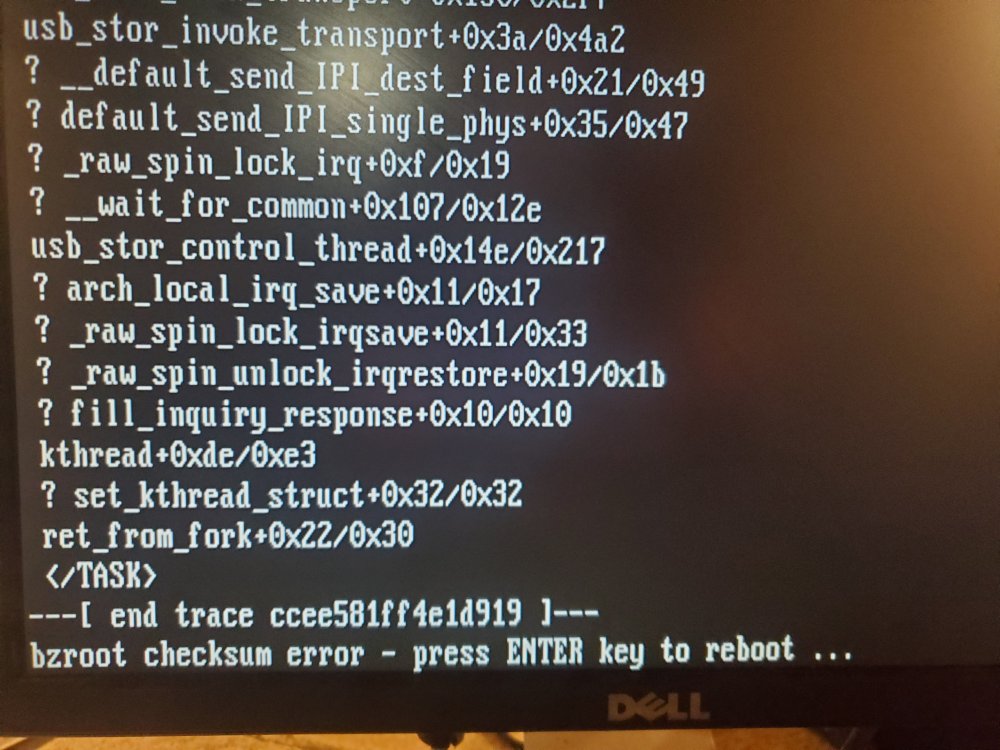
BZRoot Checksum Error?
-
I ran the upgrade this morning thru the webui Update OS - big mistake. Flash Drive update completed and prompted for a reboot. Did the reboot but server not available. It's not that I can't login to the WebUI, it is not even on the network. What do I do now? I haven't touched anything on my server it has been fine for months, finding it hard to believe that there is some sort of hardware failure after the reboot.
-
I don't know what I did wrong, but I completely lost my Sonarr Library and my Plex Library. I could have restored, I had 7 days of CA Backups. Instead I changed the AppData Config Path to explicitly use /Cache_NVME/Appdata/Sonarr and the same for Plex. I rebuilt both libraries and all is well. It's a housekeeping task I have been wanting to do for some time. The only downside is I lost all of my viewing history.
-
I did follow SI-1's process of migrating cache data using the cache settings. Moved appdata from Old Cache to Array Moved appdata from Array to New Cache I think where I went wrong. I didn't update the AppData Config path from /mnt/user/appdata/sonarr to /Cache_SSD/Appdata/sonarr I repointed my containers. Everything seems to be working now. Thanks for your help, not sure how I missed that step!
-
I added a 2nd Cache Drive several months ago following SI-1's cookbook. My original cache drive is Cache_SSD and my new one is Cache_NVME. I modified my share settings so all folders that I want to cache point to Cache_SSD. Docker, VM, and Appdata are set to Cache_NVME. Everything checked out when I was done all Dockers and VM's were functioning. Just looking around on Krusader and noticed that Cache_SSD still has an AppData folder with a folder for each Docker. I changed the folder Name of Sonarr at this location to Sonarr1. My Sonarr library is now empty(says no series found) even after I renamed it back to Sonarr and restarted the app. The container path for all of my dockers is still set to \Mnt\User\AppData\<Docker Name>, do I need to update these paths? Is there any way to get back my Sonarr Library? I do CA Appdata Backups Daily. Sizes of Appdata: Cache_SSD: 758MB CACHE_NVME: 42GB Thanks, a12vman
-
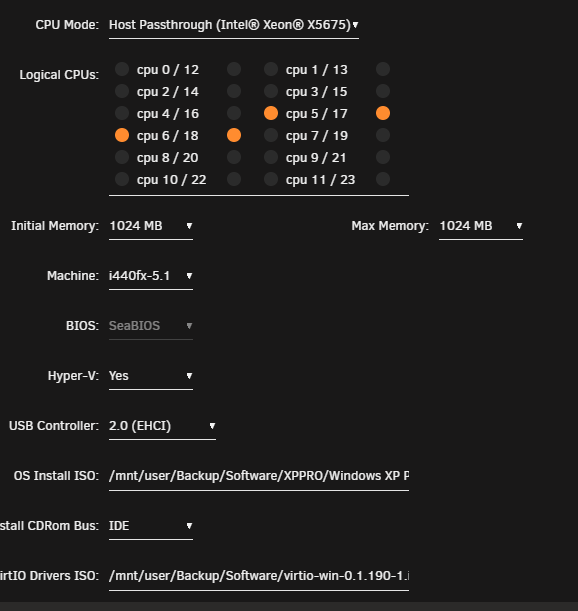
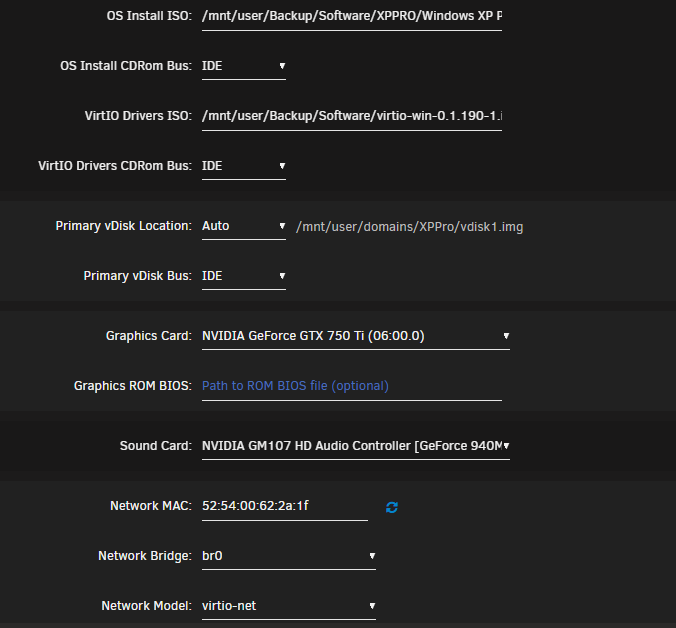
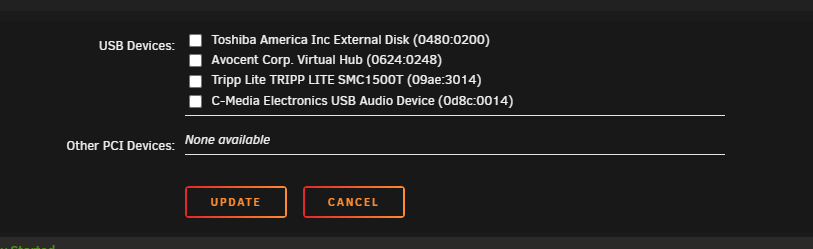
Sorry i should have been more specific. By Log Looks Normal, I meant to say that the VM Log output is the same whether I boot into Windows XP using VNC(that works) or whether I try to boot using GPU Passthru(that doesn't work) . Also the system log is not revealing anything. Here is what my VM config looks like: mediatower-diagnostics-20220130-0728.zip
-
Thanks I never thought of checking unofficial driver support. My bigger issue is that I can't even get the VM to boot up when I change the Graphics to the 750ti and start the VM. The VM is running, the logs look normal but it never appears on the network so I can connect via RDP. I ping the Machine Name from a windows client but it's not available. The VM Log looks normal and I don't see anything in the System Log. I have created Windows 7/10/11 Vm's using this card for GPU Passthru and had no issues.
-
I was able to stand up a Windows XP Pro VM thanks to advice on this forum. I have it working with VNC but want to do GPU Passthru. I have a GTX750ti card. The oldest OS drivers available from Nvidia are for Windows 7 64. I can start the VM with GPU Passthru but it never boots up. Is this too much of an ask(assigning a video card to an OS that predates the graphics card? I have some XP-era games that I would like to play that won't run on Windows 7. Thanks in Advance, a12vman
-
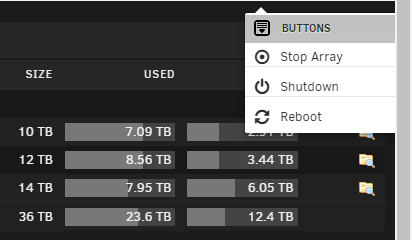
I sued the Reboot Option from the menu. When the server came back up I got an "Unclean Shutdown" and it started a parity check. What Gives? Am I not supposed to use this option?
-
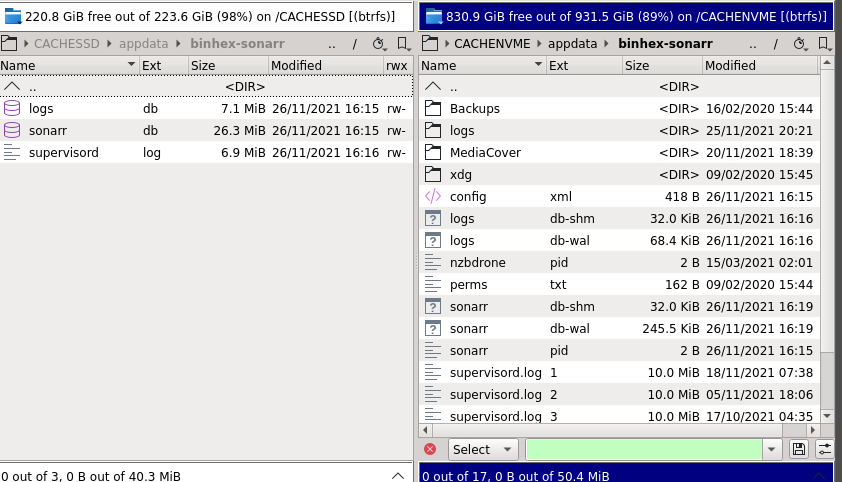
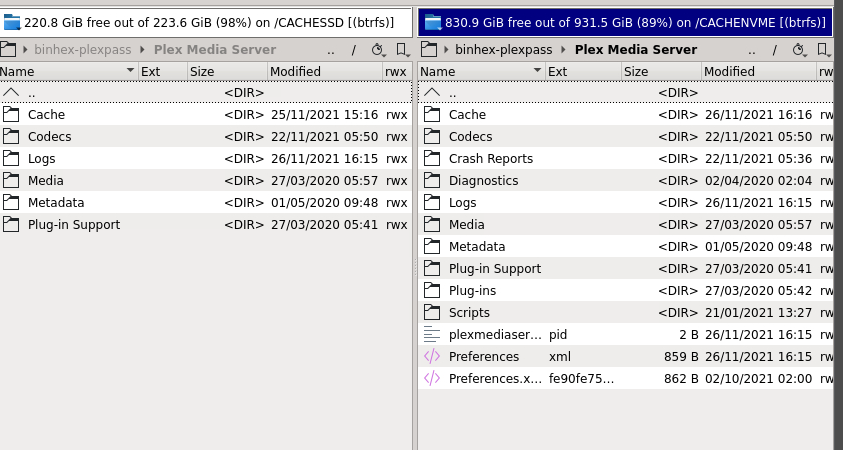
Never thought about a reboot even though I stopped/started the array- you were right on with that suggestion. Cache disappeared and now I have cache_ssd and cache_nvme as the 2 cache pools. I updated my Krusader config to add paths for cache_nvme and cache_ssd. I updated appdata,domains,and system shares. First set cache to yes to move everything off cache into the array. After mover finished I then update these 3 shares to prefer and set the pool to cache_nvme. After the mover finished I set the cache for all remaining shares to cache_ssd. I stopped Docker. Copied docker.img to cache_nvme, updated docker config to point at cache_nvme for Docker.img. I change the Docker appdata location from /mnt/user/appdata/ to /mnt/cache_nvme/appdata/. I restarted Docker Engine, everything seems fine. Plex is a bit faster than it was before. My issue is that I am seeing a split of appdata for all of my dockers. There is a small(in size) amount of appdata remaining in the old appdata location on cache_ssd(734MB). Appdata on cache_nvme is 43GB. See my Screenshot below of Sonarr and Plex AppData. Why do I have split content and what can I do about it?
-
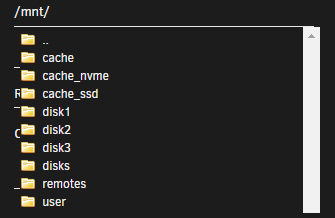
I need assistance. I am trying to add a 2nd cache drive(1TB NVME). At present I have a 240gb ssd as my only cache. I renamed my existing cache drive to cache_ssd. I stopped the array added the nvme, formatted it as BTRFS and named it is cache_nvme. Created a 2nd pool and added cache_nvme to this pool. Started the array. Modified cache settings on shares. I set appdata, system and domains to use Prefer: cache_nvme I set all other shares to use cache_ssd. My existing appdata is ~ 45gb I back it up daily to another server. When I open Krusader and look at \Cache it is only showing 46.1 MB. Something is not right. All my dockers are still working fine(like Plex). When I go into Krusader settings under the cache variable(Host Path) and browse /mnt/ I see folders for Cache, Cache_ssd, and Cache_nvme I reviewed SI-1's video on cache pools and how to create them. Clearly I missed a step here. How do I move all references from /Cache as far as AppData goes? This makes me extremely nervous.... My end goal is to have all appdata and system on cache_nvme and the rest of shares caching to cache_ssd.
-
How much reading/writing takes place against Docker.img? Is it just during the start of the Docker or is it continuous?
-
I am putting this into General as I can't find a better place for it. SI-1 has posted a how-to guide on tuning Unraid that is very useful. I would like to focus on how to get the best performance from disk as it relates to Dockers and VM's. I currently have my Cache, Appdata, and VM's on a single Crucial 240gb SSD. I have appdata of 40GB and VM's of ~60GB. I would have 1 or 2 VM's running at any given time. Docker.img resides on a 120GB SSD(unassigned device). I have ~ 20TB used inside of a 30TB Array(single parity). Sonarr & Radar Downloads first land in a 4TB Mechanical Drive(unassigned device). Once assembled they are moved to cache and eventually the mover process will commit them to the array. I have 2 Xeon x5675's with 64GB Ram. I was thinking of moving AppData off of Cache to an NVME SSD(as unassigned device) in hopes to gain some performance in Plex. What are best practices of AppData, VM's, and Docker.img locations? Will I see performance improvements if I get these off of Cache and onto separate physical devices?
-
I didn't re-boot the server but I did remove and re-install this plugin. I am not seeing the errors anymore in the system log. Not sure what that was all about. if it pops up again I will come back with the diagnostics. Thank you.
-
My Version is 2021.10.10 I went into the parity tuning config. Changed my interval from Monthly to Yearly and clicked apply. The I changed it from Yearly to Monthly and clicked apply. I am still getting these messages in my SysLog: Nov 18 05:48:11 MediaTower crond[2014]: failed parsing crontab for user root: /usr/local/emhttp/plugins/parity.check.tuning/parity.check.tuning.php "resume" &> /dev/null Nov 18 05:48:11 MediaTower crond[2014]: failed parsing crontab for user root: /usr/local/emhttp/plugins/parity.check.tuning/parity.check.tuning.php "pause" &> /dev/null Nov 18 05:49:01 MediaTower crond[2014]: failed parsing crontab for user root: /usr/local/emhttp/plugins/parity.check.tuning/parity.check.tuning.php "resume" &> /dev/null Nov 18 05:49:01 MediaTower crond[2014]: failed parsing crontab for user root: /usr/local/emhttp/plugins/parity.check.tuning/parity.check.tuning.php "pause" &> /dev/null Nov 18 05:56:01 MediaTower crond[2014]: failed parsing crontab for user root: /usr/local/emhttp/plugins/parity.check.tuning/parity.check.tuning.php "resume" &> /dev/null Nov 18 05:56:01 MediaTower crond[2014]: failed parsing crontab for user root: /usr/local/emhttp/plugins/parity.check.tuning/parity.check.tuning.php "pause" &> /dev/null
-
I am seeing this over and over in my system log. How do I resolve? Nov 17 14:57:01 MediaTower crond[2014]: failed parsing crontab for user root: /usr/local/emhttp/plugins/parity.check.tuning/parity.check.tuning.php "resume" &> /dev/null Nov 17 14:57:01 MediaTower crond[2014]: failed parsing crontab for user root: /usr/local/emhttp/plugins/parity.check.tuning/parity.check.tuning.php "pause" &> /dev/null Nov 17 15:12:01 MediaTower crond[2014]: failed parsing crontab for user root: /usr/local/emhttp/plugins/parity.check.tuning/parity.check.tuning.php "resume" &> /dev/null Nov 17 15:12:01 MediaTower crond[2014]: failed parsing crontab for user root: /usr/local/emhttp/plugins/parity.check.tuning/parity.check.tuning.php "pause" &> /dev/null Nov 17 15:27:01 MediaTower crond[2014]: failed parsing crontab for user root: /usr/local/emhttp/plugins/parity.check.tuning/parity.check.tuning.php "resume" &> /dev/null Nov 17 15:27:01 MediaTower crond[2014]: failed parsing crontab for user root: /usr/local/emhttp/plugins/parity.check.tuning/parity.check.tuning.php "pause" &> /dev/null
-
Ok I am waiving the white flag. I just stopped the array and did a full reboot, log entries are not coming back. Not sure what that was all about. It had been a long time since I did a re-boot.
-
mediatower-diagnostics-20211111-1558.zipWhy is my Log in Memory Filling up?
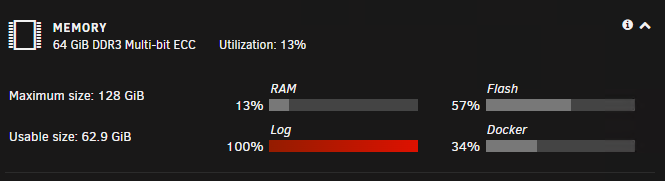 I did that but these entries are still going into SysLog. Where is this coming from? Syslog Server is disabled but I am still writing the File to Flash.... Nov 11 15:50:11 MediaTower rsyslogd: file '/var/log/syslog'[5] write error - see https://www.rsyslog.com/solving-rsyslog-write-errors/ for help OS error: No space left on device [v8.2002.0 try https://www.rsyslog.com/e/2027 ] Nov 11 15:50:11 MediaTower rsyslogd: action 'action-0-builtin:omfile' (module 'builtin:omfile') message lost, could not be processed. Check for additional error messages before this one. [v8.2002.0 try https://www.rsyslog.com/e/2027 ] Nov 11 15:50:11 MediaTower rsyslogd: file '/var/log/syslog'[5] write error - see https://www.rsyslog.com/solving-rsyslog-write-errors/ for help OS error: No space left on device [v8.2002.0 try https://www.rsyslog.com/e/2027 ] Nov 11 15:50:11 MediaTower rsyslogd: action 'action-0-builtin:omfile' (module 'builtin:omfile') message lost, could not be processed. Check for additional error messages before this one. [v8.2002.0 try https://www.rsyslog.com/e/2027 ] Nov 11 15:50:11 MediaTower rsyslogd: file '/var/log/syslog'[5] write error - see https://www.rsyslog.com/solving-rsyslog-write-errors/ for help OS error: No space left on device [v8.2002.0 try https://www.rsyslog.com/e/2027 ] Nov 11 15:50:11 MediaTower rsyslogd: action 'action-0-builtin:omfile' (module 'builtin:omfile') message lost, could not be processed. Check for additional error messages before this one. [v8.2002.0 try https://www.rsyslog.com/e/2027 ] Nov 11 15:50:11 MediaTower rsyslogd: file '/var/log/syslog'[5] write error - see https://www.rsyslog.com/solving-rsyslog-write-errors/ for help OS error: No space left on device [v8.2002.0 try https://www.rsyslog.com/e/2027 ] Nov 11 15:50:11 MediaTower rsyslogd: action 'action-0-builtin:omfile' (module 'builtin:omfile') message lost, could not be processed. Check for additional error messages before this one. [v8.2002.0 try https://www.rsyslog.com/e/2027 ] Nov 11 15:50:11 MediaTower rsyslogd: file '/var/log/syslog'[5] write error - see https://www.rsyslog.com/solving-rsyslog-write-errors/ for help OS error: No space left on device [v8.2002.0 try https://www.rsyslog.com/e/2027 ]Can anyone tell me where this is coming from? I already rebooted the server yet it continues to log. This stareted last night when I was preclearing a new drive over USB. I cancelled the preclear as it was painfullly slow yet the messages keep coming. Nov 11 11:14:27 MediaTower file.activity: Starting File Activity Nov 11 11:14:27 MediaTower emhttpd: Starting File Activity... Nov 11 11:14:27 MediaTower rsyslogd: [origin software="rsyslogd" swVersion="8.2002.0" x-pid="29640" x-info="https://www.rsyslog.com"] start Nov 11 11:14:27 MediaTower rsyslogd: file '/var/log/syslog'[8] write error - see https://www.rsyslog.com/solving-rsyslog-write-errors/ for help OS error: No space left on device [v8.2002.0 try https://www.rsyslog.com/e/2027 ] Nov 11 11:14:27 MediaTower rsyslogd: action 'action-0-builtin:omfile' (module 'builtin:omfile') message lost, could not be processed. Check for additional error messages before this one. [v8.2002.0 try https://www.rsyslog.com/e/2027 ] Nov 11 11:14:27 MediaTower rsyslogd: file '/var/log/syslog'[8] write error - see https://www.rsyslog.com/solving-rsyslog-write-errors/ for help OS error: No space left on device [v8.2002.0 try https://www.rsyslog.com/e/2027 ] Nov 11 11:14:27 MediaTower rsyslogd: action 'action-0-builtin:omfile' (module 'builtin:omfile') message lost, could not be processed. Check for additional error messages before this one. [v8.2002.0 try https://www.rsyslog.com/e/2027 ] Nov 11 11:14:27 MediaTower rsyslogd: file '/var/log/syslog'[8] write error - see https://www.rsyslog.com/solving-rsyslog-write-errors/ for help OS error: No space left on device [v8.2002.0 try https://www.rsyslog.com/e/2027 ] Nov 11 11:14:27 MediaTower rsyslogd: action 'action-0-builtin:omfile' (module 'builtin:omfile') message lost, could not be processed. Check for additional error messages before this one. [v8.2002.0 try https://www.rsyslog.com/e/2027 ] mediatower-diagnostics-20211111-1128.zipOk thanks. I am also using CA Backup/Restore but it stopped working and I haven't figured out why. I wish there was a way to backup dockers without stopping the Docker Engine. /usr/bin/tar: Error is not recoverable: exiting now Starting binhex-delugevpn Starting binhex-krusader Starting binhex-plexpass Starting binhex-sabnzbd Starting binhex-sonarr Starting duplicacy Starting firefox Backup/Restore Complete. tar Return Value: Backup / Restore CompletedOk the Duplicacy data you are referring to, is it located at \Cache\Appdata\Duplicacy\Cache\Localhost\? Are you suggesting that in event of an Appdata corruption that my Duplicacy functionality would work if I: 1. Re-install duplicacy Docker. 2. Restore Backup DB to Appdata\Duplicacy\Cache\Localhost


