





Tom899
Members
-
Joined
-
Last visited
Everything posted by Tom899
-
I know this is old, but it just worked for me after a major Windows 11 update, Thank you!
-
Thank you! the new card works great!
-
One more quick question please? I'm assuming to replace my current card its a plug-n-play swap and don't have to get into the BIOS at all? I ordered a StarTech.com SATA PCIe Card - 2 Port PCIe SATA Expansion Card - 6Gbps - Full/Low Profile - PCI Express to SATA Adapter/Controller - ASM1061 Non-Raid - PCIe to SATA Converter (2P6G-PCIE-SATA-CARD)
-
Great, that is what i will do, thank you so much!
-
Great, just downloaded a diag zip. It;s in the middle of a parity check, if that matters? I appreciate your help!
-
I built my UnRaid server in 2011 in a small Lian Li case, 7 total hdd. My MB is ASUS M4A785T-M with 6 internal SATA ports. I bought at the same time a 2-port sata card, so this gave me 5-data drives, 1-Parity, and 1 Cache, with one spare sata port on the card. The card is installed in a PCIe x 1 slot. I assume this is a single lane slot? My question, I would like to add one more HDD. Will the PCIe x 1 slot handle a 2nd or 3rd drive and not slow things down? I can't remember the brand of card from 2011? When I do a Parity all the drives are running at about 130MB/s. I don't mind buying a new/different 2-port or 4-port card, or what ever I need? What do you think? Thanks, Tom
-
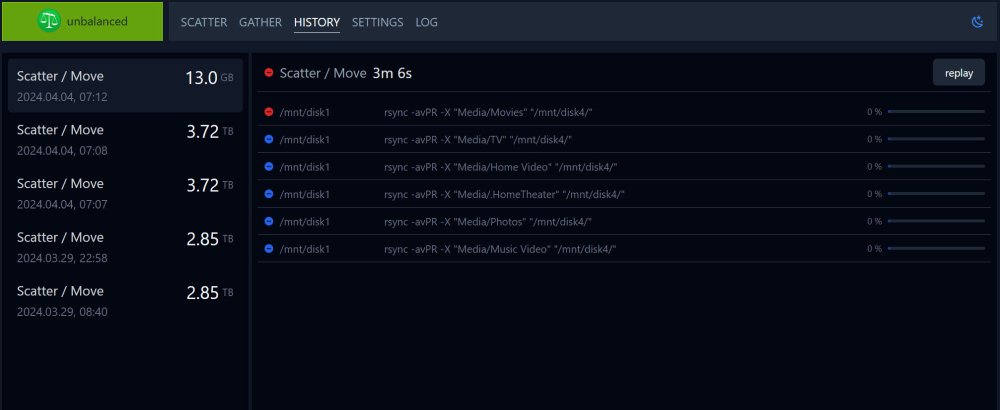
Got it, dumb me! What are the blue icons? After thinking about it, probably means staged, next... Do you please have any tips on how to delete? I know this can be complicated, and dangerous. I figured out Midnight Commander, and deleted what was necessary. Thanks for your help, unbalanced is a great program!
-
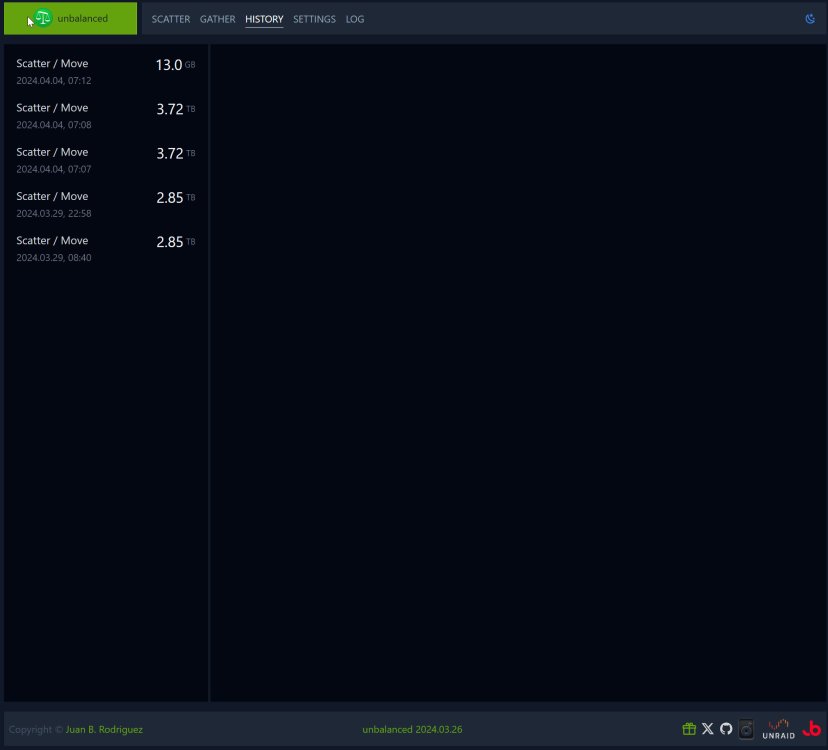
Thank you for replying, I appreciate! Here's my history tab, I don't see either green or red icons? Oh wait, is it the green icon in the unbalanced bar top left? If it is, that means I should not delete? I'm sorry, a little new to this. If I do want to delete in the future, How, a separate program for deleting files and folders?? Thanks, Tom
-
I used “Move” to start a move from my #1 disk to # 4 disk, just to balance out a bit. It was going to take about 14 hours, so I stopped it after about 5 minutes. I understand it copies and only deletes from the source at the end of the move, I’ve used it before. My question please, since it only copied some files to disk #4, and I aborted, and the files are still on #1, can I delete them from #4? Thanks, Tom
-
Raj- quick question! I couldn't stand seeing an empty slot in my hard drive cage so I just ordered another drive, but also had to order your recommended SATA PCI express card from Monoprice. Will the MB and OS automatically recognize this card or will I have to hook a monitor up and go back into the BIOS to configure it? Thanks, Tom That card has always been plug and play for me (except the one time that I got a defective one). My guess is that you won't need to mess around in BIOS at all. The only thing that might happen is that your motherboard might assign the new drive to the top of the boot priority list. In that case you would need to go into BIOS and reset the USB flash drive to be the first on the boot list. Thanks, I'll prepare for that by hooking up a monitor, keyboard and mouse and boot to the BIOS to check. Tom
-
Raj- quick question! I couldn't stand seeing an empty slot in my hard drive cage so I just ordered another drive, but also had to order your recommended SATA PCI express card from Monoprice. Will the MB and OS automatically recognize this card or will I have to hook a monitor up and go back into the BIOS to configure it? Thanks, Tom
-
Thanks! I think your reasoning on the fan direction makes sense. I will turn it around. Again thanks for your help through this, it's working great! Makes me want to build another one!
-
I just finish my 2nd unraid with the same case. What are your thoughts on mounting the PS that way? Its better for cabling but the fan facing the case wall. I mounted mine with the fan facing the motherboard. I'm still up in the air on which way might be better? It's an intake so I thought it might not matter. Also the instructions show the fan in this direction, but that just might be for illustration reasons. Probably the way you did it is the safer way?
-
My First build!! I want to thank everyone in the forum for helping me understand what this is all about, helping me select parts, and helping me with my many questions, and I'm not done asking! Ha-ha! I decided on a "LIAN LI PC-V354B Black Aluminum MicroATX Mini Tower Computer Case" because I travel between Michigan and Arizona and wanted light and small (relatively speaking). This case holds (7) 3.5" drives, (2) 2.5" drives, and you can probably mount another 3.5" drive in the optical drive area. It is very well built. It comes with (2) 120mm fans in front and (1) 140mm fan on top. I added another 120mm fan in the rear. It also has a nice variable fan controller circuit that accepts all the fans. The drives are staying cool in the low to mid 30’s. I’m using unmenu and a few other add-ons and everything is working great! I'm having some problems understanding the Share settings but I think I’m getting it now. Thanks again for all your help! Tom Case - LIAN LI PC-V354B Black Aluminum MicroATX Mini Tower http://www.newegg.com/Product/Product.aspx?Item=N82E16811112300 Motherboard - ASUS M4A785T-M http://www.newegg.com/Product/Product.aspx?Item=N82E16813131609 CPU - AMD Sempron 140 http://www.newegg.com/Product/Product.aspx?Item=N82E16819103698 Power Supply - CORSAIR Builder Series CX430 http://www.newegg.com/Product/Product.aspx?Item=N82E16817139017 RAM - Kingston 2GB 240-Pin DDR3 SDRAM DDR3 1066 http://www.newegg.com/Product/Product.aspx?Item=N82E16820134785 Flash Drive - Lexar JumpDrive FireFly 2GB USB 2.0 http://www.newegg.com/Product/Product.aspx?Item=N82E16820191269 SATA Cables - Monoprice 18inch SATA3 Cable w/Locking Latch - UV Green http://www.monoprice.com/products/product.asp?c_id=102&cp_id=10226&cs_id=1022602&p_id=4544&seq=1&format=2 Hard Drives (1) Parity, (5) Data - WD 2TB Caviar Green SATA WD20EARS http://www.amazon.com/Western-Digital-Intellipower-Desktop-WD20EARS/dp/B002ZCXK0I/ref=sr_1_3?s=electronics&ie=UTF8&qid=1292173505&sr=1-3 Hard Drive - (1) Cache - WD Caviar Black 1TB WD1002FAEX http://www.amazon.com/Western-Digital-Caviar-Desktop-WD1002FAEX/dp/B0036Q7MV0/ref=sr_1_9?s=electronics&ie=UTF8&qid=1292173630&sr=1-9
-
Sorry Joe, yes I need to study the prior posts and will do that. I'm using putty to telnet and "screen". Somehow I can't seem to see any of my other disks anymore so I don't know when thy will be finished or the results. I login to tower, then root, then screen -r 2048 (the session thats preclearing my drives) which did work to cycle through my drives with Ctrl A then N, but it is not available now. Is there another way to see if my drives are still in the preclear stage? Thanks, Tom look for them in the process list? top will show you active processes. Look for their entries in the syslog. Their completion is logged there. Thanks, I just assigned a parity drive, 4 data drives and a cache drive. It said the data and cache drives were not formatted so I started to format. Not sure why the parity drive did not request a format. It now says the parity drive is syncing with 700 minutes to go! The parity drive is never formatted. It does not contain a file-system, it just contains parity calculations. It sounds like you are well on your way. Do not forget to perform a "Check" of the parity once the initial parity calculation is complete. Right now you are writing the parity disk you will not know if it is readable until you perform a subsequent "Check" by pressing the "Check" button on the user-interface. Joe L. Great! Thanks for that tip and all your help! Tom
-
Sorry Joe, yes I need to study the prior posts and will do that. I'm using putty to telnet and "screen". Somehow I can't seem to see any of my other disks anymore so I don't know when thy will be finished or the results. I login to tower, then root, then screen -r 2048 (the session thats preclearing my drives) which did work to cycle through my drives with Ctrl A then N, but it is not available now. Is there another way to see if my drives are still in the preclear stage? Thanks, Tom look for them in the process list? top will show you active processes. Look for their entries in the syslog. Their completion is logged there. Thanks, I just assigned a parity drive, 4 data drives and a cache drive. It said the data and cache drives were not formatted so I started to format. Not sure why the parity drive did not request a format. It now says the parity drive is syncing with 700 minutes to go!
-
Sorry Joe, yes I need to study the prior posts and will do that. I'm using putty to telnet and "screen". Somehow I can't seem to see any of my other disks anymore so I don't know when thy will be finished or the results. I login to tower, then root, then screen -r 2048 (the session thats preclearing my drives) which did work to cycle through my drives with Ctrl A then N, but it is not available now. Is there another way to see if my drives are still in the preclear stage? Thanks, Tom
-
Ok, thanks Jim A master boot record has positions in it for 4 partitions. unRAID uses only 1. The bytes describing the other possible three must be cleared in case they once held old partitioning information. as described this message is informational and completely normal. Two of my disks have finished the preclear. I don't see much information though, only a few of lines? Here they are. Please, what do you think? Disk /dev/sdf has been successfully precleared == ============================================================================ S.M.A.R.T. error count differences detected after pre-clear note, some 'raw' values may change, but not be an indication of a problem 59c59 < 7 Seek_Error_Rate 0x002e 100 253 000 Old_age Always - 0 --- > 7 Seek_Error_Rate 0x002e 200 200 000 Old_age Always - 0 Disk /dev/sdc has been successfully precleared == ============================================================================ S.M.A.R.T. error count differences detected after pre-clear note, some 'raw' values may change, but not be an indication of a problem 54c54 < 1 Raw_Read_Error_Rate 0x002f 100 253 051 Pre-fail Always - 0 --- > 1 Raw_Read_Error_Rate 0x002f 200 200 051 Pre-fail Always - 0 63c63 < 193 Load_Cycle_Count 0x0032 200 200 000 Old_age Always - 19 --- > 193 Load_Cycle_Count 0x0032 200 200 000 Old_age Always - 38 67c67 < 199 UDMA_CRC_Error_Count 0x0032 200 253 000 Old_age Always - 0 --- > 199 UDMA_CRC_Error_Count 0x0032 200 200 000 Old_age Always - 0
-
Ok, thanks Jim A master boot record has positions in it for 4 partitions. unRAID uses only 1. The bytes describing the other possible three must be cleared in case they once held old partitioning information. as described this message is informational and completely normal. Thanks Joe, My disks are about 16 hours into preclear and 12% into Post-Read.
-
Ok, thanks Jim
-
Hello, I started preclearing my six disks about nine hours ago. This is my 1TB disk. Is step #4 it shows partitions 2,3 & 4. Is this normal for a new drive? I thought it should have one partition. The other disks did not get this far yet because they are 2TB. I'm using unmenu and screen through a putty telnet sesion. It shows it is doing a Post-Read now. Thanks, Tom = unRAID server Pre-Clear disk /dev/sdf = cycle 1 of 1 = Disk Pre-Clear-Read completed DONE = Step 1 of 10 - Copying zeros to first 2048k bytes DONE = Step 2 of 10 - Copying zeros to remainder of disk to clear it DONE = Step 3 of 10 - Disk is now cleared from MBR onward. DONE = Step 4 of 10 - Clearing MBR bytes for partition 2,3 & 4 DONE = Step 5 of 10 - Clearing MBR code area DONE = Step 6 of 10 - Setting MBR signature bytes DONE = Step 7 of 10 - Setting partition 1 to precleared state DONE = Step 8 of 10 - Notifying kernel we changed the partitioning DONE = Step 9 of 10 - Creating the /dev/disk/by* entries DONE = Step 10 of 10 - Testing if the clear has been successful. DONE = Post-Read in progress: 30% complete. ( 305,980,416,000 of 1,000,204,886,016 bytes read ) 91.3 MB/s Disk Temperature: 40C, Elapsed Time: 9:09:32


