




(Small).jpg.1aefaf4d6409fe8c81c96042a9b42471.jpg)
AwesomeAustn
Members
-
Joined
-
Last visited
Everything posted by AwesomeAustn
-
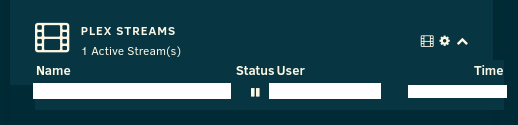
The Dashboard widget is a little off for me. I'm on 6.9.1. I'm not sure if it has to do with my theme, but I did see this exact issue in this forum topic that was fixed.
-
I love it! Thanks a lot! Edit: I had to stop using it because it kept saying the unraid logo tweaker share was deleted every time I went into a share or disk settings and I couldn't edit or see anything. Just the yellow box.
-
After changing it to Disable, the Apply button stays inactive.
-
On the third picture, I toggled the help button.
-
Edit the Docker and toggle the Basic/Advanced button on the top right. Change the WebUI to: http://[IP]:[PORT:####]/ Leave IP alone. Change the #### to the actual port number.
-
They are uncentered again. Could you please fix it again? They are centered again. Thank you very much!


-
They are uncentered again. Could you please fix it again?
-
Thank you for centering the Mount, Unmount, Mounting..., and Unmounting... text! It looks great!

.png.cf35e43c0a2c04fb9c7447f7c766b09d.png)
-
Could you please center the Mount and Unmount text on the button? Unmounting and Mounting is also not centered.
-
I used the aspect ratio of the default surfer sunset one (1270x90). This banner is 1920x136. Original wallpaper here: https://cdn.wallpapersafari.com/46/7/MVBOFG.jpg I just came across this Poly Background Image Generator. You can choose a size, color, and other options. https://bggenerator.com/poly_background.php



-
I'm having trouble following this. Can you post Docker directory screenshots?
-
Thanks so much!
-
You can verify you are connected, see FAQ Q3 post #2 if you want to go deeper and look at packets then let me know and I will write up some instructions. I verified that I have connection to the VPN. When I'm connected on my computer, ipleak.net shows my VPN IP and also my ISP IP if I have the network lock disabled. It says there's leaking through WebRTC. When the network lock is enabled, it blocks all Internet traffic in case the VPN gets disconnected for whatever reason, and the IP leak is fixed also. Is there any way to enable the network lock for AirVPN like on the Windows client or to verify my ISP IP never gets out? -Austin edit - ahh re-read your question a few times again :-), i think i know what your saying, ok so there is no obvious kill switch as this docker has no gui, but it is secured using low level firewall rules using iptables, this has been tested by myself and i have yet to see any sign of ip leakage, it doesnt matter if the vpn tunnel is running or not, no ip leakage of your real ip will occur. Again for now there is no easy way for you to see this without getting down and dirty and capturing packets and then running a packet analyser on the capture to see the flow of data. Ok. Thanks. -Austin
-
You can verify you are connected, see FAQ Q3 post #2 if you want to go deeper and look at packets then let me know and I will write up some instructions. I verified that I have connection to the VPN. When I'm connected on my computer, ipleak.net shows my VPN IP and also my ISP IP if I have the network lock disabled. It says there's leaking through WebRTC. When the network lock is enabled, it blocks all Internet traffic in case the VPN gets disconnected for whatever reason, and the IP leak is fixed also. Is there any way to enable the network lock for AirVPN like on the Windows client or to verify my ISP IP never gets out? -Austin
-
Is there any way to check for IP leaks? On my computer, I go to https://ipleak.net/ to check. Not sure how to do it on unRAID. -Austin
-
Thanks so much!
-
I am having issues loading the webui. The docker description states: "IMPORTANT - To allow access to the Deluge webui, Privoxy and Deluge deamon you need to specify you LAN network, using CIDR notation for the mask, a subnet mask of 255.255.255.0 would equate to CIDR /24, 255.255.0.0 would equate to CIDR /16." Where do I specify it? The docker created two folders, config and data. Inside the config folder, an openvpn folder, which I added my AirVPN ovpn file, and also contains the supervisord log file. There is no config file. ---------- This is the command message from the docker: Command: root@localhost:# /usr/local/emhttp/plugins/dynamix.docker.manager/scripts/docker run -d --name="DelugeVPN" --net="bridge" --privileged="true" -e VPN_ENABLED="yes" -e VPN_USER="vpn username" -e VPN_PASS="vpn password" -e VPN_REMOTE="nl.privateinternetaccess.com" -e VPN_PORT="1194" -e VPN_PROTOCOL="udp" -e VPN_PROV="pia|airvpn|custom" -e ENABLE_PRIVOXY="no" -e LAN_NETWORK="192.168.1.0/24" -e DEBUG="false" -e TZ="America/Los_Angeles" -p 8112:8112/tcp -p 58846:58846/tcp -p 8118:8118/tcp -v "/mnt/cache/appdata/DelugeVPN/config/":"/config":rw -v "/mnt/cache/appdata/DelugeVPN/data/":"/data":rw binhex/arch-delugevpn 580a323fa196b22af9405e01c98abad5b43f8a1350d9fba47aeee44807ae9901 The command finished successfully! ---------- The LAN_NETWORK is my old local IP. Not sure if that's the issue, and I don't know how to change it in the docker. All my other docker apps work perfectly fine. ---------- Log file attached. -Austin supervisord.txt
(Small).thumb.jpg.fe8c903f823244f649b99f639a4ada85.jpg)

.png.cf35e43c0a2c04fb9c7447f7c766b09d.png)



