




(Small).jpg.1aefaf4d6409fe8c81c96042a9b42471.jpg)
AwesomeAustn
Members
-
Joined
-
Last visited
Everything posted by AwesomeAustn
-
Yes! Thank you! I'm using this for the button colors for regular and hover. Thanks for providing your sample CSS code!
-
This is nice. Thank you! I got my button colors back that I used from Theme Engine for regular and hover. Thanks for providing your sample CSS code. This helped me just replace the color codes.
-
I had trouble routing this through my qBittorrentVPN container. I did all the steps, and the Soulseek UI would not load. The log said it loaded. It works without the VPN container. I ended up using the OpenVPN-Client container by ich777, and that loaded no problem. You need your VPN ovpn file named "vpn.ovpn" and a file named "vpn.auth" that has your VPN username in the first line, and your password in the second line. Extra parameters in Advanced View for Soulseek container: --network=container:OpenVPN-Client I changed the IP to the actual IP in Advanced View because the Web UI button breaks when using the network stack. Network type for Soulseek container: None OpenVPN-Client container: Add 5030 port to route Soulseek (or whatever port that uses).
-
Unraid Version 6.12.13 Scheduler During parity check, it shows this. Last month's errors never got corrected as it gets set to detected. I cancelled the check and manually ran it with Write corrections to parity checked, and it works fine. I'm not conformable attaching the diagnostics. I just wanted to share the issue. I saw some files in the log window when it was generating, and I don't want to share personal information even though it's set to Anonymize. I will only run manually when I see errors detected.
-
Mine just went blank on me for the first time after moving a bunch of files with unbalanced. Only the Main page looks like your screenshot. I'm also on 6.12.10. I know there are a couple of updates, but I'm not sure if the parity is still doing its thing. I'm still moving files around also. Same with another browser as well that wasn't signed in. Edit: Rebooting fixed it
-
I emailed them back with the link you provided. I didn't know I could install a custom version that way. That could come in handy. Thanks. I would rather just wait for the docker update.
-
I have been in contact with MEGA for months on and off. Since I disabled the cache drive for my MEGA syncs, I haven't had the FSID errors, but I have been having another issue with certain files of a certain folder that I update monthly not overwriting/updating by themselves. It makes me choose or rename them one at a time. It wouldn't choose the newest date automatically even when the mode is set to Smart. All syncs are wait until these are resolved. They sent me this new version tonight. Could you please update the docker? I'm not sure what this version is suppose to fix since I had two tickets open. One for the FSID errors, and one for my pick a file to keep annoyance. https://mega.nz/file/hyITiCBD#vUekp0gldmS3qRVb9QodpYtc7ianGkb3Wsq2mB8A51s
-
I may have figured out the FSID (File System ID) errors with the new version of MEGAsync. It wasn't an issue with version 4.12.2. Starting on v5, it happened daily. Sometimes MEGAsync has an issue and sometimes it doesn't. I tested with an empty new folder. If it has an issue right away, I have to remove the syncs and re-add them, and it scans and adds the new files. If everything seems fine, the FSID errors show up and the syncs get disabled the next morning, and I have to remove and re-add them. I use a cache drive and the files go to that first. The cache drive has the filesystem btrfs and and my regular drives have xfs. I disabled the cache drives for my syncs that go to MEGA a couple days ago, and I haven't seen the FSID error yet.
-
I updated it and I'm having the same issue. Certain syncs give this error when adding new files: Mismatch on sync root FSID. The log is flooded with this for all syncs: DTL Opening mount database WARN A virtual device shfs seems to contain path: WARN Couldn't determine which device contains path: WARN Falling back to legacy filesystem fingerprint: Is there anyway to downgrade? I found MEGA's github. I want to go back to 4.12.2.0. https://github.com/meganz/MEGAsync/releases
-
I am having the same issue and logging out and reinstalling it did nothing. Is there anyway to go back a version? I only see the latest tag. That, or hopefully the new version on the post above this one will fix it.
-
The weird dark theme happened to me today. I tried a Private window and same thing. It must have been a plugin issue. Reinstalling the plugin worked for me. Thanks! For others: It clears out the whole plugin folder when it's removed. So backup your custom ones beforehand. Just copy them out of the flash/config/plugins/theme.engine/themes folder. Put them back after it's reinstalled. Then refresh the settings page and load the one you want.
-
This worked for me. Thank you!
-
This worked for me. Thank you!
-
Thanks so much for this! Plex went from very slow and gave errors because it timed out and said waiting for busy database, to super responsive and no more errors.
-
I gave up trying to remove it a long time ago and didn't see your reply. I just checked, and it's not showing up in CA Appdata Backup/Restore anymore. I don't know what got rid of it. Maybe a restart. I know I tried that before and it didn't work.
-
I did install a docker manually on accident while trying to run the initialize command for one. I'll have to figure out how to delete it. Thanks for your answer and reply. Edit: It doesn't look like it's installed, but still shows up in CA Appdata Backup. I ran: docker rm dazzling_panini Error: No such container: dazzling_panini docker rmi dazzling_panini Error: No such image: dazzling_panini
-
There's no folder.
-
In my advanced settings, I have dazzling_panini as an app. The repository says Unknown. I have no idea what app this is or where it came from. Is it a container that another app installed? How do I get CA Appdata Backup to clear out old apps? I tried to clear them out by deleting the docker image and all apps were still there, but then showed they have a repository as Unknown until I reinstalled them all.
-
I had the same issue. I just downloaded it from https://prometheus.io/download/ and copied the yaml file to the volume I mounted.
-
I just updated to 6.9.2 and it's working now. Thank you!
-
I'm getting the same error. I'm on unRAID 6.9.1 and LibreOffice 7.1
-
Is there any way you could make a login screen for Solarized Dark?
-
Thanks for increasing the font size back and keeping the search box small. It looks great!
-
Click your Apps tab on the top and it should be the first one if New Apps is selected on the left. You can also search for GUI Search on the top right.
-
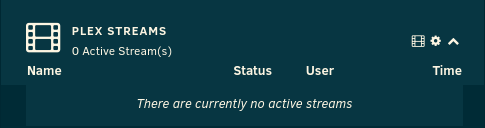
I am using Theme Engine's SolarizedDark. Here is another screenshot with nothing playing. It's slightly different than the first one with something playing.
(Small).thumb.jpg.fe8c903f823244f649b99f639a4ada85.jpg)
