





johnsanc
Members
-
Joined
-
Last visited
Everything posted by johnsanc
-
FYI - I figured out my issue above.... in short do not have Nextcloud index symlinks that would cause a loop.
-
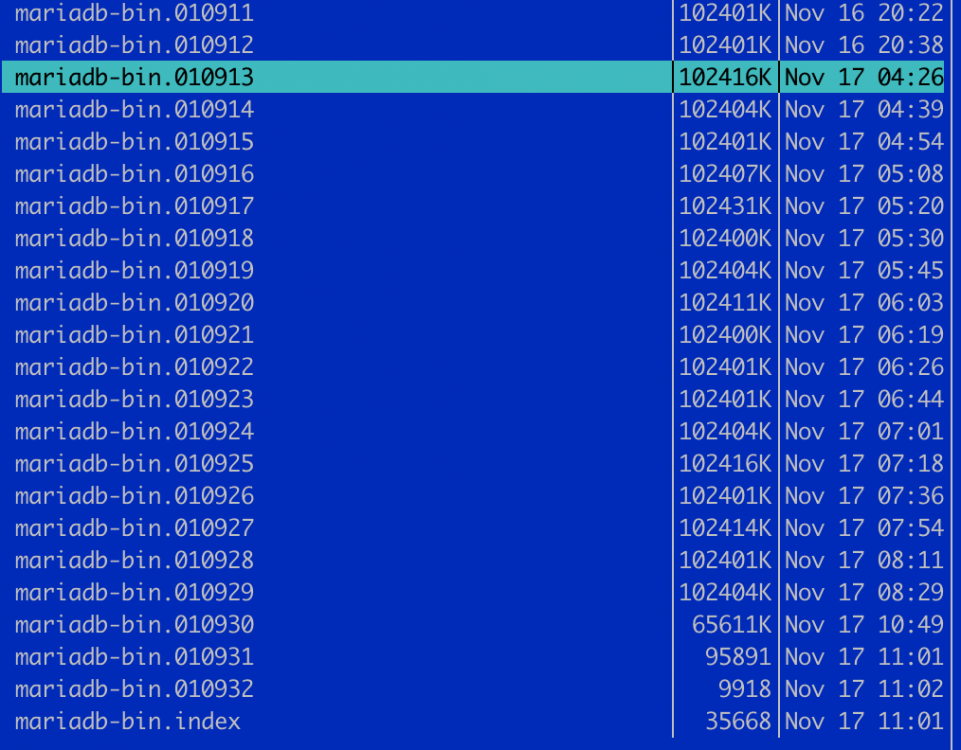
Hey guys - I hope you can help me. Nextcloud appears to be the culprit as the silent destoryer of my SSD cache pool. In less than one year I am at 482 TBW on my two 1TB SSDs. This is WAY over any normal usage. I did some tests last night and this morning and I can consistently stop the rogue disk writes by turning off Nextcloud. If I turn it back on its fine for a few hours then they start again. This is big issue for me and I suspect this may be happening to others as well and is going unnoticed unless you check the stats page often or regularly check the wear level or lbas written in the smart reports. Any help is appreciated! (Thread linked for more info) EDIT: Ok I think I'm getting closer... I noticed I have a TON of MariaDB logs starting around the time that the writes kicked in: Here is a sample from the log at the time the disk writes went crazy. Any idea what the issue is? I have a fairly standard setup so I'm not really sure what is causing this.
-
Basically to maintain consistency I suppose. If the ownership doesn't matter then why does the Fix User Permissions tool reset everything back to nobody:users? I suppose the bigger issue is having the permissions changed unintentionally, so either way I want to force the correct permissions but dont see a way to do that in the share settings. And maybe im doing something wrong, but just adding those lines to the smb-extras doesnt seem to work.
-
So it would be considered safe to add the force user/group to global? I actually shyed away from that based on reading other posts and I believe you suggested that setting was a bad idea for a default configuration.
-
I have most of my SMB shares set to Private or Secure, and I access them generally from my Windows 10 machine with a login that is also a corresponding unraid user. I noticed that any changes I make to files from my windows machine changes ownership to "johnsanc:users" instead of keeping it as "nobody:users" Ideally I would like to force the settings for most of my shares to something like this, while still having them only accessible by specific users. [share_name] force user = nobody force group = users force directory mode = 0777 force create mode = 0666 create mask = 0666 Now, I know I can add this kind of setting into [global] in the smb-extra.conf from the web UI, but I do not want it to apply globally (because I dont want to mess up any dockers). I'd rather define these extra parameters on a per-share level, but I don't see a way to do that in the web UI. If I add the configuration above into the smb-extra.conf I cannot access the share at all - so I assume it is overwriting that share configuration entirely instead of just appending the extra configurations. So what is the recomended way to do this? Do I have to manually edit the etc/samba/smb-shares.conf file to add in my extra settings? If so it would be great to allow this from the web UI.
-
@johnnie.black - THANK YOU! I'm glad the RAID1 bug has been logged and hopefully there is a fix soon so people don't think they are protected when they really aren't. If it weren't for digging through the forums or responses like yours people would never know. Also thanks for the monitoring tip. I added this script just now. Great idea!
-
Thanks - running that now... I first tried it without that because the help content on the page said thats what is used by default. I guess thats not the case in all scenarios. Now does this look like it's going to be correct when it's done? Data, RAID1: total=204.00GiB, used=203.17GiB System, RAID1: total=32.00MiB, used=48.00KiB Metadata, RAID1: total=1.00GiB, used=256.00KiB Metadata, single: total=1.00GiB, used=568.91MiB GlobalReserve, single: total=228.12MiB, used=21.38MiB EDIT: just refreshed and I think this is looking better: Data, RAID1: total=205.00GiB, used=204.17GiB System, RAID1: total=32.00MiB, used=48.00KiB Metadata, RAID1: total=1.00GiB, used=588.12MiB GlobalReserve, single: total=228.27MiB, used=0.00B
-
Well since I had a backup of the cache I just went ahead and formatted. No surprise that everything in the pool was wiped out after doing that. Everything appeared fine on the surface now, clean slate. So then I went to copy things back to the cache... after awhile I decided to check the cache settings and I noticed this: Why is only the Data in RAID1? Data, RAID1: total=205.00GiB, used=204.18GiB System, single: total=4.00MiB, used=48.00KiB Metadata, single: total=1.01GiB, used=588.72MiB GlobalReserve, single: total=228.83MiB, used=0.00B
-
OK so my backup is complete and I reseated the cables. Everything booted up fine. Before the array was started I went to add disk2 back to its rightful slot... now it says disk2 is part of the cache pool and disk1 (which was previously good) is now unmountable with no filesystem. From the web GUI it looks like my only option is to format disk1. Is this correct? I would think that disk2 would need to be formatted and re-added... Doesn't make sense to me. If I try to remove disk2 again I get errors saying that disk2 is missing now and I cannot change the number of slots to 1. I guess my worries aren't completely unfounded. The only thing noteworthy I see in the log is this: Oct 13 16:58:39 Tower emhttpd: shcmd (212): mount -t btrfs -o noatime,nodiratime,degraded -U ec85aae9-18b3-4066-9749-8195b3bee6e8 /mnt/cache Oct 13 16:58:39 Tower kernel: BTRFS info (device sdr1): allowing degraded mounts Oct 13 16:58:39 Tower kernel: BTRFS info (device sdr1): disk space caching is enabled Oct 13 16:58:39 Tower kernel: BTRFS info (device sdr1): has skinny extents Oct 13 16:58:39 Tower kernel: BTRFS warning (device sdr1): devid 3 uuid 1d8f16d9-c1d4-4ba2-8a87-729545783443 is missing Oct 13 16:58:39 Tower kernel: BTRFS info (device sdr1): bdev /dev/sdr1 errs: wr 0, rd 2, flush 0, corrupt 0, gen 0 Oct 13 16:58:39 Tower kernel: BTRFS info (device sdr1): bdev /dev/sds1 errs: wr 1, rd 2, flush 0, corrupt 0, gen 0 Oct 13 16:58:39 Tower kernel: BTRFS warning (device sdr1): chunk 14780647735296 missing 1 devices, max tolerance is 0 for writeable mount Oct 13 16:58:39 Tower kernel: BTRFS warning (device sdr1): writeable mount is not allowed due to too many missing devices Oct 13 16:58:39 Tower emhttpd: /mnt/cache mount error: No file system Oct 13 16:58:39 Tower kernel: BTRFS error (device sdr1): open_ctree failed
-
Yes thats what I thought, but I was bitten before where the entire pool was overwritten instead of just the disk so I am extra cautious. Right now I'm backing everything up to my array just in case something goes south when trying to rebuild my pool. Any explanation as to why it showed my cache as 2TB even though I only had a single 1TB disk at the time? That part I really don't understand.
-
So basically back everything up to the array and start over? Also, is there an explanation for what happened in my case? Why did the cache size appear twice as large as the single physical disk remaining?
-
OK - well I did not add a 2nd disk, I started the Array to backup the disk but now its rebalancing AGAIN... what is going on?!
-
OK I rebooted and now my other drive is available to add to cache, but I get a warning that says "All existing data on this device will be OVERWRITTEN when array is Started". If I were to add my disk back would it rebalance back to the original state? I use two 1TB Samsung EVO SSDs These were in RAID1, mirrored I never did anything to change the RAID setting, whatever happened happened automatically when I rebooted the first time.
-
Thanks - it just finished rebalancing and it did not do what I assumed it would do... Instead of balancing to a single drive now it looks like I have a single "Cache" which is twice the size of my physical drive. If I shut down the array I don't see my other disk even available for slot2. How can the size of my cache be twice the size? Why does unraid AUTOMATICALLY rebalance when the array starts in this scenario? That seems like an action that the user should have to initiate. Now when I stop the array and try to restart it I cannot even restart. My only option is to reboot or power down. I get a warning at the bottom saying I have a stale configuration.
-
I'm not really sure what happened... I woke up this morning and most of my dockers and VMs were disabled, I had what looked like some I/O errors with one of my cache drives in the cache pool. I rebooted and when the system came back up I only see one cache drive now and there is a BTRFS operation running, disk log below. I can also see on my cache disk tab that there is only one disk and the size still shows as 2TB but it appears to be freeing up space and reducing used space... I'm hoping this is just rebalancing back to one disk or something but I cannot clearly tell from the UI what is going on. What exactly is happening here and how do I get my cache pool back to normal? I assumed I should just let this run instead of trying to stop it. I fear I will lose all my cache data if I try to interfere. Oct 13 10:55:36 Tower kernel: ata7: SATA max UDMA/133 abar m512@0xecf00000 port 0xecf00100 irq 48 Oct 13 10:55:36 Tower kernel: ata7: SATA link up 6.0 Gbps (SStatus 133 SControl 300) Oct 13 10:55:36 Tower kernel: ata7.00: supports DRM functions and may not be fully accessible Oct 13 10:55:36 Tower kernel: ata7.00: ATA-11: Samsung SSD 860 EVO 1TB, [REDACTED], [REDACTED], max UDMA/133 Oct 13 10:55:36 Tower kernel: ata7.00: 1953525168 sectors, multi 1: LBA48 NCQ (depth 32), AA Oct 13 10:55:36 Tower kernel: ata7.00: supports DRM functions and may not be fully accessible Oct 13 10:55:36 Tower kernel: ata7.00: configured for UDMA/133 Oct 13 10:55:36 Tower kernel: ata7.00: Enabling discard_zeroes_data Oct 13 10:55:36 Tower kernel: sd 7:0:0:0: [sdr] 1953525168 512-byte logical blocks: (1.00 TB/932 GiB) Oct 13 10:55:36 Tower kernel: sd 7:0:0:0: [sdr] Write Protect is off Oct 13 10:55:36 Tower kernel: sd 7:0:0:0: [sdr] Mode Sense: 00 3a 00 00 Oct 13 10:55:36 Tower kernel: sd 7:0:0:0: [sdr] Write cache: enabled, read cache: enabled, doesn't support DPO or FUA Oct 13 10:55:36 Tower kernel: ata7.00: Enabling discard_zeroes_data Oct 13 10:55:36 Tower kernel: sdr: sdr1 Oct 13 10:55:36 Tower kernel: ata7.00: Enabling discard_zeroes_data Oct 13 10:55:36 Tower kernel: sd 7:0:0:0: [sdr] Attached SCSI disk Oct 13 10:55:36 Tower kernel: BTRFS: device fsid ec85aae9-18b3-4066-9749-8195b3bee6e8 devid 1 transid 14803447 /dev/sdr1 Oct 13 10:55:52 Tower emhttpd: Samsung_SSD_860_EVO_1TB_[REDACTED] (sdr) 512 1953525168 Oct 13 10:55:52 Tower emhttpd: import 30 cache device: (sdr) Samsung_SSD_860_EVO_1TB_[REDACTED] Oct 13 10:56:02 Tower kernel: BTRFS info (device sdr1): allowing degraded mounts Oct 13 10:56:02 Tower kernel: BTRFS info (device sdr1): disk space caching is enabled Oct 13 10:56:02 Tower kernel: BTRFS info (device sdr1): has skinny extents Oct 13 10:56:02 Tower kernel: BTRFS warning (device sdr1): devid 3 uuid 1d8f16d9-c1d4-4ba2-8a87-729545783443 is missing Oct 13 10:56:02 Tower kernel: BTRFS warning (device sdr1): devid 3 uuid 1d8f16d9-c1d4-4ba2-8a87-729545783443 is missing Oct 13 10:56:02 Tower kernel: BTRFS info (device sdr1): bdev (null) errs: wr 1, rd 2, flush 0, corrupt 0, gen 0 Oct 13 10:56:02 Tower kernel: BTRFS info (device sdr1): bdev /dev/sdr1 errs: wr 0, rd 2, flush 0, corrupt 0, gen 0 Oct 13 10:56:03 Tower kernel: BTRFS info (device sdr1): enabling ssd optimizations Oct 13 10:56:03 Tower kernel: BTRFS info (device sdr1): resizing devid 1 Oct 13 10:56:03 Tower kernel: BTRFS info (device sdr1): new size for /dev/sdr1 is 1000204853248 Oct 13 10:56:03 Tower kernel: BTRFS info (device sdr1): relocating block group 14118149029888 flags data Oct 13 10:56:03 Tower kernel: BTRFS info (device sdr1): found 1 extents Oct 13 10:56:03 Tower kernel: BTRFS info (device sdr1): found 1 extents Oct 13 10:56:03 Tower kernel: BTRFS info (device sdr1): relocating block group 14117008179200 flags data|raid1 Oct 13 10:56:03 Tower kernel: BTRFS info (device sdr1): found 1 extents Oct 13 10:56:03 Tower kernel: BTRFS info (device sdr1): found 1 extents Oct 13 10:56:03 Tower kernel: BTRFS info (device sdr1): relocating block group 14112230211584 flags data|raid1 etc...
-
I found a resolution to the issue I posted here and earlier in this thread if DEBUG is set to "yes" in the domain.cfg then the VMs UI will choke and appears to load forever. Changing this to "no" solved the issue. Still not really sure how that was ever set to "yes" in the first place though... just thought I would share in case anyone else runs into this.
-
Just a quick update on my VMS issues with the webui... no luck. I even tried backing up then wiping out my libvirt.img. I still got the same issue where the VMS page just looks like it loads forever. I've dug around in the forums but couldnt find any info about this particular problem. Is there a process outlined to backup my VM configurations and start completely fresh? I thought wiping out the libvirt.img would basically do that. I also noticed that occasionally the libvirt log would show errors from trying to find references to isos in directories I deleted well over a year ago. It would be nice to clean up all this old stuff.
-
I don't mean to double post - but didn't want this to get buried on the other page and lost amongst the string of troubleshooting posts above - If there is a better place to post this let me know. Since the VMs actually work fine I fear it may be a defect in the VM Manager web code. Having an unusable interface to manage VMs is a deal breaker and I may need to downgrade.
-
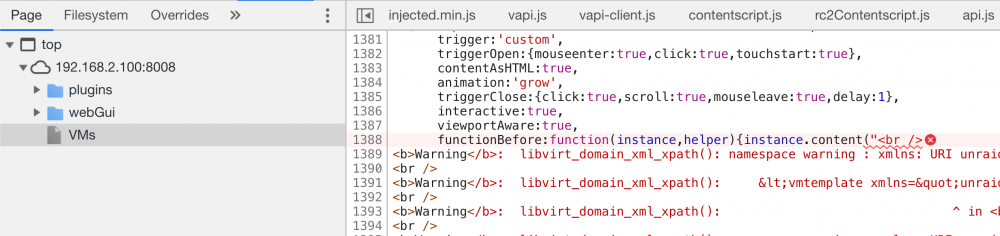
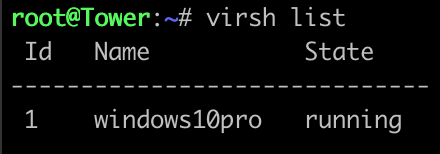
Nope, I only have 1 VM called "windows10pro" Screenshot of where the error shows for reference:
-
Upgrade seems to have gone OK, however there is something wrong with the VMS tab. My auto-start VMs start up just fine, no errors in the system log or libvirt log as far as I can tell. The VMs tab just shows the loading animation and never actually loads. In the browser console log I do see this: "Uncaught SyntaxError: Invalid or unexpected token" I also see that the request for /sub/var is pending with a 101 status code. Any ideas?
-
How do you change the max execution time for Nextcloud? I see this on the server info page: Version: 7.1.4 Memory Limit: 1.0 GB Max Execution Time: 3600 Upload max size: 10.0 GB I tried updating this in the .user.ini file but it doesn't do anything. Any ideas? The max execution time and input time need to be increased for large file uploads, especially when people have slow upload speeds. upload_max_filesize=10G post_max_size=10G memory_limit=1024M mbstring.func_overload=0 always_populate_raw_post_data=-1 default_charset='UTF-8' output_buffering=0 max_execution_time=21600 max_input_time=21600
-
Those errors will be there when you have duplicate header values, even if the values are good. Fix the dupe header issue and see if it goes away. Sent from my iPhone using Tapatalk
-
I have the same setup as you. I let the Nextcloud nginx default config do the work for the headers and leave LetsEncrypt to do only very basic reverse proxying. Seems to keep things simpler.
-
Check the headers on some of the requests when visiting your nextcloud in a browser. If you see double, then chances are there is a config with LetsEncrypt that is also setting headers which you do not want.
-
I just removed the rule. The boxes still work fine. I think it's just for pushing updates and stuff. If that rule gets pushed back automatically I'll take more drastic measures to resolve the issue. Sent from my iPhone using Tapatalk




