





ToXIc
Members
-
Joined
-
Last visited
Everything posted by ToXIc
-
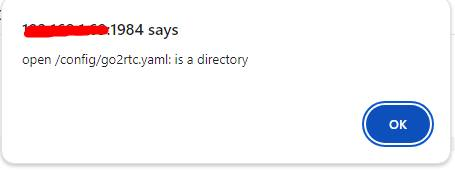
anyone ever figured out around this? ive played around with different paths. even looked at other docker setups to see if this docker is incorrectly setup..
-
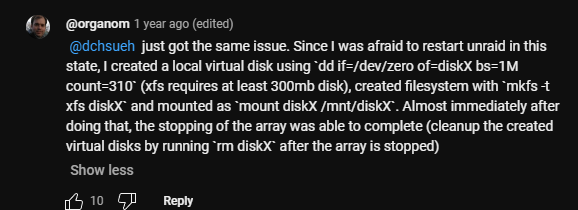
ran into this problem while trying to shrink my array using the SI video with zeroing the drive.. getting this reoccurring so the array wont stop Oct 8 20:59:07 FatJoe emhttpd: shcmd (315265): umount /mnt/disk8 Oct 8 20:59:07 FatJoe root: umount: /mnt/disk8: not mounted. Oct 8 20:59:07 FatJoe emhttpd: shcmd (315265): exit status: 32 Oct 8 20:59:07 FatJoe emhttpd: shcmd (315266): umount /mnt/disk10 Oct 8 20:59:07 FatJoe root: umount: /mnt/disk10: not mounted. Oct 8 20:59:07 FatJoe emhttpd: shcmd (315266): exit status: 32 Oct 8 20:59:07 FatJoe emhttpd: Retry unmounting disk share(s)... Oct 8 20:59:12 FatJoe emhttpd: Unmounting disks... Oct 8 20:59:12 FatJoe emhttpd: shcmd (315267): umount /mnt/disk8 Oct 8 20:59:12 FatJoe root: umount: /mnt/disk8: not mounted. Oct 8 20:59:12 FatJoe emhttpd: shcmd (315267): exit status: 32 Oct 8 20:59:12 FatJoe emhttpd: shcmd (315268): umount /mnt/disk10 Oct 8 20:59:12 FatJoe root: umount: /mnt/disk10: not mounted. Oct 8 20:59:12 FatJoe emhttpd: shcmd (315268): exit status: 32 Oct 8 20:59:12 FatJoe emhttpd: Retry unmounting disk share(s)... Oct 8 20:59:17 FatJoe emhttpd: Unmounting disks... tried running the 2nd command but it wont work root@FatJoe:~# /mnt# lsof | grep disk10 bash: /mnt#: No such file or directory root@FatJoe:~# lsof | grep disk10 root@FatJoe:/mnt# lsof | grep disk10 root@FatJoe:/mnt# 2nd command not coming back with anything Edit2: fix the loop from SI comments
-
oh wow nice.. care to share how?
-
thanks
-
long story short i have to rebuild my Plex server and i really dont want my shows and movies all showing up with 2024 as date added. Came across this reddit thread of users running some SQL commands to accomplish this. has anyone done the same on UnRaid?
-
eneded up blowing away the container. now to figure out when container to switch to.. i was using the official ver.. should i use linuxservers' or binhex's plexpass since i have to pass and gpu. also anyone have a link to mod plex to add by file date and not add by date added to plex?
-
unfortunately that didnt help looked at the docker logs and this is just scrolling Stopping Plex Media Server. kill: usage: kill [-s sigspec | -n signum | -sigspec] pid | jobspec ... or kill -l [sigspec] Starting Plex Media Server. Error: Unable to set up server: sqlite3_statement_backend::prepare: no such table: schema_migrations for SQL: select version from schema_migrations order by version (N4soci10soci_errorE) Stopping Plex Media Server. kill: usage: kill [-s sigspec | -n signum | -sigspec] pid | jobspec ... or kill -l [sigspec]
-
found the DBRepair log DBRepair.log
-
Hi board.. changed my graphics card then started getting DB errors in plex <Response code="503" title="Maintenance" status="Plex Media Server is currently running database migrations."/> loaded up PlexDBRepair and tried the automatic repair option and got Enter command # -or- command name (4 char min) : 2 Automatic Check,Repair,Index started. Checking the PMS databases Check complete. PMS main database is damaged. Check complete. PMS blobs database is OK. Exporting current databases using timestamp: 2024-07-12_20.20.31 Exporting Main DB Exporting Blobs DB Successfully exported the main and blobs databases. Start importing into new databases. Importing Main DB. Runtime error near line 491037: UNIQUE constraint failed: media_streams.id (19) Error 1 from Plex SQLite while importing from './dbtmp/library.plexapp.sql-2024-07-12_20.20.31' Cannot continue. Repair failed. Automatic mode cannot continue. Please repair with individual commands so then ran option 5 Enter command # -or- command name (4 char min) : 5 Exporting current databases using timestamp: 2024-07-12_20.22.41 Exporting Main DB Exporting Blobs DB Successfully exported the main and blobs databases. Start importing into new databases. Importing Main DB. Runtime error near line 491037: UNIQUE constraint failed: media_streams.id (19) Error 1 from Plex SQLite while importing from './dbtmp/library.plexapp.sql-2024-07-12_20.22.41' Cannot continue. but still no go.. any recommendations?
-
thanks guys!!
-
turned on the smb share for the disc and no lost+found folder
-
ran with -L got the following Phase 1 - find and verify superblock... Phase 2 - using internal log - zero log... ALERT: The filesystem has valuable metadata changes in a log which is being destroyed because the -L option was used. - scan filesystem freespace and inode maps... clearing needsrepair flag and regenerating metadata sb_fdblocks 167881827, counted 174696743 - found root inode chunk Phase 3 - for each AG... - scan and clear agi unlinked lists... - process known inodes and perform inode discovery... - agno = 0 - agno = 1 - agno = 2 - agno = 3 - process newly discovered inodes... Phase 4 - check for duplicate blocks... - setting up duplicate extent list... - check for inodes claiming duplicate blocks... - agno = 0 - agno = 3 - agno = 2 - agno = 1 Phase 5 - rebuild AG headers and trees... - reset superblock... Phase 6 - check inode connectivity... - resetting contents of realtime bitmap and summary inodes - traversing filesystem ... - traversal finished ... - moving disconnected inodes to lost+found ... Phase 7 - verify and correct link counts... Maximum metadata LSN (1:49084) is ahead of log (1:2). Format log to cycle 4. done stopped and started the array and its showing data! soo happy! thanks for helping.. was so terrified worrying about losing data

-
got this result Should i run it again with the -L option or do something else?
-
ok will do thanks. i had it in maintenance mode but some some reason this morning its running a parity check. so may have to wait.
-
for the one i placed into disk 2 correct? not the original?
-
where i dont know to start with all this is because i foolishly changed the drives instead of trying to repair the filesystem.

-
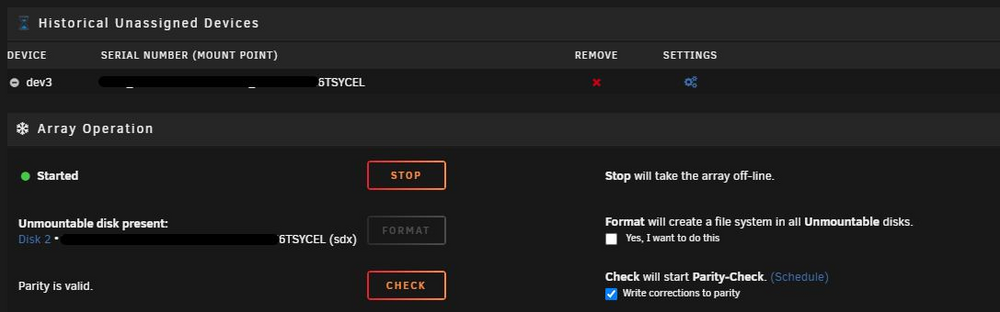
Hi there, so had a power failure and when the server came backup. disk2 stated Unmountable: Unsupported or no file system. I had another HD just sitting on the systems as a cold spare i precleared previously (sitting in unassigned devices) so i decided to just swap them. So i stopped the array swapped the disks and started it back. the array started the rebuild process and started doing a bunch of writes to the disk. However the disk still showed Unmountable: Unsupported or no file system. So i decided to let it do its thing maybe it will be fine after, because it already stated that previous data will be lost if i start the array. But there was that format message at the bottom where you start and stop the disk. im unsure what to do as im afraid of data loss.

-
ok will preclear it and hold as spare
-
plz see attached WDC_WD40EFRX-68N32N0_WD-WCC7K6TSYCEL-20220905-1317.txt
-
thank for you help btw, wished i posted here to begin with
-
i am took a bit to figure out how to get it to show up.. should i preclear the old drive and trust it?
-
recreated the log and i see some data not everything but some
-
i click on the check mark in UD and i get FS: xfs Executing file system check: /sbin/xfs_repair -n /dev/sdx1 2>&1 Phase 1 - find and verify superblock... Phase 2 - using internal log - zero log... ALERT: The filesystem has valuable metadata changes in a log which is being ignored because the -n option was used. Expect spurious inconsistencies which may be resolved by first mounting the filesystem to replay the log. - scan filesystem freespace and inode maps... sb_fdblocks 895215175, counted 902030091 - found root inode chunk Phase 3 - for each AG... - scan (but don't clear) agi unlinked lists... - process known inodes and perform inode discovery... - agno = 0 - agno = 1 - agno = 2 - agno = 3 - process newly discovered inodes... Phase 4 - check for duplicate blocks... - setting up duplicate extent list... - check for inodes claiming duplicate blocks... - agno = 0 - agno = 1 - agno = 2 - agno = 3 No modify flag set, skipping phase 5 Phase 6 - check inode connectivity... - traversing filesystem ... - traversal finished ... - moving disconnected inodes to lost+found ... Phase 7 - verify link counts... No modify flag set, skipping filesystem flush and exiting. File system corruption detected!
-
got the drive added to the system it shows up in UD but i dont see a "Check Filesystem Status" section in the Disk settings window for the drive the drive is xfs
-


