





CHBMB
Community Developer
-
Joined
Everything posted by CHBMB
-
Not that I'm aware of, but@gridrunner may have one, spaceinvaderone on YouTube is his channel. Worth checking there, but it's pretty self explanatory. Sent from my LG-H815 using Tapatalk
-
Only needed if you're accessing this from WAN. If you're only using it locally, not really required. Overall the benefit of a reverse proxy is you only need to open 80/443 or even just 443 to WAN instead of a ton of ports for all your applications. You're correct on your understanding of what this container does.
-
LOL, FWIW I enjoy shooting as a hobby. Nothing against gun owners, as long as they're responsible. Just making a joke.
-
Looks like there's still a couple of outdated packages there. These would be better. <FILE Name="/boot/packages/libffi-3.2.1-x86_64-1.txz"> <URL>https://mirrors.slackware.com/slackware/slackware64-current/slackware64/l/libffi-3.2.1-x86_64-1.txz</URL> </FILE> <FILE Name="/boot/packages/glib2-2.46.2-x86_64-2.txz"> <URL>https://mirrors.slackware.com/slackware/slackware64-current/slackware64/l/glib2-2.54.3-x86_64-2.txz</URL> </FILE> libmspack is a little out of date, but you may get away with it, failing that, you'll need to compile it from source as there doesn't seem to be a Slackware package for it. I don't use this plugin myself, but good on you for taking the time and trouble to try and update it for others.
-
Snap? Why? You a Canadian Cop too?
-
Count yourself lucky he's Canadian not American, otherwise he'd probably have shot you by now......
-
Still not a problem with our container. If two different images, by two different authors are giving you the same problem. And nobody else is seeing the same issue, the likely problem is a local issue to you. Try making the changes sparklyballs has suggested. ie change your appdata from /mnt/user/ to either /mnt/cache/ or /mnt/disk1/ /mnt/disk2/ That removes FUSE as a possible culprit. Which is the most likely reason. The error with our container says IO issue. It's because you're using /mnt/user/
-
Hope your kid is happy
-
You may need to edit the quote @dlandon
-
@1812
-
Mount the HDD with UD and then edit the docker container template and add a new mapping with this the mount point of the ext drive.
-
Agree with sparklyballs here, probably easiest to setup from scratch with fresh appdata.
-
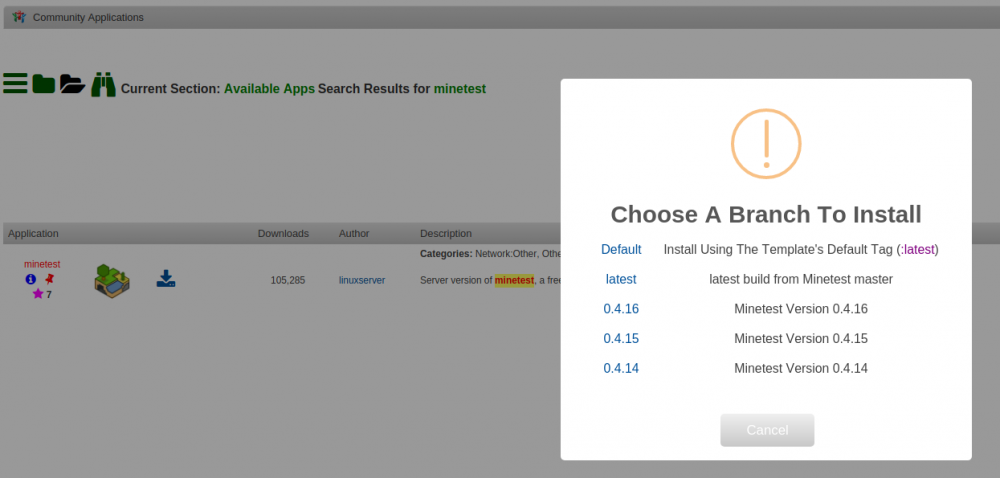
OK, so everybody has said their piece. Problem is this. Minetest releases are a bit of a mess, there is master, which is what our container is built from and updated every week, and then you need a matching client version otherwise you get an error. So basically you need to keep the client updated to the weekly image if you choose to run that. However @sparklyballs has produced some tagged releases which won't get any upstream updates to the underlying Alpine container, but people can run if they choose not to play the Minetest chase the client server version game. I'll test the tagged release and report back, and we'll alter the template to allow the option to install different versions if it works. @1812 Not having a go at you here, but moral of the story for all the posters above, if people post enough information for us to see where problems might lie, we'll do our best to help.
-
OK, first of all, there really was no need to post the repeating log over and over, one copy would have been enough, try wrapping logs in the appropriate code tags in the forum, makes it a bit easier to read.... Second of all, use our image, it works.
-
You using stable or unstable Ubuntu PPA?
-
Instructions are in my signature to get the docker run command, but here's the link from the docker FAQ Tautulli docker container logs, not Unraid logs
-
It was more to mitigate the effect the preclear plugin is having on UD. Was a genuine "Could this be an approach to fix the plugin mess in the interim?" question. Sent from my LG-H815 using Tapatalk
-
Post your docker run command, link in my sig and some logs, otherwise ain't anything we can tell you. Sent from my LG-H815 using Tapatalk
-
Wasn't really sure what those posts meant and whether it was a client config issue or a problem with the container. If you're happy to test, we can look at it. Sent from my LG-H815 using Tapatalk
-
That's a really helpful post. Unless the issue is highlighted we can't really fix it can we? "It doesn't work" is not enough info to help And @1812 I would expect a more helpful approach from you, going to put it down to a bad day.... From my personal point of view, unless someone helps debug it, yeah, fine remove it from CA, none of the linuxserver guys use it, won't bother us. If one of the community who actually wants to use it feels like highlighting exactly what the issues are then we can try and fix it.
-
@dlandon Just had a thought. To mitigate the issues with preclear plugin, might be an idea to put into your install routine to delete/move the plg off flash if it's found so it doesn't install on next reboot. I'd suggest uninstalling it as well if it hadn't spread crap far and wide across the whole of the system..... Desperate measures and all that..... Sent from my LG-H815 using Tapatalk
-
Problem is with guides, as someone that does the odd one myself, is that they're an enormous amount of work, and often become outdated quite quickly. IMHO the problem with preclear is nobody is quite clear what the end solution is going to be. Best bet for my money at the moment is to use the script via terminal. Sent from my LG-H815 using Tapatalk
-
Each instance of Kodi is essentially standalone. If you want a client/server setup then you have three options: 1. Plexkodi Addon 2. Emby for Kodi Both of these will use Plex/Emby as a backend database system with each instance of Kodi behaving as a client The third option is to use this addon and use a MySQL database as the backend. Details on how to configure the Kodi clients is found in the Kodi wiki. The advantage of this method is you don't need to run Emby or Plex.
-
location /ombi { return 301 $scheme://$host/ombi/; } location /ombi/ { proxy_pass http://192.168.0.1:3579; proxy_set_header Host $host; proxy_set_header X-Forwarded-Host $server_name; proxy_set_header X-Real-IP $remote_addr; proxy_set_header X-Forwarded-For $proxy_add_x_forwarded_for; proxy_set_header X-Forwarded-Ssl on; proxy_set_header X-Forwarded-Proto $scheme; proxy_read_timeout 90; proxy_redirect http://192.168.0.1:3579 https://$host; } if ($http_referer ~* /ombi/) { rewrite ^/dist/(.*) $scheme://$host/ombi/dist/$1 permanent; } Works for me, make sure you change the IP and port to suit and also don't forget to add /ombi as the root url in the ombi webui settings
-
https://github.com/tidusjar/Ombi/wiki/Reverse-Proxy-Examples Works for me.



