Jorgen
Members
-
Joined
-
Last visited
Everything posted by Jorgen
-
Sorry not sure what to suggest next then. Maybe ensure you’re using the exact clover version from the video (I’ve had no luck with most recent release and high sierra), or try with osx key instead of FakeSMC. Or wait for the real experts to chime in. Sent from my iPhone using Tapatalk
-
Try with two CPUs, and adjust the topology accordingly. I don’t think Mac OS likes a single cpu. And you are using FakeSMC in clover, right?
-
Yes, latest stable version: https://handbrake.fr/downloads.php Sent from my iPhone using Tapatalk
-
If you want Handbrake 1.1.0 I think you need to use docker tag 1.14.1: https://github.com/jlesage/docker-handbrake/releases
-
You should be able to specify an older release by adding the correct tag to the Repository setting in the unRAID docker template. E.g. jlesage/handbrake:v1.13.5 For available tags, see https://hub.docker.com/r/jlesage/handbrake/tags/ I don't know which tag correspond to 1.1.0 though. Edit: if you specify a particular tag you will be stuck on that version forever and won't be notified of updates. Remove the tag to get back on the "latest" releases.
-
Ok, thanks for pointing this out. I had (wrongly) assumed that QSV only added hardware acceleration to the normal h264 encoder, but after somme googling I now realise it's a completely different implementation of h264 encoding with different parameters and tradeoffs between quality/speed/file size. For other's benefit, QSV is really intended for real time streaming conversions where speed is more important than quality. If you care about quality, sacrifice raw speed and use the normal CPU powered encoders in Handbrake instead and you'll get better quality in smaller file sizes. Apparently, the best quality you can hope for using QSV is on par with the Veryfast preset for normal h264, but the file size will be larger. There are some tuning parameters you can add to QSV to improve things somewhat, but don't expect miracles: https://handbrake.fr/docs/en/latest/technical/video-qsv-options.html
-
Aha. I’ve got a Haswell, will do some quality comparisons. Sent from my iPhone using Tapatalk
-
What do you mean about the quality not being there? Do you see a difference in actual output quality when using QS? Or am I misreading your comment?
-
Happy to confirm this is working with the watch folder now! Thanks again!
-
Spoke too soon, problem has come back overnight. Deleting the Radarr container+image and re-installing fixed it again.
-
Yes, one after the other in the same session. Also tried with a restart in between, but same result.
-
Sorry Djoss, need your help. I cannot get the watch folder to work with QSV encoder on my system. Logs attached from a successful conversion via WebUI and an unsuccessful via watch folder. Same preset, same movie file (just renamed for each test). The watch folder is still pretending the CPU doesn't support QSV. WebUI 2018-07-12 20-55-00.log conversion.log HQ 720p30 Surround QSV.json
-
Thanks, good to know it’s working for you. I think I messed up the preset. I will start over and if It’s still happening I’ll post full logs. Sent from my iPhone using Tapatalk
-
Wow, this is so much faster! Thank you Djoss! Works great in UI mode, but I'm having problems getting this to work for the automatic watch folder. Has anyone else got that to work? Getting this in the docker log (from unRAID UI) when using watch folder: [autovideoconverter] Starting conversion of '/watch/Arrival.mkv' (16e292dbffc5c7745a3f5fcff335126b) using preset 'Mathias_MKV_720p30QS'... [autovideoconverter] 1 title(s) to process. [autovideoconverter] Encoding: 0.00 % [autovideoconverter] Conversion failed. In appdata/HandBrake/log/conversion.log I see this for the same job: ------- CONVERSION OUTPUT Wed Jul 11 23:39:07 AEST 2018 ------- [23:39:07] hb_init: starting libhb thread [23:39:07] thread 152b319c2ae8 started ("libhb") HandBrake 1.1.0 (2018070900) - Linux x86_64 - https://handbrake.fr 8 CPUs detected Opening /watch/Arrival.mkv... [23:39:07] CPU: Intel(R) Core(TM) i7-4770 CPU @ 3.40GHz [23:39:07] - Intel microarchitecture Haswell [23:39:07] - logical processor count: 8 [23:39:07] Intel Quick Sync Video support: no [23:39:07] hb_scan: path=/watch/Arrival.mkv, title_index=1 ...snip... x264 [error]: invalid preset 'quality' ERROR: Failure to initialise thread 'H.264/AVC encoder (libx264)' But for a successful job started from the UI, I see this in appdata/HandBrake/ghb/Encodelogs: Handbrake Version: 1.1.0 (2018070900) [23:24:20] gtkgui: Custom Preset: /My Presets/Mathias_MKV_720p30QS [23:24:20] 1 job(s) to process ...snip... [23:24:20] CPU: Intel(R) Core(TM) i7-4770 CPU @ 3.40GHz [23:24:20] - Intel microarchitecture Haswell [23:24:20] - logical processor count: 8 [23:24:20] Intel Quick Sync Video support: yes [23:24:20] - Intel Media SDK hardware: API 1.26 (minimum: 1.3) [23:24:20] - H.264 encoder: yes [23:24:20] - preferred implementation: hardware (any) via D3D11 [23:24:20] - capabilities (hardware): breftype la+i+downs vsinfo opt1 opt2+mbbrc+extbrc+trellis+ib_adapt+nmpslice [23:24:20] - H.265 encoder: no
-
You post prompted me to check my radarr and I had the exact problem (same situation too, no config changes for months, only automatic container updates). - If I restart the container, the download client test works perfectly. - If I send a movie download request over to NZBGet, I get the error message (although the request gets to NZBGet and starts downloading) - If I try the download client test again, it now fails with the same error message. If I restart container I'm back to step one. I eventually fixed it by deleting the container and image, then re-installing via CA. Quick and painless, all settings retained, annoying error message gone.
-
Can you post a screenshot of the audio/subtitle changes you are making? I have done similar changes and they stick for the preset for me.
-
Cheers JTok, went with option two and it seems to be working as intended now. Sent from my iPhone using Tapatalk
-
Hi JTok, Thanks for your work on this. I'm setting this up for the first time and was wondering about this warning for backups to keep: # WARNING: If VM has multiple vdisks, then they must end in sequential numbers in order to be correctly backed up (i.e. vdisk1.img, vdisk2.img, etc.). number_of_backups_to_keep="0" I've ended up with two vdisk's with the same number somehow, but in two different locations: /mnt/user/domains/JorgenOSX/vdisk2.img /mnt/disk3/J-VM-vdisk2/vdisk2.img In my case, will the script not backup both disks in the first place, or will the identical numbering just affect the retention/deletion? Do I need to rename one of the vdisks to resolve this? This makes me nervous as I don't have a backup yet, catch-22 moment here...
-
Here's one way of doing it from the command line: I'm sure you can achieve the same from Krusader but I don't know how. I use Midnight Commander and there it's a two step process: 1. create symlink 2. edit symlink to replace the first part (/mnt/user/Media) with something the docker can understand (/storage) I know this works for files, but haven't tried folders. Please report back if you test that.
-
Update: on second start of VM, with no changes to XML or hardware, it all just works. Still get the libusb errors in the VM log, but they don't seem to affect anything. The missing GPU output was a loose cable, and the missing network is something that happens occasionally to this VM so it was probably a coincidence. So, I think this would work for you. Alternatively, you could always use the excellent Libvirt Hotplug USB plugin instead. That will let you configure the VM without the USB device attached, and then simply attach it while the VM is running if/when required.
-
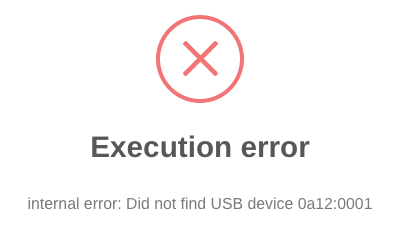
Ok, decided to try this myself. I have a VM with a bluetooth dongle passed through as a USB device. The VM starts fine with the dongle plugged in to the unRAID box and this XML: <hostdev mode='subsystem' type='usb' managed='no'> <source> <vendor id='0x0a12'/> <product id='0x0001'/> </source> <address type='usb' bus='0' port='2'/> </hostdev> If I unplug the dongle form the host and try to start the VM, I get the expected error: I then edited the XML to this: <hostdev mode='subsystem' type='usb' managed='no'> <source startupPolicy='optional'> <vendor id='0x0a12'/> <product id='0x0001'/> </source> <address type='usb' bus='0' port='2'/> </hostdev> Now the VM starts, but it's not working properly. It has no network and the passed through GPU doesn't output a signal, so I can't see what's going on. There are also three new errors in the VM log that doesn't normally show up, no doubt related to the issues: libusb: error [_get_usbfs_fd] libusb couldn't open USB device /dev/bus/usb/002/004: Operation not permitted libusb: error [_get_usbfs_fd] libusb couldn't open USB device /dev/bus/usb/002/002: Operation not permitted libusb: error [_get_usbfs_fd] libusb couldn't open USB device /dev/bus/usb/002/004: Operation not permitted I'll continue to experiment with this, but at this point it doesn't look like the startupPolicy='optional' is working. at least not for a Mac OS VM.
-
From what I've read you should be able to specify a USB device as optional on start of a VM. Fair warning, I haven't tried this myself, so I don't know if it works or breaks something. Try it on a test VM first. And please report back if it works or not. After adding your USB device as per normal in the VM edit screen, you need to manually edit the XML and add startupPolicy='optional' to the source tag of the USB device. Here's the example from the link above: Your vendor and product id will be different, and you will also have an address tag added. <hostdev mode='subsystem' type='usb'> <source startupPolicy='optional'> <vendor id='0x1234'/> <product id='0xbeef'/> </source> </hostdev>
-
Also got a nice speed bump from the 2-minute performance video, thanks @gridrunner!! Now, are there any other cpu features we could/should add? I've compared the features of my actual CPU (i7 4770): root@Tower:~# lscpu | grep Flags Flags: fpu vme de pse tsc msr pae mce cx8 apic sep mtrr pge mca cmov pat pse36 clflush dts acpi mmx fxsr sse sse2 ss ht tm pbe syscall nx pdpe1gb rdtscp lm constant_tsc arch_perfmon pebs bts rep_good nopl xtopology nonstop_tsc cpuid aperfmperf pni pclmulqdq dtes64 monitor ds_cpl vmx smx est tm2 ssse3 sdbg fma cx16 xtpr pdcm pcid sse4_1 sse4_2 x2apic movbe popcnt tsc_deadline_timer aes xsave avx f16c rdrand lahf_lm abm cpuid_fault epb invpcid_single pti retpoline tpr_shadow vnmi flexpriority ept vpid fsgsbase tsc_adjust bmi1 avx2 smep bmi2 erms invpcid xsaveopt dtherm ida arat pln pts to the CPU that MacOS thinks it is using (via terminal inside the MacOS VM): sysctl -n machdep.cpu.features FPU VME DE PSE TSC MSR PAE MCE CX8 APIC SEP MTRR PGE MCA CMOV PAT PSE36 CLFSH MMX FXSR SSE SSE2 HTT SSE3 SSSE3 CX16 SSE4.1 x2APIC AES VMM XSAVE OSXSAVE AVX1.0 Which gives me this long list of "missing" CPU features: abm acpi aperfmperf arat arch_perfmon avx avx2 bmi1 bmi2 bts clflush constant_tsc cpuid cpuid_fault ds_cpl dtes64 dtherm dts epb ept erms est f16c flexpriority fma fsgsbase ht ida invpcid invpcid_single lahf_lm lm monitor movbe nonstop_tsc nopl nx pbe pcid pclmulqdq pdcm pdpe1gb pebs pln pni popcnt pti pts rdrand rdtscp rep_good retpoline sdbg smep smx ss sse4_1 sse4_2 syscall tm tm2 tpr_shadow tsc_adjust tsc_deadline_timer vmx vnmi vpid xsaveopt xtopology xtpr Where is the best place to start learning about what these features do, and how they behave in KVM? Although, I note that AVX, AVX2 and XSAVEOPT are all missing from the sysctl results, so maybe that command in not correct? I did add them to the XML as per the video.
-
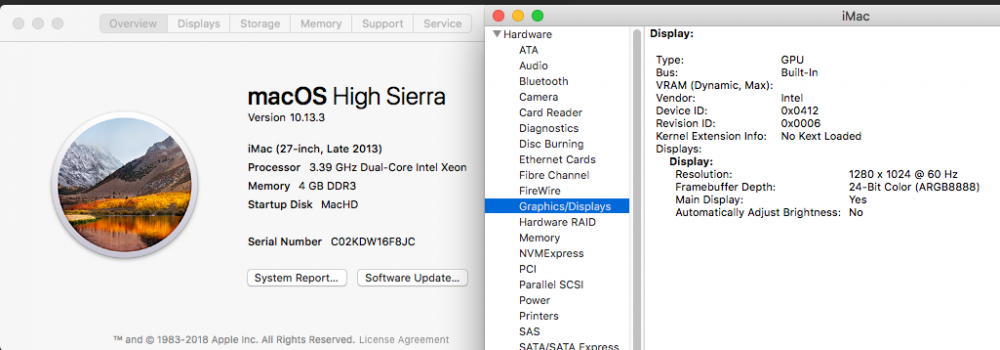
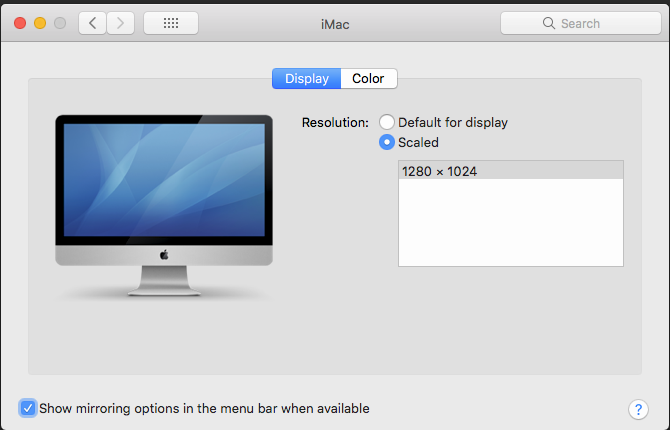
Has anyone managed to pass through an intel IGD to OSX? I've got my OSX VM running fine using VNC on unRAID 6.4.1 but can't get any output signal if I try to swap to IGD graphics with the XML below. I've tried plugging a screen into both the HDMI and DVI ports, neither outputs a signal. I haven't tried the VGA port as I don't have a cable handy. The same hostdev tags work fine for a libreelec VM, so I'm assuming it's a problem on the OSX side? OSX VM boots fine and I can access it via apples screen sharing or nomachine, but the connected display remains black. Do I need to change anything in clover to get this to work? Or is it a lost cause and intel IGD will never work? Here's what OSX system report thinks is happening The resolution is different from what I've specified in the clover bios and config.plist, so at least something is changing compared to booting with VNC graphics in the XML. The display preferences pane in system settings report the screen as built-in with 1280x1024 the only option for resolution. As far as I can tell this is not the native resolution of the screen I've got connected or the 27 inch iMac, so not sure where it's coming from. Any advice will be greatly appreciated cheers Jorgen <domain type='kvm' xmlns:qemu='http://libvirt.org/schemas/domain/qemu/1.0'> <name>JorgenOSX</name> <uuid>50c672ad-610f-9d8c-d0b1-b02d2055556e</uuid> <metadata> <vmtemplate xmlns="unraid" name="Linux" icon="Apple_vintage_white.png" os="linux"/> </metadata> <memory unit='KiB'>4194304</memory> <currentMemory unit='KiB'>4194304</currentMemory> <memoryBacking> <nosharepages/> </memoryBacking> <vcpu placement='static'>4</vcpu> <cputune> <vcpupin vcpu='0' cpuset='2'/> <vcpupin vcpu='1' cpuset='6'/> <vcpupin vcpu='2' cpuset='3'/> <vcpupin vcpu='3' cpuset='7'/> <emulatorpin cpuset='0,4'/> </cputune> <os> <type arch='x86_64' machine='pc-q35-2.10'>hvm</type> <loader readonly='yes' type='pflash'>/usr/share/qemu/ovmf-x64/OVMF_CODE-pure-efi.fd</loader> <nvram>/etc/libvirt/qemu/nvram/50c672ad-610f-9d8c-d0b1-b02d2055556e_VARS-pure-efi.fd</nvram> <boot dev='hd'/> </os> <features> <acpi/> <apic/> </features> <cpu mode='host-passthrough' check='none'> <topology sockets='1' cores='2' threads='2'/> </cpu> <clock offset='utc'> <timer name='rtc' tickpolicy='catchup'/> <timer name='pit' tickpolicy='delay'/> <timer name='hpet' present='no'/> </clock> <on_poweroff>destroy</on_poweroff> <on_reboot>restart</on_reboot> <on_crash>restart</on_crash> <devices> <emulator>/usr/local/sbin/qemu</emulator> <disk type='file' device='disk'> <driver name='qemu' type='raw' cache='writeback'/> <source file='/mnt/user/domains/JorgenOSX/vdisk2.img'/> <target dev='hdc' bus='sata'/> <address type='drive' controller='0' bus='0' target='0' unit='2'/> </disk> <disk type='file' device='disk'> <driver name='qemu' type='raw' cache='writeback'/> <source file='/mnt/disk3/J-VM-vdisk2/vdisk2.img'/> <target dev='hdd' bus='sata'/> <address type='drive' controller='0' bus='0' target='0' unit='3'/> </disk> <controller type='usb' index='0' model='ich9-ehci1'> <address type='pci' domain='0x0000' bus='0x00' slot='0x07' function='0x7'/> </controller> <controller type='usb' index='0' model='ich9-uhci1'> <master startport='0'/> <address type='pci' domain='0x0000' bus='0x00' slot='0x07' function='0x0' multifunction='on'/> </controller> <controller type='usb' index='0' model='ich9-uhci2'> <master startport='2'/> <address type='pci' domain='0x0000' bus='0x00' slot='0x07' function='0x1'/> </controller> <controller type='usb' index='0' model='ich9-uhci3'> <master startport='4'/> <address type='pci' domain='0x0000' bus='0x00' slot='0x07' function='0x2'/> </controller> <controller type='sata' index='0'> <address type='pci' domain='0x0000' bus='0x00' slot='0x1f' function='0x2'/> </controller> <controller type='pci' index='0' model='pcie-root'/> <controller type='pci' index='1' model='pcie-root-port'> <model name='pcie-root-port'/> <target chassis='1' port='0x10'/> <address type='pci' domain='0x0000' bus='0x00' slot='0x02' function='0x0' multifunction='on'/> </controller> <controller type='pci' index='2' model='pcie-root-port'> <model name='pcie-root-port'/> <target chassis='2' port='0x11'/> <address type='pci' domain='0x0000' bus='0x00' slot='0x02' function='0x1'/> </controller> <controller type='pci' index='3' model='pcie-root-port'> <model name='pcie-root-port'/> <target chassis='3' port='0x12'/> <address type='pci' domain='0x0000' bus='0x00' slot='0x02' function='0x2'/> </controller> <controller type='pci' index='4' model='pcie-root-port'> <model name='pcie-root-port'/> <target chassis='4' port='0x13'/> <address type='pci' domain='0x0000' bus='0x00' slot='0x02' function='0x3'/> </controller> <controller type='pci' index='5' model='dmi-to-pci-bridge'> <model name='i82801b11-bridge'/> <address type='pci' domain='0x0000' bus='0x00' slot='0x1e' function='0x0'/> </controller> <controller type='pci' index='6' model='pci-bridge'> <model name='pci-bridge'/> <target chassisNr='6'/> <address type='pci' domain='0x0000' bus='0x05' slot='0x00' function='0x0'/> </controller> <controller type='virtio-serial' index='0'> <address type='pci' domain='0x0000' bus='0x01' slot='0x00' function='0x0'/> </controller> <interface type='bridge'> <mac address='52:54:00:54:45:cf'/> <source bridge='br0'/> <model type='e1000-82545em'/> <address type='pci' domain='0x0000' bus='0x02' slot='0x00' function='0x0'/> </interface> <serial type='pty'> <target port='0'/> </serial> <console type='pty'> <target type='serial' port='0'/> </console> <channel type='unix'> <target type='virtio' name='org.qemu.guest_agent.0'/> <address type='virtio-serial' controller='0' bus='0' port='1'/> </channel> <input type='tablet' bus='usb'> <address type='usb' bus='0' port='1'/> </input> <input type='mouse' bus='ps2'/> <input type='keyboard' bus='ps2'/> <hostdev mode='subsystem' type='pci' managed='yes'> <driver name='vfio'/> <source> <address domain='0x0000' bus='0x00' slot='0x02' function='0x0'/> </source> <address type='pci' domain='0x0000' bus='0x06' slot='0x01' function='0x0'/> </hostdev> <hostdev mode='subsystem' type='pci' managed='yes'> <driver name='vfio'/> <source> <address domain='0x0000' bus='0x00' slot='0x03' function='0x0'/> </source> <address type='pci' domain='0x0000' bus='0x04' slot='0x00' function='0x0'/> </hostdev> <memballoon model='virtio'> <address type='pci' domain='0x0000' bus='0x03' slot='0x00' function='0x0'/> </memballoon> </devices> <qemu:commandline> <qemu:arg value='-usb'/> <qemu:arg value='-device'/> <qemu:arg value='usb-mouse,bus=usb-bus.0'/> <qemu:arg value='-device'/> <qemu:arg value='usb-kbd,bus=usb-bus.0'/> <qemu:arg value='-smbios'/> <qemu:arg value='type=2'/> <qemu:arg value='-cpu'/> <qemu:arg value='Penryn,vendor=GenuineIntel,kvm=on,+invtsc,vmware-cpuid-freq=on,'/> </qemu:commandline> </domain>
-
@Djoss can correct me if I'm wrong, but mapping /watch and /output to the same unRAID folder is probably not a good idea. Especially since they are both mapped to the root of ALL your shares. I recommend you turn off the docker until someone can give you better advice on how to map the folders, or you might be running at risk of data loss. Or at the very least, map /watch to something else, even if it's just an empty folder on one of your shares. There's a few lines in your log relating to errors processing files from the /watch folder and it doesn't look like it's something you want to be happening. For what it's worth here are my folder mappings as reference, notice that /storage is different to /watch that is different to /output: