





strike
Members
-
Joined
-
Last visited
Everything posted by strike
-
I'll check your log after work to see if there's anything obvious. In the meantime check out the FAQ.
-
Aha, sorry then I misunderstood your first post. You still need to fix your Lan network tho. As mentioned all subnets that are going to access the webui must be defined in Lan networks, including the vlan subnet. And in the log from before it was not defined. Also make sure you don't use a proxy in the other containers. If it still doesn't work after doing that you should look at the faq. Theres a few things in there regarding using the VPN on other containers. I'm on my phone at work right now so I don't have the link.
-
Yeah, it looks better now.
-
That's exactly what I'm saying.. In your log from before, it says your LAN_NETWORK is defined as: 10.33.101.0/27 This is not correct if the computer your trying to access the webui from is x.x.12.0/27 Forget about sonarr,privoxy etc for now. First, fix deluge so you can get to the deluge webui. As I've said multiple times, ALL subnets you're accessing the web ui from need to be defined in LAN_NETWORK. So if the computer you're trying to get to the webui from is on x.x.12.0/27 you need to add that. Subnets are separated by commas. After doing this you still can't get to the deluge webui? What do you mean by this?
-
When VPN is enabled strict ip tables rules are in place and every subnet you are accessing the webui from needs to be defined in LAN_NETWORK in the container template. If it's not defined you'll be blocked. So if you're accessing the webui on a machine on the normal Lan or a different vlan it needs to be defined in the template. What is the Ip of the machine you're accessing the webui from?
-
I'm also running the official container, and one thing I noticed is that I have UID and GID as the variables, whereas you have APP_UID and APP_GID. Can you try changing it to UID and GID and try your test again to see if it creates the files with the proper owner?
-
Looks fairly standard. Then I don't know what is causing this. Maybe post in the support thread for emby to see if others can help.
-
Are you running some extra metadata plugin in emby or something? You need to figure out why the .nfo files are created with daemon daemon instead of nobody users. Which emby container are you running? Binhex? Official?
-
Do you have another app creating the .nfo files? It doesn't look like emby has created this one, as it's not nobody users. Since emby is set up with UID and GID for 99/100 (nobody users), any files emby creates should have nobody users. So maybe you have another app creating .nfo files? This look correct. Is this after pasting the settings in smb extras?
-
I don't know why you are renaming and moving manually when there are apps like sonarr/radarr, but anywho; Make sure the emby conatiner has UID and GID set to 99 (UID) and 100 (GID) in the template. Run docker safe permissions tool. Go to settings-SMB-SMB Extras and paste this in the box: domain master = yes preferred master = yes os level = 255 force user = nobody force group = users create mask = 0666 force create mode = 0666 directory mask = 0777 force directory mode = 0777Try again now, it should be fixed.
-
The vpn tunnel seems to be working, so the issue is most likely what you have defined as your LAN_NETWORK. I see you have only one subnet in there, but you mentioned that the container is running on a VLAN. You have to define both your normal LAN subnet and your VLAN subnet (and any other VLAN subnet your might be accessing the webui from), separated by a comma. If that doesn't work, you have to check your network/firewall settings.
-
Please do this: https://github.com/binhex/documentation/blob/master/docker/faq/help.md
-
I don't see any reason why you can't load the webui. I went back to your first post and saw this: "Changed the webGui port number away fro 8080 (default) - locked me out of the gui with the VPN on and off - its worse." I'm thinking maybe this could be the issue: you changing the port and changing it back. Can you change the port again to maybe 8085 or something, following the directions in Q4: https://github.com/binhex/documentation/blob/master/docker/faq/qbittorrentvpn.md
-
What I think you're referring to in his logs is actually normal. It's just the watchdog script checking if the connection is up/down, checking if the port has changed, and checking that DNS and iptables are working. You don't see it actually disconnect and reconnect in his log. So the vpn tunnel seems to be working fine, at least from what I can tell.
-
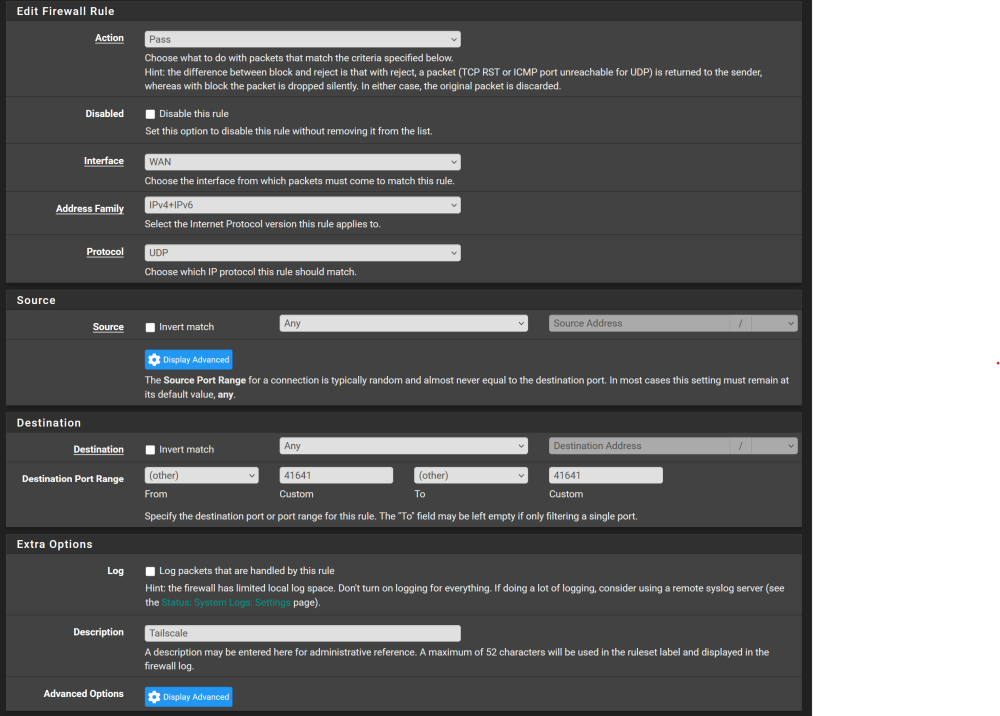
It should do the same thing yes, for your server. But you have been trying to ping containers on a custom network and not the server so just humor me and open up port 41641 and see if that helps. Also, if you have Tailscale on your phone, try pinging the container from there on a mobile connection. And in the unraid webui under tailscale->status just to see if you get a direct connection from the server to the container.
-
I forgot one thing, you might need to open up port 41641 UDP in your pfsense firewall.
-
Does it still connect fine if you check the logs? Since you changed the password, have you checked that there are no authentication errors? Please stop the container, delete the supervisord.log, start the container, and let it run a few min before you post a new log file. This time without username and password :)
-
Can you run this on the server, does it have tailscale dns enabled? tailscale dns statusif it's enabled run this: tailscale set --accept-dns=falseThen try pinging a container in bridge mode again. You might have to restart the container. Nothing is wrong with Unraid's Tailscale implementation; I have direct connections working fine.
-
Have you enabled host access to custom networks in docker settings? By default, containers on a custom network are not allowed to talk to the host. That's probably why it's getting relayed. If you switch to the default bridge network, you'll see you'll get a direct connection. I personally don't have host access to custom networks enabled because of security, as I want as few things as possible to be able to talk to the host. But if you're interested, I can tell you a trick so that you can still use a custom network and only allow certain containers to talk to the host instead of enabling it globally; just say the word.
-
@dolphinspanker Change your PIA password asap, you forgot to redact it from your supervisord.log file. Also, change your network to bridge, and you should be able to get to the webui if your server IP is 10.1.1.x
-
Yeah, I get that. One of the sites I use also doesn't like duplicate IPs (I think most private sites have that rule), but I haven't had an issue with that on airvpn. (Only if I restart the vpn container multiple times in a row I can get duplicate IPs). Airvpn has the most stable connections out of any providers I've tried. I mean, my desktop can have the same connection for many weeks without drops. One of the reasons I left PIA was because of unstable connections.
-
Why do you need a dedicated IP? I was using PIA like 15 years ago, but switched to airvpn after a few years due to several issues I had. Never had an issue with airvpn. They support port forwarding, but they do not offer dedicated IPs. Nordvpn and Mullvad are also good vpn providers.
-
To answer your question first, there's really no "easy" way to do this, but here are a few commands that can be useful. If you want to never think about port mapping again, scroll down to my last option. This command will list all containers and their exposed ports: docker container ls --format "table {{.ID}}\t{{.Names}}\t{{.Ports}}" -a And to find an available port, the easiest way is to run the same command and just grep for the port to see if it's in use or not. Say you want to install a container that use port 8080 by default, then you run this: docker container ls --format "table {{.ID}}\t{{.Names}}\t{{.Ports}}" -a | grep 8080If it returns an empty result, the port is available, but if it returns a container name and port, you know it's in use. So you run the same command again and just put a random port like 5035 to check if it's available, and if it is, you use that in your port mapping. OR ( the "right" and more secure way to do it) You can change all your containers' network to a custom network like br0 and assign each container its own IP. Then the port mapping is irrelevant, as the containers expose all ports, and since it's using a dedicated IP, there will be no port conflicts. The best way is to use a macvlan network for this; you can change this in Settings -> Docker (you might have to toggle the advanced view button. After you have done this, you have to set the network type for each container to custom br0 or create your own custom network. Then, under "Fixed IP" set an IP that is outside your router's DHCP range. Then you're done. One thing you should know tho, is that by default containers on a custom network can NOT talk to containers that use the host or bridge network (unless you enable host access to the custom network in Settings-Docker). This is for security reasons, and you should only enable it if you need to. The only thing you need to worry about when deploying your containers now is to set an available IP instead of port, which is far easier IMHO. And if you sort all your containers by IP (like I do), it takes 1 second to see what the next IP you should use is. No more worrying about ports; you simply use the default port set by the container.
-
Well, the only pros for using a folder I can think of are that it dynamically expands, whereas with a vDisk you have to delete the image and recreate it with a bigger size if it ever gets close to full. The con tho is that if you one day need to copy/move the docker folder elsewhere for whatever reason, it's gonna take forever. This is because it consists of millions of small files. And with a vDisk is just one big file. And we all know that it's quicker to copy/move one big file vs millions of small files. With a vDisk tho, you would just delete and recreate, as copy/moving the image can cause corruption. I personally prefer using a vDisk. I think it's super easy to just nuke the image and recreate it if I need to. It takes like 5 min to install all the containers again. I tried using a folder once, but I had issues with it. Can't remember what it was tho, but I switched back to using a vDisk.
-
It's because you're using docker folder instead of a vDisk. If you want to change to a vDisk image, you need to change that in Settings> Docker

