





strike
Members
-
Joined
-
Last visited
Everything posted by strike
-
Sorry, my bad 🙂 press the terminal button in the unraid webui. Do you know the full path to your appdata dir? If you do then just type in the whole path to the file with the chmod 0777 command first. If you don't know the path type mc and hit enter. You will then be inside a file manager. Navigate with the mouse or arrow keys to /mnt/user/ and your appdata dir. Once inside where you can see the core.conf file press F10 to hop back to the terminal (might be a different key for you. You should see the options on the bottom of the file manager). Your path should then already be filled out. Now run the chmod 0777 core.conf command. If you want you can edit the file directly in the file manager using F4 I think (might be different for you, look at the options on the bottom.
-
Navigate to the appdata folder where the core.conf file is in the terminal and run: chmod 0777 core.conf and open it in notepad++. You should only edit this file when the container is stopped.
-
My bad, I thought I saw an old version in your log, but I was wrong. I see you're on the latest now. Hmm.. That's weird. Could be a PIA issue. But then again, I think more people would have reported the problem. I think @binhex is the best person to answer that particular question as I'm not that familiar with how the PIA stuff works in this container. I use AirVPN so.
-
Great, then we know what the issue is, and it's related to port forwarding. For port forwarding to work, STRICT_PORT_FORWARD should be set yes. But since your webui won't load when set to yes, it means either the endpoint is not supporting port forwarding anymore, or more likely, it could be because you're running an old version of delugevpn, which maybe has an old link for fetching the port forwarding supported endpoints. I noticed in your log a warning that the url was down. It may be down, but I don't think it has been down for 1 1/2 months.. And without port forwarding, your speed will suffer, so you should definitely fix it. Start by updating the container to the latest version. Set STRICT_PORT_FORWARD to yes again and see if you have the same issue. If it works, then it's fixed. If it won't load again, you could try to download a new ovpn file and pem file. The Netherlands is a good choice.
-
Maybe Q4 can help? https://github.com/binhex/documentation/blob/master/docker/faq/delugevpn.md
-
Immich is not just a backup solution, you can browse, manage, search etc. But if you want something really simple jellyfin is a good option. You just create the library, and then you can browse your photos. Quick, easy, and simple. Nothing too fancy.
-
If you set STRICT_PORT_FORWARD to no can you reach the webui then? It looks like you have an old template, so you need to add the variable yourself to the template. Add a new variable, set the key to: STRICT_PORT_FORWARD and value to no
-
I would go for Immich, but if that's not an option, you can maybe try Jellyfin, which is free.
-
Try this new container: https://forums.unraid.net/topic/194313-support-containernetwork-autofix-cnaf-auto-fix-vpn-dependent-containers/
-
First, remove the deluge run.txt attachment as you forgot to remove your username and password. Then change your password asap. You also uploaded the supervisord.log from krusader and not delugevpn. Please attach the log from delugevpn instead, and REMOVE your user/pw from it before uploading. What is the IP of the machine you're trying to access deluge from?
-
What is the issue? Please also do this: https://github.com/binhex/documentation/blob/master/docker/faq/help.md
-
@roland It's not clear to me if you solved the issue or not. I had the exact same issue with "randomness" as you describe. But it was due to snort (IDS/IPS) adding a new rule, which blocked. Your unify also has IDS/IPS, I think, and if it's like pfSense, the logs for that may be different place than the regular firewall log.
-
Which firewall are you using? I recently had a similar issue with pfSense and Snort. Turns out there was a new snort rule blocking. Also, do this so we can get a full log: https://github.com/binhex/documentation/blob/master/docker/faq/help.md
-
Have you recently installed tailscale or done any changes in tailscale releated to dns?
-
I would use SFTPGo, it has a webclient. That + a reverse proxy and/or tailscale will give you access from anywhere with a browser. You can set up how many shares and users you want. For the most secure access, use Tailscale. Which, of course, requires each user to install Tailscale. If that is not an option, just set up the reverse proxy, and they can access it with just a browser. SFTPGo has pretty nice security features on its own, which blocks unwanted access if you decide to make it public. You can create a white list, block after x amount of login attempts, etc.
-
Add this to your rclone mount script: --uid 99 --gid 99
-
@ICDeadPpl Since you didn't respond, I assume you figured out the issue yourself? It was probably a caching issue. Since writing directly from disk to disk bypasses the FUSE user share system, it can sometimes take some time before the files show up in the user share. I can probably put in some code, adding a "cache refresh" command, forcing an update, ensuring the user share system is immediately aware of the file's new location.
-
And when you encountered this, did you run a library scan in plex after? I use emby, so I'm not familiar with how plex works, but emby does library scans every 24h, I think, to update any existing files. Are you saying the movies are still gone from plex after a library scan is initiated?
-
Oh, that's a weird one. Since everything under the same share in /mnt/disk.. should appear in mnt/user.. Are you saying it happened to only some movies and not all? What path do you use in plex/radarr? It's the same one that's in the log, except only /mnt/user/data.. instead of disk..? Does the share you have in plex/radarr have any disks excluded in the share settings?
-
If you mean move it to the array, then yes. Simply perform a "new config" and relocate the parity drive to a new slot in the array. To move it to a pool, it depends on what filesystem you use in the pool and how many drives you have in the pool already.
-
So I deleted the api key, made a new admin one, and still the same issue. One weird thing is if I disconnect from the Tailscale app on the phone and try to connect in the app, nothing happens, no failed connection message, no message at all, just nothing happens. If I connect to Tailscale again, I get connection failed.
-
I already had an admin api key, but it still doesn't work. Will try to make a new one later tonight.
-
That log snippet is 99% useless; the 1% usable information here is the vpn remote server: ams-289.whiskergalaxy.com. So I'm just guessing here, as that variable isn't necessarily the server you're trying to connect to. But if this is indeed the server you're connecting to, you need to change the endpoint, as this endpoint is down. So download a new .ovpn file and try again. If this doesn't solve the issue, do this: https://github.com/binhex/documentation/blob/master/docker/faq/help.md
-
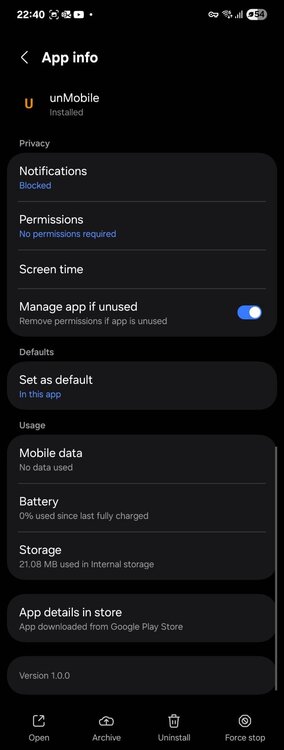
There's nothing to enable in the app settings. Can't even turn on notifications as it won't allow me to.
-
Same for me also on android


