Pete
Members
-
Joined
-
Last visited
-
Many thanks. Was close to give up when I found your comment. Setting it to Q35-4.2 fixed the problem. Have not tried other values but the default (Q35-9.2) didn't work. @SpaceInvaderOne This should be pinned to the top of this thread. Maybe it is something special with my hardware and the majority of Unraiders don't have the problem. Otherwise it should be set as the default in the VM or at least recommended as a necessity in the UI of the VM in case someones gets the "an internet connection is required to install macOS" error.
-
It is nice that I can choose what filetypes should stay on the cache for faster access and less disc spin up. But it would be nice if I could move these filetypes from the array to the cache as well. I omit the cache when doing large bulk transfers to prevent wearing out the cache SSDs and then these types of files never reach the cache. Is this possible? If not I'd suggest this as a feature request for a future update. It would probably be enough to add a checkbox ("move to cache") behind the "Ignore files listed inside of a text file" and "Ignore file types" menu options because a "move to cache" would make no sense without excluding these files from the normal "move to array" operation. Otherwise the files would be moved back and forth forever.
-
Many thanks. It worked. You have to log out each server individually from the WebUI, not just you from the Unraid Connect webpage.
-
I have an Unraid server (A) with a dual 10G NIC. As I'm running low on 10G ports on my switch, I came up with the idea to connect the second 10G port to another Unraid server (B) that has a 2.5G NIC. That way I use only one 10G port on my switch to connect 2 servers one with 10 G the other with 2.5 G. Server A sees server B and vice versa and I can transfer files between them, nice. What does not work is to access Server B from the LAN (through Server A). Tried to set the network ports on A both as separate nics and as a bridge. And tried to put B into the same and a different subnet as A with the gateway set to the IP address of the connected port on A. But nothing works. If I add another NIC to B and connect it directly to the LAN (via 1 GbE port on switch), I can connect to B from the LAN. But then transfer between B and the LAN is only 1 G. Maybe I need to put the NIC on A into promiscuous mode or add some VM on A that handles the routing? Any tips appreciated.
-
I didn't care about the name of my server, when I activated my license. Later I changed it from TOWER to something more meaningful in the WebUI. New name works everywhere except in UNRAID CONNECT the server name is still TOWER and I do not find a way to change it. Any help appreciated.
-
Ich habe mal die Lüfter manuell abgeklemmt. Jetzt bin ich auf ca. 14W. Ich denke die bekomme ich mit Fancontrol in den Griff. CPU Lüfter lasse ich über BIOS geregelt aber vielleicht finde ich noch einen PMW Lüfter der bis Null runter geht. Dann wären im Standby alle Lüfter aus. Die Trendnet Karte ist nat. schön sparsam. Nur ein Wechsel auf SFP+ wäre bei mir recht teuer, da ich bislang weder Switche mit SFP+ Ports habe noch entsprechende Kabel verlegt sind. 10 Gbe brauche ich eigentlich nur, wenn ich mal große Mengen an Daten auf das UNRAID kopieren muss. Also bei Ersteinrichtung oder größeren Umverlagerungen von anderen NASen. Zum Lesen der Daten reicht mir 1 Gbe. Die meisten Clients sind auch nur per 1 Gbe angebunden und wenn die Daten direkt vom HDD Array kommen, ist da sowieso nicht viel mehr an Geschwindikeit drin. Ergo werde ich wohl beim integrierten 1 Gbe Netzwerk bleiben. Und bei Kopierorgien temporär ne 10 Gbe Karte mit RJ45 reinschieben. Weiß jemand, ob man eine 10 Gbe Netzwerkkarte im PCIe Slot softwaremäßg weitestgehend stromlos schalten kann? Das wäre dann das Optimum. Ich würde die Karte einfach deaktiviert drin lassen und bei Bedarf aktivieren und ich müsste nicht jedemal das Gehäuse öffnen und die Karte einbauen, wenn ich mal 10 Gbe Geschwindigkeit brauche. Wenn es dafür eines Neustarts bedarf, wäre das auch nicht tragisch. Nur jedesmal im BIOS rumfummeln wäre blöd, da ich nat. normalerweise keinen Monitor angeschlossen habe und das Board ja auch kein IPMI hat.
-
24W im Idle ist schon relativ viel. Andererseits mit etlichen laufenden Dockern auch wieder nicht. Wie kommst du dann aber auf C10? Die Docker dürfen dann auch keine Resourcen ziehen. Dann passen die 24W aber wiederum nicht. Seltsam. Was hast du für ein Netzteil drin? Und wie viele Lüfter, die dauerhaft drehen?
-
Schlechtes Netzteil oder zusätzliche Verbraucher, die direkt am Netzteil hängen, z.B. Gehäuselüfter? Und nochmals meine Frage: C10 pkg oder CPU?
-
C9 bei Pkg oder nur bei CPU. Komme nur auf C9 (Pkg). Hast du spezielle Lowpower NVMe oder SATA drin? Oder wenig RAM?
-
Was ist das für ne 10Gbe Karte. Nur 1,5W mehr als mit integriertem LAN ist ja beeindruckend. Und wie bekommst du 3 NVME auf dem Board unter? Ansonsten habe ich ein ähnliches Setup: CPU nur den kleinen Bruder 2126G, 96 GB ECC RAM (4 Sticks), derzeit testweise 6 SATA HDD aber nur 2 NVMe. Da komme ich mit integriertem LAN aber nur auf ca 17 W. Ich habe die 3 Lüfter im Fractal Gehäuse im Verdacht. Bekomme die momentan nicht komplett ausgeschaltet.
-
Does the card limit the C states you can reach? Does it increase idle power consumption? By how much?
-
Ich hatte 2 von den QNAP Switchen und beide funktionierten nicht richtig. Wenn ein Gerät mit 10 Gbit am 10 Gbit Port und eines mit 2,5 Gbit am 2,5 Gbit Port des Switches angeschlossen wurde, dann war der Durchsatz in die eine Richtung wie erwartet 2,5 Gbit, in die andere aber nur 1 Gbit. Habe dies mit iPerf und einer Kombination verschiedenster Geräte getestet, wie z.B. Macs, Unify 10 Gbit Switch und selbst zwischen 2 QNAP NAS. Immer dasselbe Ergebnis. Ticket bei QNAP ergab nur, ich solle mich an den Händler wenden. Toll. Habe letztendlich beide Switche zurückgesendet.
-
Weißt du noch den Verbrauch in C9 mit dem C246M-WU4 in Realbedingungen also mit aktivem Netztwerk, SATA in Standby und NVMEs? Verkauft? Warum? Ich dachte das C246M-WU4 wäre nach wie vor das Optimum für ein sparsames NAS mit 8x SATA und ECC Option. Deshalb ist es aktuell schwerer zu bekommen als der heilige Kral. Hast du was Besseres gefunden?
-
@mgutt der Thread bricht hier überraschend ab. Hat du es zwischenzeitlich geschafft C10 zu erreichen und wenn ja womit?
-
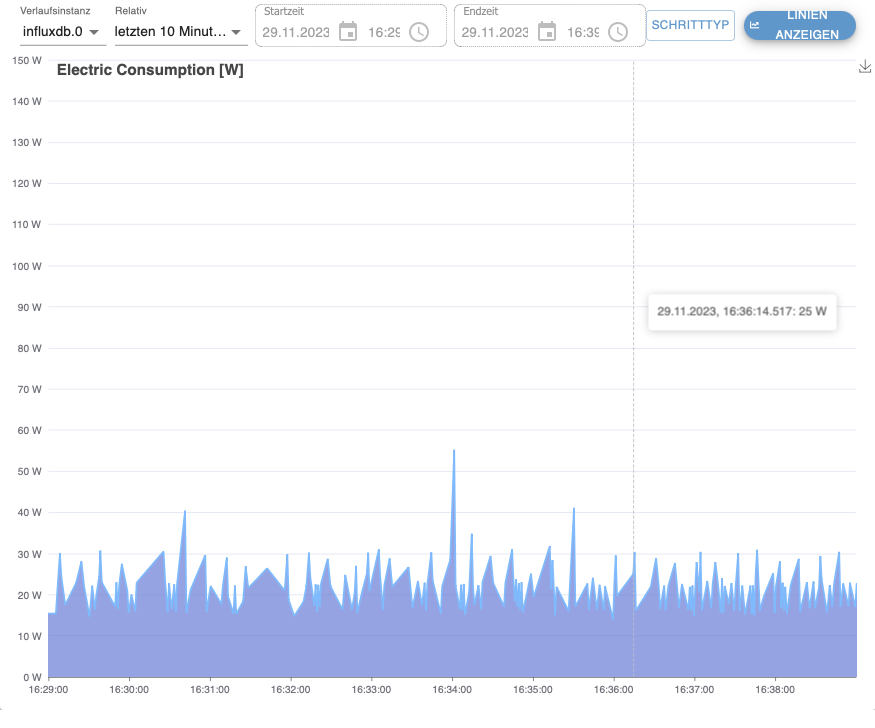
Finally got my hands on a Gigabyte C246M-WU4 mainboard. Came with an Intel Xeon E-2126G SR3WU CPU and 96GB of Kingston ECC RAM. A bit overkill for UNRAID but nice to have for dockers and VMs. Put in 2x Kingston NVME SSD 2 GB in RAID 1 for cache and 6 Ironwolf 12 TB harddrives for the array. Tweaked BIOS and edited the Go files according to the recommendations by @mgutt at the beginnning of this thread. System reaches C9 (nice) but lowest power consumption with all drives idle is around 17 W. Even with all harddrives disconnected it won't go below 13 W. What is even worse, that power consumption varies between 17 and 30 W occasionally spiking to 50 W. Something must be running in the background. The top power consuming process according to powertop is tick_sched_timer which presumably changes the CPU frequency but how to find out what is triggering it? Frankly after having read about idle power consumption of 8 W possible on the C246M-WU4, I've expected a bit more. Different from the reference C246M-WU4 design is the XEON CPU, the 96 GB ECC RAM, the 2 Kingston NVME SSDs and the power supply. Yes it is a Corsair RM550X but the old one from 2018. But as long as I don't reach sub 10 W power consumption, the 2021 modell probably won't make much difference. I'll attach the powertop HTML report to this post. Would be nice if someone could have a look and help me to find the reason, why my system does not reach lower power consumption. powertop.html